Contacts Database: How to Build One That Actually Converts
Most B2B contacts databases quietly rot at 2-3% a month. Here's how the major vendors compare on accuracy, coverage, and price in 2026 — and how to build a list that stays clean.
TL;DR
- A contacts database is only as valuable as its freshness. B2B contact data decays roughly 2-3% per month — about 22-30% a year — so a list you bought in January is meaningfully wrong by December.
- The three ways to get one: buy a static list, subscribe to a platform database, or build your own with an API. Each fails differently.
- Static lists are cheapest per record and rot fastest. Platform subscriptions cost the most and lock you into seat-based pricing. API-built databases cost the least at scale but require you to own the pipeline.
- The single highest-ROI step nobody does consistently: verify before every send, not just at import. Verification at import is a snapshot; verification at send is the truth.
- Budget reality: a 10,000-contact database costs anywhere from ~$300 (API credits) to $20,000+ (enterprise seat licences) for broadly similar coverage.
What is a contacts database?#
A contacts database is a structured store of the people you want to sell to — name, work email, job title, company, company domain, phone, and whatever enrichment fields your GTM motion needs (headcount, tech stack, funding, hiring signals).
The word "database" is doing a lot of hidden work. In practice, teams mean one of three very different things:
- A static purchased list. A CSV you bought once. Fixed price, fixed records, no refresh. It is a photograph, not a feed.
- A vendor's platform database. You subscribe to ZoomInfo, Apollo, Cognism, or similar and search their index. You never own the records — you export them under credit limits, and access ends when the contract does.
- Your own database. You maintain the schema and rows in your CRM or a warehouse, and you fill it from APIs, scraping, forms, and events. You own it. You also own the rot.
The distinction matters because it determines who is responsible for accuracy. In options 1 and 2, you outsource accuracy and inherit the vendor's blind spots. In option 3, accuracy becomes an engineering problem you can actually fix.

Wait — that image reference should be the placeholder. Use the placeholder below.

Why does a contacts database decay so fast?#
Because people move, companies die, and email systems change — constantly, and all at once.
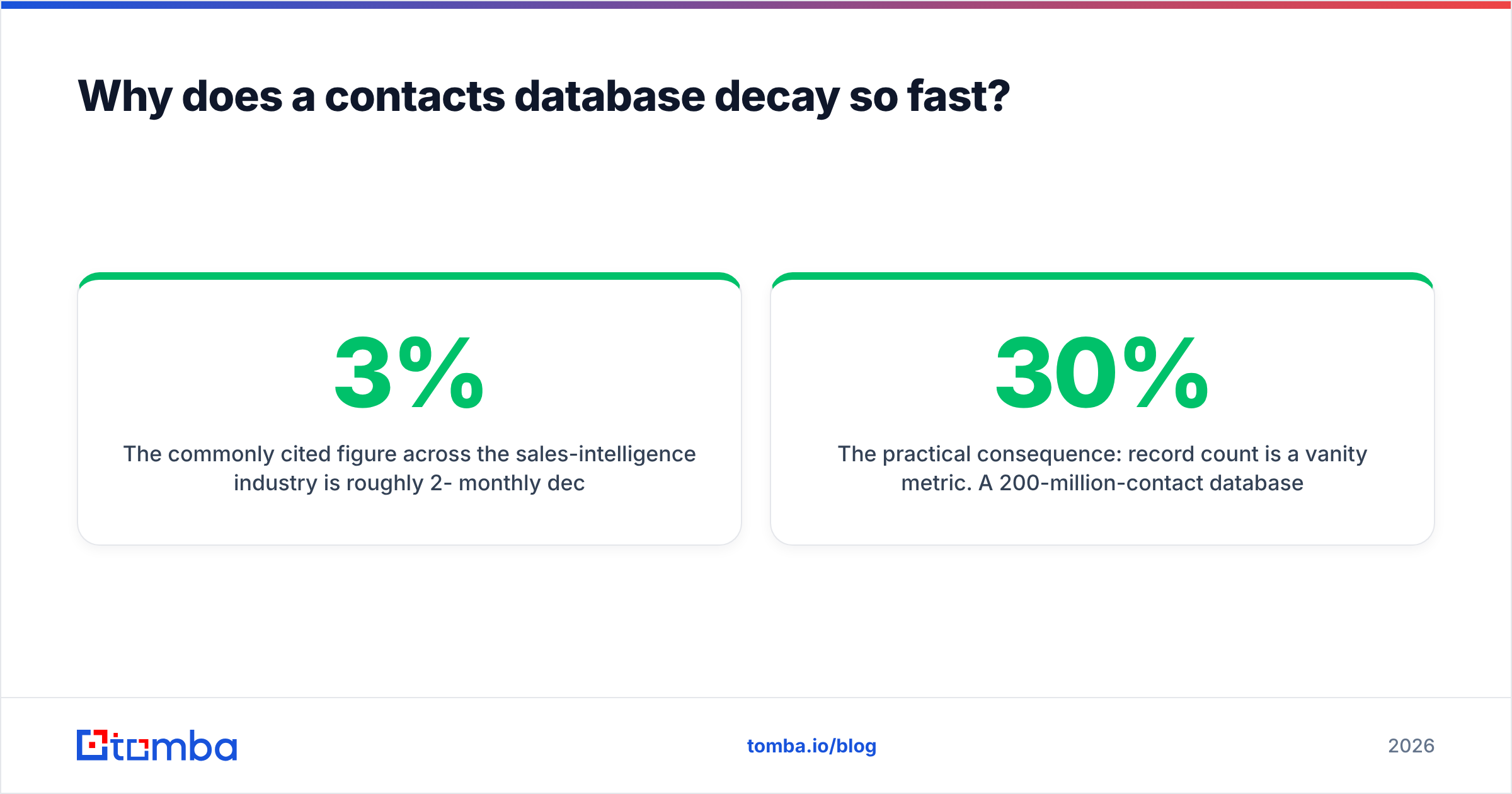
The commonly cited figure across the sales-intelligence industry is roughly 2-3% monthly decay on B2B contact data. Compound that and you lose a quarter of your list per year. The drivers are boring and relentless:
- Job changes. The average B2B buyer changes roles every ~2-3 years. Their work email dies with the role.
- Company churn. Acquisitions, rebrands, and shutdowns kill entire domains. Every
@oldbrand.comin your list becomes a hard bounce overnight. - Format changes. A company migrates from
first.last@toflast@and your permutation-derived guesses silently break. - Catch-all walls. A growing share of domains accept everything at the SMTP layer, so a "valid" result from a naive checker means nothing. You need a dedicated catch-all verifier to distinguish a real mailbox from a black hole.
- Role-based inflation.
info@,sales@,contact@pad a vendor's record count and destroy your reply rate.
The practical consequence: record count is a vanity metric. A 200-million-contact database with 30% decay gives you fewer usable contacts than a 40-million database with 5% decay. Ask vendors for verified-at timestamps, not totals.
What actually makes a contacts database good?#
Judge any provider — or your own build — on these six dimensions. Nothing else matters much.
- Verified-at recency. When was this specific record last confirmed against a live mail server? "Refreshed quarterly" is not the same as "verified on request." Insist on per-record timestamps.
- Bounce guarantee, in writing. Serious data vendors publish a bounce threshold (typically 95-98% deliverability) and credit you back when they miss it. A vendor with no stated guarantee is telling you something.
- Coverage where you actually sell. Global averages hide gaps. A database can be excellent in US SaaS and useless in DACH manufacturing. Test 100 real accounts from your ICP before signing anything.
- Enrichment depth beyond the email. Title, seniority, department, company size, tech stack, and phone. Without these you cannot segment, and unsegmented outbound is spam with extra steps.
- Export freedom. Can you get your records out, in bulk, without a per-export credit tax? Platform databases often make this deliberately painful.
- Compliance posture. GDPR/CCPA handling, documented data sources, suppression list support, and a working opt-out path. This is a legal requirement, not a feature.
If a vendor scores well on 1, 2, and 3, the rest is negotiable. If they score badly on 1, nothing else saves the list.
How do the main contacts database options compare in 2026?#
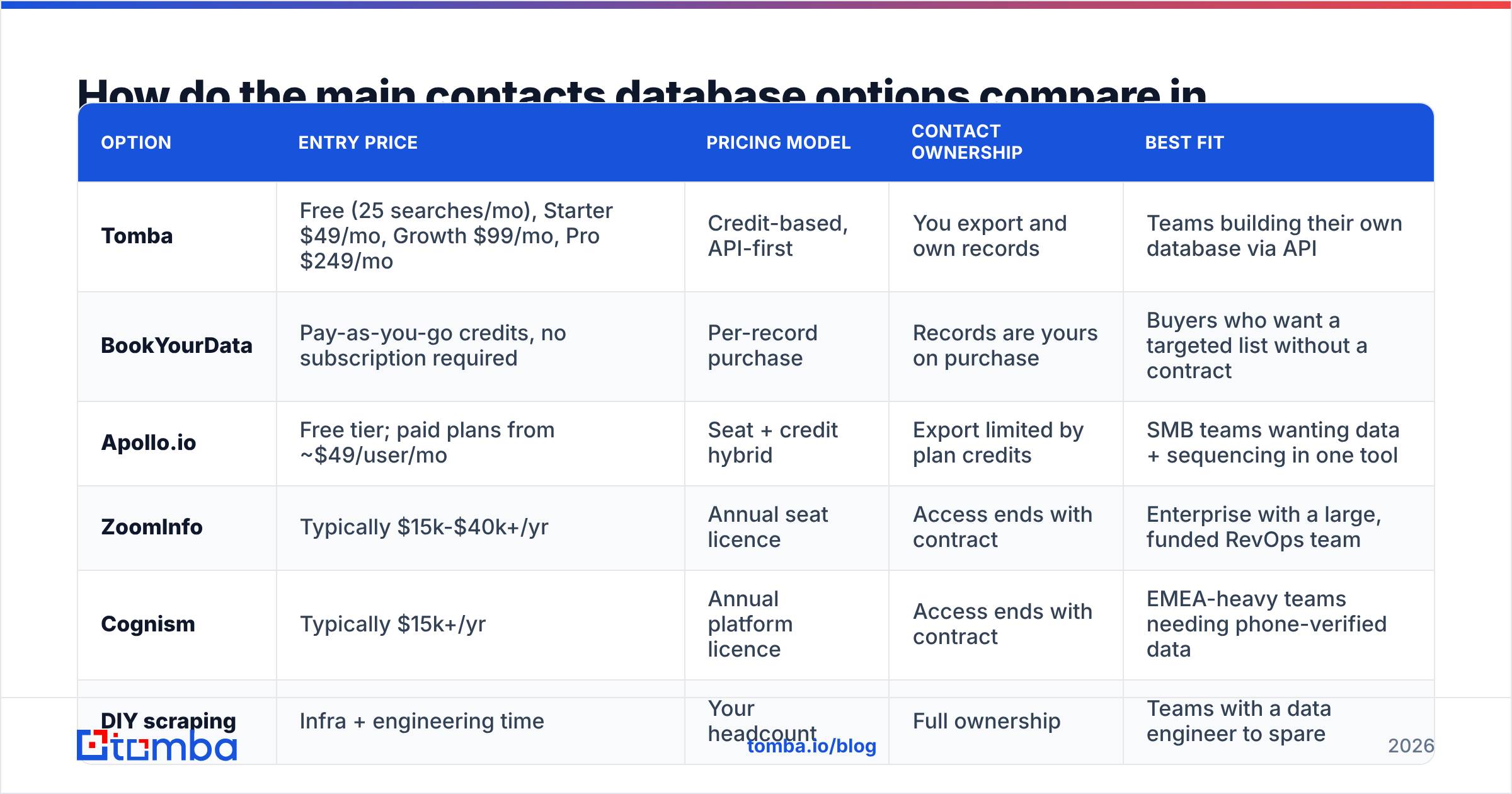
Prices below are list prices as commonly published or reported; enterprise deals vary and most vendors negotiate. Verify current pricing with each vendor directly.
| Option | Entry price | Pricing model | Contact ownership | Best fit |
|---|---|---|---|---|
| Tomba | Free (25 searches/mo), Starter $49/mo, Growth $99/mo, Pro $249/mo | Credit-based, API-first | You export and own records | Teams building their own database via API |
| BookYourData | Pay-as-you-go credits, no subscription required | Per-record purchase | Records are yours on purchase | Buyers who want a targeted list without a contract |
| Apollo.io | Free tier; paid plans from ~$49/user/mo | Seat + credit hybrid | Export limited by plan credits | SMB teams wanting data + sequencing in one tool |
| ZoomInfo | Typically $15k-$40k+/yr | Annual seat licence | Access ends with contract | Enterprise with a large, funded RevOps team |
| Cognism | Typically $15k+/yr | Annual platform licence | Access ends with contract | EMEA-heavy teams needing phone-verified data |
| DIY scraping | Infra + engineering time | Your headcount | Full ownership | Teams with a data engineer to spare |
Two honest observations from this table.
First: there is no accuracy premium for price. A $30,000/year enterprise subscription does not automatically produce cleaner emails than a $99/month credit plan. What the enterprise price buys is breadth, intent signals, org charts, and an account team. If you need those, pay for them. If you need correct email addresses at volume, you are overpaying by an order of magnitude.
Second: pay-as-you-go is underrated. Vendors like BookYourData let you buy exactly the segment you want without an annual commitment, which is a genuinely good fit when you have a defined ICP and a one-off campaign rather than an always-on outbound motion. Credit-based tools like Tomba solve the adjacent problem — continuous, programmatic enrichment — with pricing that scales with usage rather than seats.
Cross-check any vendor's claims against third-party review data on G2 before you commit. Look specifically at the one- and two-star reviews mentioning "bounce" and "refund."
Should you buy a contacts database or build one?#
Build it — if you send more than a few thousand emails a quarter.
The math is unsentimental. A purchased list of 10,000 contacts might cost $2,000-$5,000 and start decaying the moment it lands in your inbox. Building the same 10,000 records through an email finder API on a Growth-tier plan costs a fraction of that, and — critically — you can re-run it. Re-verification is cheap; re-purchase is not.
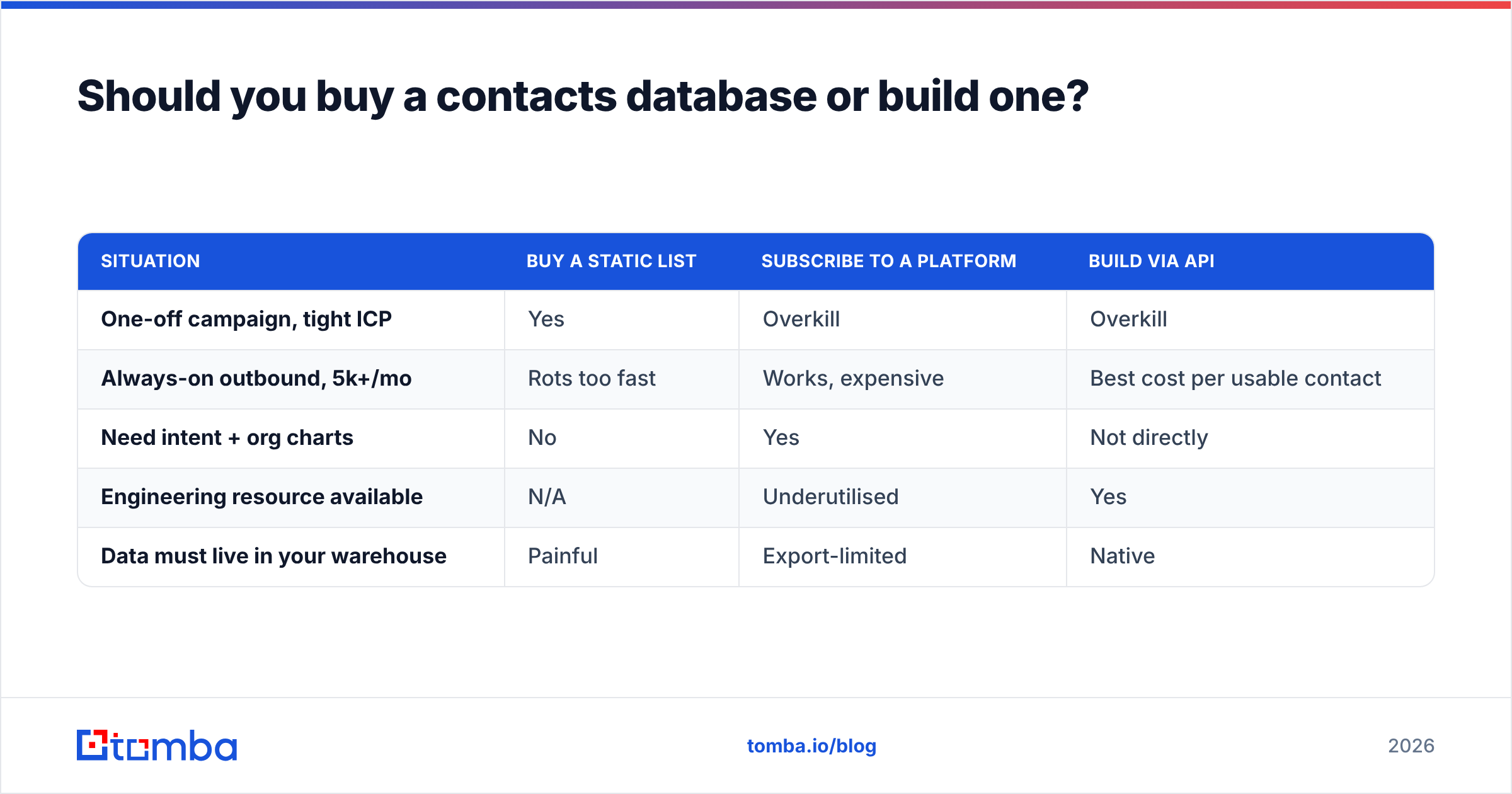
Here is the decision matrix:
| Situation | Buy a static list | Subscribe to a platform | Build via API |
|---|---|---|---|
| One-off campaign, tight ICP | Yes | Overkill | Overkill |
| Always-on outbound, 5k+/mo | Rots too fast | Works, expensive | Best cost per usable contact |
| Need intent + org charts | No | Yes | Not directly |
| Engineering resource available | N/A | Underutilised | Yes |
| Data must live in your warehouse | Painful | Export-limited | Native |

How do you build a contacts database that stays clean?#
Treat it as a pipeline with four stages, not a one-time import.
Stage 1 — Define the ICP before you touch a tool. Firmographics (industry, headcount, region, revenue band) plus the two or three job titles who actually sign. Write this down. A contacts database without a written ICP becomes a landfill within a quarter.
Stage 2 — Source by domain, not by name. Start from the account list, then find people inside it. A domain search returns every discoverable mailbox at a company plus the detected email pattern — which means you can derive colleagues you never explicitly looked up. This is dramatically more efficient than one-off name lookups, and it surfaces the org's actual email format instead of guessing it.
Stage 3 — Verify at two points, not one. Verify at import to kill obvious garbage. Then verify again at send time, because the record you cleaned in March is a coin flip by September. Run every batch through an email verifier as a pre-send gate, and route catch-all domains to a separate, slower validation path rather than blasting them.
Stage 4 — Enrich and re-enrich on a schedule. Job title, seniority, and company size drive your segmentation. They also change. Run data enrichment against your CRM monthly and flag records whose company domain no longer resolves — those are your dead rows.
Wire these four stages into your CRM rather than a spreadsheet. HubSpot, Salesforce, and Pipedrive all support workflow-triggered enrichment; HubSpot's own CRM documentation covers the property and workflow model you'll be automating against. The goal is that a new record entering the database automatically gets found, verified, enriched, and scored without a human touching it.
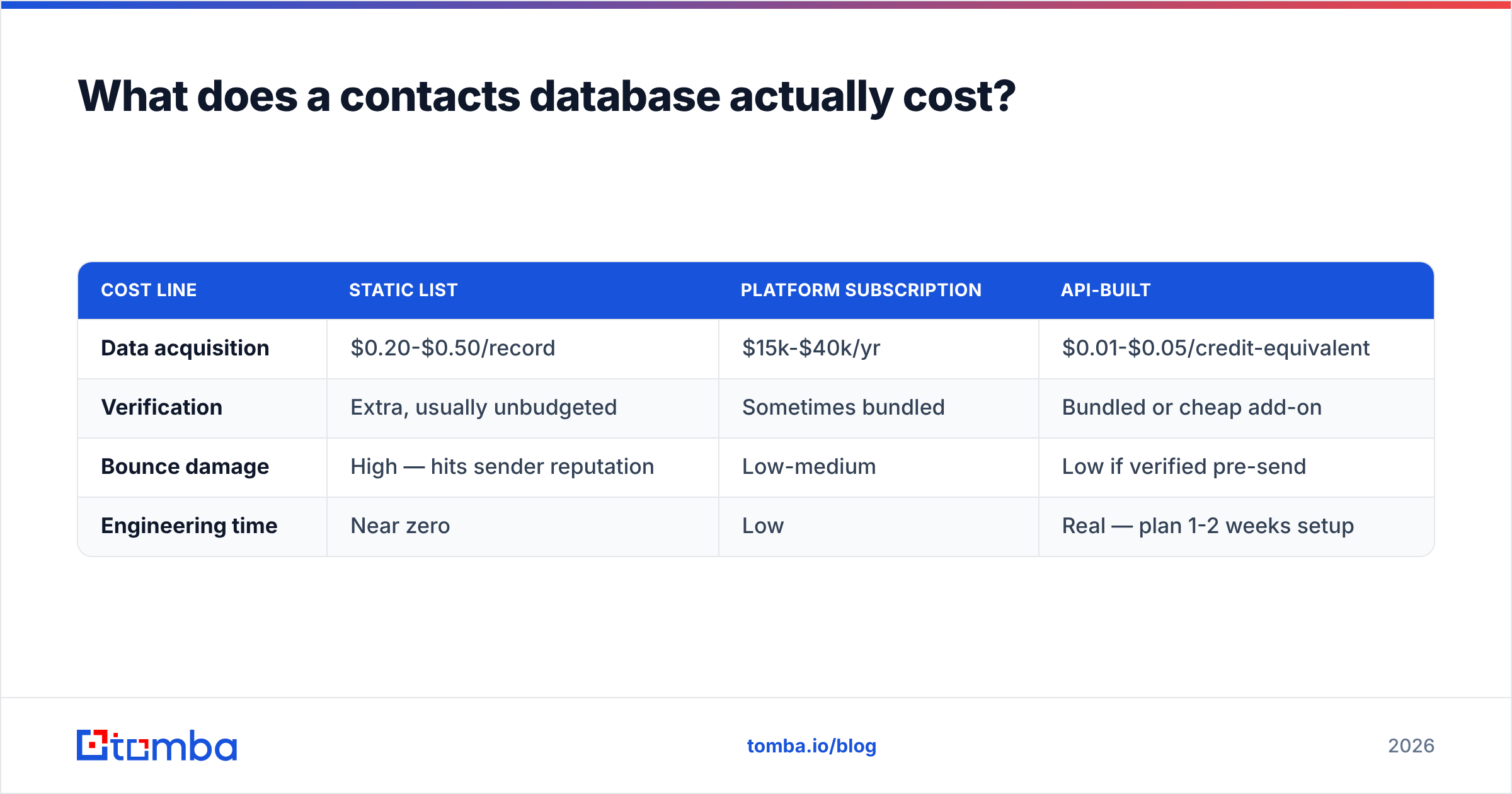
What does a contacts database actually cost?#
The sticker price is the smallest line item. Budget for all four:
| Cost line | Static list | Platform subscription | API-built |
|---|---|---|---|
| Data acquisition | $0.20-$0.50/record | $15k-$40k/yr | $0.01-$0.05/credit-equivalent |
| Verification | Extra, usually unbudgeted | Sometimes bundled | Bundled or cheap add-on |
| Bounce damage | High — hits sender reputation | Low-medium | Low if verified pre-send |
| Engineering time | Near zero | Low | Real — plan 1-2 weeks setup |
The hidden cost is bounce damage. A 12% bounce rate on a 5,000-contact send does not just waste 600 emails — it degrades your domain's sender reputation, which suppresses inbox placement for the 4,400 that were valid. The cheap list is the expensive one.
How do you keep a contacts database compliant?#
Three non-negotiables, regardless of vendor.
- Know your lawful basis. Under GDPR, B2B outbound in most EU states runs on legitimate interest — which requires a documented balancing test, not a shrug. Under CCPA/CPRA, you need a working deletion and opt-out path.
- Honour suppression globally. One unsubscribe should suppress that contact across every list, sequence, and campaign you run. If your suppression list lives in one tool but your database lives in another, you will eventually email someone who asked you not to.
- Keep provenance. For every record, store where it came from and when. If a regulator or an angry prospect asks "how did you get this," "we bought a list" is not an answer. Vendors who publish their data sources make this trivially easy; vendors who don't are transferring risk to you.
Which contacts database should you actually pick?#
Match the tool to the motion, not to the logo:
- Running one targeted campaign into a known ICP? Buy a precise, pay-as-you-go list. Don't sign an annual contract for a quarter's work.
- Running always-on outbound at 5,000+ contacts a month? Build it. Credit-based API pricing beats seat licensing on cost per usable contact, and you keep the records forever.
- Need intent data, org charts, and an account team? Pay the enterprise price. Just go in knowing you're buying signals, not superior email accuracy.
- Enriching an existing CRM that's gone stale? Skip the new database entirely. Re-verify and re-enrich what you already have — it's usually 10x cheaper than buying rows you already own.
Build the database instead of renting it#
The teams with the best contacts databases in 2026 aren't the ones with the biggest subscription. They're the ones who treat contact data as a pipeline: sourced by domain, verified before every send, enriched on a schedule, and owned outright.
The Tomba Email Finder is built for exactly that motion — find verified professional emails by name, domain, or company, at credit-based pricing that starts free (25 searches/mo) and scales to $49/mo Starter and $99/mo Growth without seat taxes. Pair it with the verifier and enrichment endpoints, wire it into your CRM, and your contacts database stops being a depreciating asset and starts being infrastructure.
Start with your ten best accounts. Run a domain search. Verify what comes back. You'll know within an hour whether the list you're currently paying for is worth what you're paying.
Related guides#
Ready to find emails that actually work?
Join 150,000+ professionals who stopped guessing and started sending. Free credits on signup — no credit card required.
Get the Tomba newsletter
Practical outbound tactics and product updates — once every two weeks.
About the author