Conversation Intelligence in Salesforce: A 2026 Buyer's Guide
Salesforce ships Einstein Conversation Intelligence natively, but Gong, Chorus, and Clari Copilot all plug into the same CRM. Here's what each actually does, what it costs, and when native is enough.
TL;DR
- Conversation intelligence Salesforce tools record, transcribe, and analyze sales calls. They write the signals — competitor mentions, next steps, sentiment, talk ratio — back onto Opportunity and Contact records.
- Salesforce ships this natively as Einstein Conversation Intelligence (ECI). It is bundled into Sales Cloud Einstein and Unlimited tiers. Many teams already pay for it.
- Third-party tools — Gong, Chorus (ZoomInfo), Clari Copilot, Avoma — go deeper on coaching, deal risk, and market trends. They run $1,200–$1,800+ per seat, per year.
- The usual failure is not the tool. It is messy CRM data. Calls attach to the wrong Opportunity, or to a contact whose email bounced months ago.
- Buy native for visibility. Buy third-party for a real coaching program. Buy neither until your contact data is clean.
Sales leaders keep asking one question: "We're on Salesforce — do we still need Gong?" The honest answer is that the overlap is smaller than the pricing pages suggest. The deciding factor is usually about people, not technology. Every conversation intelligence Salesforce decision comes down to who will actually listen to the calls.
This guide covers four things. What conversation intelligence does inside Salesforce. How the native option compares to the big platforms. What the real cost looks like. And the data-hygiene step nobody mentions until the rollout stalls.
What is conversation intelligence in Salesforce?#
Conversation intelligence is software that listens to your revenue calls — Zoom, dialer, Teams — and turns them into structured data you can query.
Think of it like a flight data recorder for sales. The plane still flies the same way. But afterward you can replay exactly what happened. Patterns show up across hundreds of flights that no single pilot could see.
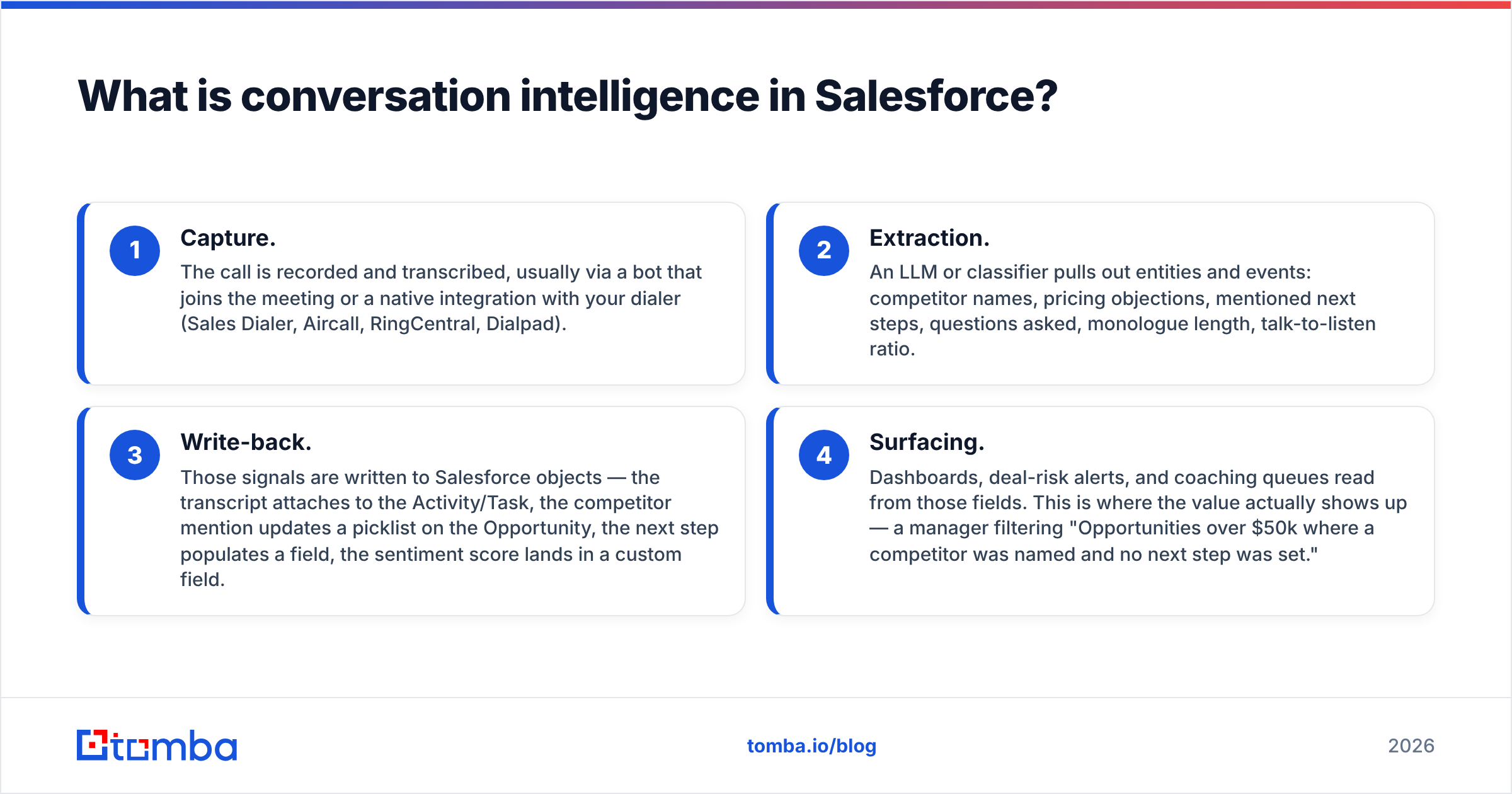
Inside Salesforce, four things happen:
- Capture. The call is recorded and transcribed. A bot joins the meeting, or your dialer handles it (Sales Dialer, Aircall, RingCentral, Dialpad).
- Extraction. A model pulls out entities and events: competitor names, pricing objections, next steps, questions asked, monologue length, talk-to-listen ratio.
- Write-back. Those signals land on Salesforce objects. The transcript attaches to the Activity. A competitor mention updates a picklist on the Opportunity. The next step fills a field. The sentiment score lands in a custom field.
- Surfacing. Dashboards, deal-risk alerts, and coaching queues read those fields. This is where the value shows up. A manager can filter for "Opportunities over $50k where a competitor was named and no next step was set."
Step 3 is the whole game. A tool that does not write back gives you a nice video library. A tool that does write back becomes part of your forecast.
Is Einstein Conversation Intelligence enough?#
Einstein Conversation Intelligence is the native option. It does more than most buyers assume.
ECI records and transcribes calls. It writes AI call summaries. It detects keywords you define — competitors, products, custom groups. It scores talk-time ratios. The insights appear right on the Opportunity record. It works with Sales Dialer and supports video calls through partners. Because it lives inside the platform, write-back is solved by default. The data never left Salesforce.
Where ECI wins:
- No integration risk. No middleware. No OAuth token that dies at quarter-end. No second admin console.
- Native permissions. Field-level security and sharing rules already decide who can hear what. That matters in regulated industries.
- Already in your license. On Sales Cloud Unlimited or Einstein 1 Sales, you likely pay for it today.
- Reporting stays put. Insights are Salesforce objects. They drop into standard reports without a connector.
Where ECI falls short:
- Coaching workflows are thin. Fewer scorecards, weaker snippet libraries, less mature review queues.
- Deal-risk scoring is simpler than Gong's or Clari's. Those models train on far more calls.
- Market intelligence across the whole pipeline is limited.
- Non-English coverage and accent handling has lagged the specialists.
The verdict is simple. Want visibility and clean records? ECI is enough. Want a coaching program that changes rep behavior every quarter? It usually is not.
Conversation intelligence Salesforce tools compared#
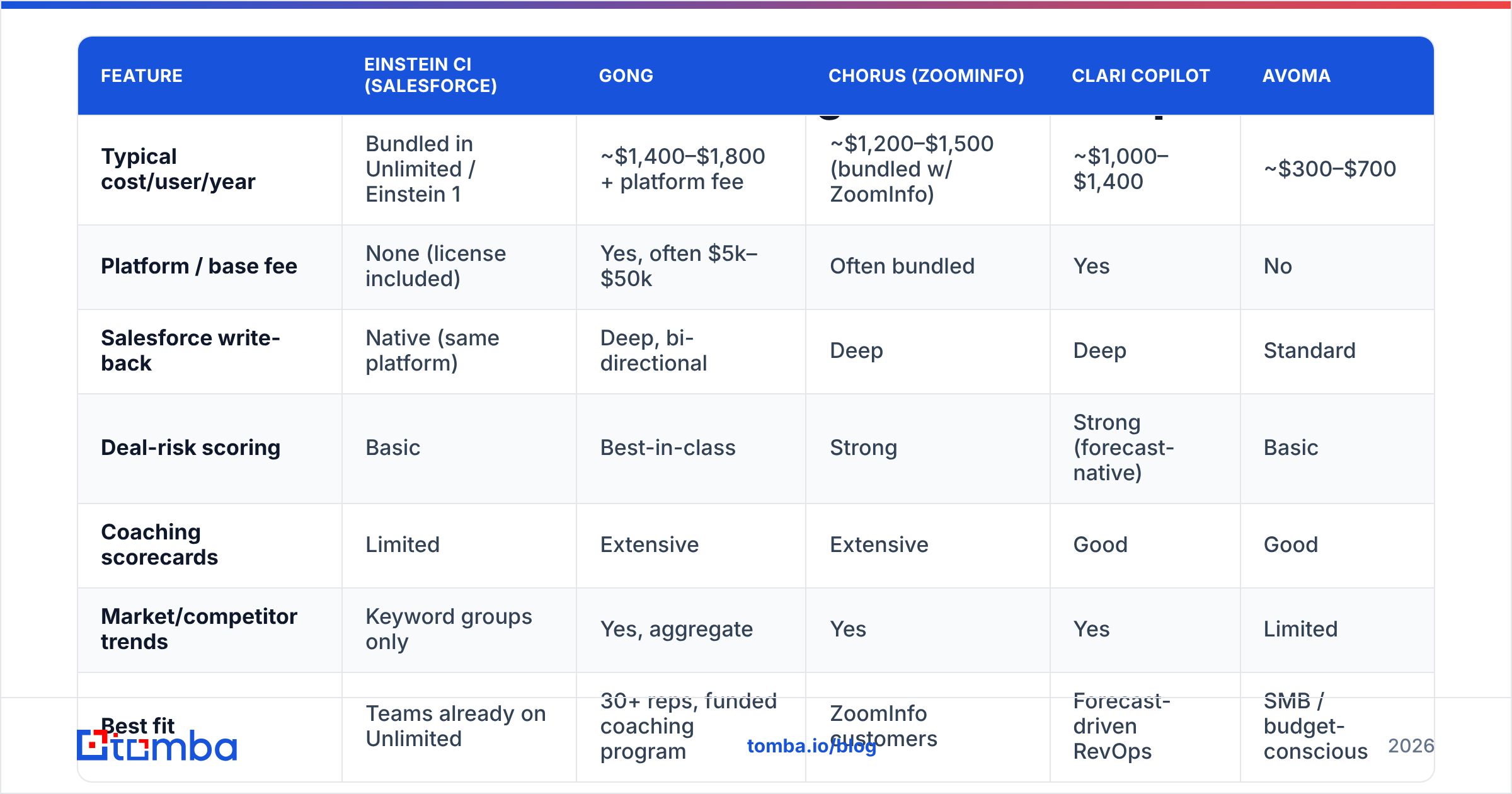
Here is the honest side-by-side. Pricing reflects reported list ranges as of early 2026. Every vendor negotiates, and none of them publish a real price list.
| Feature | Einstein CI (Salesforce) | Gong | Chorus (ZoomInfo) | Clari Copilot | Avoma |
|---|---|---|---|---|---|
| Typical cost/user/year | Bundled in Unlimited / Einstein 1 | ~$1,400–$1,800 + platform fee | ~$1,200–$1,500 (bundled w/ ZoomInfo) | ~$1,000–$1,400 | ~$300–$700 |
| Platform / base fee | None (license included) | Yes, often $5k–$50k | Often bundled | Yes | No |
| Salesforce write-back | Native (same platform) | Deep, bi-directional | Deep | Deep | Standard |
| Deal-risk scoring | Basic | Best-in-class | Strong | Strong (forecast-native) | Basic |
| Coaching scorecards | Limited | Extensive | Extensive | Good | Good |
| Market/competitor trends | Keyword groups only | Yes, aggregate | Yes | Yes | Limited |
| Best fit | Teams already on Unlimited | 30+ reps, funded coaching program | ZoomInfo customers | Forecast-driven RevOps | SMB / budget-conscious |
| Rollout effort | Low (config) | Medium–high | Medium | Medium | Low |
Two patterns fall out of that table.
First, the platform fee is the hidden cost. Buyers compare seat prices and forget the base fee. On a 25-rep team, it can double the first-year bill. Ask for the all-in year-one number in writing.
Second, bundling decides more deals than features do. Chorus wins because the buyer just renewed ZoomInfo. Einstein wins because the buyer already bought Unlimited. Gong wins on merit more often, which is why it charges more.
What does it actually change in the pipeline?#
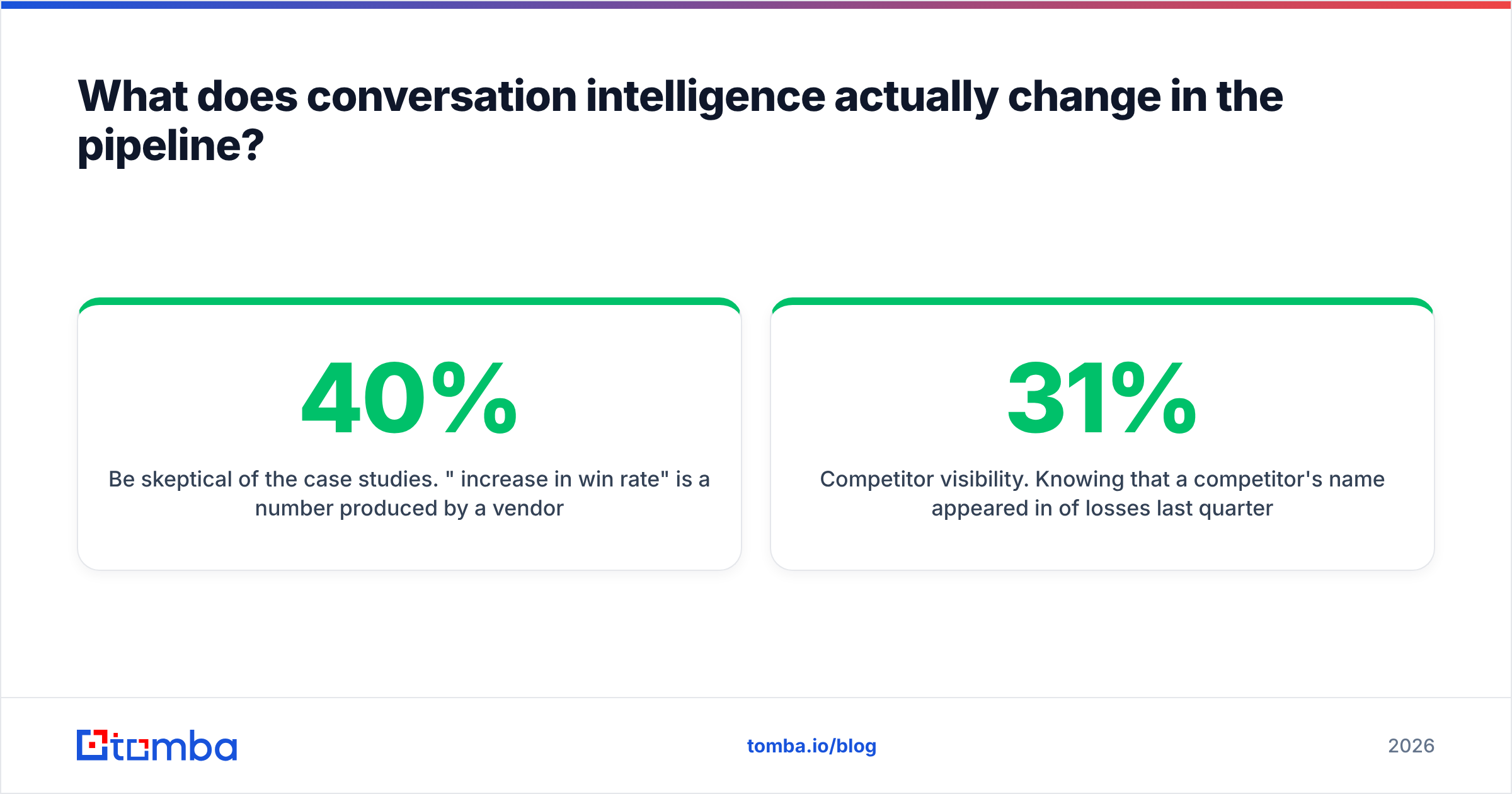
Be skeptical of the case studies. "40% increase in win rate" comes from a vendor's marketing team, not a controlled test.
Here is what these tools reliably change:
- Manager time per rep. A 15-minute AI summary beats sitting through a 45-minute call. That is a real 3x on coaching throughput, and the most defensible ROI claim in the category.
- Onboarding speed. New reps who hear 20 closed-won calls in week one ramp faster than reps reading a deck. Most teams see it.
- Forecast honesty. "Next step: they need to check with legal" gets pulled from the transcript, not typed by the rep. The pipeline stops flattering itself.
- Competitor visibility. Knowing a rival's name came up in 31% of last quarter's losses — and in which segment — is strategic.
What it does not change on its own: your win rate. Recording calls does not make reps better. A manager who reviews the calls and runs a weekly coaching cadence does. The tool is the instrument, not the surgeon. With no time to review anything, you are buying an expensive archive.
Why do these rollouts fail?#
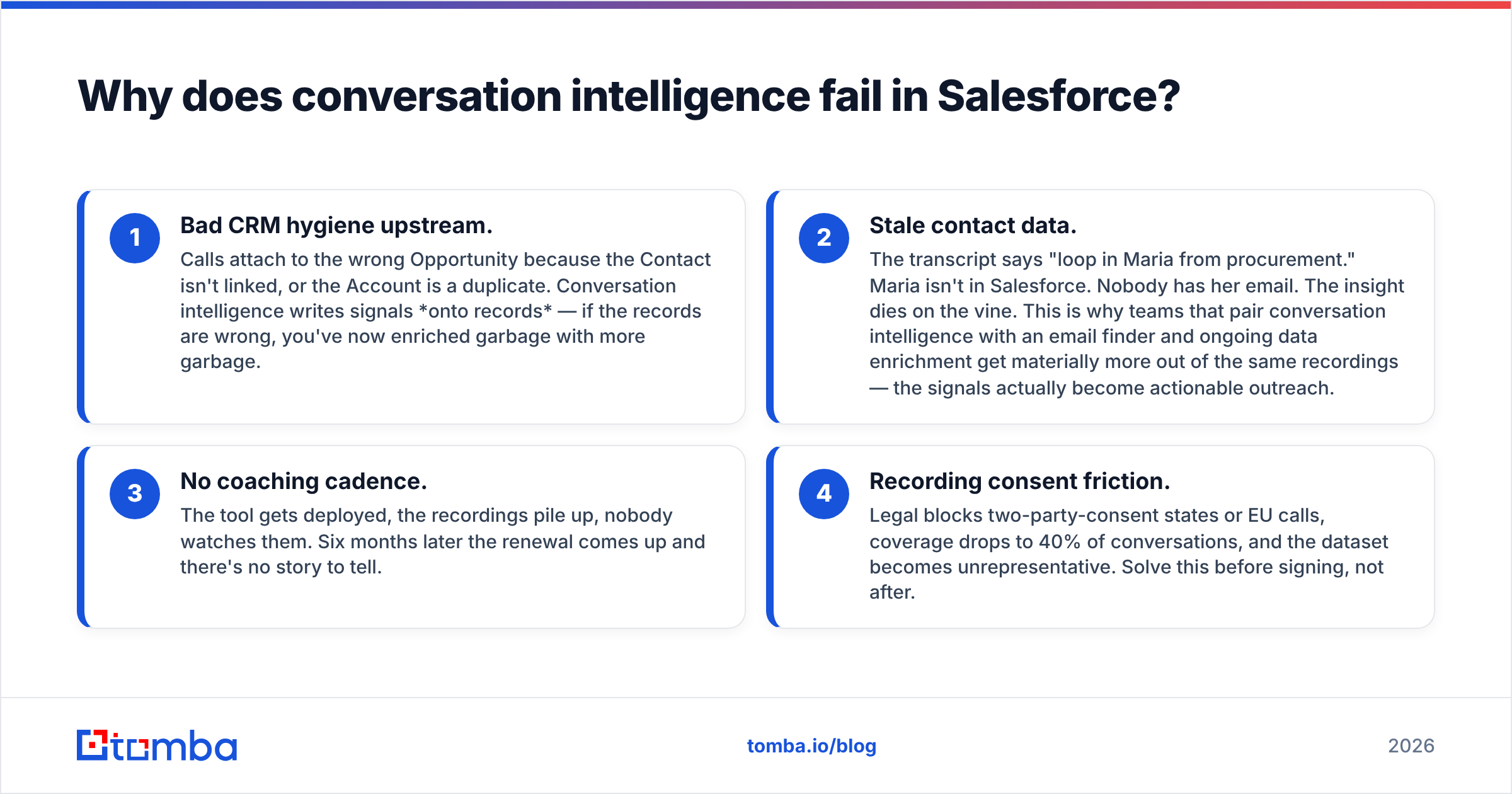
Almost always for one of four reasons. Only one of them is the tool's fault.
- Messy CRM data upstream. Calls attach to the wrong Opportunity because the Contact is not linked, or the Account is a duplicate. The tool writes signals onto records. If the records are wrong, you have enriched garbage with more garbage.
- Stale contact data. The transcript says "loop in Maria from procurement." Maria is not in Salesforce. Nobody has her email. The insight dies. Teams that pair calls with an email finder and steady data enrichment get much more out of the same recordings.
- No coaching cadence. The tool ships. Recordings pile up. Nobody watches them. At renewal, there is no story to tell.
- Consent friction. Legal blocks two-party-consent states or EU calls. Coverage drops to 40% of conversations, and the data stops representing the pipeline. Sort this out before you sign.
Three of the four are process problems. The products mostly work. The rollouts mostly do not.
What data hygiene do you need first?#
Conversation intelligence multiplies your CRM data quality. Multipliers work in both directions.
Start with the records themselves:
- Deduplicate Accounts and Contacts. Calls only attach cleanly to clear records. Duplicate Accounts split your competitor data across two rows, and then every dashboard lies.
- Verify every Contact email on the open pipeline. An insight is worthless if you cannot act on it. Run active Contacts through an email verifier so the follow-up lands. Use a catch-all verifier for domains that accept everything.
- Fill the org chart gaps. Every call names people who are not in your CRM. A domain search finds the rest of the buying committee, so the next call has the right people on it.
Then settle the process questions:
- Standardize Opportunity stages. If "Discovery" means three things to three teams, stage-based call analytics are noise.
- Define keyword groups on purpose. Competitors, pricing objections, security terms, integration names. Thirty minutes of work drives 80% of the reporting value.
- Settle consent policy. Auto-record with disclosure, or rep-initiated? Get it in writing from legal before the first call is captured.
Teams that do this see value in the first quarter. Teams that skip it spend that quarter debugging why the dashboard flags a competitor on an Opportunity that closed last year.
Which one should you buy?#
Match the tool to your constraint, not to the feature list.
- On Unlimited or Einstein 1, and you want visibility. Turn on ECI. You already paid for it. Give it a full quarter with real keyword groups before you shop. Most teams under 20 reps stop here and are fine.
- 30+ reps, real frontline managers, budget for coaching. Gong. It costs the most and it is the most complete. You are paying for the coaching workflows and the deal-risk models. Transcription is a commodity now.
- Already paying ZoomInfo. Get Chorus quoted inside the bundle. The extra cost is often small enough that the comparison stops being close.
The rest depends on who owns the decision:
- RevOps owns it, and forecast accuracy is the KPI. Clari Copilot. Call data feeds the forecast model by design, not as a bolt-on.
- Under 15 reps and cost-sensitive. Avoma, or just ECI. Do not spend $40k on a coaching platform with no coaching program behind it.
- Your contact data is a mess. Fix that first. Genuinely. No tool makes a stale database useful, and you will blame the wrong thing when it fails.
Want to sanity-check the market? G2's conversation intelligence category lists user-reported implementation times and satisfaction scores. Salesforce's own ECI documentation is unusually clear about what the native tool does and does not support. Read both before you take a demo.
Where does the data layer fit?#
Conversation intelligence tells you what was said. It does not tell you who to talk to next.
Most teams hit that gap around month four. The transcripts name a whole buying committee: the VP of Engineering who signs off, the security reviewer, the procurement contact. None of them exist as records in Salesforce. The insight is there. The contact is not.
Closing that loop is a data problem, not an AI problem. Turn a name and a company into a verified, deliverable email address the moment the call ends. Push it back onto the same Opportunity the transcript sits on. Do that, and your reporting layer starts driving pipeline.
Start with the contact layer. Tomba Email Finder turns the names your reps hear on calls into verified, deliverable email addresses — by domain, by name, or in bulk. Every insight then has somewhere to go. The free tier includes 25 searches a month, Starter is $49/mo, and everything runs through the Tomba API if you want it wired straight into your Salesforce flows. See full Tomba pricing to size it against your pipeline.
Related guides#
Ready to find emails that actually work?
Join 150,000+ professionals who stopped guessing and started sending. Free credits on signup — no credit card required.
Get the Tomba newsletter
Practical outbound tactics and product updates — once every two weeks.
About the author