Conversion Blitz vs FindThatLead: Honest 2026 Comparison
One is a 14-tool lead-gen bundle, the other a focused email finder with a cold-email sender. We compare pricing, data accuracy, bounce risk and API depth to show which one earns a slot in your 2026 stack.
TL;DR — Conversion Blitz vs FindThatLead in 30 seconds#
- Conversion Blitz is a bundle: ~14 small tools (email finder, chatbot, review generator, website visitor tracking, daily-lead feeds) sold under one flat subscription. Breadth over depth.
- FindThatLead is narrower and older: email finding by domain, name, or LinkedIn, plus a built-in cold-email sender. It does two things instead of fourteen.
- Neither is a data company. Both resell and scrape; both leave you to catch bad rows yourself. Expect verification to be your job, not theirs.
- Cost is not where they differ most — bounce rate is. A "cheap" finder that ships 15% invalid addresses costs you far more in domain reputation than a $49/mo tool that ships 2%.
- Verdict: pick Conversion Blitz if you want many small utilities in one bill. Pick FindThatLead if you want find-plus-send in one screen. Pair either with a dedicated email verifier — or replace both with a finder built for accuracy first.
What is Conversion Blitz, actually?#
Conversion Blitz (conversionblitz.com) is best understood as a software bundle, not a single product. You buy one subscription and get access to a shelf of lead-generation micro-tools: an email finder and extractor, a daily-updated newly-registered-domains feed, a website chatbot, a review generator, a website-visitor identifier, a Chrome extension for scraping LinkedIn and Google Maps, and a small email sender.
That model has a real appeal. If you are a solo founder or a small agency, the alternative is five vendors, five logins, and five invoices. Conversion Blitz collapses that into one.
The trade-off is the one every bundle makes: each tool is a 6/10, not a 9/10. The email finder inside a 14-tool suite is not the same class of product as a company whose entire engineering roadmap is email discovery. The chatbot is not Intercom. The visitor identifier is not Clearbit Reveal. You are buying convenience and a single line item, and you are paying for it in depth.
The other thing to watch is data provenance. Conversion Blitz leans heavily on scraping (LinkedIn, Google Maps, newly registered domains) and pattern-based guessing. Scraped-and-guessed data ages fast. A B2B contact record decays roughly 22–30% per year through job changes alone, and pattern-guessed addresses were never confirmed to begin with.

What is FindThatLead, and how is it different?#
FindThatLead (findthatlead.com) is a Barcelona-based tool that has been around since ~2015, which in this category makes it an elder. It is far more focused than Conversion Blitz:
- Search by domain — pull the emails a company publishes or that FTL has on file.
- Search by name + company — the classic single-lookup flow.
- LinkedIn prospecting — a Chrome extension that pulls emails off profiles and Sales Navigator lists.
- Bulk / Prospector — upload a CSV, or filter by role and location, and get a list back.
- Scrab.in + Sender — a built-in cold-email sender so you can go from list to campaign without exporting.
That last point is FindThatLead's genuine differentiator. Most email finders hand you a CSV and wish you luck. FTL lets you find and send in one session. For a founder running their first 200-lead campaign, that is a real reduction in friction.
The cost of that integration is the same cost every all-in-one sender pays: the sending layer is weaker than a dedicated sender. You do not get the deliverability tooling, inbox rotation, or warmup sophistication of a purpose-built platform. And FTL's finder, like Conversion Blitz's, is a mix of scraped, licensed, and pattern-inferred data — it does not consistently tell you how confident it is or why.
Conversion Blitz vs FindThatLead: the feature-by-feature table#
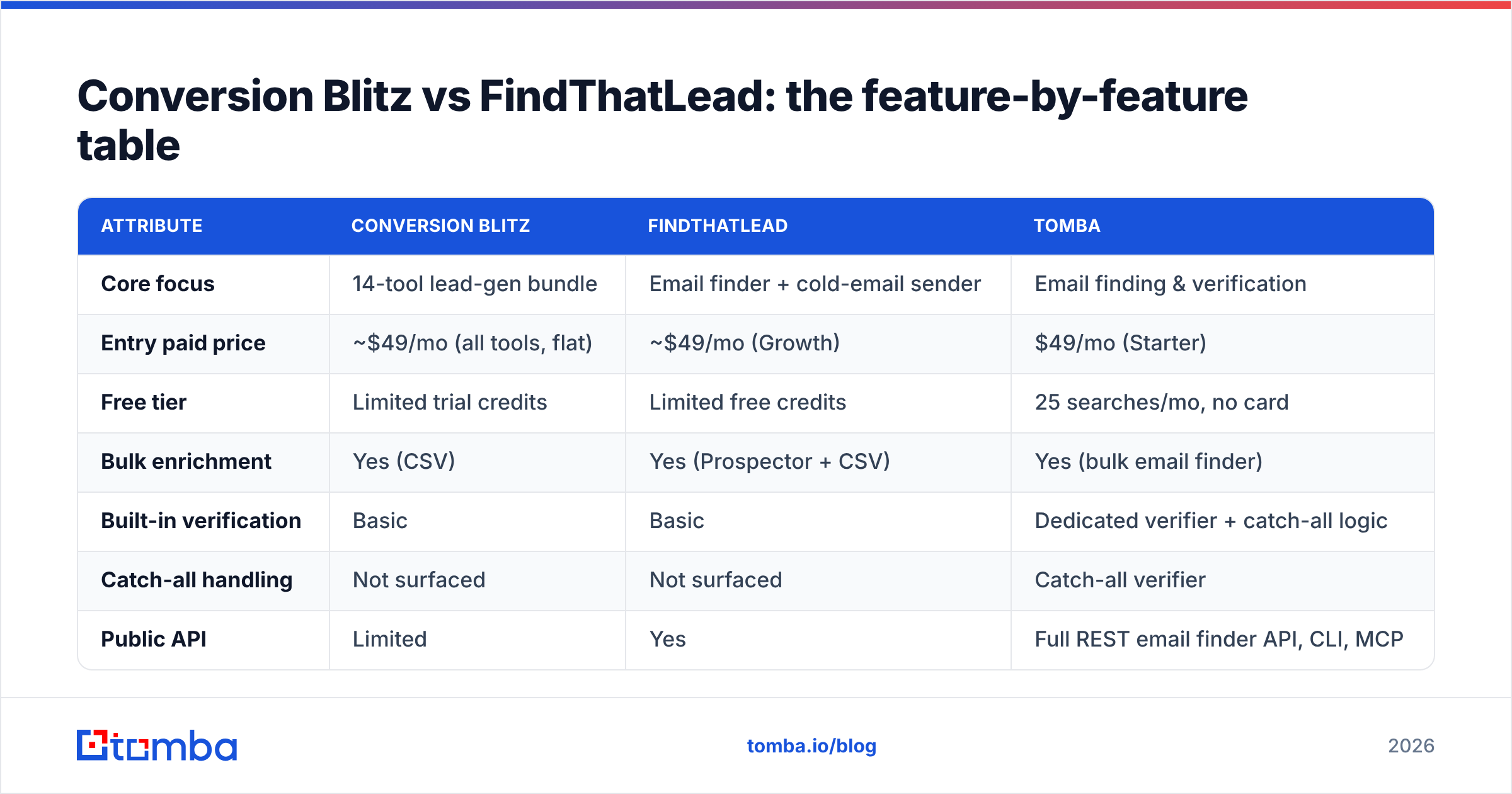
Pricing on both platforms moves and both run frequent promotions — treat the figures below as list-price ballparks and confirm on the vendor's own pricing page before you buy. Tomba's numbers are exact.
| Attribute | Conversion Blitz | FindThatLead | Tomba |
|---|---|---|---|
| Core focus | 14-tool lead-gen bundle | Email finder + cold-email sender | Email finding & verification |
| Entry paid price | ~$49/mo (all tools, flat) | ~$49/mo (Growth) | $49/mo (Starter) |
| Free tier | Limited trial credits | Limited free credits | 25 searches/mo, no card |
| Bulk enrichment | Yes (CSV) | Yes (Prospector + CSV) | Yes (bulk email finder) |
| Built-in verification | Basic | Basic | Dedicated verifier + catch-all logic |
| Catch-all handling | Not surfaced | Not surfaced | Catch-all verifier |
| Public API | Limited | Yes | Full REST email finder API, CLI, MCP |
| Native integrations | Zapier + few | Zapier, HubSpot, Salesforce | HubSpot, Salesforce, Pipedrive, Sheets, Excel, Airtable, Zapier, Make |
| Cold-email sending | Yes (basic) | Yes (Sender/Scrab.in) | No — pairs with your sender |
| Best for | Solo founders wanting many tools, one bill | SMBs wanting find + send in one place | Teams where bounce rate is the KPI |
The row that matters most in that table is not price. It is catch-all handling — and almost nobody shops on it until their first campaign gets throttled.

Which one has better email accuracy?#
Here is the uncomfortable truth about this whole category: most tools quote an accuracy number they do not define.
"95% accuracy" can mean:
- 95% of returned emails are syntactically valid — a nearly meaningless claim.
- 95% of returned emails passed an SMTP handshake — better, but catch-all domains accept everything, so this inflates.
- 95% of returned emails actually delivered to a human inbox — the only number that matters, and the one nobody publishes.
Both Conversion Blitz and FindThatLead will find you emails. Both will also hand you rows that look fine and bounce. In independent user reviews on G2, the recurring complaint against budget finders is not "it found nothing" — it is "it found something, I emailed it, and it bounced."
That is the expensive failure mode. Google and Microsoft both tightened bulk-sender rules, and the practical enforcement floor is now a 0.3% spam-complaint rate, with bounce rates above roughly 2–3% putting your domain into throttling territory. Read the Google bulk sender guidelines if you have not — they are short and they are the rulebook you are actually being graded against.
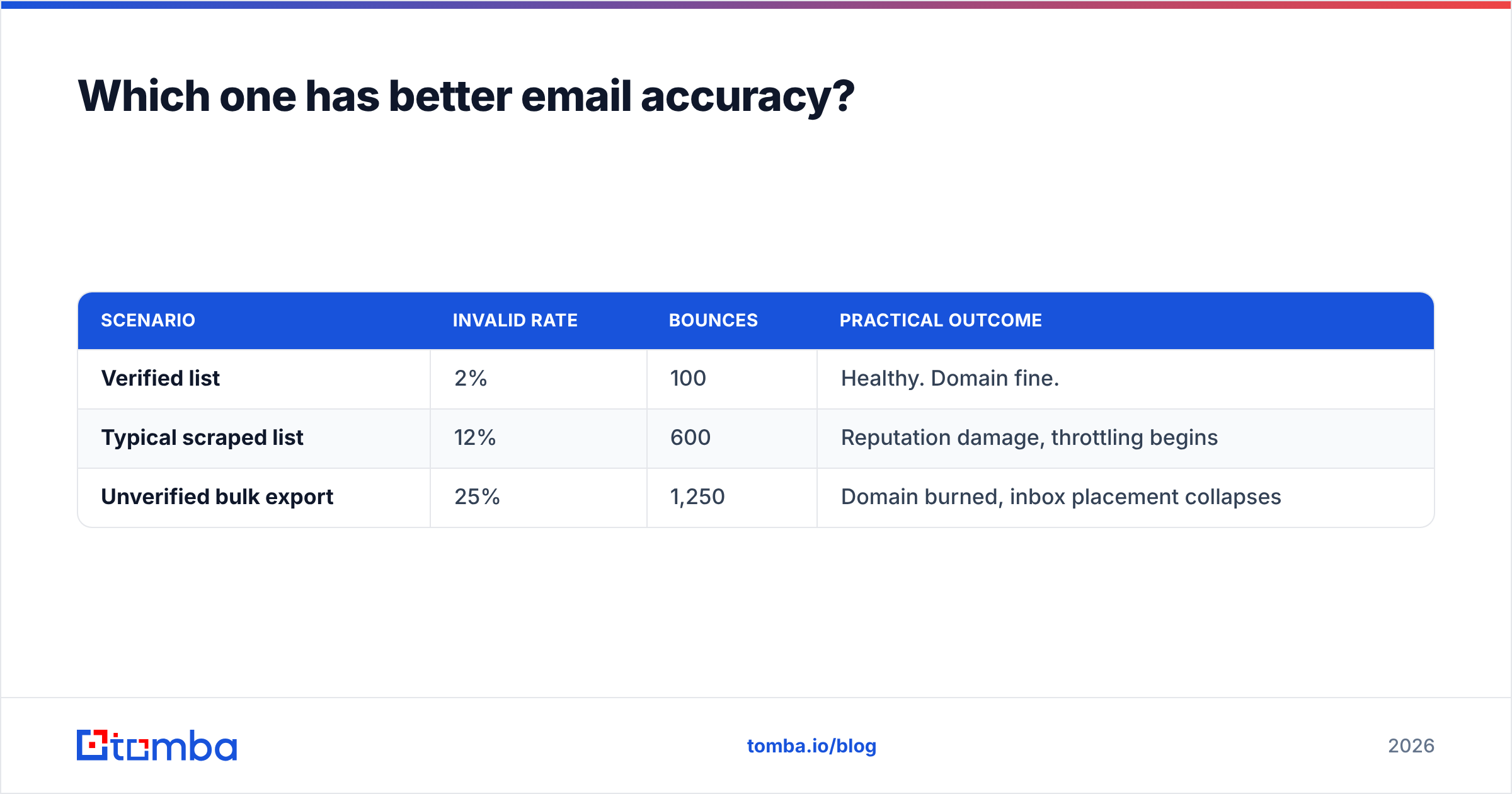
Run the math on a 5,000-contact list:
| Scenario | Invalid rate | Bounces | Practical outcome |
|---|---|---|---|
| Verified list | 2% | 100 | Healthy. Domain fine. |
| Typical scraped list | 12% | 600 | Reputation damage, throttling begins |
| Unverified bulk export | 25% | 1,250 | Domain burned, inbox placement collapses |
A tool that saves you $30/month and costs you a sending domain is not cheap. It is the most expensive line item in your stack.

Where does each tool actually win?#
Neither of these is a bad product. They are aimed at different buyers.
- Conversion Blitz wins on breadth-per-dollar. If you genuinely want a chatbot, a review widget, a visitor tracker, and an email finder — and you are a one-person shop who will not push any of them hard — one flat subscription beats four.
- FindThatLead wins on find-then-send simplicity. If your workflow is "get 300 emails, write one sequence, send it," FTL removes an export step and a second tool. That is worth something.
- Conversion Blitz's newly-registered-domains feed is a real niche edge. If you sell to brand-new companies (web design, branding, hosting), a daily feed of fresh domains is a genuinely differentiated signal that most finders do not offer.
- FindThatLead's LinkedIn extension is mature. It has had a decade of iteration. If LinkedIn is your primary prospecting surface, that matters — though you should compare it against a purpose-built LinkedIn email extractor before committing.
- Both lose on data confidence. Neither gives you a per-row confidence score, source attribution, or an honest catch-all verdict. You get an email string and a vibe.
That fifth point is the whole argument for keeping verification separate from finding.
Should you buy the bundle or buy the best tool?#
The bundle question is older than SaaS. Cable TV sold you 200 channels so you would not notice that you watched four. Software bundles work the same way: the pitch is fourteen tools, the reality is that you use two and pay for twelve.
Ask yourself two questions before you buy either:
1. How many of the bundled tools will I still be using in 90 days? Be honest. If the answer is "the email finder and maybe the extension," you are not buying a bundle — you are buying an email finder with a lot of unused surface area, and you should compare it directly against dedicated finders on the only axis that matters: how many of its emails land.
2. What is my cost per bounce? If you send 500 emails a month from a personal domain, a mediocre finder is survivable. If you send 20,000 a month from a domain your entire pipeline depends on, verification is not a nice-to-have. It is insurance, and it is cheaper than the claim.
This is why plenty of teams end up with a finder + verifier + sender stack rather than a suite: each layer is best-in-class, and the layer that protects your domain is not an afterthought bolted onto a chatbot.
How does Tomba compare to both?#
Full disclosure: this is the Tomba blog. Here is the honest version, including where Tomba is not the answer.
Tomba does not send email. If your requirement is "find and send in one login," FindThatLead does that and Tomba does not. Tomba is built to sit in front of your sender (Instantly, Smartlead, Lemlist, HubSpot — whatever you already run) and make sure what enters it is clean.
Where Tomba is structurally different:
- Verification is a first-class product, not a checkbox. The email verifier runs syntax, DNS, MX, disposable, role-account, and SMTP checks — and a separate catch-all verifier for the domains where a standard SMTP ping tells you nothing useful. Catch-all domains are where most "verified" lists quietly rot.
- Sources are disclosed. Tomba publishes where its data comes from and attaches sources to results, so you can judge a row instead of trusting a percentage.
- Developer surface is real. A documented REST API, a CLI, an MCP server, plus Sheets, Excel, and Airtable add-ins. If your RevOps team wants enrichment inside a pipeline rather than inside a dashboard, this is the gap.
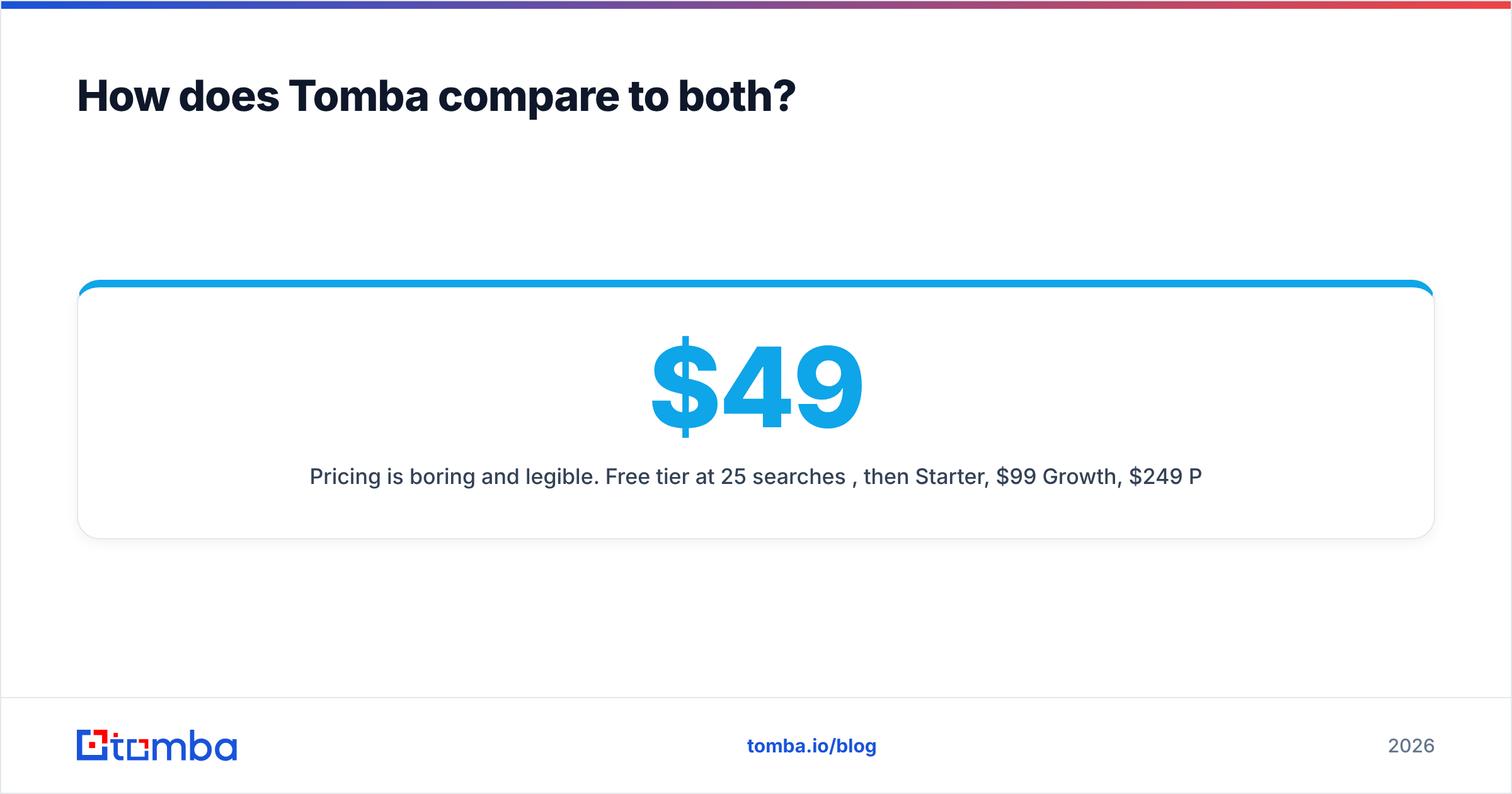
- Pricing is boring and legible. Free tier at 25 searches/mo, then $49/mo Starter, $99/mo Growth, $249/mo Pro, custom Enterprise. No credit-math riddles. Full Tomba pricing is public.

What should you actually do next?#
Run a real test. Do not take any vendor's accuracy claim — including this post's — on faith.
The 100-row bake-off, in four steps:
- Take 100 contacts you already know are real (past customers, current pipeline, people you have emailed successfully). This is your ground truth.
- Strip the emails. Feed name + company domain into Conversion Blitz, FindThatLead, and one dedicated finder.
- Compare on three columns: hit rate (found an email), precision (matched the known-correct address), and honest unknowns (told you it wasn't sure, instead of guessing).
- Weight column three heavily. A tool that says "I don't know" is worth more than one that confidently ships you a bounce.
Most teams are surprised by the results — usually because the tool with the highest hit rate has the worst precision. Guessing every address gets you a 100% hit rate and a burned domain.
If you want to run that test today, start with the free tier of the Tomba Email Finder — 25 searches a month, no card required. Feed it your 100 known contacts, run the same set through Conversion Blitz and FindThatLead, and compare precision, not volume. Whichever way the numbers fall, you will be buying on evidence instead of on a landing page, and your sending domain will thank you for it.
Related guides#
Ready to find emails that actually work?
Join 150,000+ professionals who stopped guessing and started sending. Free credits on signup — no credit card required.
Get the Tomba newsletter
Practical outbound tactics and product updates — once every two weeks.
About the author