Copper vs Salesforce (2026): Which CRM Actually Fits Your Team?
Copper is a Google Workspace-native CRM built for speed. Salesforce is an enterprise platform built for control. Here's the honest 2026 breakdown of pricing, setup time, reporting, and which one your team should actually buy.
TL;DR
- Copper is a Google Workspace-native CRM. It lives inside Gmail, takes days (not months) to deploy, and costs roughly $12–$134 per user/month. Best for teams of 2–50 running relationship-driven sales.
- Salesforce is a configurable revenue platform. It can model almost any process, but Sales Cloud realistically starts at $25/user/month and climbs to $165–$500 for the tiers most teams actually need — plus admin time.
- The real decision isn't features. It's whether you have someone to own the CRM. Copper assumes nobody does. Salesforce assumes somebody does.
- Copper wins on time-to-value and Gmail workflow. Salesforce wins on custom objects, forecasting, territory logic, and anything that has to survive an audit.
- Neither tool creates pipeline. Both are only as good as the contact data you feed them — which is the failure point most CRM migrations ignore.
What is Copper, and who is it actually for?#
Copper (formerly ProsperWorks) is a CRM built as a first-class citizen of Google Workspace. It installs as a Chrome extension and a Gmail side panel, reads your inbox and calendar, and auto-creates contacts and activity records from the mail you already send. You don't "log into the CRM" — the CRM shows up in the tab you already have open.
That single design decision explains everything else about the product. Copper's pipelines are lightweight. Its reporting is competent but shallow. Its automations handle the 80% case — stage changes, task creation, email templates — and stop there.
The buyer profile is consistent: agencies, consultancies, professional services firms, real estate teams, and small B2B sales orgs where deals are won on relationships and follow-up discipline rather than on a 14-stage process with approval gates. If your entire company runs on Google Workspace and your biggest CRM problem is "reps don't update it," Copper is a legitimate answer, because Copper mostly updates itself.
Its limits show up fast at scale. There are no true custom objects. Forecasting is basic. Permission granularity is thin. Once you have multiple teams selling different products to different segments with different comp plans, Copper starts feeling like a spreadsheet with better manners.

What is Salesforce, and what are you really buying?#
Salesforce Sales Cloud is not a CRM in the same sense Copper is. It's a data platform with a CRM configured on top of it by default. Custom objects, validation rules, flows, permission sets, territory management, forecasting hierarchies, AppExchange packages, sandboxes — the whole point is that you can model your business rather than adopt someone else's model of it.
That flexibility is the product, and it's also the cost. Every Salesforce implementation that goes badly goes badly for the same reason: someone bought seats without buying ownership. A Salesforce org with no admin degrades into required fields nobody fills, reports nobody trusts, and dashboards that quietly disagree with the board deck.
When Salesforce works, it's because a real person (or agency) owns the object model, the pipeline definitions, and the reporting layer. When that person exists, Salesforce is genuinely hard to beat — it will still be the system of record when you're at $100M ARR, and it will integrate with everything, because everything integrates with it.
Read the actual editions on the Salesforce Sales Cloud pricing page before you budget anything, because the edition you're being demoed is rarely the edition in the quote.
Copper vs Salesforce: how do they compare head to head?#
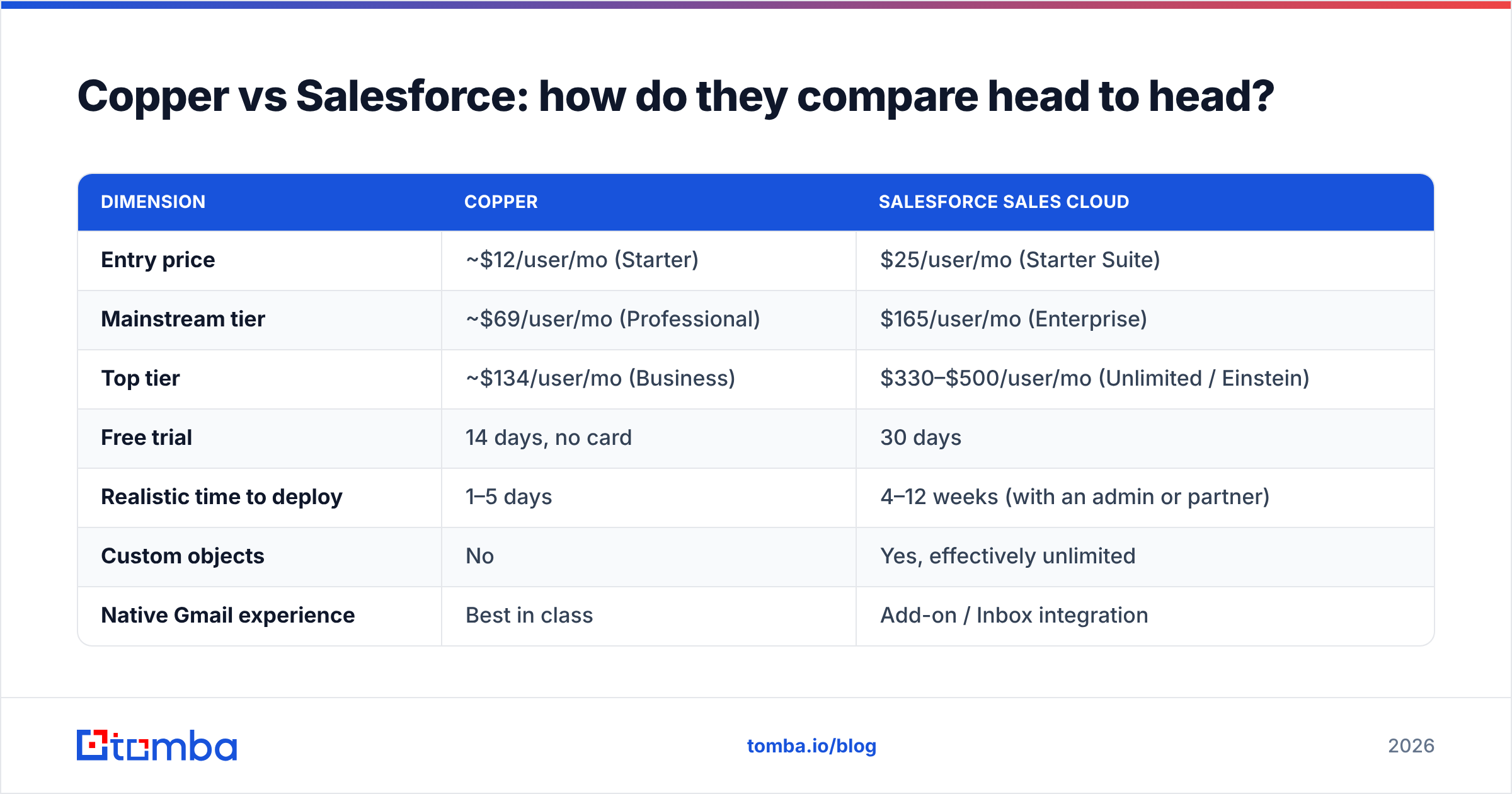
Prices below reflect published list rates as of 2026 and are billed annually. Always confirm with the vendor — CRM pricing changes more often than the feature set does.
| Dimension | Copper | Salesforce Sales Cloud |
|---|---|---|
| Entry price | ~$12/user/mo (Starter) | $25/user/mo (Starter Suite) |
| Mainstream tier | ~$69/user/mo (Professional) | $165/user/mo (Enterprise) |
| Top tier | ~$134/user/mo (Business) | $330–$500/user/mo (Unlimited / Einstein) |
| Free trial | 14 days, no card | 30 days |
| Realistic time to deploy | 1–5 days | 4–12 weeks (with an admin or partner) |
| Custom objects | No | Yes, effectively unlimited |
| Native Gmail experience | Best in class | Add-on / Inbox integration |
| Forecasting | Basic pipeline value | Multi-level, weighted, territory-aware |
| Automation | Workflow rules, templates | Flow Builder, Apex, approval processes |
| Reporting depth | Standard dashboards | Custom report types, joined reports |
| Admin required | No | Yes, in practice |
| Best team size | 2–50 | 20–20,000+ |
| Ecosystem | Modest | AppExchange (thousands of apps) |
The table hides the most important variable: total cost of ownership. Copper's cost is close to its sticker price. Salesforce's cost is sticker price plus an admin (part-time to full-time), plus implementation, plus the add-ons that turn out to be non-optional — CPQ, Sales Engagement, data enrichment, sometimes a second seat type for non-sales users.
Run the honest math. A 10-person team on Copper Professional is roughly $8,300/year, all-in. The same team on Salesforce Enterprise is roughly $19,800/year in licenses, plus $10k–$40k in implementation and ongoing admin. That's not an argument against Salesforce. It's an argument for knowing which problem you're paying to solve.
Which one is easier to actually adopt?#
Copper, by a wide margin — and adoption is the metric that decides whether a CRM was a good purchase.
Here's what the first 30 days typically look like:
- Copper, day 1–2. Install the Chrome extension, connect Google Workspace, import contacts from a CSV, build one pipeline with five stages. Reps see the CRM inside Gmail and log activity without changing behavior.
- Copper, day 3–14. Add workflow rules for stage changes and follow-up tasks. Adoption is usually near-total because there's nothing to adopt.
- Salesforce, week 1–3. Discovery. Someone maps your object model, decides whether an opportunity is a deal or a project, and argues about what "qualified" means. This work is valuable and everybody hates it.
- Salesforce, week 4–8. Build. Custom fields, validation rules, page layouts, permission sets, dashboards. Data migration and dedupe.
- Salesforce, week 9–12. Training and enforcement. Adoption depends entirely on whether leadership inspects the CRM in pipeline reviews. If they don't, reps go back to spreadsheets within a quarter.
If you cannot name the person who will do steps 3 through 5, you should not buy Salesforce. That's the whole test.
Is Salesforce worth the extra cost?#
It is when at least two of these are true:
- You sell more than one thing to more than one segment. Custom objects and record types stop being a luxury the moment your product line and your process diverge.
- Your forecast is a board-level artifact. Weighted forecasting, forecast categories, and territory rollups are things Copper does not seriously attempt.
- You have compliance, audit, or contract complexity. Approval processes, field history tracking, and granular sharing rules are Salesforce's home turf.
- You have 20+ reps and a real ops function. Salesforce scales with headcount; Copper scales with simplicity, and those diverge fast.
- Your stack is enterprise-shaped. If Marketo, NetSuite, Workday, or a data warehouse are already in play, Salesforce is the path of least resistance.
It is not worth the extra cost when your entire pipeline is 40 open deals, your team is six people, and the real bottleneck is that nobody follows up on day 4. That's a Copper problem — or a process problem wearing a CRM costume.
Independent review data backs this split. Both tools score well on G2's CRM category, but the review text diverges predictably: Copper reviewers praise ease of use and complain about reporting; Salesforce reviewers praise power and complain about complexity and cost. Nobody is confused about what they bought.
What about integrations and the surrounding stack?#
This is where the gap is widest and least negotiable.
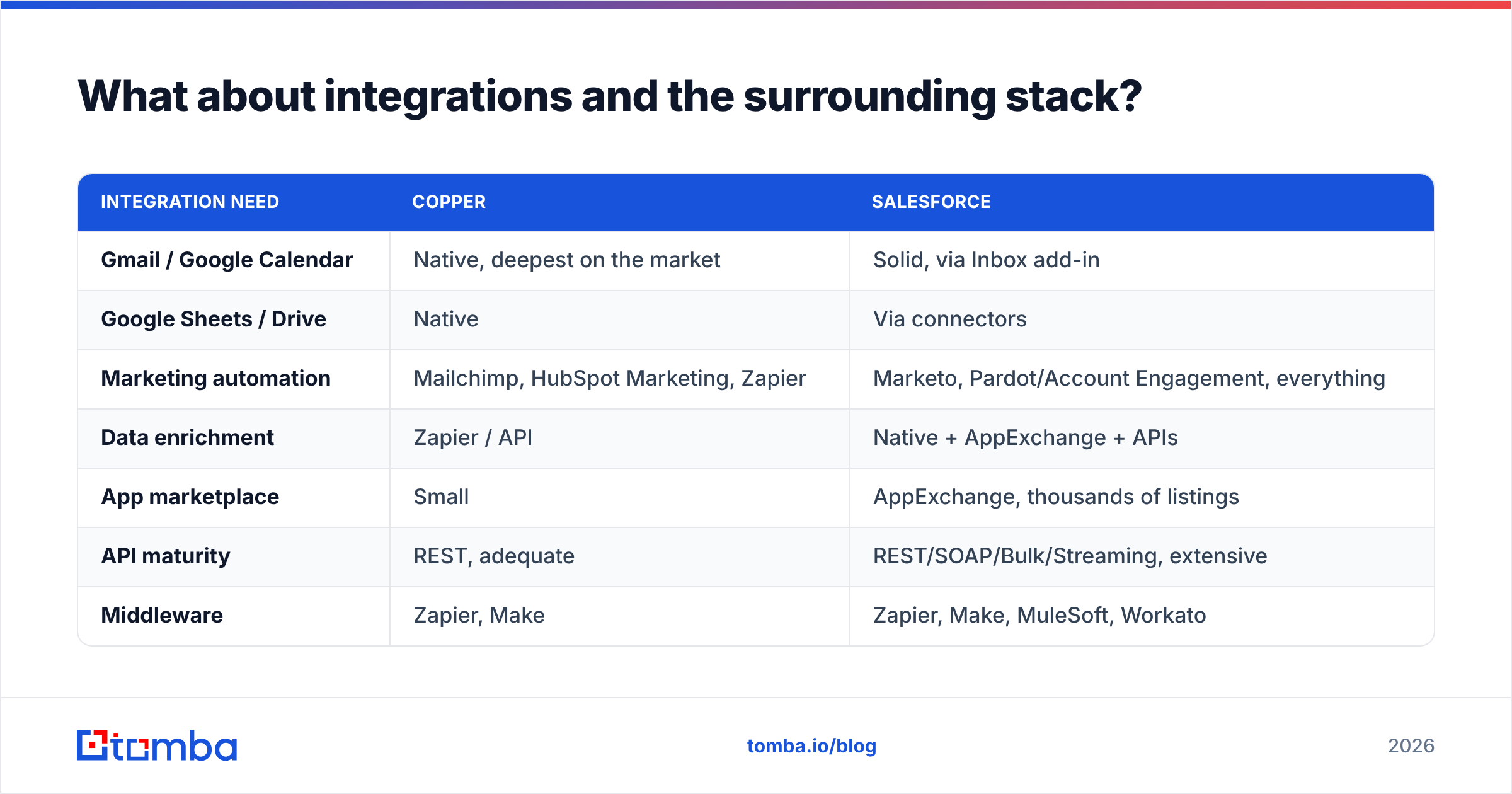
| Integration need | Copper | Salesforce |
|---|---|---|
| Gmail / Google Calendar | Native, deepest on the market | Solid, via Inbox add-in |
| Google Sheets / Drive | Native | Via connectors |
| Marketing automation | Mailchimp, HubSpot Marketing, Zapier | Marketo, Pardot/Account Engagement, everything |
| Data enrichment | Zapier / API | Native + AppExchange + APIs |
| App marketplace | Small | AppExchange, thousands of listings |
| API maturity | REST, adequate | REST/SOAP/Bulk/Streaming, extensive |
| Middleware | Zapier, Make | Zapier, Make, MuleSoft, Workato |
If your ops team lives in Google Sheets and Zapier, Copper is frictionless. If you need an ETL job pushing product usage into a custom object every hour so RevOps can score accounts, you need Salesforce, and it isn't close.
Either way, plan the enrichment layer before you migrate. A CRM is a container. Both of these tools will happily store 12,000 records where 4,000 have a bad email address and 3,000 are duplicates, and both will produce beautiful dashboards from that garbage.
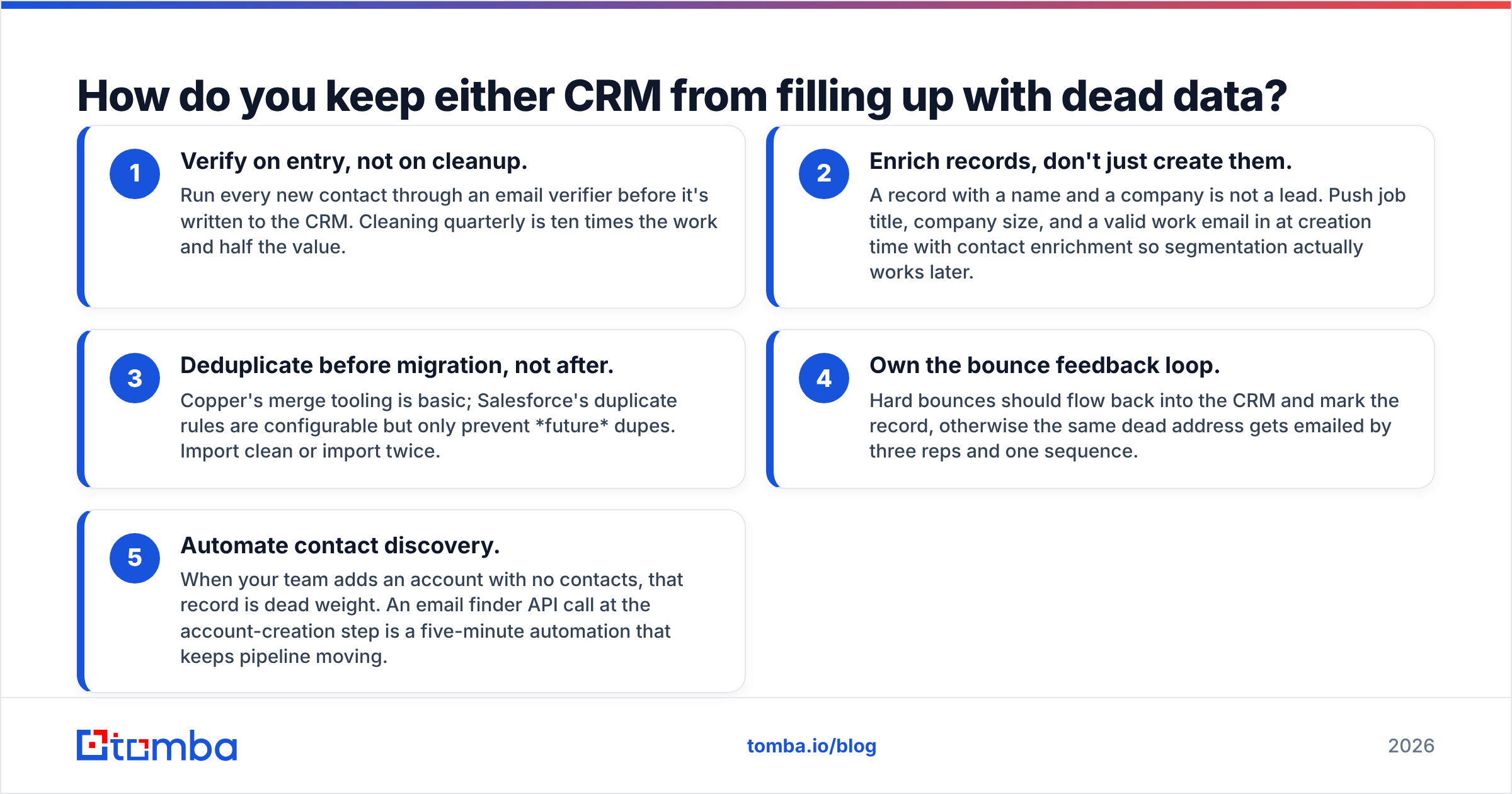
How do you keep either CRM from filling up with dead data?#
The unglamorous truth about the Copper vs Salesforce debate: most CRM failures are data failures, not software failures. Reps stop trusting the system when they email three contacts from a record and two bounce.
A few things that hold up regardless of which CRM you pick:
- Verify on entry, not on cleanup. Run every new contact through an email verifier before it's written to the CRM. Cleaning quarterly is ten times the work and half the value.
- Enrich records, don't just create them. A record with a name and a company is not a lead. Push job title, company size, and a valid work email in at creation time with contact enrichment so segmentation actually works later.
- Deduplicate before migration, not after. Copper's merge tooling is basic; Salesforce's duplicate rules are configurable but only prevent future dupes. Import clean or import twice.
- Own the bounce feedback loop. Hard bounces should flow back into the CRM and mark the record, otherwise the same dead address gets emailed by three reps and one sequence.
- Automate contact discovery. When your team adds an account with no contacts, that record is dead weight. An email finder API call at the account-creation step is a five-minute automation that keeps pipeline moving.
If you're running Salesforce specifically, wiring enrichment through the Salesforce integration or a Zapier step keeps this invisible to reps — which is the only way it survives contact with a quarter-end.
Copper vs Salesforce: which should you choose in 2026?#
Pick Copper if:
- You're 2–50 people and Google Workspace is your operating system.
- Deals are won on relationships and follow-up, not on process compliance.
- You want the CRM live this week, with no admin, no partner, and no discovery workshop.
- Your reporting needs stop at pipeline value, stage conversion, and activity counts.
Pick Salesforce if:
- You have (or will hire) someone who owns the CRM as part of their job title.
- Your process needs custom objects, approvals, territories, or serious forecasting.
- You're planning for 3–5 years of headcount growth and want to migrate once.
- Procurement, security review, or audit requirements are part of the sale.
And if you're honestly torn, that usually means you're a growing SMB with an ops-shaped hole in the org chart. In that case, run Copper now, define your process while it's cheap to change, and revisit Salesforce when you hire the person who can run it. Migrating from a clean, well-structured Copper instance into Salesforce two years from now is far less painful than running a neglected Salesforce org for two years.
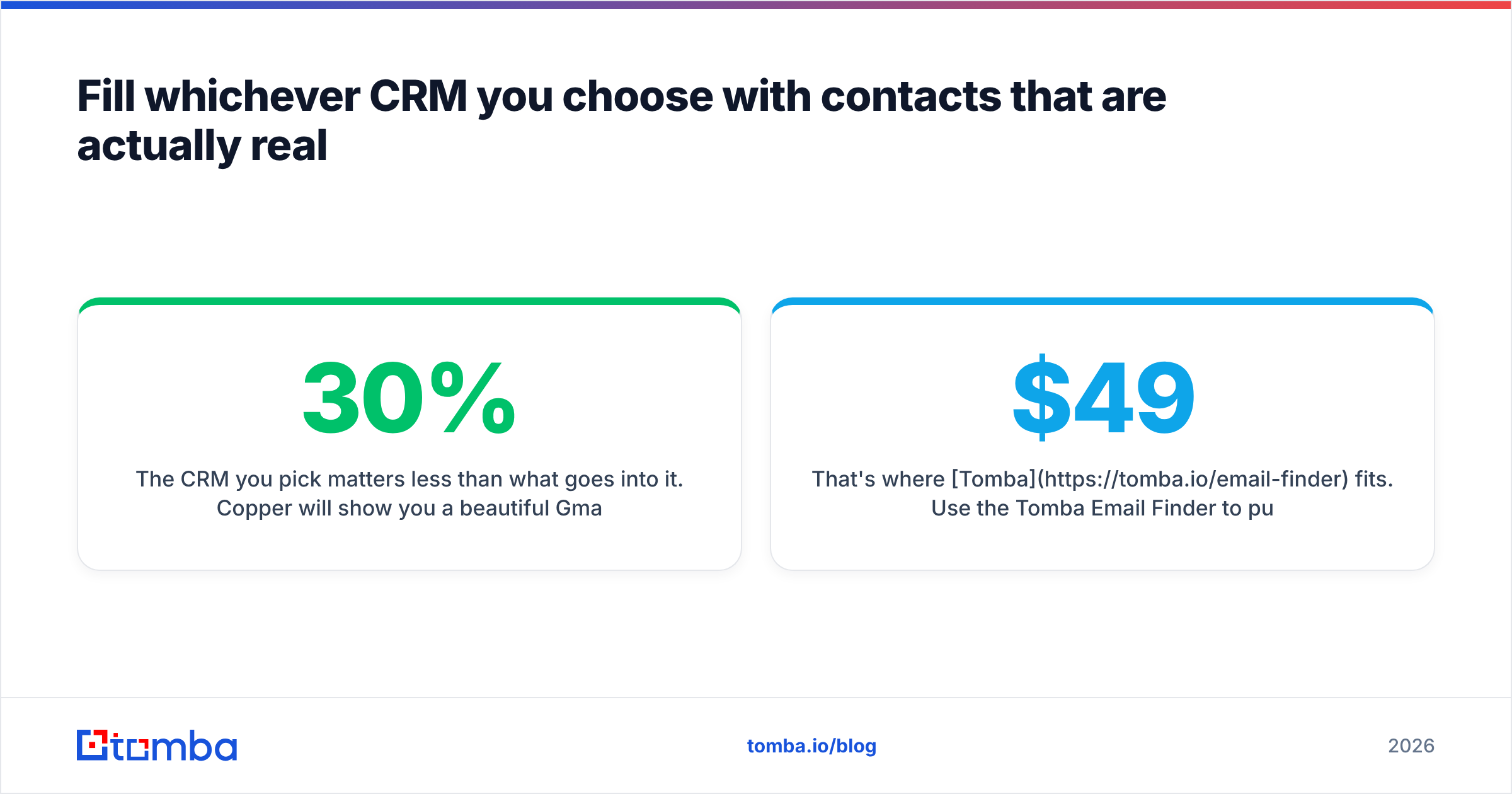
Fill whichever CRM you choose with contacts that are actually real#
The CRM you pick matters less than what goes into it. Copper will show you a beautiful Gmail sidebar full of stale contacts. Salesforce will build you an executive dashboard on top of a 30% bounce rate. Neither tool sources or validates its own data.
That's where Tomba fits. Use the Tomba Email Finder to pull verified professional email addresses by domain, name, or company — then push them straight into Copper or Salesforce via the API, a Zapier step, or a bulk import. Start on the free tier (25 searches/month), and check Tomba pricing if you need volume: Starter is $49/mo, Growth $99/mo, Pro $249/mo.
Buy the CRM that matches your team. Feed it data that matches reality.
Related guides#
Ready to find emails that actually work?
Join 150,000+ professionals who stopped guessing and started sending. Free credits on signup — no credit card required.
Get the Tomba newsletter
Practical outbound tactics and product updates — once every two weeks.
About the author