Coresignal vs Cufinder (2026): Which B2B Data Tool Wins?
Coresignal sells raw web data at scale. Cufinder sells ready-to-use leads. They look like competitors but solve different problems — and picking wrong costs you a quarter. Here's the honest breakdown.
TL;DR#
- Coresignal is a data infrastructure vendor, not a prospecting tool. It sells raw employee, company, and job-posting data through APIs and bulk files. You need engineers to make it useful.
- Cufinder is a go-to-market tool. It sells ready contact records — emails, phones, company data — through a dashboard, a Chrome extension, and an API. It is built for SDRs and growth teams.
- In a Coresignal vs Cufinder fight, the two rarely meet. Building a product, a scoring model, or a data warehouse? Coresignal fits. Need 500 verified emails by Friday? It does not.
- Neither one is a verification layer. Both ship contact data with real bounce risk. Verify the list before you send.
- The cost shape differs. Coresignal is priced like infrastructure: volume tiers, enterprise contracts. Cufinder is priced like SaaS: per seat, per credit, self-serve.
Most Coresignal vs Cufinder searches start from a bad premise. People assume the two tools do the same job, so the cheaper one wins. They don't do the same job. One is a pipe. The other is a faucet. Pick the wrong one and you lose a quarter of engineering time, or a quarter of pipeline.
Here is what each tool does, where each one breaks, and how to choose in about ten minutes.
What is Coresignal?#
Coresignal is a public web data provider. It scrapes, cleans, structures, and re-sells professional data at scale: company records, employee profiles, job postings, funding events, and tech signals.
The delivery model tells you who it is for:
- APIs for lookups and search on demand.
- Datafeeds — bulk exports (JSON, Parquet, CSV) on a schedule, dropped into your S3 bucket or warehouse.
- Custom and historical datasets for training a model or backfilling a warehouse.
Coresignal's typical buyer is an engineering or data team. A VC firm building a company-scoring model. A recruiting platform enriching candidate profiles. A sales-intelligence startup that needs a data layer it does not want to scrape itself. A RevOps team filling a warehouse that feeds revenue operations dashboards.
What Coresignal is not: a prospecting workflow. There is no button an SDR can press to get 200 VPs of Engineering with their emails. You get an API, a schema, rate limits, and a bill.
What is Cufinder?#
Cufinder sits at the other end of the stack. It is built for people who need contacts today. You get a searchable B2B database, an email and phone finder, an enrichment engine that turns a domain into firmographics, and a browser extension for grabbing contacts on LinkedIn.
Cufinder's buyer is an SDR, a founder doing their own outbound, a recruiter, or a small growth team. The unit of value is one usable contact, not a dataset.
That single split drives everything else in the Coresignal vs Cufinder comparison: price, accuracy, support, and time to value.

Coresignal vs Cufinder: how do they differ?#
Stop comparing feature lists. Compare what each tool hands you at the end of a workflow.
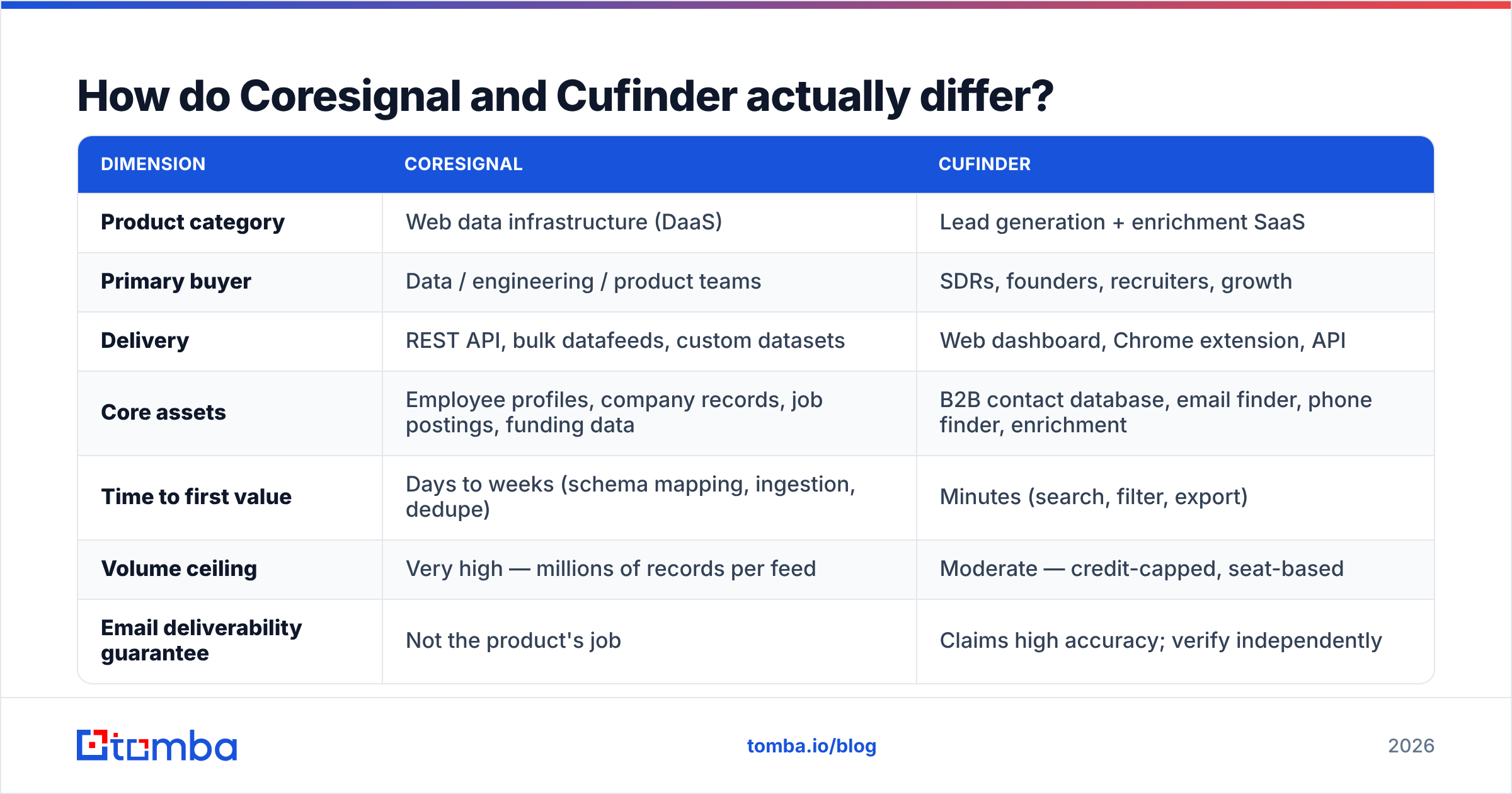
| Dimension | Coresignal | Cufinder |
|---|---|---|
| Product category | Web data infrastructure (DaaS) | Lead generation + enrichment SaaS |
| Primary buyer | Data / engineering / product teams | SDRs, founders, recruiters, growth |
| Delivery | REST API, bulk datafeeds, custom datasets | Web dashboard, Chrome extension, API |
| Core assets | Employee profiles, company records, job postings, funding data | B2B contact database, email finder, phone finder, enrichment |
| Time to first value | Days to weeks (schema mapping, ingestion, dedupe) | Minutes (search, filter, export) |
| Volume ceiling | Very high — millions of records per feed | Moderate — credit-capped, seat-based |
| Email deliverability guarantee | Not the product's job | Claims high accuracy; verify independently |
| Contract style | Volume tiers, annual/enterprise common | Self-serve monthly plans + free tier |
| Engineering required | Yes — this is table stakes | No |
| Best analogy | Buying flour by the pallet | Buying a sandwich |
Did the "engineering required" row make you wince? Then you have your answer, and it is not Coresignal.
Which one fits your use case?#
Run your case against these five profiles. One of them is you.
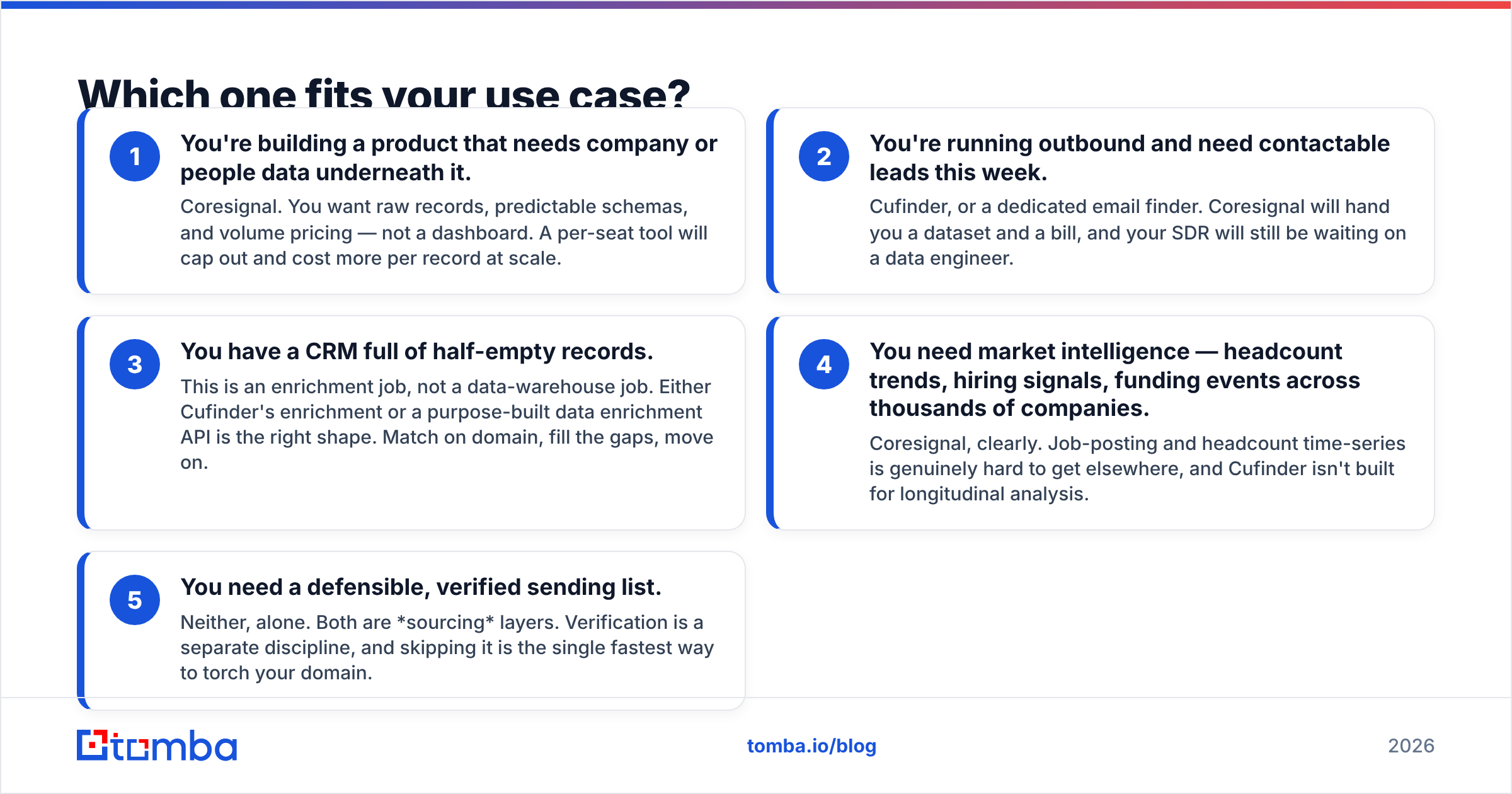
- You are building a product that needs company or people data. Pick Coresignal. You want raw records, stable schemas, and volume pricing. A per-seat tool will cap out and cost more per record at scale.
- You are running outbound and need leads this week. Pick Cufinder, or a dedicated email finder. Coresignal hands you a dataset and a bill. Your SDR still waits on a data engineer.
- Your CRM is full of half-empty records. That is an enrichment job, not a warehouse job. Use Cufinder's enrichment or a purpose-built data enrichment API. Match on domain, fill the gaps, move on.
- You need market signals — headcount trends, hiring, funding — across thousands of companies. Pick Coresignal. Job-posting and headcount history is hard to get elsewhere. Cufinder is not built for it.
- You need a verified sending list. Neither, on its own. Both are sourcing layers. Verification is a separate job. Skip it and you torch your domain.
Point five is where most teams get burned. It deserves its own section.
Why doesn't sourcing data fix deliverability?#
Because two facts are not the same fact. One: a contact sits in a database. Two: an inbox accepts mail at that address. Time sits between them.
Every B2B dataset is a snapshot of a moving target. That goes for Coresignal, for Cufinder, for everyone. B2B contact data decays by roughly 20–30% a year. It decays fastest where you care most: senior roles at fast-growing companies.
People change jobs. Companies get bought and switch domains. IT teams merge aliases. A record that was perfect in January bounces in July.
So a vendor's accuracy number describes their extraction. It is not a promise about your send window. Two teams pulling the same 1,000 records three months apart will see very different bounce rates.
The fix is simple. Add a verification step between "exported" and "sent". Run the list through an email verifier before it reaches your sequencer. Treat catch-all domains as their own bucket — they are why "verified" lists still bounce.
Mailbox providers score you on the outcome. A bounce rate above 2–3% drags your sender reputation down. You feel it in reply rates long before you see it in a report.
None of this is a knock on either vendor. It is just how the physics work. Buying data and protecting deliverability are two jobs. No single tool does both well.
Coresignal vs Cufinder: what does each one cost?#
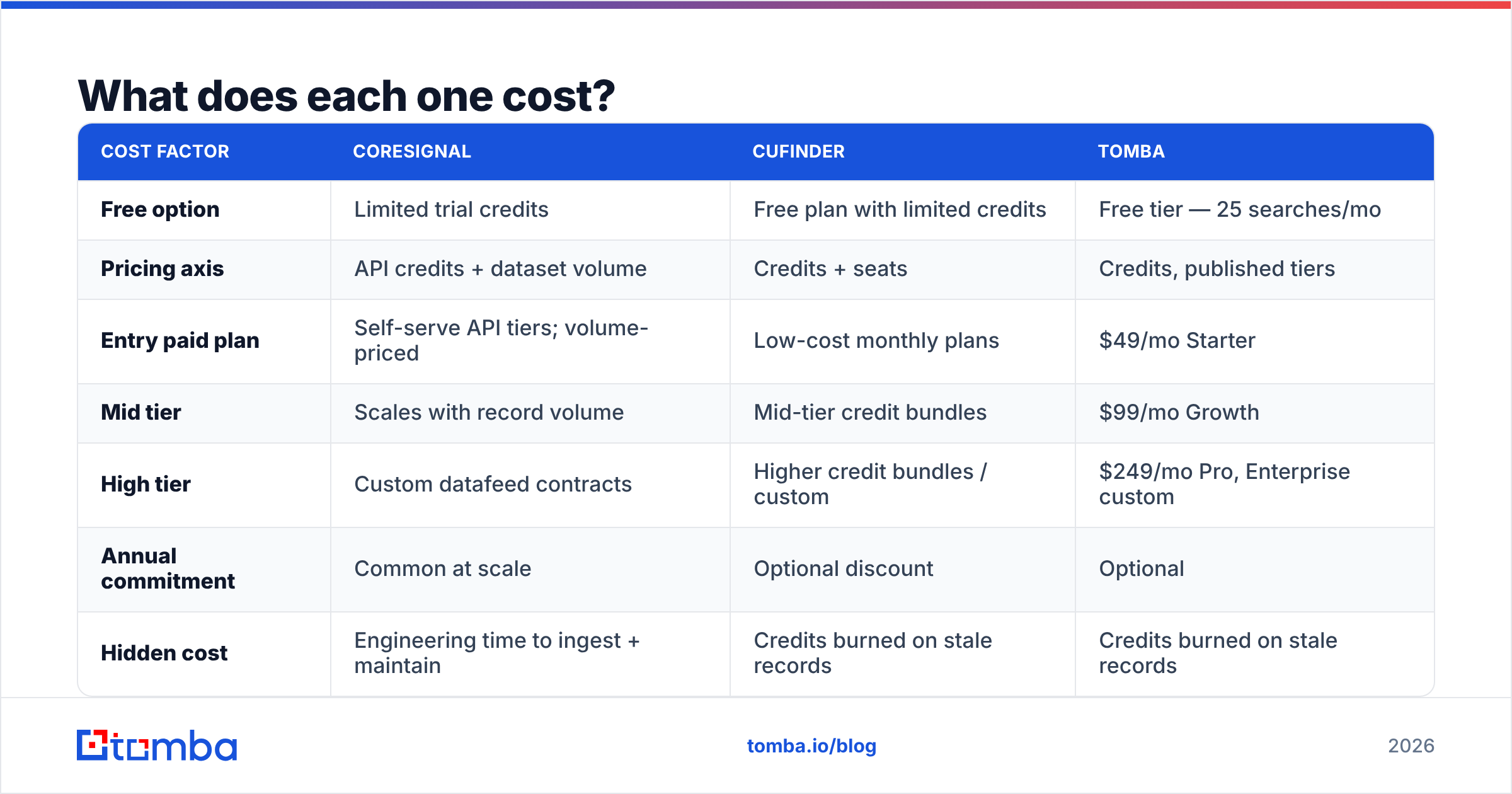
Pricing is where Coresignal vs Cufinder gets confusing. The two vendors price on different axes, and both change their published tiers often. Treat the table below as directional. Check each vendor's own page before you buy. That goes for our pricing too.
| Cost factor | Coresignal | Cufinder | Tomba |
|---|---|---|---|
| Free option | Limited trial credits | Free plan with limited credits | Free tier — 25 searches/mo |
| Pricing axis | API credits + dataset volume | Credits + seats | Credits, published tiers |
| Entry paid plan | Self-serve API tiers; volume-priced | Low-cost monthly plans | $49/mo Starter |
| Mid tier | Scales with record volume | Mid-tier credit bundles | $99/mo Growth |
| High tier | Custom datafeed contracts | Higher credit bundles / custom | $249/mo Pro, Enterprise custom |
| Annual commitment | Common at scale | Optional discount | Optional |
| Hidden cost | Engineering time to ingest + maintain | Credits burned on stale records | Credits burned on stale records |
| Verification included | No | Bundled claims; verify anyway | Verification is a first-class product |
The row that matters is "hidden cost." For Coresignal, the sticker price is not the real price. Add a data engineer's time: map the schema, dedupe, handle refresh cycles, keep the pipeline from rotting. That is a fine trade if you are building infrastructure. It is an absurd trade if you wanted 500 emails.
For credit-based tools, the hidden cost flips. You burn credits on records that turn out to be dead. A tool that charges for a bad result has doubled your cost per usable contact. Ask any vendor — ours included — whether they charge for invalid results. The answer tells you a lot.
Want a like-for-like anchor while you compare? Our pricing details are public, and no call is required.
How should you evaluate them?#
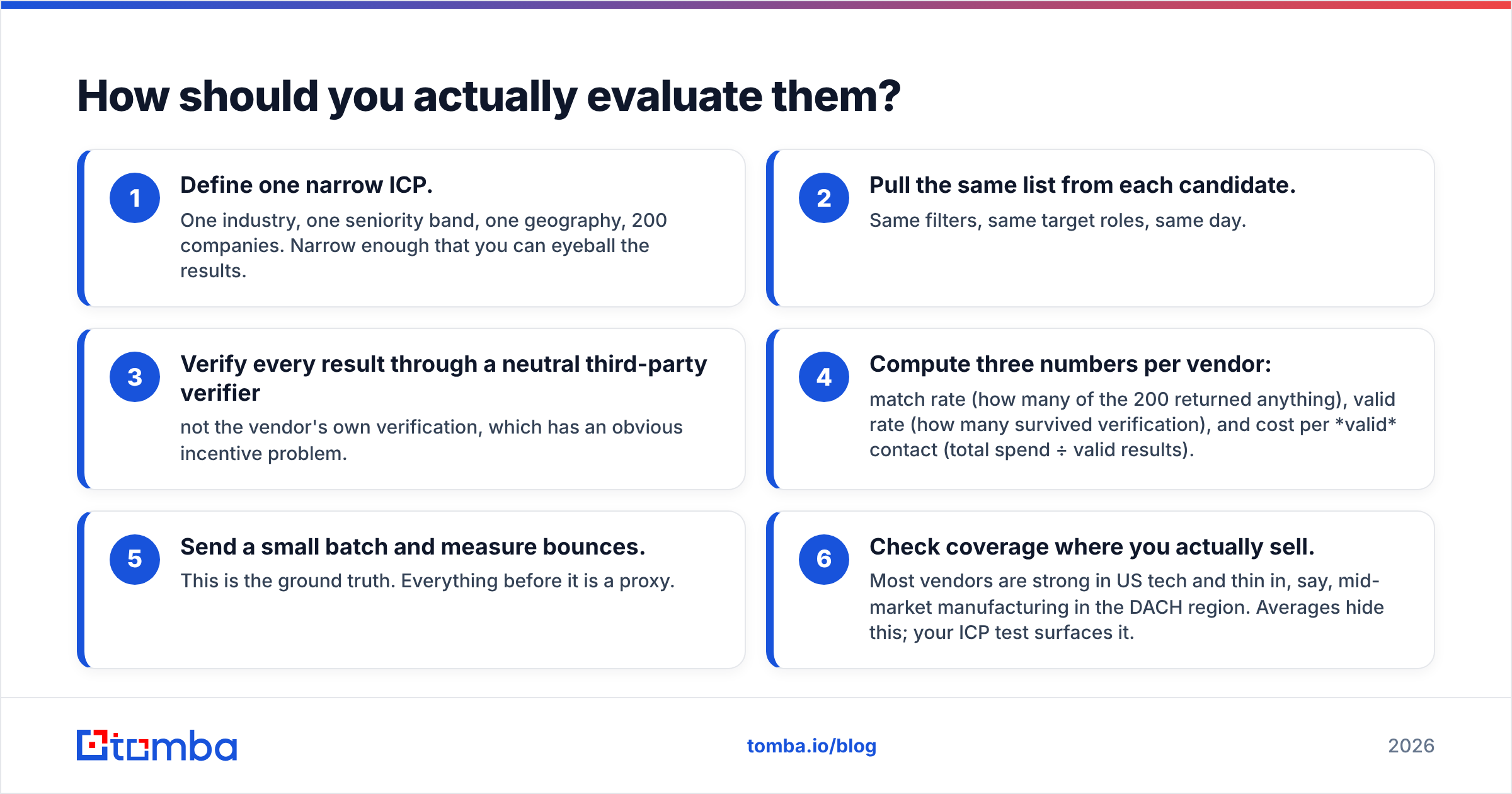
Skip the feature bake-off. Run a cost-per-usable-contact test. It is the only number that survives a real campaign.
- Pick one narrow ICP. One industry, one seniority band, one country, 200 companies. Small enough to eyeball.
- Pull the same list from each tool. Same filters, same roles, same day.
- Verify every result with a neutral third party. Not the vendor's own checker. That is an obvious conflict of interest.
- Compute three numbers per vendor. Match rate, valid rate, and cost per valid contact.
- Send a small batch and count bounces. This is ground truth. Everything before it is a proxy.
- Check coverage where you actually sell. Most vendors are strong in US tech and thin in, say, DACH manufacturing. Averages hide that. Your test will not.
Vendor accuracy claims are marketing. A 98% figure from a vendor's own sample says nothing about your bounce rate, on your ICP, this month. Only step 5 does.
Review sites like G2 help with one thing: spotting pattern complaints. Support delays, credit-rollover disputes, sudden coverage gaps. Accuracy scores there are noisy in both directions.
Where does a dedicated email finder fit?#
Between the two poles, honestly.
Coresignal gives you scale with no workflow. Cufinder gives you a workflow with a fixed shape. An email-finding and verification layer covers what both do worst: turning a name and a domain into an address that accepts mail.
That is the idea behind Tomba. The email finder resolves an email from a name and a domain. Domain search pulls every address it can find at a company. The catch-all verifier handles the domains that break naive checks. The Tomba API lets engineers wire the same logic into a product or a warehouse. No bulk datafeed, no ingestion pipeline.
A realistic stack for a mid-sized GTM team looks like this:
- Market signals from a data layer. Coresignal, your own scraping, or a warehouse you already run.
- Contact discovery and verification from a tool that treats deliverability as the product.
- Sequencing from whatever sender you already trust.
You do not need one vendor for all three. Teams that try usually overpay for the parts they did not need.
The honest verdict#
Pick Coresignal if you have engineers, you are building something, and you need volume. At scale, per-record pricing beats per-seat pricing. It is a solid infrastructure product. Just do not expect it to fill your SDR's Monday.
Pick Cufinder if you are a small or mid-sized GTM team. You want search, enrichment, and export in a dashboard, with no API work. It does that job well.
Pick neither as your only layer if deliverability matters. And it always matters. Verification is not a checkbox. It is the line between a campaign and a domain reputation incident.
So the real Coresignal vs Cufinder question is not "which tool is better." It is "which layer am I missing." Answer that, and the vendor picks itself.
Missing contactable, verified email addresses — not a data warehouse, not another dashboard? Start with the Tomba Email Finder. The free tier gives you 25 searches a month. Run the cost-per-usable-contact test above against whatever you use now. Check the bounce rate on your real ICP, and let the numbers make the call.
Related guides#
Ready to find emails that actually work?
Join 150,000+ professionals who stopped guessing and started sending. Free credits on signup — no credit card required.
Get the Tomba newsletter
Practical outbound tactics and product updates — once every two weeks.
About the author