Correct Email Format: Syntax, Patterns, and Examples 2026
The correct email format is two problems in one: an address that passes syntax rules, and the pattern the company actually uses. Here is how to get both right — with real examples, a pattern frequency table, and the checks that stop bounces.
TL;DR
- "Correct email format" means two different things: an address that is syntactically valid (
name@domain.tld) and an address that is actually in use at the target company (f.last@vsfirst.last@vsfirst@). - Syntax validity is cheap and nearly worthless on its own. Roughly every fake address you can invent —
notarealperson@stripe.com— passes a regex check. - Around 80% of B2B mailboxes follow one of five patterns. Knowing the frequency order lets you guess intelligently, but guessing still bounces at rates that damage your sender reputation.
- The reliable sequence is: confirm the domain pattern → generate the candidate → verify it at the SMTP layer → only then send.
- Keep hard bounces under 2%. Above that, Google and Microsoft start throttling you regardless of how good your copy is.
What does "correct email format" actually mean?#
Two people search this phrase for two different reasons.
The first wants the rules for a valid email address — what characters are legal, where the dot goes, whether john..doe@ is allowed. That is a syntax question, answered by RFC 5322.
The second is staring at a prospect's name and a company domain and wants to know which pattern that company uses — sarah.chen@acme.com, schen@acme.com, or sarah@acme.com. That is a data question, and no rulebook answers it.
A third group means "how do I structure a professional email message" — subject line, greeting, body, sign-off. That is covered at the end.
This guide handles all three, in the order that matters when you are building a prospect list: syntax first (so nothing malformed enters your CRM), pattern second (so your guess is educated), verification third (so your guess is confirmed before it costs you deliverability).
What makes an email address technically valid?#
Every address has three parts: a local part, the @ symbol, and a domain.
sarah.chen @ acme.com
   ↑         ↑    ↑
local     at   domain
The local part (before the @) may contain:
- Uppercase and lowercase letters
A–Z,a–z - Digits
0–9 - These special characters:
! # $ % & ' * + - / = ? ^ _ \{ | } ~` - A dot
., provided it is not the first or last character and never appears twice in a row - Up to 64 characters
The domain part (after the @) must be a valid hostname: letters, digits, and hyphens, split into labels by dots, ending in a top-level domain. Maximum 255 characters. The full address should stay under 254 characters to survive real-world SMTP servers.
Here is where theory and practice diverge:
| Address | RFC-valid? | Accepted by real mail servers? |
|---|---|---|
sarah.chen@acme.com |
Yes | Yes |
sarah+news@acme.com |
Yes | Yes (Gmail/Outlook sub-addressing) |
"sarah chen"@acme.com |
Yes (quoted local part) | Rarely — many servers reject it |
sarah..chen@acme.com |
No (double dot) | No |
.sarah@acme.com |
No (leading dot) | No |
sarah@acme |
No (no TLD) | No |
sarah@[192.168.1.1] |
Yes (IP literal) | Almost never in B2B |
SARAH@ACME.COM |
Yes | Yes — domain is case-insensitive |
Two practical notes that trip people up:
- The local part is technically case-sensitive. RFC 5321 says
Sarah@acme.comandsarah@acme.commay be different mailboxes. In practice, every major provider — Google Workspace, Microsoft 365, Zoho — treats them as identical. Normalize to lowercase and move on. - Gmail ignores dots.
sarahchen@gmail.comandsarah.chen@gmail.comland in the same inbox. This is a Gmail-only behavior, not a standard. Do not assume it for corporate domains — at a company running Google Workspace onacme.com, dots absolutely matter.
If you want the primary sources rather than a summary, the IETF's RFC 5322 defines the message syntax, and Wikipedia's email address article is a readable, well-cited overview of the edge cases.
You can sanity-check any single address with a free email checker before it ever touches your sequence.

Why is a syntactically valid address still useless?#
Because syntax proves nothing about existence.
ceo@microsoft.com, jeff@amazon.com, and definitely-not-a-real-human@salesforce.com all pass every regex you can write. None of them are addresses you should send to.
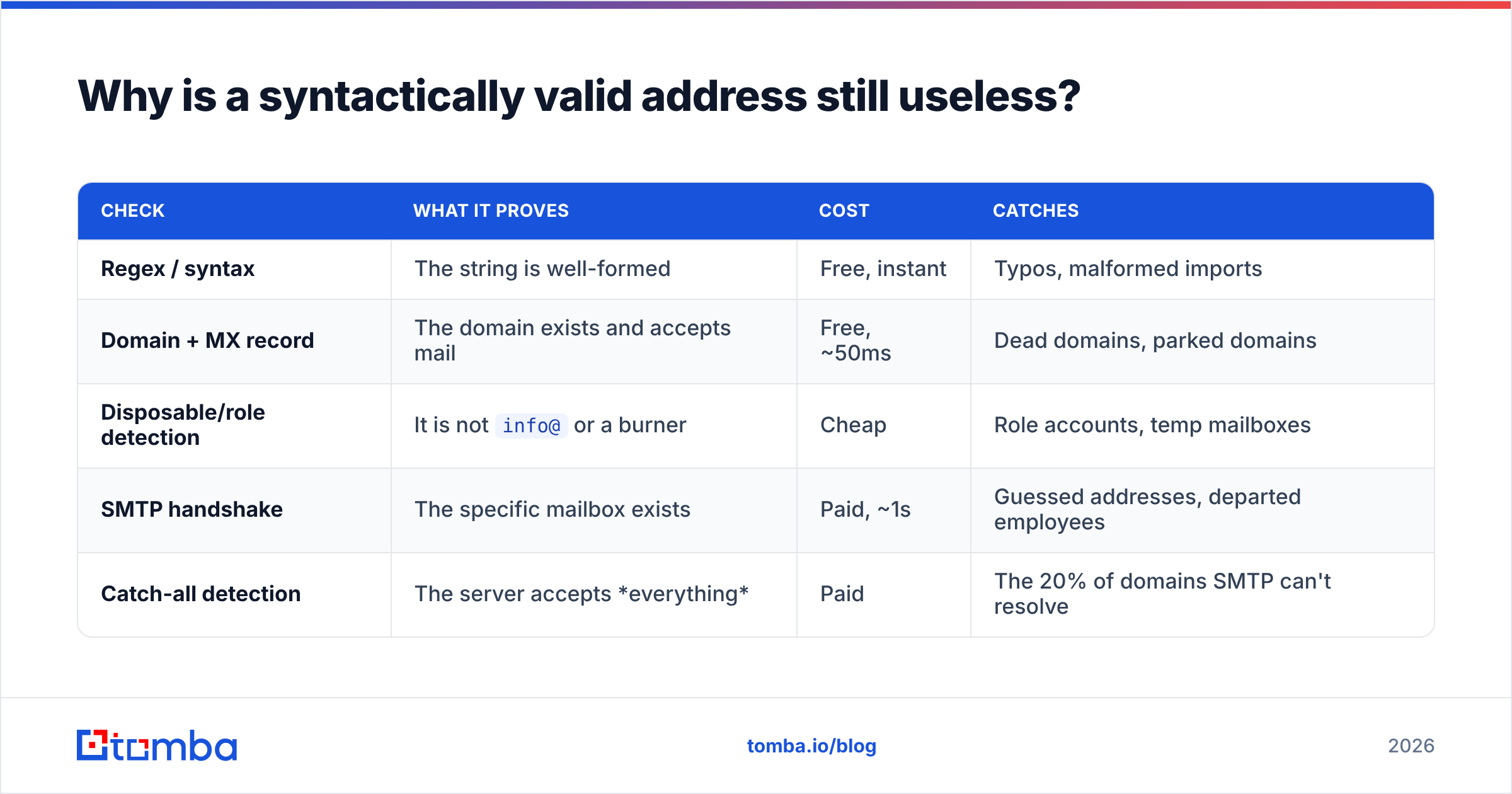
Validity is a floor, not a signal. The checks that actually tell you whether an address will land form a ladder:
| Check | What it proves | Cost | Catches |
|---|---|---|---|
| Regex / syntax | The string is well-formed | Free, instant | Typos, malformed imports |
| Domain + MX record | The domain exists and accepts mail | Free, ~50ms | Dead domains, parked domains |
| Disposable/role detection | It is not info@ or a burner |
Cheap | Role accounts, temp mailboxes |
| SMTP handshake | The specific mailbox exists | Paid, ~1s | Guessed addresses, departed employees |
| Catch-all detection | The server accepts everything | Paid | The 20% of domains SMTP can't resolve |
Skip the bottom two rungs and you are, functionally, sending blind. An email verifier runs all five in one pass and returns a status rather than a guess.
Catch-all domains deserve their own warning. A catch-all server accepts mail for any address at that domain — asdfgh@company.com included — then silently drops or quarantines what it doesn't recognize. Standard SMTP verification returns "valid" and you feel great, right up until your reply rate for that domain is zero. A dedicated catch-all verifier uses secondary signals to resolve those instead of shrugging.
Which company email format patterns are the most common?#
This is the question most people are actually asking. Across B2B domains, mailbox naming clusters into a handful of patterns. Using "Sarah Chen" at acme.com as the example:
first.last@→sarah.chen@acme.com— the most common corporate pattern by a wide margin. Default for most Google Workspace and Microsoft 365 deployments at companies above ~50 employees.first@→sarah@acme.com— dominant at startups and small teams, where first names are still unique. Breaks the day they hire a second Sarah.flast@→schen@acme.com— the classic enterprise and legacy-IT pattern. Common in finance, healthcare, government, and any org that standardized before 2010.firstlast@→sarahchen@acme.com— a compact variant, popular in tech and among companies that hate punctuation.first_last@orfirst-last@→sarah_chen@acme.com— the underscore/hyphen minority. Rare, but real, and worth testing before you write a domain off.f.last@→s.chen@acme.com— common in European organizations, especially in France, Germany, and the Netherlands.
Two structural rules override all six:
- Companies are internally consistent. If you confirm one employee's address at a domain, you have effectively confirmed the pattern for the rest. This is why the correct workflow is find one, extrapolate, verify — not guess each one independently.
- Acquisitions break consistency. A company that bought three startups may run four patterns and four domains simultaneously, with aliases forwarding between them. Verify per contact when you see multiple domains in play.
A company email pattern checker resolves the dominant pattern for a domain in one lookup, which is faster and safer than eyeballing a LinkedIn export.
How do you find the correct email format for a specific company?#
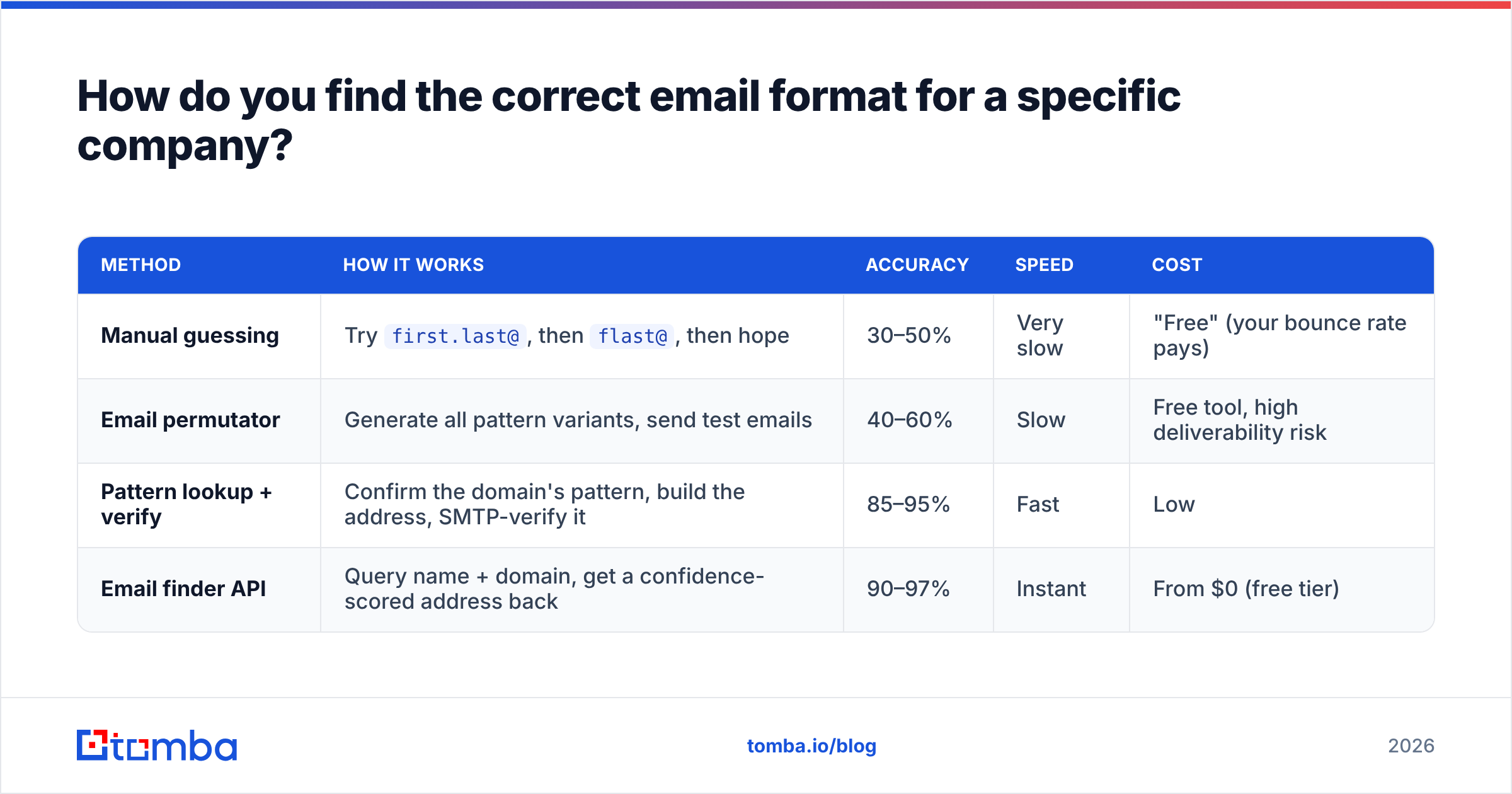
Four methods, ranked by accuracy and by how much of your time they burn.
| Method | How it works | Accuracy | Speed | Cost |
|---|---|---|---|---|
| Manual guessing | Try first.last@, then flast@, then hope |
30–50% | Very slow | "Free" (your bounce rate pays) |
| Email permutator | Generate all pattern variants, send test emails | 40–60% | Slow | Free tool, high deliverability risk |
| Pattern lookup + verify | Confirm the domain's pattern, build the address, SMTP-verify it | 85–95% | Fast | Low |
| Email finder API | Query name + domain, get a confidence-scored address back | 90–97% | Instant | From $0 (free tier) |
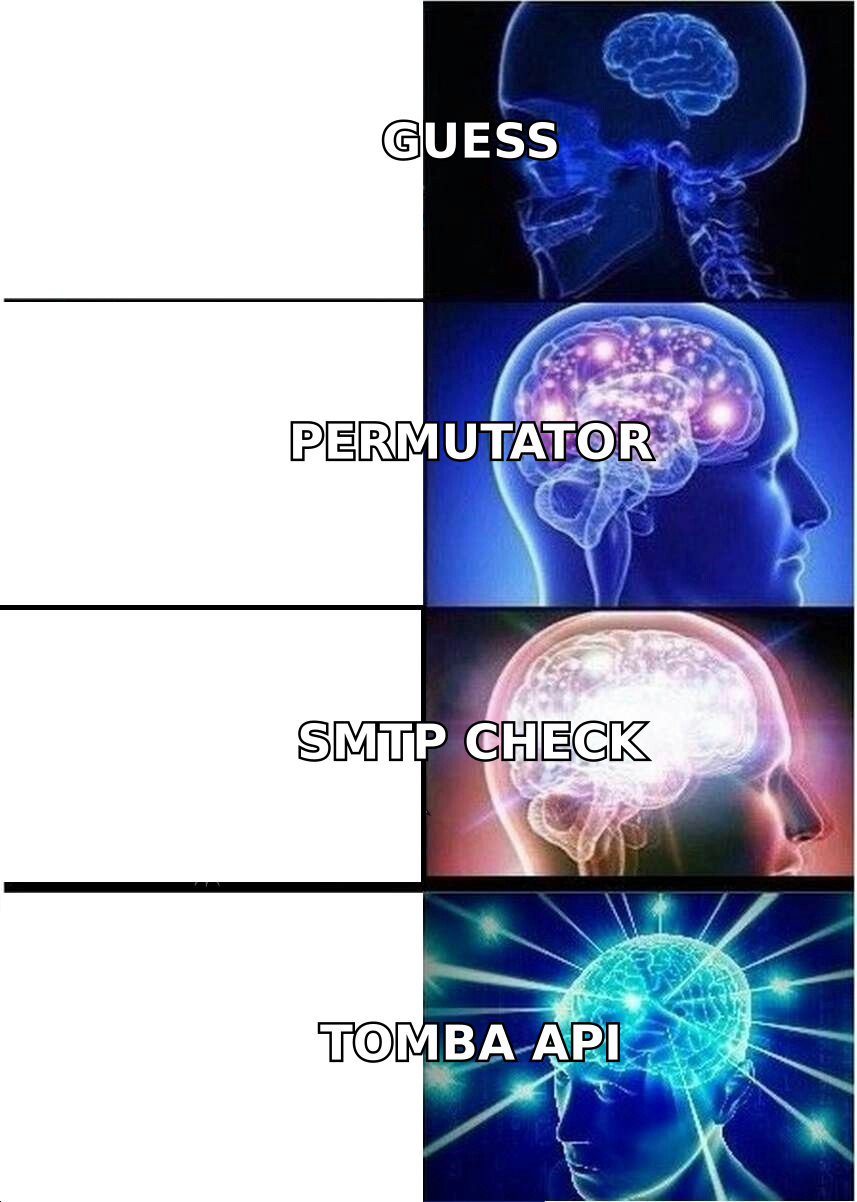
Manual guessing is the default for people who have never seen their own bounce dashboard. Don't. Every bounced send is a signal to Google and Microsoft that you don't know who you are emailing.
Permutators have a legitimate role — generating candidate lists — but only when paired with verification. Generating eight variants and mailing all eight is the fastest way to torch a sending domain. Use an email permutator to build the candidates, then verify them. Never send to the raw list.
Pattern lookup + verification is the workflow that scales. Run a domain search to see every known address at the company, read the pattern off the results, apply it to your target, then SMTP-verify the result. Two API calls, one confirmed address.
Email finder APIs collapse those steps into one. You pass a first name, last name, and domain; you get back an address plus a confidence score sourced from crawled and verified data, not from a coin flip. Tomba's email finder returns the address, the pattern it matched, and the sources it was seen in, so you can audit the answer rather than trust it.
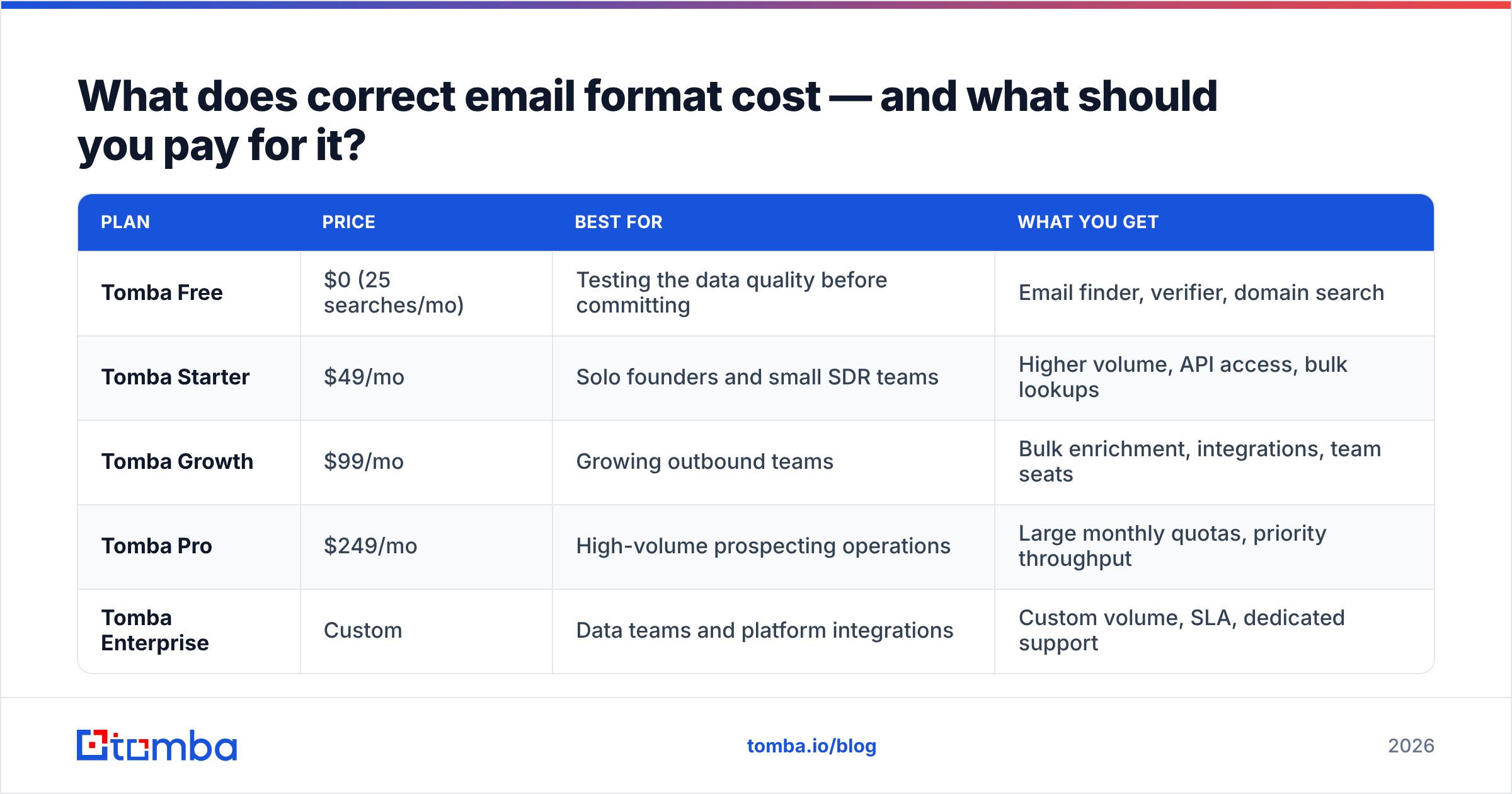
What does correct email format cost — and what should you pay for it?#
Cost per verified address is the only number that matters. A free tool that yields a 40% bounce rate is more expensive than a paid one, because bounces cost you the domain.
| Plan | Price | Best for | What you get |
|---|---|---|---|
| Tomba Free | $0 (25 searches/mo) | Testing the data quality before committing | Email finder, verifier, domain search |
| Tomba Starter | $49/mo | Solo founders and small SDR teams | Higher volume, API access, bulk lookups |
| Tomba Growth | $99/mo | Growing outbound teams | Bulk enrichment, integrations, team seats |
| Tomba Pro | $249/mo | High-volume prospecting operations | Large monthly quotas, priority throughput |
| Tomba Enterprise | Custom | Data teams and platform integrations | Custom volume, SLA, dedicated support |
Full breakdown lives on the Tomba pricing page. The relevant test on any plan: run 50 known-good addresses through the verifier and check that it flags the ones you already know are dead. Any vendor that returns "valid" for every address you throw at it is selling you optimism.
If you are enriching a spreadsheet rather than calling an API, the bulk email finder handles the same workflow at list scale — upload names and domains, get back verified addresses with statuses.
What is the correct format for a professional email message?#
Different question, same word. If you searched "correct email format" wanting message structure, here it is — the five components, in order:
- Subject line — 3 to 7 words, lowercase-ish, specific.
quick question about your Q3 hiringoutperformsPartnership Opportunity — ACME x YourCo. Front-load the concrete noun. - Greeting —
Hi [First name],covers 95% of B2B.Dear [Title] [Last name],only in finance, law, government, or Japan. NeverTo Whom It May Concern— it announces that you did no research. - Opening line — one sentence proving you know something specific about them or their company. Not a compliment. A fact.
- Body — two to three short paragraphs, max 125 words total. One idea. State what you do, who it is for, and why it is relevant to them, in that order.
- Sign-off + signature —
Thanks,orBest,then your name, title, company, and a single link. No banner images, no legal boilerplate, no six social icons. Every image and tracking pixel nudges your spam score up.
The formatting rules that decide whether it renders correctly on a phone:
- Plain text or lightly styled HTML. No tables, no columns, no background colors.
- Paragraphs of one to three lines. A five-line block reads as a wall on mobile.
- One call to action. Two CTAs is zero CTAs.
- Left-aligned. Centered body text signals "newsletter," which signals "promotions tab."
For the message-craft side of this — sequencing, follow-up cadence, subject-line testing — HubSpot's sales blog has a deep, mostly vendor-neutral library. What it can't tell you is whether the address you're sending to exists.
What breaks most often, and how do you prevent it?#
Five failures account for most bad B2B lists:
- Typos in the domain.
@gmial.com,@hotmial.com,@yahooo.com. Syntactically perfect, permanently undeliverable. A syntax check passes them; an MX check does not. - Departed employees. The address was correct 18 months ago. Data ages at roughly 2–3% per month in B2B — a year-old list is a third wrong. Re-verify before every campaign, not once at import.
- Role accounts.
info@,sales@,support@,admin@. Real mailboxes, filtered by whoever drew the short straw. High complaint risk, near-zero reply rate. Strip them. - Catch-all false positives. Covered above. If your verifier reports "valid" for 100% of a domain's addresses, you're looking at a catch-all, not a jackpot.
- Sending to unverified guesses. Each hard bounce is a reputation hit. Cross 2% and mailbox providers begin throttling; cross 5% and you are effectively shadow-banned. No subject line rescues a domain in that state.
The prevention is procedural, not clever: verify at import, verify again within seven days of sending, and never let a permutator's output reach a sequence without an SMTP check in between.
The bottom line#
The correct email format is not one thing. It is a valid string, matched to a real company pattern, confirmed against a live mail server. Miss any of the three and you are sending mail into a void that quietly reports you to Google.
Get the pattern from the domain. Build the address from the pattern. Verify the address before you send. That order is boring and it works.
If you want that whole sequence in a single call, run your next list through the Tomba Email Finder — pass a name and a domain, get back a verified, confidence-scored address with the pattern it matched and the sources it came from. Start on the free tier (25 searches a month, no card), test it against contacts you already know are good, and only upgrade once the data has earned it.
Related guides#
Ready to find emails that actually work?
Join 150,000+ professionals who stopped guessing and started sending. Free credits on signup — no credit card required.
Get the Tomba newsletter
Practical outbound tactics and product updates — once every two weeks.
About the author