Corteza Pricing, Reviews, Pros and Cons: A 2026 Breakdown
Corteza is free to license and expensive to run. Here is what the open-source CRM actually costs in 2026, who it fits, and where it quietly breaks down.
TL;DR
- Corteza's software license costs $0. It is Apache-2.0 open source, and you can download and run the full low-code platform (CRM included) without ever talking to a salesperson.
- The real Corteza pricing question is not licensing — it is total cost of ownership: servers, Postgres, upgrades, SSO, backups, and the engineer who owns all of it.
- Reviews cluster around one theme: teams that already have DevOps love it; teams that wanted "free Salesforce" churn within a quarter.
- Best fit: data-sovereignty-driven orgs (EU public sector, healthcare, defense contractors) and companies that want to build internal apps, not just track deals.
- Worst fit: a 6-person sales team that needs pipeline hygiene by Friday.
What is Corteza, exactly?#
Corteza is an open-source, self-hosted low-code platform maintained by Planet Crust and published at cortezaproject.org. It is usually described as an open-source Salesforce alternative, but that framing undersells and oversells it at the same time.
It undersells it because Corteza is not just a CRM. The platform ships four layers:
- Corteza Low Code (Compose) — a builder for modules, records, pages, and charts. This is where the CRM actually lives; the CRM is a pre-built app on top of the builder, not a hard-coded product.
- Corteza Workflow — visual automation, triggers, and scripting for business logic.
- Corteza Identity & Access Management — users, roles, permissions, federated login.
- Corteza Server — the Go backend with a REST API, backed by PostgreSQL.
And it oversells it because "Salesforce alternative" implies feature parity. It is not close. There is no AppExchange, no CPQ, no native forecasting suite, no army of certified consultants. What you get is a solid, permissively licensed application framework with a CRM bundled in — and the freedom to reshape it.
The license is Apache 2.0, which is the practically important detail: no copyleft obligations, no seat counting, no vendor audit. You can fork it, brand it, and resell it.
What does Corteza pricing actually look like in 2026?#
Here is the honest answer: there is no public price list, because the software itself is free. Planet Crust monetizes through enterprise support, hosting, and implementation services, which are quote-based. Any blog claiming "Corteza costs $X/user/month" is inventing numbers.
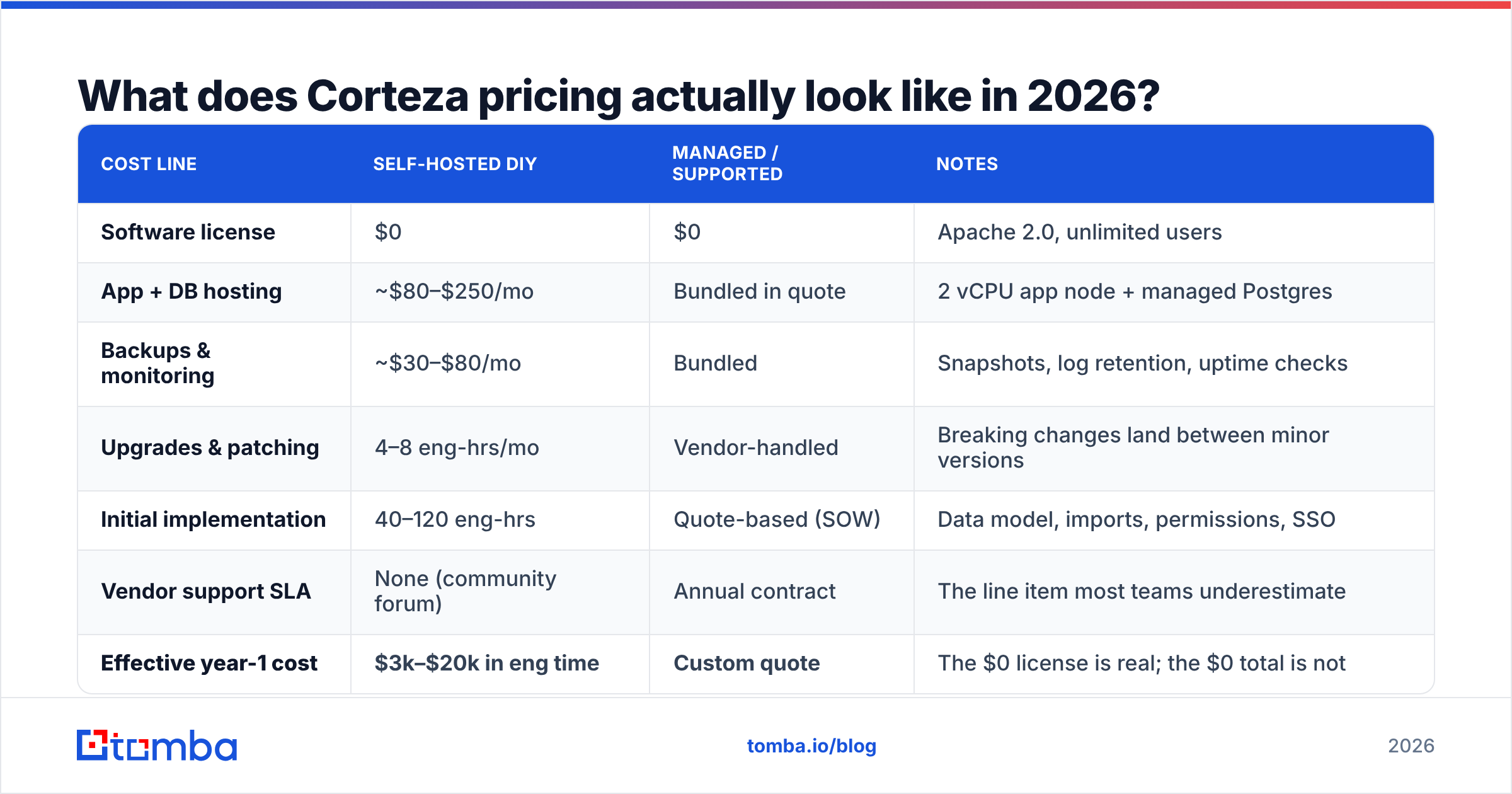
That makes Corteza pricing a TCO exercise rather than a plan comparison. Below is a realistic model for a 25-seat deployment. Treat the figures as planning ranges, not vendor quotes — your infrastructure and salary costs will move them.
| Cost line | Self-hosted DIY | Managed / supported | Notes |
|---|---|---|---|
| Software license | $0 | $0 | Apache 2.0, unlimited users |
| App + DB hosting | ~$80–$250/mo | Bundled in quote | 2 vCPU app node + managed Postgres |
| Backups & monitoring | ~$30–$80/mo | Bundled | Snapshots, log retention, uptime checks |
| Upgrades & patching | 4–8 eng-hrs/mo | Vendor-handled | Breaking changes land between minor versions |
| Initial implementation | 40–120 eng-hrs | Quote-based (SOW) | Data model, imports, permissions, SSO |
| Vendor support SLA | None (community forum) | Annual contract | The line item most teams underestimate |
| Effective year-1 cost | $3k–$20k in eng time | Custom quote | The $0 license is real; the $0 total is not |
The pattern is not unique to Corteza — it is the standard open-source bargain. You trade a predictable subscription for an unpredictable internal cost that shows up on the engineering payroll instead of the software budget. Whether that trade is good depends entirely on whether you already employ someone who can run a Go service and a Postgres instance without flinching.
Sorry — the correct embed:
How does Corteza compare to the alternatives?#
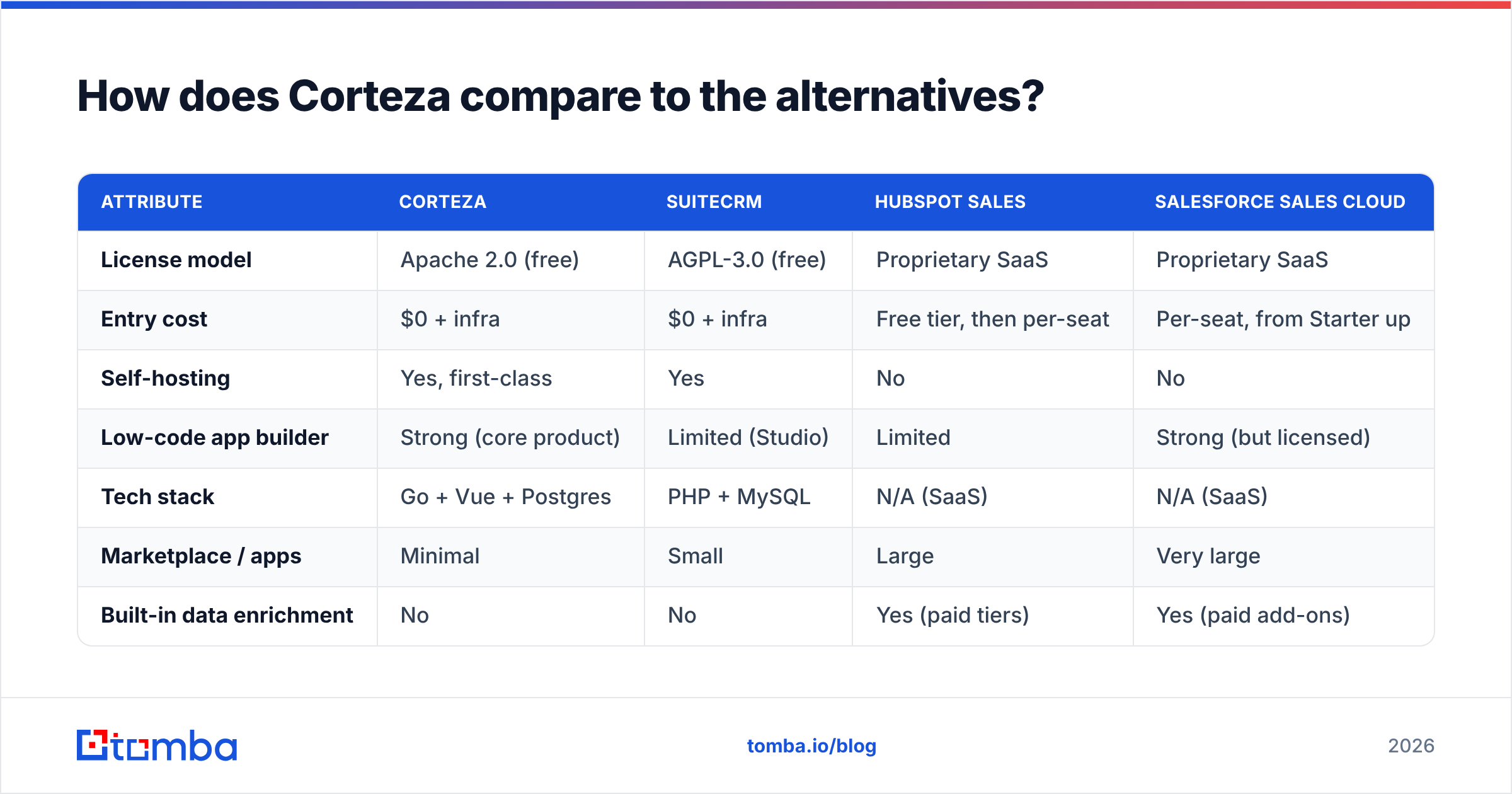
The useful comparison is not Corteza vs Salesforce — it is Corteza vs the other ways to get a CRM you control.
| Attribute | Corteza | SuiteCRM | HubSpot Sales | Salesforce Sales Cloud |
|---|---|---|---|---|
| License model | Apache 2.0 (free) | AGPL-3.0 (free) | Proprietary SaaS | Proprietary SaaS |
| Entry cost | $0 + infra | $0 + infra | Free tier, then per-seat | Per-seat, from Starter up |
| Self-hosting | Yes, first-class | Yes | No | No |
| Low-code app builder | Strong (core product) | Limited (Studio) | Limited | Strong (but licensed) |
| Tech stack | Go + Vue + Postgres | PHP + MySQL | N/A (SaaS) | N/A (SaaS) |
| Marketplace / apps | Minimal | Small | Large | Very large |
| Built-in data enrichment | No | No | Yes (paid tiers) | Yes (paid add-ons) |
| Support | Community + paid SLA | Community + paid | Included by tier | Included + partners |
| Realistic time-to-value | 4–10 weeks | 3–8 weeks | 1–3 days | 4–12 weeks |
Two things jump out.
First, Corteza's tech stack is a genuine advantage over SuiteCRM. A Go binary and Postgres is a far more pleasant operational story in 2026 than a legacy PHP monolith. If you are choosing between the two open-source options and your team has any modern infra habits, Corteza is the easier one to keep alive.
Second, Corteza has no data layer. Neither does SuiteCRM, to be fair. But HubSpot and Salesforce both bundle some level of company/contact enrichment, and when you drop that column, you have to fill it yourself — which is the single most common reason open-source CRM projects stall out. An empty CRM is a very expensive spreadsheet. You will need an email finder and a data enrichment source wired into it before anyone in sales will log in twice.
What do Corteza reviews actually say?#
Public review volume for Corteza is thin — it does not have thousands of G2 entries the way HubSpot does, and that in itself is a signal about market penetration. But across community forums, GitHub issues, and the reviews that do exist, the feedback is remarkably consistent.
What reviewers consistently praise:
- The low-code builder is legitimately good. Reviewers who came for a CRM often stay for Compose. Building an internal app — an asset register, a grant tracker, a partner portal — in an afternoon is the recurring "aha."
- Data sovereignty is uncompromised. For EU public bodies and regulated industries, "the records never leave our VPC" is not a nice-to-have, it is the entire purchasing rationale.
- Permissions are unusually granular. Role-based access down to the field level, which is rare at this price.
- The API is clean. A well-documented REST surface makes Corteza a decent system-of-record to sync into.
- No seat tax. Adding 200 read-only users costs exactly nothing, which changes how you think about deploying it internally.
What reviewers consistently criticize:
- Documentation lags the product. Multiple reviewers describe hunting through GitHub issues and forum threads to answer questions that should be in the docs.
- Upgrades can bite. Minor-version jumps have introduced breaking changes; teams report cautious, tested upgrade cycles rather than casual
docker pullupdates. - The out-of-the-box CRM is basic. It is a starting point, not a finished product. Expect to build.
- Small ecosystem. Few third-party integrations, few consultants, small talent pool. If your Corteza person leaves, replacing them is hard.
- Sales-user experience is functional, not delightful. Reps who have used a modern SaaS CRM notice the difference immediately, and adoption suffers for it.
The meta-review: Corteza is an engineering product bought by engineering-adjacent buyers. When a non-technical revenue leader buys it because the license is free, the project fails — not because the software is bad, but because nobody budgeted for the part that isn't free.
Is Corteza worth it for a sales team?#
It depends on which sentence describes you.
Choose Corteza if:
- Compliance drives the decision. GDPR, data residency, or a customer contract that forbids US-hosted SaaS. This is Corteza's strongest use case, full stop.
- You want to build, not configure. If your requirements are weird enough that no SaaS CRM fits, a low-code platform you own beats fighting someone else's object model.
- You have DevOps capacity. Not "a developer" — actual capacity to own an internal service for years.
- Seat count is large and budget is small. 300 internal users on a free license is a real, defensible saving.
Skip Corteza if:
- You need pipeline visibility this month. Time-to-value is measured in weeks, not hours.
- Your sales team is the buyer. They will compare it to Pipedrive and lose enthusiasm fast.
- Nobody owns infrastructure. A CRM that silently stops backing up is worse than no CRM.
- You expected enrichment included. It is not. Budget for a data source separately.
A useful gut check: if the phrase "we'll just self-host it" made someone in the room wince, listen to that person.
What does a realistic Corteza stack cost end to end?#
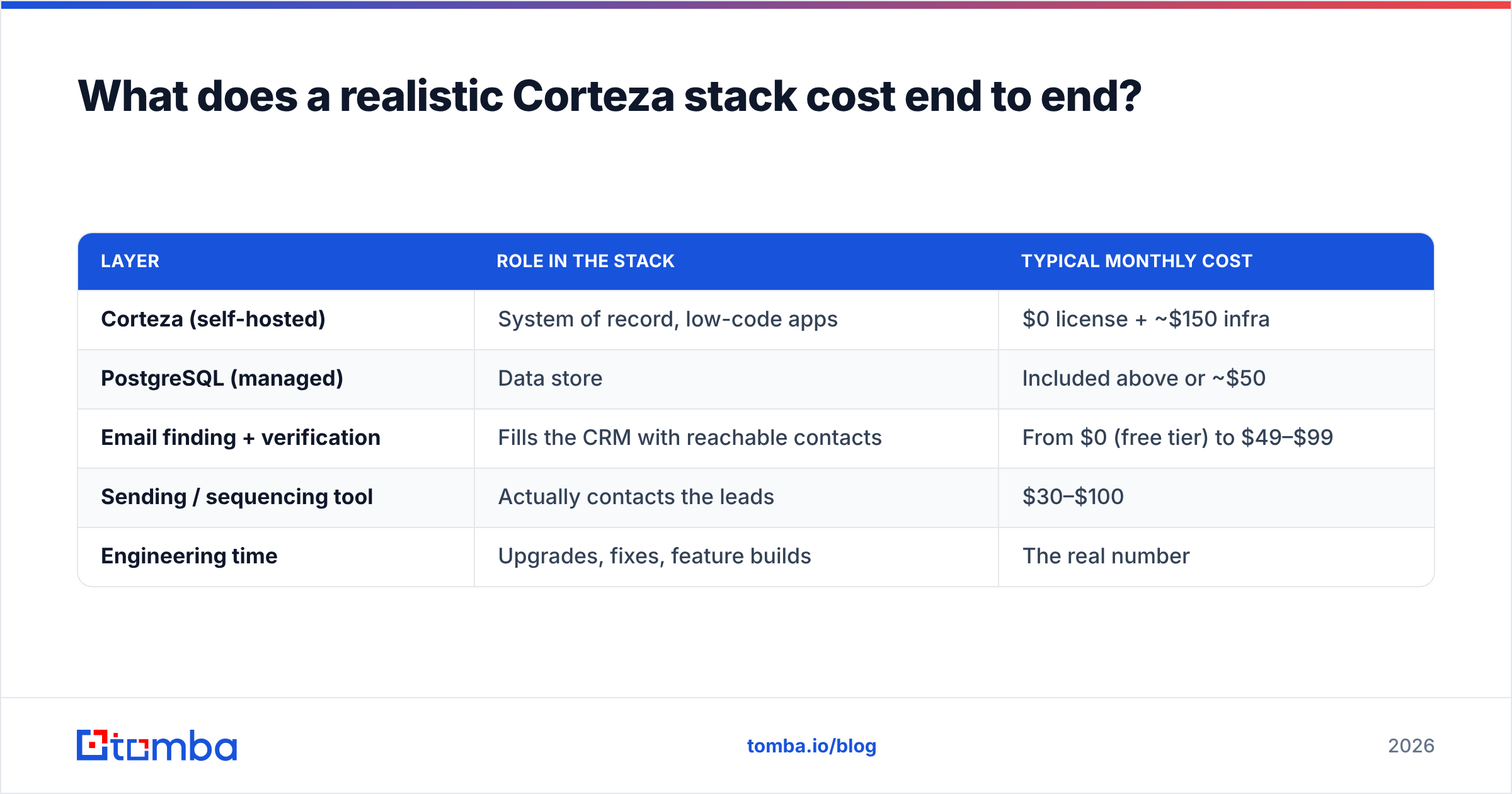
Because Corteza ships no contact data, the honest total includes the data layer. Here is how the pieces typically slot together for a small B2B team:
| Layer | Role in the stack | Typical monthly cost |
|---|---|---|
| Corteza (self-hosted) | System of record, low-code apps | $0 license + ~$150 infra |
| PostgreSQL (managed) | Data store | Included above or ~$50 |
| Email finding + verification | Fills the CRM with reachable contacts | From $0 (free tier) to $49–$99 |
| Sending / sequencing tool | Actually contacts the leads | $30–$100 |
| Engineering time | Upgrades, fixes, feature builds | The real number |
For the data layer specifically, most teams use an API rather than a UI, because a self-hosted CRM invites automation. Tomba pricing starts with a free tier at 25 searches/month, then Starter at $49/mo, Growth at $99/mo, and Pro at $249/mo — and the Tomba API means you can enrich a Corteza record the moment it is created, via a Workflow trigger, without a human touching it. That is exactly the kind of glue a low-code platform is good at, and it turns Corteza from an empty shell into something a rep will actually open.
What is the smartest way to evaluate Corteza before committing?#
Do not run a feature bake-off. Run an operations bake-off, because operations is where this decision is actually made.
- Spin it up on a real VM, not a laptop. Docker Compose on localhost tells you nothing about your upgrade path.
- Import 5,000 real records. Performance and data-model friction only appear at volume.
- Perform one version upgrade. Deliberately jump a minor version. Time it. That number is your recurring tax.
- Wire one external API into a Workflow. Prove that enrichment can be automated before you build the whole thing on the assumption that it can.
- Hand it to two reps for a week. Adoption, not architecture, kills CRM projects.
If steps 3 and 5 both go well, Corteza is probably a genuinely good decision for you. If either one goes badly, you have just saved yourself a very expensive year — and you should look at a hosted CRM plus a B2B database instead.
The bottom line on Corteza pricing, pros, and cons#
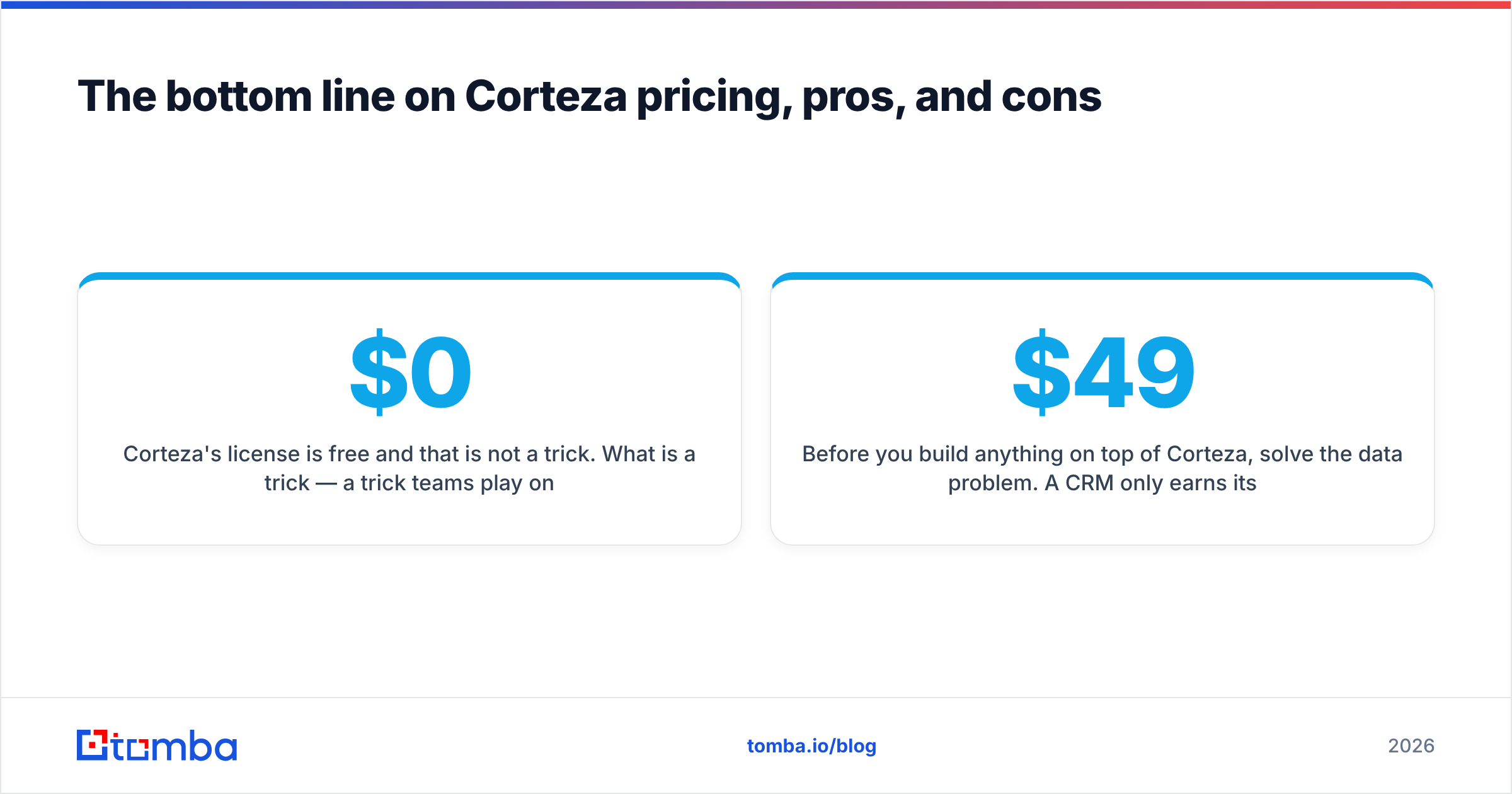
Corteza's license is free and that is not a trick. What is a trick — a trick teams play on themselves — is treating a $0 license as a $0 system. The software is competent, the low-code builder is genuinely strong, the tech stack is modern, and the data-sovereignty story is best-in-class. The costs are simply relocated: from a subscription line item to an engineering headcount, from a vendor SLA to your own on-call rotation, and from bundled enrichment to a data source you have to choose yourself.
If you have the engineering muscle and a compliance reason, Corteza is one of the best open-source platforms in this category. If you don't, the free CRM will be the most expensive software you never used.
Before you build anything on top of Corteza, solve the data problem. A CRM only earns its cost when it is full of contacts your reps can actually reach. Start with Tomba Email Finder — free for your first 25 searches, $49/mo when you outgrow it, and available as a REST API you can call directly from a Corteza Workflow so every new company record arrives already enriched with verified, reachable emails. Build the platform you want; just don't leave it empty.
Related guides#
Ready to find emails that actually work?
Join 150,000+ professionals who stopped guessing and started sending. Free credits on signup — no credit card required.
Get the Tomba newsletter
Practical outbound tactics and product updates — once every two weeks.
About the author