Corteza vs Salesforce (2026): Open-Source CRM Compared
Corteza is free, self-hosted, and Apache-licensed. Salesforce is $165/user/month and runs half the enterprise world. Here's the honest breakdown of cost, features, migration pain, and which one actually fits your team in 2026.
TL;DR — Corteza vs Salesforce in 30 seconds#
- Corteza is free software, not a free product. Apache 2.0 license, zero seat fees, unlimited users — but you pay in infrastructure, DevOps hours, and the absence of a 5,000-app marketplace.
- Salesforce is the default because it removes decisions. Sales Cloud Enterprise runs about $165/user/month (list), and you inherit a mature ecosystem, a huge consultant pool, and AI features you didn't have to build.
- The break-even is roughly 15–25 seats, but it flips based on how much internal engineering time you actually have. If nobody on your team wants to own a Docker Compose file, Corteza's price tag is a trap.
- Corteza is a low-code platform first, a CRM second. That's a feature if your process is weird and a liability if you just want a pipeline that works on Monday.
- Neither one finds your leads. Both are systems of record. The data that fills them — verified work emails, direct dials, enrichment — comes from somewhere else.
What is Corteza, actually?#
Corteza is an open-source, low-code platform maintained by the Corteza Project (originally built by Planet Crust). It ships under Apache 2.0, which means you can run it, fork it, resell it, and modify it without paying anyone a license fee.
Out of the box it gives you three things:
- Corteza CRM — a prebuilt application with accounts, contacts, leads, opportunities, quotes, and pipelines. It looks and behaves like a classic Salesforce Sales Cloud clone, because that was more or less the design brief.
- Corteza Low-Code — a visual builder for modules, fields, pages, and record layouts. This is the real product. You create custom objects and UIs without writing code, similar in spirit to Salesforce's Object Manager.
- Corteza Workflow — an automation engine with triggers, conditions, and actions. Think Flow Builder, minus the polish.
The backend is Go, the frontend is Vue, and deployment is Docker-based. You host it — on your own VPS, in your own Kubernetes cluster, in a customer's air-gapped data center, wherever. Planet Crust sells commercial support and hosting if you want a throat to choke.
That last point matters more than most comparison posts admit. Corteza is popular in exactly the places where "your data lives in a US public cloud" is a dealbreaker: EU public sector, healthcare, defense contractors, and companies with a legal team that reads sub-processor lists.

What does Salesforce give you that Corteza doesn't?#
Salesforce is not one product. It's a platform, an ecosystem, and a labor market. When you buy Salesforce Sales Cloud, you're buying:
- AppExchange. Thousands of vetted integrations. Whatever niche tool your team uses — a dialer, a CPQ, a signature tool, an enrichment vendor — it already connects.
- A hiring pool. You can post a job for a Salesforce admin and get 200 applicants this week. Post one for a Corteza admin and you'll get silence, then you'll train someone internally.
- AI that already works. Einstein / Agentforce lead scoring, call summaries, and forecast prediction ship as features. Corteza has no equivalent; you'd bolt one on via API.
- Reporting and forecasting depth. Salesforce reports, dashboards, and territory management are the reason RevOps teams tolerate the price.
- Compliance paperwork. SOC 2, ISO 27001, HIPAA BAAs — signed, dated, and ready for your enterprise buyer's security review.
None of this is magic. All of it is expensive.
How do Corteza and Salesforce compare head-to-head?#
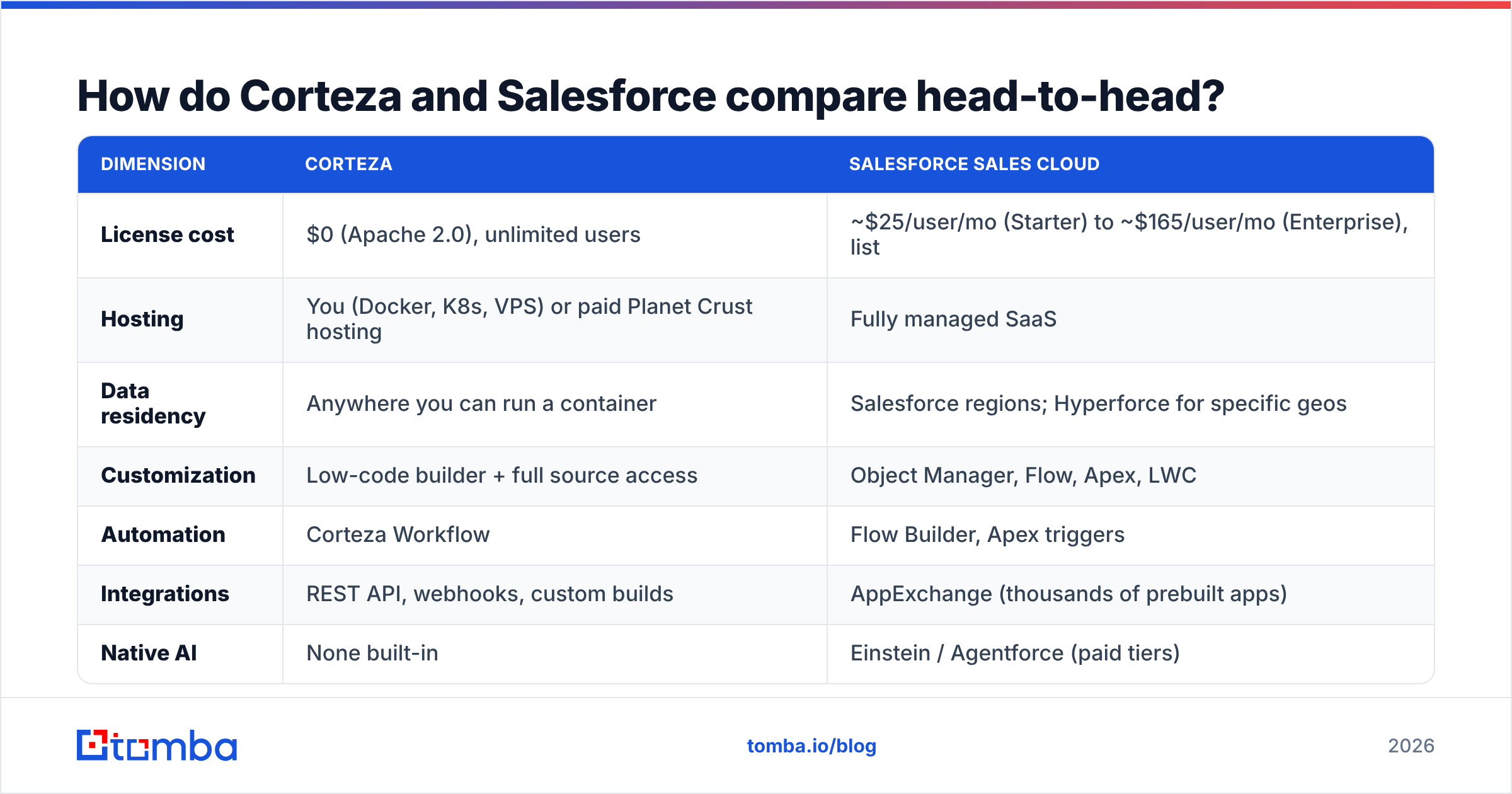
| Dimension | Corteza | Salesforce Sales Cloud |
|---|---|---|
| License cost | $0 (Apache 2.0), unlimited users | ~$25/user/mo (Starter) to ~$165/user/mo (Enterprise), list |
| Hosting | You (Docker, K8s, VPS) or paid Planet Crust hosting | Fully managed SaaS |
| Data residency | Anywhere you can run a container | Salesforce regions; Hyperforce for specific geos |
| Customization | Low-code builder + full source access | Object Manager, Flow, Apex, LWC |
| Automation | Corteza Workflow | Flow Builder, Apex triggers |
| Integrations | REST API, webhooks, custom builds | AppExchange (thousands of prebuilt apps) |
| Native AI | None built-in | Einstein / Agentforce (paid tiers) |
| Mobile app | Responsive web only | Full native iOS/Android |
| Talent availability | Scarce — you train internally | Enormous certified admin/dev market |
| Support | Community forum; paid commercial support | Tiered SLA support (Premier costs extra) |
| Real cost at 20 seats | Infra (~$100–400/mo) + engineering time | ~$3,300/mo list at Enterprise |
| Lock-in risk | Low — you own the database | High — data model, Apex, and workflows are proprietary |
What does each one actually cost at 20 seats?#
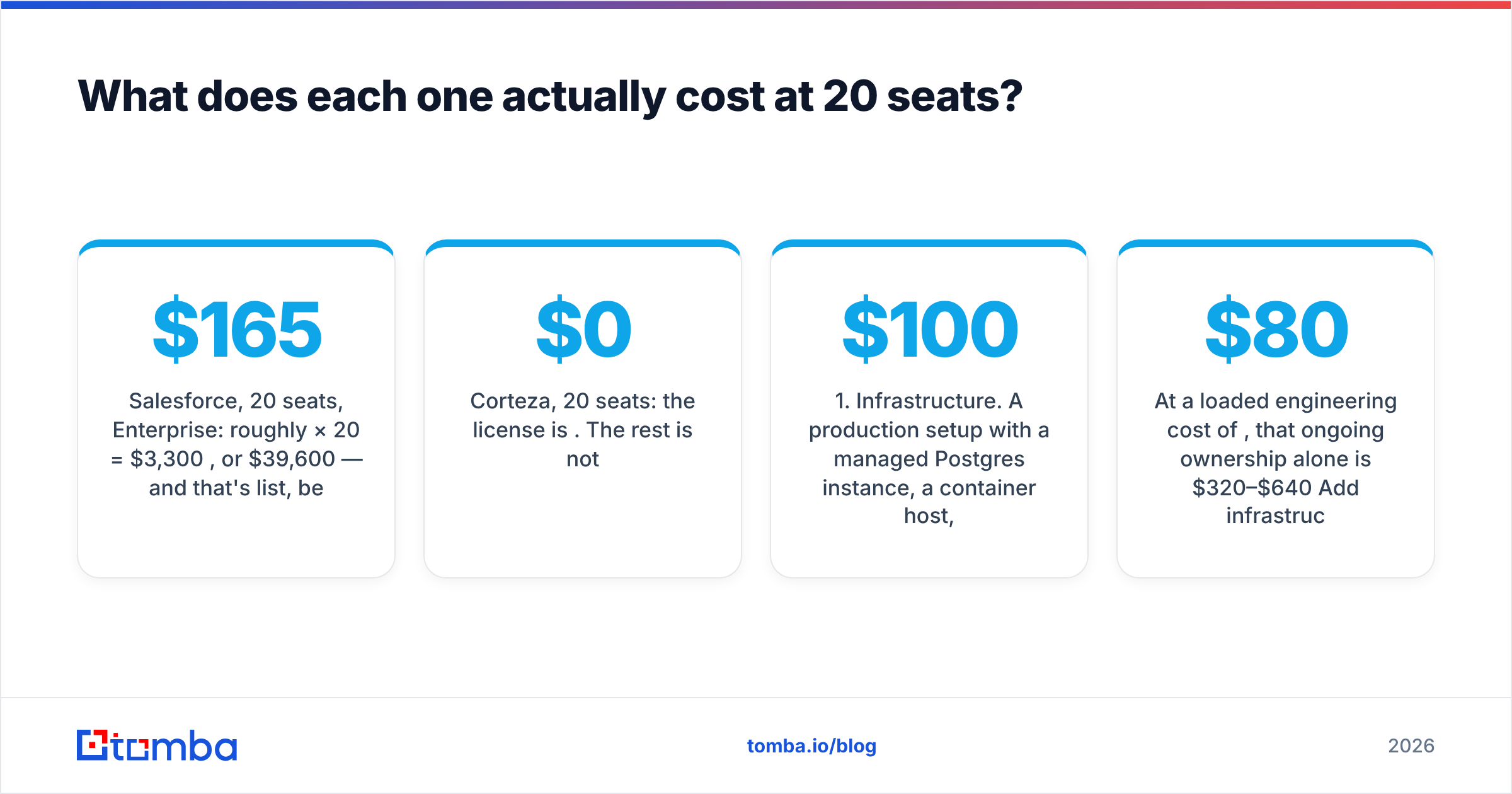
This is where most "free CRM" arguments fall apart, so let's do the arithmetic honestly.
Salesforce, 20 seats, Enterprise: roughly $165 × 20 = $3,300/month, or $39,600/year — and that's list, before the discount your procurement team will negotiate, and before Premier Support, sandboxes, data storage overages, or the implementation partner you'll almost certainly hire for the first 90 days. Budget $50k–$70k in year one.
Corteza, 20 seats: the license is $0. The rest is not.
- Infrastructure. A production setup with a managed Postgres instance, a container host, backups, and a staging environment lands somewhere between $100 and $400/month depending on your cloud.
- Setup time. A competent engineer gets a working Corteza instance up in a day. Getting it production-ready — SSO, backups, monitoring, TLS, upgrade path — is closer to two weeks.
- Ongoing ownership. Someone has to apply upgrades, fix the thing when it breaks at 11pm before a board meeting, and rebuild integrations after a breaking change. Call it 4–8 hours/month, conservatively.
- Integration build. Every connector Salesforce hands you from AppExchange, you build against the Corteza REST API.
At a loaded engineering cost of $80/hour, that ongoing ownership alone is $320–$640/month. Add infrastructure and you're at roughly $500–$1,000/month in true cost — still meaningfully cheaper than Salesforce at 20 seats, but nowhere near "free."
The crossover point is real though. At 100 seats, Salesforce Enterprise is ~$16,500/month while Corteza's marginal cost per additional user is approximately zero. That's when open source stops being an ideology and starts being a budget line.
Which one should you pick?#
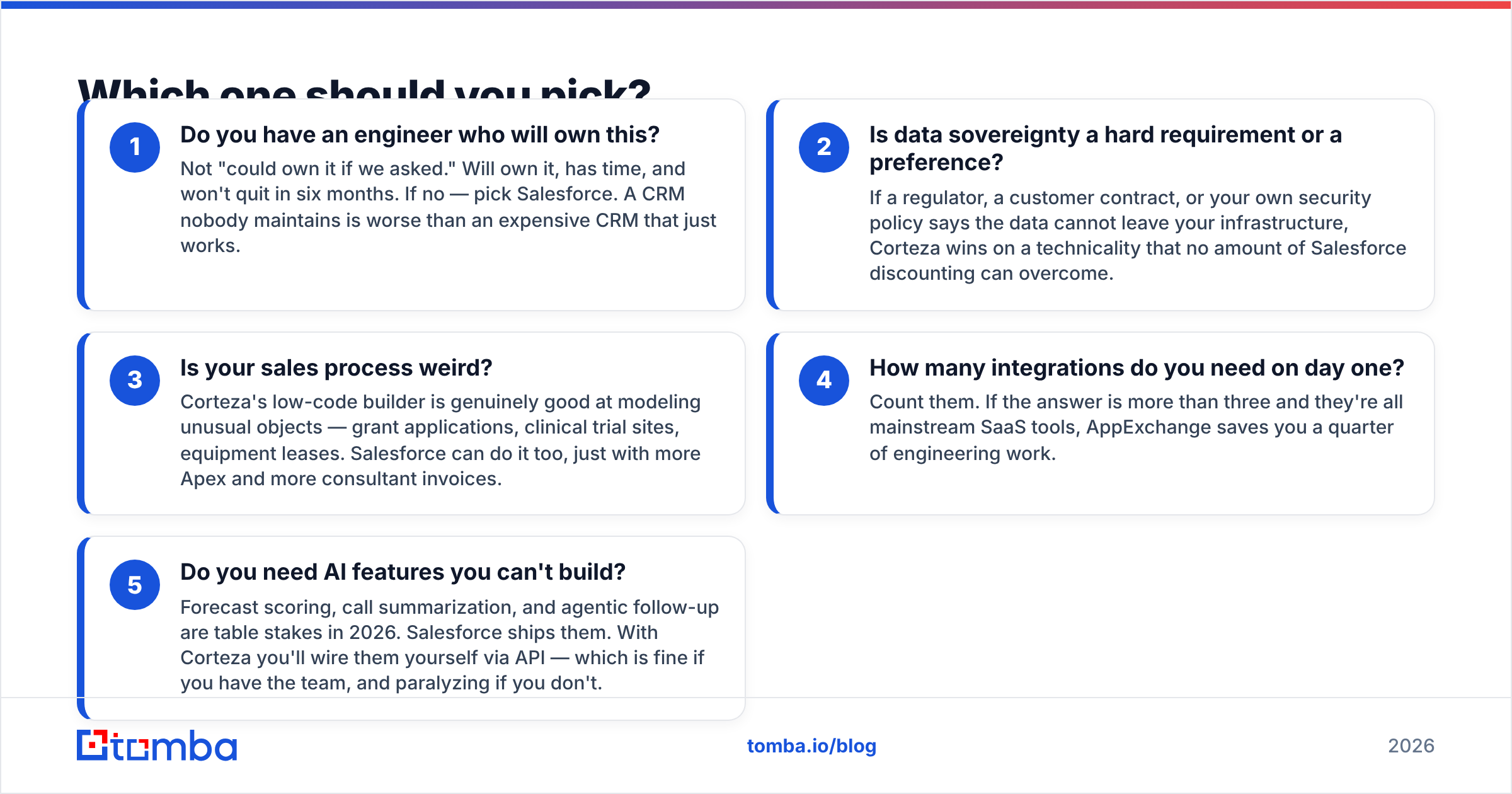
Skip the feature matrix for a second. The decision comes down to five honest questions:
- Do you have an engineer who will own this? Not "could own it if we asked." Will own it, has time, and won't quit in six months. If no — pick Salesforce. A CRM nobody maintains is worse than an expensive CRM that just works.
- Is data sovereignty a hard requirement or a preference? If a regulator, a customer contract, or your own security policy says the data cannot leave your infrastructure, Corteza wins on a technicality that no amount of Salesforce discounting can overcome.
- Is your sales process weird? Corteza's low-code builder is genuinely good at modeling unusual objects — grant applications, clinical trial sites, equipment leases. Salesforce can do it too, just with more Apex and more consultant invoices.
- How many integrations do you need on day one? Count them. If the answer is more than three and they're all mainstream SaaS tools, AppExchange saves you a quarter of engineering work.
- Do you need AI features you can't build? Forecast scoring, call summarization, and agentic follow-up are table stakes in 2026. Salesforce ships them. With Corteza you'll wire them yourself via API — which is fine if you have the team, and paralyzing if you don't.
Rough verdict: Under 15 seats with a technical founder → Corteza is a legitimately smart choice. 15–50 seats with a RevOps hire and no dedicated engineer → Salesforce, or one of the mid-market options like HubSpot or Pipedrive. Regulated, sovereignty-constrained, or 100+ seats with real engineering capacity → Corteza starts to look inevitable.
What breaks when you migrate from Salesforce to Corteza?#
If you're already on Salesforce and eyeing the exit, here's what actually hurts — in the order it will hurt.
- Apex and Flows do not port. Every custom trigger, validation rule, and Flow gets rebuilt in Corteza Workflow. Inventory them first. Most teams discover they have three times more automation than they remembered, and that half of it is dead.
- Reports and dashboards are a rewrite. Corteza's reporting is functional, not luxurious. If your VP of Sales lives inside a custom Salesforce dashboard, prepare her for a downgrade.
- AppExchange dependencies become build tickets. Your dialer, your e-signature tool, your enrichment vendor — each becomes a REST integration you own.
- Field-level history and audit trails. Salesforce tracks a lot by default. Verify Corteza's audit logging meets whatever your compliance team expects before you commit.
- User adoption. Reps are creatures of habit. A CRM that's 90% as good but different still gets sandbagged for a quarter.
Do a two-week parallel pilot with one real sales pod before you pull the trigger. Not a sandbox demo — a real pod, with real deals, hitting real quota.
Where does your CRM data actually come from?#
Here's the part both vendors quietly assume you've solved: neither Corteza nor Salesforce generates a single contact. They store what you put in them, and they will store garbage with perfect fidelity.
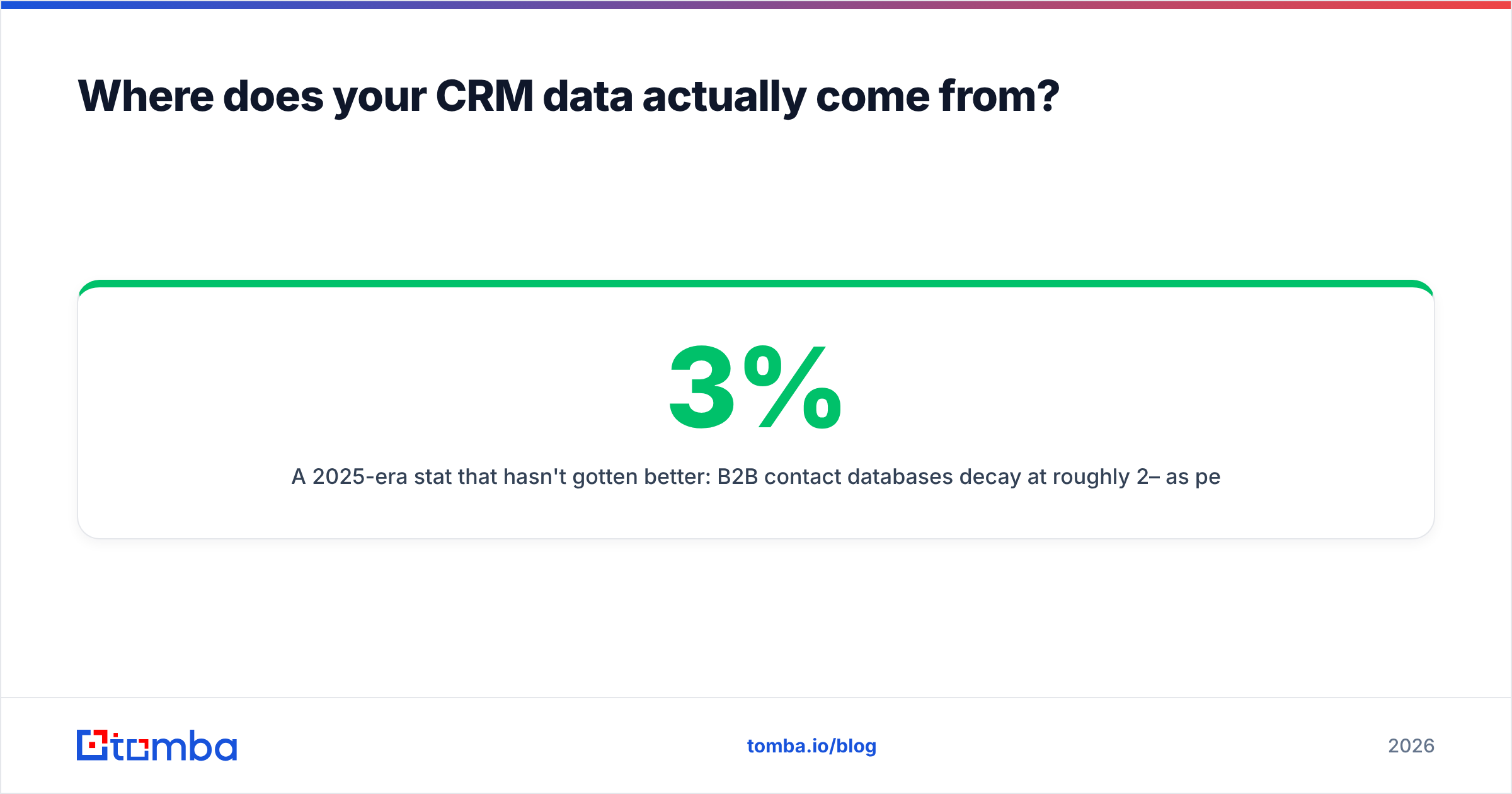
A 2025-era stat that hasn't gotten better: B2B contact databases decay at roughly 2–3% per month as people change jobs. That's a quarter to a third of your CRM going stale every year, whether you paid $0 or $165 a seat for the privilege of hosting it.
Which means the leverage isn't in the CRM. It's in the pipeline feeding it:
- Find the contact. An email finder resolves a name and a company domain into a real, deliverable work address. Do this at the point of list-building, not after your reps have already burned a week on manual LinkedIn scraping.
- Verify before you write. Run every address through an email verifier before it hits your CRM or your sequencer. Bounces don't just waste sends — they damage sender reputation, and once your domain is flagged, no CRM saves you.
- Enrich on the way in. Data enrichment fills job title, company size, and social profiles so your segmentation isn't guesswork.
- Push it into whichever system won. If you land on Salesforce, a native Salesforce integration writes verified contacts straight into the object. If you land on Corteza, you write the same data via its REST API — the data layer doesn't care which CRM is downstream.

That last point is the strategic one. Your enrichment layer should be portable. If your contact data only exists because a Salesforce-native app put it there, you've deepened the lock-in you were trying to escape. Keep the finding and verification stack independent of the CRM, and switching CRMs becomes an inconvenience rather than a rebuild.
What do real users say?#
Reviews on G2 tell a consistent story on both sides.
Salesforce's complaint pattern: cost creep, admin complexity, and "we're paying for features nobody uses." The praise pattern: it scales, it never falls over, and everything integrates.
Corteza's complaint pattern: thin documentation, a small community, and "we needed a developer for things that should have been settings." The praise pattern: total control, no per-seat anxiety, and the ability to model processes that no commercial CRM would accommodate.
Nobody has ever regretted Salesforce's reliability. Plenty of teams have regretted its invoice. Nobody has ever regretted Corteza's license terms. Plenty of teams have regretted underestimating what self-hosting costs in human attention.
Pick your regret deliberately.
The bottom line#
Corteza wins on cost, control, and sovereignty. Salesforce wins on ecosystem, talent, and time-to-value. Choose Corteza if you have engineering capacity and a hard reason to own your infrastructure. Choose Salesforce if your constraint is people, not money — which, for most sales teams under 50 reps, it is.
Whichever way you go, the CRM is a container. What determines whether your pipeline grows is the quality of what you pour into it.
Start there. Use the Tomba Email Finder to turn company domains and prospect names into verified, deliverable work emails before they ever touch your CRM — Corteza, Salesforce, or whatever replaces both in three years. The free tier gives you 25 searches a month to test accuracy against your own list; paid plans start at $49/month on Tomba pricing, with an API and bulk tools for when you're ready to feed the whole pipeline.
The CRM debate is worth having once. Clean, verified contact data is worth having every single day.
Related guides#
Ready to find emails that actually work?
Join 150,000+ professionals who stopped guessing and started sending. Free credits on signup — no credit card required.
Get the Tomba newsletter
Practical outbound tactics and product updates — once every two weeks.
About the author