Crawlbase Pricing, Reviews, Pros and Cons: A 2026 Breakdown
A neutral, buyer-side look at Crawlbase in 2026: how the credit model really bills you, what reviewers praise and complain about, and when a scraping API is the wrong tool for B2B contact data.
TL;DR
- Crawlbase is a scraping and crawling infrastructure company — a Crawling API, Smart Proxy, Crawler, Screenshots API, and Storage — not a B2B contact database. Buy it for fetching pages, not for finding people.
- Pricing is credit- and request-based. The sticker price is not the price you pay: JavaScript rendering, premium/residential proxies, and hard targets (LinkedIn, Amazon, Google) consume multiples of a base request.
- Reviewers consistently praise the success rate on protected sites and the developer docs. The recurring complaints are cost predictability, credit burn on retries, and a learning curve if you've never run a scraper.
- Crawlbase makes sense if you have engineers, a scraping use case, and volume. It's the wrong purchase if your actual goal is "get me verified work emails for 5,000 companies."
- If contact data is the endgame, a purpose-built email finder is dramatically cheaper and faster than building a pipeline on top of a proxy layer.
Crawlbase sits in an awkward spot on most B2B buying shortlists. It shows up in searches for lead data because scraping can produce lead data — but the product is infrastructure, and infrastructure gets priced like infrastructure. This post breaks down what Crawlbase actually charges for, what its users say after six months, and where the honest boundary is between "I need a scraper" and "I need contacts."
What is Crawlbase, and who actually uses it?#
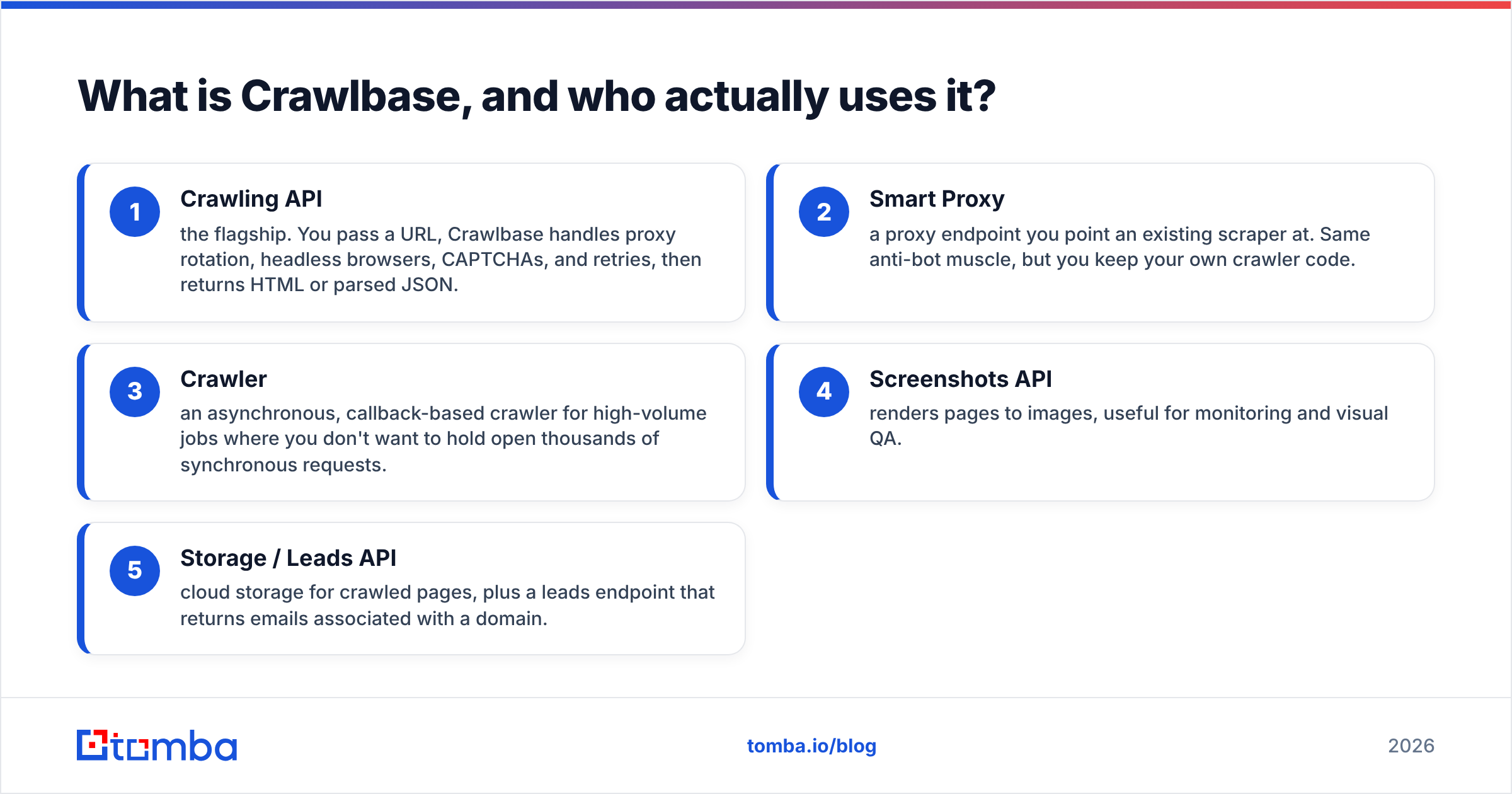
Crawlbase (formerly ProxyCrawl) sells the plumbing that sits between your code and a website that doesn't want your code visiting it. Its product line breaks into a few pieces:
- Crawling API — the flagship. You pass a URL, Crawlbase handles proxy rotation, headless browsers, CAPTCHAs, and retries, then returns HTML or parsed JSON.
- Smart Proxy — a proxy endpoint you point an existing scraper at. Same anti-bot muscle, but you keep your own crawler code.
- Crawler — an asynchronous, callback-based crawler for high-volume jobs where you don't want to hold open thousands of synchronous requests.
- Screenshots API — renders pages to images, useful for monitoring and visual QA.
- Storage / Leads API — cloud storage for crawled pages, plus a leads endpoint that returns emails associated with a domain.
The typical buyer is an engineering team at a price-monitoring, market-research, SEO, or e-commerce company. They already know they need to fetch thousands of pages from sites with real anti-bot defenses, and they've decided that maintaining their own proxy pool and browser farm is a bad use of headcount. That's a legitimate, well-understood problem, and Crawlbase solves it.
The buyer who gets burned is the sales or growth operator who lands on Crawlbase from a "how do I get leads" search. Scraping is a method; contact data is an outcome. Buying a Crawling API to get 5,000 work emails is like buying a lathe because you need a chair leg.
How does Crawlbase pricing work in 2026?#
Crawlbase prices on successful requests, not on attempts — which sounds generous until you learn what counts as one request. The model has three levers, and every buyer complaint traces back to one of them.
The three cost multipliers:
- JavaScript rendering. A plain HTML fetch is the cheapest unit. Spinning up a headless browser to execute JS costs several times more. Most modern sites need it.
- Proxy tier. Datacenter proxies are the base rate. Residential and mobile IPs — the ones that actually get through on hard targets — cost a premium.
- Target difficulty. Certain protected domains (major marketplaces, search engines, social networks) carry their own higher credit weight, regardless of how you fetch them.
Stack all three and a single "request" against a hard target can cost an order of magnitude more than the base rate on the pricing page. That is not a Crawlbase-specific trick — ScraperAPI, Zyte, and Bright Data all do the same thing — but it is the number-one reason people say their bill surprised them.
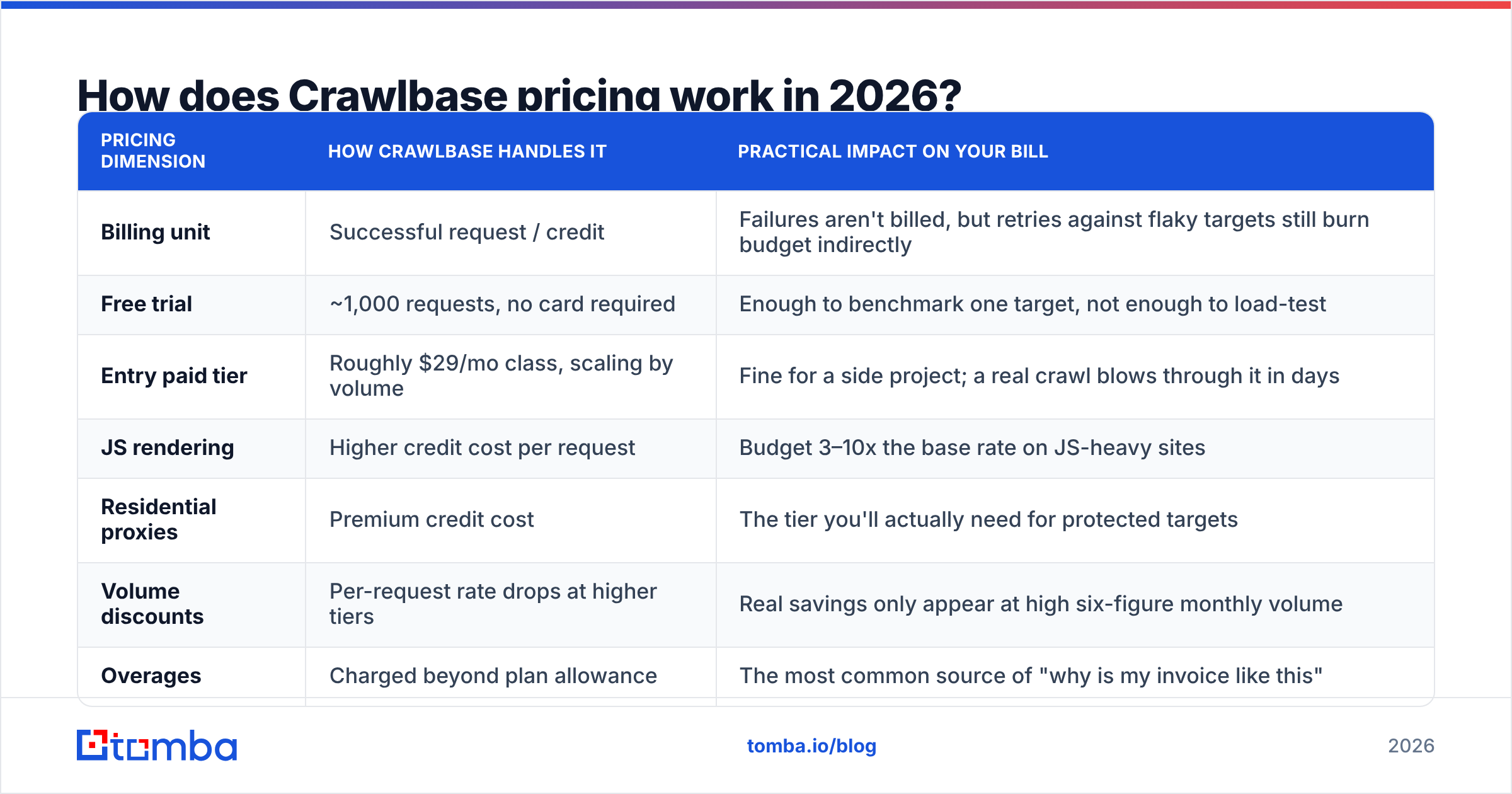
| Pricing dimension | How Crawlbase handles it | Practical impact on your bill |
|---|---|---|
| Billing unit | Successful request / credit | Failures aren't billed, but retries against flaky targets still burn budget indirectly |
| Free trial | ~1,000 requests, no card required | Enough to benchmark one target, not enough to load-test |
| Entry paid tier | Roughly $29/mo class, scaling by volume | Fine for a side project; a real crawl blows through it in days |
| JS rendering | Higher credit cost per request | Budget 3–10x the base rate on JS-heavy sites |
| Residential proxies | Premium credit cost | The tier you'll actually need for protected targets |
| Volume discounts | Per-request rate drops at higher tiers | Real savings only appear at high six-figure monthly volume |
| Overages | Charged beyond plan allowance | The most common source of "why is my invoice like this" |
Verify current numbers on the official Crawlbase pricing page before you budget — scraping vendors reprice tiers more often than SaaS vendors do, and any figure in a blog post (including this one) should be treated as directional, not contractual.
The one calculation that matters: don't compare monthly plan prices. Compare effective cost per successfully extracted record. Take your target site, run 500 requests through the trial with the settings you'll actually use in production (JS on, residential proxies on), count how many produced a usable record, and divide. That number is usually 5–20x higher than the headline rate — and it's the only number that lets you compare Crawlbase against anything else honestly.
What do Crawlbase reviews actually say?#
Pull the reviews on G2 and Capterra and the sentiment clusters cleanly. Strip the marketing-adjacent five-star noise and you're left with four consistent themes.
What reviewers genuinely like:
- Success rate on hard targets. This is the most repeated compliment. Crawlbase gets through where a homegrown scraper with rotating datacenter IPs stalls out at a 40% failure rate.
- Documentation and SDKs. Node, Python, Ruby, PHP, and Go libraries with working examples. Engineers get a first successful call in under an hour, which is a low bar that a surprising number of vendors miss.
- No infrastructure to babysit. No proxy pool to maintain, no Puppeteer cluster to keep from OOM-ing at 3 a.m.
- Responsive support on paid tiers, particularly for target-specific tuning.
What reviewers complain about:
- Cost predictability. By a wide margin the top complaint. People model their spend on the base rate, then discover the multipliers in production.
- Credit burn on iteration. Every failed parsing attempt during development still hits a real endpoint. Debugging a selector against a live target costs money.
- Learning curve for non-engineers. There is no meaningful no-code path. If your team can't write a loop, this isn't your tool.
- Parsed-output coverage. The auto-parsers cover major sites well; for long-tail targets you're writing and maintaining your own extraction logic, which is where the real ongoing cost lives.
Notice what's absent from both lists: nobody praises or criticizes Crawlbase's data quality, because Crawlbase doesn't sell data. It sells access. Data quality is your problem, downstream, forever.
What are the real pros and cons of Crawlbase?#
Here's the honest ledger.
| Crawlbase | |
|---|---|
| Pro — Anti-bot handling | Genuinely strong. Solves the hardest part of scraping. |
| Pro — Breadth of products | Crawling API, Smart Proxy, async Crawler, Screenshots, Storage under one account. |
| Pro — Pay for successes | Failed requests aren't billed, which is fairer than flat per-attempt models. |
| Pro — Developer experience | Clean SDKs, honest docs, fast first call. |
| Con — Opaque effective cost | Base rate ≠ your rate. Multipliers are where the money goes. |
| Con — Engineering required | Parsing, scheduling, dedup, storage, and compliance all remain yours. |
| Con — Wrong tool for contact data | Returns pages, not verified people. |
| Con — Maintenance tax | Sites change layouts; your parsers break; that's a permanent line item. |
The pros are real, and the cons are not disqualifying — they're just the nature of infrastructure. The mistake isn't buying Crawlbase. It's buying Crawlbase for a job that never needed a scraper.

Is Crawlbase worth it compared to the alternatives?#
Two different comparison sets exist, and conflating them is how buyers waste a quarter.
Set one: other scraping infrastructure. If you've confirmed you need to fetch protected pages at volume, you're comparing Crawlbase against ScraperAPI, Zyte, Apify, and Bright Data. Crawlbase generally lands as a mid-market pick: cheaper and simpler than Bright Data, stronger on hard targets than the budget end, less of an ecosystem than Apify.
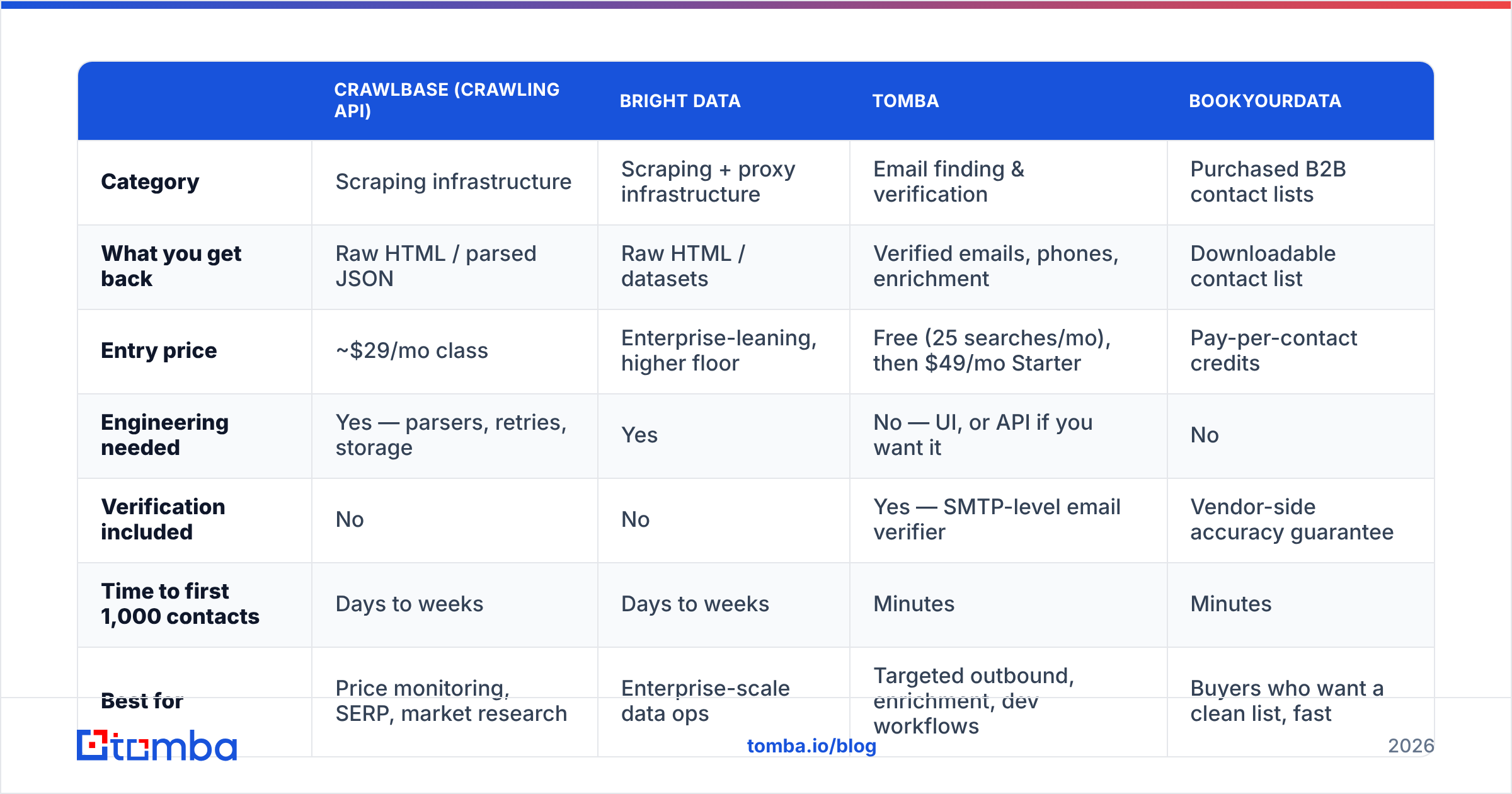
Set two: not scraping at all. If the outcome you want is "verified work emails and phone numbers for a defined list of companies or people," you're not in the scraping market. You're in the contact-data market, and the economics are completely different.
| Crawlbase (Crawling API) | Bright Data | Tomba | BookYourData | |
|---|---|---|---|---|
| Category | Scraping infrastructure | Scraping + proxy infrastructure | Email finding & verification | Purchased B2B contact lists |
| What you get back | Raw HTML / parsed JSON | Raw HTML / datasets | Verified emails, phones, enrichment | Downloadable contact list |
| Entry price | ~$29/mo class | Enterprise-leaning, higher floor | Free (25 searches/mo), then $49/mo Starter | Pay-per-contact credits |
| Engineering needed | Yes — parsers, retries, storage | Yes | No — UI, or API if you want it | No |
| Verification included | No | No | Yes — SMTP-level email verifier | Vendor-side accuracy guarantee |
| Time to first 1,000 contacts | Days to weeks | Days to weeks | Minutes | Minutes |
| Best for | Price monitoring, SERP, market research | Enterprise-scale data ops | Targeted outbound, enrichment, dev workflows | Buyers who want a clean list, fast |
| Worst for | Sales teams without engineers | Small budgets | Non-contact scraping jobs | Highly bespoke, narrow segments |
BookYourData and Tomba solve adjacent problems well — a bought list versus a targeted find-and-verify motion — and both beat a scraping pipeline on time-to-value for contact data. Crawlbase beats both, decisively, when your target isn't people at all.
Do you actually need a scraper to get B2B contact data?#
Usually not, and this is the question that saves teams the most money.
Run the math on the DIY path. You buy Crawlbase, then you build: a company-list source, a parser per site layout, a name-to-email pattern engine, an SMTP verification layer to kill bounces, dedup logic, a retry queue, and a compliance review. That's four to eight engineering weeks before the first campaign sends, plus permanent maintenance every time a target site ships a redesign. The Crawlbase invoice is the smallest number in that budget.
Now run the purpose-built path. A domain search returns known email addresses at a company, already pattern-matched and verified. A bulk email finder takes a CSV of names and companies and returns deliverable addresses. Enrichment fills in titles, seniority, and phone numbers. There's no parser to maintain because there's no page to parse.
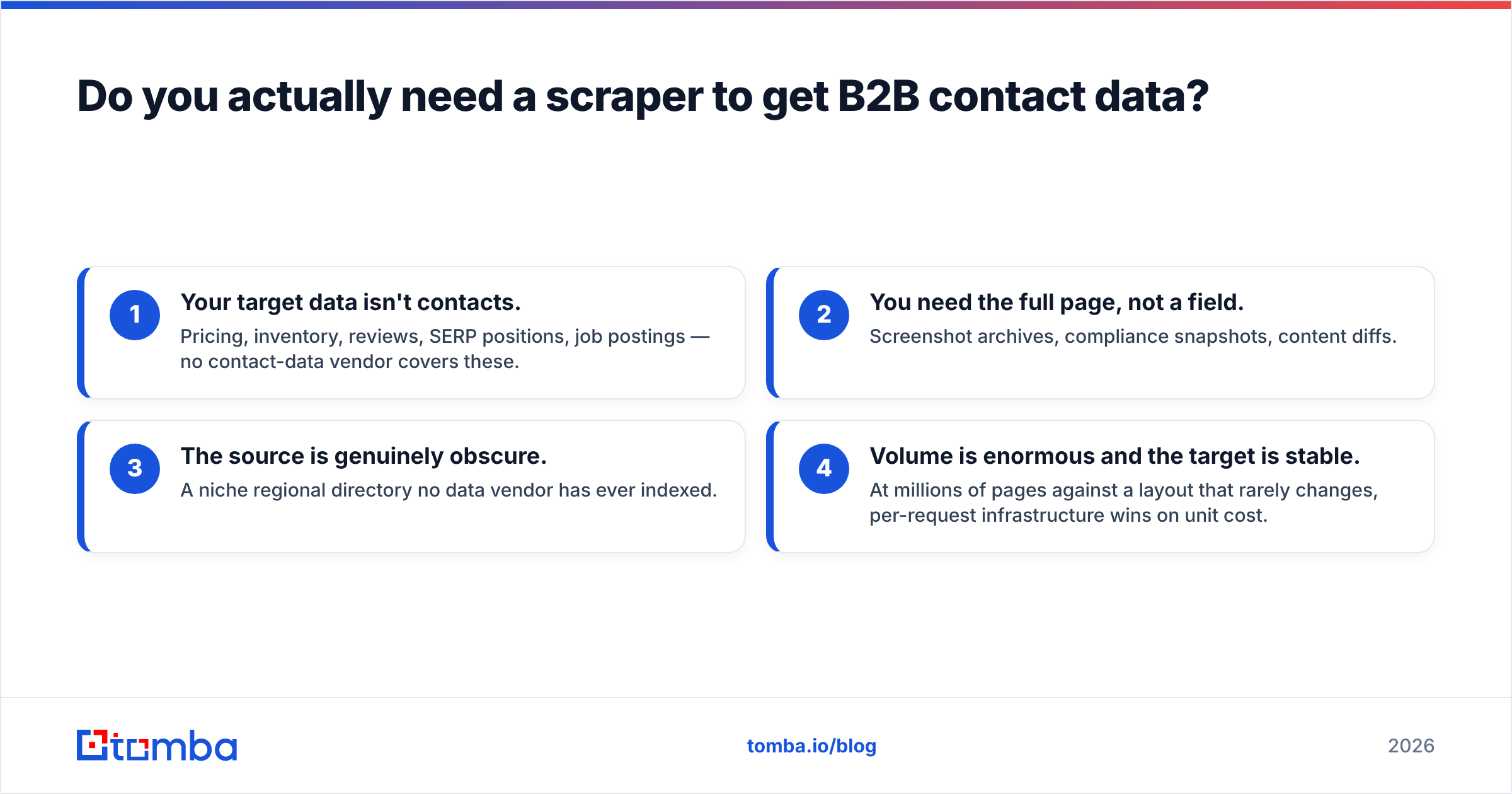
When scraping genuinely is the right call:
- Your target data isn't contacts. Pricing, inventory, reviews, SERP positions, job postings — no contact-data vendor covers these.
- You need the full page, not a field. Screenshot archives, compliance snapshots, content diffs.
- The source is genuinely obscure. A niche regional directory no data vendor has ever indexed.
- Volume is enormous and the target is stable. At millions of pages against a layout that rarely changes, per-request infrastructure wins on unit cost.
If none of those describe you, the scraper is an expensive detour. And if two of them do, the right architecture is often both: Crawlbase for the pages, an email API for the people, joined in your warehouse.
Who should buy Crawlbase, and who should skip it?#
Buy Crawlbase if: you have at least one engineer who owns the pipeline, you've validated the target sites in the free trial with production settings, and your effective cost per record clears your unit economics. Start on the smallest tier, instrument credit consumption per target from day one, and set a hard budget alert. The teams that are happy with Crawlbase a year in are the ones that treated credit spend as a first-class metric from week one.
Skip Crawlbase if: your goal is outbound contact data, your team is sales rather than engineering, or you can't answer the question "how many credits does one usable record cost me?" after a trial. In every one of those cases you'll spend more on engineering time than you'd have spent on a data tool, and you'll ship a worse list — because a scraped email that never passed email verification is a bounce waiting to damage your sending domain.
The blunt version: Crawlbase is a good product priced fairly for what it is. It's just not what most people searching for "how do I get leads" actually need.
What's the cheaper, faster path to verified contacts?#
If your endgame is a clean list of people you can actually email, skip the pipeline and go straight to the data. Tomba's Email Finder takes a name and a domain — or just a domain — and returns verified professional email addresses, with SMTP-level verification built in so you're not shipping bounces into a cold sequence. It runs in the browser, in Google Sheets, or through the API if you want it inside your own stack.
The free tier gives you 25 searches a month to test it against your real target accounts, and paid plans start at $49/mo. Compare that against four weeks of engineering plus a credit bill you can't forecast, and the decision usually makes itself. Check Tomba pricing and run your own list through both paths — the effective cost per verified contact is the only benchmark that matters.
Related guides#
Ready to find emails that actually work?
Join 150,000+ professionals who stopped guessing and started sending. Free credits on signup — no credit card required.
Get the Tomba newsletter
Practical outbound tactics and product updates — once every two weeks.
About the author