CRM API Integration in 2026: A Practical Build Guide
CRM API integration sounds simple until webhooks silently fail and duplicate contacts pile up. Here is how to design, build, and enrich CRM syncs that actually hold up in production.
CRM API Integration in 2026: A Practical Build Guide
Connecting your CRM to the rest of your stack through its API is the difference between a system of record and a system that actually runs your revenue. Done well, a CRM API integration keeps contacts, deals, and activity in sync across every tool without a human touching a spreadsheet. Done badly, it quietly duplicates records, drops webhooks, and burns your team's trust in the data.
This guide is the version we wish existed when we first wired a CRM to a lead pipeline: concrete auth choices, sync patterns that survive rate limits, and the data-quality steps most tutorials skip.
TL;DR#
- A CRM API integration is a programmatic link between your CRM (HubSpot, Salesforce, Pipedrive) and other systems, so records move automatically instead of by CSV.
- Pick your sync direction first — one-way, two-way, or event-driven — because it dictates everything downstream.
- OAuth 2.0 is the default auth for modern CRMs; API keys still exist but are being phased toward tokens.
- Rate limits and webhook reliability break more integrations than bad code. Design for retries, idempotency, and backoff from day one.
- Garbage in, garbage synced. Verify and enrich contact data before it hits the CRM, or you scale bad records faster.
What is a CRM API integration?#
A CRM API integration is a connection that lets external software read from and write to your CRM programmatically, using the CRM's Application Programming Interface. Instead of exporting a CSV from your marketing tool and importing it into Salesforce by hand, an integration pushes each new contact over HTTP the moment it's created.
Think of the API as the CRM's front desk. Your app doesn't wander into the building and rearrange files itself — it hands a structured request to the desk ("create this contact," "update this deal stage"), the desk validates it, and passes back a receipt. Every serious CRM exposes this desk as a REST or GraphQL API.
Common jobs a CRM API integration handles:
- Lead capture — push form fills, chat conversations, and website signups straight into the CRM as contacts or leads.
- Bi-directional contact sync — keep the CRM and a marketing platform agreeing on the same email, title, and company.
- Deal and pipeline automation — move deals between stages based on product usage or billing events.
- Activity logging — write calls, emails, and meetings back to the timeline so reps see full context.
- Enrichment — fill missing fields (email, phone, company size) from a data provider before the record is saved.
- Reporting exports — pull data out on a schedule into a warehouse for RevOps dashboards.

Which CRM APIs matter most in 2026?#
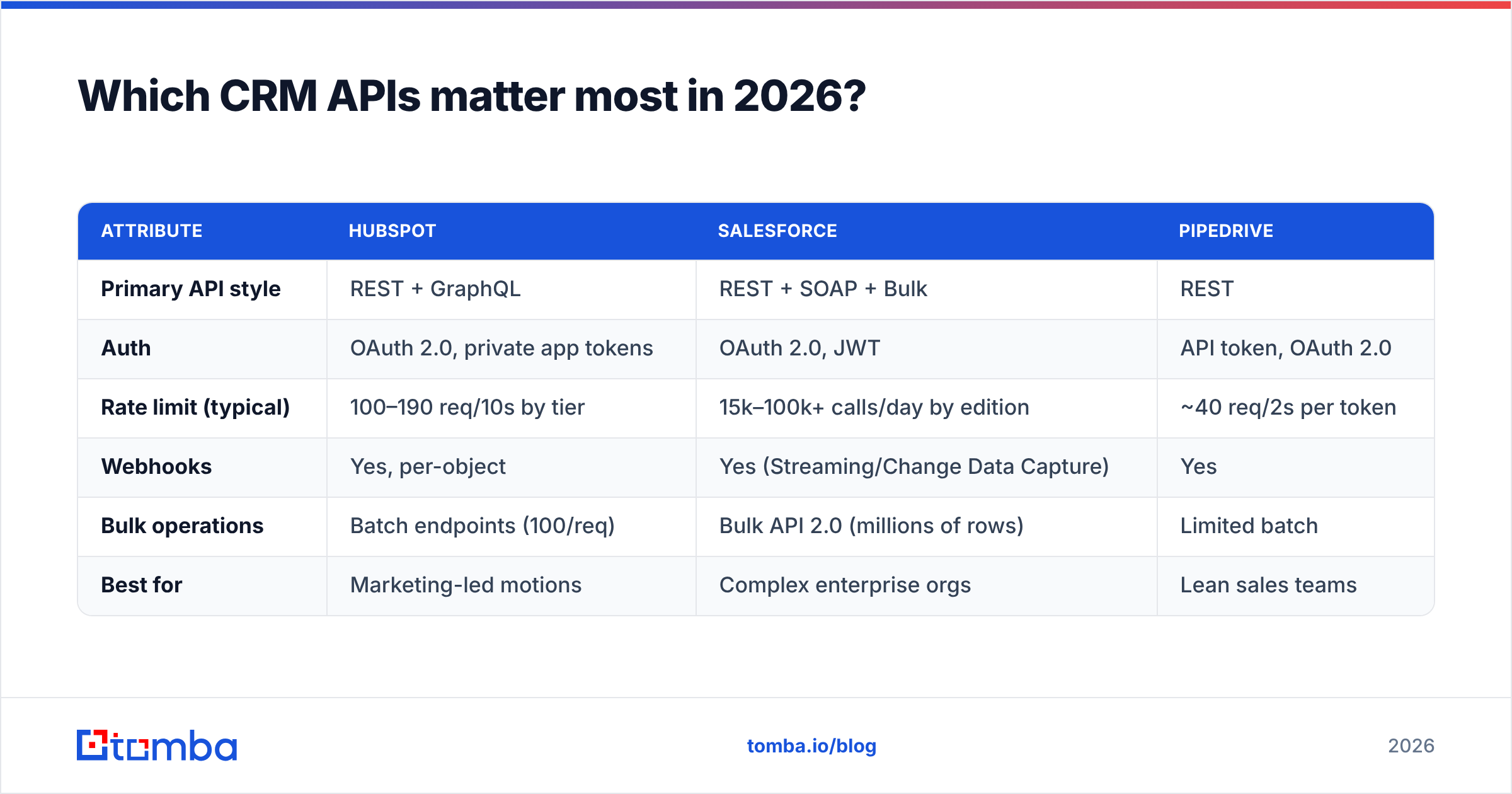
Most B2B teams are integrating with one of three CRMs, and their APIs differ enough to change your build. Here's a grounded comparison to set expectations before you write a line of code.
| Attribute | HubSpot | Salesforce | Pipedrive |
|---|---|---|---|
| Primary API style | REST + GraphQL | REST + SOAP + Bulk | REST |
| Auth | OAuth 2.0, private app tokens | OAuth 2.0, JWT | API token, OAuth 2.0 |
| Rate limit (typical) | 100–190 req/10s by tier | 15k–100k+ calls/day by edition | ~40 req/2s per token |
| Webhooks | Yes, per-object | Yes (Streaming/Change Data Capture) | Yes |
| Bulk operations | Batch endpoints (100/req) | Bulk API 2.0 (millions of rows) | Limited batch |
| Best for | Marketing-led motions | Complex enterprise orgs | Lean sales teams |
Read the official docs before committing: HubSpot's developer docs, the Salesforce REST API guide, and Pipedrive's API reference. Rate limits and endpoints change often enough that memorized numbers go stale — the docs are the source of truth.
How do you choose a sync direction?#
Decide your sync direction before anything else, because it dictates your conflict-resolution logic, your webhook needs, and your failure modes. There are three patterns.
One-way sync (source of truth → CRM). Your app is authoritative; the CRM is a downstream mirror. New signups flow into the CRM, but edits in the CRM never flow back. This is the simplest to build and reason about — no conflict resolution needed. Use it when the CRM is a reporting destination, not a place reps edit records.
Two-way sync (bi-directional). Both systems can create and edit, and changes propagate both ways. Powerful, and the source of most integration pain. You need a conflict-resolution rule (last-write-wins, or field-level ownership) and a stable external ID mapping so you never create the same contact twice. Only build this when reps genuinely edit in both places.
Event-driven (webhook-first). Instead of polling, the CRM pushes an event ("deal.updated") to your endpoint the instant something changes. This is the most efficient and the most modern, but it demands a reliable listener, signature verification, and a fallback poll for missed events.
A common mistake is defaulting to two-way sync because it sounds complete. Most teams need one-way plus a few targeted webhooks. Start narrow; widen only when a real workflow demands it.
What does the build actually look like?#
Here's the practical sequence for a production-grade CRM API integration, in the order you should tackle it.
1. Authenticate with OAuth 2.0. Register an app in the CRM's developer portal, request the minimum scopes you need (don't ask for full write access if you only create contacts), and store the refresh token securely — in a secrets manager or an encrypted environment variable, never in source control. Access tokens expire; your integration must refresh them automatically.
2. Map your data model. List every field you'll sync and match it to the CRM's property names. CRMs have internal API names that differ from the UI label (jobtitle vs. "Job Title"). Build an explicit mapping table so a field rename doesn't silently break the sync.
3. Establish a stable external ID. Store the CRM's record ID against your own record, and vice versa. This mapping is what prevents duplicate creation. When your app sees an existing mapping, it updates; when it doesn't, it creates.
4. Handle rate limits with backoff. Every CRM will throttle you. Read the Retry-After header, implement exponential backoff with jitter, and queue writes so a burst of 5,000 new leads doesn't trip a daily cap. Batch endpoints (100 records per call on HubSpot, Bulk API 2.0 on Salesforce) exist precisely for this.
5. Make writes idempotent. Network retries are inevitable. If your "create contact" call runs twice because the first response timed out, idempotency keys or an upsert-by-email pattern keep you from doubling the record.
6. Verify and enrich before writing. This is the step that separates a clean CRM from a landfill — covered next.
Why does data quality break CRM integrations?#
Because an integration is an amplifier: it scales whatever quality your inbound data has. Sync 10,000 records a month with a 20% bad-email rate and you've just injected 2,000 dead contacts into the system your reps trust. The integration didn't fail — it worked perfectly, and faithfully replicated the mess.
Three data problems dominate:
- Invalid or fake emails from form fills (typos,
test@test.com, role addresses) that bounce and hurt sender reputation. - Missing fields — a contact with no company, title, or phone can't be routed or scored.
- Duplicates created when the external-ID mapping is incomplete or a two-way sync races itself.
The fix is a validation-and-enrichment layer that sits between your capture point and the CRM write. Before a record hits Salesforce, you: verify the email is deliverable, enrich the missing firmographic fields, and dedupe against existing records. This is where a data API earns its keep.
Tomba fits this layer cleanly. You can call the email verifier to confirm an address is valid and not a catch-all trap, use the email finder to recover a missing work email from a name and company, and run data enrichment to backfill title, company, and social profiles. Because Tomba exposes all of this through the Tomba API, it slots into the same pipeline as your CRM writes — verify, enrich, then upsert.
How do you compare integration approaches?#
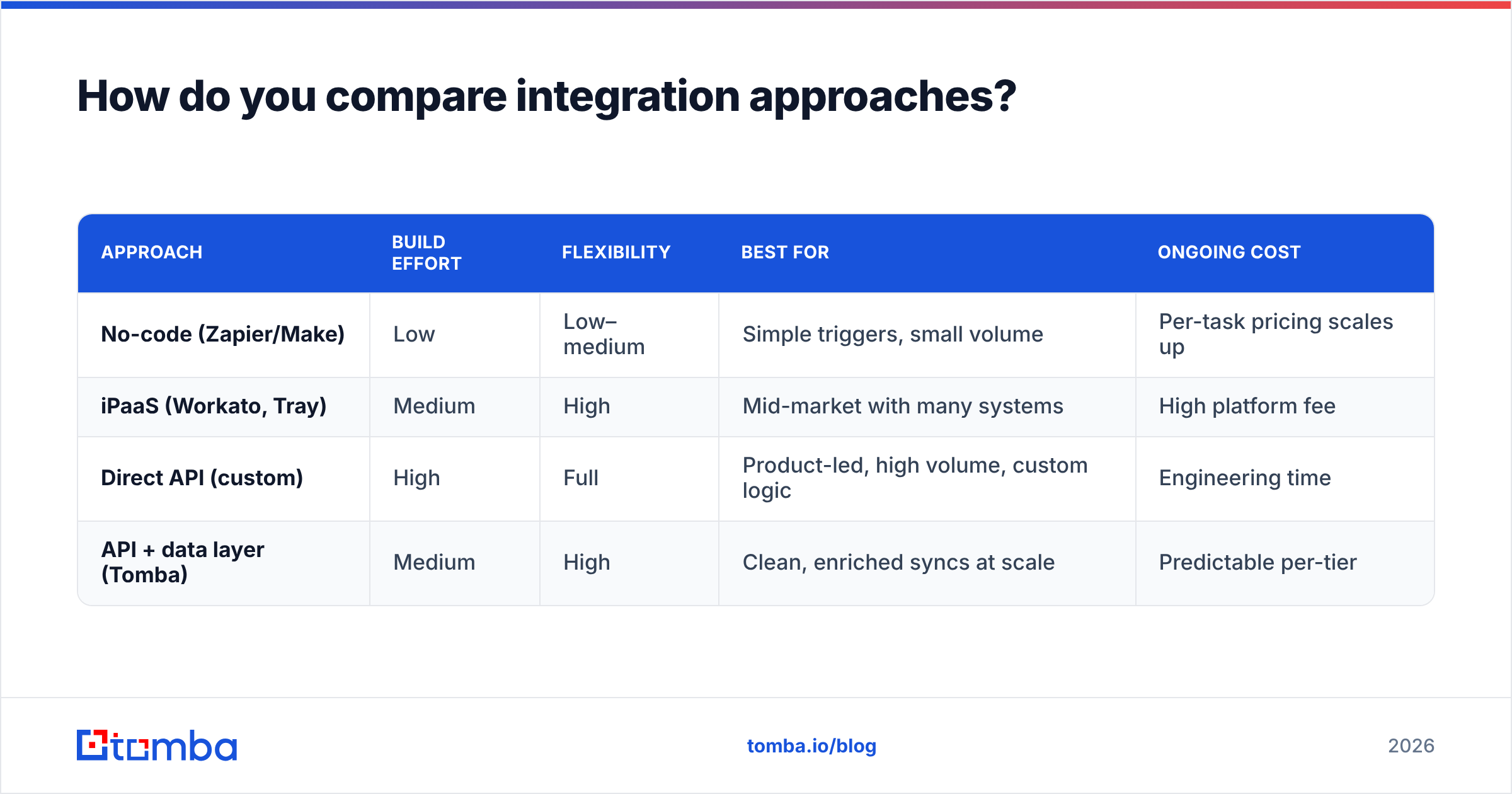
Not every team should hand-code against the raw API. Here's how the three main approaches stack up.
| Approach | Build effort | Flexibility | Best for | Ongoing cost |
|---|---|---|---|---|
| No-code (Zapier/Make) | Low | Low–medium | Simple triggers, small volume | Per-task pricing scales up |
| iPaaS (Workato, Tray) | Medium | High | Mid-market with many systems | High platform fee |
| Direct API (custom) | High | Full | Product-led, high volume, custom logic | Engineering time |
| API + data layer (Tomba) | Medium | High | Clean, enriched syncs at scale | Predictable per-tier |
If you're wiring one form to one CRM, a Zapier integration or the native HubSpot integration will get you live in an hour and you should not overthink it. If you're syncing product events, running enrichment, and handling tens of thousands of records, direct API access gives you the control and unit economics that no-code tools lose at volume.
The honest rule: start with no-code to validate the workflow, then graduate to direct API when either the per-task bill or the logic complexity outgrows it. Rebuilding a proven Zap as an API integration is far cheaper than designing a custom pipeline for a workflow you haven't validated.
What about webhooks and reliability?#
Webhooks are where integrations quietly rot, because a missed event produces no error — it just produces stale data nobody notices until a rep complains.
Build webhook listeners defensively:
- Verify signatures on every incoming payload so a spoofed request can't write to your CRM.
- Respond fast, process async. Acknowledge the webhook with a 200 immediately, then push the payload onto a queue for processing. CRMs retry — and eventually disable — endpoints that respond slowly.
- Run a reconciliation poll. Once a day, pull records changed in the last 25 hours and diff them against what your webhooks delivered. This catches the events that slipped through. Trust webhooks for speed, trust polling for completeness.
- Log every event with an idempotency key so a duplicate delivery is a no-op, not a double write.
Salesforce's Change Data Capture, HubSpot's per-object webhooks, and Pipedrive's webhook system all follow this shape. The platform differs; the discipline doesn't.
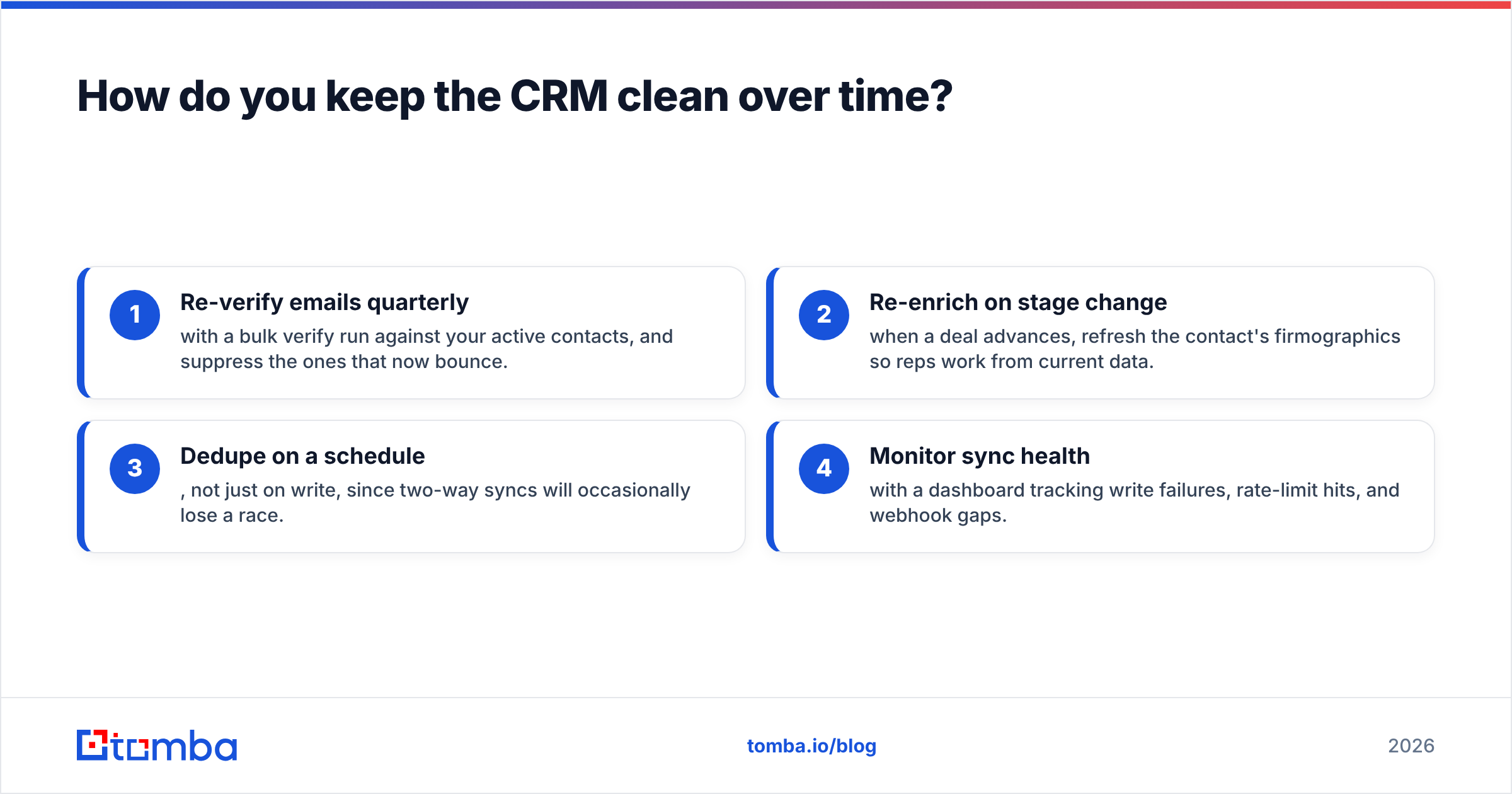
How do you keep the CRM clean over time?#
An integration that starts clean drifts dirty without maintenance. Contacts change jobs, emails go dead, and companies get acquired. A one-time verify at capture doesn't keep pace.
Schedule ongoing hygiene:
- Re-verify emails quarterly with a bulk verify run against your active contacts, and suppress the ones that now bounce.
- Re-enrich on stage change — when a deal advances, refresh the contact's firmographics so reps work from current data.
- Dedupe on a schedule, not just on write, since two-way syncs will occasionally lose a race.
- Monitor sync health with a dashboard tracking write failures, rate-limit hits, and webhook gaps.
This ongoing loop is what separates an integration that's a genuine asset from one that becomes technical debt. Review your Tomba pricing tier against your monthly verification and enrichment volume so the hygiene layer scales with your pipeline rather than surprising you.
Frequently asked questions#
Do I need a developer to build a CRM API integration? For no-code tools, no — a RevOps person can wire Zapier or a native integration. For direct API work with custom logic, enrichment, and webhooks, yes: budget engineering time and treat it like a real service with monitoring and retries.
How do I avoid duplicate contacts? Store a stable external-ID mapping between your system and the CRM, and use upsert-by-email as a fallback. Never rely on name matching — it creates duplicates the moment someone's title or spelling changes.
What's the biggest hidden cost? Bad data. The integration itself is a one-time build; feeding it unverified emails and empty fields is a recurring tax on deliverability, routing, and rep trust. Verify and enrich before the write.
Is OAuth required, or can I use an API key? Most modern CRMs support both, but the industry is moving to OAuth 2.0 for its scoped, revocable tokens. Prefer OAuth for anything user-facing or long-lived; reserve static tokens for internal, tightly controlled scripts.
Build it on clean data#
A CRM API integration is only as valuable as the records flowing through it. The auth, the sync direction, the webhook discipline — all of it matters, but none of it saves you from garbage contacts multiplied at machine speed. Put a verify-and-enrich step in front of every CRM write and the whole system compounds in your favor instead of against it.
Start with the Tomba Email Finder and its API to recover missing work emails, confirm they're deliverable, and enrich the fields your CRM needs — before the record ever lands. Wire that layer once, and every downstream integration inherits clean data by default. Spin up a free account, drop the API into your sync pipeline, and let your CRM fill up with contacts your reps can actually trust.
Related guides#
Ready to find emails that actually work?
Join 150,000+ professionals who stopped guessing and started sending. Free credits on signup — no credit card required.
Get the Tomba newsletter
Practical outbound tactics and product updates — once every two weeks.
About the author