CRM Automation Tools in 2026: A Practical Buyer's Guide
CRM automation tools promise to erase busywork and speed up your pipeline, but the gap between the demo and daily reality is wide. Here is what actually works in 2026, what to skip, and how to choose.
CRM automation tools are supposed to give your reps their week back. In practice, half of them just add another dashboard nobody opens. This guide cuts through the pitch decks and shows you what CRM automation actually does, where it breaks, and how to pick a stack that earns its seat cost.
TL;DR#
- CRM automation tools automate data entry, lead routing, follow-ups, and pipeline hygiene so reps sell instead of typing — but they only work if the underlying data is clean.
- The four automation categories that matter: data capture/enrichment, workflow triggers, sequence automation, and reporting. Most "AI CRM" hype is a repackaging of these.
- Native automation (HubSpot, Salesforce, Pipedrive) is easiest; dedicated tools win on depth. Budget $15–$150 per seat/month plus data costs.
- Garbage in, garbage out: automation amplifies bad contact data. Fix enrichment and verification first, or you automate spam.
- Start with two workflows that hurt the most (lead routing + follow-up reminders), measure, then expand. Do not buy a 40-feature platform for two problems.
What are CRM automation tools?#
CRM automation tools are software that removes the manual, repetitive work inside your customer relationship management system — logging activity, updating fields, routing leads, sending follow-ups, and building reports — so your team spends time on conversations instead of clerical work.
Think of your CRM as a restaurant kitchen. The raw ingredients are your contact records. Without automation, one chef chops every vegetable by hand for every order. CRM automation is the prep station: it washes, chops, and portions ahead of time so the line moves fast when tickets come in. The food (your deals) still needs a human to cook, but nobody is wasting the dinner rush peeling potatoes.
Technically, these tools sit on top of or inside a CRM and use triggers ("when a lead fills out a form"), conditions ("if company size > 200"), and actions ("assign to enterprise rep, send Slack alert, start sequence"). That trigger-condition-action pattern is the backbone of all sales automation, whether the vendor calls it "workflows," "playbooks," or "AI agents."
Why do teams need CRM automation in 2026?#
Because manual CRM work is where pipeline goes to die. Salesforce's own research has long pegged the share of a seller's day spent actually selling at roughly a third; the rest disappears into admin, data entry, and searching for information. Every hour a rep spends updating a stage field is an hour not spent on a live buyer.
Here is what automation fixes when it is set up correctly:
- Data entry — Activity, email, and call logging happen automatically instead of at 6 p.m. when memory is fuzzy and half of it never gets recorded.
- Lead routing — New leads reach the right rep in seconds based on territory, size, or product interest, instead of sitting unassigned overnight.
- Follow-up discipline — The average deal needs multiple touches. Automated reminders and sequences make sure nobody slips through after touch two.
- Pipeline hygiene — Stale deals get flagged, missing fields get filled, and duplicate records get merged without a quarterly cleanup fire drill.
- Reporting — Dashboards update themselves, so forecasts reflect reality instead of last Tuesday.
- Enrichment — Thin records ("John, Acme, no email") get completed automatically with verified contact data before a rep ever touches them.
That last point is where most automation projects quietly fail, and it is worth its own section.
What breaks when your data is dirty?#
Automation amplifies whatever you feed it. Point a beautifully built sequence at a list of guessed, bounced, or duplicated emails and you have not saved time — you have industrialized your spam problem and torched your sender reputation at scale.
This is the uncomfortable truth vendors skip: a CRM automation tool is only as good as the records flowing through it. If 20% of your contacts have wrong or missing emails, then 20% of your automated outreach bounces, drags down email deliverability, and trains inbox providers to distrust your domain.
The fix is to gate automation behind two steps:
- Enrichment — Fill in missing emails, titles, company data, and phone numbers before routing. A tool like Tomba's data enrichment can complete partial records from just a name and domain.
- Verification — Run every address through an email verifier so bounces get caught before they hit a mailbox provider, not after.
Do this first. A clean, verified, enriched record is the ingredient your automation kitchen actually needs.

What are the main types of CRM automation tools?#
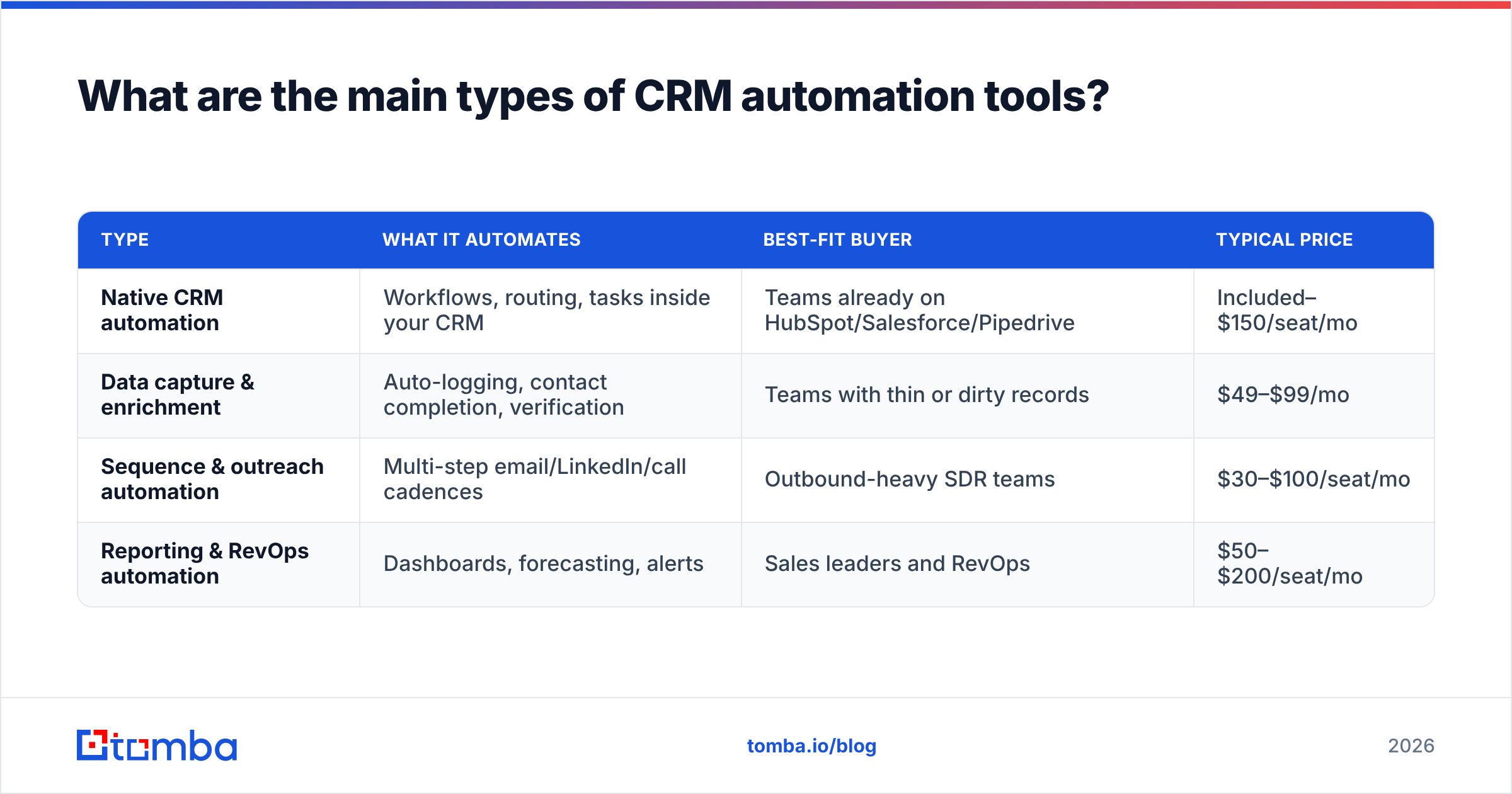
There are four functional buckets. Most platforms claim all four; few are excellent at more than two.
| Type | What it automates | Best-fit buyer | Typical price |
|---|---|---|---|
| Native CRM automation | Workflows, routing, tasks inside your CRM | Teams already on HubSpot/Salesforce/Pipedrive | Included–$150/seat/mo |
| Data capture & enrichment | Auto-logging, contact completion, verification | Teams with thin or dirty records | $49–$99/mo |
| Sequence & outreach automation | Multi-step email/LinkedIn/call cadences | Outbound-heavy SDR teams | $30–$100/seat/mo |
| Reporting & RevOps automation | Dashboards, forecasting, alerts | Sales leaders and RevOps | $50–$200/seat/mo |
The mistake is buying a heavyweight all-in-one when you only need one bucket. If your pain is "leads sit unrouted," you need routing, not a $150/seat forecasting suite.
Which CRM automation tools are worth it in 2026?#
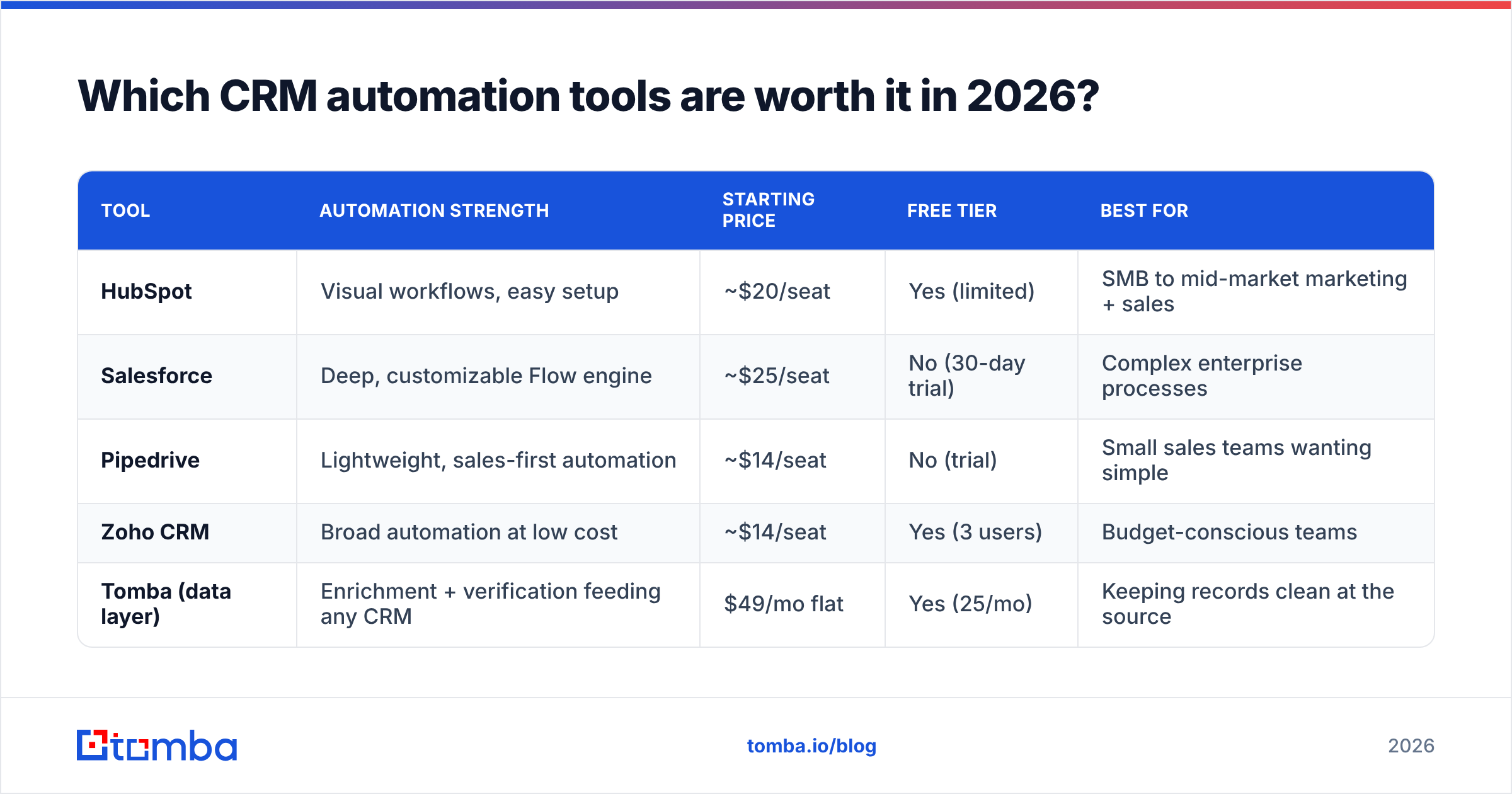
Here is an honest side-by-side of the platforms teams actually shortlist. Prices are per-seat monthly on annual billing and move constantly, so treat them as directional and confirm on each vendor's page.
| Tool | Automation strength | Starting price | Free tier | Best for |
|---|---|---|---|---|
| HubSpot | Visual workflows, easy setup | ~$20/seat | Yes (limited) | SMB to mid-market marketing + sales |
| Salesforce | Deep, customizable Flow engine | ~$25/seat | No (30-day trial) | Complex enterprise processes |
| Pipedrive | Lightweight, sales-first automation | ~$14/seat | No (trial) | Small sales teams wanting simple |
| Zoho CRM | Broad automation at low cost | ~$14/seat | Yes (3 users) | Budget-conscious teams |
| Tomba (data layer) | Enrichment + verification feeding any CRM | $49/mo flat | Yes (25/mo) | Keeping records clean at the source |
A few notes so this table is useful and not just logos:
- HubSpot wins on ease. Its workflow builder is genuinely learnable by a non-technical ops person, and it connects to the rest of your stack cleanly. Check the current tiers on the HubSpot site — automation depth jumps sharply between Starter and Professional.
- Salesforce wins on power. Flow can model almost any process, which is exactly why it needs an admin. If you have edge cases, it is the answer; if you have five reps, it is overkill. See the platform docs at Salesforce.
- Pipedrive is the "just make selling easier" pick — clean pipeline, simple automations, minimal admin tax.
- Zoho delivers a lot of automation per dollar, at the cost of a busier interface.
- Tomba is not a CRM — it is the data layer that keeps whichever CRM you chose from filling up with junk. It plugs in via native integrations and the Tomba API.
Cross-check any shortlist against real user reviews on G2 rather than the vendor's own case studies. The pattern you are looking for: do reviewers praise the automation, or complain that it broke after an update?
How do you set up CRM automation without wasting money?#
Start narrow, prove value, then expand. The teams that fail buy everything on day one and configure nothing well.
Step 1 — Pick the two workflows that hurt most. Usually that is lead routing and follow-up. Do not automate what you have never done manually; you will just codify a bad process.
Step 2 — Clean the inputs. Before a single automated email fires, enrich and verify the records those workflows will touch. Use a bulk email finder to complete lists and a verifier to strip dead addresses.
Step 3 — Build the trigger, condition, action. Keep the first version boring. "When a demo form is submitted → if company > 50 employees → assign to AE + create task." Ship it, watch it for a week.
Step 4 — Connect your data source natively. If you are on HubSpot, wire enrichment through the Tomba HubSpot integration; on Salesforce, use the Tomba Salesforce integration; on Pipedrive, the Pipedrive integration. Native beats CSV round-trips every time.
Step 5 — Measure and expand. Track response rate, time-to-first-touch, and bounce rate before and after. If a workflow does not move a number, kill it.
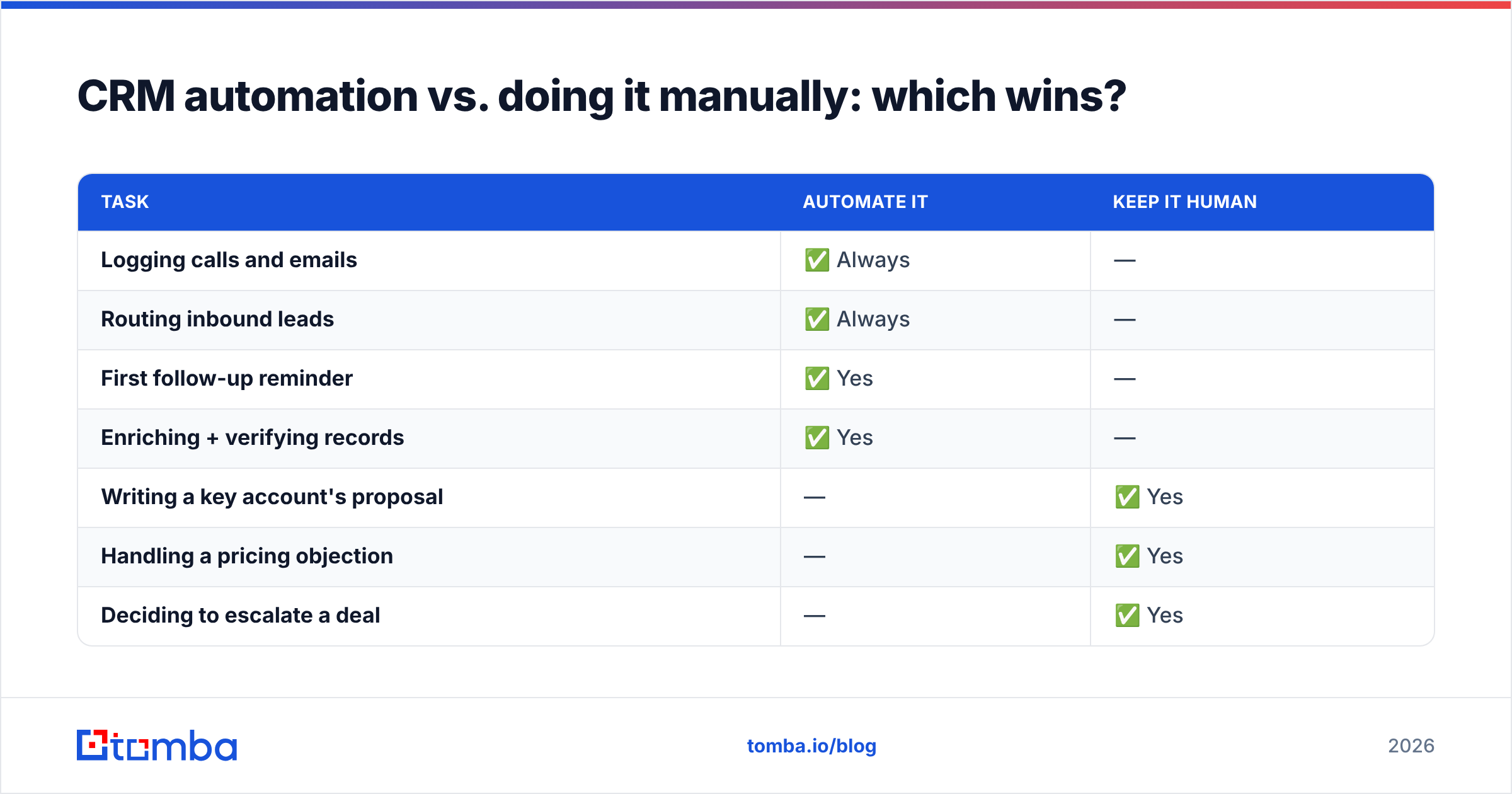
CRM automation vs. doing it manually: which wins?#
Automation wins on volume and consistency; humans win on judgment. The right split is to automate the mechanical and reserve people for the persuasive.
| Task | Automate it | Keep it human |
|---|---|---|
| Logging calls and emails | ✅ Always | — |
| Routing inbound leads | ✅ Always | — |
| First follow-up reminder | ✅ Yes | — |
| Enriching + verifying records | ✅ Yes | — |
| Writing a key account's proposal | — | ✅ Yes |
| Handling a pricing objection | — | ✅ Yes |
| Deciding to escalate a deal | — | ✅ Yes |
If a task has a clear rule, automate it. If it needs reading the room, do not hand it to a workflow and hope.
What does CRM automation cost, really?#
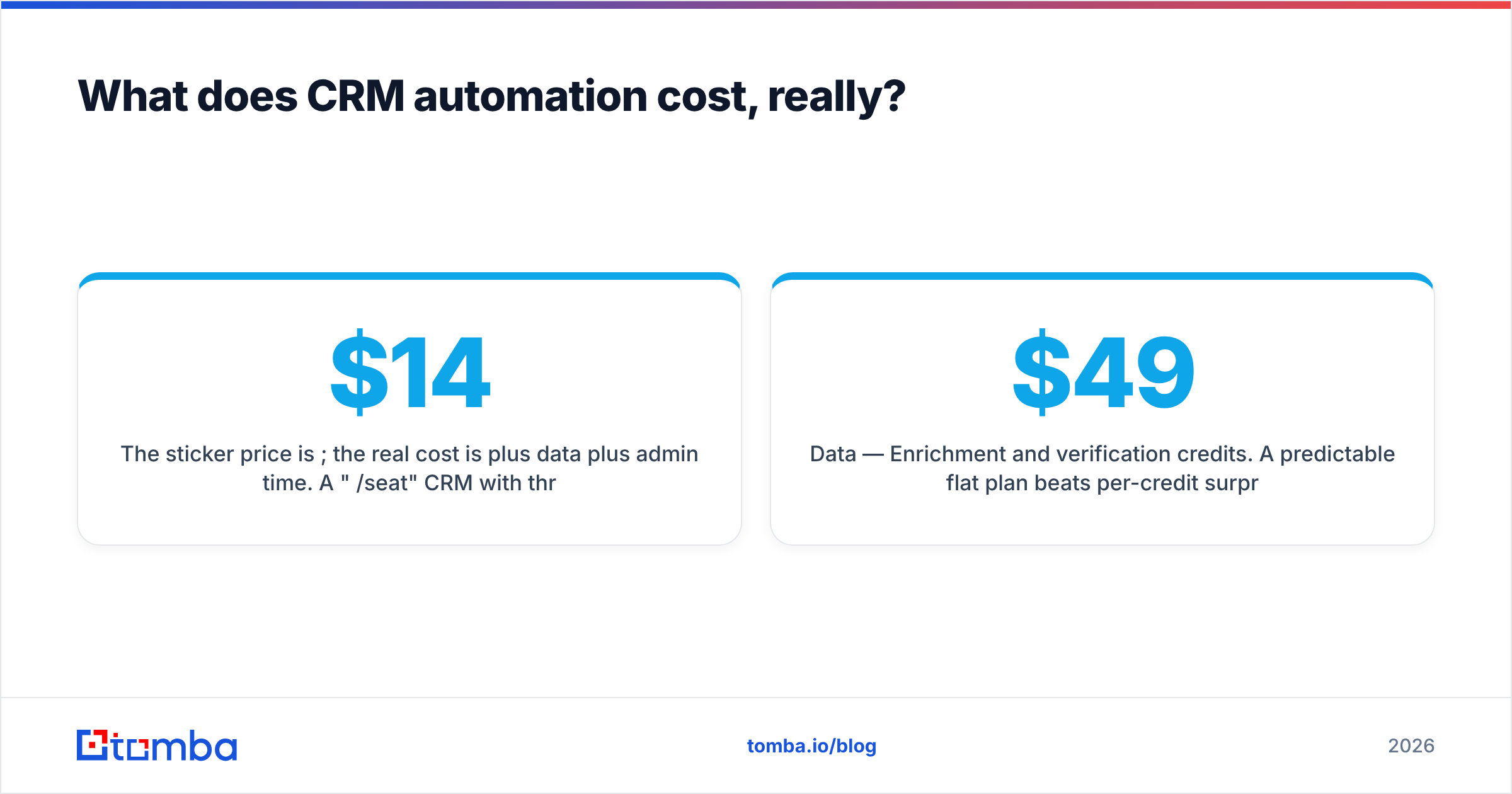
The sticker price is per seat; the real cost is per seat plus data plus admin time. A "$14/seat" CRM with three integrations, an enrichment vendor, and a part-time ops person is a very different number by quarter's end.
Budget in three layers:
- Platform — Per-seat CRM license. This is the number on the pricing page.
- Data — Enrichment and verification credits. A predictable flat plan beats per-credit surprises; Tomba's pricing starts free (25 searches/month) and moves to $49/month Starter, $99/month Growth, and $249/month Pro.
- People — Setup and maintenance. Simple tools need hours; Salesforce-class platforms need a dedicated admin.
Add all three before you compare vendors. The cheapest license is often the most expensive stack.
The bottom line#
CRM automation tools are worth it when they remove specific, measurable busywork — and a liability when you point them at dirty data. Buy for the two or three workflows that actually hurt, keep humans on the judgment calls, and above all, gate every automation behind clean, verified records.
That last part is where Tomba fits. Before your workflows route, sequence, or report on a contact, make sure the contact is real. Use the Tomba Email Finder to complete records by name, company, or domain, verify them, and push the clean data straight into your CRM through native integrations. Start on the free tier — 25 searches a month, no card — and see how much of your pipeline was running on guesses. Automate the good data, not the garbage.
Related guides#
Ready to find emails that actually work?
Join 150,000+ professionals who stopped guessing and started sending. Free credits on signup — no credit card required.
Get the Tomba newsletter
Practical outbound tactics and product updates — once every two weeks.
About the author