CRM Deduplication in 2026: How to Clean Duplicate Records
Duplicate records quietly wreck reporting, routing, and rep trust. Here's a practical 2026 playbook for CRM deduplication that actually holds.
CRM Deduplication in 2026: How to Clean Duplicate Records
Duplicate records are the quiet tax on every revenue team. They don't crash your CRM or trigger an alert. They just slowly erode forecast accuracy, split a customer's history across three accounts, and route the same lead to two reps who both call within the hour. By the time someone notices, the database is 30% duplicates and nobody trusts the numbers.
This guide is a practical, no-fluff playbook for CRM deduplication in 2026: how duplicates form, how to detect and merge them safely, how to prevent them at the source, and how to keep your data clean without a six-month cleanup project that never ends.
TL;DR#
- Duplicates cost more than storage. They break routing, inflate pipeline, corrupt attribution, and make reps distrust the CRM they're supposed to live in.
- Match on identity, not exact strings. Fuzzy matching on email, domain, and normalized name beats "find rows where email = email."
- Merge with a survivorship rule. Decide which field wins (most recent, most complete, highest source trust) before you click merge — not during.
- Prevention beats cleanup. Validation at entry, deduped imports, and enriched-at-source data stop 80% of duplicates from ever landing.
- Clean data starts with clean inputs. A verified email and a canonical company domain are the two keys everything else dedupes against.
What is CRM deduplication?#
CRM deduplication is the process of finding records that refer to the same real-world person or company and collapsing them into a single trusted record. Think of it like merging contacts on your phone: "John Smith," "J. Smith," and "john@acme.com" are three entries for one human, and you want one card, not three.
In a CRM the stakes are higher because records carry history — emails, deals, tasks, notes, activity. A bad merge loses that history; no merge at all scatters it. Good deduplication does three things in order:
- Detect — identify which records are likely the same entity.
- Match & score — quantify how confident you are that two records are duplicates.
- Merge — combine them using a survivorship rule that keeps the best data from each.
The core concept is that duplicates are rarely identical. They differ by a typo, a nickname, a personal vs. work email, or a company written four ways ("Acme", "Acme Inc", "Acme, Inc.", "acme.com"). Exact-match dedup misses all of it. You need normalization plus fuzzy matching.
Why do duplicate records hurt so much?#
Because the damage compounds silently across every downstream system. Here's where it actually bites:
- Lead routing breaks. Two records for the same buyer get assigned to two reps. Both reach out. The prospect thinks you're disorganized — and one rep just wasted a slot.
- Forecasting inflates. The same opportunity, entered twice, doubles in the pipeline report. Leadership plans against a number that isn't real.
- Attribution lies. A contact's journey is split across duplicate records, so no single record shows the full path. Your marketing-sourced revenue looks wrong.
- Personalization fails. You email "Hi John" to a record missing his title while the complete record sits three rows down. Relevance drops, and so does your email deliverability when bounces climb.
- Reps stop trusting the CRM. Once a rep gets burned by stale duplicate data, they start keeping a private spreadsheet. Now your CRM is both dirty and incomplete.
Industry research has long pegged the cost of bad data high — Gartner has estimated poor data quality costs organizations an average of $12.9 million per year. Duplicates are one of the most common and most fixable contributors.
How do duplicates get into a CRM in the first place?#
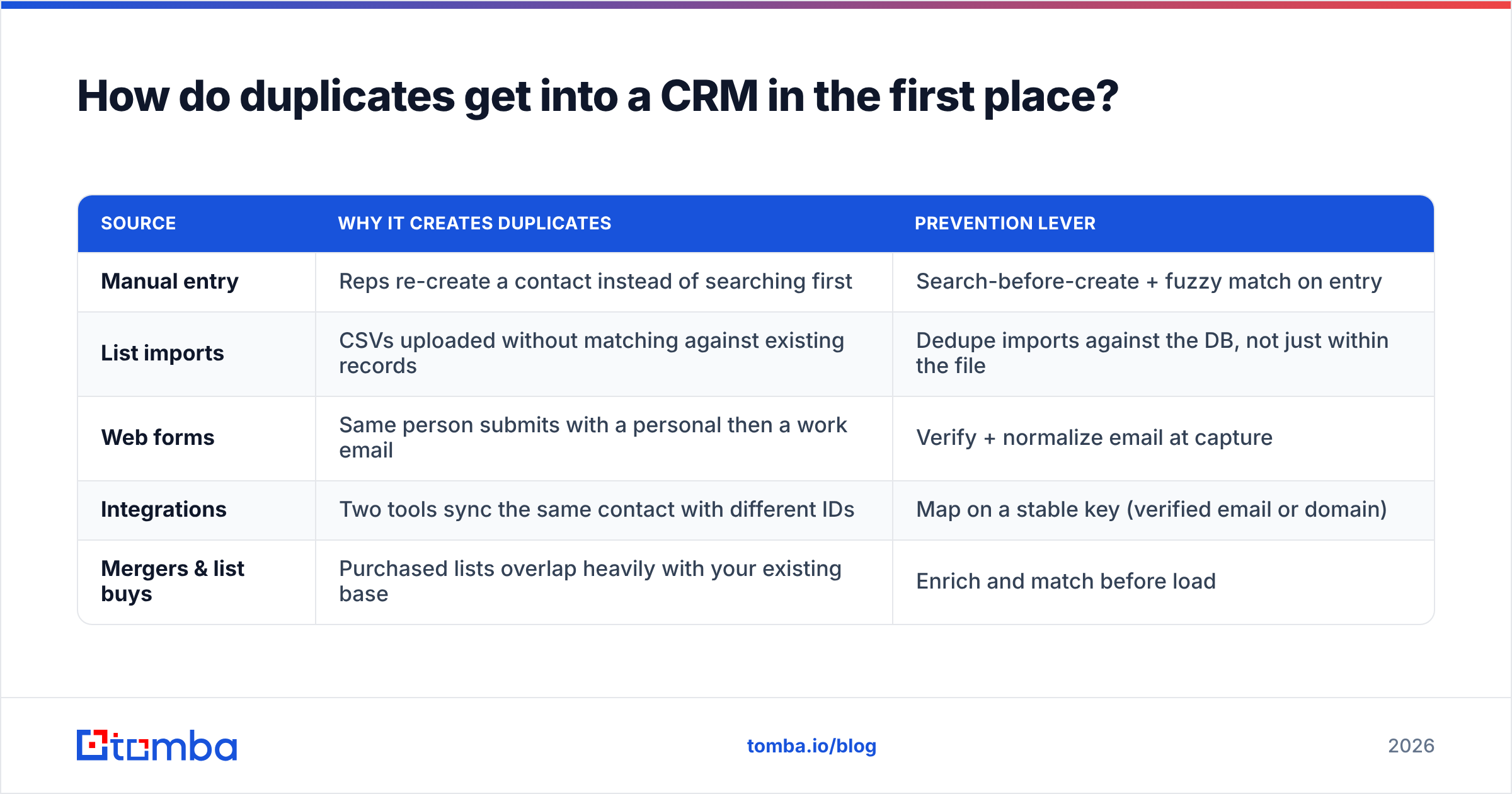
You can't prevent what you don't understand. Most duplicates trace back to a handful of predictable sources:
| Source | Why it creates duplicates | Prevention lever |
|---|---|---|
| Manual entry | Reps re-create a contact instead of searching first | Search-before-create + fuzzy match on entry |
| List imports | CSVs uploaded without matching against existing records | Dedupe imports against the DB, not just within the file |
| Web forms | Same person submits with a personal then a work email | Verify + normalize email at capture |
| Integrations | Two tools sync the same contact with different IDs | Map on a stable key (verified email or domain) |
| Mergers & list buys | Purchased lists overlap heavily with your existing base | Enrich and match before load |
The pattern is clear: duplicates enter at the boundary — wherever data crosses into the CRM. That's also the cheapest place to stop them.
How do you match duplicate records accurately?#
The match logic is where deduplication succeeds or fails. Match too loosely and you merge two different people named Maria Garcia. Match too strictly and you leave obvious duplicates behind.
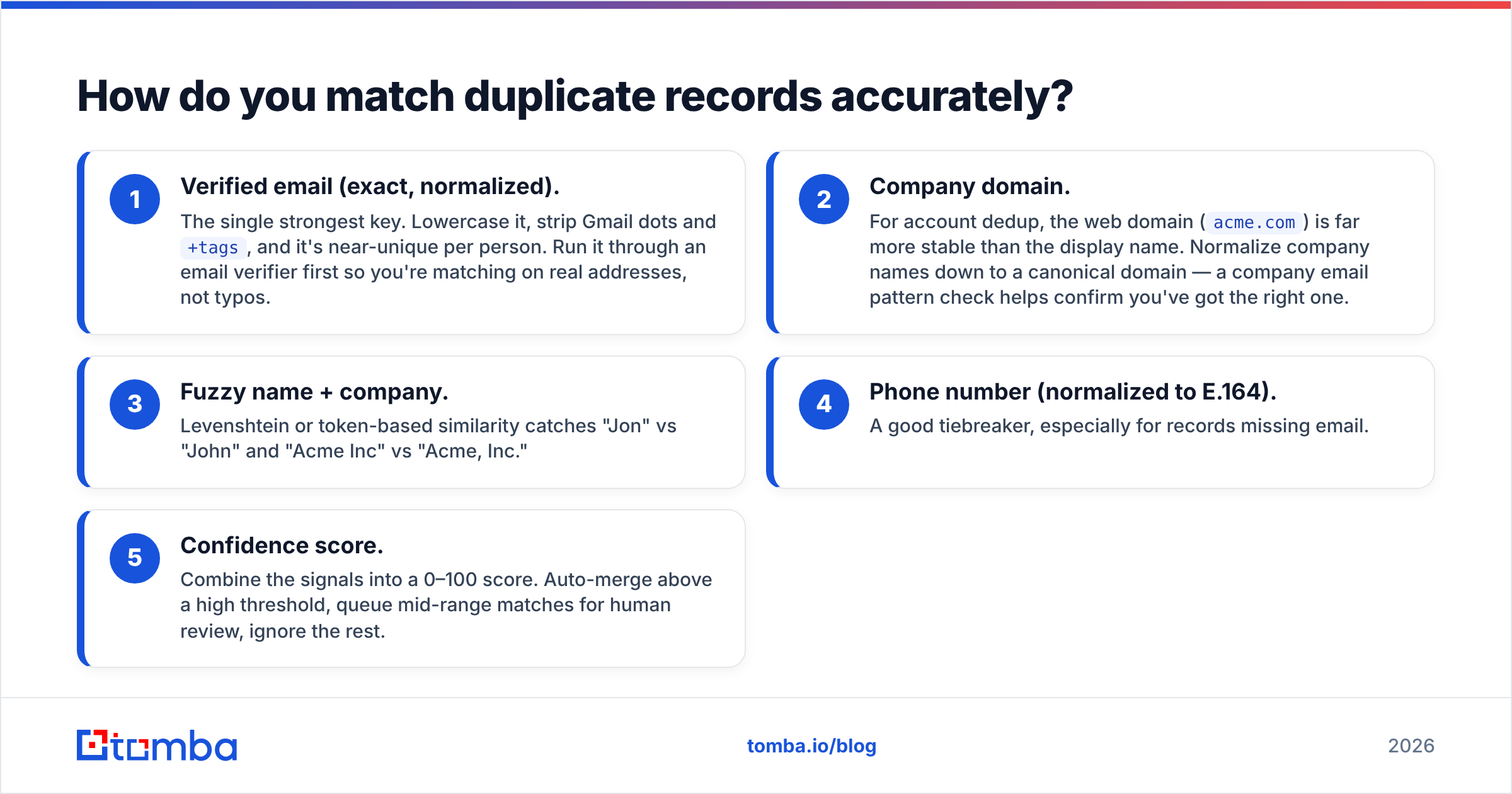
A reliable 2026 matching stack works in layers, from strongest identity signal to weakest:
- Verified email (exact, normalized). The single strongest key. Lowercase it, strip Gmail dots and
+tags, and it's near-unique per person. Run it through an email verifier first so you're matching on real addresses, not typos. - Company domain. For account dedup, the web domain (
acme.com) is far more stable than the display name. Normalize company names down to a canonical domain — a company email pattern check helps confirm you've got the right one. - Fuzzy name + company. Levenshtein or token-based similarity catches "Jon" vs "John" and "Acme Inc" vs "Acme, Inc."
- Phone number (normalized to E.164). A good tiebreaker, especially for records missing email.
- Confidence score. Combine the signals into a 0–100 score. Auto-merge above a high threshold, queue mid-range matches for human review, ignore the rest.

The golden rule: never auto-merge on a single weak signal. Name-only matches belong in a review queue, never in an automated merge job.
What's the safest way to merge duplicates?#
Decide survivorship before you merge. Survivorship is the rule that answers "when two records disagree on a field, which value wins?" Settle it up front and merging becomes mechanical instead of risky.
Common survivorship strategies:
- Most recent wins — good for fields like job title or phone that change over time.
- Most complete wins — the record with more populated fields becomes the master.
- Highest source trust wins — a verified/enriched value beats a hand-typed one.
- Never overwrite non-empty — fill blanks only; keep existing data untouched.
Then follow a safe merge sequence:
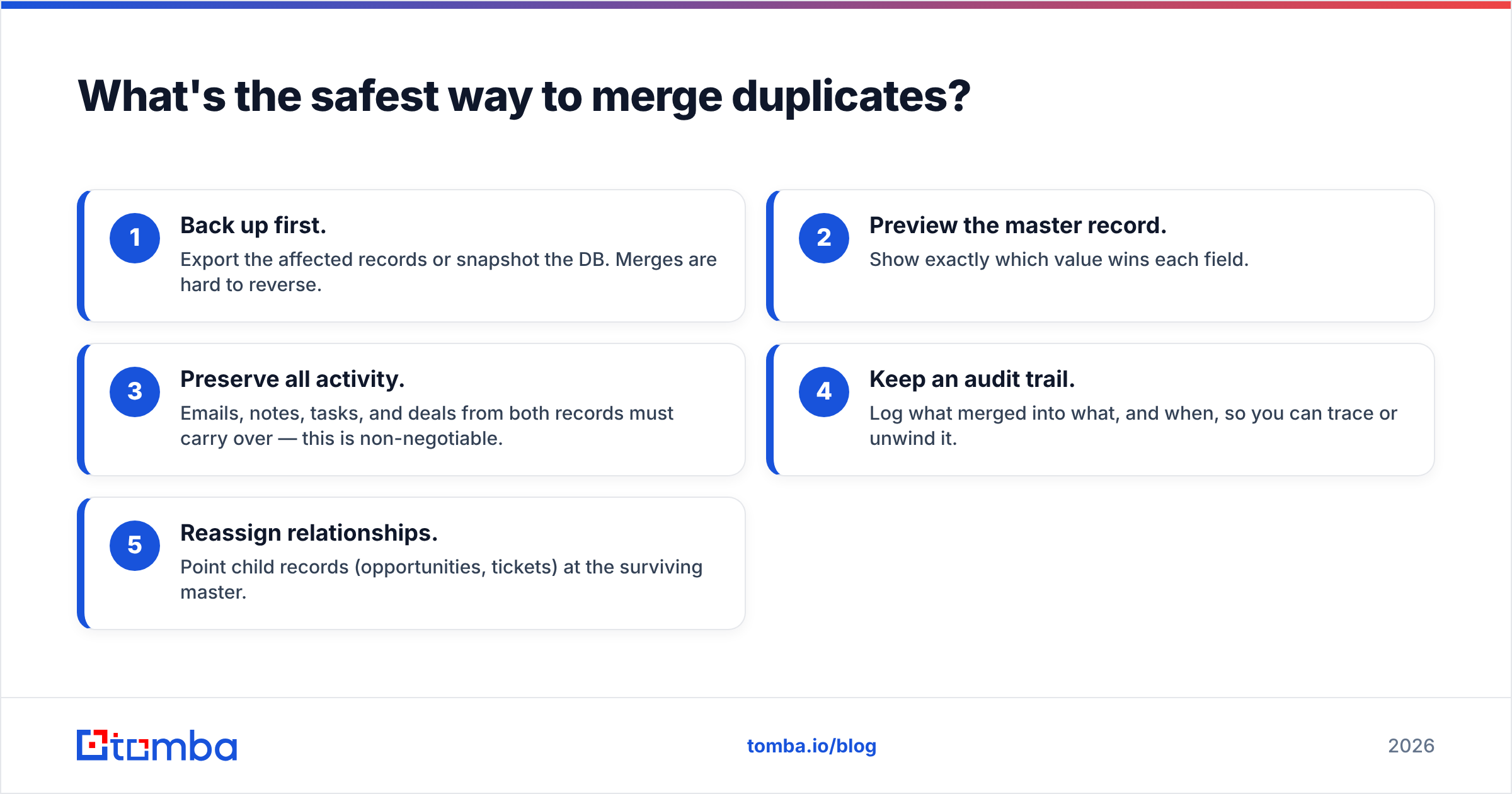
- Back up first. Export the affected records or snapshot the DB. Merges are hard to reverse.
- Preview the master record. Show exactly which value wins each field.
- Preserve all activity. Emails, notes, tasks, and deals from both records must carry over — this is non-negotiable.
- Keep an audit trail. Log what merged into what, and when, so you can trace or unwind it.
- Reassign relationships. Point child records (opportunities, tickets) at the surviving master.
Most modern CRMs — Salesforce, HubSpot, Pipedrive — have native merge tools, but they typically only surface exact-ish matches and merge two at a time. For large or fuzzy cleanups you'll want a dedicated dedup pass feeding clean, matched data in.
Build vs. buy vs. prevent: what's the right approach?#
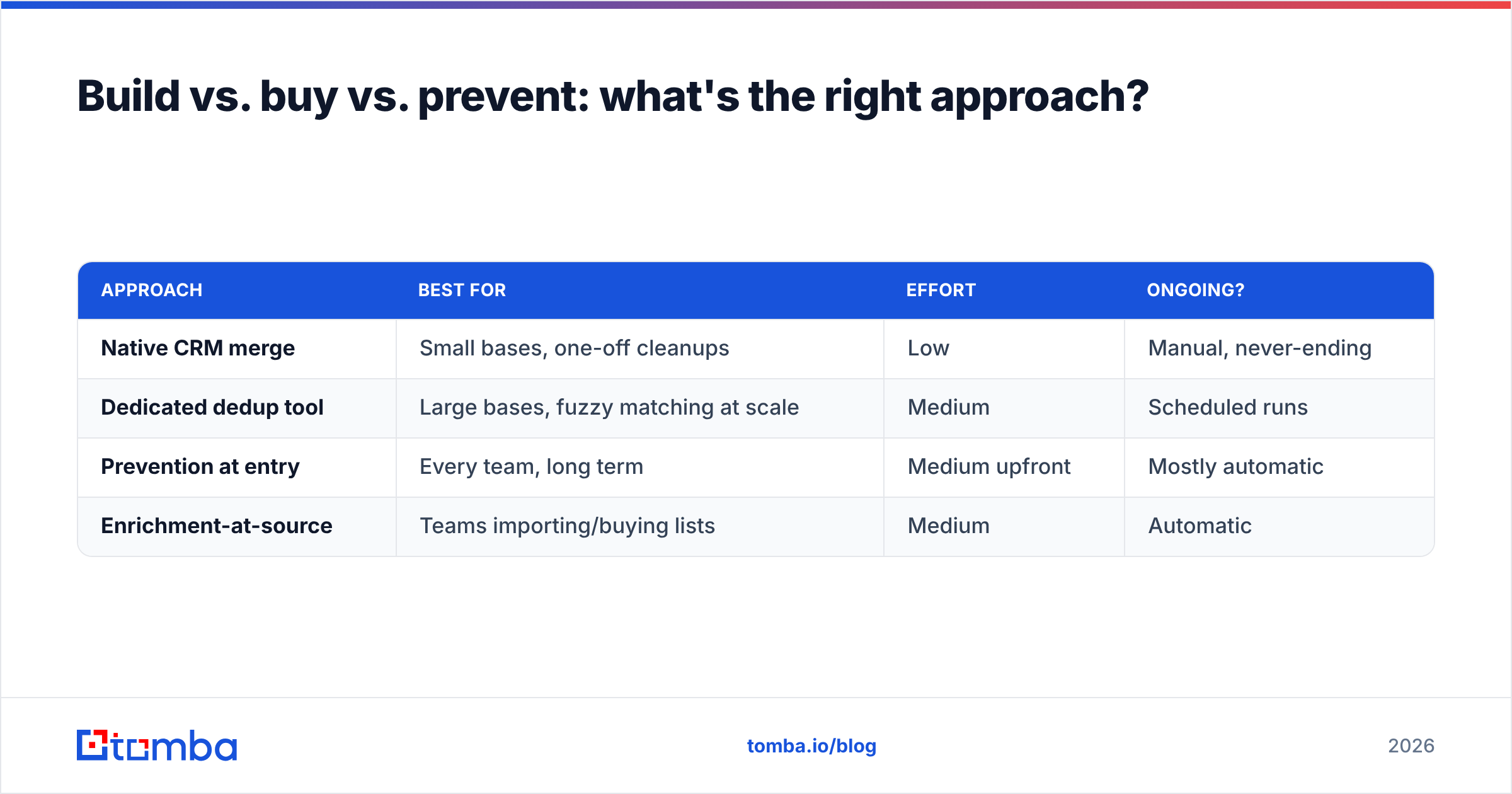
There's no single winner — it depends on scale and how the duplicates got there. Here's an honest comparison:
| Approach | Best for | Effort | Ongoing? |
|---|---|---|---|
| Native CRM merge | Small bases, one-off cleanups | Low | Manual, never-ending |
| Dedicated dedup tool | Large bases, fuzzy matching at scale | Medium | Scheduled runs |
| Prevention at entry | Every team, long term | Medium upfront | Mostly automatic |
| Enrichment-at-source | Teams importing/buying lists | Medium | Automatic |
The teams with the cleanest CRMs don't pick one — they prevent at the boundary and clean on a schedule. Prevention stops the flood; periodic dedup mops up what slips through integrations and manual entry.
How do you stop duplicates before they're created?#
Prevention is unglamorous and it's where the real ROI lives. Four controls stop the majority of duplicates from ever landing:
- Search-before-create. Force reps to fuzzy-search existing records before a new contact can be saved. Most tools support this; most teams leave it off.
- Verify and normalize at capture. Every inbound email gets verified and normalized so
John.Smith@Acme.comandjsmith@acme.comresolve to the same person. A reverse email lookup can tie a stray personal address back to the right work identity. - Dedupe imports against the database. Never load a CSV blind. Match every incoming row against existing records first — this is where bulk email finder and bulk verification pay for themselves.
- Enrich at the source. When new records arrive with a verified email and canonical domain already attached, matching downstream becomes trivial. Feeding clean data in from an email finder means fewer half-empty records competing to be someone's master.
Note the through-line: prevention depends on clean input keys. A verified email and a canonical company domain are the two anchors every dedup decision hangs on. Get those right at entry and your merge queue shrinks by half.
How often should you run deduplication?#
Match the cadence to your ingestion rate, not the calendar. A rough guide:
- Continuous / at-entry — validation and search-before-create should always be on.
- Weekly — automated fuzzy-match scans if you import lists or run high inbound volume.
- Monthly — a review-queue pass over mid-confidence matches a human should judge.
- Quarterly — a full audit: dupe rate, field completeness, stale records, orphaned activity.
Track your duplicate rate as a KPI (duplicates ÷ total records). If it climbs after a clean-up, your prevention layer is leaking — usually a new integration syncing on the wrong key.
Clean your CRM at the source with Tomba#
Deduplication is a matching problem, and matching is only as good as your keys. That's where Tomba fits: the Tomba Email Finder gives you verified, normalized professional emails and canonical company domains — the exact anchors your CRM needs to match, merge, and dedupe with confidence. Pair it with the email verifier to kill typos before they become duplicates, use domain search to canonicalize accounts, and run large lists through bulk processing before they ever touch your database.
Prevention beats cleanup every time, and prevention starts with clean input. Start free with 25 searches a month, or scale up on the Starter plan at $49/mo — see full Tomba pricing to match a plan to your import volume. Feed your CRM verified data at the source, and the duplicate problem stops being a quarterly fire drill.
Related guides#
Ready to find emails that actually work?
Join 150,000+ professionals who stopped guessing and started sending. Free credits on signup — no credit card required.
Get the Tomba newsletter
Practical outbound tactics and product updates — once every two weeks.
About the author