CRM for Account Management: How to Choose the Right One in 2026
A CRM built for account management does more than store contacts — it maps buying committees, tracks white space, and flags churn early. Here's how to pick one.
Account management lives or dies on one thing: knowing your customers better than they expect you to. A generic sales CRM is built to close new logos and then move on. Account management is the opposite job — you already won the deal, and now you have to keep the relationship healthy, map every stakeholder, and grow the account over years. That requires a CRM configured for retention and expansion, not just a pipeline of new opportunities.
This guide breaks down what a CRM for account management actually needs to do, how the major platforms compare, and how to keep your account records accurate enough that the whole system earns its keep.
TL;DR#
- A CRM for account management is optimized for retention, renewals, and expansion inside existing accounts — not just net-new pipeline.
- The features that matter most: hierarchy mapping, white-space tracking, renewal alerts, activity timelines, and health scoring — not just contact storage.
- HubSpot, Salesforce, and Pipedrive all work, but they serve different account sizes and budgets. Match the tool to your account complexity, not the other way around.
- Your CRM is only as good as its data. Stale contacts silently break account plans — enrich and verify records on a schedule.
- Start by fixing data hygiene, then layer on health scores and renewal workflows.
What is a CRM for account management?#
Think of it like the difference between a hotel front desk and a concierge. The front desk checks people in and out — one transaction, done. A concierge remembers you, knows your preferences, anticipates what you need next, and builds a relationship that keeps you coming back. A sales CRM is the front desk. A CRM configured for account management is the concierge.
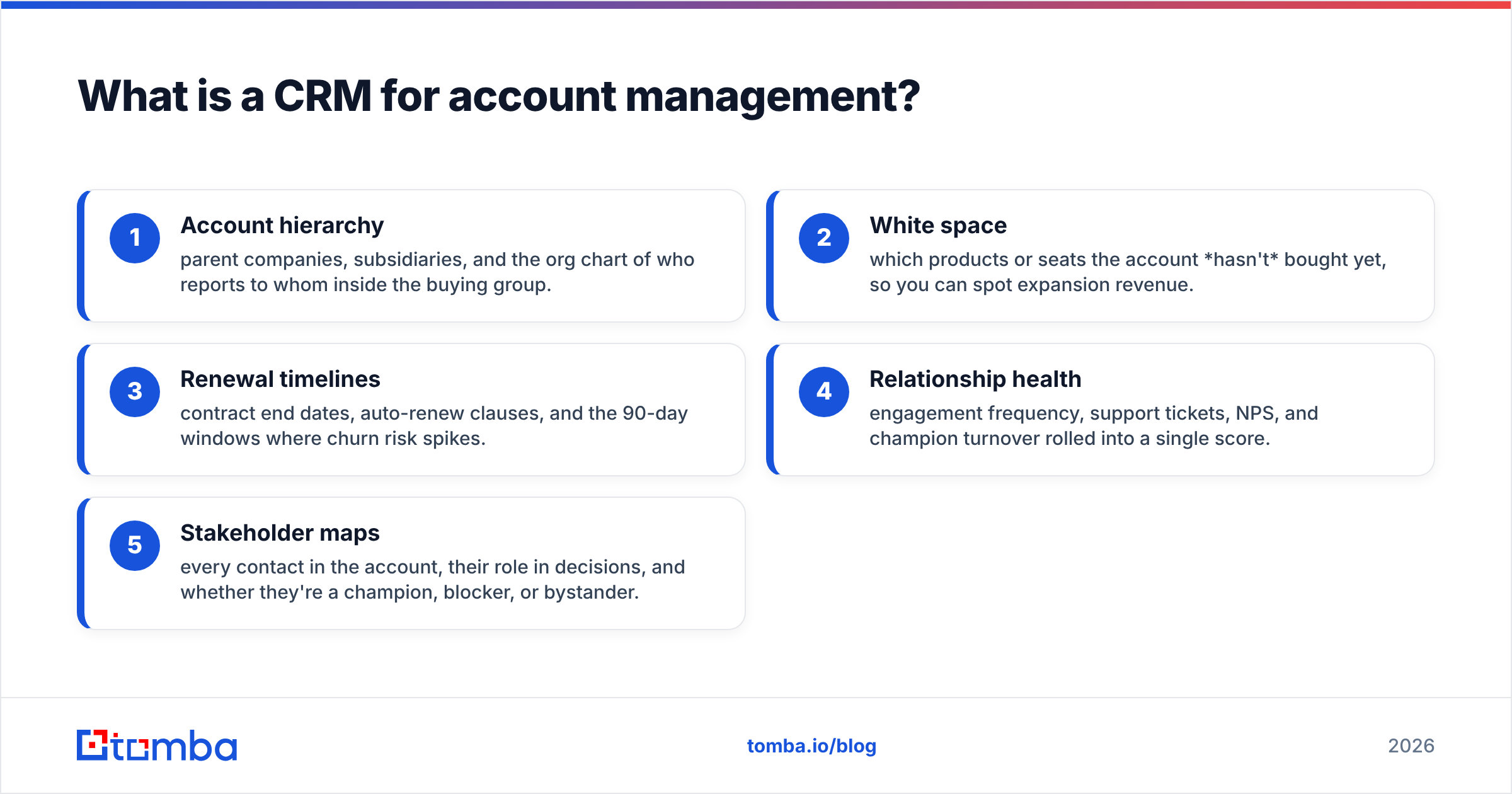
Technically, it's the same underlying software — but the objects, fields, and workflows are oriented around the account as the primary unit, not the individual deal. That means you're tracking things like:
- Account hierarchy — parent companies, subsidiaries, and the org chart of who reports to whom inside the buying group.
- White space — which products or seats the account hasn't bought yet, so you can spot expansion revenue.
- Renewal timelines — contract end dates, auto-renew clauses, and the 90-day windows where churn risk spikes.
- Relationship health — engagement frequency, support tickets, NPS, and champion turnover rolled into a single score.
- Stakeholder maps — every contact in the account, their role in decisions, and whether they're a champion, blocker, or bystander.
A pipeline CRM can store all of this in theory. The difference is whether the platform makes account management the default view or forces you to bolt it on.
Why can't a spreadsheet handle account management?#
Spreadsheets fail the moment an account gets complex. One enterprise customer might have twelve stakeholders across four departments, three active contracts, and a renewal in eight months. Track that in a sheet and you get stale data, version conflicts, and zero automation. Nobody gets an alert when the champion leaves, and the renewal sneaks up on you.
A real CRM adds three things a spreadsheet never will:
- Automation — renewal reminders, task assignments, and health-score recalculation happen without anyone remembering to do them.
- A shared source of truth — the AE, CSM, and support team all see the same account timeline instead of trading screenshots.
- Reporting across the book — you can rank every account by expansion potential or churn risk in one click, not by manually re-sorting rows.
The trade-off is setup cost and discipline. If your team won't log activity, even the best CRM decays into an expensive spreadsheet. That's a process problem, not a tooling one — pick a platform your reps will actually use.
Which CRM is best for account management?#
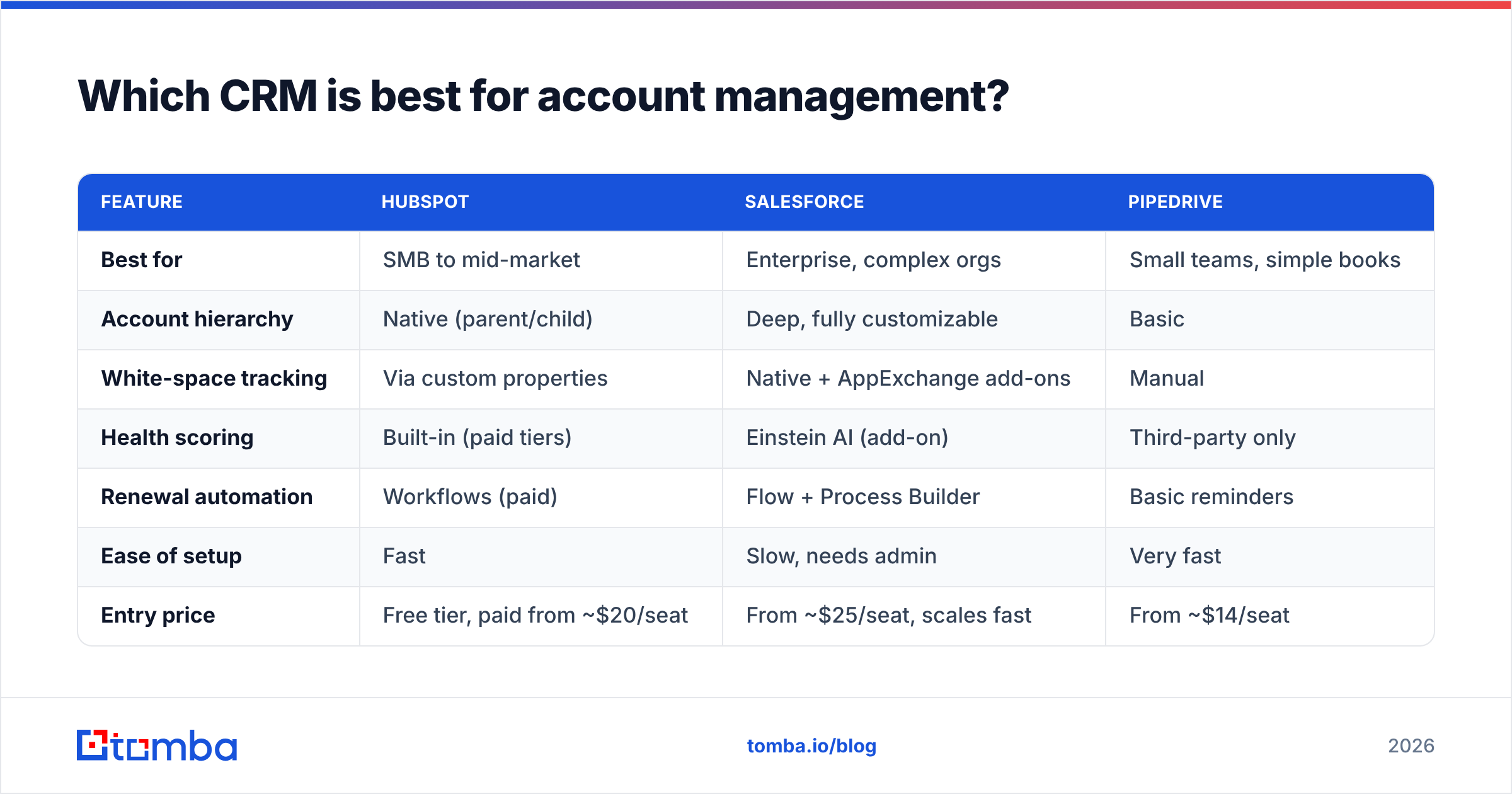
There's no single winner. The right choice depends on account size, team headcount, and how much configuration you're willing to own. Here's how the most common options stack up for account-management work specifically.
| Feature | HubSpot | Salesforce | Pipedrive |
|---|---|---|---|
| Best for | SMB to mid-market | Enterprise, complex orgs | Small teams, simple books |
| Account hierarchy | Native (parent/child) | Deep, fully customizable | Basic |
| White-space tracking | Via custom properties | Native + AppExchange add-ons | Manual |
| Health scoring | Built-in (paid tiers) | Einstein AI (add-on) | Third-party only |
| Renewal automation | Workflows (paid) | Flow + Process Builder | Basic reminders |
| Ease of setup | Fast | Slow, needs admin | Very fast |
| Entry price | Free tier, paid from ~$20/seat | From ~$25/seat, scales fast | From ~$14/seat |
| Learning curve | Low | High | Very low |
A few honest takeaways:
- HubSpot hits the sweet spot for most mid-market account teams — strong native account objects without needing a full-time admin. See their account management overview for how they frame it.
- Salesforce wins when accounts are genuinely complex — multinational orgs, nested subsidiaries, custom health models. The Salesforce platform can model almost anything, but you'll pay in setup time and admin cost.
- Pipedrive is the pragmatic pick for small teams with a handful of key accounts. It's not built for deep account planning, but it's fast and cheap.
Before you commit, read recent verified reviews on a neutral source like G2 — feature lists on vendor sites rarely tell you where a tool struggles day to day.
What features actually separate the good tools from the rest?#
Every CRM claims to do account management. Here's what to test during a trial, ranked by how much they move the needle:
- Stakeholder mapping that's visual. If you can't see the buying committee as an org chart with roles color-coded, mapping large accounts becomes a chore reps skip.
- Renewal and contract fields as first-class objects. Contract end date, renewal owner, and auto-renew status should be native — not a note buried in a deal record.
- Activity timelines that unify the account. Emails, calls, meetings, and support tickets from every contact in the account, in one chronological feed.
- Health scoring you can define. Canned AI scores are fine, but you need to weight the inputs that matter to your business (usage, tickets, exec engagement).
- Expansion signals. Flags when an account crosses a usage threshold or adds headcount — the moments that predict upsell readiness.
If a platform nails three of these five, it's a serious contender. If it only stores contacts and logs emails, it's a pipeline CRM wearing an account-management label.
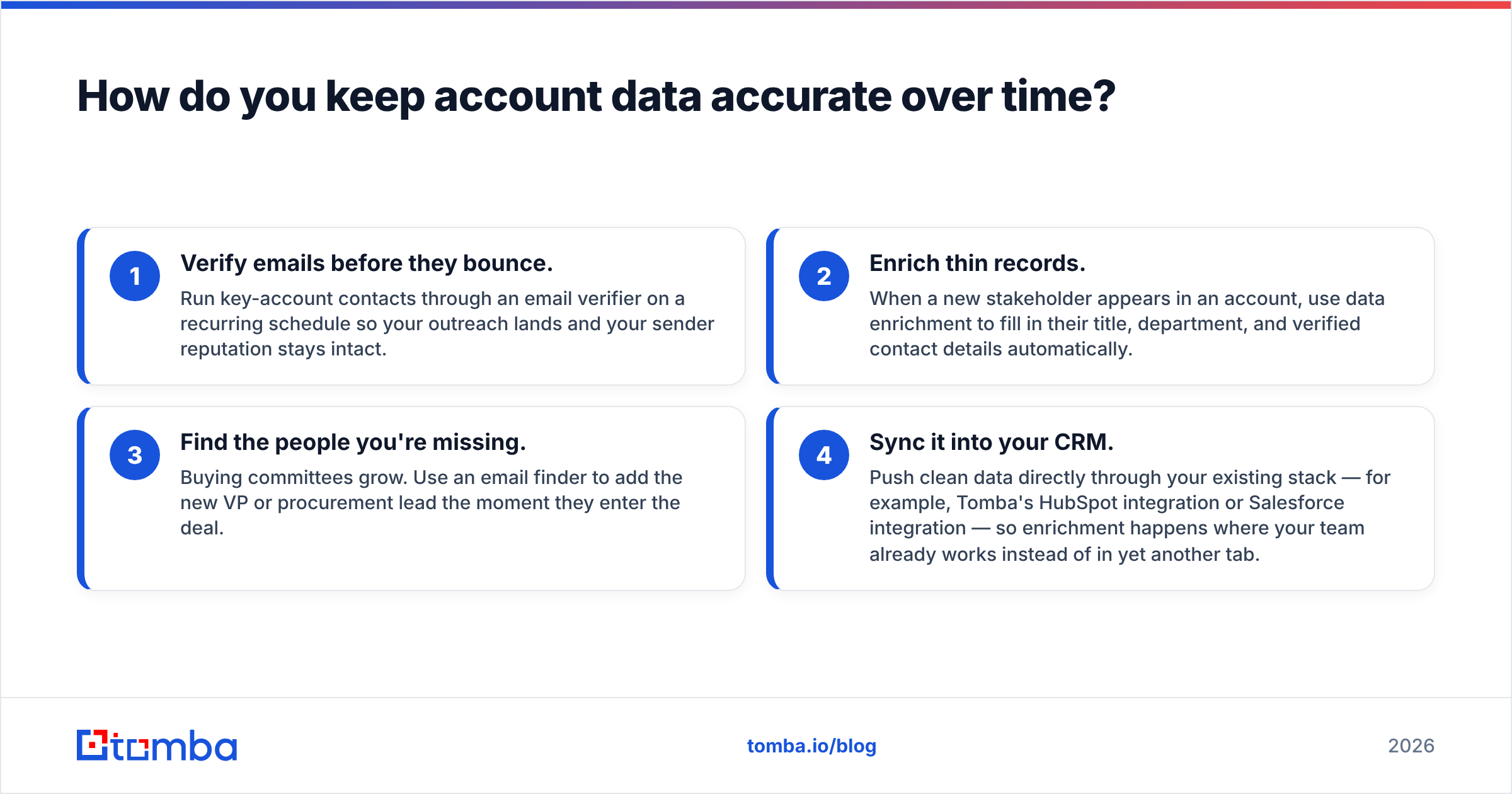
How do you keep account data accurate over time?#
This is the part most teams get wrong, and it quietly kills every other feature. Roughly a quarter to a third of B2B contact data goes stale every year — people change jobs, companies rebrand, emails bounce. When your champion leaves and their record still shows them as the primary contact, your renewal playbook fires at a person who no longer works there.
The fix is to treat data hygiene as an ongoing process, not a one-time import:
- Verify emails before they bounce. Run key-account contacts through an email verifier on a recurring schedule so your outreach lands and your sender reputation stays intact.
- Enrich thin records. When a new stakeholder appears in an account, use data enrichment to fill in their title, department, and verified contact details automatically.
- Find the people you're missing. Buying committees grow. Use an email finder to add the new VP or procurement lead the moment they enter the deal.
- Sync it into your CRM. Push clean data directly through your existing stack — for example, Tomba's HubSpot integration or Salesforce integration — so enrichment happens where your team already works instead of in yet another tab.
The payoff compounds. Clean data makes health scores accurate, which makes churn alerts trustworthy, which makes reps act on them. Dirty data does the reverse — every downstream feature inherits the errors, and eventually people stop trusting the CRM entirely.
What does a good account-management workflow look like?#
Tooling only matters if it maps to a repeatable motion. Here's a lean workflow that works across most CRMs:
- Segment the book. Tier accounts by revenue and expansion potential. Your top tier gets the full account plan; the long tail gets automated touchpoints.
- Build the stakeholder map at handoff. The moment sales closes, the account owner documents every known contact and their role — before context gets lost.
- Set the renewal clock. Log the contract end date and create tasks at 120, 90, and 30 days out. Never let a renewal surprise you.
- Score health monthly. Recalculate account health on a cadence and route at-risk accounts to a save play.
- Review white space quarterly. Walk each key account's unbought products and headcount growth to surface expansion conversations.
Notice that none of these steps require a specific vendor. The CRM's job is to make each one lower-friction — automating the reminders, unifying the timeline, and keeping the underlying data clean enough to trust.
How much should you budget for a CRM for account management?#
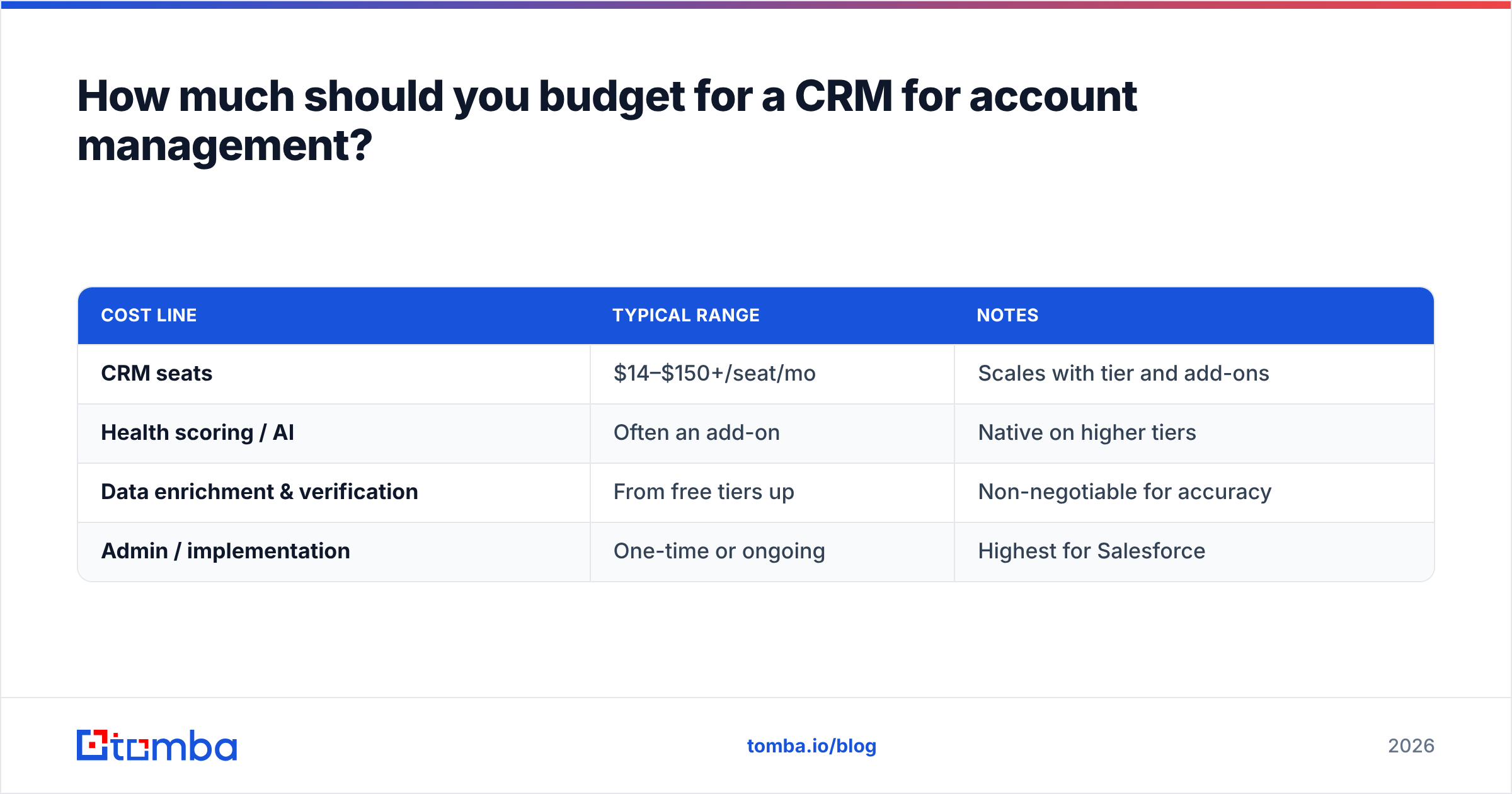
Plan for two line items, not one: the CRM license and the data layer that keeps it accurate. Teams routinely buy the first and forget the second, then wonder why the CRM feels unreliable within a year.
| Cost line | Typical range | Notes |
|---|---|---|
| CRM seats | $14–$150+/seat/mo | Scales with tier and add-ons |
| Health scoring / AI | Often an add-on | Native on higher tiers |
| Data enrichment & verification | From free tiers up | Non-negotiable for accuracy |
| Admin / implementation | One-time or ongoing | Highest for Salesforce |
For the data layer specifically, tools like Tomba start with a free tier (25 searches/month) and scale through paid plans; you can see the full Tomba pricing breakdown, with Starter at $49/mo. The point isn't the exact number — it's that budgeting for verified data upfront is far cheaper than the churned renewals and bounced campaigns that dirty data causes.
The bottom line#
A CRM for account management isn't a different product — it's the same platform pointed at a different goal. Configure it around accounts, stakeholders, renewals, and health instead of raw pipeline, pick the tier that matches your account complexity, and treat data hygiene as a permanent process rather than a launch-day task.
Get those three things right and the CRM stops being a place where information goes to die and becomes the system that actually drives retention and expansion.
If your account records are only as trustworthy as the day you imported them, start there. Tomba's Email Finder helps you find and verify the right stakeholders inside every account — new champions, procurement leads, and decision-makers — and push them straight into your CRM with connections to HubSpot, Salesforce, and more. Clean data first, and every other account-management feature you paid for finally works. Try it free and keep your key accounts current.
Related guides#
Ready to find emails that actually work?
Join 150,000+ professionals who stopped guessing and started sending. Free credits on signup — no credit card required.
Get the Tomba newsletter
Practical outbound tactics and product updates — once every two weeks.
About the author