CRM for Sales in 2026: How to Choose the Right System
A CRM for sales only pays off if reps actually use it and the data inside is clean. Here is how to compare the top systems on price, features, and hidden costs in 2026.
CRM for Sales in 2026: How to Choose the Right System
Picking a CRM for sales is less about the logo on the login screen and more about whether your reps will open it every morning — and whether the contact data inside is worth trusting. A beautiful pipeline view is useless if half your deals point to a bounced email or a phone number that rings a former employee.
This guide breaks down what a sales CRM actually needs to do in 2026, how the major platforms compare on price and features, and where most teams quietly lose money. No vendor spin — just the trade-offs.
TL;DR#
- A CRM for sales is a system of record for pipeline, contacts, and activity — its value comes from adoption and data quality, not feature count.
- HubSpot, Salesforce, Pipedrive, and Zoho cover most B2B needs at very different price points; the "right" one depends on team size and process complexity.
- The hidden cost is data hygiene. Stale contacts, duplicates, and unverified emails silently kill deliverability and forecast accuracy.
- Feed your CRM clean, enriched contacts with an email finder and email verifier instead of paying per-seat data add-ons.
- Start cheap, scale deliberately. Most teams overbuy on day one and underuse 80% of what they paid for.
What is a CRM for sales, really?#
A CRM for sales is your team's shared memory. Think of it like a restaurant's reservation book: every table (deal), every guest history (contact), and every note about who ordered what last time (activity) lives in one place so the next person to walk up to the table already knows the story.
Technically, a customer relationship management system centralizes contacts, companies, deals, and interactions, then layers automation and reporting on top. For a sales team specifically, three jobs matter most:
- Pipeline visibility — where every deal sits and what moves it forward.
- Contact management — accurate people and company records, not a graveyard of dead leads.
- Activity tracking — calls, emails, and tasks logged so nothing slips.
Everything else (AI summaries, quote builders, forecasting dashboards) is a bonus that only helps once those three fundamentals are solid. If you want the textbook definition, the customer relationship management glossary entry is a useful primer.
Which CRM for sales is right for your team?#
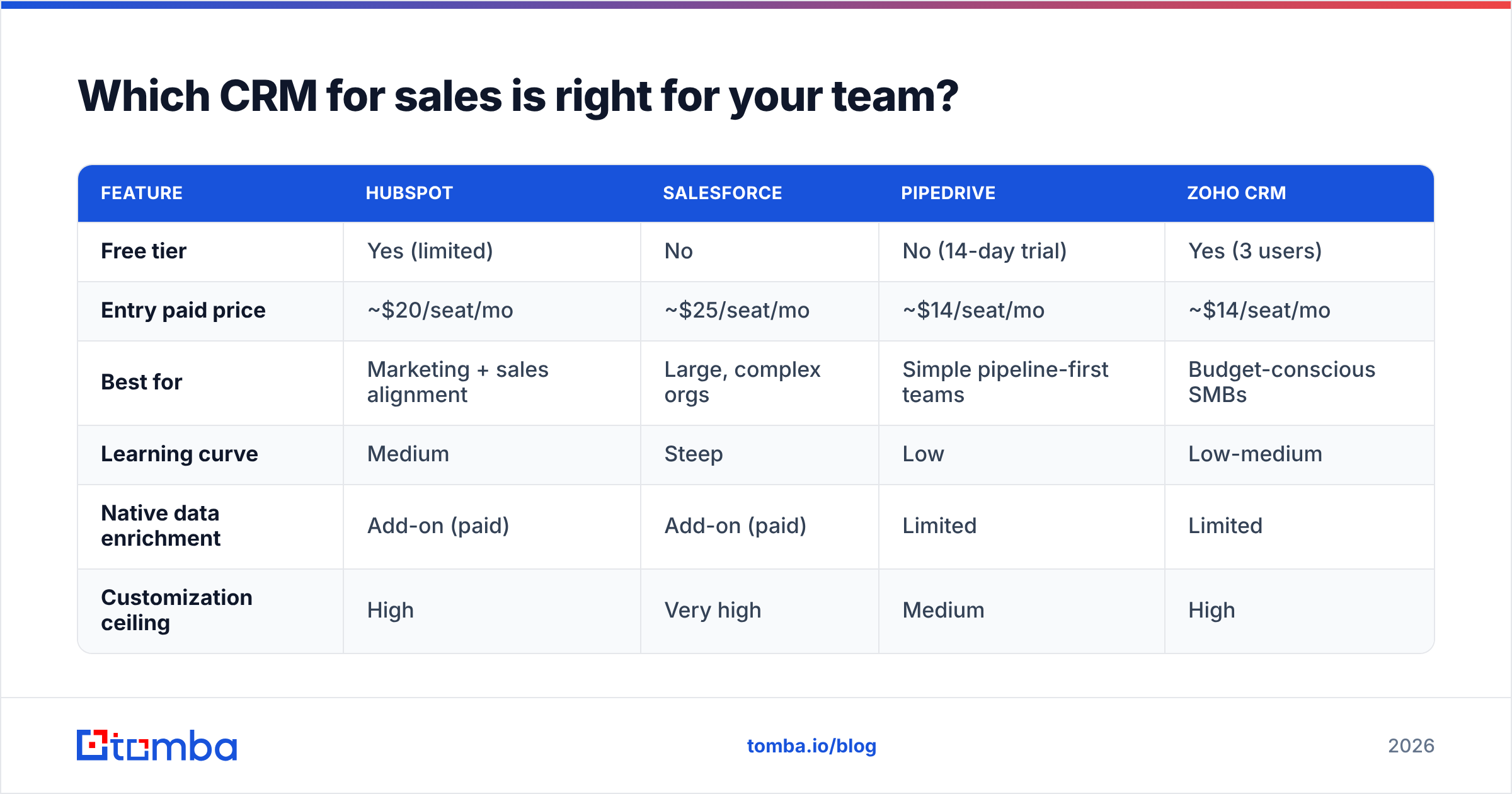
There is no universal winner — there is a best fit for your team size, deal complexity, and budget. Here is how the four most common B2B choices stack up.
| Feature | HubSpot | Salesforce | Pipedrive | Zoho CRM |
|---|---|---|---|---|
| Free tier | Yes (limited) | No | No (14-day trial) | Yes (3 users) |
| Entry paid price | ~$20/seat/mo | ~$25/seat/mo | ~$14/seat/mo | ~$14/seat/mo |
| Best for | Marketing + sales alignment | Large, complex orgs | Simple pipeline-first teams | Budget-conscious SMBs |
| Learning curve | Medium | Steep | Low | Low-medium |
| Native data enrichment | Add-on (paid) | Add-on (paid) | Limited | Limited |
| Customization ceiling | High | Very high | Medium | High |
How to read this table:
- Pipedrive and Zoho win on price and speed-to-value for small teams that mostly need a clean pipeline and reminders.
- HubSpot is the strongest pick if sales and marketing share a database and you want automation without a full admin team.
- Salesforce is overkill for most SMBs but unmatched once you have complex territories, custom objects, and a dedicated ops function.
Notice the row that repeats across all four: native data enrichment is either an add-on or limited. That is the gap that quietly determines whether your CRM stays useful — and it is where most teams overspend.
Why does CRM data quality matter more than the CRM itself?#
Because a CRM is a mirror — it reflects the data you feed it, and dirty data makes every downstream decision wrong.
Industry research consistently finds that a meaningful share of B2B contact data decays every year as people change jobs, companies rebrand, and domains move. When that rot lands in your CRM, three things break:
- Deliverability tanks. Sending to stale or invalid addresses raises bounce rates and damages your sender reputation, which drags down inbox placement for every future email — even to good contacts.
- Forecasts lie. Duplicate records and dead deals inflate pipeline and make your win-rate math meaningless.
- Reps stop trusting it. The fastest way to kill CRM adoption is to let reps get burned by bad data twice. After that, they go back to their own spreadsheets and the shared system rots.
This is why "which CRM" is often the wrong first question. A cheaper CRM with clean, verified, enriched contacts will out-perform an expensive one full of garbage every single time.
How to keep sales CRM data clean#
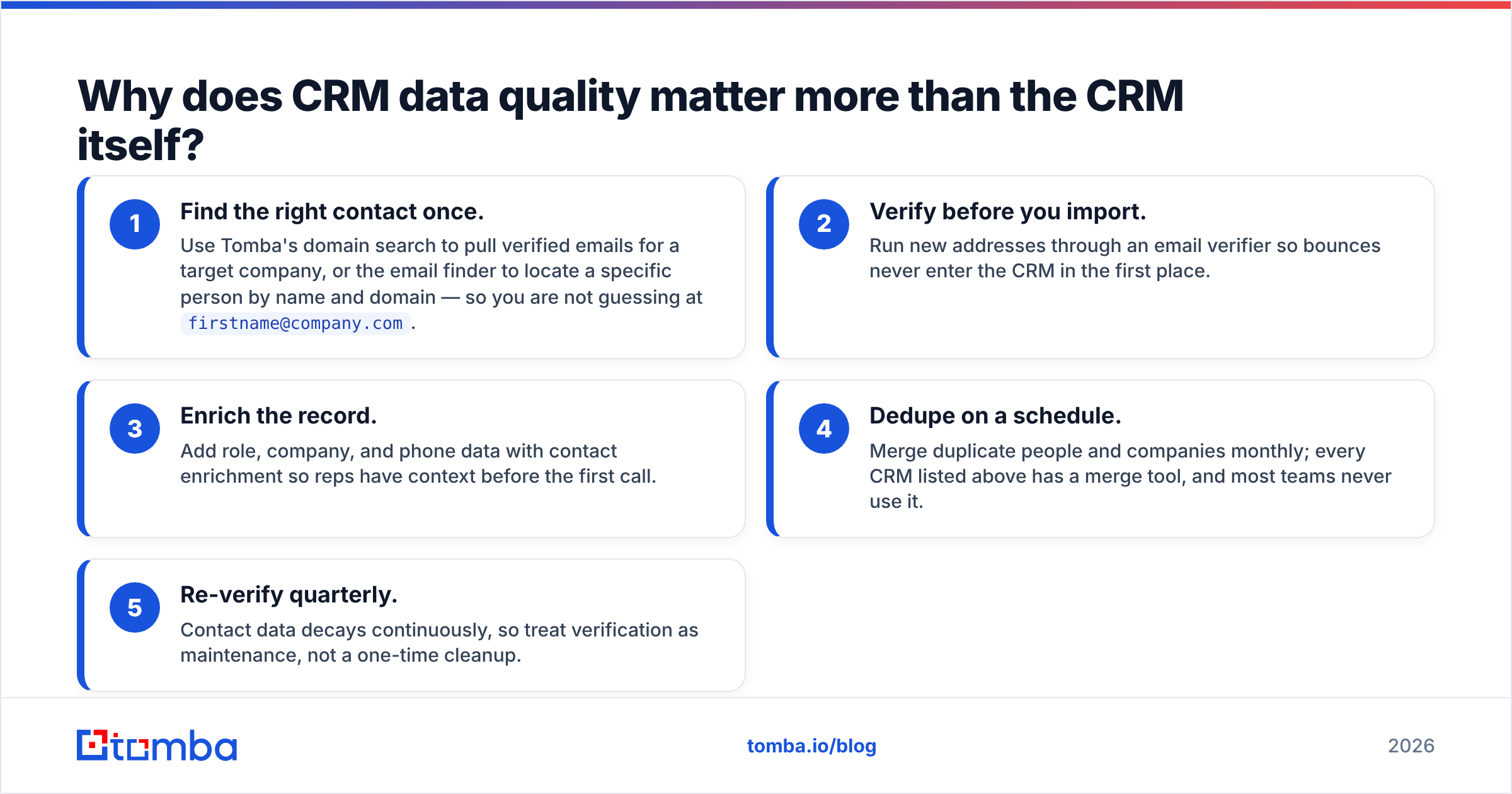
You do not need a dedicated data team. You need a repeatable intake process:
- Find the right contact once. Use Tomba's domain search to pull verified emails for a target company, or the email finder to locate a specific person by name and domain — so you are not guessing at
firstname@company.com. - Verify before you import. Run new addresses through an email verifier so bounces never enter the CRM in the first place.
- Enrich the record. Add role, company, and phone data with contact enrichment so reps have context before the first call.
- Dedupe on a schedule. Merge duplicate people and companies monthly; every CRM listed above has a merge tool, and most teams never use it.
- Re-verify quarterly. Contact data decays continuously, so treat verification as maintenance, not a one-time cleanup.
Do this and your $14/seat CRM behaves like a $150/seat one.
How much should a CRM for sales actually cost?#
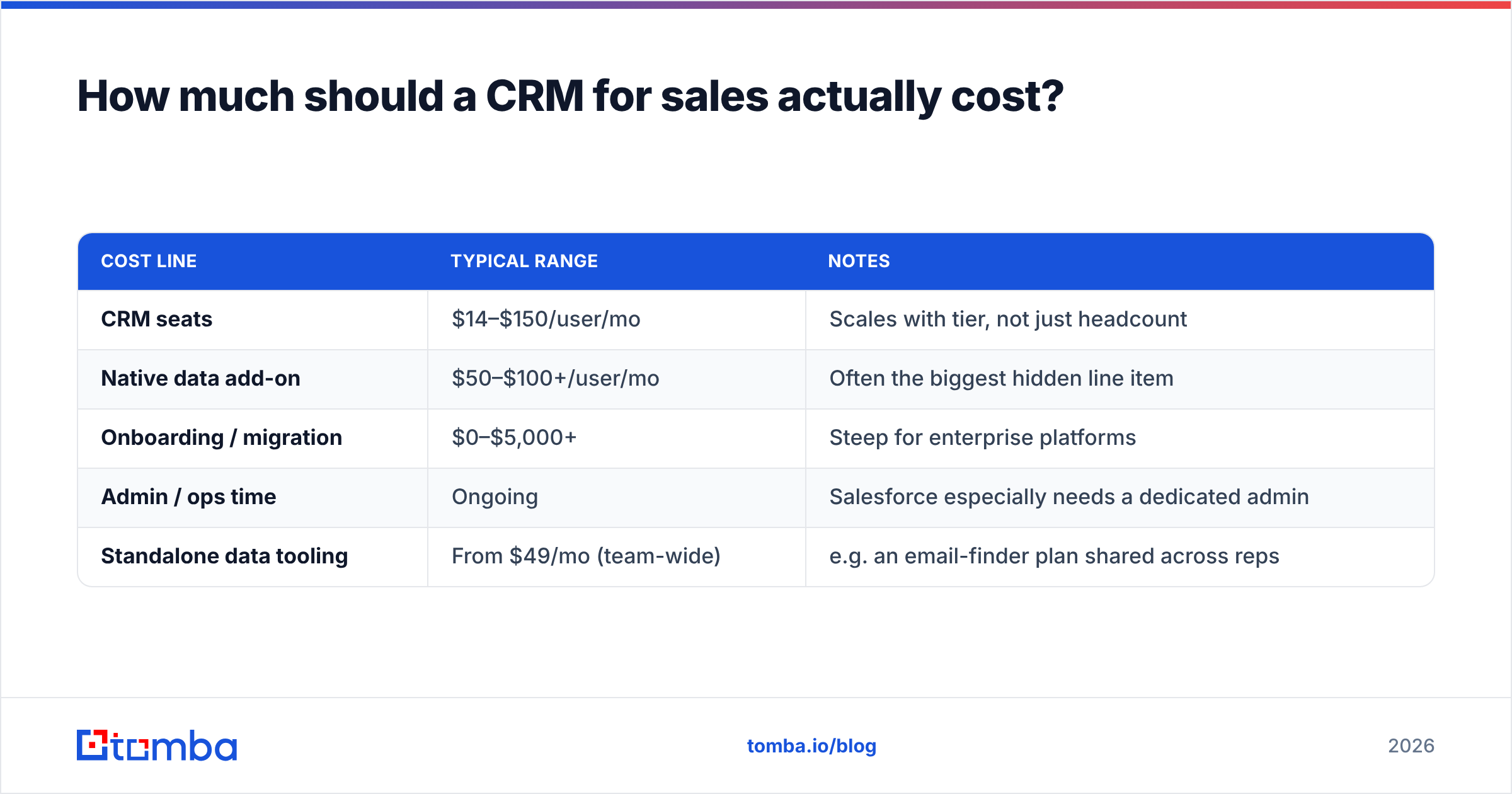
Less than you think for the software, and more than you budget for the data. The sticker price is only part of the total.
| Cost line | Typical range | Notes |
|---|---|---|
| CRM seats | $14–$150/user/mo | Scales with tier, not just headcount |
| Native data add-on | $50–$100+/user/mo | Often the biggest hidden line item |
| Onboarding / migration | $0–$5,000+ | Steep for enterprise platforms |
| Admin / ops time | Ongoing | Salesforce especially needs a dedicated admin |
| Standalone data tooling | From $49/mo (team-wide) | e.g. an email-finder plan shared across reps |
The insight most teams miss: bundled CRM data add-ons are priced per seat, but a standalone data tool is usually priced per plan. A ten-person team paying $75/seat/month for a native enrichment add-on is spending $750 a month. A shared data plan can deliver comparable coverage for a fraction of that — you can see how a per-plan model works on the Tomba pricing page, where a single Starter plan runs $49/mo for the whole team.
That difference compounds. Route your enrichment budget to a shared tool and you can often afford a better CRM tier with the savings.
What features actually move the needle for sales teams?#
Ignore the feature checklist arms race. In practice, a short list of capabilities drives almost all the value:
- Fast contact and deal entry — if logging an activity takes more than a few clicks, reps won't do it.
- Email and calendar sync — two-way, so the CRM captures activity automatically.
- Pipeline stages that match your real process — not a generic default you never customize.
- Reliable reporting — win rate, stage conversion, and cycle length, computed on clean data.
- An open API and integrations — so the CRM talks to your finder, verifier, and outreach tools.
That last point is where a data platform pays off. The Tomba API lets you push verified, enriched contacts straight into HubSpot, Salesforce, or Pipedrive, and native connectors for HubSpot, Salesforce, and Pipedrive mean you can automate the intake process described above without custom code.
For teams that live in spreadsheets before committing to a CRM, the Google Sheets add-on is a low-friction way to build clean lists first, then sync them in.
How do you roll out a sales CRM without killing adoption?#
Start small, prove value fast, and expand only when reps ask for more. The graveyard of failed CRM projects is full of teams that configured everything before anyone logged a single deal.
A pragmatic rollout:
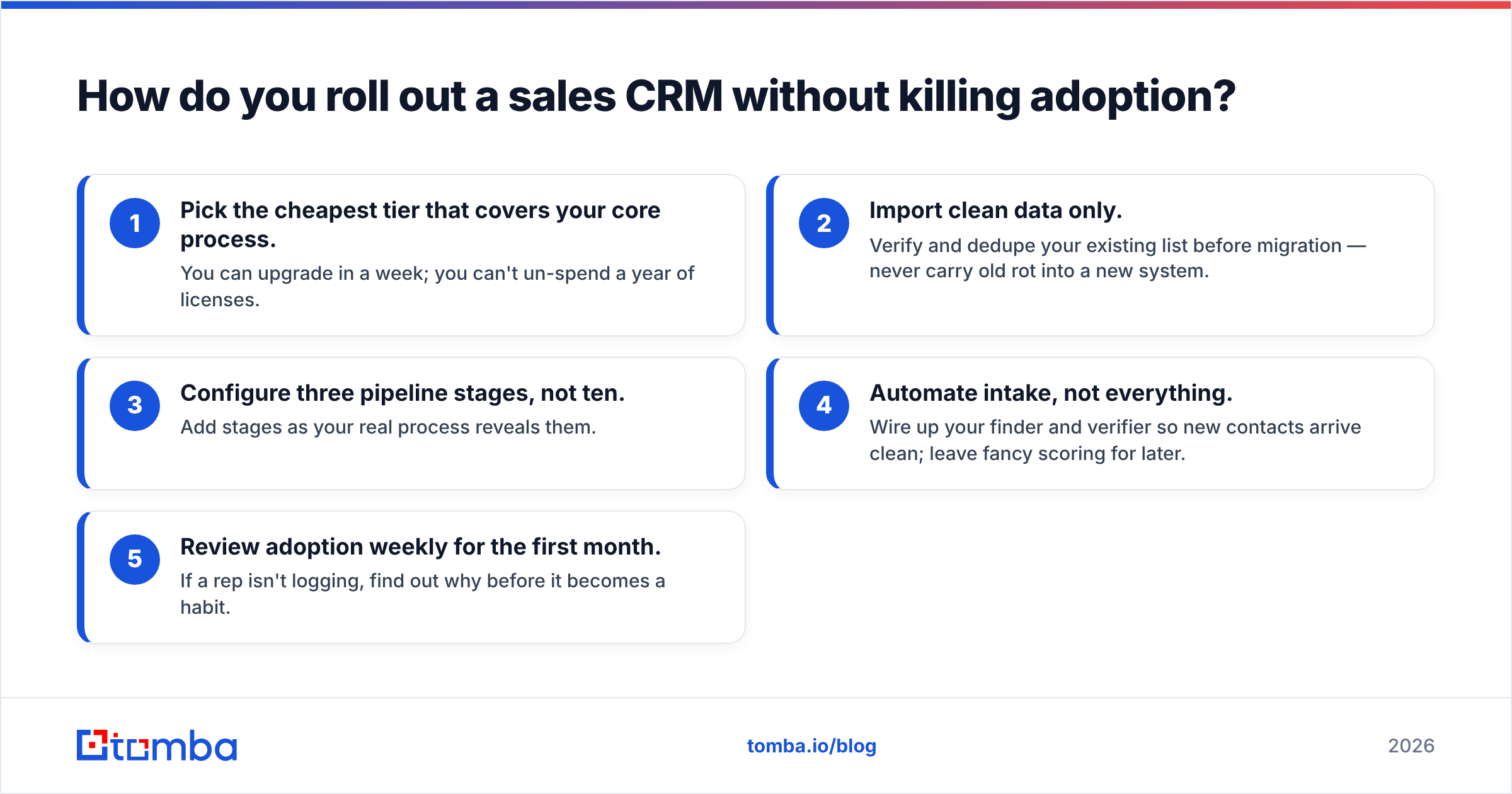
- Pick the cheapest tier that covers your core process. You can upgrade in a week; you can't un-spend a year of licenses.
- Import clean data only. Verify and dedupe your existing list before migration — never carry old rot into a new system.
- Configure three pipeline stages, not ten. Add stages as your real process reveals them.
- Automate intake, not everything. Wire up your finder and verifier so new contacts arrive clean; leave fancy scoring for later.
- Review adoption weekly for the first month. If a rep isn't logging, find out why before it becomes a habit.
Compared with the "big bang" launch where you buy the enterprise tier and spend three months in configuration, this approach gets reps in the system in days and lets real usage — not a vendor demo — decide what you actually need.
For reference, both HubSpot's CRM overview and Salesforce's guidance publish solid, if self-interested, rollout playbooks worth skimming before you commit.
What about AI features in sales CRMs?#
They are useful for summarizing and drafting, but they amplify whatever data you already have — good or bad. AI call summaries, deal-risk scoring, and auto-generated follow-ups are genuinely helpful once your records are clean. Point the same models at duplicate contacts and unverified emails, though, and you get confident, well-written nonsense.
The order of operations matters: fix the data foundation first, then turn on the AI layer. An AI that drafts a perfect outreach email to a bounced address has produced negative value. This is the same reason data quality out-ranks the CRM brand — every layer you add on top inherits the quality of the contacts underneath.
The bottom line#
The best CRM for sales in 2026 is the one your reps use daily, filled with contacts you can actually reach. Match the platform to your team size and process — Pipedrive or Zoho for lean pipeline-first teams, HubSpot for sales-marketing alignment, Salesforce for genuine enterprise complexity — but spend at least as much attention on the data going in as on the software itself.
Skip the per-seat enrichment add-ons and feed your CRM with a shared data stack instead. Use the Tomba Email Finder to source verified professional emails by name, company, or domain, run them through verification before import, and let your reps spend their time selling to real people — not chasing bounces. Start free with 25 searches a month, and scale up only when your pipeline demands it.
Related guides#
Ready to find emails that actually work?
Join 150,000+ professionals who stopped guessing and started sending. Free credits on signup — no credit card required.
Get the Tomba newsletter
Practical outbound tactics and product updates — once every two weeks.
About the author