CRM for Sales and Marketing: How to Align Both in 2026
A CRM for sales and marketing only pays off when both teams share one record. Here's how to pick, structure, and feed a system that ends the lead-handoff war.
CRM for Sales and Marketing: How to Align Both in 2026
Most "CRM problems" are not CRM problems. They are two teams keeping two versions of the truth in one database. Marketing counts a lead the moment a form is filled. Sales counts it only when someone picks up the phone. The CRM sits in the middle, quietly logging both definitions, and everyone argues about the report.
A CRM for sales and marketing fixes that only if you set it up to. The software is the easy part. The alignment — shared stages, shared definitions, clean shared data — is the work. This guide walks through what a joint CRM actually needs to do, how to choose one, and how to feed it so both teams trust the numbers.
TL;DR#
- A shared CRM only works with shared definitions. Agree on what an MQL, SQL, and closed-won mean before you configure a single field.
- The lead handoff is where revenue leaks. Automate the routing and log the SLA, or leads rot between teams.
- Marketing needs the CRM as much as sales does. Attribution, campaign ROI, and lifecycle stages live there — not in a separate marketing silo.
- Dirty data breaks both sides. Bad emails wreck deliverability for marketing and waste dials for sales; enrichment and verification are non-negotiable.
- Pick for your motion, not the logo. HubSpot, Salesforce, and Pipedrive win different fights depending on team size and complexity.
What Does a CRM for Sales and Marketing Actually Do?#
Think of a shared CRM like a relay race baton. Marketing runs the first leg, sales runs the second, and the whole race is lost if the baton drops during the handoff. The CRM is the baton — a single object that carries the contact's full history from first ad click to signed contract.
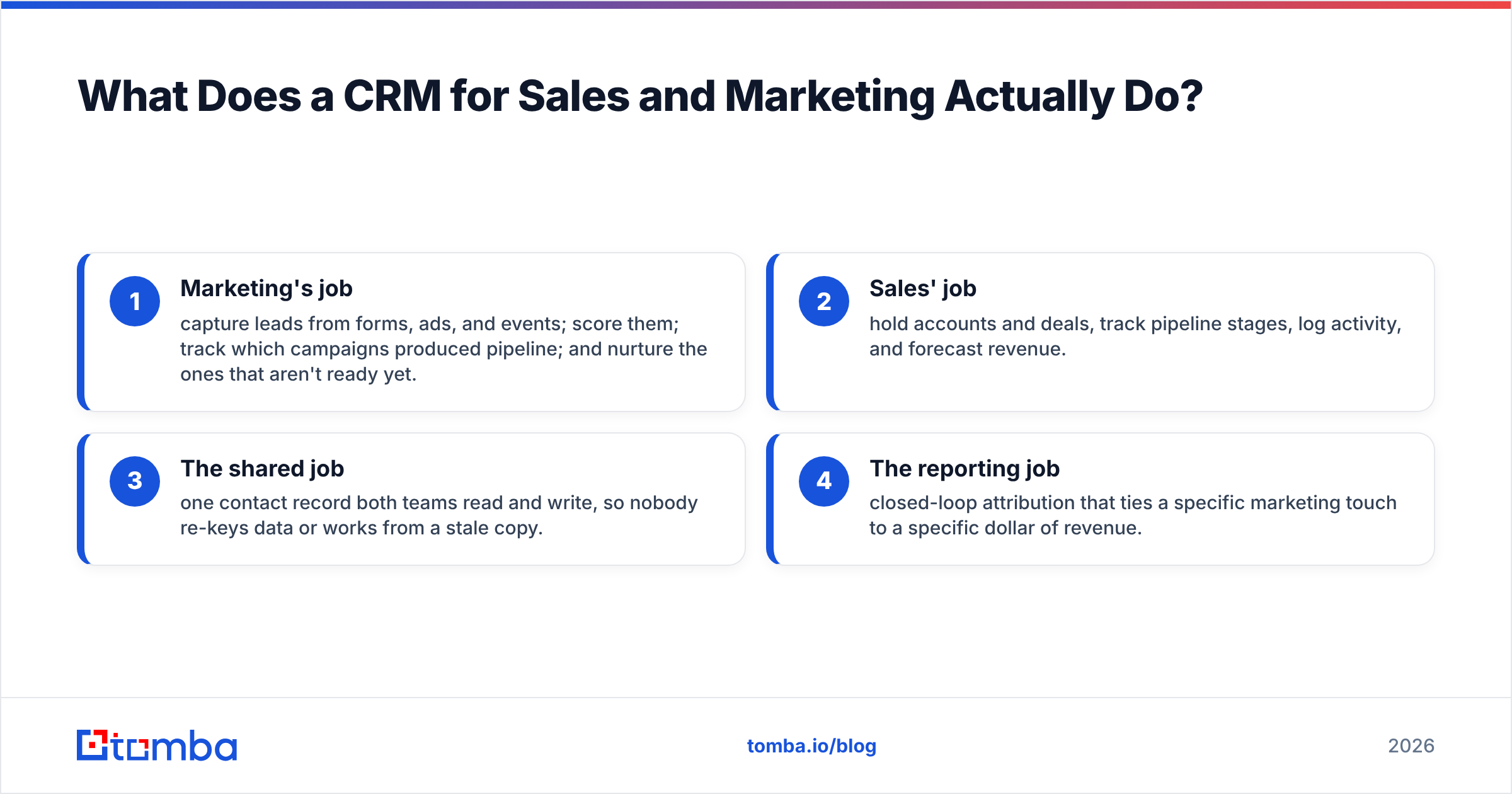
A CRM built for both teams has to serve two jobs at once:
- Marketing's job — capture leads from forms, ads, and events; score them; track which campaigns produced pipeline; and nurture the ones that aren't ready yet.
- Sales' job — hold accounts and deals, track pipeline stages, log activity, and forecast revenue.
- The shared job — one contact record both teams read and write, so nobody re-keys data or works from a stale copy.
- The reporting job — closed-loop attribution that ties a specific marketing touch to a specific dollar of revenue.
When those four jobs live in one system, a marketing qualified lead stops being a number marketing brags about and becomes a record sales can act on the same day.

Why Do Sales and Marketing Fight Over the CRM?#
Because they measure different things and both are right. Marketing is paid on pipeline created. Sales is paid on pipeline closed. The gap between those two metrics is exactly where the handoff happens, and it is invisible unless the CRM makes it visible.
Here is the pattern almost every team falls into:
- Marketing generates 500 leads and calls it a great month.
- Sales works 40 of them, ignores the rest, and says the leads were junk.
- Nobody logged why 460 leads were dropped, so the argument repeats next month.
The fix is not a better dashboard. It is a shared definition enforced by the CRM. When your sales process and pipeline stages are agreed on paper first, the software just records what both teams already decided. A customer relationship management system can't referee a fight the two teams never resolved.
What Should a Joint CRM Include? (Core Feature Checklist)#
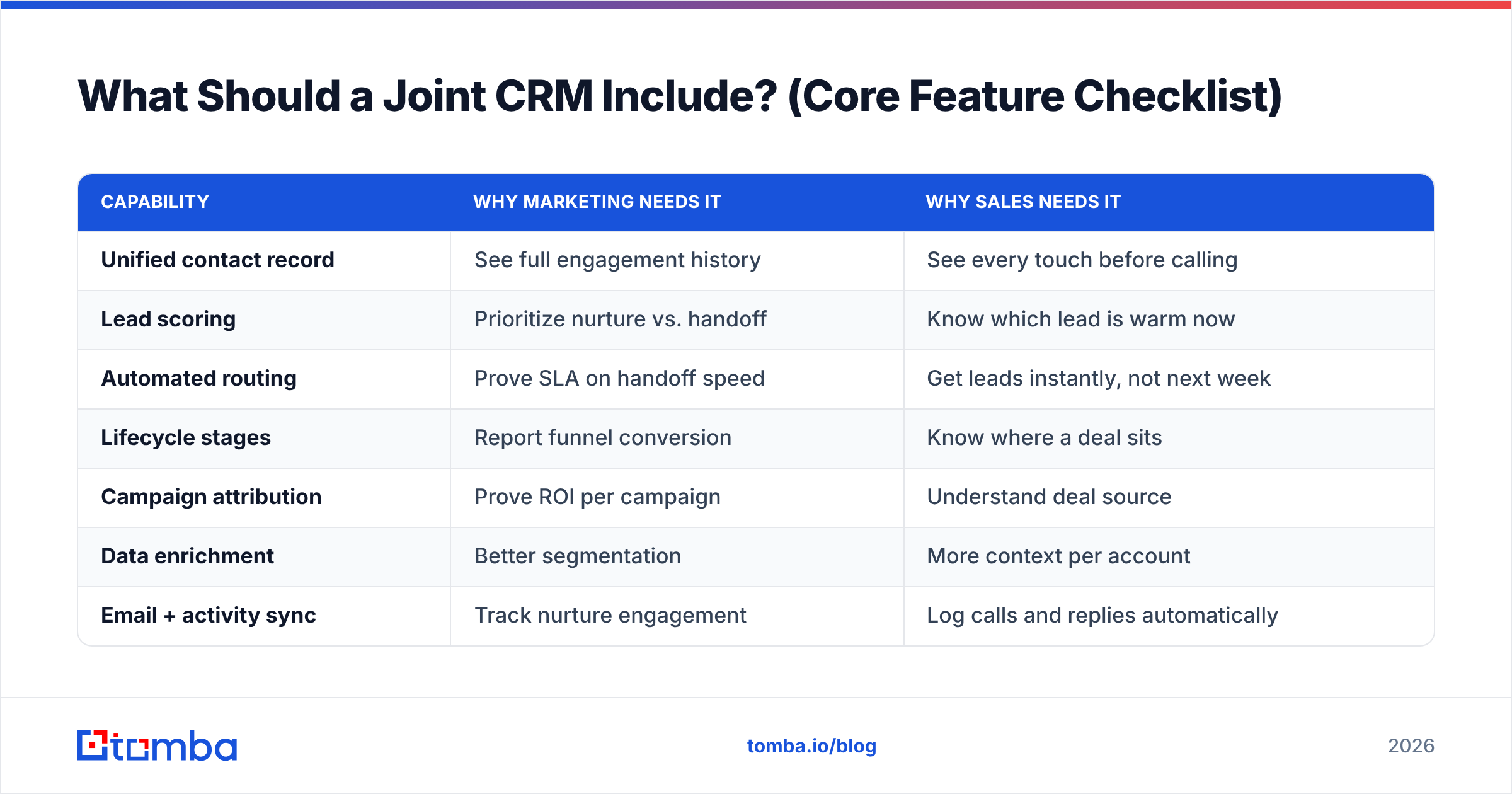
Use this as a buying and configuration checklist. If your CRM can't do these, the alignment problem stays manual.
| Capability | Why marketing needs it | Why sales needs it |
|---|---|---|
| Unified contact record | See full engagement history | See every touch before calling |
| Lead scoring | Prioritize nurture vs. handoff | Know which lead is warm now |
| Automated routing | Prove SLA on handoff speed | Get leads instantly, not next week |
| Lifecycle stages | Report funnel conversion | Know where a deal sits |
| Campaign attribution | Prove ROI per campaign | Understand deal source |
| Data enrichment | Better segmentation | More context per account |
| Email + activity sync | Track nurture engagement | Log calls and replies automatically |
The two rows people skip are automated routing and data enrichment — and they are the two that quietly decide whether alignment works. Routing kills the "the lead sat for a week" complaint. Enrichment kills the "we don't have enough info to call" excuse.
How Do You Choose the Right CRM? (HubSpot vs. Salesforce vs. Pipedrive)#
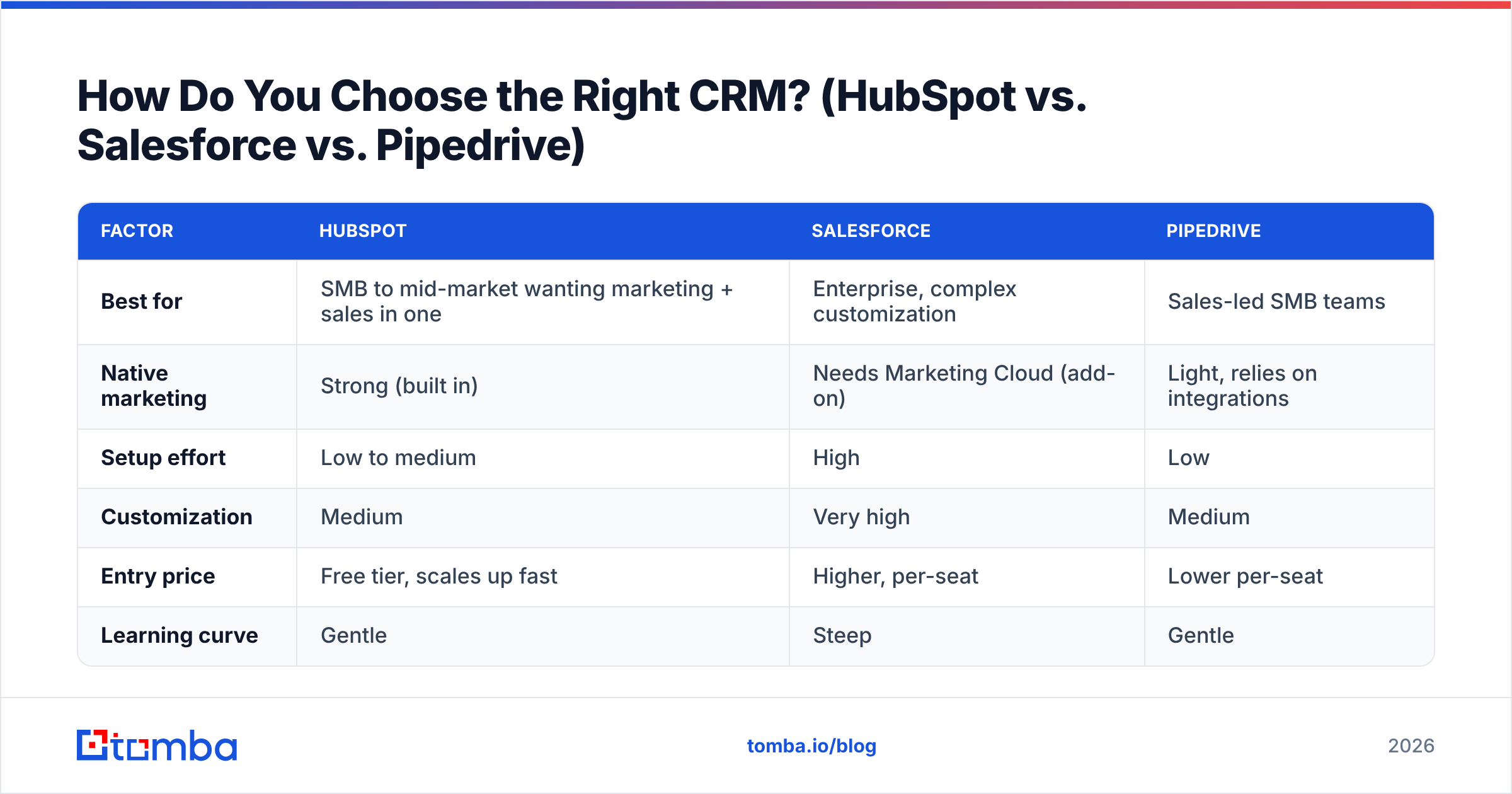
The honest answer: pick for your motion and team size, not the brand recognition. All three below can run a joint sales-and-marketing operation. They differ in how much marketing they include natively and how much setup they demand.
| Factor | HubSpot | Salesforce | Pipedrive |
|---|---|---|---|
| Best for | SMB to mid-market wanting marketing + sales in one | Enterprise, complex customization | Sales-led SMB teams |
| Native marketing | Strong (built in) | Needs Marketing Cloud (add-on) | Light, relies on integrations |
| Setup effort | Low to medium | High | Low |
| Customization | Medium | Very high | Medium |
| Entry price | Free tier, scales up fast | Higher, per-seat | Lower per-seat |
| Learning curve | Gentle | Steep | Gentle |
A few plain-English rules of thumb:
- Choose HubSpot if you want marketing automation and sales in one login and don't have an admin to configure Salesforce. Their own product documentation leans hard on the "one platform" pitch, and for smaller teams that's real.
- Choose Salesforce if you already have or plan to hire an admin, run complex territories, and need deep customization. See how Salesforce frames the sales-and-marketing tie-in before committing to the add-on stack.
- Choose Pipedrive if you are sales-led, want a clean pipeline view, and are happy wiring marketing tools in through integrations rather than paying for a suite. Independent reviews on G2 are a good gut-check on how each performs in the wild.
Whatever you pick, the CRM is a container. What you pour into it decides whether it works.
Why Does Data Quality Decide Whether the CRM Works?#
Because both teams break the same way when the data is dirty. A CRM full of stale, unverified contacts is a shared liability, not a shared asset.
Watch what one bad record does to each side:
- Marketing side: you email an old or fake address. It bounces. Your bounce rate climbs, your sender reputation drops, and now your good emails land in spam too. One dead contact damages the whole list's email deliverability.
- Sales side: the rep dials a disconnected number, emails a bounced address, and burns 15 minutes proving the record is junk. Multiply by a full lead list.
That is why enrichment and verification belong inside the CRM workflow, not as an afterthought. When a lead enters the system, it should be enriched with a verified work email, a valid phone number, and firmographic context before anyone works it.
This is where a tool like Tomba plugs directly into the pipeline. You can find email addresses for inbound leads that only submitted a name and company, verify emails before they hit your marketing sends, and run data enrichment to fill the blanks sales needs to have a real conversation. For teams importing lists, bulk lead generation cleans and completes records at scale before they ever enter the CRM.
How Do You Structure the Sales-and-Marketing Handoff?#
Treat the handoff like a contract with an SLA, not a vibe. The CRM enforces the contract; the two teams write it.
Build it in four steps:
- Define the trigger. Agree the exact score or action that turns a marketing lead into a sales lead (e.g., "requested a demo" or "score ≥ 75"). Write it down. Configure it once.
- Automate the routing. The moment the trigger fires, the CRM assigns the lead to a rep and starts a timer. No manual "hey did you see this" in Slack.
- Set the response SLA. Sales commits to first contact within X hours. The CRM logs whether it happened. Now the argument is data, not opinion.
- Close the loop back. When a deal is won or lost, the reason and the source campaign flow back to marketing. That's how the next batch of leads gets better.
The teams that run this well stop talking about "lead quality" as a feeling. They look at conversion by source, by score band, by campaign — and they fix the leak instead of blaming each other. Solid lead management and scoring is the difference between a CRM that reports the problem and one that shrinks it.
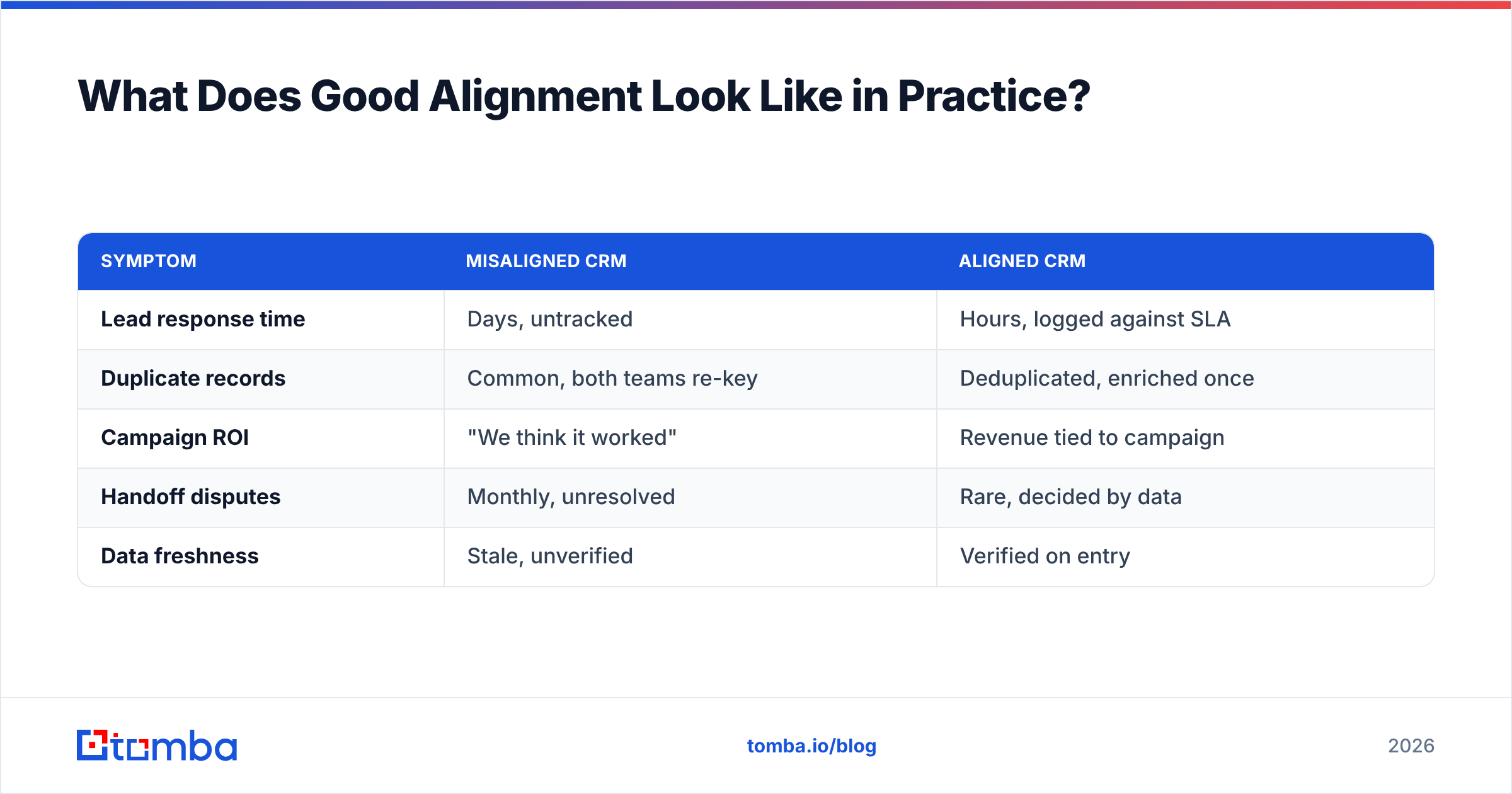
What Does Good Alignment Look Like in Practice?#
A quick before-and-after, because the difference is concrete:
| Symptom | Misaligned CRM | Aligned CRM |
|---|---|---|
| Lead response time | Days, untracked | Hours, logged against SLA |
| Duplicate records | Common, both teams re-key | Deduplicated, enriched once |
| Campaign ROI | "We think it worked" | Revenue tied to campaign |
| Handoff disputes | Monthly, unresolved | Rare, decided by data |
| Data freshness | Stale, unverified | Verified on entry |
The aligned column isn't a software feature you buy. It's the result of three habits: shared definitions, automated routing, and clean data on entry. The CRM makes all three durable.
Frequently Asked Questions#
Do sales and marketing really need the same CRM? Yes, if you want closed-loop reporting. Separate systems mean separate versions of the truth and a manual sync that always drifts. One shared record is the entire point.
Is HubSpot enough for both teams? For most SMB and mid-market teams, yes — it includes marketing automation and sales tools natively. Larger teams with complex territories often outgrow it and move to Salesforce with a marketing add-on.
Where does data enrichment fit? At the point of entry. Enrich and verify every lead before it's worked so marketing doesn't email dead addresses and sales doesn't dial dead numbers. Feeding the CRM clean data is cheaper than cleaning it later.
How do I stop the lead-handoff argument? Write a shared definition of a qualified lead, automate routing on that trigger, and set a response SLA the CRM logs. Arguments end when both teams look at the same timestamped record.
The Bottom Line#
A CRM for sales and marketing is only as aligned as the definitions and data you put into it. Buy the platform that fits your motion — HubSpot for all-in-one, Salesforce for complexity, Pipedrive for sales-led simplicity — then do the real work: shared stages, automated handoffs, and a hard rule that no record enters dirty.
That last rule is where most teams lose. Before a lead reaches a rep or a nurture campaign, run it through a verified email and enrichment step so both teams inherit a record they can trust. Start with the Tomba Email Finder to complete and verify inbound leads at the top of the funnel — clean data in, aligned pipeline out. Check the Tomba pricing tiers, from the free plan up to Growth at $99/mo, and wire it into your CRM before the next campaign goes out.
Related guides#
Ready to find emails that actually work?
Join 150,000+ professionals who stopped guessing and started sending. Free credits on signup — no credit card required.
Get the Tomba newsletter
Practical outbound tactics and product updates — once every two weeks.
About the author