CRM in Sales: How It Drives Pipeline and Revenue in 2026
A CRM only pays off when it reflects reality. Here's how CRM in sales actually drives pipeline, what features matter, and how to keep the data clean enough to trust.
Ask ten sales leaders what a CRM does and you'll get ten answers: a contact database, a forecasting tool, a pipeline board, a manager's spreadsheet with better graphics. They're all partly right, and that's exactly why so many CRM rollouts underwhelm. A CRM in sales is only as valuable as the reality it reflects — and most of them reflect a version of reality that's six months stale.
This guide cuts through the marketing. You'll see what a CRM actually does in a sales motion, where it earns its keep, where teams waste money on it, and the one input that quietly decides whether the whole thing works: data quality.
TL;DR#
- A CRM in sales is the system of record for every prospect, deal, and interaction — its job is to make pipeline visible and forecasts trustworthy, not just to store names.
- The value comes from usage, not features. A cheap CRM your reps actually update beats an expensive one they avoid.
- Dirty data is the silent killer: bounced emails, wrong titles, and dead contacts make every report and forecast wrong downstream.
- The highest-ROI move most teams skip is enriching and verifying contact data before it hits the CRM — clean-in beats clean-up.
- Pick the CRM that matches your motion (SMB vs. enterprise, inbound vs. outbound), then wire in a reliable email finder and verification step to keep records accurate.
What is a CRM in sales, really?#
A CRM (customer relationship management system) is the database and workflow layer where your team tracks every account, contact, deal, and touchpoint from first outreach to closed-won. Think of it as the sales team's shared memory. Without it, everything a rep knows about a deal lives in their head, their inbox, and a personal spreadsheet — and it walks out the door the day they leave.
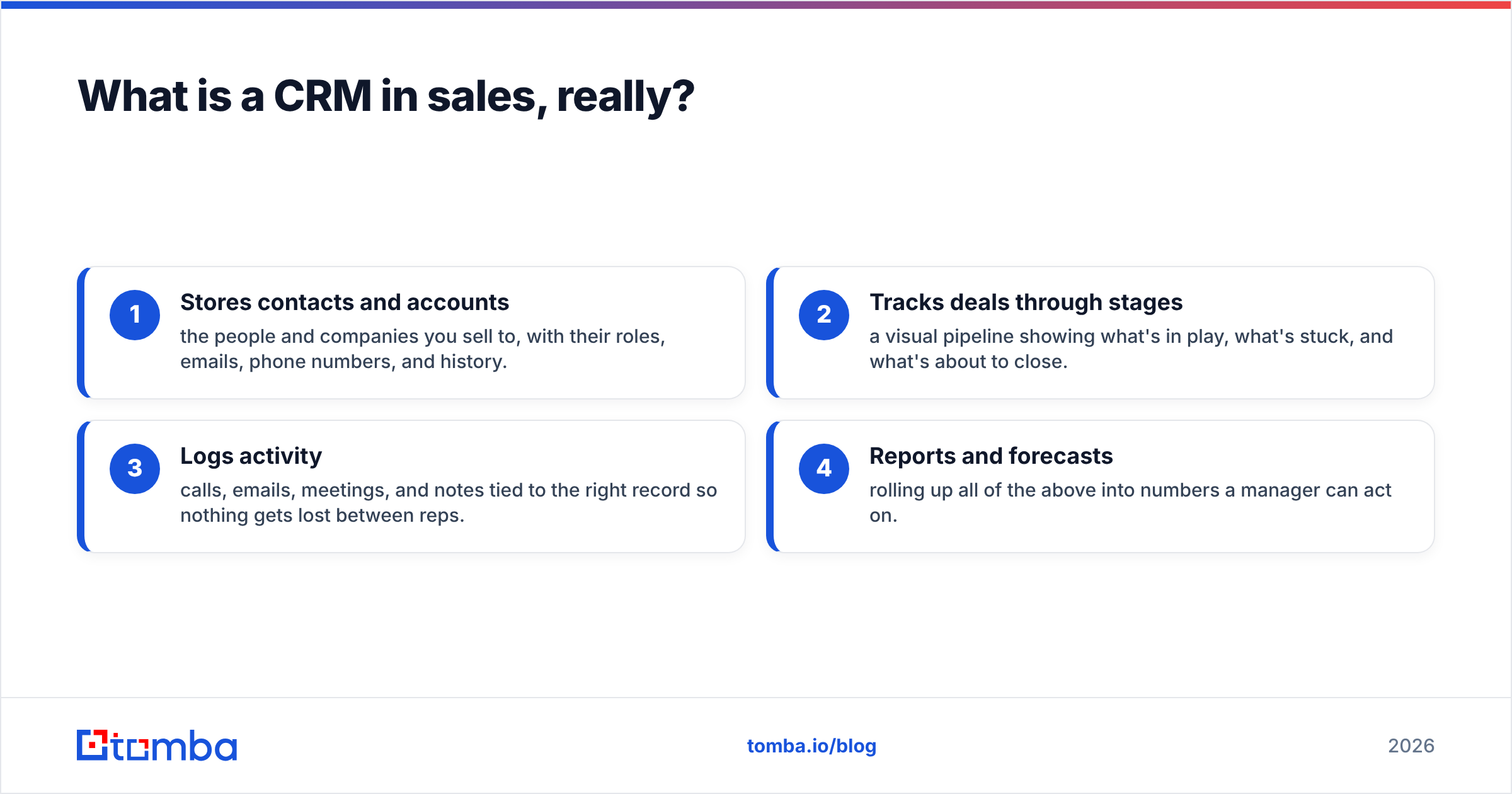
In practice, a CRM in sales does four jobs:
- Stores contacts and accounts — the people and companies you sell to, with their roles, emails, phone numbers, and history.
- Tracks deals through stages — a visual pipeline showing what's in play, what's stuck, and what's about to close.
- Logs activity — calls, emails, meetings, and notes tied to the right record so nothing gets lost between reps.
- Reports and forecasts — rolling up all of the above into numbers a manager can act on.
The trap is treating a CRM as a filing cabinet. A filing cabinet is passive; a good CRM is the operating system for your sales process and pipeline. The difference is whether the data inside it is current enough to make decisions on.
Why does CRM data quality matter more than the CRM itself?#
Here's the uncomfortable truth: the brand of CRM matters far less than the quality of what's in it. A pristine forecast built on a database where 30% of the emails bounce and half the job titles are two promotions out of date isn't a forecast — it's fiction with nice charts.
Data decays faster than most teams realize. B2B contact data degrades at roughly 22–30% per year as people change jobs, companies rebrand, and domains move. That means a contact list you imported 12 months ago is already a quarter wrong. Every downstream number inherits that error:
- Pipeline coverage looks healthier than it is because dead accounts still sit in "open" stages.
- Rep productivity drops as they burn hours emailing addresses that bounce.
- Deliverability suffers — high bounce rates hurt your sender reputation and push good emails to spam.
- Forecasts miss because the stage data was never trustworthy in the first place.
This is why the smartest teams treat data hygiene as a first-class part of their CRM strategy, not an afterthought. Verifying an email with an email verifier before it enters the CRM costs a fraction of a cent. Discovering it's dead after a rep spends a week chasing the deal costs real money.
What features actually matter in a sales CRM?#
CRM vendors compete on feature counts, but most reps use a fraction of what they pay for. Here's what genuinely moves the needle, ranked by how often it earns its cost:
- Pipeline management — a drag-and-drop deal board with customizable stages. This is the daily-driver view for every rep and manager.
- Contact and activity logging — automatic capture of emails and calls so reps don't have to do manual data entry (the #1 reason CRMs go stale).
- Data enrichment and verification — native or integrated tools that fill in missing emails, phones, and firmographics and flag bad records.
- Reporting and forecasting — pipeline reports, win-rate analysis, and forecast rollups that leadership can trust.
- Integrations and API — connections to your email finder, sequencer, and data tools so records stay in sync without copy-paste.
- Automation — rules that move deals, assign leads, and trigger tasks so nothing falls through the cracks.
Notice that "AI features" isn't at the top. AI summaries and predictive scoring are useful, but they run on the same underlying data — garbage in, confident garbage out. Fix the data layer first.
How do the major sales CRMs compare?#
There's no single best CRM; there's a best CRM for your motion and budget. Here's an honest look at the categories teams choose between in 2026.
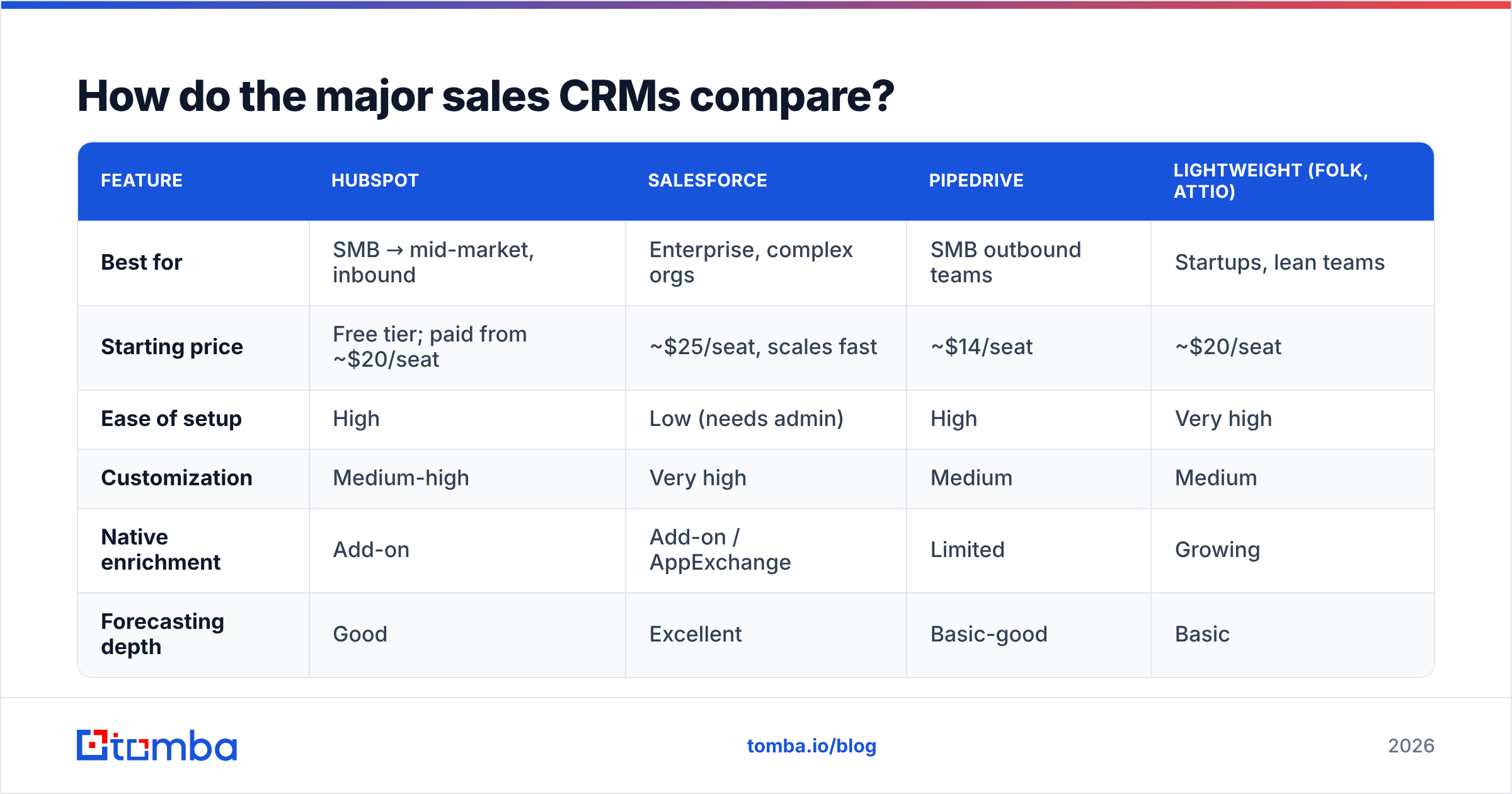
| Feature | HubSpot | Salesforce | Pipedrive | Lightweight (Folk, Attio) |
|---|---|---|---|---|
| Best for | SMB → mid-market, inbound | Enterprise, complex orgs | SMB outbound teams | Startups, lean teams |
| Starting price | Free tier; paid from ~$20/seat | ~$25/seat, scales fast | ~$14/seat | ~$20/seat |
| Ease of setup | High | Low (needs admin) | High | Very high |
| Customization | Medium-high | Very high | Medium | Medium |
| Native enrichment | Add-on | Add-on / AppExchange | Limited | Growing |
| Forecasting depth | Good | Excellent | Basic-good | Basic |
A few honest takeaways:
- Salesforce wins on power and customization but demands admin resources and a real budget. It's overkill for a five-person team.
- HubSpot is the default for inbound-heavy SMB and mid-market teams thanks to its free tier and gentle learning curve. Compare specifics on G2 before committing.
- Pipedrive is deliberately simple and pipeline-first — great for outbound SDR teams who just want to move deals.
- Lightweight CRMs (Attio, Folk) suit startups that value speed and design over deep configurability.
Whatever you pick, the CRM is the container. The value is the data you put in it — which is where most of the ROI decision actually lives.
Is a CRM worth it for a small sales team?#
Yes — but only if you'll keep it current. A CRM that reps avoid is worse than a shared spreadsheet, because it creates false confidence. Leadership makes calls on the CRM's numbers, and if those numbers are stale, the decisions are wrong.
The break-even math is simple. If a CRM saves each rep even 30 minutes a day of "where did we leave off with this account?" and prevents one lost deal a quarter from falling through the cracks, it pays for itself many times over at $20–50 per seat. The failure mode isn't cost — it's adoption. And adoption dies when data entry is manual and the records are wrong.
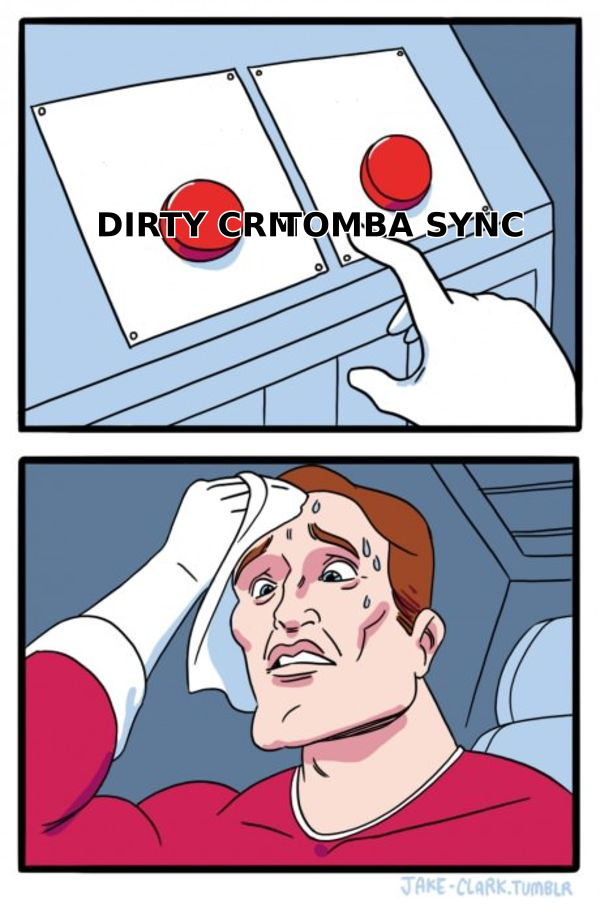
That's the connection most teams miss: adoption and data quality reinforce each other. Reps trust and use a CRM that has accurate, enriched records. They abandon one full of bounced emails and missing phone numbers. So the investment that unlocks CRM ROI isn't a fancier CRM — it's a clean data pipeline feeding the one you have.
How do you keep your CRM data clean?#
Clean data is a process, not a one-time project. Here's the workflow high-performing teams run:
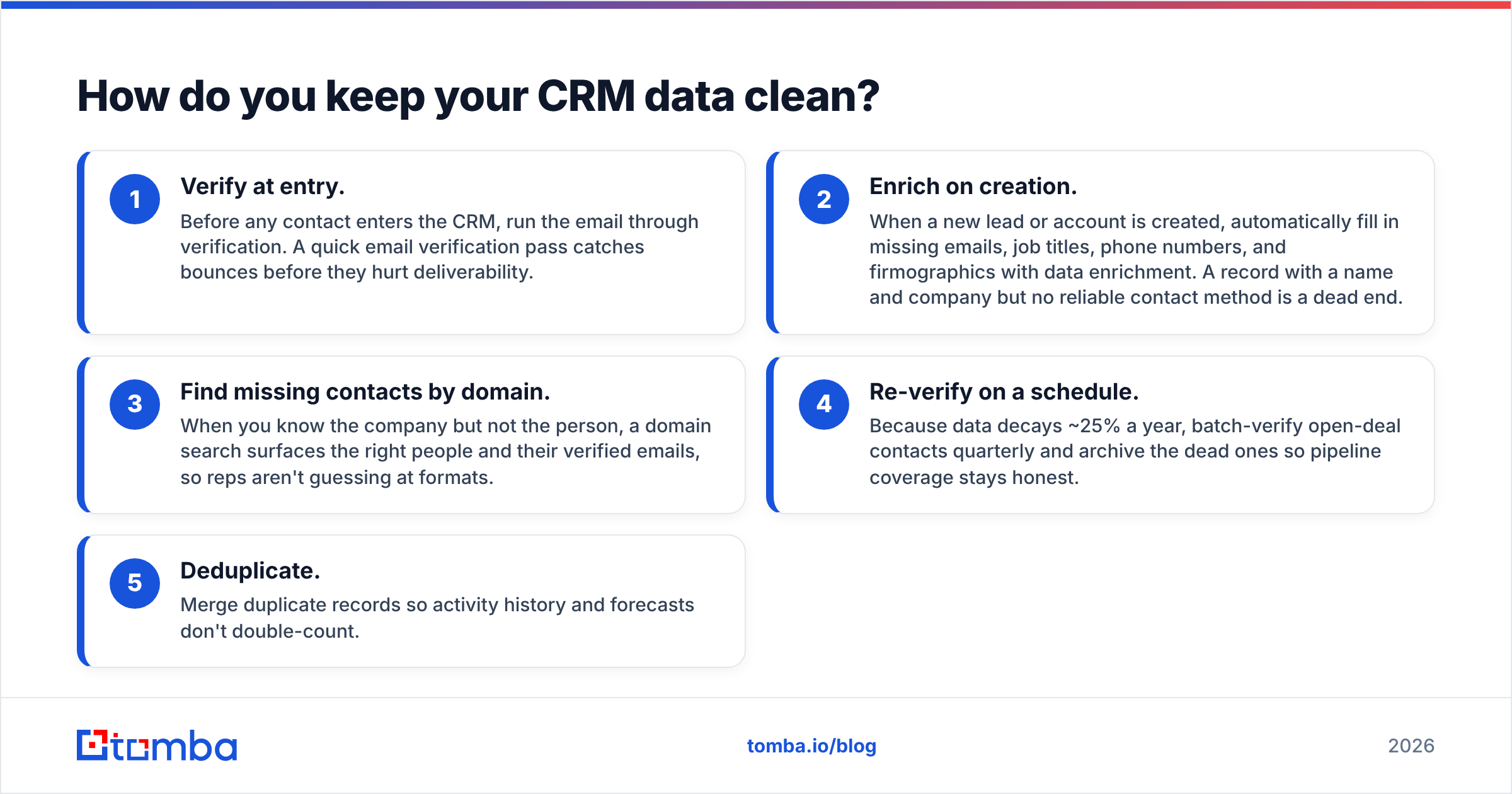
- Verify at entry. Before any contact enters the CRM, run the email through verification. A quick email verification pass catches bounces before they hurt deliverability.
- Enrich on creation. When a new lead or account is created, automatically fill in missing emails, job titles, phone numbers, and firmographics with data enrichment. A record with a name and company but no reliable contact method is a dead end.
- Find missing contacts by domain. When you know the company but not the person, a domain search surfaces the right people and their verified emails, so reps aren't guessing at formats.
- Re-verify on a schedule. Because data decays ~25% a year, batch-verify open-deal contacts quarterly and archive the dead ones so pipeline coverage stays honest.
- Deduplicate. Merge duplicate records so activity history and forecasts don't double-count.
The tooling for steps 1–3 doesn't have to live inside the CRM. Most teams wire an external email finder and verifier into their CRM through native integrations or the Tomba API, so enrichment happens automatically as records are created. Tomba connects directly to HubSpot, Salesforce, and Pipedrive, which means clean-in becomes the default instead of a manual chore.
What does a CRM data workflow cost?#
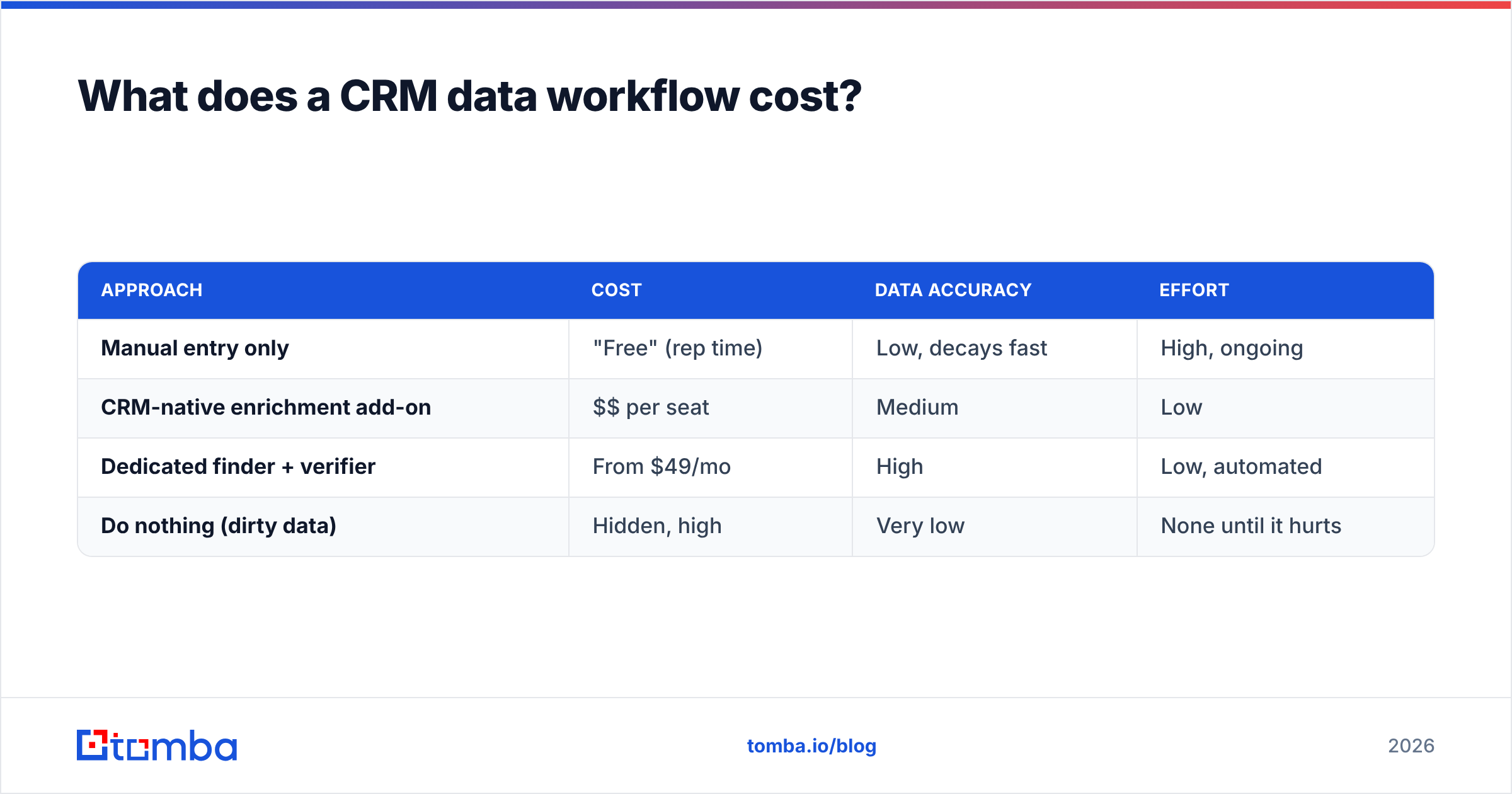
Enrichment and verification are cheap relative to the deals they protect. Here's a rough comparison of adding a data layer to your CRM:
| Approach | Cost | Data accuracy | Effort |
|---|---|---|---|
| Manual entry only | "Free" (rep time) | Low, decays fast | High, ongoing |
| CRM-native enrichment add-on | $$ per seat | Medium | Low |
| Dedicated finder + verifier | From $49/mo | High | Low, automated |
| Do nothing (dirty data) | Hidden, high | Very low | None until it hurts |
Tomba's plans start with a free tier (25 searches/mo), then Starter at $49/mo and Growth at $99/mo — see full Tomba pricing for higher tiers. For most teams, the dedicated finder-plus-verifier route wins because it automates the two steps (find and verify) that manual entry gets wrong most often, and it scales with bulk email finder jobs when you're importing a whole list at once.
How do CRM, enrichment, and outreach fit together?#
Picture the sales stack as a relay race. Each stage hands data to the next, and a drop anywhere ruins the run:
- Prospecting identifies target accounts and people.
- Enrichment + verification turns those names into accurate, reachable contacts.
- CRM stores the record and tracks the deal.
- Outreach and sequencing work the contact toward a meeting.
- Reporting rolls it all up for the forecast.
The CRM sits in the middle, but it depends entirely on the enrichment step feeding it good data. Skip that step and every stage downstream — outreach, reporting, forecasting — inherits the errors. This is why "which CRM?" is often the wrong first question. The better first question is "how do we guarantee the contacts entering the CRM are real, reachable, and current?"
Answer that, and almost any competent CRM will serve you well. Ignore it, and even the most expensive platform on the market becomes an expensive place to store wrong information.
The bottom line#
A CRM in sales is the system of record that makes your pipeline visible and your forecast trustworthy — but only when the data inside it reflects reality. The platform you choose matters less than two things: whether your reps actually use it, and whether the contacts it holds are accurate. Both hinge on data quality.
Get the data layer right and the CRM stops being a chore reps avoid and starts being the revenue engine it was sold as.
If your CRM is filling up with bounced emails and dead-end contacts, fix the input first. The Tomba Email Finder finds and verifies professional email addresses by name, company, or domain — so every record that lands in your CRM is one your reps can actually reach. Start free with 25 searches a month, wire it into HubSpot, Salesforce, or Pipedrive, and let clean-in do the work your team keeps putting off.
Related guides#
Ready to find emails that actually work?
Join 150,000+ professionals who stopped guessing and started sending. Free credits on signup — no credit card required.
Get the Tomba newsletter
Practical outbound tactics and product updates — once every two weeks.
About the author