CRM Lead Generation in 2026: A Practical, No-Fluff Guide
CRM lead generation only works when your pipeline is fed with clean, enriched, deduplicated contacts. Here's how to build the workflow that actually fills your CRM in 2026.
Your CRM is only as valuable as the leads inside it. You can buy the slickest platform on the market, but if the records are half-empty, duplicated, or three job changes out of date, your reps spend their day cleaning data instead of selling. CRM lead generation is the discipline of feeding that system with the right contacts, enriched with the right fields, at the right moment — automatically.
This guide breaks down what CRM lead generation actually means in 2026, the workflow that works, the tools that matter, and the mistakes that quietly kill pipelines.
TL;DR#
- CRM lead generation is the end-to-end process of sourcing, capturing, enriching, and routing leads directly into your CRM so reps get sales-ready records, not raw noise.
- The bottleneck is almost never lead volume — it's data quality: missing emails, stale titles, and duplicate records.
- A working stack has four layers: capture, enrich, verify, route. Skip enrichment and verification and your deliverability and win rate both drop.
- Tools like Tomba's email finder plus native HubSpot or Salesforce syncs close the gap between "a name in a spreadsheet" and "a contact your rep can email today."
- Measure CRM lead gen by enriched-record rate, bounce rate, and speed-to-lead — not raw form fills.
What is CRM lead generation?#
CRM lead generation is the practice of generating leads and landing them inside your customer relationship management system in a usable, enriched state. Think of it like stocking a restaurant kitchen. Getting ingredients delivered to the back door (raw leads) is only step one. Someone still has to wash, sort, and prep them (enrich and verify) before the line cook (your rep) can turn them into a dish (a closed deal). A CRM full of unwashed ingredients just rots.
The term covers two motions that people often confuse:
- Inbound capture — forms, chat, demo requests, and website visitors flowing into the CRM.
- Outbound sourcing — reps and automation actively finding target accounts and contacts, then pushing them into the CRM.
Modern CRM lead generation blends both. A visitor fills out a form with just a work email; enrichment fills in the company, title, headcount, and phone number automatically. Meanwhile, an SDR builds an account list, finds verified emails, and syncs those contacts into the same pipeline. If you want the textbook definition of the underlying system, CRM is the record of every interaction — lead gen is what keeps that record fed.
Why do most CRM lead generation efforts fail?#
They fail on data, not effort. Marketing teams celebrate a spike in form fills; two weeks later, sales says the leads are garbage. Both are right. The volume was real, but the records were unusable.
Here are the recurring failure modes:
- Half-empty records. A form captures a name and email but nothing else. Reps have no title, no company size, no context — so they can't prioritize or personalize.
- Stale data. Gartner has repeatedly noted that B2B data decays at roughly 20–30% per year as people change jobs. A CRM you cleaned last January is already wrong by summer.
- Duplicates. The same lead comes in through a webinar, a content download, and an outbound sequence. Now three reps are working one buyer.
- Unverified emails. You push contacts straight to your sequencer, hard bounces spike, and your sending domain's reputation tanks — hurting every campaign afterward.
- Slow routing. A lead sits in a queue for two days before assignment. Research on speed-to-lead consistently shows conversion collapses when first response drags past the first hour.
None of these are volume problems. They're pipeline-hygiene problems, and they're all fixable with the right layer between "lead captured" and "rep works it."
What does a working CRM lead generation workflow look like?#
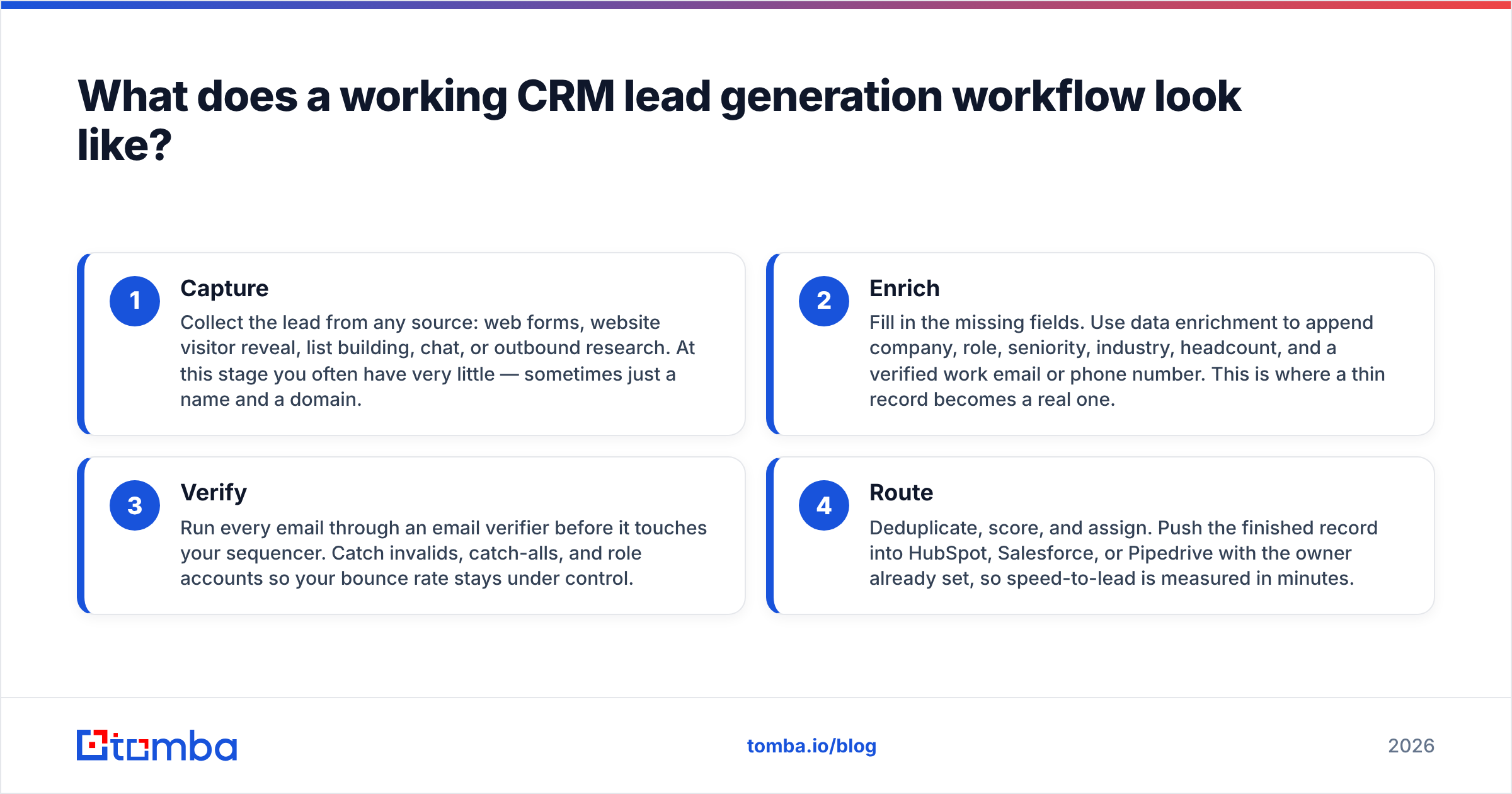
A reliable workflow has four stages. Each one hands clean output to the next, so nothing reaches a rep until it's genuinely sales-ready.
- Capture — Collect the lead from any source: web forms, website visitor reveal, list building, chat, or outbound research. At this stage you often have very little — sometimes just a name and a domain.
- Enrich — Fill in the missing fields. Use data enrichment to append company, role, seniority, industry, headcount, and a verified work email or phone number. This is where a thin record becomes a real one.
- Verify — Run every email through an email verifier before it touches your sequencer. Catch invalids, catch-alls, and role accounts so your bounce rate stays under control.
- Route — Deduplicate, score, and assign. Push the finished record into HubSpot, Salesforce, or Pipedrive with the owner already set, so speed-to-lead is measured in minutes.
The order matters. Verifying before enriching wastes credits; routing before verifying poisons deliverability. Get the sequence right and each stage compounds the last.
Which tools handle CRM lead generation in 2026?#
The market splits into three buckets: all-in-one sales platforms, dedicated data/enrichment providers, and the CRM's own native tooling. Most teams end up combining a CRM with a data layer, because the CRM stores records well but sources them poorly.
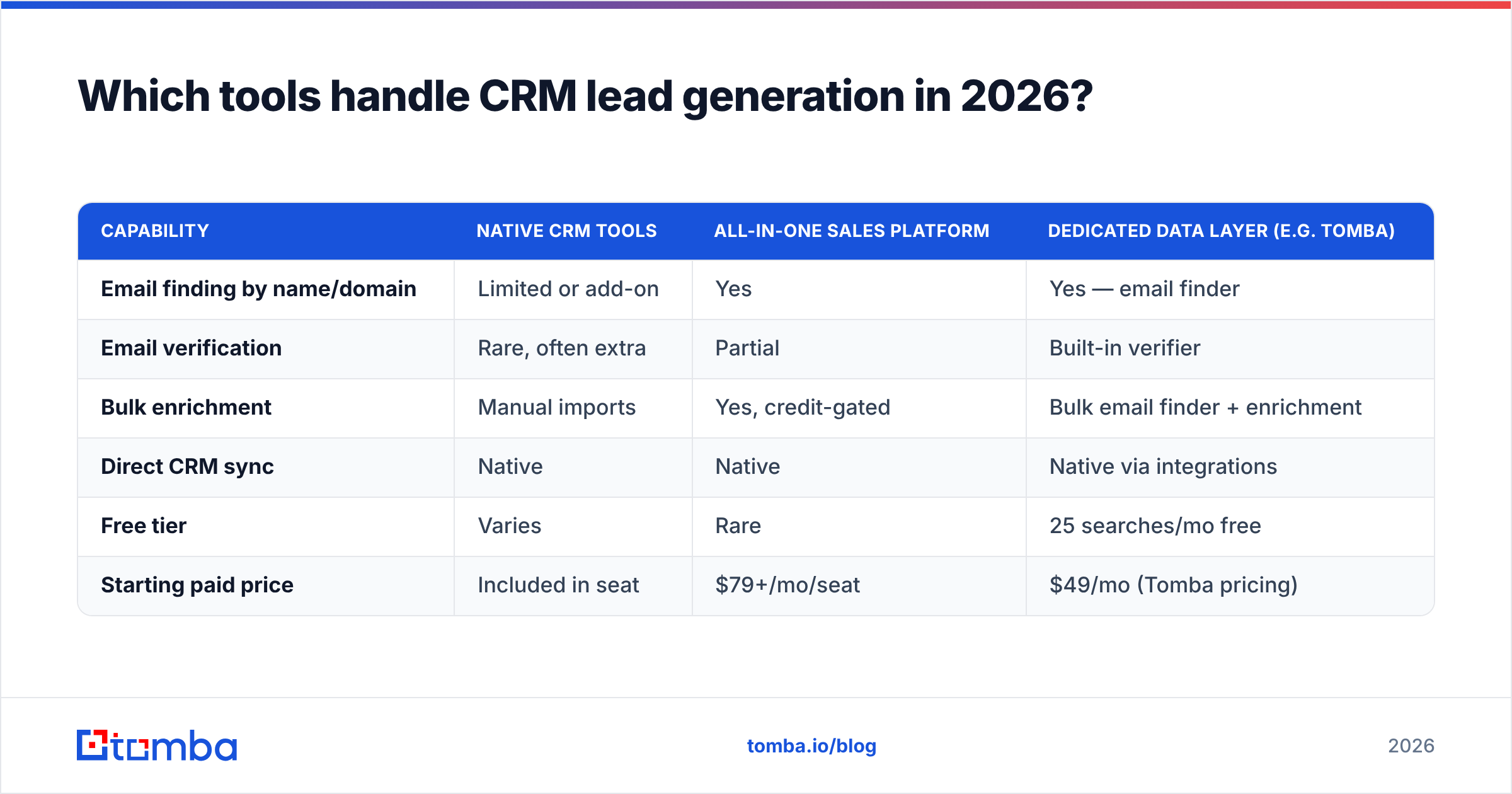
Here's how the common building blocks compare on the job that matters — turning a name into a clean, CRM-ready contact.
| Capability | Native CRM tools | All-in-one sales platform | Dedicated data layer (e.g. Tomba) |
|---|---|---|---|
| Email finding by name/domain | Limited or add-on | Yes | Yes — email finder |
| Email verification | Rare, often extra | Partial | Built-in verifier |
| Bulk enrichment | Manual imports | Yes, credit-gated | Bulk email finder + enrichment |
| Direct CRM sync | Native | Native | Native via integrations |
| Free tier | Varies | Rare | 25 searches/mo free |
| Starting paid price | Included in seat | $79+/mo/seat | $49/mo (Tomba pricing) |
The takeaway isn't "one tool wins." It's that a CRM alone won't generate or clean leads, and an all-in-one platform locks you into its data quality whether it's good or not. A dedicated data layer lets you keep your CRM of choice and simply feed it better records.
How the layers stack up in practice#
If you already run HubSpot or Salesforce, you don't need to rip anything out. You need to plug the enrichment gap. A typical 2026 stack looks like this:
- CRM: HubSpot, Salesforce, or Pipedrive — your system of record.
- Data layer: an email finder + verifier + enrichment provider that pushes clean contacts in.
- Sequencer: a cold email or dialer tool that pulls verified records out.
- Automation glue: Zapier or Make to move records between steps without manual CSV exports.
How do you enrich CRM leads without wrecking deliverability?#
Verify before you send, always. This is the single highest-leverage habit in CRM lead generation, and it's the one teams skip most.
When you find an email — whether by domain search across a target account or by name — treat it as a candidate, not a fact. Push it through verification to separate the deliverable addresses from the invalid and risky ones. Catch-all domains are their own trap: they accept every address at the SMTP layer, so a naive check calls them "valid" when they may bounce. A dedicated catch-all verifier resolves that ambiguity before the record ever hits your sequencer.
Concretely, protect your sending reputation with three rules:
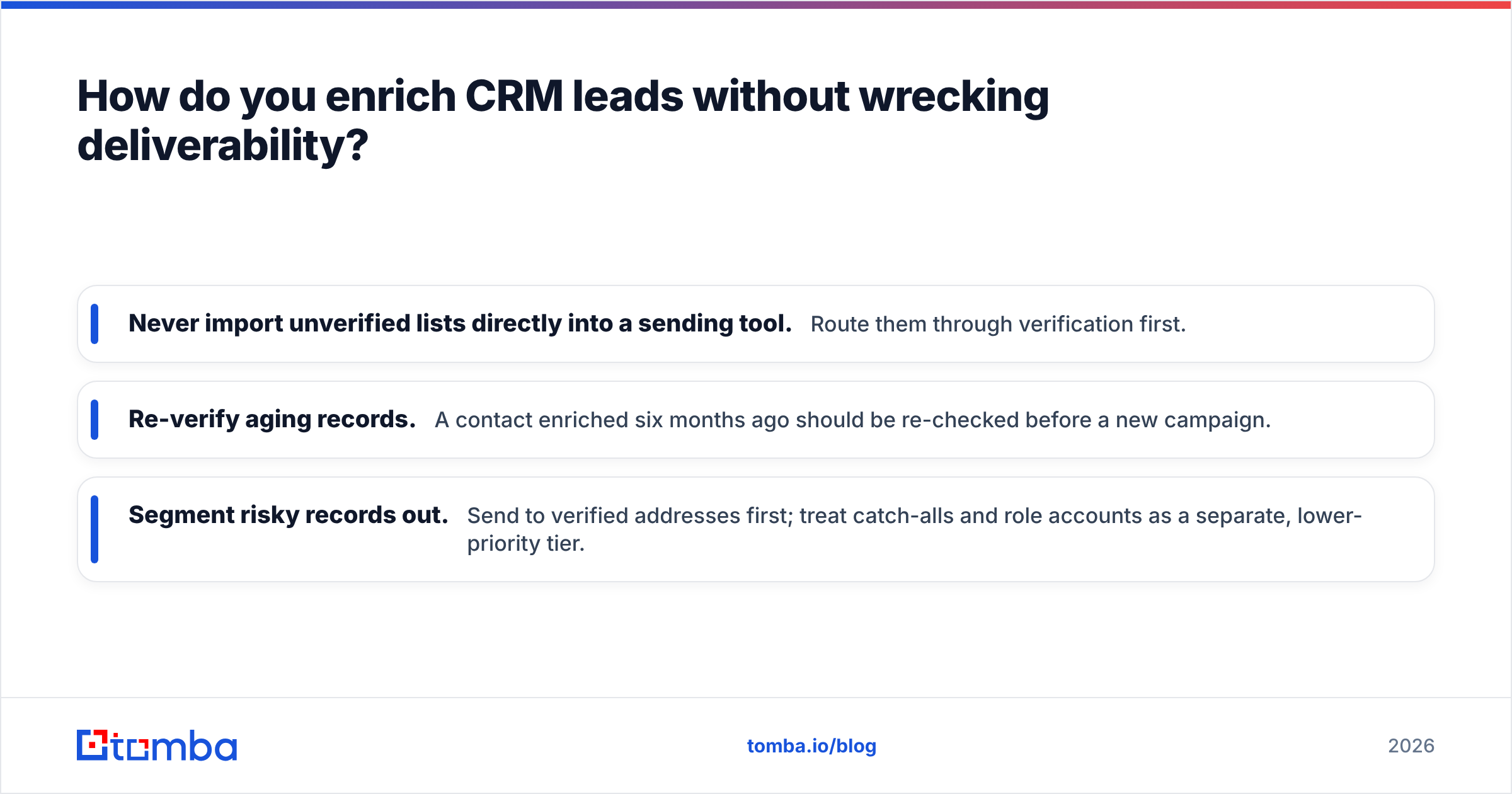
- Never import unverified lists directly into a sending tool. Route them through verification first.
- Re-verify aging records. A contact enriched six months ago should be re-checked before a new campaign.
- Segment risky records out. Send to verified addresses first; treat catch-alls and role accounts as a separate, lower-priority tier.
Deliverability is a compounding asset. One clean campaign builds reputation; one dirty blast of unverified addresses can undo months of it. If you want the mechanics, Tomba's glossary explains email deliverability and sender reputation in plain terms.
How do you route and score leads inside the CRM?#
Once records are enriched and verified, routing decides whether they convert or rot. Two mechanisms do the heavy lifting: deduplication and scoring.
Deduplication prevents the "three reps, one buyer" problem. Match on email and domain before creating a new record; merge on collision. Tools like a remove-duplicates utility help clean lists before import, and native CRM merge rules handle the rest.
Lead scoring decides order of attack. A simple, effective model weights:
- Fit — does the company match your ICP on size, industry, and geography?
- Role — is the contact a decision-maker or an end user?
- Intent — did they visit pricing, request a demo, or open three emails?
- Recency — how fresh is the interaction?
You don't need a machine-learning scoring engine on day one. A transparent points model that any rep can explain beats a black box they don't trust. The goal is simply to make sure your best-fit, highest-intent leads get worked first — because that's where win rate actually moves.
What metrics prove CRM lead generation is working?#
Stop reporting raw form fills. They flatter marketing and tell sales nothing. Measure the health of the pipeline instead:
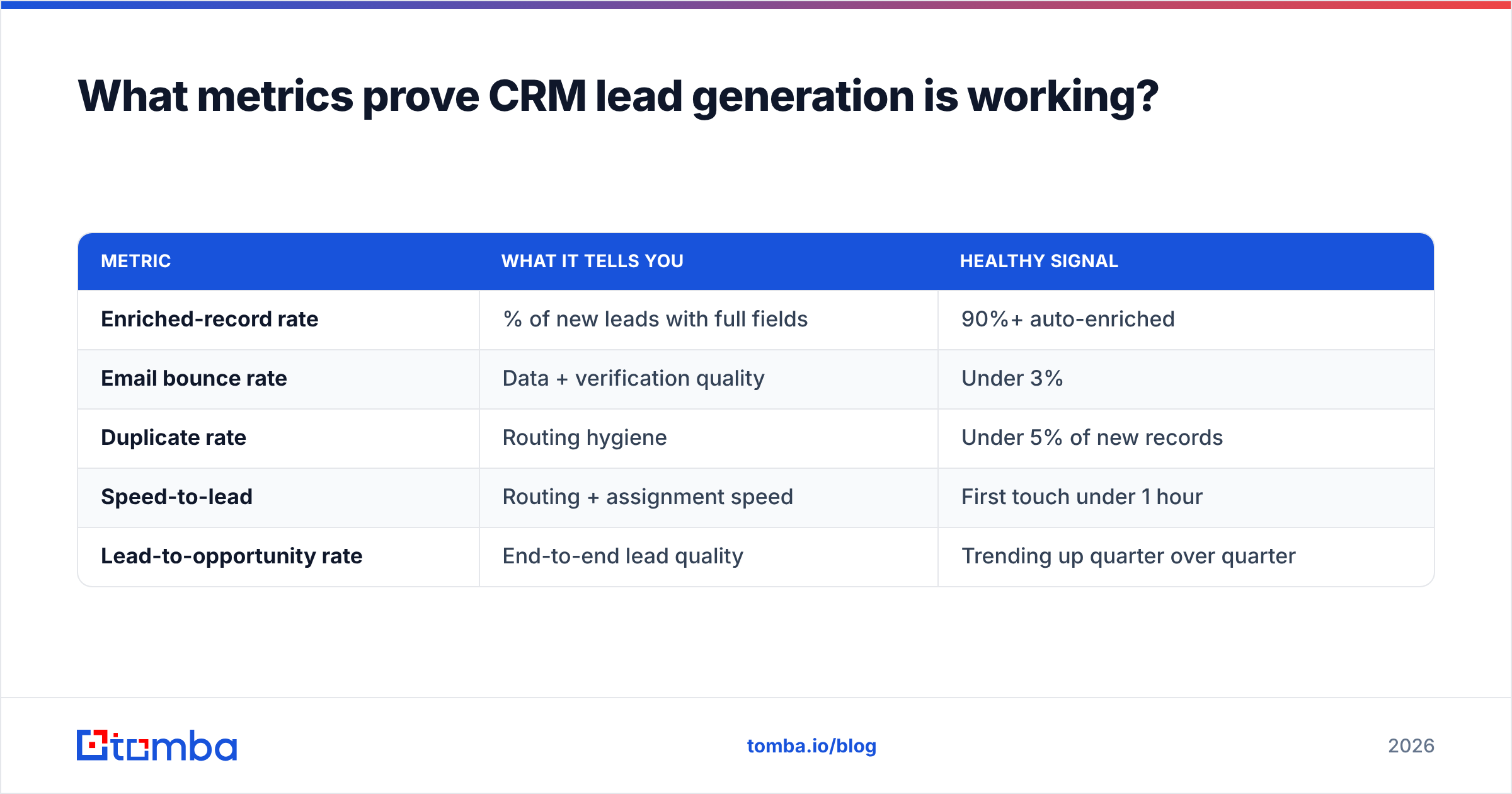
| Metric | What it tells you | Healthy signal |
|---|---|---|
| Enriched-record rate | % of new leads with full fields | 90%+ auto-enriched |
| Email bounce rate | Data + verification quality | Under 3% |
| Duplicate rate | Routing hygiene | Under 5% of new records |
| Speed-to-lead | Routing + assignment speed | First touch under 1 hour |
| Lead-to-opportunity rate | End-to-end lead quality | Trending up quarter over quarter |
If enriched-record rate is high and bounce rate is low, your data layer is doing its job. If speed-to-lead is slow, the problem is routing, not sourcing. These five numbers isolate exactly which stage of the workflow is leaking — which is far more useful than a vanity count of leads generated.
For a broader view of how teams instrument this across the funnel, G2's CRM category and vendor benchmarks are a reasonable neutral reference, but your own trend line matters more than any industry average.
Is a dedicated data layer worth it over your CRM's built-in tools?#
Yes, when your reps spend more than a few hours a week hand-filling records. The math is simple: if a rep costs you meaningful money per hour and spends five hours a week researching and cleaning contacts, a data layer that automates that work pays for itself long before you hit the Tomba plans ceiling. Native CRM enrichment is fine for occasional cleanup; it's not built to source and verify hundreds of new contacts a week.
The decision comes down to volume and quality tolerance:
- Low volume, occasional lists: your CRM's built-in tools plus a free tier may be enough.
- Steady outbound, multiple reps: a dedicated finder + verifier + enrichment layer with direct CRM sync will save real hours and protect deliverability.
- High-volume, API-driven: a programmable data layer via the Tomba API lets you enrich records the moment they're created, with no human in the loop.
Fill your CRM with leads worth working#
CRM lead generation isn't a magic channel — it's a hygiene discipline. Capture from anywhere, enrich everything, verify before you send, and route fast. Do those four things consistently and your reps stop cleaning data and start closing.
If your pipeline is full of thin, half-verified records, start at the source. Use the Tomba Email Finder to turn names and domains into verified, CRM-ready contacts, then push them straight into HubSpot, Salesforce, or Pipedrive with the enrichment fields already filled. Start free with 25 searches a month, and scale to a paid plan only once you've felt what a clean CRM does to your win rate. Your reps — and your deliverability — will thank you.
Related guides#
Ready to find emails that actually work?
Join 150,000+ professionals who stopped guessing and started sending. Free credits on signup — no credit card required.
Get the Tomba newsletter
Practical outbound tactics and product updates — once every two weeks.
About the author