CRM Lead Management in 2026: The Complete Playbook for Teams
Leads leak out of most CRMs long before a rep ever calls them. Here's a practical 2026 framework for capturing, scoring, routing, and enriching leads so fewer slip through.
TL;DR
- CRM lead management is the end-to-end system for capturing, scoring, routing, nurturing, and enriching leads inside your CRM — not just storing names in a database.
- Most pipelines leak at the same three points: bad data at capture, no scoring model, and slow or random routing.
- A working model has five stages: capture, qualify/score, route, nurture, and enrich. Skip any one and conversion drops.
- Data quality is the multiplier. A clean, enriched lead record beats a fancy workflow built on garbage contact data every time.
- You can bolt accurate contact enrichment onto any CRM with tools like the Tomba Email Finder and an email verifier.
What is CRM lead management?#
CRM lead management is the process of moving a lead from "we just met" to "sales-ready" — inside your CRM, with rules that don't depend on someone remembering to follow up.
Think of it like an airport. A lead is a passenger. Capture is check-in, scoring is security screening (who's ready to board, who needs more time), routing is the gate assignment, and nurturing is the boarding announcements that keep people moving. When any station is understaffed, the whole terminal backs up and flights get missed. Most teams obsess over the plane (the sales call) and ignore the terminal (everything before it) — which is exactly where deals are lost.
Technically, lead management spans the systems and workflows that govern a lead's lifecycle: web form and enrichment at intake, a scoring model that ranks intent and fit, assignment rules that hand the lead to the right rep, automated nurture for the not-yet-ready, and the reporting that tells you where leads stall. It sits on top of your CRM but is bigger than it.

Why do so many CRMs leak leads?#
The short answer: the CRM is only as good as the data and the rules you feed it. Three failure points show up in almost every audit.
- Dirty capture data. Forms accept typos, fake emails, and role addresses (info@, sales@). Reps waste hours on records that were never reachable.
- No scoring model. Every lead looks equal, so reps cherry-pick the easy logos and let genuine buyers go cold.
- Slow or random routing. A lead that waits an hour is dramatically less likely to convert than one contacted in five minutes — research from HubSpot and others has hammered this point for years.
Here's the uncomfortable part: workflow automation can't fix bad inputs. If the email on a record is wrong, no sequence, cadence, or AI reply will reach the human. That's why enrichment and verification belong at the front of the system, not as an afterthought.
What are the stages of a lead management process?#
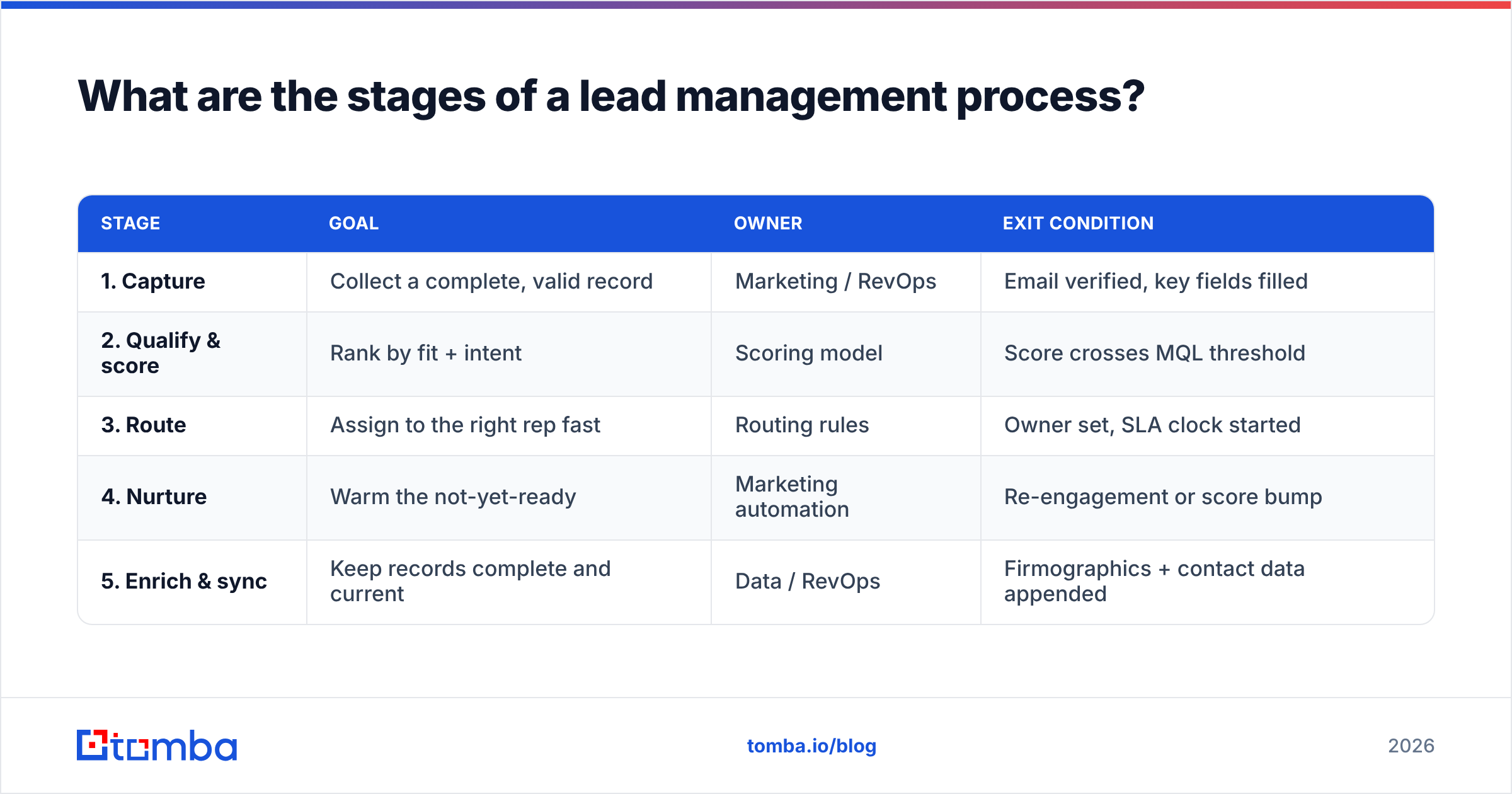
A durable process has five stages. Each one has an owner, an entry condition, and an exit condition — otherwise leads sit in limbo.
| Stage | Goal | Owner | Exit condition |
|---|---|---|---|
| 1. Capture | Collect a complete, valid record | Marketing / RevOps | Email verified, key fields filled |
| 2. Qualify & score | Rank by fit + intent | Scoring model | Score crosses MQL threshold |
| 3. Route | Assign to the right rep fast | Routing rules | Owner set, SLA clock started |
| 4. Nurture | Warm the not-yet-ready | Marketing automation | Re-engagement or score bump |
| 5. Enrich & sync | Keep records complete and current | Data / RevOps | Firmographics + contact data appended |
Notice that capture and enrich bookend the process. Data quality isn't one stage — it's the thing that makes the other four work.
1. Capture#
Capture is where most damage is done silently. A lead fills a form, and if you don't validate on the spot, you've just imported a problem. At minimum, verify the email at the point of entry. A free email checker or an API call to an email verification API catches fakes and typos before they poison your reporting.
For inbound-heavy teams, pair the form with enrichment: capture a work email, then append company, title, and size automatically instead of asking for 11 form fields nobody completes.
2. Qualify and score#
Lead scoring answers one question: who deserves a rep's time right now? A basic model combines two axes.
- Fit (firmographic): industry, company size, region, tech stack — does this match your ideal customer profile?
- Intent (behavioral): pricing-page visits, demo requests, email replies, repeat sessions — how hot are they?
Once a lead's combined score crosses a threshold, it becomes a marketing qualified lead and moves to routing. Keep the model simple to start; a 6-signal model you actually maintain beats a 40-signal model nobody trusts.
3. Route#
Speed and accuracy win here. Define routing rules that assign by territory, segment, or round-robin, and start an SLA timer the moment ownership is set. If a rep doesn't act within the window, escalate. Native tools plus a Zapier integration or HubSpot integration can automate assignment and alerts so nothing waits in a queue overnight.
4. Nurture#
Not everyone is ready to buy. Nurturing keeps those leads warm with relevant, paced content until a behavioral trigger bumps their score. This is where marketing earns its keep — and where a bad email address quietly kills the whole sequence.

5. Enrich and sync#
Records decay. People change jobs, companies rebrand, direct dials go stale. Ongoing data enrichment keeps your CRM current so scoring and routing stay accurate. Batch-enrich existing records with a bulk email finder, and append direct dials with a phone finder for accounts that warrant a call.
How does data quality affect CRM lead management?#
Data quality is the multiplier on everything else — get it wrong and every downstream stage inherits the error.
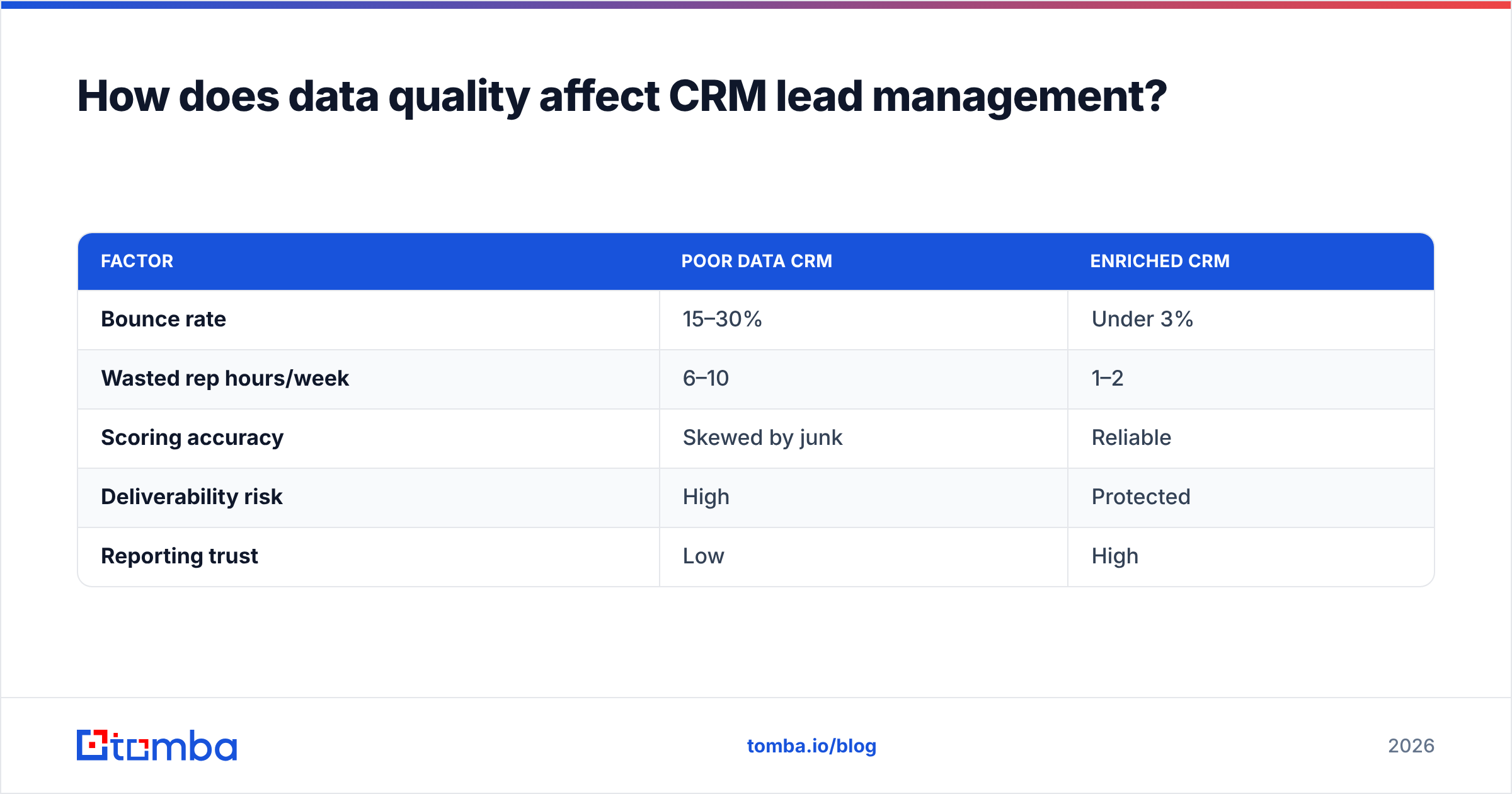
Consider two identical pipelines. Both have great scoring and instant routing. Pipeline A runs on records where 30% of emails are invalid or role-based. Pipeline B verifies and enriches at capture. Even with the same reps and the same script, Pipeline B contacts more real humans, books more meetings, and reports cleaner metrics — because the fundamentals are sound.
| Factor | Poor data CRM | Enriched CRM |
|---|---|---|
| Bounce rate | 15–30% | Under 3% |
| Wasted rep hours/week | 6–10 | 1–2 |
| Scoring accuracy | Skewed by junk | Reliable |
| Deliverability risk | High | Protected |
| Reporting trust | Low | High |
High bounce rates don't just waste time — they damage your sender reputation and hurt email deliverability for every campaign after. Verifying before you send is cheaper than recovering a burned domain.
What should you look for in lead management tooling?#
You don't need a single monolith. You need a CRM plus a few sharp tools that plug into it. Evaluate on these dimensions.
- Data accuracy: How is contact data sourced and verified? Ask about the data sources and independent accuracy claims.
- Verification built in: Can you validate emails at capture and in bulk, including tricky catch-all domains?
- Enrichment coverage: Email, phone, firmographics, and social — does it fill the fields your scoring model needs?
- Integrations: Native connectors to your CRM (Salesforce, Pipedrive, HubSpot) and automation layers.
- Access model: UI, browser extension, Google Sheets, and a real email finder API for engineering-led workflows.
- Pricing that scales: Transparent tiers and a free tier to test. Review the Tomba pricing before you commit.
How does Tomba fit into a CRM lead management stack?#
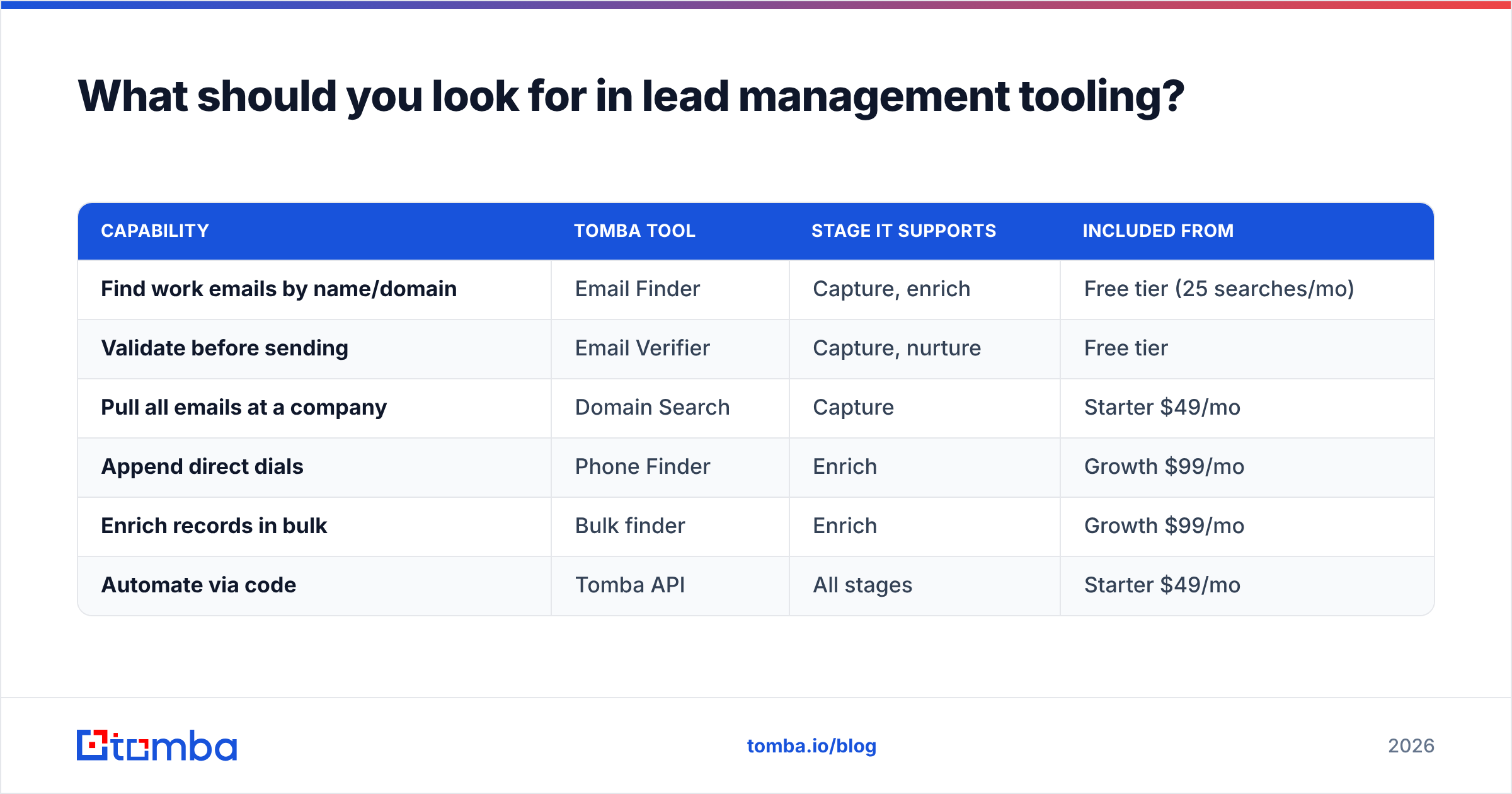
Tomba isn't a CRM — it's the data layer that makes your CRM trustworthy. Here's how the pieces map to the five stages, with pricing for context.
| Capability | Tomba tool | Stage it supports | Included from |
|---|---|---|---|
| Find work emails by name/domain | Email Finder | Capture, enrich | Free tier (25 searches/mo) |
| Validate before sending | Email Verifier | Capture, nurture | Free tier |
| Pull all emails at a company | Domain Search | Capture | Starter $49/mo |
| Append direct dials | Phone Finder | Enrich | Growth $99/mo |
| Enrich records in bulk | Bulk finder | Enrich | Growth $99/mo |
| Automate via code | Tomba API | All stages | Starter $49/mo |
For teams that want native CRM plumbing, the Salesforce integration and HubSpot integration push verified, enriched contacts straight into the record — no CSV shuffling.
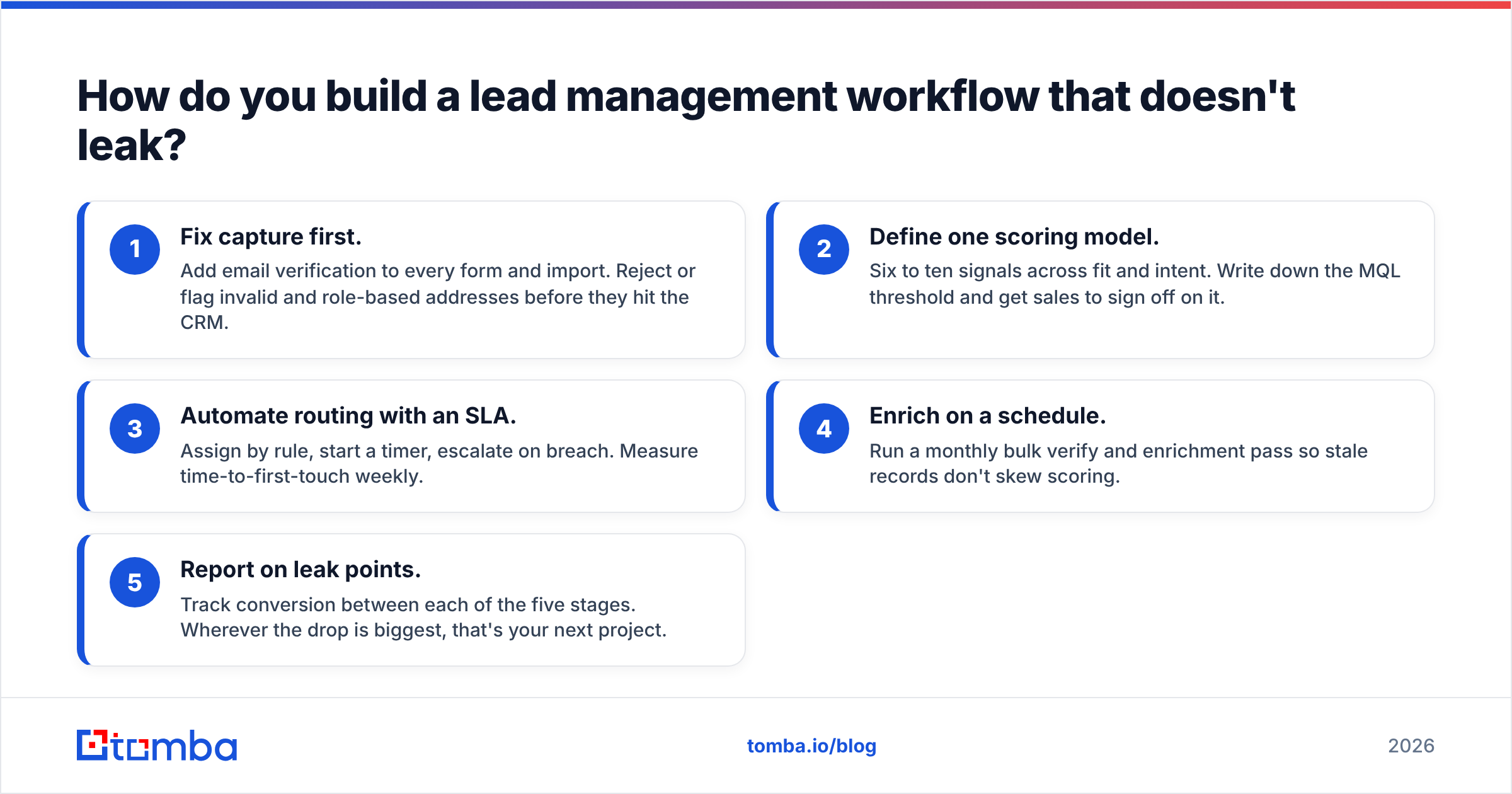
How do you build a lead management workflow that doesn't leak?#
Start narrow and instrument everything. Here's a pragmatic build order that most RevOps teams can ship in a couple of weeks.
- Fix capture first. Add email verification to every form and import. Reject or flag invalid and role-based addresses before they hit the CRM.
- Define one scoring model. Six to ten signals across fit and intent. Write down the MQL threshold and get sales to sign off on it.
- Automate routing with an SLA. Assign by rule, start a timer, escalate on breach. Measure time-to-first-touch weekly.
- Enrich on a schedule. Run a monthly bulk verify and enrichment pass so stale records don't skew scoring.
- Report on leak points. Track conversion between each of the five stages. Wherever the drop is biggest, that's your next project.
The discipline that separates good teams from great ones isn't fancier automation — it's refusing to let a lead sit unowned and refusing to trust unverified data. Both are boring. Both compound.
Common mistakes to avoid#
- Treating the CRM as a filing cabinet. Storing leads isn't managing them. Without scoring and routing rules, you have a graveyard, not a pipeline.
- Over-engineering the score. A model nobody understands gets ignored. Ship simple, refine with data.
- Skipping verification to "save credits." A single burned domain costs more than months of verification. Check the math with a free email checker first.
- Enriching once and never again. B2B data decays 2–3% per month. Set a recurring pass.
- Manual routing. Humans forget, sleep, and go on vacation. Rules don't.
Frequently asked questions#
Is lead management the same as a CRM? No. A CRM is the database and interface. Lead management is the process — capture, scoring, routing, nurturing, enrichment — that runs on top of it. You can have a CRM with terrible lead management, and that's the norm.
What's the fastest win for a leaky pipeline? Verify emails at capture and cut your time-to-first-touch. Those two changes fix data quality and speed simultaneously, and both are measurable within a week.
Where does contact enrichment come from? Reputable providers combine public web data, verified patterns, and live validation. Ask any vendor to explain their data sources and how they verify catch-all domains before you rely on their records.
The bottom line#
CRM lead management is a system, not a screen. Get the five stages working — capture, score, route, nurture, enrich — and stop treating data quality as an afterthought. The teams that win aren't the ones with the most expensive CRM; they're the ones whose records are clean, whose leads are owned within minutes, and whose scoring they actually trust.
If your pipeline is leaking at the capture and enrichment stages — and it almost certainly is — start there. Use the Tomba Email Finder to fill in verified work emails, run your list through the email verifier before it ever reaches a rep, and push clean records into your CRM with the Tomba API. It's free to test with 25 searches a month, and it's the cheapest insurance you'll buy against a leaky pipeline.
Related guides#
Ready to find emails that actually work?
Join 150,000+ professionals who stopped guessing and started sending. Free credits on signup — no credit card required.
Get the Tomba newsletter
Practical outbound tactics and product updates — once every two weeks.
About the author