CRM Limitations in 2026: What Your CRM Can't Do (and Fixes)
Your CRM is a system of record, not a data source. Here are the real CRM limitations in 2026 — and the practical fixes that keep your pipeline clean and your reps selling.
CRM Limitations in 2026: What Your CRM Can't Do (and Fixes)
Your CRM is the most expensive filing cabinet you own — and like any filing cabinet, it only holds what you put in it. That single fact explains almost every CRM limitation you will hit this year.
TL;DR
- A CRM is a system of record, not a system of truth. It stores decisions; it does not verify them, enrich them, or keep them fresh.
- The biggest limitations are data decay (contacts rot ~30% a year), no native enrichment, weak deduplication, rep-dependent data entry, and reporting that reflects garbage in, garbage out.
- Most "CRM problems" are really data-layer problems that a CRM was never designed to solve.
- The fix is not ripping out your CRM. It is pairing it with a dedicated data source for finding, verifying, and enriching contacts before they ever hit a record.
- Below: a plain-English map of where CRMs stop, and a practical stack to cover the gaps.
What is a CRM actually built to do?#
A CRM (customer relationship management platform) is like the scorebook at a baseball game. It records what happened — who reached base, who struck out, what the final tally was. What it does not do is throw the pitches, scout the players, or tell you whether the numbers were entered correctly.
Technically, a CRM is a relational database with a workflow layer on top: contacts, companies, deals, activities, and the automations that move them between stages. That is genuinely valuable. But the design goal is organizing relationships your team already has, not discovering or validating new data. Once you internalize that boundary, the limitations below stop feeling like bugs and start looking like the edge of the tool's job description.
For a formal definition, see the CRM glossary entry — but the working definition that matters is simpler: your CRM knows only what a human or an integration told it, and it assumes that input was true forever.
What are the biggest CRM limitations in 2026?#
Here are the six that cost teams the most money, ranked by how often they quietly break pipeline.
- Data decay is relentless. B2B contact data degrades roughly 25–30% per year as people change jobs, companies rebrand, and emails get retired. Your CRM has no built-in mechanism to notice. A record entered in January is often wrong by Q4, and nothing flags it.
- No native enrichment. Out of the box, most CRMs cannot find a missing email, append a direct dial, or fill in company size and industry. They store those fields; they do not populate them.
- Weak deduplication. "John Smith" and "J. Smith" at the same company become two records, two owners, and two conflicting sources of truth. Native dedupe rules are blunt and easy to bypass.
- Rep-dependent data entry. The CRM is only as complete as your busiest, least-motivated rep is willing to type. Studies routinely show reps spend a large share of their week on manual entry — and skip it whenever they can.
- Reporting inherits every upstream flaw. Dashboards look authoritative, but a forecast built on stale, duplicated, half-empty records is confident and wrong. The CRM cannot audit the quality of its own inputs.
- Poor at unknown or top-of-funnel contacts. A CRM manages people you already know. It is nearly useless for identifying net-new prospects, anonymous website visitors, or the right buyer at an account you have never touched.
Notice the pattern: five of six are data-quality problems, not workflow problems. That is the core insight of this entire post.
Why can't a CRM just fix its own data?#
Short answer: because verification and discovery are different products with different economics.
Keeping contact data accurate means continuously re-checking millions of records against live sources — SMTP validation, web crawling, catch-all detection, cross-referencing multiple providers. That is a data business, and CRM vendors are workflow businesses. Salesforce and HubSpot both sell add-on data products precisely because the core CRM was never meant to do it, and those add-ons are frequently thin or pricey.
So the record just sits there. Your CRM will happily let a rep email jordan@oldcompany.com for eighteen months after Jordan left, because from the database's point of view nothing changed — no one told it otherwise. The limitation isn't laziness in the software; it's that the CRM has no sensor pointed at the outside world. It needs one bolted on.
CRM alone vs CRM + a data layer: what actually changes?#
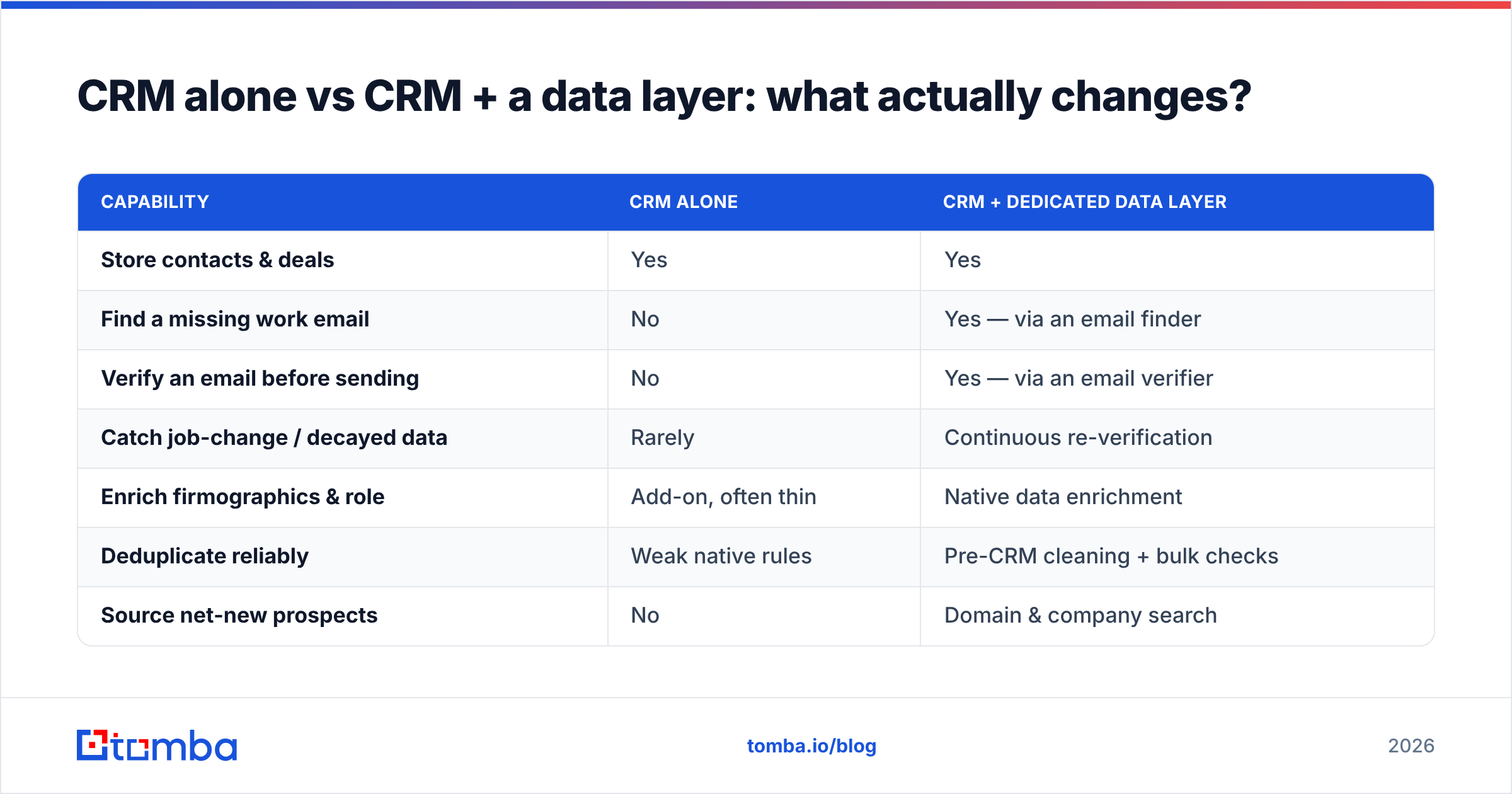
Here is the difference in concrete terms. The left column is what most teams run today; the right is a CRM paired with a dedicated finding-and-verification layer.
| Capability | CRM alone | CRM + dedicated data layer |
|---|---|---|
| Store contacts & deals | Yes | Yes |
| Find a missing work email | No | Yes — via an email finder |
| Verify an email before sending | No | Yes — via an email verifier |
| Catch job-change / decayed data | Rarely | Continuous re-verification |
| Enrich firmographics & role | Add-on, often thin | Native data enrichment |
| Deduplicate reliably | Weak native rules | Pre-CRM cleaning + bulk checks |
| Source net-new prospects | No | Domain & company search |
| Cost of bad data | Hidden in low reply rates | Caught before it hits the record |
The table makes the strategy obvious: you don't replace the CRM, you stop letting unverified data into it. Every contact gets found, verified, and enriched before it becomes a record — so the scorebook finally reflects reality.
How much do CRM data limitations actually cost?#
More than the software line item, almost always. Walk the chain:
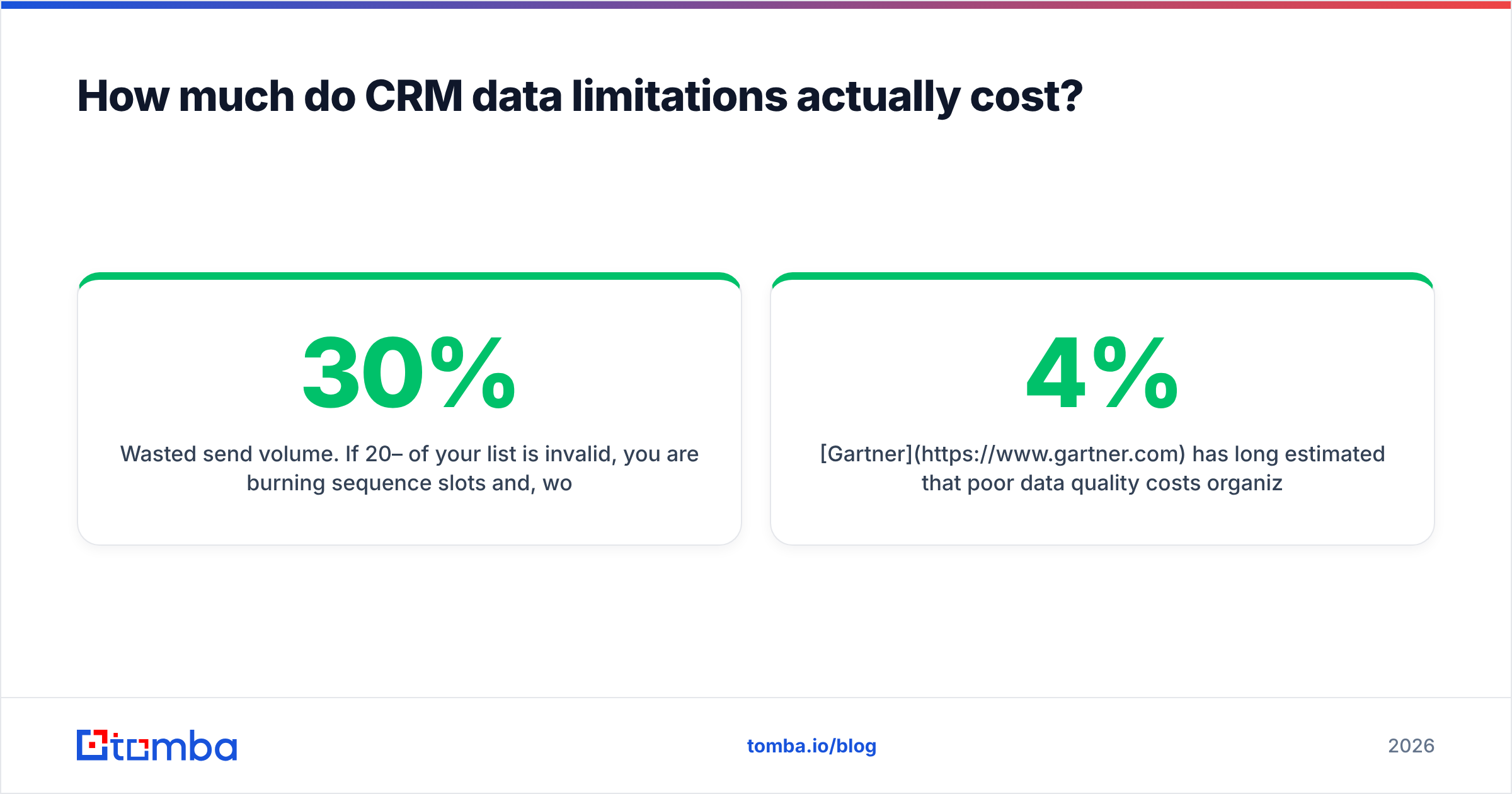
- Wasted send volume. If 20–30% of your list is invalid, you are burning sequence slots and, worse, hurting sender reputation. Bounces above ~2% start to drag email deliverability for your good addresses too.
- Rep time. Every minute spent hunting a missing email or fixing a duplicate is a minute not spent selling. Multiply across a team and the "free" CRM data work becomes a full salary.
- Forecast risk. Leadership makes hiring and spend decisions off dashboards. When the underlying records are stale, the forecast is a well-formatted guess.
- Opportunity cost. The prospects your CRM can't surface — the accounts you've never touched — are often your best pipeline. A CRM structurally cannot find them.
Gartner has long estimated that poor data quality costs organizations millions annually; you don't need the exact figure to feel it in a 4% reply rate. The point is that CRM limitations are not abstract. They show up as concrete, recurring line items you're already paying — just not on the CRM invoice.
What's the practical fix — do you need a new CRM?#
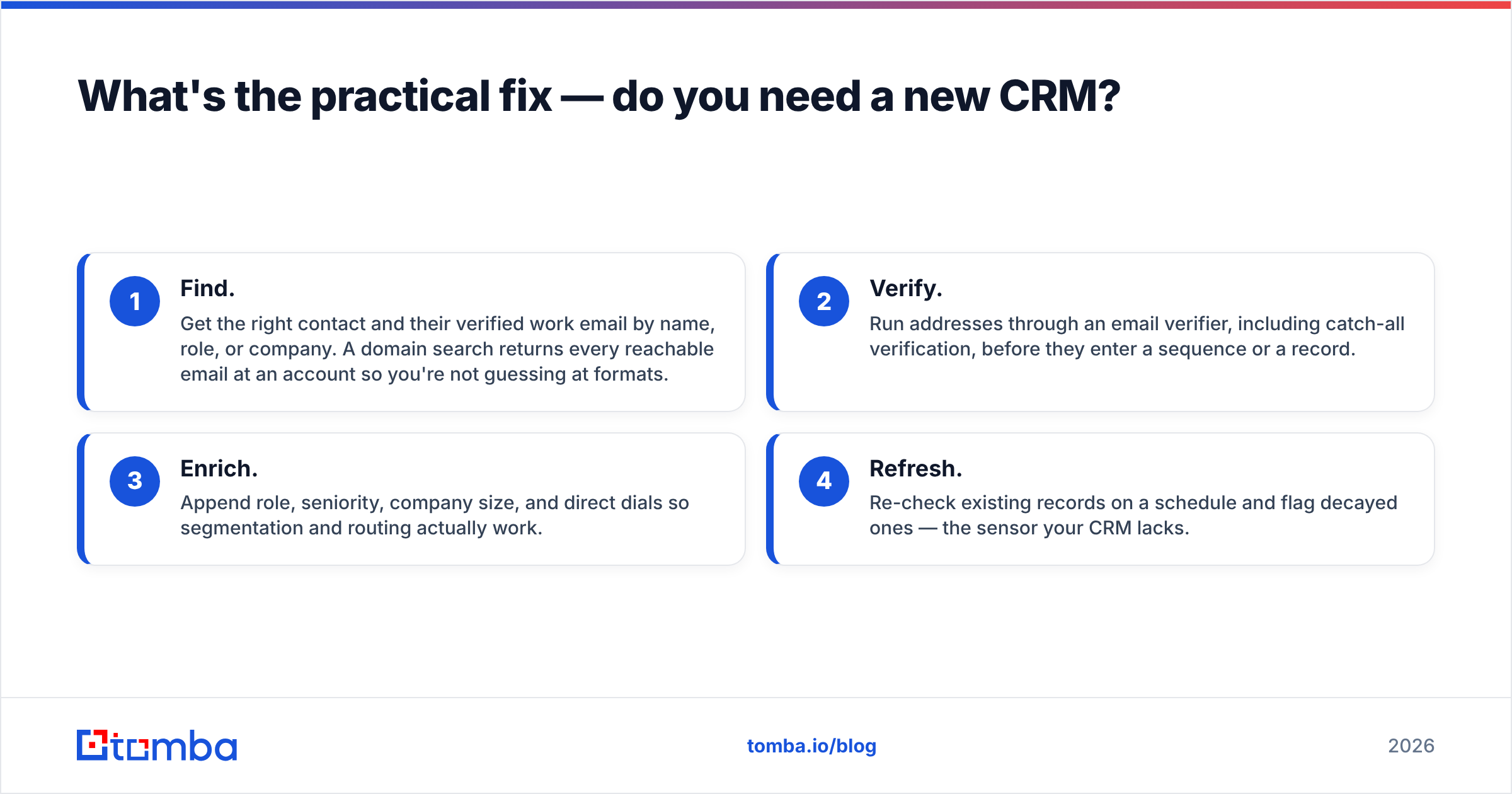
No. Rebuilding on a new CRM migrates the same dirty data into a nicer interface. The fix is a thin data layer in front of the CRM that handles the four jobs the CRM can't:
- Find. Get the right contact and their verified work email by name, role, or company. A domain search returns every reachable email at an account so you're not guessing at formats.
- Verify. Run addresses through an email verifier, including catch-all verification, before they enter a sequence or a record.
- Enrich. Append role, seniority, company size, and direct dials so segmentation and routing actually work.
- Refresh. Re-check existing records on a schedule and flag decayed ones — the sensor your CRM lacks.
The cleanest way to run this is to make it part of intake. New lead from a form, a list, or a scrape? It passes through find → verify → enrich, then lands in the CRM already clean. For teams doing volume, a bulk email finder processes whole lists at once, and native connectors push results straight into your stack.
Where this plugs into your existing tools#
You don't have to change how reps work. The data layer rides along inside the tools they already open:
- Inside the CRM: direct HubSpot and Salesforce integrations enrich records in place.
- Inside the spreadsheet: a Google Sheets add-on verifies and finds emails without leaving the tab.
- Inside the browser: a Chrome extension pulls verified contacts as reps research accounts.
- Inside your automations: the email finder API wires find-and-verify into any workflow — Zapier, Make, or custom code.
How do you choose the data layer that covers your CRM's gaps?#
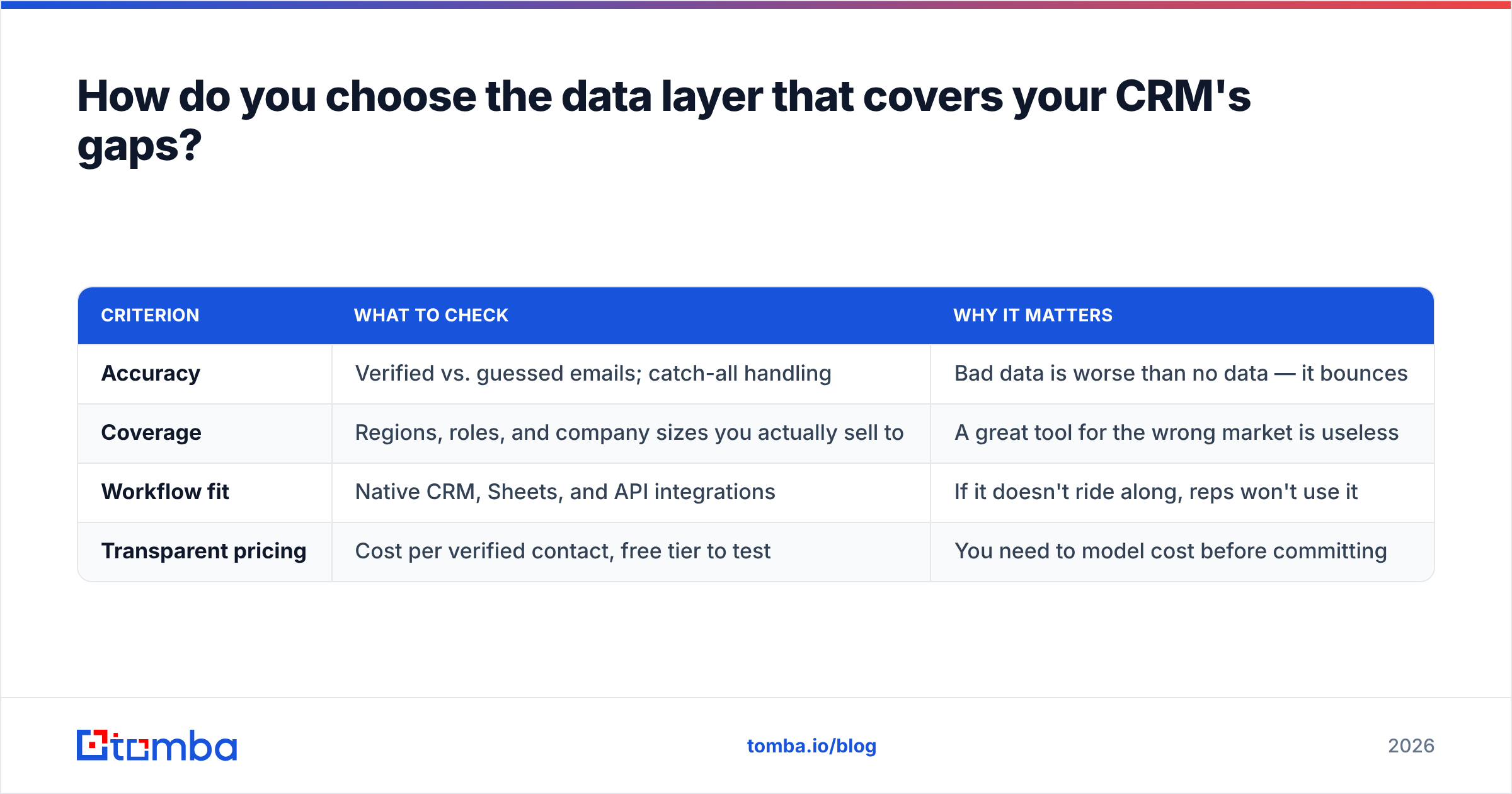
Judge it on the jobs your CRM can't do, not on feature-list length. Four criteria matter:
| Criterion | What to check | Why it matters |
|---|---|---|
| Accuracy | Verified vs. guessed emails; catch-all handling | Bad data is worse than no data — it bounces |
| Coverage | Regions, roles, and company sizes you actually sell to | A great tool for the wrong market is useless |
| Workflow fit | Native CRM, Sheets, and API integrations | If it doesn't ride along, reps won't use it |
| Transparent pricing | Cost per verified contact, free tier to test | You need to model cost before committing |
On price and testing specifically, look for a real free tier so you can measure accuracy on your list before paying. Tomba pricing starts with a free plan (25 searches/month), then Starter at $49/mo and Growth at $99/mo — enough to validate hit rates against your own accounts before scaling. Whatever you pick, the buying question is the same: does this cover the specific limitation my CRM has, on the data I actually sell into?
What CRM limitations can't be fixed by data alone?#
Honesty matters, so here's the boundary in the other direction. Some CRM frustrations are not data problems, and no enrichment tool will solve them:
- Adoption. If reps won't log activity, cleaner data won't change behavior — that's a process and incentive problem.
- Over-customization. CRMs configured with 200 custom fields collapse under their own weight. That's an admin-discipline issue.
- Process misfit. If your sales motion doesn't match how the CRM models stages, you'll fight it daily regardless of data quality.
- Reporting literacy. Clean data still needs someone who can read it. Dashboards don't interpret themselves.
For these, the fix is revenue operations discipline — process design, governance, enablement — not another tool. Knowing which bucket a problem falls into is half the battle: data-layer gap → add a data source; behavior or process gap → fix the operating model. Most teams try to solve the first with the second and stay stuck.
Fix the layer your CRM was never built for#
Your CRM is doing its job: it remembers. What it can't do is find, verify, and refresh — and those gaps are where pipeline quietly leaks. The move in 2026 isn't a rip-and-replace; it's putting a verification-first data layer in front of the CRM so only clean, real, enriched contacts ever become records.
Start where the leak is biggest: missing and decayed emails. The Tomba Email Finder locates verified work emails by name, company, or domain, checks them before they enter your sequences, and pushes clean records straight into HubSpot, Salesforce, or a spreadsheet. Test it free on your own worst list, measure the bounce rate against what your CRM currently holds, and let the difference make the case. Your scorebook is only as good as the plays you feed it — start feeding it real ones.
Related guides#
Ready to find emails that actually work?
Join 150,000+ professionals who stopped guessing and started sending. Free credits on signup — no credit card required.
Get the Tomba newsletter
Practical outbound tactics and product updates — once every two weeks.
About the author