CRM Pipeline Stages: How to Build a Pipeline That Forecasts
Most CRM pipelines are just renamed folders. Here is how to design pipeline stages with real exit criteria, benchmarks, and a copy-ready 7-stage template that actually predicts revenue.
Your CRM says you have $2.4M in the pipeline. Your gut says maybe $600K will close. When those two numbers disagree that badly, the problem is almost never the deals — it is the pipeline stages themselves.
Most teams inherit a default pipeline from whatever CRM they installed, rename a few columns, and call it a process. Then they wonder why forecasts miss and why reps argue about whether a deal is "qualified" or just "interested." This guide fixes that. You will learn what CRM pipeline stages actually are, the seven stages that map to how B2B buyers really buy, the exit criteria that keep each stage honest, and the conversion benchmarks you should hold each stage to.
TL;DR#
- CRM pipeline stages are decision gates, not folders. Each stage should represent a verifiable change in buyer behavior, with clear exit criteria before a deal moves forward.
- Seven stages cover most B2B motions: Lead → Qualified → Discovery → Proposal → Negotiation → Closed-Won → Closed-Lost. Simplify to five if your deals are transactional.
- Exit criteria beat gut feel. "Rep feels good" is not a stage — "buyer confirmed budget and timeline" is.
- Clean contact data is the entry gate. A pipeline built on unverified leads inflates every stage below it; enrich and verify before a lead ever counts.
- Benchmark stage-to-stage conversion so you can spot the leaky stage instead of blaming the whole funnel.
What are CRM pipeline stages?#
CRM pipeline stages are the sequential steps a deal moves through from first contact to a final win or loss, tracked inside your CRM. Think of them like the boarding process at an airport: check-in, security, gate, boarding, takeoff. Each checkpoint has a rule you must satisfy before you reach the next one — you cannot board without clearing security. A pipeline stage works the same way: a deal should not advance until it clears that stage's exit criteria.
The mistake most teams make is treating stages as status labels ("this deal feels warm") instead of evidence gates ("the buyer scheduled a technical review"). Labels are subjective, so two reps score the same deal differently and your forecast turns to noise. Evidence gates are objective, so the pipeline reflects reality.
A well-designed stage has three properties:
- A named buyer action that triggers entry (they requested a demo, they returned a signed order form).
- Exit criteria — the specific, checkable conditions required to advance.
- A default rot timer — how long a deal can sit before it is flagged stale.
Get those three right and your pipeline stops being a wish list and starts being a forecast.
What are the 7 standard CRM pipeline stages?#
Here is the seven-stage model that fits most B2B sales motions. Adjust the names to your vocabulary, but keep the underlying gates.
- Lead / New — A contact has entered your system from a form, list, or inbound source. No qualification yet. Entry gate: a real, verified person with valid contact data.
- Qualified (MQL → SQL) — The lead fits your ICP and has shown intent worth a rep's time. Exit criteria: confirmed fit (industry, size, role) plus at least one buying signal.
- Discovery / Meeting — You have booked and held a discovery call. Exit criteria: documented pain, decision process, and rough timeline.
- Proposal / Quote — You have sent pricing or a formal proposal. Exit criteria: proposal delivered and the buyer confirmed they received and reviewed it.
- Negotiation — Terms, pricing, or legal are in active back-and-forth. Exit criteria: verbal agreement on scope and price, contract in redlines.
- Closed-Won — Signed and booked. This is revenue, not hope.
- Closed-Lost — Dead, with a required loss reason logged for later analysis.
That last requirement — a mandatory loss reason — is what turns Closed-Lost from a graveyard into a data source. Over a quarter, your loss reasons tell you exactly where deals die.
Core stage anatomy: entry, exit, and rot#
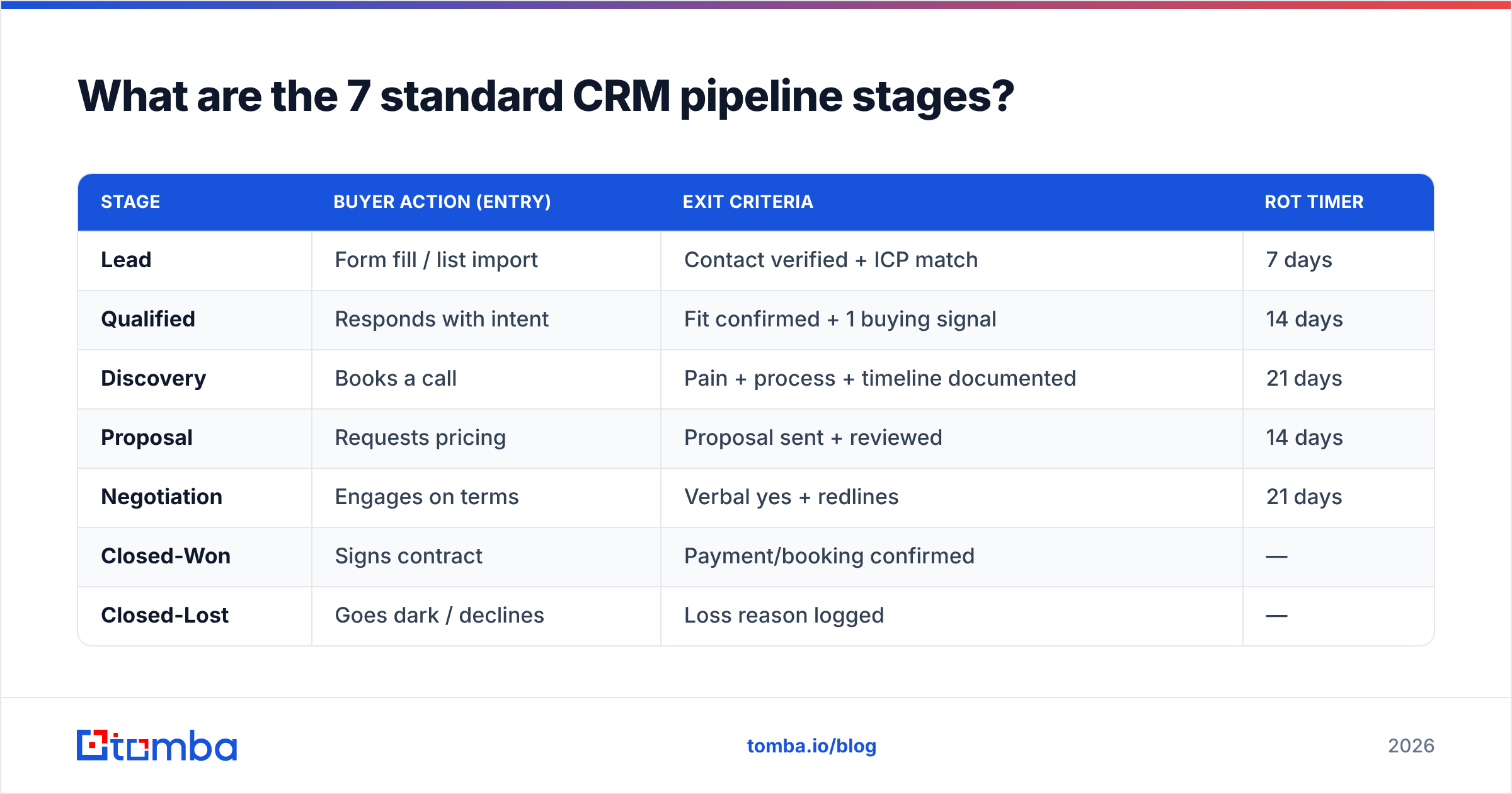
| Stage | Buyer action (entry) | Exit criteria | Rot timer |
|---|---|---|---|
| Lead | Form fill / list import | Contact verified + ICP match | 7 days |
| Qualified | Responds with intent | Fit confirmed + 1 buying signal | 14 days |
| Discovery | Books a call | Pain + process + timeline documented | 21 days |
| Proposal | Requests pricing | Proposal sent + reviewed | 14 days |
| Negotiation | Engages on terms | Verbal yes + redlines | 21 days |
| Closed-Won | Signs contract | Payment/booking confirmed | — |
| Closed-Lost | Goes dark / declines | Loss reason logged | — |
Notice that every exit criterion is something you can point to. If you cannot name the artifact — the call notes, the sent proposal, the redlined contract — the deal has not earned the next stage.
Why do CRM pipeline stages matter for forecasting?#
Because your forecast is only as accurate as your stage definitions. When "Proposal" means the same thing across every rep and every deal, the historical conversion rate from Proposal to Closed-Won becomes a reliable multiplier. When it means whatever each rep decides on a given Friday, that multiplier is fiction.
Gartner and Forrester have both repeatedly tied forecast accuracy to process discipline rather than to fancier models — the input quality dominates. A clean, consistently-applied stage model lets you do three things you cannot do with sloppy stages:
- Weight deals by real probability. If Discovery historically converts to won at 22%, a $100K deal in Discovery is worth ~$22K in your weighted forecast — not $100K, and not zero.
- Spot the leaky stage. If 80% of deals clear Qualified but only 30% survive Discovery, your qualification is too loose, not your closers.
- Coach the pipeline, not just the rep. Managers can review deals stuck past their rot timer and intervene before the quarter ends.
For a deeper primer on the surrounding process, our guide to sales process and pipeline design covers how stages connect to quota and capacity planning.
How many pipeline stages should you have?#
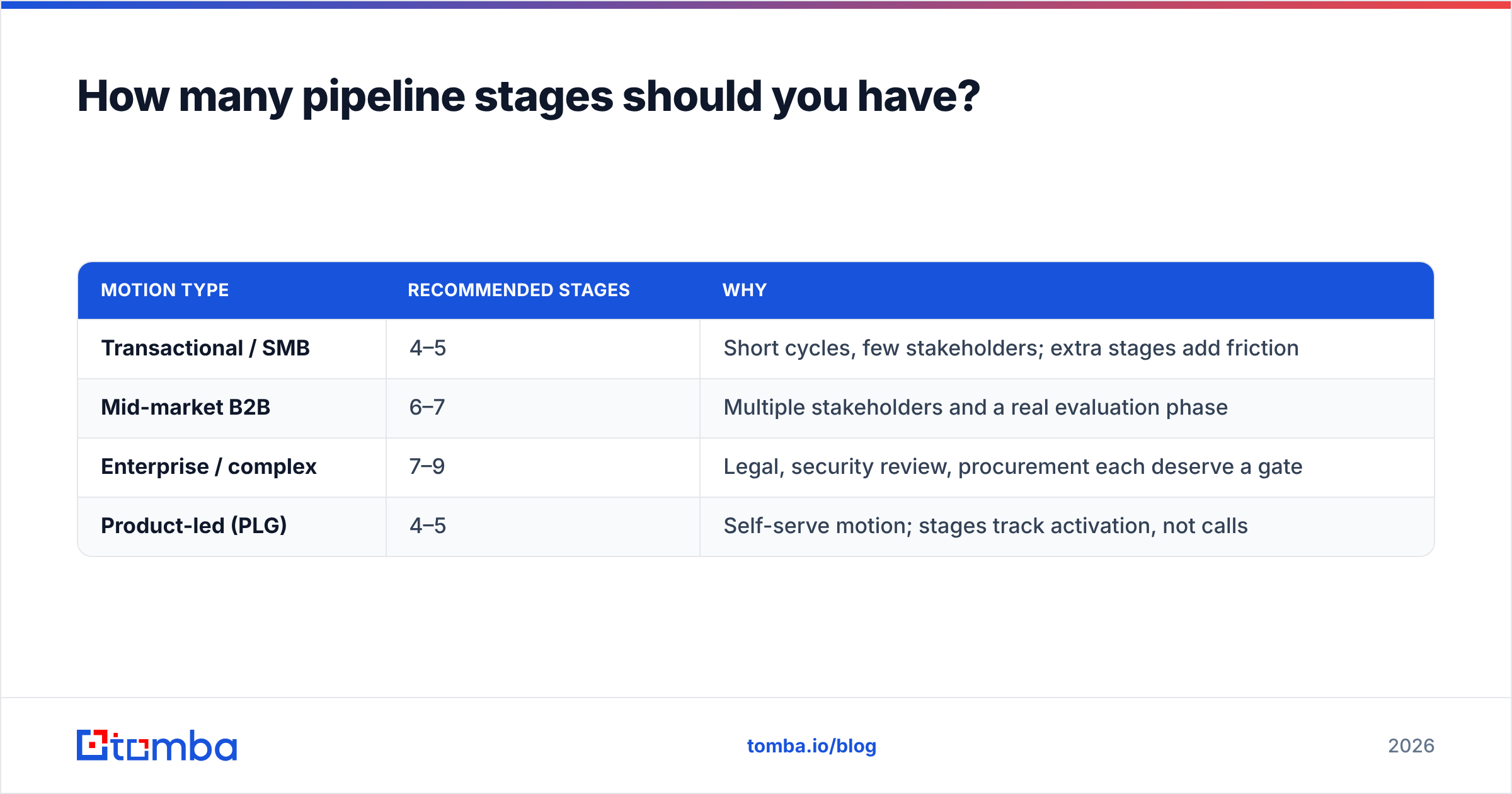
Five to seven for most teams. More than eight and reps start gaming the stages; fewer than four and you lose forecasting resolution. The right number is a function of deal complexity, not ambition.
| Motion type | Recommended stages | Why |
|---|---|---|
| Transactional / SMB | 4–5 | Short cycles, few stakeholders; extra stages add friction |
| Mid-market B2B | 6–7 | Multiple stakeholders and a real evaluation phase |
| Enterprise / complex | 7–9 | Legal, security review, procurement each deserve a gate |
| Product-led (PLG) | 4–5 | Self-serve motion; stages track activation, not calls |
The test is simple: every stage must change your forecast weight. If moving a deal from stage 4 to stage 5 does not change how likely you think it is to close, stage 5 is decoration. Merge it.
Vendors like HubSpot and Salesforce ship with sensible defaults, but their defaults are starting points, not prescriptions. Pipedrive built its entire brand on customizable stages precisely because no single template fits every business.
What makes a good pipeline stage exit criterion?#
A good exit criterion is observable, buyer-verified, and binary. Let's break that down.
- Observable — You can see the evidence. A sent proposal exists in your sent folder; a "strong interest" does not exist anywhere.
- Buyer-verified — The signal comes from the buyer's behavior, not the rep's optimism. "Buyer forwarded the proposal to their CFO" beats "rep thinks the CFO is on board."
- Binary — It either happened or it did not. No "sort of qualified."
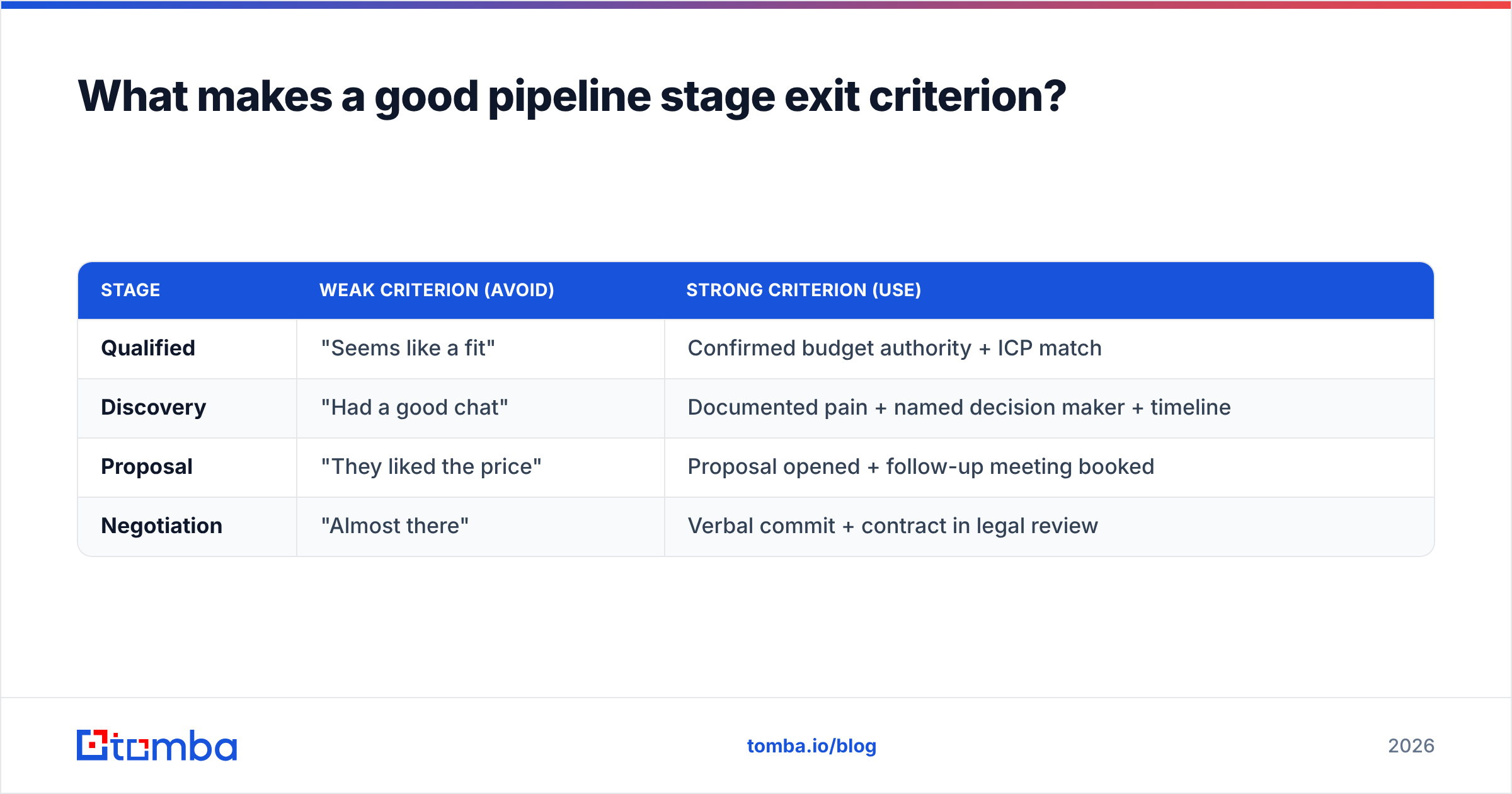
Weak versus strong criteria, side by side:
| Stage | Weak criterion (avoid) | Strong criterion (use) |
|---|---|---|
| Qualified | "Seems like a fit" | Confirmed budget authority + ICP match |
| Discovery | "Had a good chat" | Documented pain + named decision maker + timeline |
| Proposal | "They liked the price" | Proposal opened + follow-up meeting booked |
| Negotiation | "Almost there" | Verbal commit + contract in legal review |
The pattern is consistent: replace feelings with facts. This is the single highest-leverage change most sales orgs can make to their CRM.

How does data quality affect your pipeline stages?#
Every stage inherits the quality of the data at the top. If your Lead stage is full of role accounts, typo'd addresses, and people who left the company two years ago, you are not qualifying leads — you are laundering bad data through your funnel and calling the output a forecast.
Consider the math. Say 40% of your inbound leads have unverified or wrong contact data. Those leads still get counted in the Lead stage. Reps waste cycles trying to reach ghosts, deals stall with no exit criteria met, and your Lead-to-Qualified conversion looks broken when the real problem was data hygiene at the door.
The fix is to make verified, enriched contact data the entry gate for the pipeline — not an afterthought:
- Verify before entry. Bounce-check every email so dead contacts never inflate your Lead count.
- Enrich on arrival. Append company size, role, and industry so ICP scoring is automatic, not manual. Tomba's data enrichment does this at the point a lead lands.
- Fill the gaps. When a lead arrives with a name and company but no reachable email, a tool like the email finder recovers the missing address so the deal can actually progress instead of dying in stage one.
Clean the entry gate and every downstream conversion rate you measure becomes trustworthy. Dirty data does not just cost you the bad leads — it corrupts the benchmarks you use to run the whole team.
What are healthy pipeline stage conversion benchmarks?#
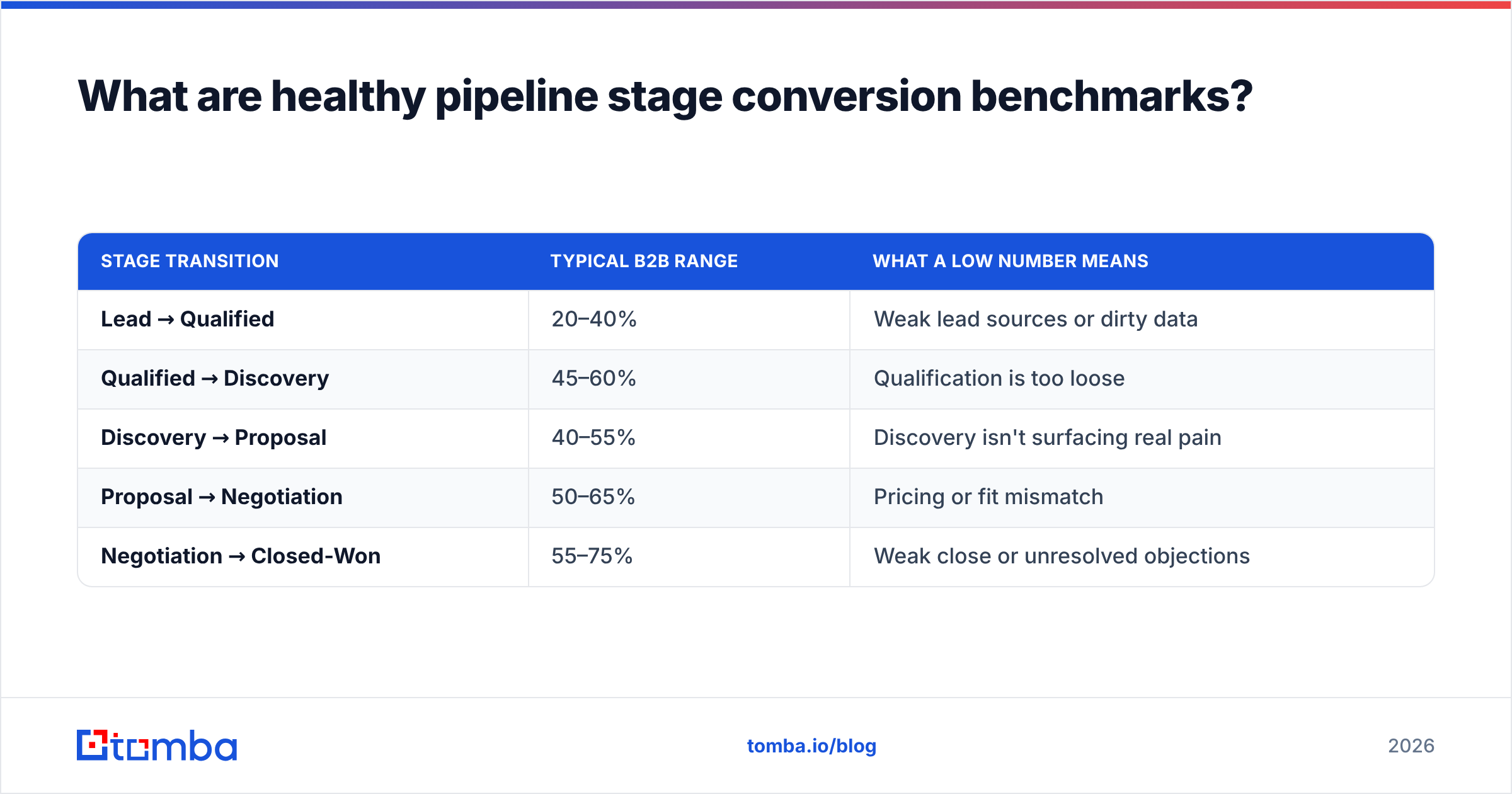
Benchmarks vary by industry and deal size, so treat these as a starting reference, not gospel. The point is to establish your baseline and then watch the trend.
| Stage transition | Typical B2B range | What a low number means |
|---|---|---|
| Lead → Qualified | 20–40% | Weak lead sources or dirty data |
| Qualified → Discovery | 45–60% | Qualification is too loose |
| Discovery → Proposal | 40–55% | Discovery isn't surfacing real pain |
| Proposal → Negotiation | 50–65% | Pricing or fit mismatch |
| Negotiation → Closed-Won | 55–75% | Weak close or unresolved objections |
Multiply those together and you get your overall lead-to-won rate — often 3–8% for cold-sourced B2B pipelines. If yours is far below, do not panic about the whole funnel. Find the single stage with the worst conversion versus benchmark and fix that gate first. That is the entire advantage of a staged pipeline: it turns "we're not closing enough" into "our Discovery-to-Proposal step is leaking."
How do you set up pipeline stages in your CRM?#
A practical rollout, in order:
- Map your buyer's real journey first. Interview three reps and two recent won deals. Write down the actual milestones buyers hit. Your stages should mirror that, not an org chart.
- Write exit criteria before you name stages. Define what must be true to leave each step. The names come after.
- Set rot timers per stage. Decide how many days a deal can sit before it is flagged. This alone recovers dozens of forgotten deals a quarter.
- Make loss reasons mandatory. No deal enters Closed-Lost without a reason from a fixed dropdown.
- Gate the entry with data quality. Route new leads through verification and enrichment before they count as pipeline.
- Review weekly against benchmarks. Compare each transition to your baseline and coach the weakest gate.
Keep the stage count honest. It is tempting to add a stage for every internal step, but remember the test: if it does not move the forecast weight, it does not belong.
Common pipeline stage mistakes to avoid#
- Sandbagging and happy ears. Reps parking deals in early stages to hide slippage, or pushing them forward on optimism. Objective exit criteria kill both.
- Stages that describe your internal process, not the buyer's. "Sent to legal" is your step; "buyer engaged legal" is theirs. Track theirs.
- No stale-deal hygiene. Without rot timers, your pipeline balloons with zombies and your forecast weight is meaningless.
- Counting unverified leads as pipeline. The fastest way to a fake forecast. Verify and enrich at the gate.
- Never analyzing Closed-Lost. Loss reasons are the cheapest sales research you will ever get. Use them.
Build your pipeline on data you can trust#
Great pipeline stages are only as good as the leads that enter them. If your first stage is full of unverified addresses and half-complete records, no amount of exit-criteria discipline downstream will save your forecast — you will just be tracking phantom deals with precision.
Start at the gate. Use the Tomba Email Finder to recover missing decision-maker emails, verify every address before it counts as a lead, and enrich each record with the firmographic data your qualification stage depends on. When the top of your pipeline is clean, every stage below it finally tells the truth — and your CRM's forecast starts matching your gut. Check Tomba pricing to find the plan that fits your lead volume, starting free with 25 searches a month.
Define your stages, enforce the gates, and feed them verified data. That is the whole game.
Related guides#
Ready to find emails that actually work?
Join 150,000+ professionals who stopped guessing and started sending. Free credits on signup — no credit card required.
Get the Tomba newsletter
Practical outbound tactics and product updates — once every two weeks.
About the author