CRM Productivity in 2026: A Practical Guide to Faster Sales
Most CRM productivity problems aren't about the software — they're about dirty data and manual busywork. Here's a concrete 2026 playbook to fix both and get reps selling again.
Your CRM was supposed to make selling faster. Instead, reps spend a third of their week typing into it, half the records are wrong, and pipeline reviews turn into arguments about whose numbers are real. CRM productivity isn't a software problem — it's a data-and-workflow problem that the software quietly amplifies.
This guide breaks down what actually moves the needle in 2026: cleaner records, less manual entry, and automation that fills the CRM instead of asking your team to.
TL;DR#
- CRM productivity is throughput, not activity — deals moved per rep-hour, not fields filled or logins counted.
- Dirty data is the silent tax. B2B contact data decays ~30% a year; bad records break routing, scoring, and forecasting before any feature can help.
- Manual entry is where hours die. Reps lose 10+ hours a week to admin; every field a human types is a field an automation could fill.
- The fix is a stack, not a setting: verified enrichment on entry, deduplication, workflow automation, and tight integrations.
- Start upstream. Feed your CRM accurate, verified contact data with tools like Tomba's data enrichment so downstream automation has something clean to work with.
What is CRM productivity, really?#
CRM productivity is the amount of real selling work your team gets done per hour spent in (or because of) the CRM. Think of your CRM like a kitchen. A bigger kitchen doesn't make you a faster cook — clean prep, sharp knives, and ingredients within reach do. Most teams buy a bigger kitchen and wonder why dinner is still late.
Technically, productivity here is a ratio: useful outcomes ÷ input effort. Outcomes are things like qualified meetings booked, deals advanced a stage, or accurate forecasts produced. Effort is rep hours, data-hygiene overhead, and the cognitive tax of not trusting what you're looking at.
The trap is measuring the denominator as if it were the numerator. Logins, fields completed, and "activities logged" feel like productivity but are just motion. A rep who logs 40 activities into stale records is less productive than one who logs 10 into clean ones, because only the second rep's work compounds.
Why is my CRM slowing the team down?#
Because the CRM inherits every upstream problem and hides none of them. Three failure modes show up on almost every team.
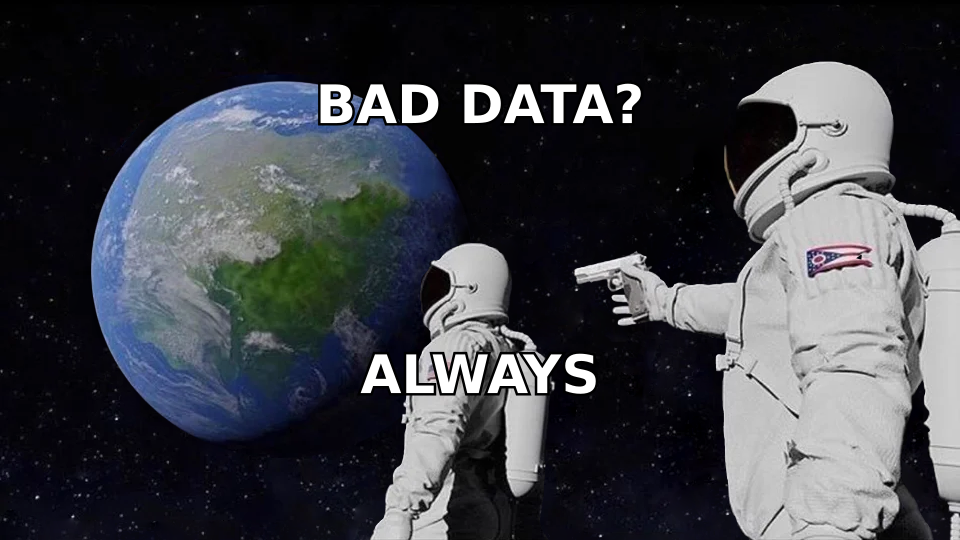
1. Decaying data. People change jobs, companies rebrand, emails bounce. Industry estimates put B2B data decay near 30% per year, which means a database you cleaned last January is one-third wrong by December. Bad data doesn't just sit there — it poisons routing rules, lead scoring, and territory assignments that all read from those fields.
2. Manual data entry. Every minute a rep spends copying an email from LinkedIn into a contact record is a minute not spent selling. Multiply across a team and it's the single largest hidden cost in your sales org. Reps consistently report losing 10+ hours a week to CRM admin, and much of it is retyping information a machine could have captured.
3. Tool sprawl without integration. A CRM, a prospecting tool, an email sequencer, and a dialer that don't talk to each other force humans to be the integration layer — copying data between tabs, reconciling conflicting records, and resolving duplicates by hand.
None of these are fixed by a new dashboard. They're fixed by changing what enters the CRM and how much of the entry a human has to do.
How do you actually measure CRM productivity?#
Pick metrics that reward outcomes and punish busywork. Here's a starter scorecard you can build in any CRM report.
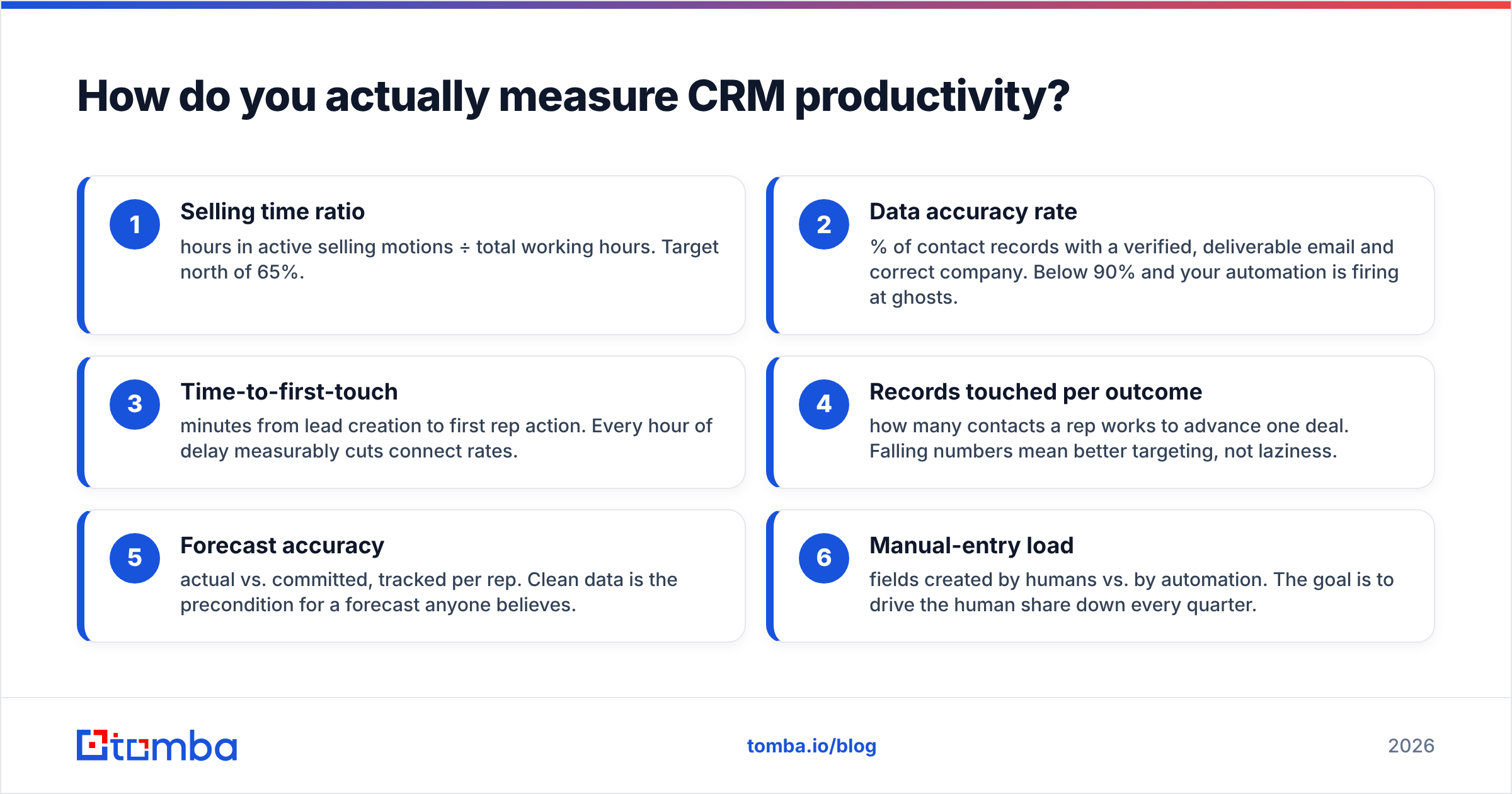
- Selling time ratio — hours in active selling motions ÷ total working hours. Target north of 65%.
- Data accuracy rate — % of contact records with a verified, deliverable email and correct company. Below 90% and your automation is firing at ghosts.
- Time-to-first-touch — minutes from lead creation to first rep action. Every hour of delay measurably cuts connect rates.
- Records touched per outcome — how many contacts a rep works to advance one deal. Falling numbers mean better targeting, not laziness.
- Forecast accuracy — actual vs. committed, tracked per rep. Clean data is the precondition for a forecast anyone believes.
- Manual-entry load — fields created by humans vs. by automation. The goal is to drive the human share down every quarter.
The pattern: measure the result and the tax, not the activity in between. When you report on these six, the conversation shifts from "log more" to "waste less."
What's the difference between a busy CRM and a productive one?#
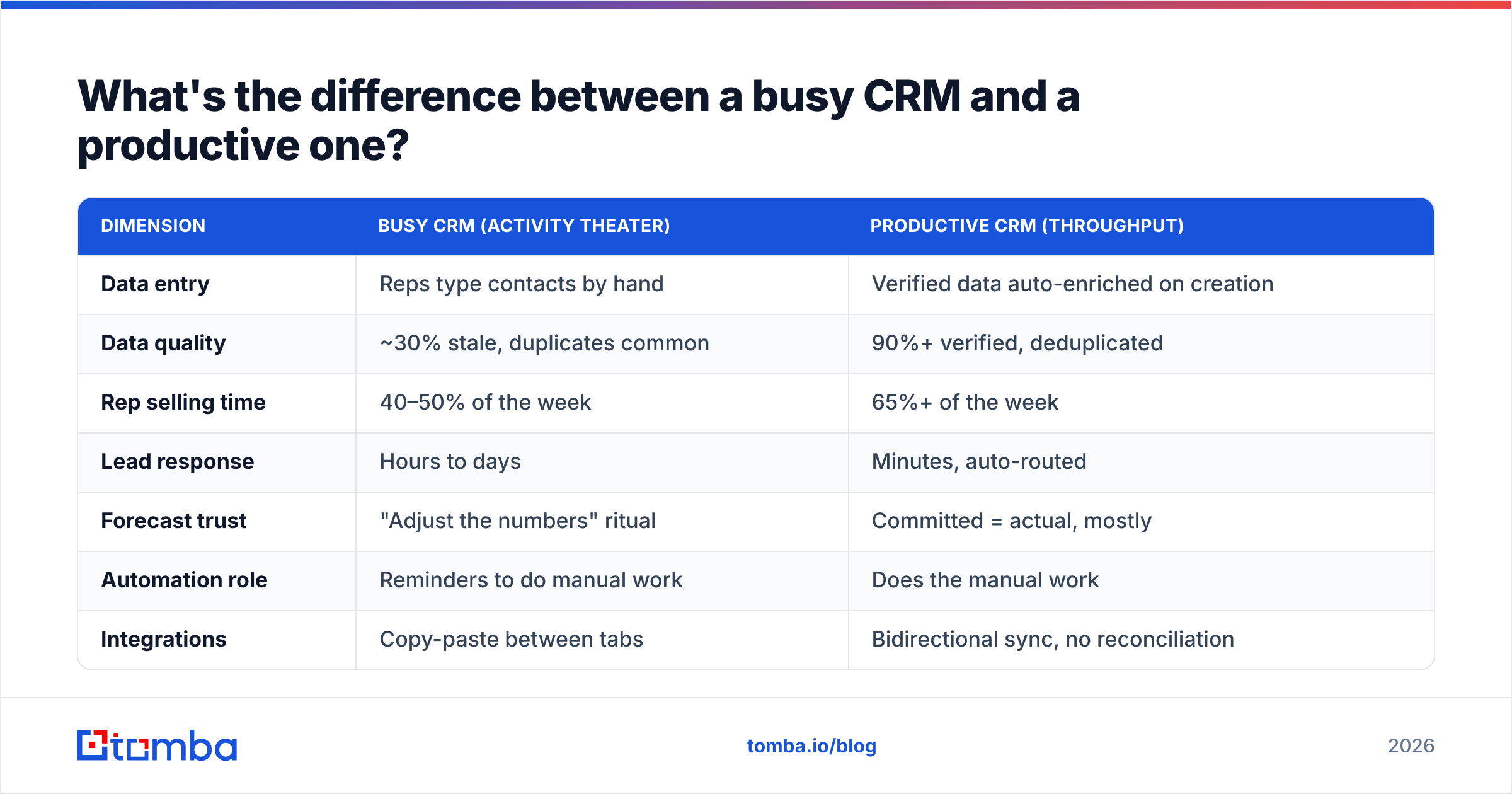
A busy CRM is full of activity; a productive one is full of advanced deals. The table below contrasts the two on the dimensions that matter.
| Dimension | Busy CRM (activity theater) | Productive CRM (throughput) |
|---|---|---|
| Data entry | Reps type contacts by hand | Verified data auto-enriched on creation |
| Data quality | ~30% stale, duplicates common | 90%+ verified, deduplicated |
| Rep selling time | 40–50% of the week | 65%+ of the week |
| Lead response | Hours to days | Minutes, auto-routed |
| Forecast trust | "Adjust the numbers" ritual | Committed = actual, mostly |
| Automation role | Reminders to do manual work | Does the manual work |
| Integrations | Copy-paste between tabs | Bidirectional sync, no reconciliation |
Notice that only two rows are about the CRM's own features. The rest are about what you feed it and what you automate around it. That's the whole thesis: productivity is upstream and around the CRM, not inside it.
How do you fix CRM productivity in 2026?#
Fix it as a stack, in order. Each layer makes the next one worth building.
Layer 1 — Get clean data in on entry#
The cheapest bad record is the one you never let in. Instead of importing a raw list and cleaning it later, verify and enrich at the point of creation. When a lead hits the CRM, an email verifier confirms the address is deliverable and enrichment fills in the firmographics — before a rep ever sees the record. Garbage-in becomes verified-in, and every downstream rule (scoring, routing, sequences) suddenly works.
For existing databases, run a one-time cleanup: deduplicate, re-verify emails, and re-enrich stale accounts in batches with a bulk email finder so you're not paying reps to fix records by hand.
Layer 2 — Automate the entry itself#
Every field a human types is a candidate for automation. Route new-lead enrichment, activity logging, and follow-up task creation through your automation platform so the CRM fills itself. The rep's job becomes reviewing and deciding — not transcribing.

Layer 3 — Connect the tools that touch the CRM#
Kill the copy-paste tax. Native, bidirectional syncs mean prospecting data, sequence replies, and dialer outcomes land in the CRM automatically. If you run HubSpot or Salesforce, wire enrichment straight in through the HubSpot integration so contacts arrive complete instead of half-blank.
Layer 4 — Standardize and simplify the CRM itself#
Only now do you touch the CRM's configuration. Retire fields nobody reports on. Collapse redundant pipeline stages. Make required fields genuinely required — but only the three or four that drive real decisions. A leaner CRM is faster to fill and easier to trust.
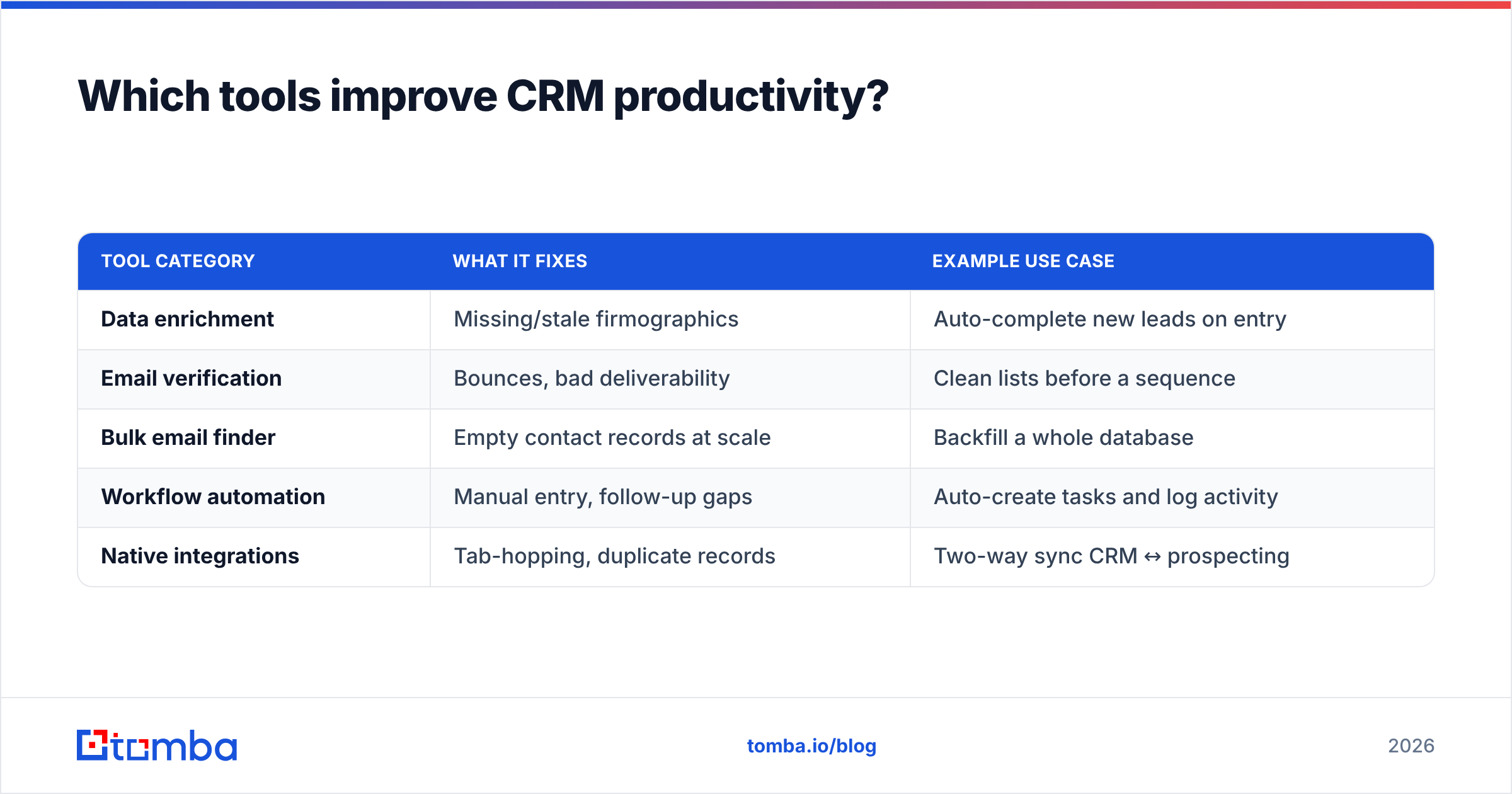
Which tools improve CRM productivity?#
Different bottlenecks call for different tools. Match the category to your actual pain rather than buying the biggest suite.
| Tool category | What it fixes | Example use case |
|---|---|---|
| Data enrichment | Missing/stale firmographics | Auto-complete new leads on entry |
| Email verification | Bounces, bad deliverability | Clean lists before a sequence |
| Bulk email finder | Empty contact records at scale | Backfill a whole database |
| Workflow automation | Manual entry, follow-up gaps | Auto-create tasks and log activity |
| Native integrations | Tab-hopping, duplicate records | Two-way sync CRM ↔ prospecting |
A quick reality check before you buy: read verified reviews on G2 or Capterra for the specific integration you need, not the headline feature list. The gap between "has a HubSpot integration" and "has a good HubSpot integration" is where productivity dies.
Tomba sits in the first three rows — enrichment, verification, and bulk finding — which is deliberately upstream. It doesn't try to be your CRM; it makes sure your CRM is fed accurate data. Pricing is straightforward: a free tier for 25 searches a month, then paid plans starting at $49/mo. You can see the full Tomba pricing if you want to size it against your list volume.
How much does poor CRM data actually cost?#
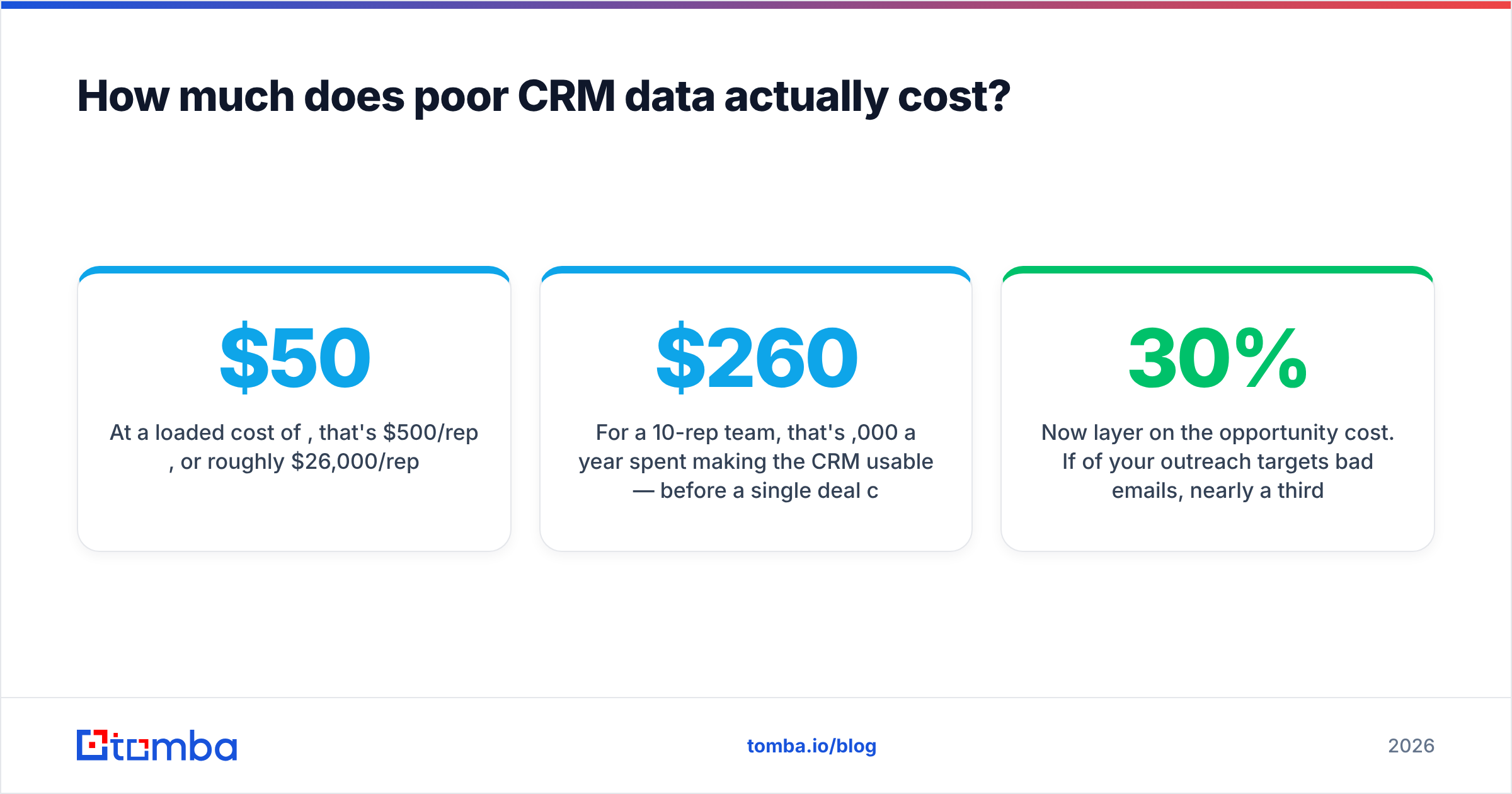
More than the software. Work the math for a modest team.
- Say a rep loses 10 hours a week to manual entry and data cleanup.
- At a loaded cost of $50/hour, that's $500/rep/week, or roughly $26,000/rep/year.
- For a 10-rep team, that's $260,000 a year spent making the CRM usable — before a single deal closes.
Now layer on the opportunity cost. If 30% of your outreach targets bad emails, nearly a third of your reps' selling effort produces nothing. That's not a line item; it's a tax on everything. Vendors and analysts like Gartner have long put the cost of poor data quality in the millions for larger orgs — the number scales with headcount, but the mechanism is identical at any size.
The comforting part: this cost is highly addressable. Cleaning data on entry and automating the retyping recovers most of those hours directly, and it does so without asking anyone to work harder.
What does a productive CRM workflow look like end to end?#
Here's the flow a well-tuned 2026 stack runs, from raw lead to advanced deal, with the human doing only the parts that need judgment.
- Lead enters — from a form, list, or prospecting tool.
- Auto-verify and enrich — email deliverability checked, firmographics filled, duplicates merged, all before a rep sees it.
- Auto-route — scoring rules (now trustworthy because the data is clean) assign the lead to the right rep instantly.
- Auto-task — the CRM creates the first-touch task and drops the contact into the correct sequence.
- Rep decides — reviews the enriched record, personalizes, and sends. This is the first point a human is required.
- Auto-log — replies, calls, and stage changes sync back automatically.
- Forecast reads clean data — pipeline reviews argue about strategy, not about whose numbers are wrong.
Count the automated steps versus the human ones. In a busy CRM, steps 2 through 4 and 6 are all manual. In a productive one, the rep touches step 5 and nothing else. That reallocation — from typing to selling — is CRM productivity.
Common mistakes that quietly kill CRM productivity#
- Buying features before fixing data. A better dashboard on dirty data is a prettier lie.
- Requiring 15 fields. Every mandatory field is friction; reps respond by faking entries, which is worse than blanks.
- Cleaning data once. Decay is continuous, so hygiene has to be continuous — verify on entry, not in an annual panic.
- Automating notifications instead of work. A reminder to do manual entry is not automation; it's nagging with a timestamp.
- Ignoring integrations at purchase. If it doesn't sync natively, your team becomes the sync.
Fix these five and you've eliminated the majority of the productivity drain most teams blame on "the CRM being clunky."
Get your CRM productive by fixing what feeds it#
Faster sales don't come from a new CRM — they come from clean data entering it and automation replacing the manual entry around it. Start upstream: verify and enrich every contact before it lands, so your scoring, routing, and forecasting finally work on numbers you trust.
That's exactly where Tomba's Email Finder fits. Find and verify professional email addresses by name, domain, or company, push them straight into HubSpot or Salesforce, and stop paying reps to type what a machine can capture. Start free with 25 searches a month, and let your team spend their hours on the one step that actually needs a human — selling.
Related guides#
Ready to find emails that actually work?
Join 150,000+ professionals who stopped guessing and started sending. Free credits on signup — no credit card required.
Get the Tomba newsletter
Practical outbound tactics and product updates — once every two weeks.
About the author