CRM Sales and Marketing Alignment: The 2026 Playbook
A shared CRM is where sales and marketing stop blaming each other and start closing. Here's how to align both teams, clean your data, and measure what matters in 2026.
CRM Sales and Marketing Alignment: The 2026 Playbook
Sales says marketing sends garbage leads. Marketing says sales never follows up. Both look at different spreadsheets, and both are partly right. The fix for CRM sales and marketing friction is not another meeting. It is a single CRM that both teams trust, feed, and act on.
This guide shows how a CRM connects sales and marketing in practice. You will see what to look for, how to keep the data clean, and how to measure whether alignment pays off in 2026.
TL;DR#
- A CRM built for both sales and marketing gives you one shared record of every lead, so handoffs stop leaking revenue.
- Alignment fails on data quality, not software. Bad emails, duplicates, and missing firmographics quietly kill even the best CRM.
- The winning stack is a CRM plus a lead-enrichment layer that fills in verified contact data automatically. Enrich at capture, not after.
- Track a small set of shared metrics (MQL→SQL rate, speed-to-lead, win rate) instead of vanity dashboards each team defends.
- Start free, prove the workflow on one pipeline, then scale. Tools like Tomba and a mainstream CRM cover most of the job on entry tiers.
What Does "CRM Sales and Marketing" Actually Mean?#
A CRM (customer relationship management) system is the shared database where every interaction with a prospect or customer lives. When people say a CRM serves both sales and marketing, they mean it does two jobs at once:
- For marketing: it captures leads from forms, ads, and content, scores them, and runs nurture campaigns.
- For sales: it tracks deals through pipeline stages, logs calls and emails, and forecasts revenue.
The magic is not either half. It is the seam between them. When a marketing-qualified lead becomes a sales conversation, nothing should be re-typed, lost, or guessed. One record travels the whole way.
If you want the textbook definition, the CRM glossary entry covers the fundamentals. But the operational reality is simpler: a CRM sales and marketing platform is the place both teams stop arguing about whose number is right.
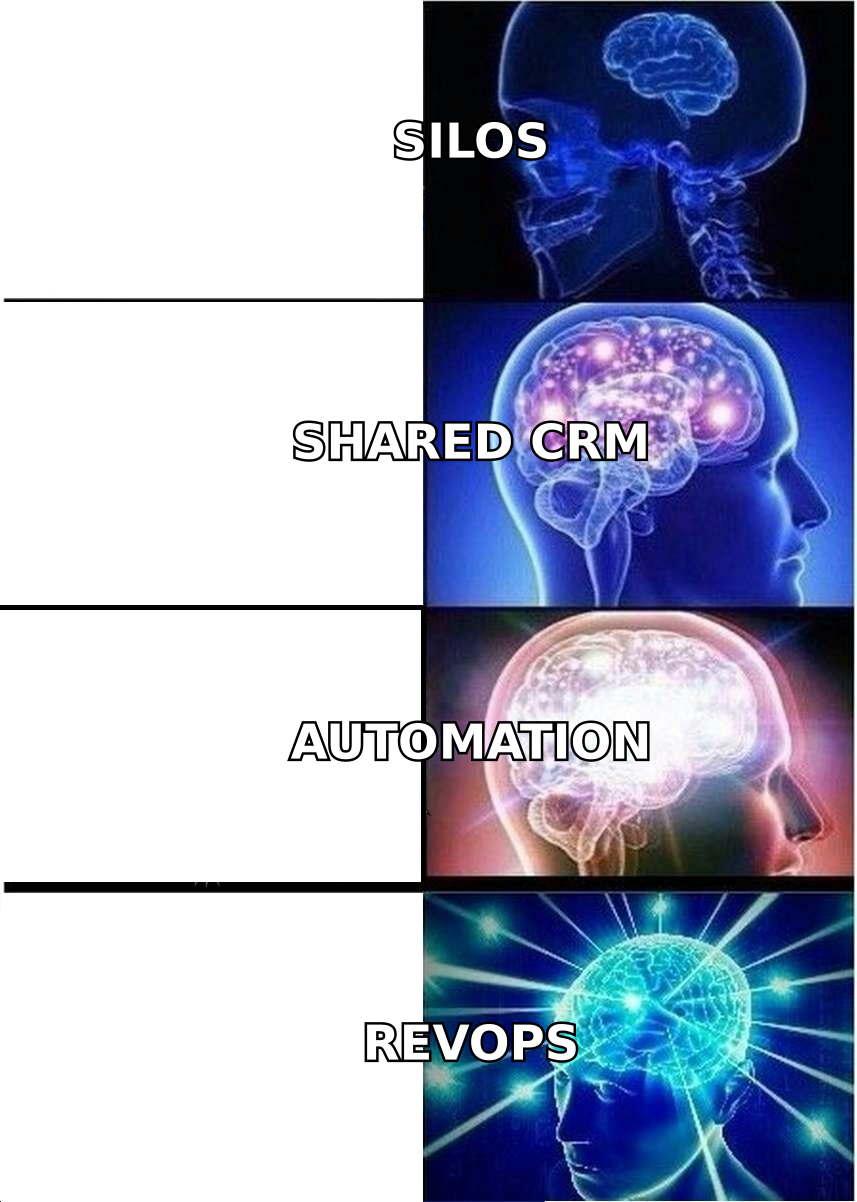
Why Do Sales and Marketing Need the Same CRM?#
Because misalignment is expensive, and the cost hides in plain sight. When the two teams run separate systems, three things happen:
- Leads fall through the crack. Marketing hands off a lead by email or a nightly export. Sales sees it a day late, if at all. Speed-to-lead is the single biggest predictor of conversion, and it collapses here.
- Nobody agrees on definitions. What counts as a marketing qualified lead? If marketing and sales score leads differently, every handoff turns into a debate.
- Attribution breaks. Marketing can't prove which campaigns drive revenue because the closing data lives in a sales tool it can't see.
A shared CRM removes all three. Studies from firms like Gartner and Forrester have long tied tight sales-marketing alignment to higher win rates and shorter cycles. The mechanism is boring but real: the same data, visible to both teams, in real time.
The handoff that actually works#
Here is the alignment sequence a good CRM enforces:
- Capture — a lead fills a form or gets sourced by an SDR.
- Enrich — the record is instantly filled with a verified email, company, and role.
- Score — marketing's rules decide if it's ready for sales.
- Route — the lead auto-assigns to the right rep.
- Act — sales works it inside the same system, and marketing sees the outcome.
Break any link and revenue leaks. Most teams skip the enrichment step (2). Yet it is the one that decides whether steps 3 through 5 run on real data or garbage.
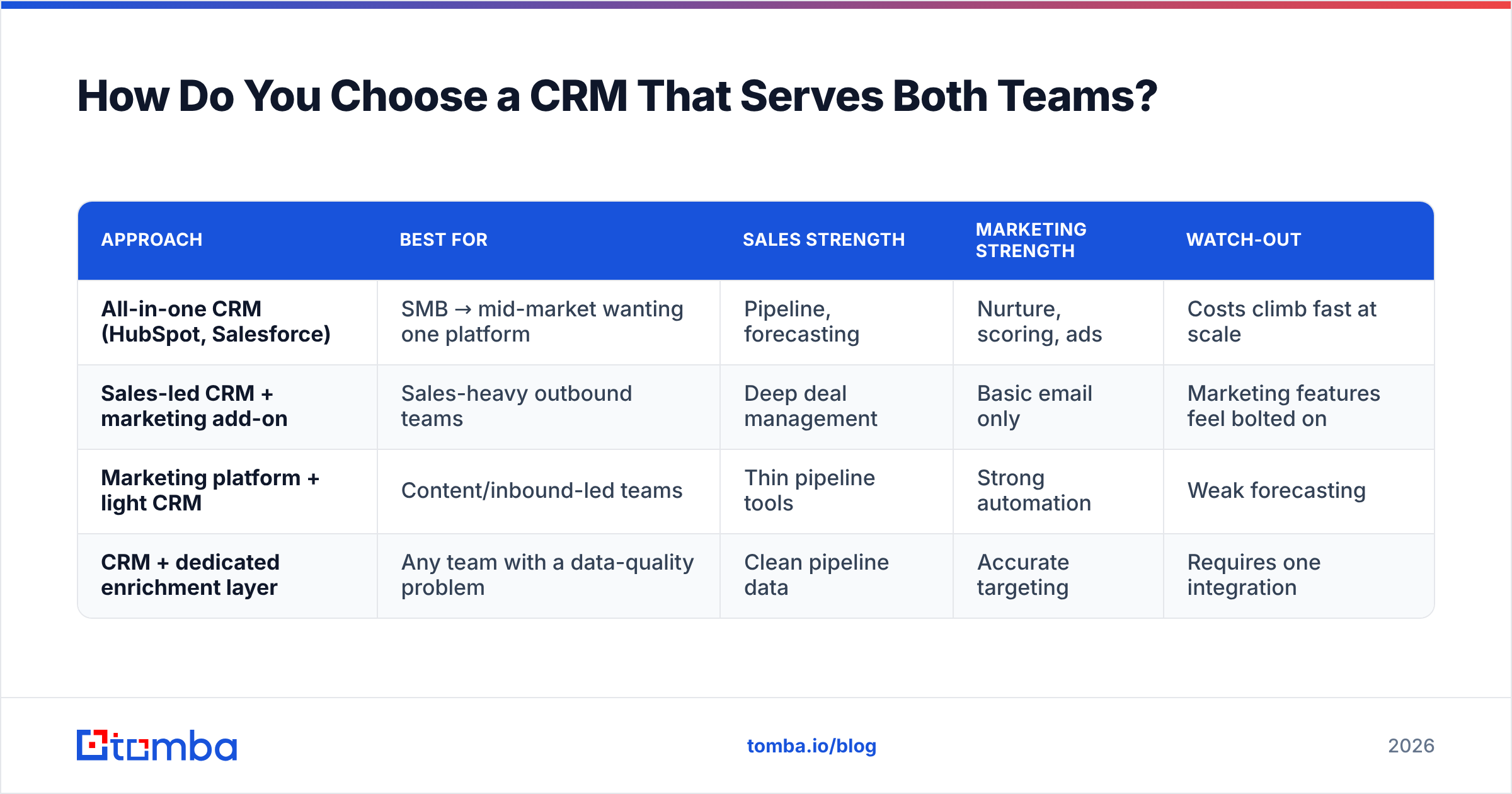
How Do You Choose a CRM That Serves Both Teams?#
Pick based on where your revenue motion actually lives, not on feature-count marketing. Here's a practical comparison of the common approaches.
| Approach | Best for | Sales strength | Marketing strength | Watch-out |
|---|---|---|---|---|
| All-in-one CRM (HubSpot, Salesforce) | SMB → mid-market wanting one platform | Pipeline, forecasting | Nurture, scoring, ads | Costs climb fast at scale |
| Sales-led CRM + marketing add-on | Sales-heavy outbound teams | Deep deal management | Basic email only | Marketing features feel bolted on |
| Marketing platform + light CRM | Content/inbound-led teams | Thin pipeline tools | Strong automation | Weak forecasting |
| CRM + dedicated enrichment layer | Any team with a data-quality problem | Clean pipeline data | Accurate targeting | Requires one integration |
Notice the last row. Whatever core CRM you pick, an enrichment layer sits underneath all of them, because none of the big platforms verify contact data well on their own. That's the gap tools like Tomba's data enrichment close.
A quick feature checklist#
When you evaluate a CRM sales and marketing platform, confirm it has:
- Shared lead records — one object both teams read and write.
- Native lead scoring — configurable by marketing, visible to sales.
- Automation triggers — route, notify, and enrich without manual work.
- Two-way sync with your data tools — enrichment and email finding shouldn't require CSV gymnastics.
- Reporting both teams trust — a single funnel view from click to closed-won.
You can compare mainstream options head-to-head on independent sites like G2 before committing.
Why Is Data Quality the Real Alignment Problem?#
Because a CRM is only as smart as the data inside it, and most CRMs are full of decay. Contacts change jobs. Emails bounce. Records duplicate. Within a year, a neglected CRM can lose a large chunk of its accuracy, and both teams start distrusting it.
When the data rots, alignment reverses. Marketing targets the wrong personas because titles are blank. Sales wastes hours on dead inboxes. The shared system that was supposed to unite the teams becomes the thing they both work around.
Two habits keep the CRM trustworthy:
- Verify before you send. Run every address through an email verifier so bounces never touch your sender reputation. High bounce rates hurt email deliverability for the whole domain, a marketing problem that lands squarely on sales.
- Enrich at the point of capture. When a lead enters the CRM with only a name and company, use an email finder or domain search to fill the verified contact automatically. Don't leave rows half-empty for a human to chase later.
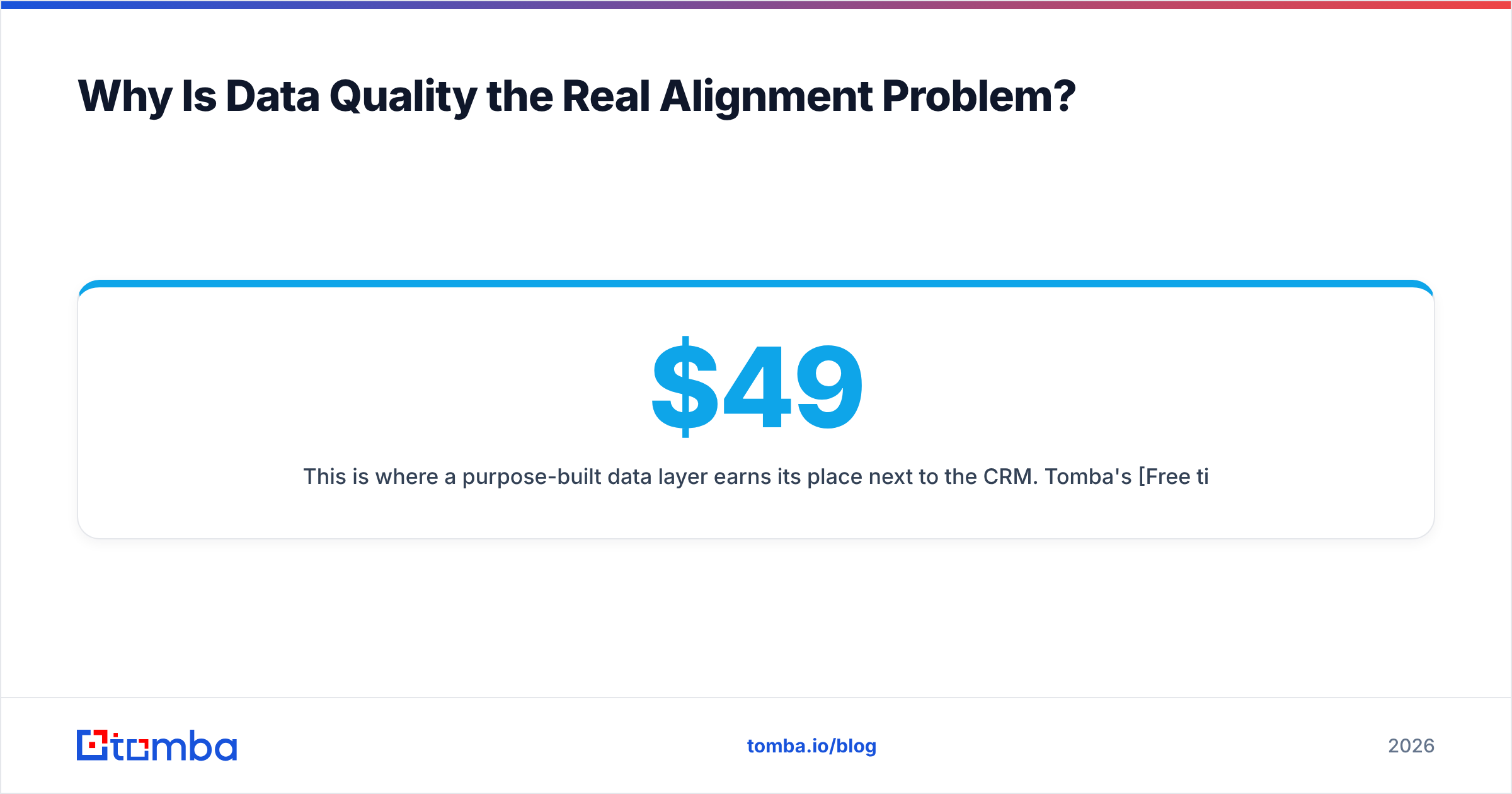
This is where a purpose-built data layer earns its place next to the CRM. Tomba's Free tier gives you 25 searches per month to test the workflow; paid plans start at $49/mo (Starter), then $99/mo (Growth) and $249/mo (Pro) as volume grows.
What Does an Aligned CRM Stack Look Like in 2026?#
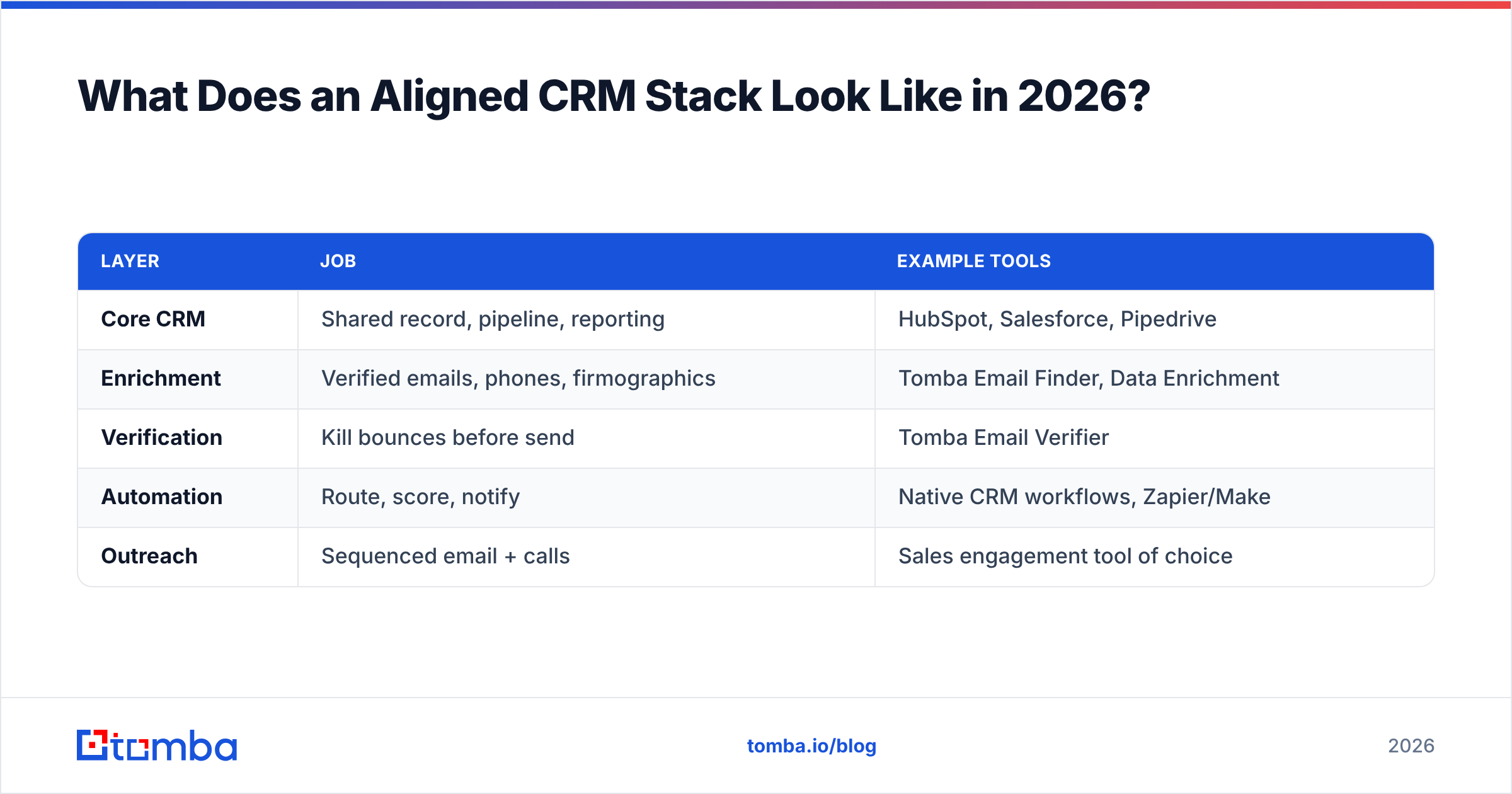
Layered, not monolithic. The pattern that works: a CRM at the center, an enrichment and verification layer feeding it clean data, and automation stitching the handoffs. Here's how a lean, effective stack maps out.
| Layer | Job | Example tools |
|---|---|---|
| Core CRM | Shared record, pipeline, reporting | HubSpot, Salesforce, Pipedrive |
| Enrichment | Verified emails, phones, firmographics | Tomba Email Finder, Data Enrichment |
| Verification | Kill bounces before send | Tomba Email Verifier |
| Automation | Route, score, notify | Native CRM workflows, Zapier/Make |
| Outreach | Sequenced email + calls | Sales engagement tool of choice |
The connective tissue matters as much as the boxes. Tomba integrates with the major CRMs directly. The HubSpot integration, Salesforce integration, and Pipedrive integration push verified contacts into the CRM without manual export. For anything custom, the Tomba API lets you enrich records the moment they're created.
A realistic implementation order#
Don't boil the ocean. Roll it out in stages:
- Week 1 — one pipeline, one source of truth. Move a single revenue motion (say, inbound demo requests) fully into the shared CRM. No side spreadsheets.
- Week 2 — plug in enrichment. Auto-fill verified emails and company data on every new lead so both teams work from complete records.
- Week 3 — agree on definitions. Sales and marketing jointly define MQL and SQL criteria, then encode them as CRM scoring rules.
- Week 4 — wire the automation. Auto-route scored leads, notify reps instantly, and log every outcome back where marketing can see it.
- Ongoing — review shared metrics (below) in one weekly standup, not two.
How Do You Measure Whether Alignment Is Working?#
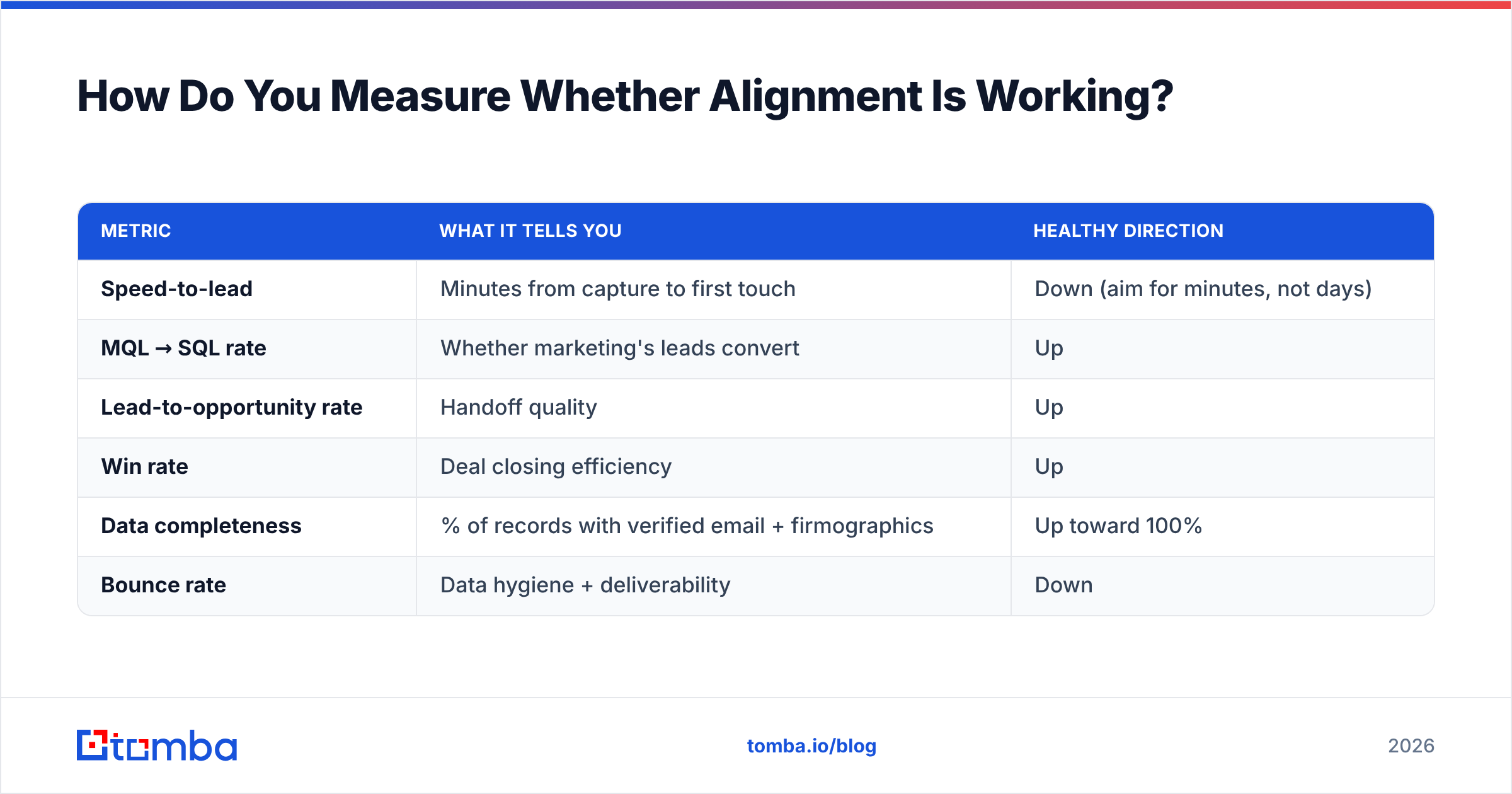
Track a short list of shared metrics both teams own together, not separate dashboards each defends. The point of a joint CRM is a joint scoreboard.
| Metric | What it tells you | Healthy direction |
|---|---|---|
| Speed-to-lead | Minutes from capture to first touch | Down (aim for minutes, not days) |
| MQL → SQL rate | Whether marketing's leads convert | Up |
| Lead-to-opportunity rate | Handoff quality | Up |
| Win rate | Deal closing efficiency | Up |
| Data completeness | % of records with verified email + firmographics | Up toward 100% |
| Bounce rate | Data hygiene + deliverability | Down |
If speed-to-lead and MQL→SQL rate both improve after you unify the CRM, alignment is real. If data completeness is stuck low, that's your bottleneck. It's an enrichment problem, not a CRM problem. For deeper definitions of the pipeline metrics, the B2B glossary is a useful shared reference so both teams use the same vocabulary.
Common Mistakes That Undo CRM Alignment#
Even with the right tools, teams sabotage themselves. Avoid these:
- Treating the CRM as marketing's tool or sales' tool. It's neither. It's the shared ledger. Ownership disputes are the first sign of trouble.
- Skipping verification to "save time." A dirty list costs far more in bounces and burned reputation than verification ever costs in credits.
- Manual enrichment. If a human has to look up every email, records stay incomplete. Automate capture-time enrichment with an email finder or bulk enrichment.
- Too many metrics. Ten dashboards means no shared focus. Pick the six above and review them together.
- No agreed lead definition. Without a written MQL/SQL contract, every handoff reopens the same fight.
Frequently Asked Questions#
Do small teams really need a CRM for both sales and marketing?#
Yes, arguably more than big ones. Small teams can't afford leaked leads or duplicated work. A shared CRM on a free or entry tier, plus an enrichment layer, punches well above its cost.
Can't I just use spreadsheets?#
For a handful of deals, briefly. But spreadsheets don't enforce definitions, don't verify data, and don't sync between teams in real time. They're where alignment goes to die.
Where does email finding fit into a CRM?#
At the enrichment step. When a lead arrives with partial data, an email finder fills the verified professional email so the record is complete and sales can act immediately. It's the difference between a name and a reachable contact.
How do I keep CRM data from decaying?#
Verify on entry and re-verify periodically. Run addresses through an email verifier, deduplicate regularly, and enrich records that go stale. Data hygiene is a routine, not a one-time project.
The Bottom Line#
A CRM sales and marketing setup isn't about buying the biggest platform. It's about giving both teams one trusted record and keeping that record clean. The software aligns the workflow; verified data aligns the outcomes. Skip the second half and even a great CRM turns into another silo.
Start by fixing the data layer, because it's the cheapest lever and the one everyone ignores. Fill your CRM with verified, complete contacts automatically using the Tomba Email Finder. Find professional emails by name, domain, or company, verify them before they ever hit your pipeline, and push them straight into HubSpot, Salesforce, or Pipedrive. The free tier's 25 searches is enough to prove the workflow this week. Clean data in, aligned revenue out.
Related guides#
Ready to find emails that actually work?
Join 150,000+ professionals who stopped guessing and started sending. Free credits on signup — no credit card required.
Get the Tomba newsletter
Practical outbound tactics and product updates — once every two weeks.
About the author