CRM With Email Automation: The Complete 2026 Setup Guide
A CRM with email automation only works when the data feeding it is clean. Here's how to pick, configure, and fuel one that actually books meetings in 2026.
CRM With Email Automation: The Complete 2026 Setup Guide
A CRM with email automation promises the same thing every year: fewer manual tasks, faster follow-up, more booked meetings. Most teams buy one, wire up a few sequences, and then watch open rates crater because the emails are firing at addresses that never existed. The software works. The data doesn't.
This guide walks through what a CRM with email automation actually does, how to choose one in 2026, where the setup usually breaks, and how to feed it clean contacts so the automation earns its price instead of quietly torching your sender reputation.
TL;DR#
- A CRM with email automation combines contact records, pipeline stages, and triggered/sequenced email sending in one system — so a status change can fire the next message without a rep touching it.
- The automation is only as good as the underlying data. Bad emails cause bounces, and bounces wreck email deliverability for your whole domain.
- Native CRM automation (HubSpot, Pipedrive, Salesforce) is convenient; dedicated sequencers add depth. Pick based on volume and how outbound-heavy you are.
- Verify and enrich contacts before they enter a sequence. A quick email verifier pass is the cheapest deliverability insurance you can buy.
- Budget for the data layer, not just the CRM seat. Automation that sends to dead addresses costs you more than the subscription.
What is a CRM with email automation?#
Think of a CRM with email automation like a restaurant kitchen with a ticket rail. The CRM is the rail — every order (contact) sits in a slot (pipeline stage) with notes. Email automation is the line cook who reads the rail and starts the next dish the moment a ticket moves, without waiting for the manager to shout it.
Technically, it's a customer-relationship platform where contact records, deal stages, and email sending live in the same database, connected by triggers. When a contact hits a condition — books a demo, goes cold for 14 days, downloads a PDF — the system sends a pre-written email or enrolls them in a multi-step sequence automatically.
Two flavors dominate:
- Trigger-based automation — a single event fires a single action ("deal moved to Negotiation → send contract reminder").
- Sequence-based automation — a contact enters a timed series of emails with branching logic ("no reply after email 2 → wait 3 days → send email 3").
Most modern platforms do both. The difference between vendors is depth of branching, reporting granularity, and how tightly the sending is coupled to deliverability controls like warmup and sending limits. If you want the textbook definition of the broader category, sales automation covers the umbrella these features sit under.

Why does email automation depend on clean data?#
Here's the conclusion first: automation multiplies whatever you feed it, including mistakes. Send 3 great emails to 1,000 contacts where 200 addresses are invalid, and you've just told mailbox providers that one in five of your recipients doesn't exist. That signal alone can push you into spam folders for the valid 800.
Every invalid address in an automated sequence produces a hard bounce. Mailbox providers (Gmail, Outlook, Yahoo) track your bounce rate as a core reputation metric. Cross ~2% and filtering tightens; cross 5% and you can get throttled or blocked outright. Automation makes this worse because it sends faster and at higher volume than a human ever would, so a dirty list does damage before anyone notices.
The fix is upstream, not downstream. You verify and enrich contacts before they enter the CRM's sending engine, not after the bounces roll in. That means:
- Verify every email at import and before enrollment — catch typos, dead mailboxes, and role addresses.
- Enrich thin records so your automation has the fields (first name, company, title) it needs to personalize instead of blasting "Hi there."
- Re-check catch-all domains, which accept everything at the SMTP layer and hide invalids until you send.
A catch-all verifier matters here because catch-all domains are exactly the ones automation can't validate on its own — they say "yes" to every address, then silently drop half.
Native CRM automation vs. dedicated sequencers: which do you need?#
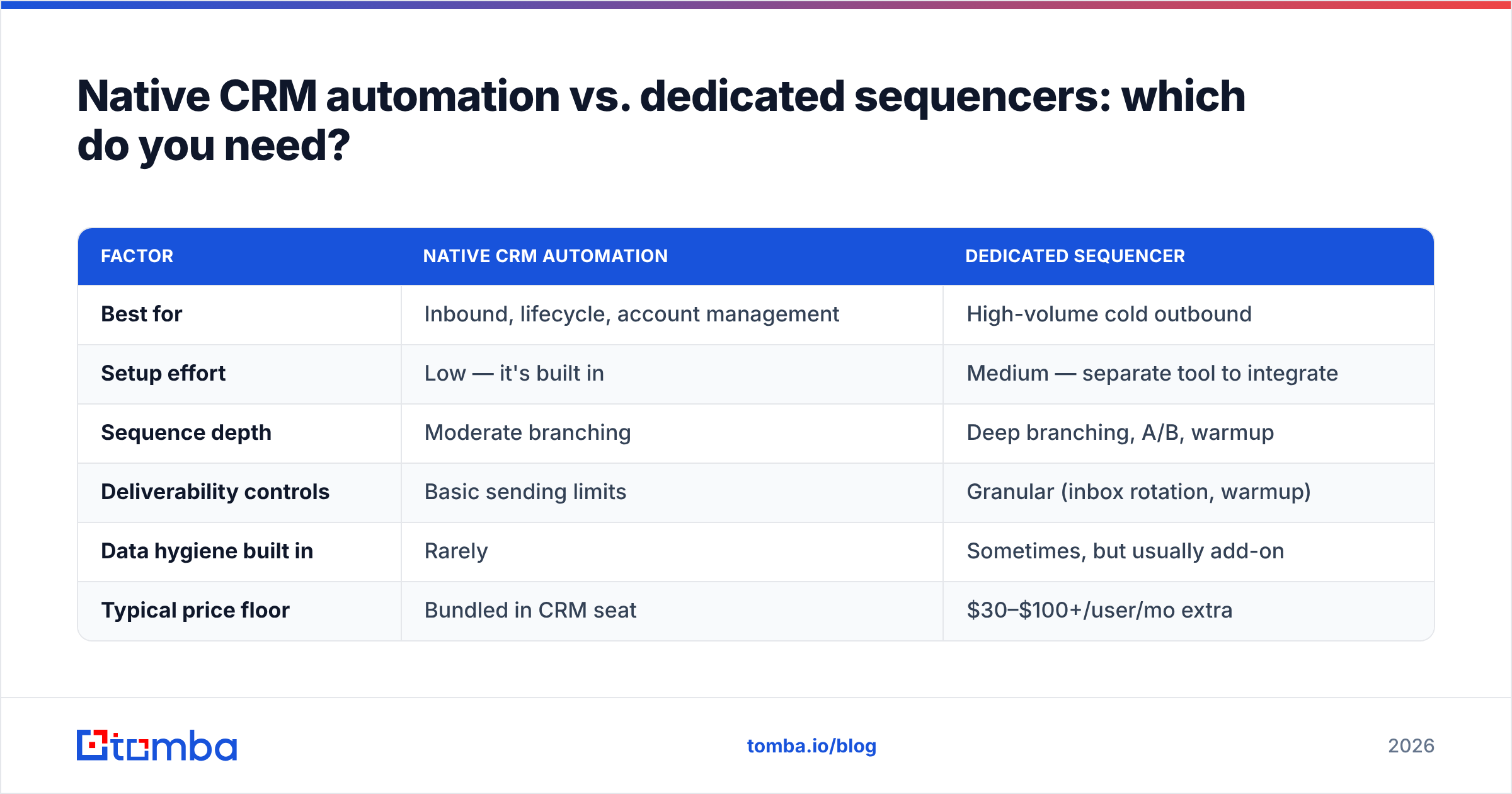
The honest answer depends on how outbound-heavy you are. Native automation inside an all-in-one CRM is enough for most inbound and account-management motions. High-volume cold outbound usually outgrows it and wants a dedicated sequencer plus a clean data source.
| Factor | Native CRM automation | Dedicated sequencer |
|---|---|---|
| Best for | Inbound, lifecycle, account management | High-volume cold outbound |
| Setup effort | Low — it's built in | Medium — separate tool to integrate |
| Sequence depth | Moderate branching | Deep branching, A/B, warmup |
| Deliverability controls | Basic sending limits | Granular (inbox rotation, warmup) |
| Data hygiene built in | Rarely | Sometimes, but usually add-on |
| Typical price floor | Bundled in CRM seat | $30–$100+/user/mo extra |
The pattern most teams land on: keep the CRM as the system of record, run cold outbound through a sequencer, and pipe a verified, enriched contact list into both. The CRM tracks the relationship; the sequencer handles the volume; a data tool keeps the fuel clean.
If you're weighing specific platforms, compare native options like HubSpot and Pipedrive against dedicated tools, and check independent reviews on G2 before committing — vendor demos never show you the bounce reports.
How do you set up a CRM with email automation the right way?#
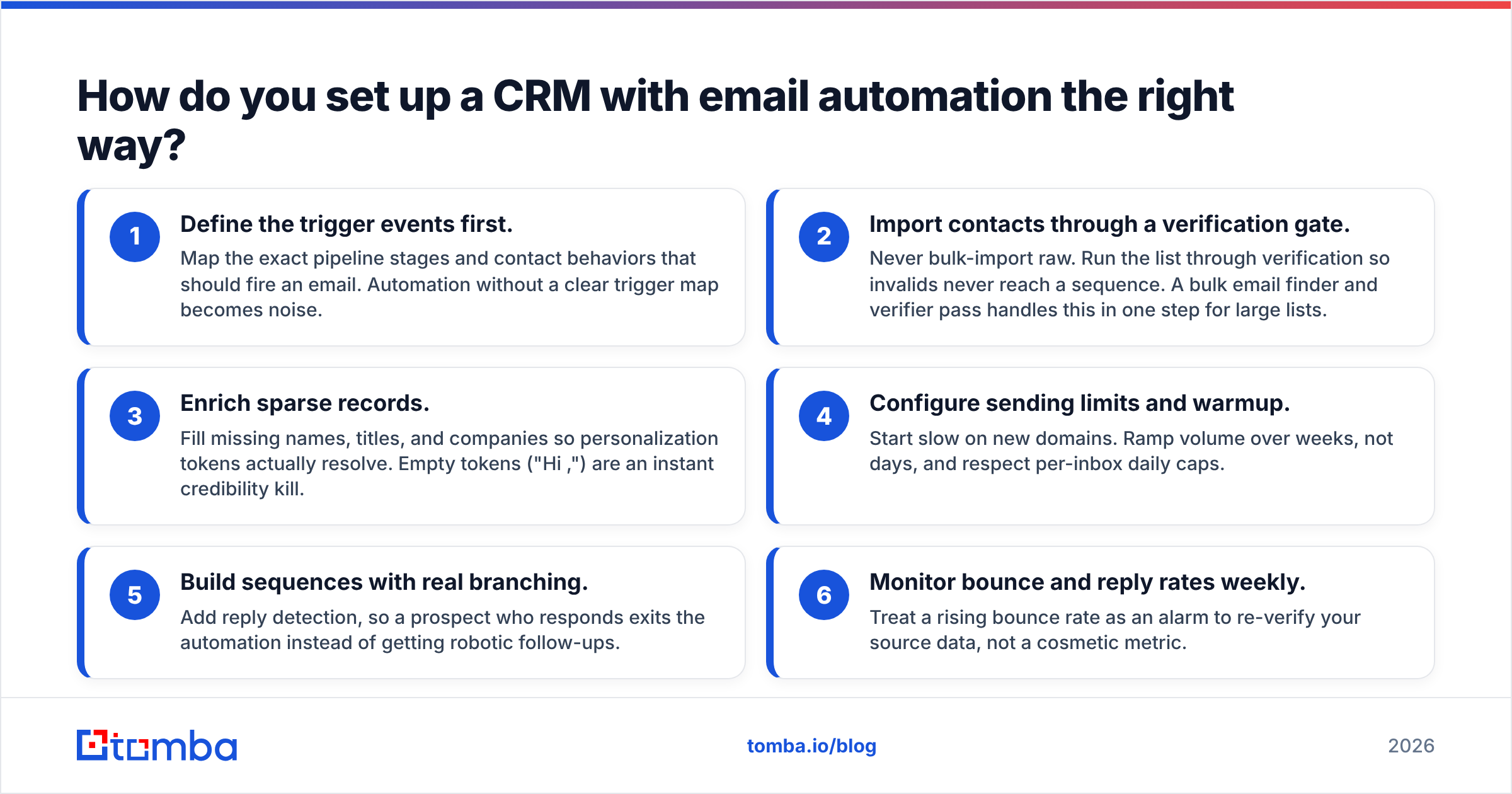
Follow this order. Skipping the data steps is the single most common reason automation underperforms.
- Define the trigger events first. Map the exact pipeline stages and contact behaviors that should fire an email. Automation without a clear trigger map becomes noise.
- Import contacts through a verification gate. Never bulk-import raw. Run the list through verification so invalids never reach a sequence. A bulk email finder and verifier pass handles this in one step for large lists.
- Enrich sparse records. Fill missing names, titles, and companies so personalization tokens actually resolve. Empty tokens ("Hi ,") are an instant credibility kill.
- Configure sending limits and warmup. Start slow on new domains. Ramp volume over weeks, not days, and respect per-inbox daily caps.
- Build sequences with real branching. Add reply detection, so a prospect who responds exits the automation instead of getting robotic follow-ups.
- Monitor bounce and reply rates weekly. Treat a rising bounce rate as an alarm to re-verify your source data, not a cosmetic metric.
That third step is where enrichment pays off. Automated emails that reference a prospect's role or company convert far better than generic blasts, and data enrichment turns a bare email address into a record your sequences can personalize.

What does a healthy automated email stack look like in 2026?#
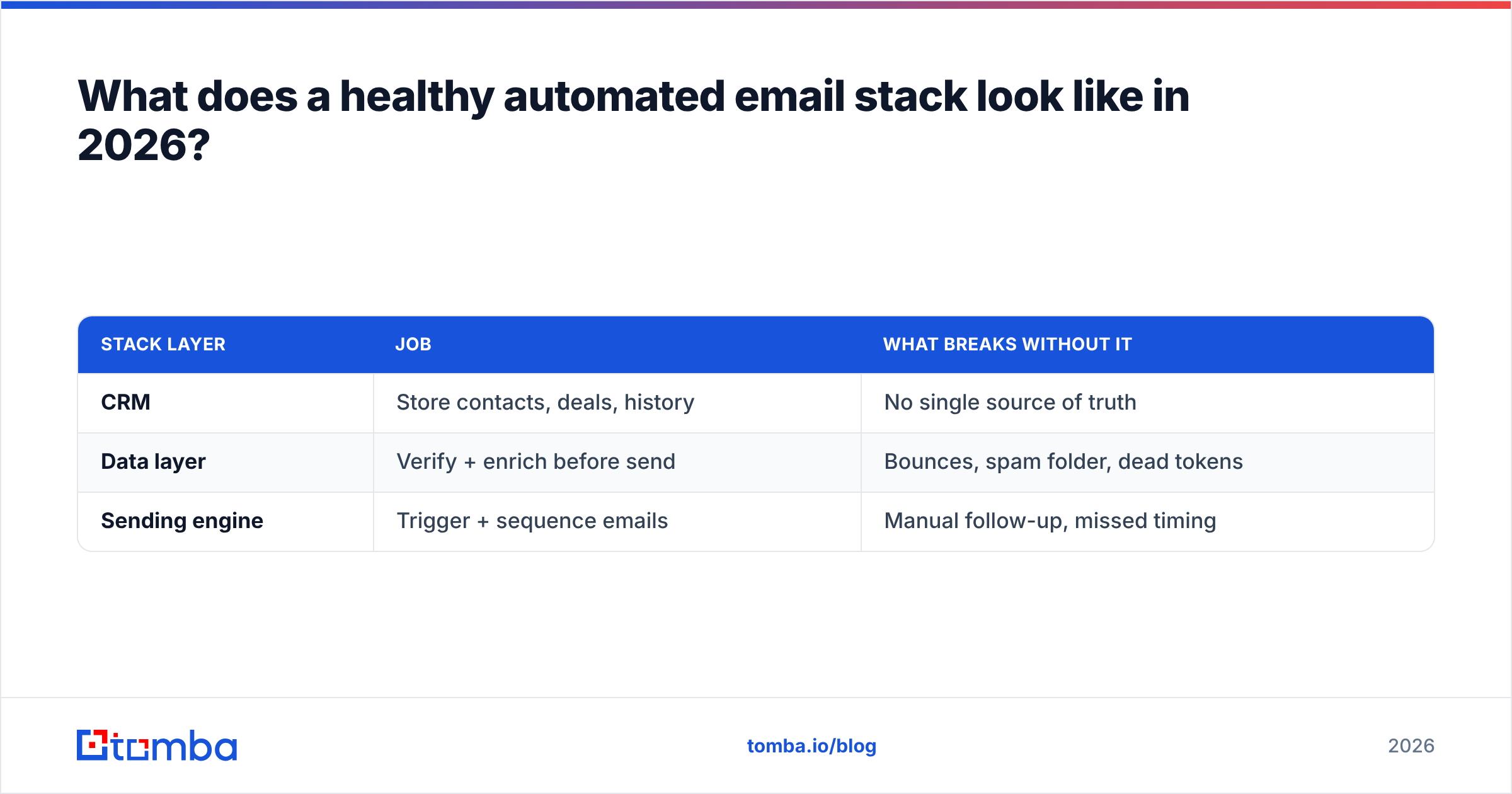
A working stack has three layers, and teams that skip the middle one pay for it in deliverability. Here's the shape most successful outbound and lifecycle teams converge on:
- System of record (the CRM). HubSpot, Salesforce, or Pipedrive holds contacts, deals, and history. This is your source of truth and where reporting lives. Pair it with a native Pipedrive integration or HubSpot integration so enriched data flows in without CSV shuffling.
- Data layer (verify + enrich). Before any contact reaches a sequence, it passes verification and enrichment. This is the layer that protects sender reputation — the difference between landing in the inbox and the spam folder.
- Sending engine (automation/sequencer). Native CRM automation for lifecycle emails, a dedicated sequencer for cold volume, both fed exclusively by verified contacts.
The middle layer is the one buyers cut to save money, and it's the one that determines whether the other two work. Automation sending to unverified data is a faster way to burn a domain, not a growth channel.
| Stack layer | Job | What breaks without it |
|---|---|---|
| CRM | Store contacts, deals, history | No single source of truth |
| Data layer | Verify + enrich before send | Bounces, spam folder, dead tokens |
| Sending engine | Trigger + sequence emails | Manual follow-up, missed timing |
How much should the data layer cost?#
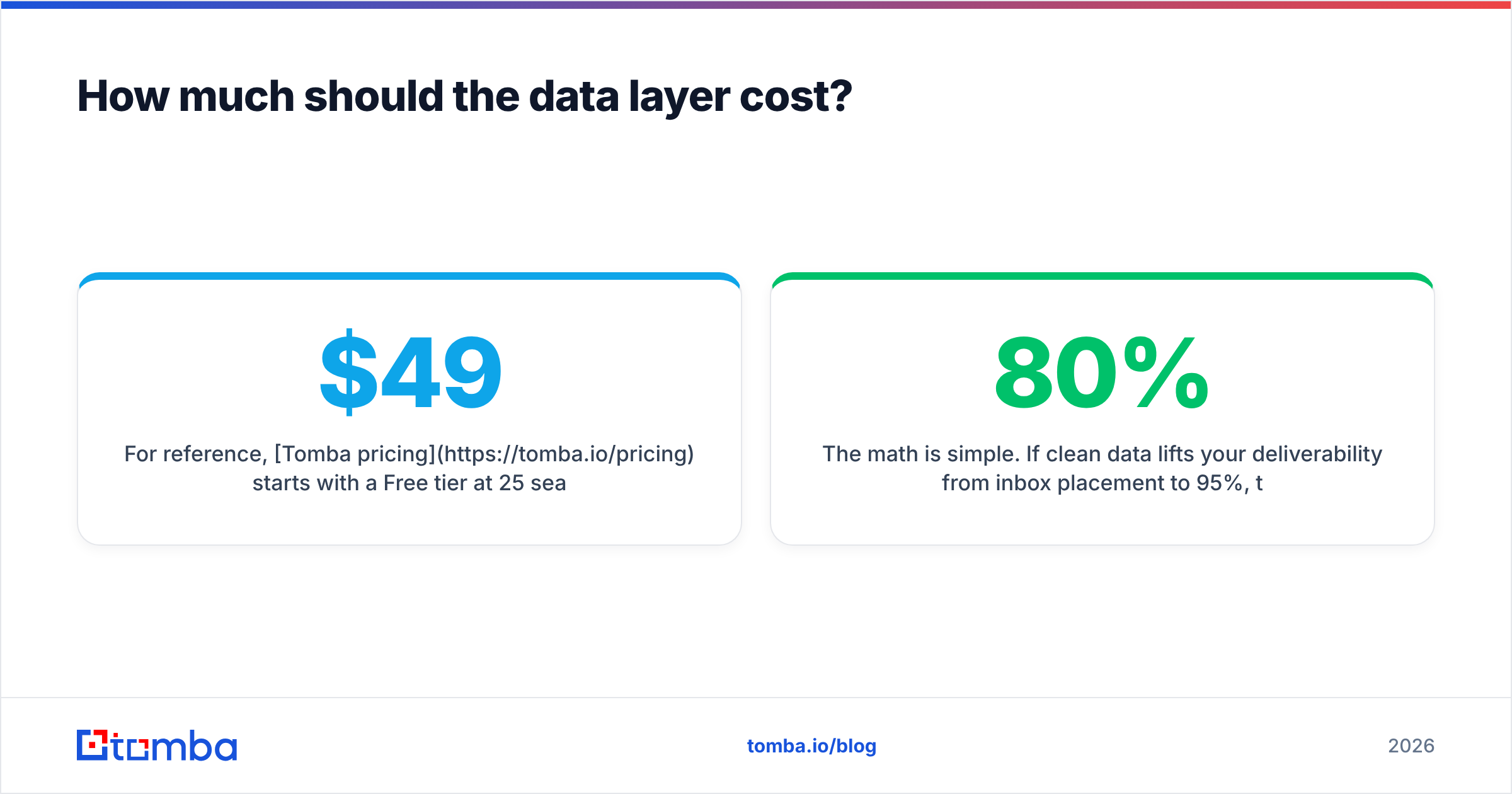
Less than you'd expect, and far less than the automation it protects. A verification-and-enrichment tool typically runs a fraction of your combined CRM and sequencer bill, while preventing the bounces that would otherwise cap your entire program.
For reference, Tomba pricing starts with a Free tier at 25 searches per month, then Starter at $49/mo, Growth at $99/mo, and Pro at $249/mo — with verification, domain search, and enrichment included rather than sold as separate add-ons. Compare that to the cost of a throttled sending domain: once a mailbox provider tanks your reputation, recovery takes weeks of reduced volume, and every deal in your pipeline slows with it.
The math is simple. If clean data lifts your deliverability from 80% inbox placement to 95%, that's a 19% increase in emails actually seen — on the exact same automation, sequences, and copy you already built. The data layer doesn't compete with your CRM budget; it's what makes that budget produce results.
Common mistakes that break CRM email automation#
- Importing raw lists. The fastest way to poison a new domain. Verify first, always.
- No reply detection. Prospects who answer keep getting automated follow-ups, which reads as spam and kills the deal.
- Over-personalizing with empty fields. Tokens that don't resolve ("Hi {{first_name}},") look worse than no personalization. Enrich before you tokenize.
- Ramping volume too fast. New domains need weeks of gradual warmup. Automation makes it tempting to send 5,000 on day one — don't.
- Ignoring catch-all domains. They accept everything and validate nothing. Screen them with a dedicated catch-all finder before enrolling.
- Treating bounce rate as cosmetic. It's the leading indicator of dirty data. A rising bounce rate means re-verify now, not next quarter.
Most of these trace back to one root cause: contacts entering the automation before anyone checked whether the emails were real. Fix the intake gate and the downstream problems mostly disappear.
Frequently asked questions#
Do I need a separate tool for email automation if my CRM has it built in? Not necessarily. Native automation covers lifecycle and inbound motions well. You add a dedicated sequencer when cold outbound volume and deliverability controls outgrow what the CRM offers.
Will email automation hurt my deliverability? Only if you feed it bad data or ramp too fast. Automation itself is neutral — it amplifies your data quality in both directions. Verify contacts and warm up sending domains and it helps you.
How often should I re-verify contacts already in my CRM? B2B email data decays roughly 2–3% per month as people change jobs. Re-verify active outbound segments every 60–90 days, and always re-check before a big campaign.
Can I find and verify emails at the point of import? Yes. Tools that combine finding and verification let you build a list and clean it in one pass, so nothing unverified reaches your sequences.
Put clean data behind your automation#
A CRM with email automation is only as strong as the contacts you pour into it. The trigger logic, the sequences, the branching — none of it matters if the address bounces. Get the intake right and the rest of the stack finally does what the demo promised.
Start with the data layer. Use the Tomba Email Finder to source accurate, verified professional emails, enrich them with the fields your sequences need, and pipe them straight into your CRM through native integrations. Your automation keeps firing — it just starts landing in inboxes instead of bouncing. Try the free tier, run one list through verification, and watch your bounce rate drop before you commit a dollar to more sending volume.
Related guides#
Ready to find emails that actually work?
Join 150,000+ professionals who stopped guessing and started sending. Free credits on signup — no credit card required.
Get the Tomba newsletter
Practical outbound tactics and product updates — once every two weeks.
About the author