CRM With Marketing Automation: The 2026 Buyer's Guide
A CRM with marketing automation should shorten your sales cycle, not inflate your bill. Here's how the top platforms compare, what the hidden costs are, and why clean data decides whether any of it works.
Choosing a CRM with marketing automation is really two decisions bolted together: where your customer records live, and how much of your follow-up runs without a human touching it. Get the pairing right and a single lead flows from first click to closed deal without anyone re-typing an email address. Get it wrong and you pay enterprise prices for a glorified spreadsheet with a newsletter button.
This guide breaks down what "marketing automation inside a CRM" actually means in 2026, which platforms deliver it without gouging you, and the one input that quietly decides whether any of it works.
TL;DR#
- A CRM with marketing automation unifies contact records, lead scoring, email/SMS sequences, and reporting so marketing and sales work from the same data.
- HubSpot and Salesforce lead on depth; actiCampaign, Zoho, and Brevo win on price-to-value for small and mid-size teams.
- The biggest hidden cost is not the license — it's the "contact tier" pricing that scales with your list size, dirty records and all.
- Automation amplifies whatever data you feed it. Bad emails mean bounces, suppressed sends, and a wrecked sender reputation at scale.
- Clean your source data first with an email verifier and enrich records before import, or automation just moves your mistakes faster.
What is a CRM with marketing automation?#
Think of a plain CRM as a filing cabinet: every customer has a folder, and someone has to open it, read it, and act. Marketing automation is the assistant who watches those folders and acts on your rules — "if this lead downloads the pricing page twice, email them the case study and ping the rep." A CRM with marketing automation puts the filing cabinet and the assistant in the same room, so the assistant never works from an outdated copy.
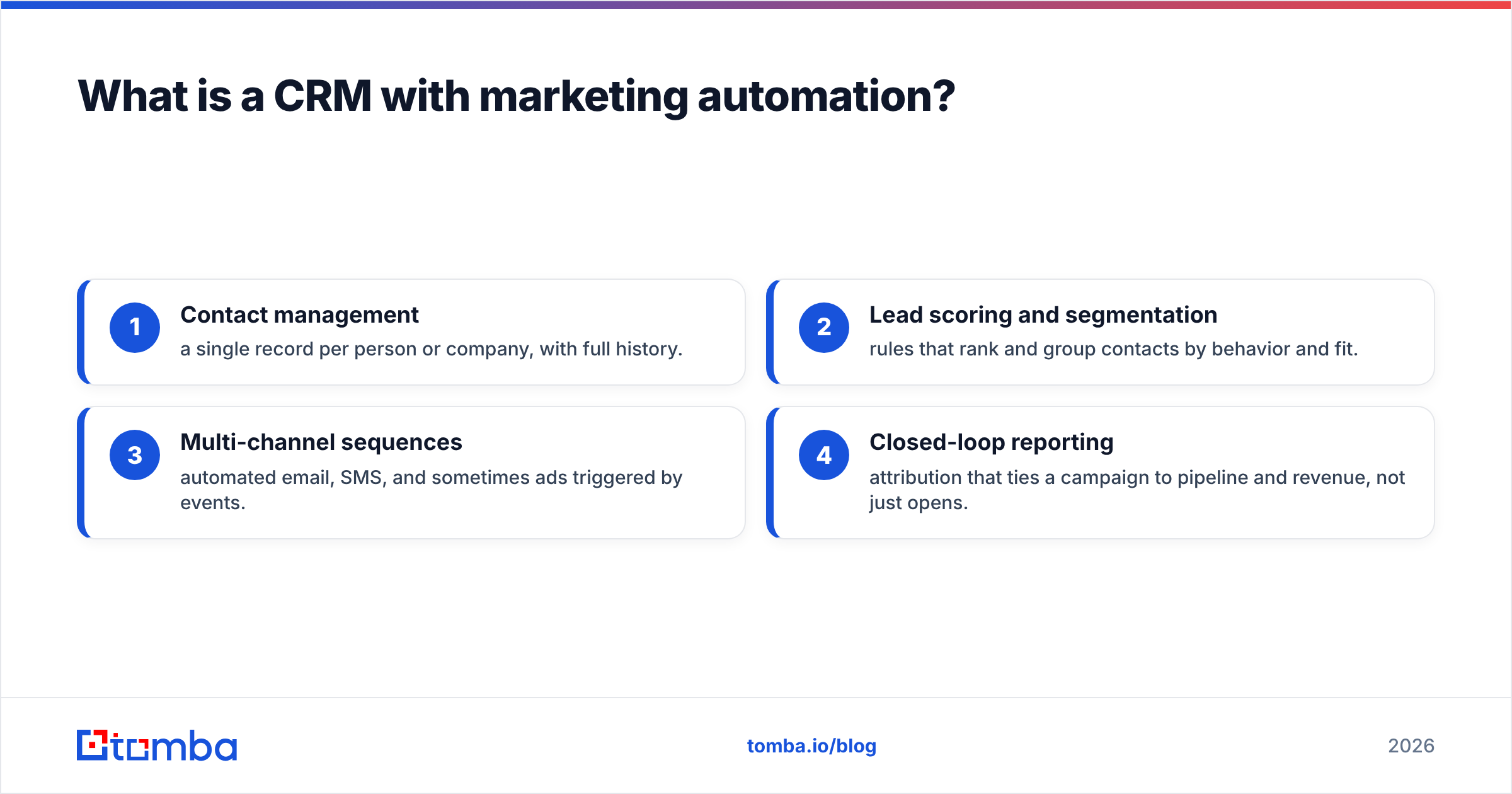
Technically, you're combining four capabilities in one system:
- Contact management — a single record per person or company, with full history.
- Lead scoring and segmentation — rules that rank and group contacts by behavior and fit.
- Multi-channel sequences — automated email, SMS, and sometimes ads triggered by events.
- Closed-loop reporting — attribution that ties a campaign to pipeline and revenue, not just opens.
When these live in separate tools, you spend your week syncing them. When they live together, a form fill can create a contact, score it, drop it into a nurture sequence, and notify a rep — in seconds, untouched.

Why combine CRM and marketing automation at all?#
The short answer: because handoffs leak. Every time a lead is exported from a marketing tool and imported into a sales CRM, you lose context, introduce duplicates, and delay follow-up. According to HubSpot's research, response speed is one of the strongest predictors of conversion — and manual handoffs are where speed goes to die.
Combining them delivers three concrete wins:
- Faster response. Behavioral triggers fire instantly instead of waiting for a Monday list export.
- One source of truth. Marketing sees which leads closed; sales sees which campaigns actually influenced the deal.
- Compounding automation. Once records are unified, you can layer workflows — onboarding, renewal, win-back — on the same clean foundation.
The catch is that all three benefits assume your contact data is accurate. A unified system with 20% invalid emails doesn't unify anything; it broadcasts your worst records to every workflow at once.
Which CRM with marketing automation is best in 2026?#
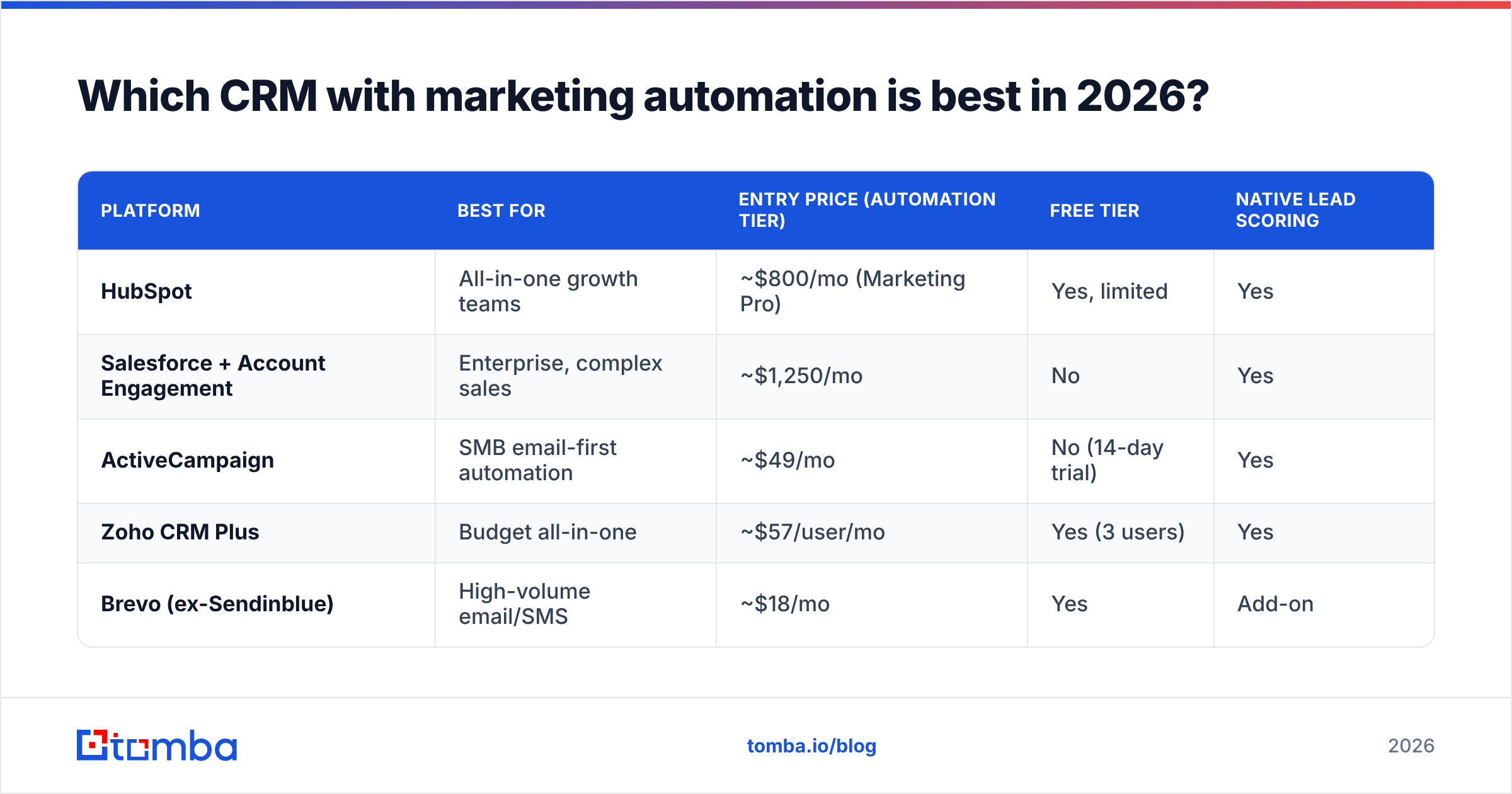
There's no single winner — there's a best fit for your team size, technical depth, and budget. Below is a like-for-like comparison of the platforms most teams shortlist. Prices reflect published entry points for paid marketing-automation tiers as of 2026; always confirm current rates, since contact-based pricing shifts often.
| Platform | Best for | Entry price (automation tier) | Free tier | Native lead scoring |
|---|---|---|---|---|
| HubSpot | All-in-one growth teams | ~$800/mo (Marketing Pro) | Yes, limited | Yes |
| Salesforce + Account Engagement | Enterprise, complex sales | ~$1,250/mo | No | Yes |
| ActiveCampaign | SMB email-first automation | ~$49/mo | No (14-day trial) | Yes |
| Zoho CRM Plus | Budget all-in-one | ~$57/user/mo | Yes (3 users) | Yes |
| Brevo (ex-Sendinblue) | High-volume email/SMS | ~$18/mo | Yes | Add-on |
A few honest takeaways:
- HubSpot is the smoothest experience and the fastest to launch, but the Marketing Pro tier and contact overages add up quickly. Its native HubSpot integration ecosystem is unmatched.
- Salesforce with Account Engagement (formerly Pardot) is the deepest and most customizable, and also the most expensive and consultant-dependent. If you already run Salesforce, adding automation is logical; adopting both cold is a project.
- ActiveCampaign punches far above its price for email-centric SMB automation, with excellent visual workflow building.
- Zoho is the value pick if you want a broad suite and can tolerate a busier interface.
- Brevo is the pragmatic choice when your automation is mostly email and SMS at volume.
Cross-check any shortlist against real user reviews on G2 before committing — feature checklists rarely reveal support quality or the true cost at scale.
What features actually matter versus marketing fluff?#
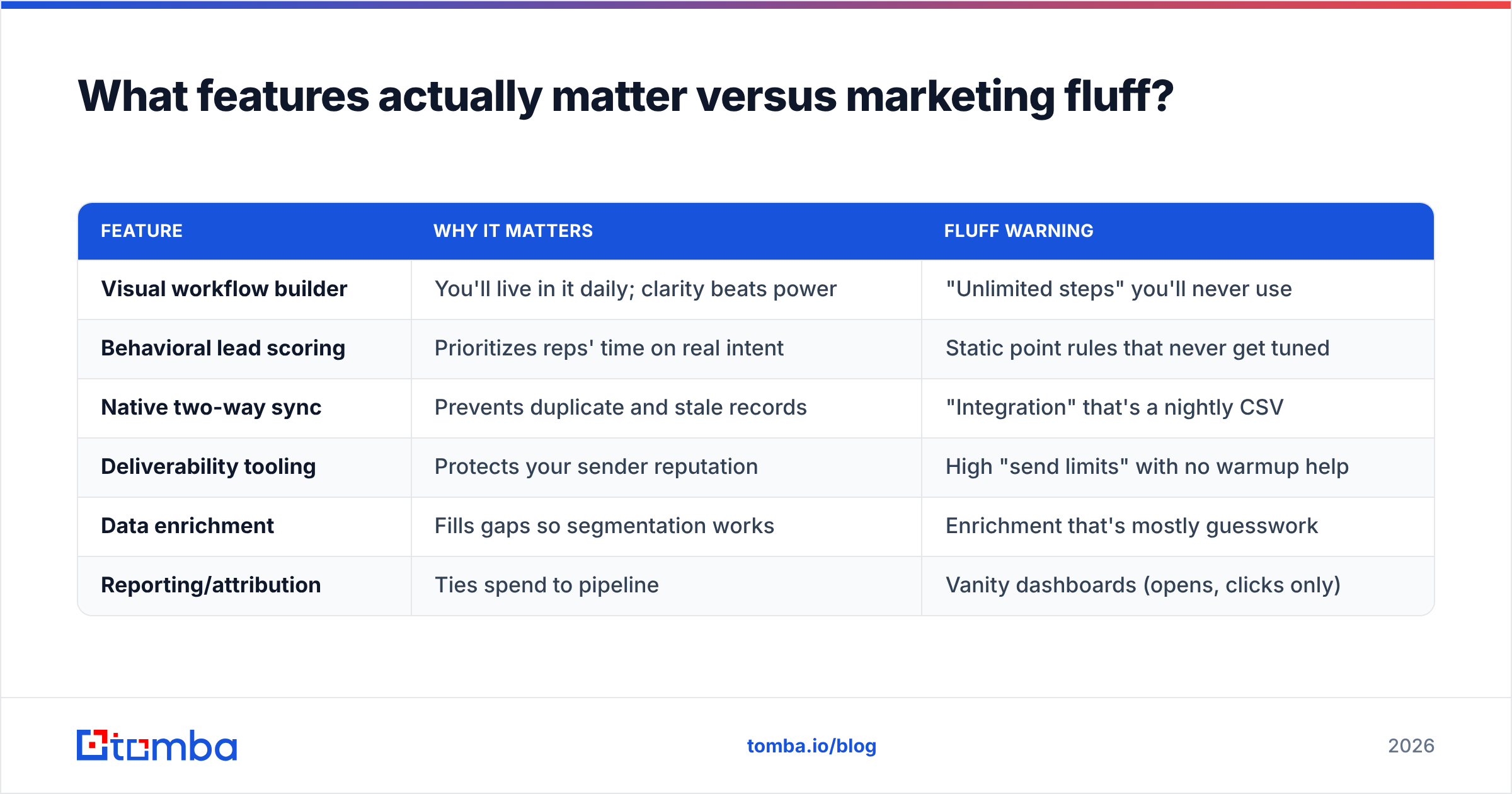
Vendors list hundreds of features. Only a handful change your outcomes. Here's how to separate signal from noise.
| Feature | Why it matters | Fluff warning |
|---|---|---|
| Visual workflow builder | You'll live in it daily; clarity beats power | "Unlimited steps" you'll never use |
| Behavioral lead scoring | Prioritizes reps' time on real intent | Static point rules that never get tuned |
| Native two-way sync | Prevents duplicate and stale records | "Integration" that's a nightly CSV |
| Deliverability tooling | Protects your sender reputation | High "send limits" with no warmup help |
| Data enrichment | Fills gaps so segmentation works | Enrichment that's mostly guesswork |
| Reporting/attribution | Ties spend to pipeline | Vanity dashboards (opens, clicks only) |
Notice how many rows depend on data quality. Lead scoring is meaningless on incomplete records. Segmentation breaks when job titles are blank. Deliverability collapses when a quarter of your list bounces. This is the recurring theme: automation is a multiplier, and it multiplies bad inputs just as eagerly as good ones.
What are the hidden costs of a CRM with marketing automation?#
The sticker price is rarely the real price. Budget for these before you sign:
- Contact-tier inflation. Most platforms bill by the number of contacts stored, valid or not. Import a bloated, duplicate-ridden list and you pay a premium to store records that will only bounce.
- Onboarding and consultants. Enterprise tools like Salesforce often require paid implementation partners. Factor in weeks of setup, not days.
- Overage fees. Sending or storing beyond your tier triggers charges that can dwarf your base plan during a big campaign.
- Deliverability damage. The most expensive hidden cost isn't a line item. Blast automation across unverified addresses and mailbox providers throttle you — quietly killing the ROI of every future campaign.
You can eliminate two of these four before they ever hit your invoice by fixing your data upstream. Deduplicate, verify, and enrich contacts before import, and you shrink your billable contact count while raising deliverability at the same time.
How does data quality make or break marketing automation?#
Automation is only as good as the records it runs on — that's the whole game. A workflow that sends the perfect message to a mistyped address accomplishes nothing except lowering your sender score. Do that a thousand times an hour, automated, and you teach Gmail and Outlook to distrust your domain.
Three data disciplines protect the investment:
- Verify before import. Run every address through an email verifier so invalids never enter the CRM and never inflate your contact tier. Pay special attention to catch-all domains, which pass basic checks but often hide dead mailboxes.
- Enrich for segmentation. Scoring and personalization need job title, company size, and industry. Data enrichment fills those gaps so your "if title contains VP" rules actually fire.
- Fill the gaps at the source. When a lead arrives with a company but no contact email, an email finder recovers a verified address instead of leaving the record — and the workflow — dead on arrival.
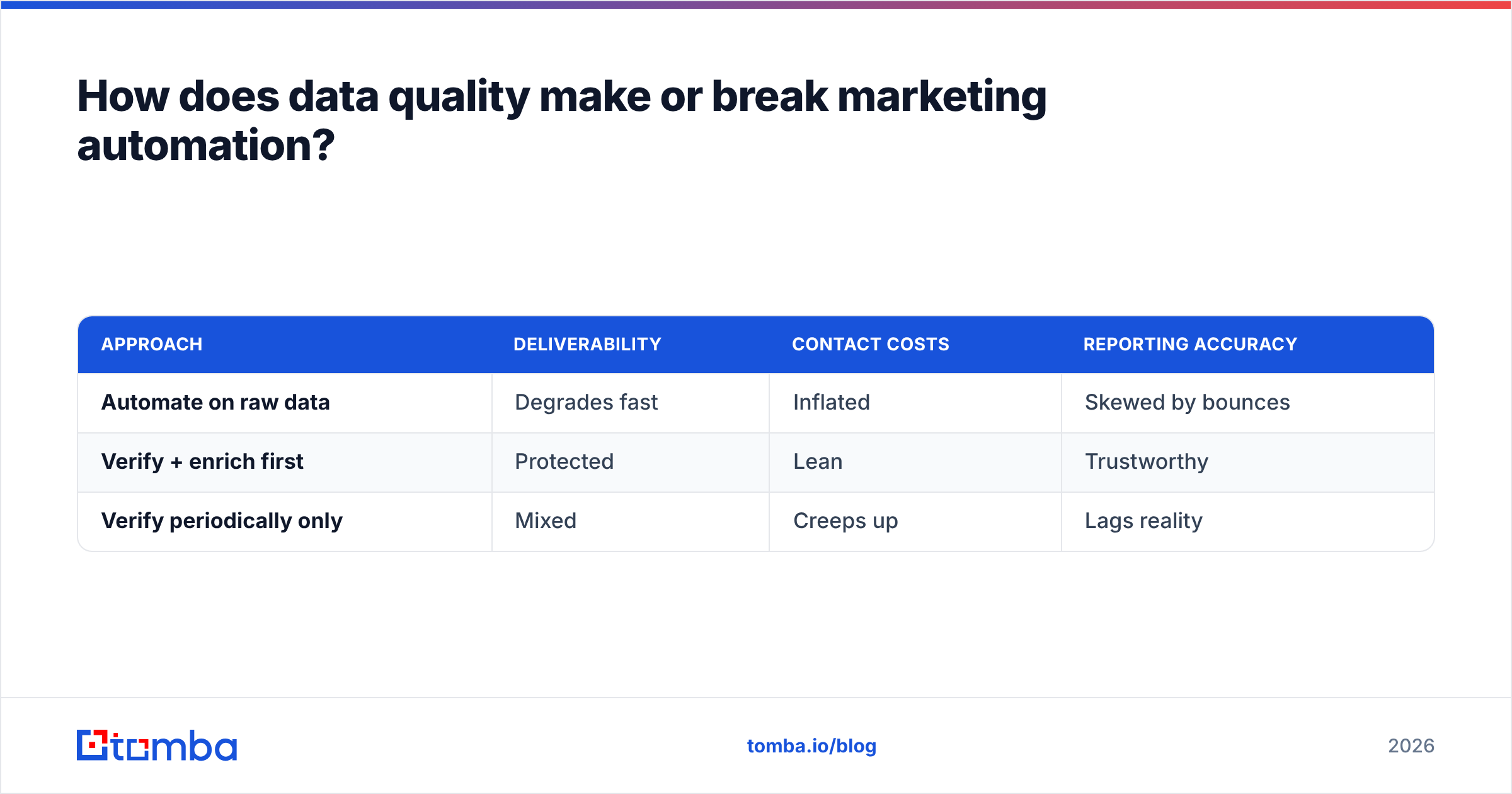
Here's the practical order of operations most teams miss: clean and enrich first, then let automation loose. The reverse — automate now, clean later — means every dirty record has already fired sends, damaged reputation, and skewed your reports before you notice.
| Approach | Deliverability | Contact costs | Reporting accuracy |
|---|---|---|---|
| Automate on raw data | Degrades fast | Inflated | Skewed by bounces |
| Verify + enrich first | Protected | Lean | Trustworthy |
| Verify periodically only | Mixed | Creeps up | Lags reality |
The middle column is the one finance notices and the first column is the one your deliverability team dreads. Doing the upfront work is cheaper on every axis.
How do you roll out a CRM with marketing automation without chaos?#
A staged rollout beats a big-bang launch every time. Here's a sequence that keeps data clean and adoption high:
- Audit your existing data. Export current contacts, deduplicate, and verify. Measure your true valid-contact count — it's usually far below your stored count.
- Define scoring before you build workflows. Agree with sales on what a qualified lead looks like. Automation without an agreed definition just automates disagreement.
- Migrate clean, enrich on the way in. Import only verified records, enriched with the fields your segments need.
- Launch one workflow, measure, then expand. Start with a single high-value sequence (say, demo requests). Prove it, then scale.
- Schedule ongoing hygiene. Re-verify quarterly and enrich new records at capture, so quality never decays back to where you started.
This is where combining tools pays off: your CRM becomes the system of record, automation becomes the engine, and a verification-plus-enrichment step becomes the fuel filter that keeps the engine clean. Skip the filter and you'll rebuild the engine within a year.
Is a CRM with marketing automation worth it for small teams?#
Yes — but only if you right-size it. A five-person startup does not need Salesforce plus Account Engagement; it needs ActiveCampaign, Brevo, or Zoho and a disciplined data process. The value of automation scales with the volume and repeatability of your follow-up, not with the size of your logo.
The honest test: if your team sends the same three or four sequences to different segments week after week, automation returns its cost quickly. If your outreach is genuinely bespoke every time, you'll get more from clean data and a lightweight CRM than from an expensive automation suite you underuse.
Whatever tier you land on, the input that determines your results is identical across all of them — accurate, enriched, verified contact data. That's the one lever that improves deliverability, lowers contact costs, and sharpens reporting simultaneously.
The bottom line#
A CRM with marketing automation is worth it when the platform matches your team's size and your data is clean enough for automation to trust. Pick HubSpot or Salesforce for depth, ActiveCampaign or Zoho or Brevo for value — but pick your data discipline first, because every platform on this list multiplies whatever you feed it.
Before you import a single contact into any automation platform, run your list through the Tomba Email Finder to recover missing addresses and verify what you already have. You'll enter your new CRM with a leaner, cleaner, deliverable list — so your first automated campaign builds sender reputation instead of burning it. Start on the free tier and clean your data before it costs you.
Related guides#
Ready to find emails that actually work?
Join 150,000+ professionals who stopped guessing and started sending. Free credits on signup — no credit card required.
Get the Tomba newsletter
Practical outbound tactics and product updates — once every two weeks.
About the author