CRMio Pros and Cons: An Honest 2026 Review for B2B Teams
A neutral breakdown of CRM.io's pros and cons in 2026 — pricing, features, data quality, and the gaps you should plan around before you commit.
CRM.io promises an all-in-one sales platform at a low price. That pitch is appealing when your budget is tight and your pipeline is growing. But "cheap and all-in-one" hides trade-offs. The ones that matter show up months after you switch — not during the demo. This guide breaks down the CRMio pros and cons so you know what you're getting.
This is a neutral, hands-on look at the CRM.io pros and cons so you can decide with your eyes open. No hype, no hit piece. Just where it earns its keep, where it frustrates real teams, and what to bolt on so the gaps don't cost you deals.
TL;DR: Is CRM.io Worth It in 2026?#
- Best for: small-to-mid B2B teams that want contact management, deals, and light automation in one low-cost tool.
- Biggest pro: genuinely cheap per-seat pricing plus a broad feature set (pipelines, email, workflows) that would cost far more stitched together.
- Biggest con: data enrichment and lead accuracy are thin — you'll still need a dedicated source for verified emails and phone numbers.
- Watch out for: support responsiveness, learning curve on the automation builder, and export/portability once your data lives inside the suite.
- Verdict: a solid value CRM for organizing deals, but pair it with a real data layer before you scale outbound.
What Is CRM.io and Who Is It For?#
CRM.io is a cloud CRM built by 500apps. It's pitched as a cheaper option than HubSpot and Salesforce. It bundles contact and account management, deal pipelines, email sync, task automation, and reporting into one subscription. You can read the vendor's own feature list on the CRM.io site, and cross-reference user sentiment on G2 before you trust any single review — including this one.
The sweet spot is a team of 2–50 reps. You've outgrown spreadsheets or a free CRM tier, but you can't justify enterprise seat pricing. If that's you, the value math is real. If you run high-volume, data-hungry outbound, the picture gets more nuanced — which is exactly what the pros and cons below unpack.
What Are the Main Pros of CRM.io?#
Here's where CRM.io consistently delivers for the teams that fit its profile.
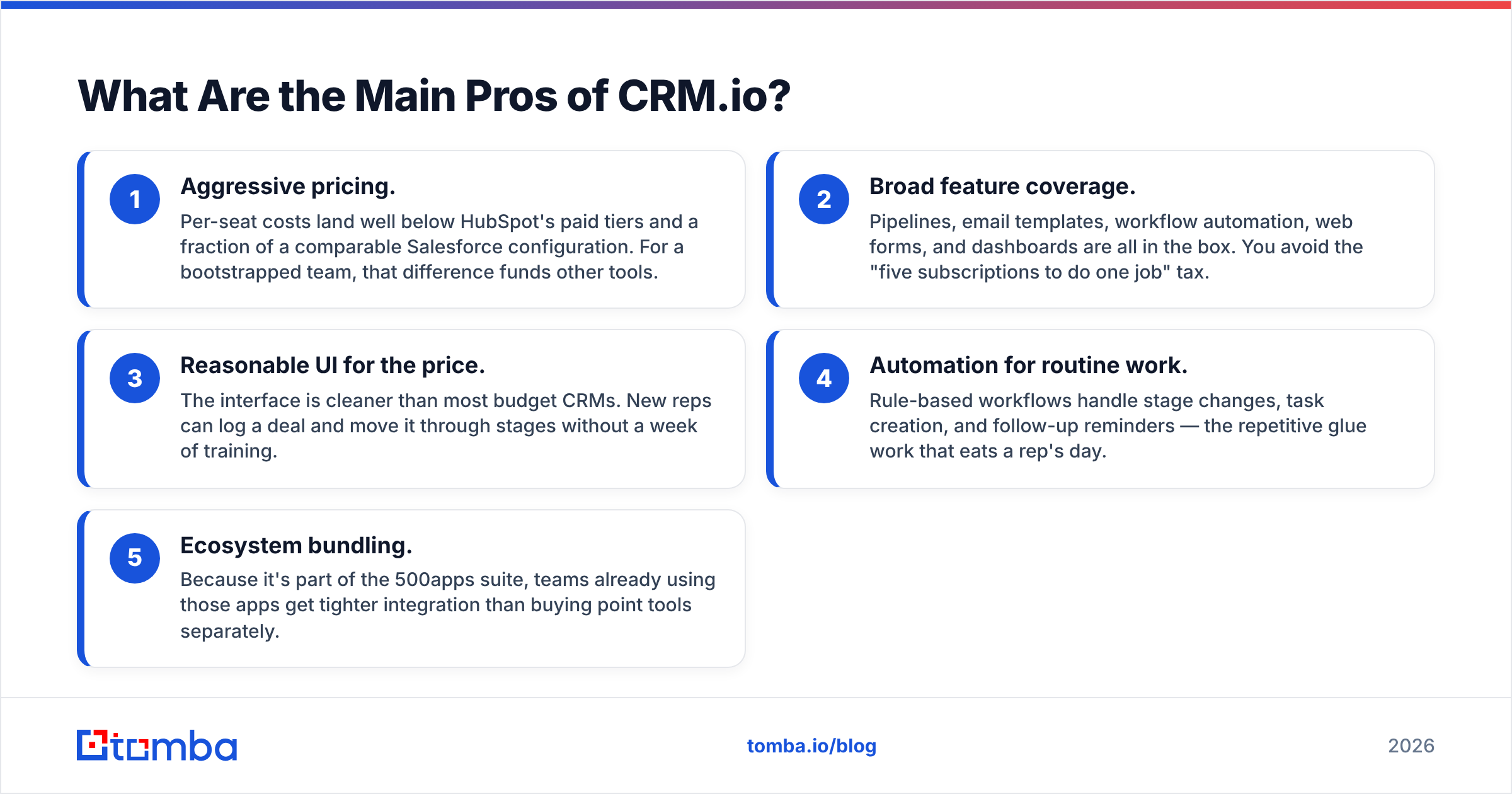
- Aggressive pricing. Per-seat costs land well below HubSpot's paid tiers and a fraction of a comparable Salesforce configuration. For a bootstrapped team, that difference funds other tools.
- Broad feature coverage. Pipelines, email templates, workflow automation, web forms, and dashboards are all in the box. You avoid the "five subscriptions to do one job" tax.
- Reasonable UI for the price. The interface is cleaner than most budget CRMs. New reps can log a deal and move it through stages without a week of training.
- Automation for routine work. Rule-based workflows handle stage changes, task creation, and follow-up reminders — the repetitive glue work that eats a rep's day.
- Ecosystem bundling. Because it's part of the 500apps suite, teams already using those apps get tighter integration than buying point tools separately.
None of these are trivial. A CRM that's cheap, usable, and reasonably complete removes a lot of friction for a growing team. That's a legitimate reason CRM.io shows up on shortlists.
What Are the Main Cons of CRM.io?#
Every affordable all-in-one makes cuts somewhere. With CRM.io, the cuts cluster around data, depth, and support.
- Thin built-in data enrichment. The CRM stores what you feed it, but it won't reliably fill in verified work emails, direct-dial phone numbers, or firmographics on its own. That gap directly limits outbound.
- Automation learning curve. The workflow builder is powerful-ish but not intuitive. Non-technical admins hit walls configuring multi-step logic.
- Support responsiveness. Recurring theme in user reviews: slower-than-expected ticket resolution, especially on lower tiers. Budget pricing often means budget support.
- Reporting depth. Dashboards cover the basics but stop short of the cohort, attribution, and forecasting analysis that revenue teams eventually want.
- Portability friction. Once contacts, notes, and activity history live inside the suite, clean export and migration take work. Plan your exit before you're locked in.
Notice the pattern: CRM.io is good at holding and organizing your pipeline, and weaker at sourcing and enriching the data that fills it. That distinction shapes the smartest way to use it.
CRMio Pros and Cons at a Glance#
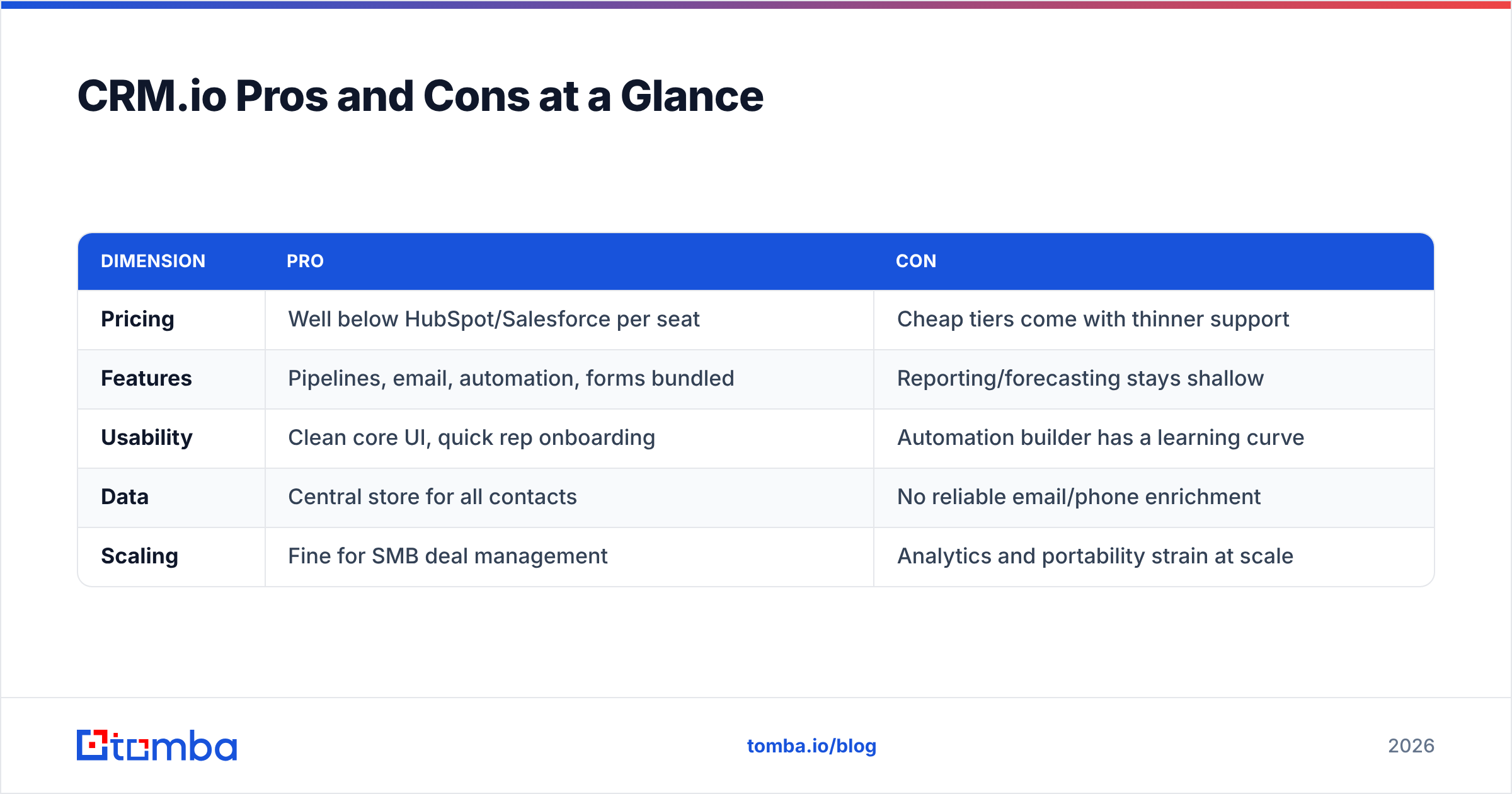
| Dimension | Pro | Con |
|---|---|---|
| Pricing | Well below HubSpot/Salesforce per seat | Cheap tiers come with thinner support |
| Features | Pipelines, email, automation, forms bundled | Reporting/forecasting stays shallow |
| Usability | Clean core UI, quick rep onboarding | Automation builder has a learning curve |
| Data | Central store for all contacts | No reliable email/phone enrichment |
| Scaling | Fine for SMB deal management | Analytics and portability strain at scale |
Use this table as a gut check. If your pain is "our pipeline is chaos," CRM.io helps immediately. If your pain is "we can't reach the right people," the CRM alone won't fix it.
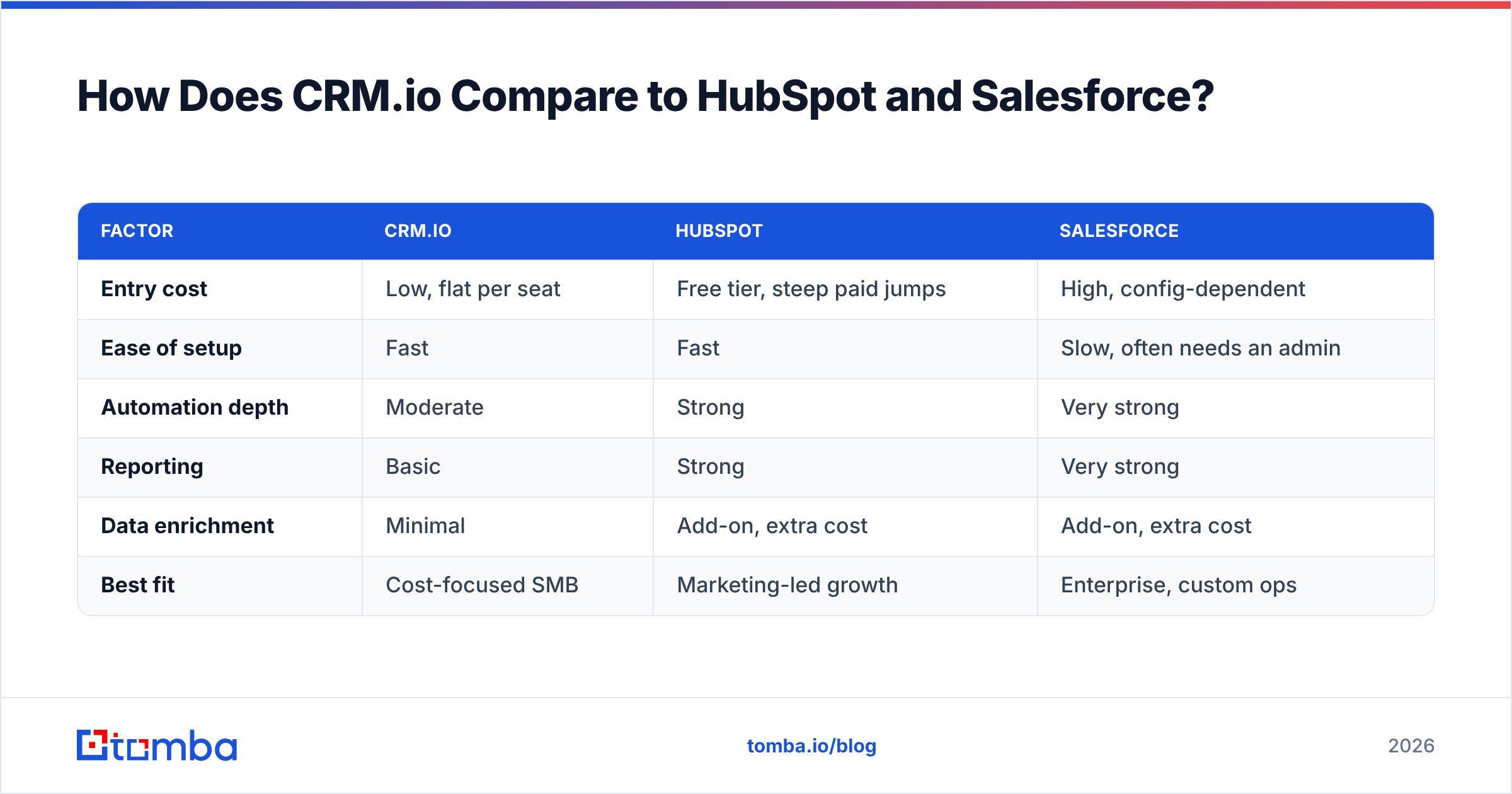
How Does CRM.io Compare to HubSpot and Salesforce?#
Price is CRM.io's whole argument against the incumbents, so weigh it honestly against what you give up.
| Factor | CRM.io | HubSpot | Salesforce |
|---|---|---|---|
| Entry cost | Low, flat per seat | Free tier, steep paid jumps | High, config-dependent |
| Ease of setup | Fast | Fast | Slow, often needs an admin |
| Automation depth | Moderate | Strong | Very strong |
| Reporting | Basic | Strong | Very strong |
| Data enrichment | Minimal | Add-on, extra cost | Add-on, extra cost |
| Best fit | Cost-focused SMB | Marketing-led growth | Enterprise, custom ops |
The takeaway: CRM.io wins on cost and speed-to-value, loses on analytical depth and native data. Crucially, none of these platforms ships accurate B2B contact data as a core strength — enrichment is an add-on everywhere. That's why the smart play isn't "CRM.io vs. the world," it's "which CRM plus which data source."
Where CRM.io Falls Short: The Data Problem#
Here's the honest core of the CRMio pros and cons debate. A CRM is a filing cabinet. It's only as valuable as what you put in it. Feed it stale, unverified contacts and even the best pipeline UI just organizes bounces and dead numbers.
This isn't unique to CRM.io — it's true of every CRM. But CRM.io's minimal enrichment makes the gap more obvious. Reps end up hunting for emails by hand, guessing at formats, and burning sender reputation on addresses that never existed. Bounce rates climb, and your domain's email deliverability suffers for it.
The fix is architectural, not emotional: treat your CRM as the system of record and a dedicated finder-verifier as the system of truth for contact data. That's where a tool like Tomba slots in cleanly alongside CRM.io rather than competing with it.
- Find the address: use an email finder to get the verified work email from a name and company domain before it ever touches the CRM.
- Verify before you send: run new contacts through an email verifier so you're not importing bounces into CRM.io.
- Fill the whole company: a domain search pulls the full set of reachable contacts at an account in one pass.
- Enrich in bulk: push a list through Tomba's bulk email finder and import clean records, rather than typing them in one by one.
Do that, and CRM.io's weakest area stops being a liability because you've moved the data job to a tool built for it.
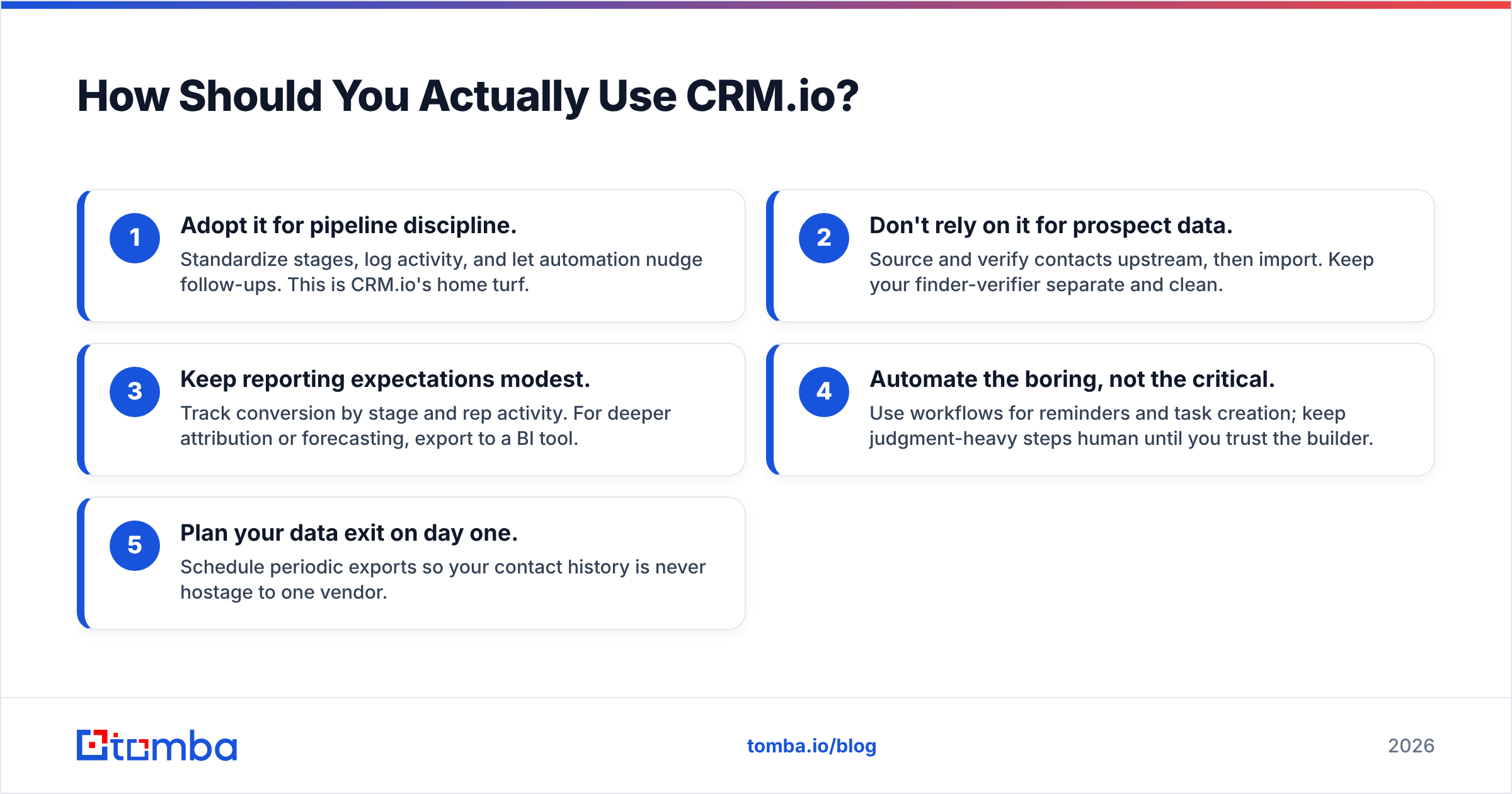
How Should You Actually Use CRM.io?#
A practical playbook, based on where it's strong and weak:
- Adopt it for pipeline discipline. Standardize stages, log activity, and let automation nudge follow-ups. This is CRM.io's home turf.
- Don't rely on it for prospect data. Source and verify contacts upstream, then import. Keep your finder-verifier separate and clean.
- Keep reporting expectations modest. Track conversion by stage and rep activity. For deeper attribution or forecasting, export to a BI tool.
- Automate the boring, not the critical. Use workflows for reminders and task creation; keep judgment-heavy steps human until you trust the builder.
- Plan your data exit on day one. Schedule periodic exports so your contact history is never hostage to one vendor.
Teams that follow this pattern get the value (cheap, organized pipeline) without absorbing the cost (bad data, shallow analytics). Check current Tomba pricing if you're building the data layer — the free tier is enough to test the workflow before you commit budget.
Frequently Asked Questions#
Is CRM.io good for small businesses? Yes — it's arguably its best fit. Low per-seat cost and quick setup suit teams that need structure without an admin. Pair it with verified data and you've covered the main weakness.
What's the biggest downside of CRM.io? Weak native data enrichment. The CRM organizes contacts well but won't reliably source accurate emails or phone numbers, so outbound teams need a separate finder and verifier.
Does CRM.io replace tools like HubSpot? For deal management on a budget, largely yes. For advanced marketing automation, attribution, and reporting, HubSpot still pulls ahead — at a much higher price.
How is CRM.io's customer support? Adequate but not fast, especially on lower tiers. Reviews cite slow ticket resolution, so lean on documentation and community for time-sensitive issues.
The Bottom Line on CRMio Pros and Cons#
CRM.io is a genuinely good value CRM for SMB teams that need to organize deals without enterprise pricing. Its pros — cost, coverage, usability — are real. Its cons — thin data, modest reporting, patchy support — are manageable if you plan around them instead of pretending they don't exist.
The single highest-leverage move is fixing the data gap. A CRM full of verified, deliverable contacts beats an expensive CRM full of guesses every time. Feed CRM.io clean records with the Tomba Email Finder — find verified professional emails by name, company, or domain, run them through verification, and import only addresses that actually land. Start free with 25 searches a month, wire it into your workflow, and let CRM.io do what it does best: keep your now-reachable pipeline moving.
Related guides#
Ready to find emails that actually work?
Join 150,000+ professionals who stopped guessing and started sending. Free credits on signup — no credit card required.
Get the Tomba newsletter
Practical outbound tactics and product updates — once every two weeks.
About the author