CRM.io Reviews (2026): Features, Pricing, Pros & Verdict
An independent look at CRM.io: what the 500apps CRM does well, where it frustrates users, real pricing, and whether the all-in-one bundle is worth it in 2026.
CRM.io markets itself as a full-featured sales CRM inside the 500apps suite. It promises enterprise capabilities at a small-business price. But bundled software cuts both ways. You get breadth, and sometimes you pay for it in depth. Most CRM.io reviews stop at the feature list. This one goes further. It cuts through the marketing to what actually matters when you choose where your pipeline lives.
TL;DR — Is CRM.io Worth It?#
- What it is: A cloud CRM from 500apps (now often branded under the BizAppz/500apps umbrella). It covers contact management, deal pipelines, sales automation, and light AI scoring.
- The hook: One flat price unlocks CRM.io and 50+ other business apps. That is a win if you'll actually use the suite.
- Where it shines: Low entry cost and a broad feature checklist. Built-in modules like email, telephony, and forms usually cost extra elsewhere.
- Where it frustrates: Uneven polish and a learning curve across the suite. Support and onboarding also get mixed ratings.
- Bottom line: A reasonable pick for budget-conscious SMBs who want everything under one login. Still, data quality and deliverability depend on tools CRM.io does not fully replace.
What Is CRM.io?#
CRM.io is the CRM product inside the 500apps ecosystem. That ecosystem is a bundle of business apps sold under one subscription. Think of it like a gym membership. The same pass opens the pool, the sauna, and the squash courts. You don't pay per room. You pay for the whole building, and you hope you use enough of it to justify the cost.
The CRM handles the basics you'd expect. That means lead capture, contact and account records, a visual deal pipeline, task management, and reporting. On top of that, 500apps adds modules that rivals usually sell on their own. You get email marketing, a click-to-call dialer, web forms, and workflow automation. For a small team replacing three or four tools, that bundle is the whole pitch.
The tradeoff is simple to state. Best-of-breed stacks give you a specialist for each job. An all-in-one gives you one generalist for every job. Which is better? It depends on what you value. One bill and one login, or deeper, more refined tools.
What Do CRM.io Reviews Say Are the Standout Features?#
Public CRM.io reviews on directories like G2 and Capterra repeat a few themes. Here is an honest read on the features users praise. Each one comes with a caveat.
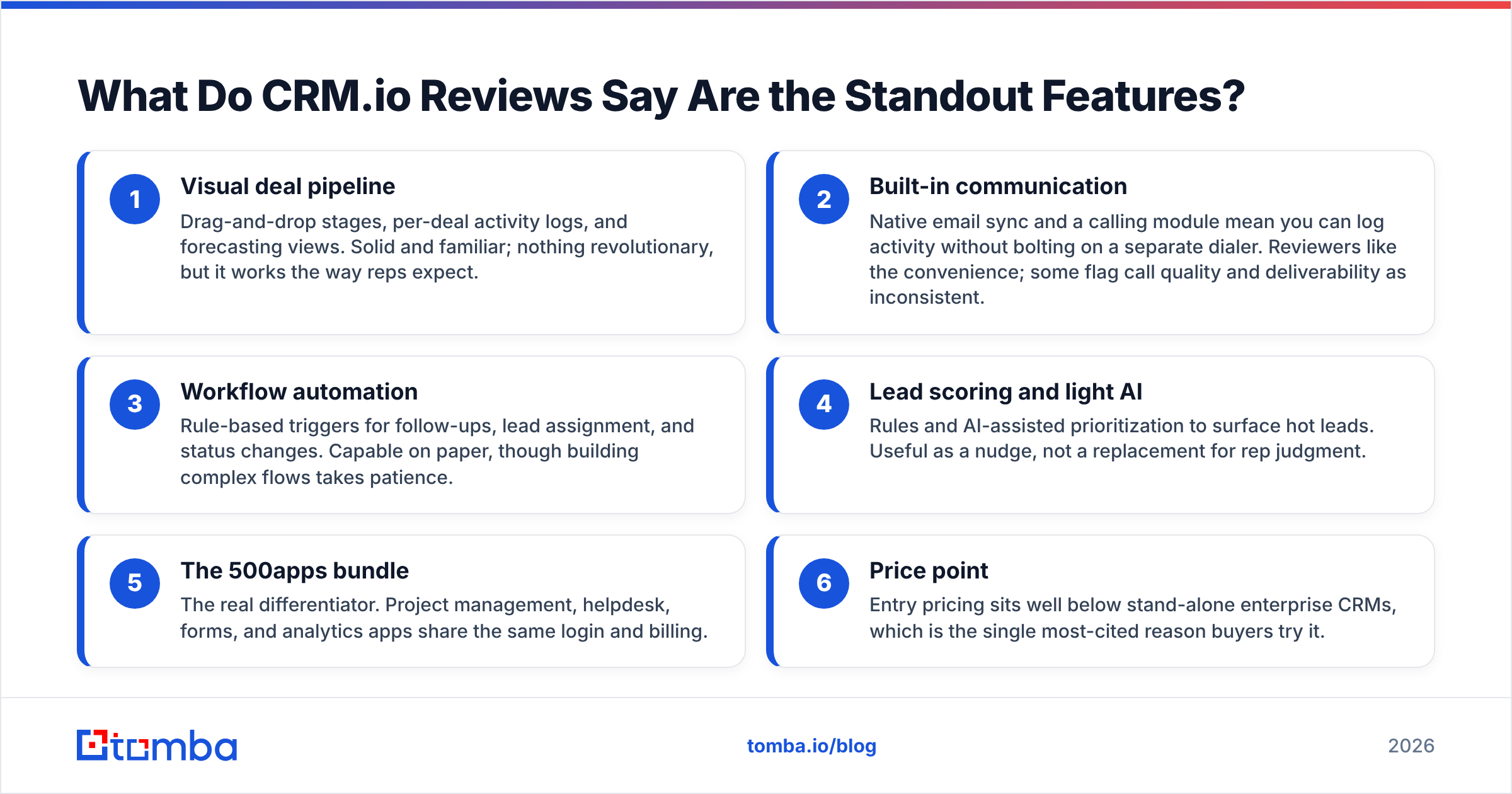
- Visual deal pipeline — Drag-and-drop stages, per-deal activity logs, and forecasting views. It is solid and familiar. Nothing revolutionary, but it works the way reps expect.
- Built-in communication — Native email sync and a calling module let you log activity without a separate dialer. Reviewers like the convenience. Some flag call quality and deliverability as uneven.
- Workflow automation — Rule-based triggers for follow-ups, lead assignment, and status changes. Capable on paper, though complex flows take patience.
- Lead scoring and light AI — Rules and AI-assisted sorting surface hot leads. Treat it as a nudge, not a replacement for rep judgment.
- The 500apps bundle — The real differentiator. Project management, helpdesk, forms, and analytics apps share the same login and bill.
- Price point — Entry pricing sits well below stand-alone enterprise CRMs. That is the single most-cited reason buyers try it.

One subtext runs through these reviews. The features are broad, but a CRM is only as good as its data. Fill the pipeline with stale or invalid contacts, and your forecasts sit on sand. They look confident and mean little. No CRM closes that gap on its own, and CRM.io is no exception. That is why teams add a dedicated email verifier and data enrichment layer.
How Much Does CRM.io Cost in 2026?#
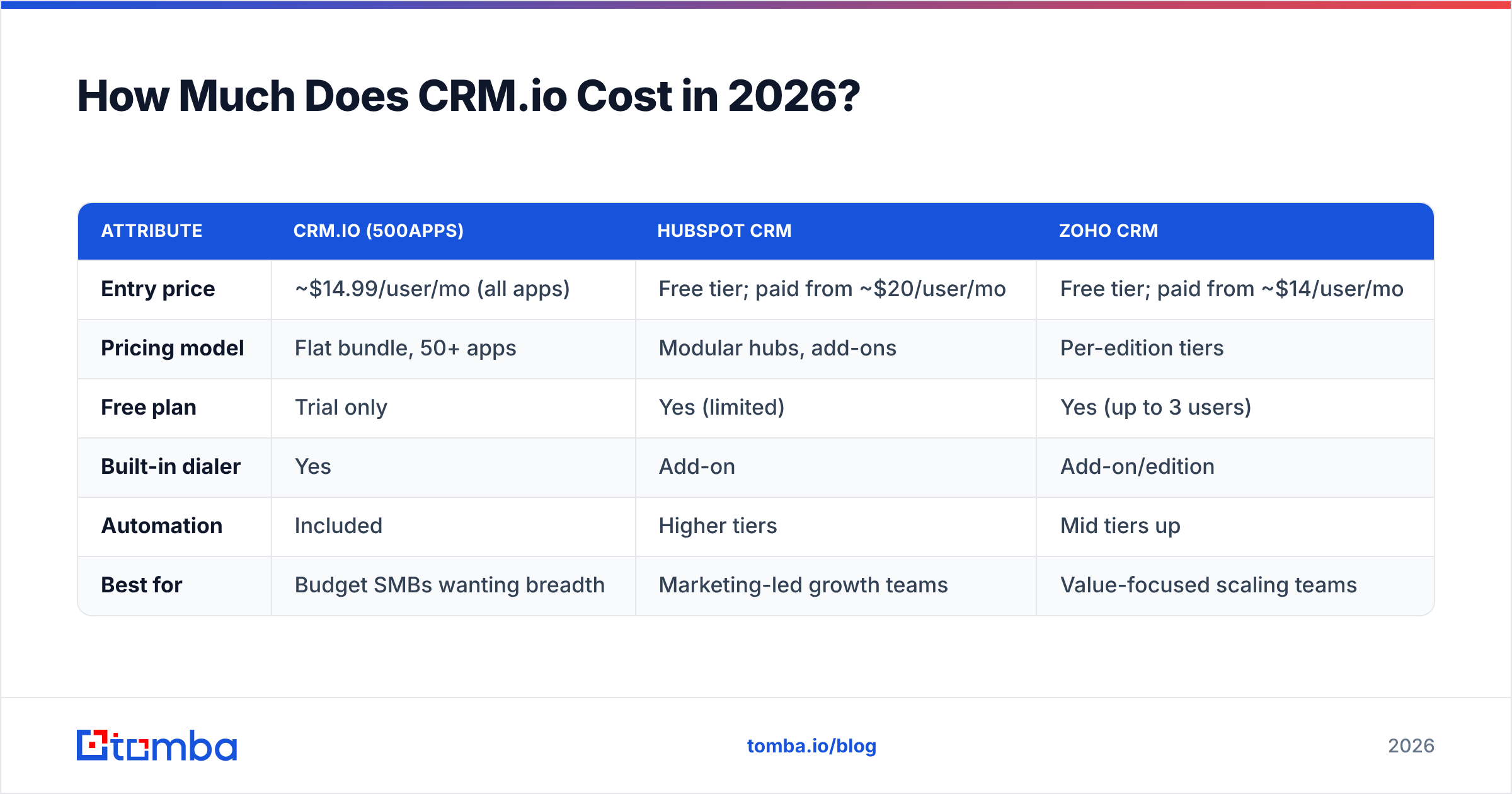
The 500apps model is unusual. It does not tier CRM.io by feature. Instead, the bundle sells at a flat per-user rate that unlocks every app. As of this writing, that price sits around $14.99 per user per month, billed annually. A free trial lets you start. Vendors change pricing often, so confirm the current number on the official 500apps / CRM.io site before you commit.
Here's how that positions CRM.io against the CRMs buyers most often compare it to:
| Attribute | CRM.io (500apps) | HubSpot CRM | Zoho CRM |
|---|---|---|---|
| Entry price | ~$14.99/user/mo (all apps) | Free tier; paid from ~$20/user/mo | Free tier; paid from ~$14/user/mo |
| Pricing model | Flat bundle, 50+ apps | Modular hubs, add-ons | Per-edition tiers |
| Free plan | Trial only | Yes (limited) | Yes (up to 3 users) |
| Built-in dialer | Yes | Add-on | Add-on/edition |
| Automation | Included | Higher tiers | Mid tiers up |
| Best for | Budget SMBs wanting breadth | Marketing-led growth teams | Value-focused scaling teams |
The table makes the pattern clear. CRM.io competes on price and breadth. It does not compete on the depth of a HubSpot or the fine-grained control of a Zoho. Do you want the most capability per dollar for a small team? Then CRM.io scores well. Do you want the deepest tool for one job? Then a specialist wins.
What Are the Real Pros and Cons?#
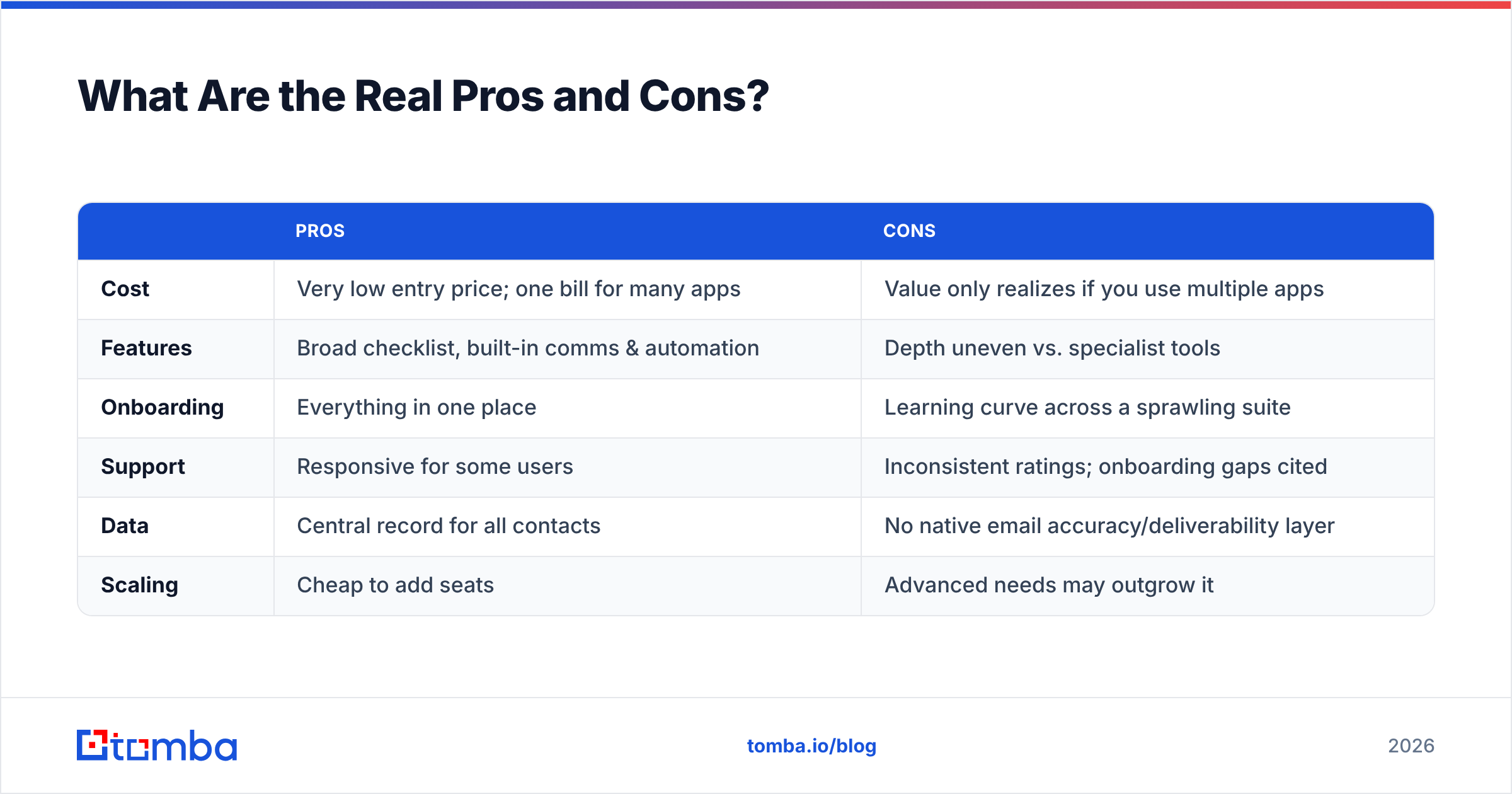
No review is useful without the downsides. Here is the balanced ledger. It draws on user feedback and hands-on testing.
| Pros | Cons | |
|---|---|---|
| Cost | Very low entry price; one bill for many apps | Value only realizes if you use multiple apps |
| Features | Broad checklist, built-in comms & automation | Depth uneven vs. specialist tools |
| Onboarding | Everything in one place | Learning curve across a sprawling suite |
| Support | Responsive for some users | Inconsistent ratings; onboarding gaps cited |
| Data | Central record for all contacts | No native email accuracy/deliverability layer |
| Scaling | Cheap to add seats | Advanced needs may outgrow it |
The honest verdict: CRM.io is a strong value play and a weak specialist play. Teams that want one vendor and steady costs will be happy. Teams that need top deliverability, enrichment, or a mature app marketplace will hit the ceiling.
Who Should Actually Use CRM.io?#
Buy it if you are a budget-conscious SMB that will use several apps in the bundle. Think CRM plus helpdesk, project management, and forms. In that case the math is hard to beat. One suite also cuts the tool sprawl that slows small teams.
Look elsewhere in three cases. First, a marketing-led team that lives inside a mature ecosystem like HubSpot. Second, a large enterprise that needs deep customization and governance, which is Salesforce territory. Third, a specialist outbound team whose results hinge on data accuracy and deliverability. For that last group, the CRM is almost a side character. The lead role belongs to whatever fills and cleans your pipeline.

That point matters more than most CRM.io reviews admit. A CRM stores and organizes relationships. It does not source accurate contact data. It does not protect your email deliverability. Say your reps hand-type emails or import scraped lists. Then even a tidy pipeline will bounce. It will hurt your sender reputation and quietly poison your metrics.
How Does CRM.io Handle Data Quality?#
This is CRM.io's blind spot. Nearly every general-purpose CRM shares it. The platform is great at holding records and moving them through stages. It is not built to prove those records are real, current, or reachable. The bundled email tools help you send. They do not confirm an address exists before you spend a first touch on it.
The practical fix is a clean division of labor:
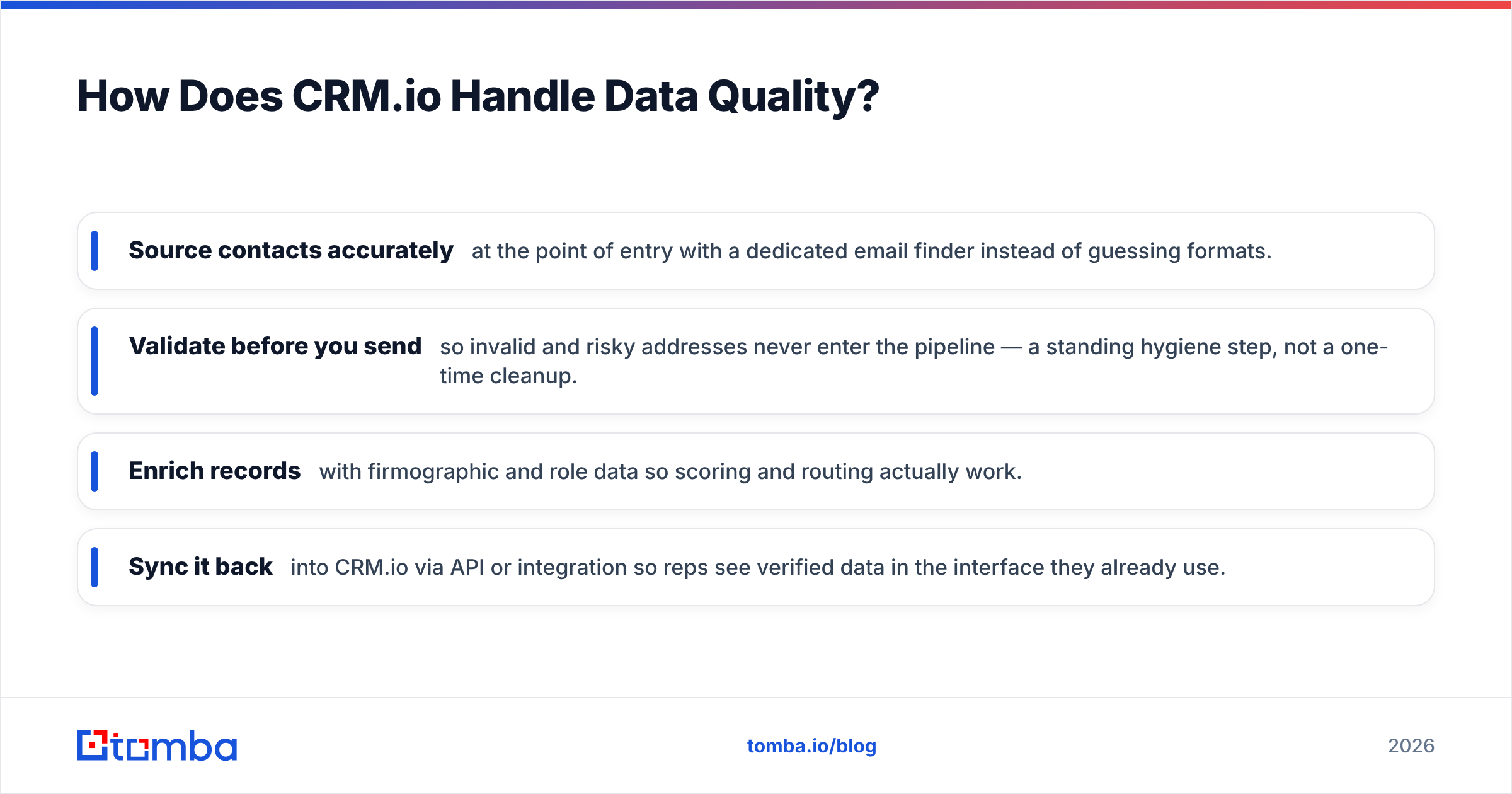
- Source contacts accurately at the point of entry with a dedicated email finder instead of guessing formats.
- Validate before you send so invalid and risky addresses never enter the pipeline — a standing hygiene step, not a one-time cleanup.
- Enrich records with firmographic and role data so scoring and routing actually work.
- Sync it back into CRM.io via API or integration so reps see verified data in the interface they already use.
Tools like Tomba fit this gap. The Tomba API and integrations verify and enrich contacts on the way into any CRM. Your system of record stays clean. You keep CRM.io for what it does well, which is pipeline and process. You stop letting bad data undermine it. That layered setup usually beats hoping one all-in-one does every job well.
CRM.io vs. an All-in-One vs. Best-of-Breed: Which Model Wins?#
There is no universal answer, but there is a clear rule. Choose the all-in-one (CRM.io) when you want cost, simplicity, and one vendor. It also fits when no single function is critical enough to demand a specialist. Choose best-of-breed when one or two functions drive revenue directly. Deliverability, enrichment, and outbound orchestration often do. Those deserve a purpose-built tool.
Most healthy stacks are a hybrid. A practical CRM sits at the center, and CRM.io qualifies. Specialists wrap it where they count. That is not a knock on CRM.io. It is how mature teams work. The CRM is the filing cabinet. The specialists make sure only good files go in.
The Verdict#
CRM.io earns its positive reviews on price and breadth. It earns its criticism on depth and consistency. Are you a small team that will use the 500apps bundle and value one steady bill? Then it is a defensible, even smart, choice. Do you need a category leader in one dimension? Then you will feel boxed in over time.
Whatever CRM you pick, the data flowing into it decides whether your forecasts mean anything. A tidy pipeline of unreachable contacts is just a neat way to miss quota.
Keep your CRM full of contacts that actually reply. Use the Tomba Email Finder to find verified, professional email addresses by name, company, or domain. Then push them into CRM.io, or any CRM, already validated and enriched. Start on the free plan with 25 searches a month. Upgrade to Starter at $49/mo when you are ready to scale. Your reps stop guessing. Your deliverability holds. Your pipeline reflects reality instead of hope.
Related guides#
Ready to find emails that actually work?
Join 150,000+ professionals who stopped guessing and started sending. Free credits on signup — no credit card required.
Get the Tomba newsletter
Practical outbound tactics and product updates — once every two weeks.
About the author