CRMone Pricing, Reviews, Pros and Cons: An Honest 2026 Breakdown
A neutral, no-hype look at CRMone pricing, real user reviews, and the pros and cons that decide whether it fits your sales team in 2026.
Choosing a CRM is less about the sticker price and more about what that price unlocks once your team logs in. CRMone sells itself as an all-in-one system for small and mid-sized sales teams. But the real question is simpler: does the pricing, feature gates, and daily experience hold up once you move past the demo? This CRMone pricing, reviews, pros and cons guide is a neutral breakdown. It shows where CRMone is strong, where the costs creep, and how to decide if it belongs in your stack.
TL;DR: Is CRMone Worth the Money in 2026?#
- CRMone is a solid mid-tier CRM for teams that want pipeline management, contact records, and basic automation without enterprise complexity — but it is not the cheapest or the most powerful option in any single category.
- The pricing looks simple, the add-ons are where it adds up. Seat minimums, enrichment credits, and automation limits can push the real monthly cost well above the advertised base tier.
- Reviews are broadly positive on usability, mixed on support response times and reporting depth.
- The biggest hidden cost is data. A CRM is only as useful as the contacts inside it, and CRMone's native enrichment is limited — you'll likely pair it with a dedicated email finder.
- Best fit: growing SMB and mid-market sales teams that value a clean interface over deep customization.
What Is CRMone and Who Is It For?#
CRMone is a customer relationship management platform aimed at small to mid-sized B2B sales teams. Think of it as the digital equivalent of a well-organized sales floor: every deal has a slot on the board, every contact has a folder, and every follow-up has a reminder attached. The pitch is consolidation — contacts, pipeline, tasks, email, and light automation in one place, so reps stop bouncing between six browser tabs.
It competes in the crowded middle of the market, sitting below heavyweight platforms like Salesforce and roughly alongside tools such as HubSpot's starter tiers, Pipedrive, and Zoho. That positioning matters: CRMone is not trying to be the most configurable system on earth. It's trying to be the one your team will actually use without a three-week onboarding.
The typical CRMone buyer is a founder-led sales team of 3–25 reps, a marketing-to-sales handoff that's currently living in spreadsheets, or an ops lead who wants reporting that doesn't require a certified admin. If your requirements include complex territory management, multi-currency quoting, or heavy custom-object modeling, you'll feel the ceiling quickly.
How Much Does CRMone Cost? Pricing Tiers Explained#
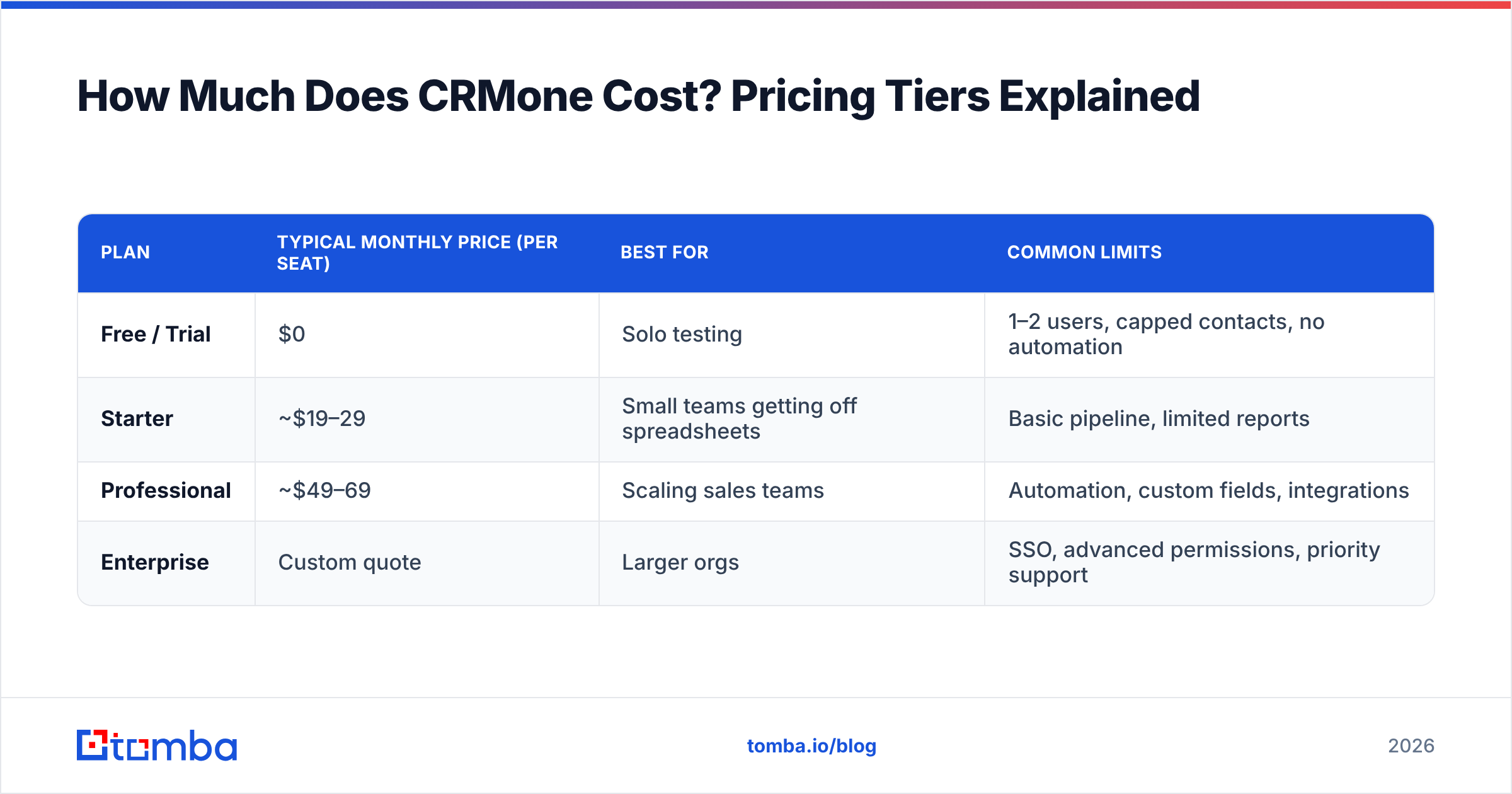
CRMone uses the familiar per-seat, tiered model. Exact numbers shift with promotions and annual-vs-monthly billing. Always confirm on the vendor's own page before you buy. Still, the structure below reflects how most mid-market CRMs are packaged. That structure is what drives your real cost.
| Plan | Typical monthly price (per seat) | Best for | Common limits |
|---|---|---|---|
| Free / Trial | $0 | Solo testing | 1–2 users, capped contacts, no automation |
| Starter | ~$19–29 | Small teams getting off spreadsheets | Basic pipeline, limited reports |
| Professional | ~$49–69 | Scaling sales teams | Automation, custom fields, integrations |
| Enterprise | Custom quote | Larger orgs | SSO, advanced permissions, priority support |
The advertised entry price is rarely the price you pay. Three things inflate the real cost:
- Seat minimums. Some tiers require a floor of users, so a 4-person team may pay for 5 seats.
- Annual lock-in for the good rate. Monthly billing often costs 20–30% more than the headline annual number.
- Add-on credits. Enrichment, extra automation runs, and additional storage are frequently metered separately.
That last point is the one buyers underestimate most. You can sign up expecting a $49 tool and discover you're spending closer to $90 once you add the data features you assumed were included.

What Do CRMone Reviews Actually Say?#
Pulling from patterns you'll see across review sites like G2 and Capterra, CRMone reviews cluster into a few consistent themes. Reviews are directional, not gospel — but when dozens of users flag the same thing, it's signal.
What reviewers praise:
- Onboarding speed. Reps describe getting productive in days, not weeks. The interface is clean and the learning curve is gentle.
- Pipeline visibility. Drag-and-drop deal stages and a readable dashboard get repeated praise.
- Value at the Starter tier. For teams leaving spreadsheets, the jump in organization feels worth the money.
What reviewers criticize:
- Reporting depth. Once teams want cohort analysis or custom attribution, they hit walls.
- Support latency. Response times on lower tiers draw complaints; priority support is gated to higher plans.
- Native data quality. Contact enrichment is thin, and reps report chasing down missing emails and phone numbers manually.
That last criticism is the connective tissue of this whole review. A CRM stores relationships; it doesn't create them. If the records going in are incomplete, no amount of pipeline polish fixes your outreach.
CRMone Pricing, Reviews, Pros and Cons at a Glance#
Here's the honest ledger. Weigh these against your team's actual workflow, not the feature list you hope to grow into.
| Pros | Cons |
|---|---|
| Fast onboarding, minimal training | Reporting is shallow for data-heavy teams |
| Clean, modern interface reps enjoy using | Support tiers gate faster response times |
| Reasonable Starter pricing for SMBs | Add-ons inflate the real monthly cost |
| Solid pipeline and task management | Limited native contact enrichment |
| Decent integration marketplace | Customization ceiling for complex orgs |
The pattern is clear: CRMone is a very good system of organization and a mediocre system of data. That's not a dealbreaker — it's a design choice. It means you should plan to feed it clean, enriched contacts from a dedicated source rather than expecting the CRM to find them for you.
Is CRMone Better Than the Alternatives?#
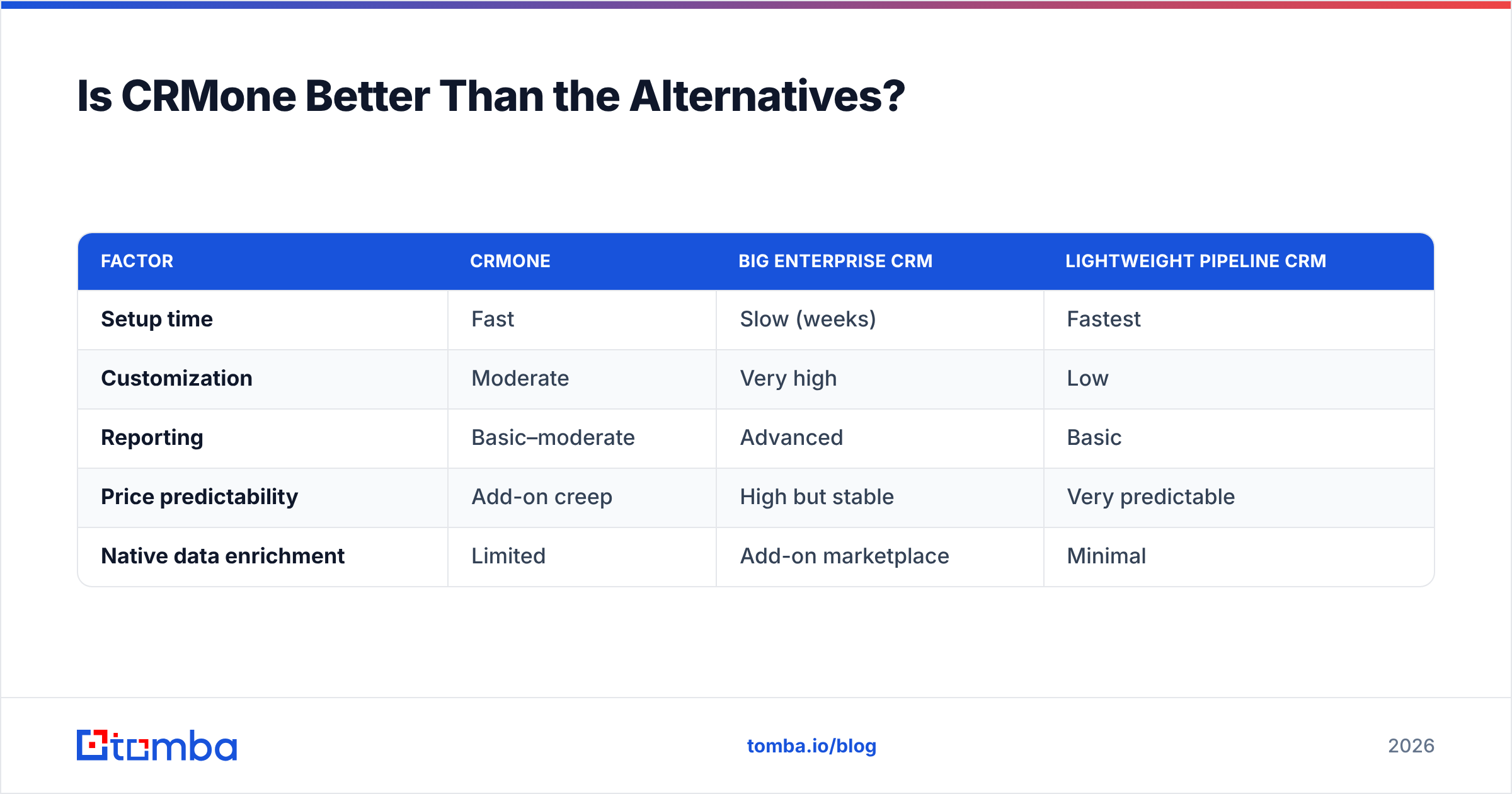
No CRM wins every category, so "better" depends on what you're optimizing for. Here's how CRMone stacks up on the dimensions buyers actually care about.
| Factor | CRMone | Big enterprise CRM | Lightweight pipeline CRM |
|---|---|---|---|
| Setup time | Fast | Slow (weeks) | Fastest |
| Customization | Moderate | Very high | Low |
| Reporting | Basic–moderate | Advanced | Basic |
| Price predictability | Add-on creep | High but stable | Very predictable |
| Native data enrichment | Limited | Add-on marketplace | Minimal |
If you need deep customization and can staff an admin, an enterprise platform wins. If you want the absolute simplest deal tracker, a lightweight pipeline tool wins. CRMone lives in the sensible middle — and for a lot of teams, the middle is exactly right.
But notice the constant across all three columns: native data enrichment is a weak spot everywhere. CRMs are relationship databases, not prospecting engines. This is why high-performing teams treat their data layer as a separate, deliberate purchase.
The Hidden Cost Every CRMone Review Skips: Your Data#
Here's the part most pricing reviews ignore. You can buy the perfect CRM at the perfect price and still get poor ROI — because the expensive part of a CRM is the empty fields.
A rep spending 20 minutes per prospect hunting for a valid email address is the real cost center, not the $49 subscription. Multiply that across a team and a quarter, and manual data entry dwarfs the software bill. This is where a purpose-built data tool pays for itself.
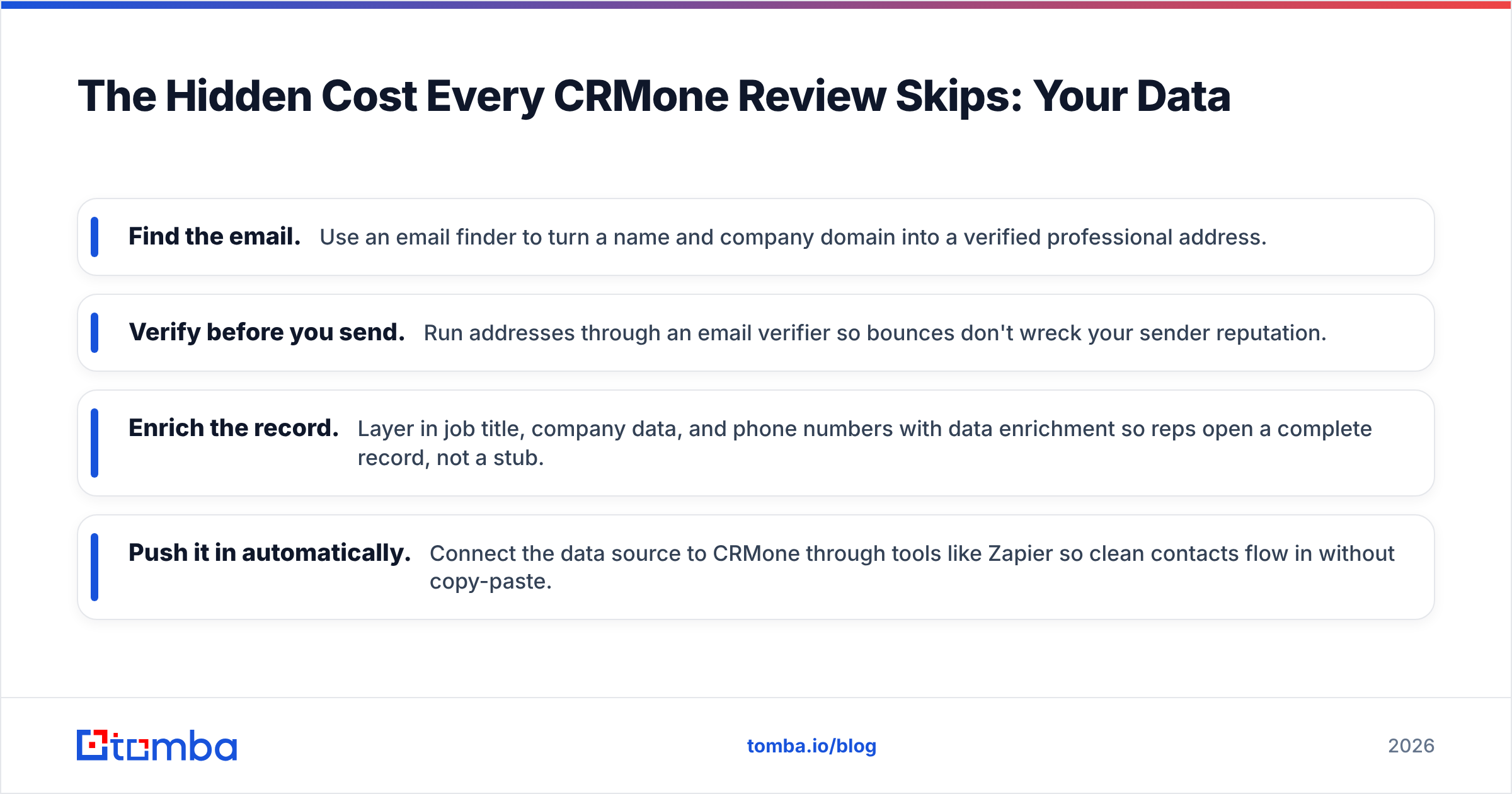
Instead of relying on CRMone's thin native enrichment, teams route contacts through a dedicated finder and verifier before they ever hit the pipeline:
- Find the email. Use an email finder to turn a name and company domain into a verified professional address.
- Verify before you send. Run addresses through an email verifier so bounces don't wreck your sender reputation.
- Enrich the record. Layer in job title, company data, and phone numbers with data enrichment so reps open a complete record, not a stub.
- Push it in automatically. Connect the data source to CRMone through tools like Zapier so clean contacts flow in without copy-paste.
This is the difference between a CRM that feels expensive and one that feels like leverage.

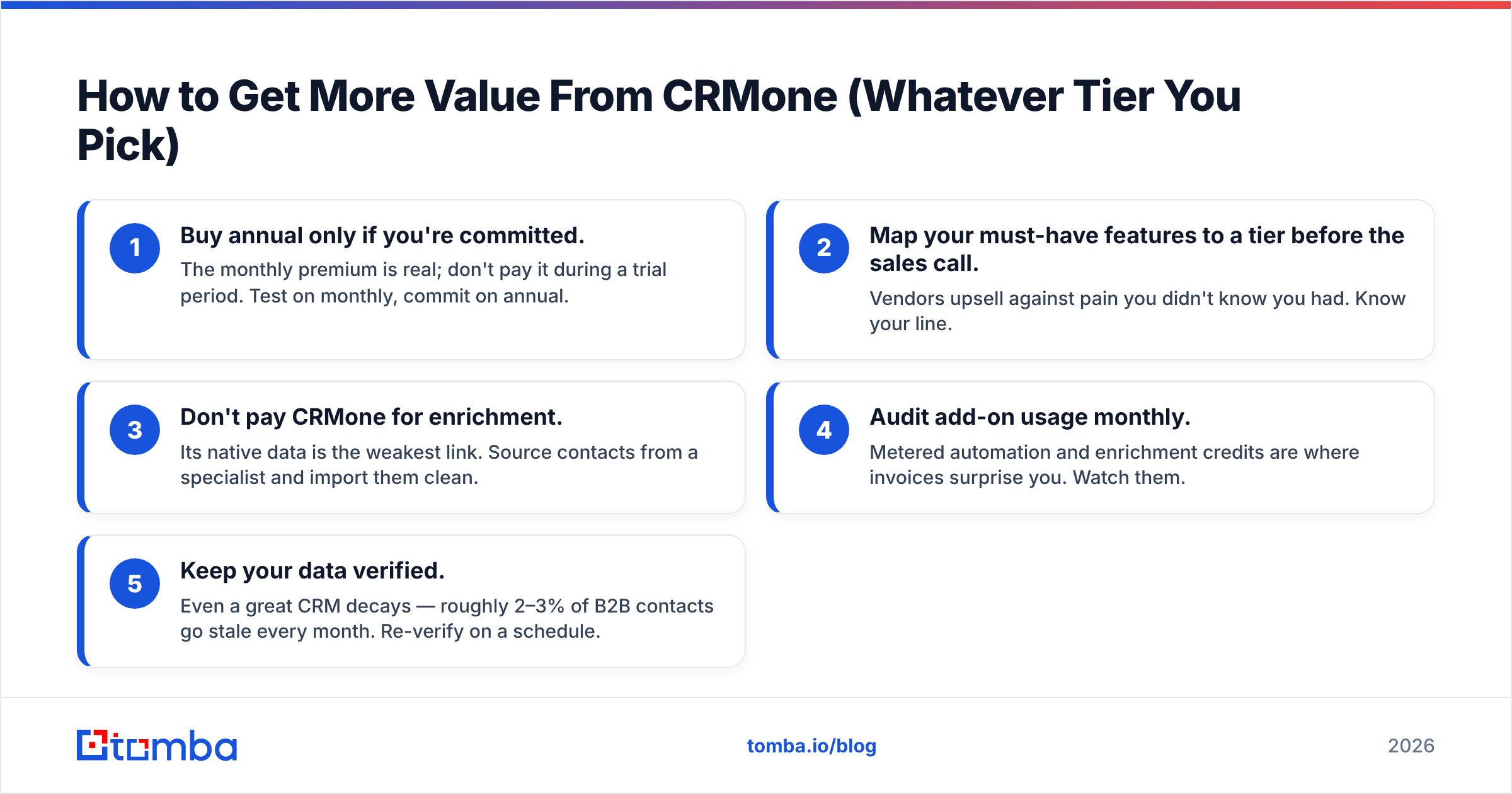
How to Get More Value From CRMone (Whatever Tier You Pick)#
If you've decided CRMone is your platform, these moves protect your budget and your results:
- Buy annual only if you're committed. The monthly premium is real; don't pay it during a trial period. Test on monthly, commit on annual.
- Map your must-have features to a tier before the sales call. Vendors upsell against pain you didn't know you had. Know your line.
- Don't pay CRMone for enrichment. Its native data is the weakest link. Source contacts from a specialist and import them clean.
- Audit add-on usage monthly. Metered automation and enrichment credits are where invoices surprise you. Watch them.
- Keep your data verified. Even a great CRM decays — roughly 2–3% of B2B contacts go stale every month. Re-verify on a schedule.
The teams that complain CRMone is "too expensive" are almost always the ones paying for add-ons that a $49-tier data tool would handle better. The teams that love it treat the CRM as the destination and invest separately in the pipeline that fills it.
Frequently Asked Questions#
Is CRMone worth it for a small team? For teams leaving spreadsheets, yes — the organization gain is real and the Starter tier is reasonably priced. Just budget for a separate data tool rather than CRMone's native enrichment.
What's the biggest hidden cost in CRMone pricing? Add-on credits (enrichment, extra automation runs) and seat minimums. The advertised base price is often 30–50% below what teams actually spend.
How does CRMone compare to Salesforce or HubSpot? It's simpler and faster to deploy than either, with a lower ceiling on customization and reporting. It's a mid-market fit, not an enterprise one.
Can I connect CRMone to an email finder? Yes. Most CRMs, CRMone included, integrate through Zapier, native connectors, or an API — so you can push verified contacts in automatically. See Tomba's integrations for the connection points.
The Verdict#
CRMone earns its place as a clean, usable, fairly priced CRM for growing B2B teams — as long as you go in clear-eyed about two things: the add-ons that inflate the headline price, and the native data quality that won't fill your pipeline on its own. Rate the software on organization and it scores well. Rate it on data, and you'll want a specialist alongside it. That is the short version of CRMone pricing, reviews, pros and cons: good software, thin data.
That's the real decision. The CRM is where deals live; the data is what makes them worth tracking. Before you optimize the subscription line on your CRMone invoice, fix the more expensive problem: reps wasting hours on contacts that bounce or don't exist.
Feed CRMone clean, verified contacts from day one. Start with the Tomba Email Finder to turn names and domains into accurate professional emails, verify them before they hit your pipeline, and push them straight into your CRM. Check the Tomba pricing — the free tier gives you 25 searches a month to test it against your own list before you spend a dollar. A great CRM deserves great data going in.
Related guides#
Ready to find emails that actually work?
Join 150,000+ professionals who stopped guessing and started sending. Free credits on signup — no credit card required.
Get the Tomba newsletter
Practical outbound tactics and product updates — once every two weeks.
About the author