Crunchbase Pricing Reviews, Pros and Cons for 2026
An honest breakdown of Crunchbase pricing, real user reviews, and the pros and cons of each plan — plus who should skip it for a cheaper, contact-first tool.
Crunchbase is one of the best-known names in company data. Yet its pricing rarely shows up on its own homepage in plain numbers. This guide to Crunchbase pricing, reviews, pros and cons gives you the honest, third-party breakdown you need. Use it to decide whether a paid seat is worth it, or whether you are paying for data you barely touch.
TL;DR — Is Crunchbase worth the money?#
- Crunchbase pricing starts around $49/user/month (Starter, billed annually) and jumps to roughly $99/user/month for Pro, with Enterprise quoted on request. Prices shift year to year, so always confirm on their site.
- Best for: investors, market researchers, and BD teams who need company-level signals (funding rounds, acquisitions, growth metrics).
- Weakest for: outbound sales teams that need verified email addresses and direct dials at scale — that is not Crunchbase's core strength.
- The main gripe in reviews: thin contact data and per-seat costs that add up fast for a whole team.
- If you mostly need contacts, a dedicated email finder like Tomba covers that job for less and pairs neatly with Crunchbase's firmographics.

What is Crunchbase and who is it for?#
Crunchbase started life as a public database of startups, funding rounds, and the people behind them. Today it is a paid intelligence platform aimed at three audiences: investors tracking deal flow, researchers mapping markets, and sales teams hunting companies that just raised money or hit a growth trigger.
Think of it like a stadium scoreboard for the private-company world. It tells you who is winning, who just got funded, and who is expanding. What it does not do well is hand you the phone number of the VP of Marketing so you can run the play. That distinction is the root of almost every pro and con below.
Crunchbase's real value is timing and context. A company raising a Series B this quarter is a very different prospect than one that raised four years ago. If your outreach hinges on that kind of trigger, the data earns its keep. If you just need a list of emails, you are paying for a scoreboard when you wanted a roster.
How much does Crunchbase cost in 2026?#
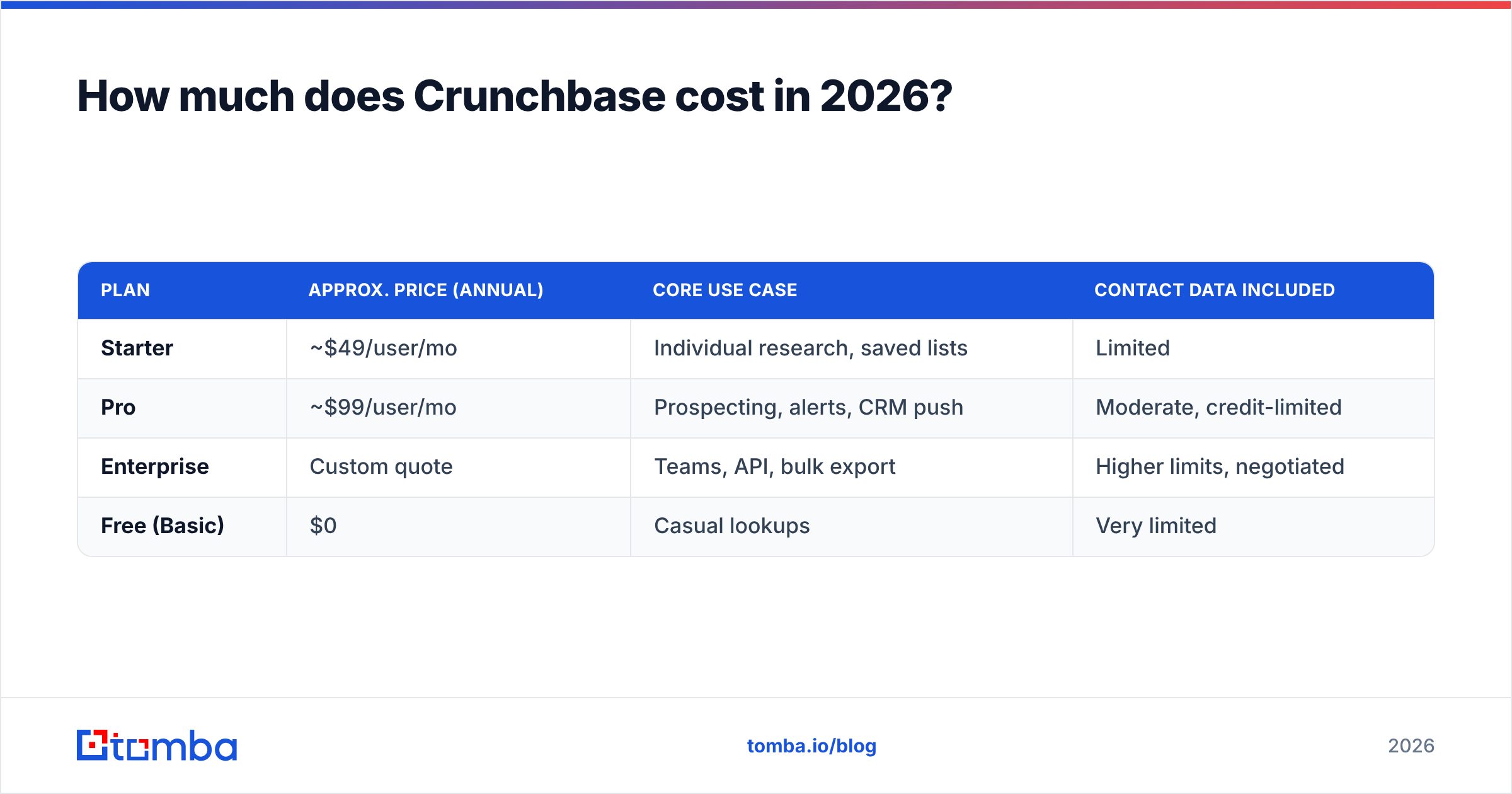
Crunchbase sells per user, per month, and leans hard on annual billing to advertise its lowest numbers. Monthly billing costs more. Here is the shape of the lineup — treat exact figures as approximate and verify against the vendor before you buy.
| Plan | Approx. price (annual) | Core use case | Contact data included |
|---|---|---|---|
| Starter | ~$49/user/mo | Individual research, saved lists | Limited |
| Pro | ~$99/user/mo | Prospecting, alerts, CRM push | Moderate, credit-limited |
| Enterprise | Custom quote | Teams, API, bulk export | Higher limits, negotiated |
| Free (Basic) | $0 | Casual lookups | Very limited |
A few things the pricing table doesn't shout about:
- It is per seat. A five-person team on Pro is roughly $495/month, or close to $6,000/year — before anyone touches the API.
- Contact credits are metered. Even on paid plans, pulling emails and phone numbers draws down a monthly allowance. Heavy prospecting burns through it.
- The API and bulk export usually sit behind Enterprise. If you want to pipe data into your own systems, budget for a custom quote.
- Annual lock-in is the norm. The headline price assumes a yearly commitment; month-to-month is pricier and not always offered.
For comparison, you can see how a contact-first vendor structures this on the Tomba pricing page: a free tier with 25 searches, Starter at $49/mo, Growth at $99/mo, and Pro at $249/mo — priced around contact volume rather than per-seat access to a research database. Different job, different meter.
What do Crunchbase reviews actually say?#
Pull the reviews on G2 and Capterra and a consistent picture emerges. The praise and the complaints are both specific — which is a good sign the reviews are real.
What reviewers like:
- Funding and firmographic data is genuinely strong. For tracking rounds, investors, and acquisitions, few tools are as recognizable or as trusted.
- Trigger alerts save time. Getting pinged when a target company raises money is the feature people renew for.
- The UI is clean. It is easy to navigate compared to clunkier data platforms.
What reviewers criticize:
- Contact data is hit or miss. The most common complaint: emails and direct dials are incomplete, outdated, or missing entirely for the person you actually want.
- Per-seat cost scales painfully. Small teams feel the pinch fast, especially when only one or two people use it daily.
- Credit limits frustrate power users. Running out of contact reveals mid-month is a recurring theme.
- Coverage skews toward tech and funded startups. Bootstrapped, traditional, or non-US companies are thinner.
The through-line: people buy Crunchbase for company intelligence and are happy, then try to use it as a contact database and get annoyed. Knowing which job you are hiring it for prevents most of the disappointment.
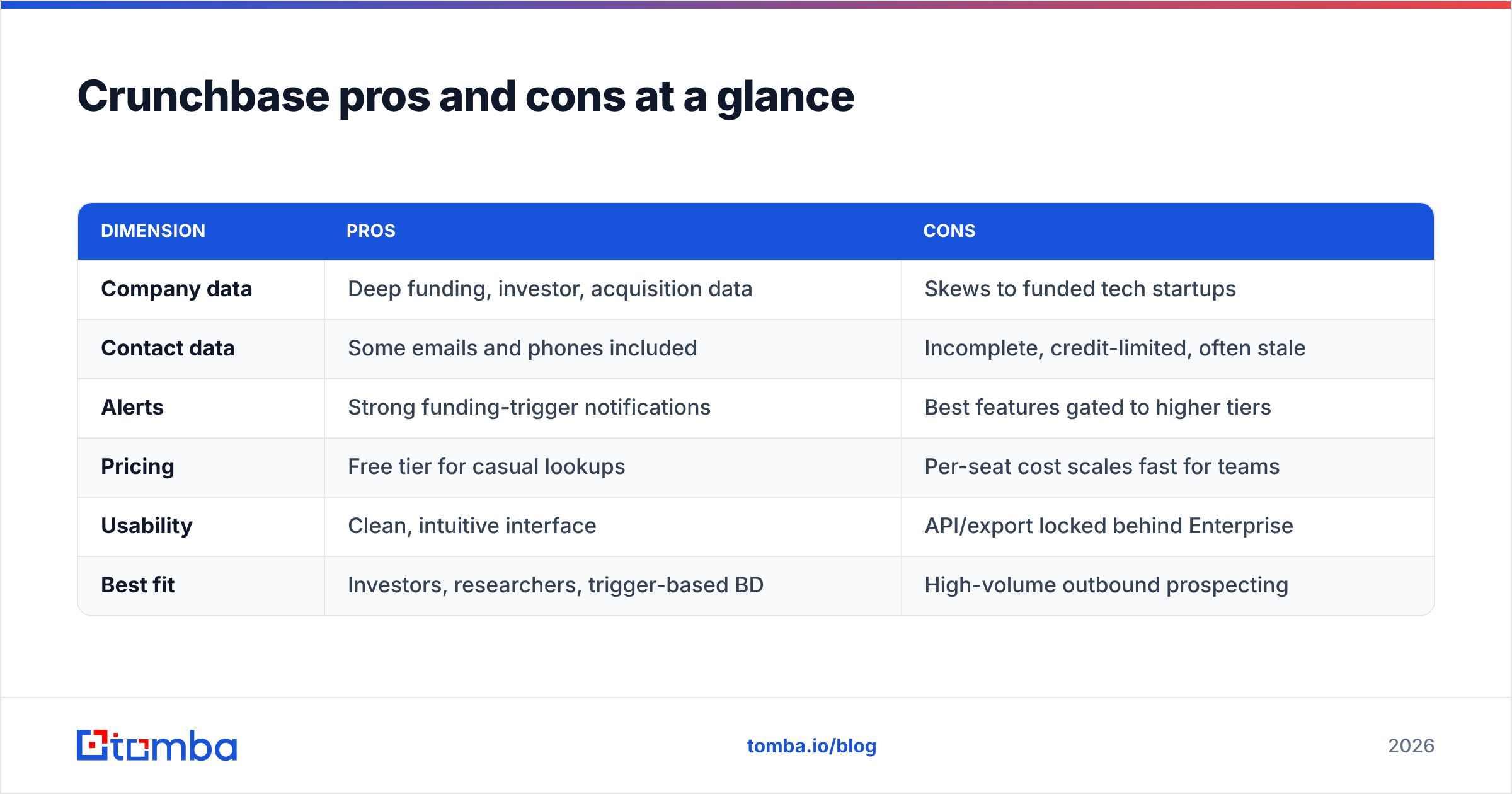
Crunchbase pros and cons at a glance#
| Dimension | Pros | Cons |
|---|---|---|
| Company data | Deep funding, investor, acquisition data | Skews to funded tech startups |
| Contact data | Some emails and phones included | Incomplete, credit-limited, often stale |
| Alerts | Strong funding-trigger notifications | Best features gated to higher tiers |
| Pricing | Free tier for casual lookups | Per-seat cost scales fast for teams |
| Usability | Clean, intuitive interface | API/export locked behind Enterprise |
| Best fit | Investors, researchers, trigger-based BD | High-volume outbound prospecting |
Is Crunchbase good for sales prospecting and email outreach?#
Short answer: it is good for finding the right companies, and weak for reaching the right people. That gap is where most sales teams overspend.
Here is the practical breakdown of a typical outbound workflow and where Crunchbase fits:
- Account discovery — Crunchbase shines. Filter by funding, headcount growth, or industry to build a target list.
- Trigger timing — Crunchbase shines. Alerts tell you when to reach out.
- Finding the decision-maker's email — Crunchbase is unreliable. Coverage is patchy and metered.
- Verifying deliverability — not really Crunchbase's job. Sending to unverified addresses tanks your email deliverability and sender reputation.
- Phone outreach — direct dials exist but are inconsistent.
A cleaner setup is to let each tool do what it does best: use Crunchbase (or its free tier) to find and time accounts, then use a dedicated finder to get and verify the contact. Tomba's domain search takes a company domain and returns the email patterns and named contacts behind it, and the email verifier confirms the address is safe to send to before you burn your domain reputation on a bounce.
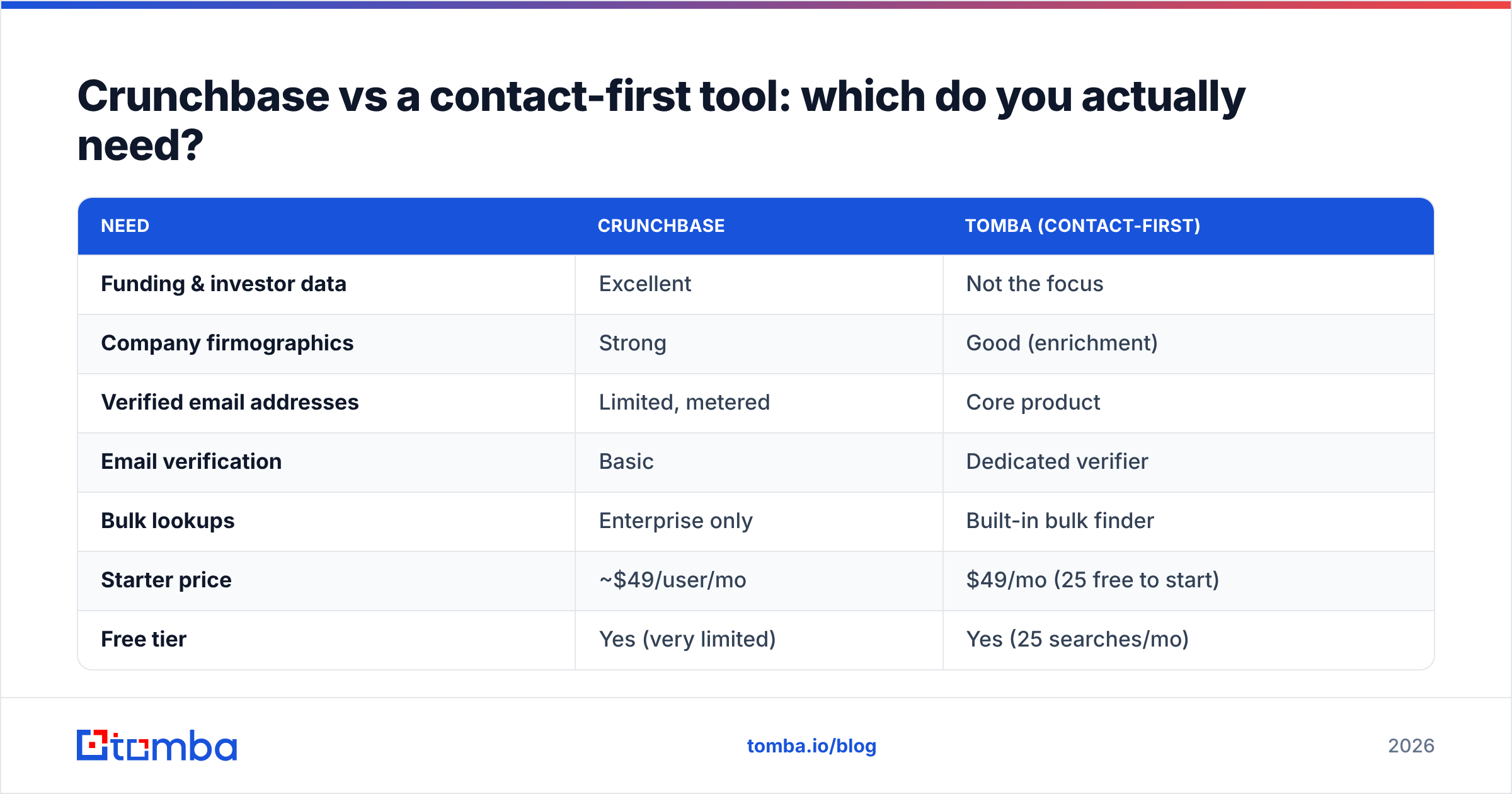
Crunchbase vs a contact-first tool: which do you actually need?#
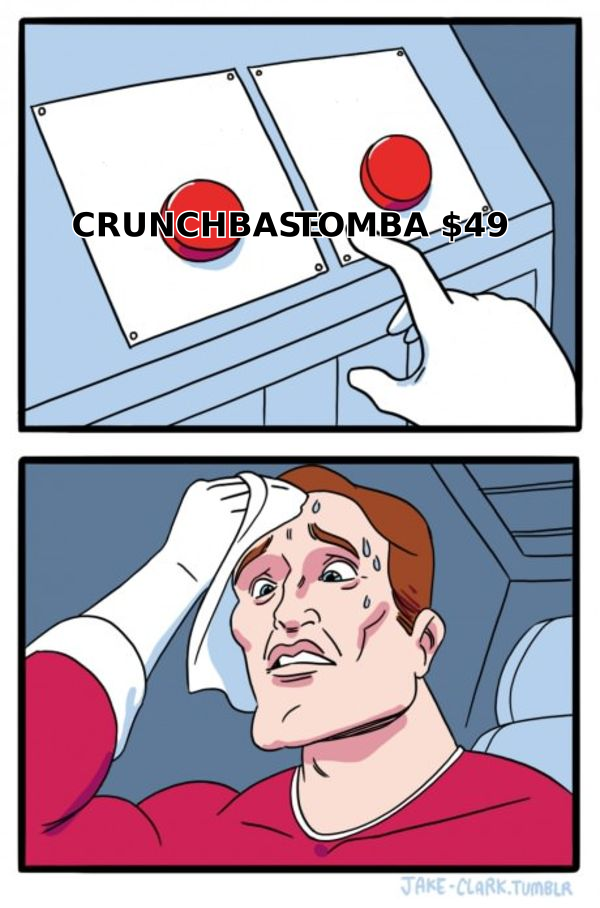
This is the decision most buyers get wrong. They pay Crunchbase Pro across a whole team when only one person needs the funding data, and everyone else just needs emails. Split the job and the math changes.
| Need | Crunchbase | Tomba (contact-first) |
|---|---|---|
| Funding & investor data | Excellent | Not the focus |
| Company firmographics | Strong | Good (enrichment) |
| Verified email addresses | Limited, metered | Core product |
| Email verification | Basic | Dedicated verifier |
| Bulk lookups | Enterprise only | Built-in bulk finder |
| Starter price | ~$49/user/mo | $49/mo (25 free to start) |
| Free tier | Yes (very limited) | Yes (25 searches/mo) |
| API access | Enterprise tier | All paid plans |
The honest verdict: these are complements, not rivals. If you live in deal flow and market maps, Crunchbase is worth it. If your day is sending 200 cold emails and you just need them to land, you are overpaying Crunchbase for a job a bulk email finder does better and cheaper. Many teams keep one Crunchbase seat for research and equip the rest of the team with a finder-plus-verifier stack.
How to decide if Crunchbase pricing is worth it for you#
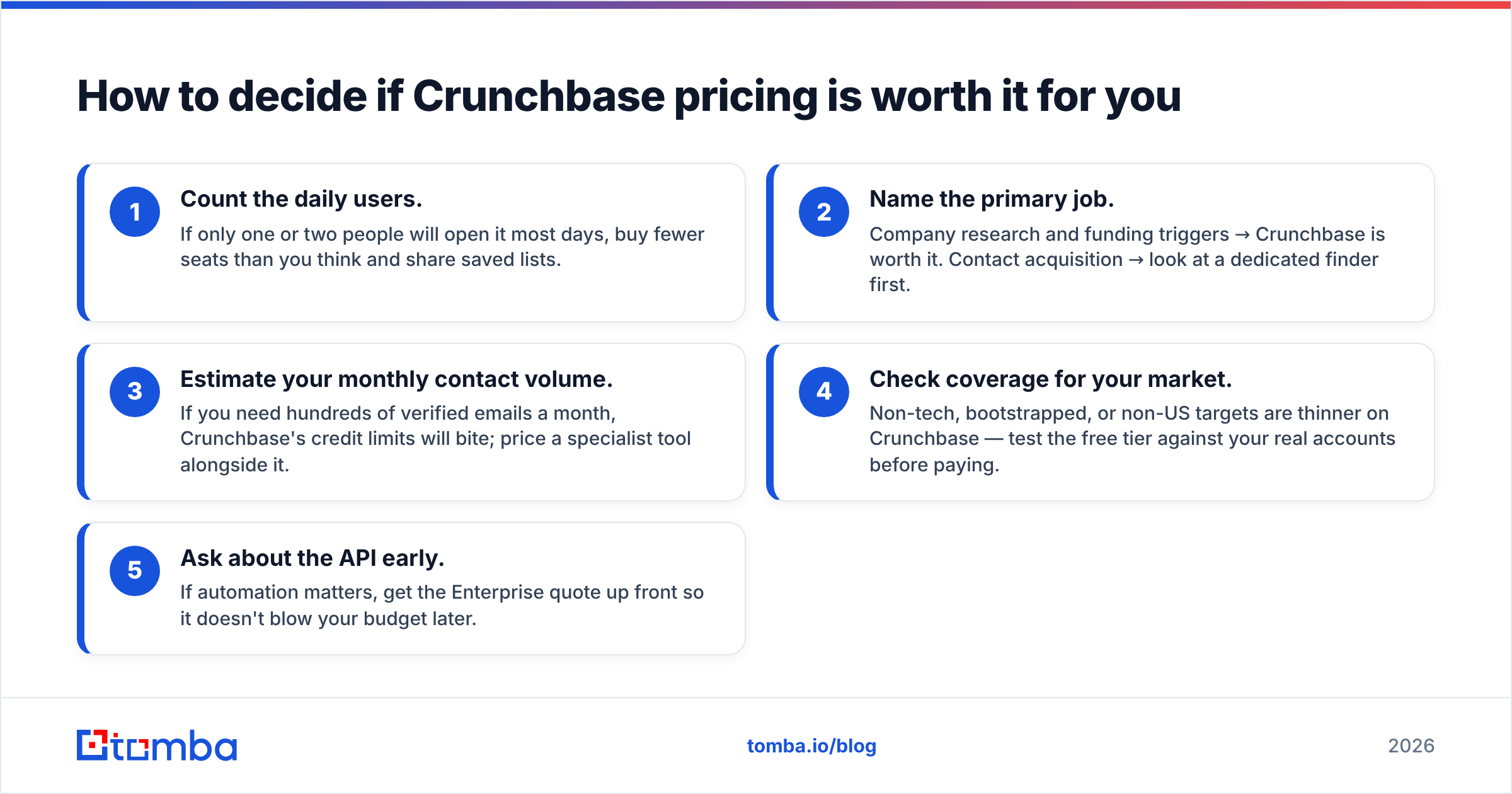
Run through this quick checklist before you commit to an annual seat:
- Count the daily users. If only one or two people will open it most days, buy fewer seats than you think and share saved lists.
- Name the primary job. Company research and funding triggers → Crunchbase is worth it. Contact acquisition → look at a dedicated finder first.
- Estimate your monthly contact volume. If you need hundreds of verified emails a month, Crunchbase's credit limits will bite; price a specialist tool alongside it.
- Check coverage for your market. Non-tech, bootstrapped, or non-US targets are thinner on Crunchbase — test the free tier against your real accounts before paying.
- Ask about the API early. If automation matters, get the Enterprise quote up front so it doesn't blow your budget later.
If two or more of those point away from Crunchbase, you probably want a lighter, contact-focused stack — and you can validate that in an afternoon with a free trial on both sides.
Crunchbase pricing, reviews, pros and cons: the bottom line#
Weighing Crunchbase pricing, reviews, pros and cons, the verdict is simple. It is a premium, per-seat window into private-company intelligence. It is strongest on funding and firmographics and weakest on contact data. The reviews back that up: people love the signals and grumble about the emails and the per-seat bill.
If your team's real bottleneck is reaching the people at those companies, don't stretch Crunchbase to do a job it was never built for. Start free with the Tomba Email Finder to pull verified, ready-to-send email addresses by name, company, or domain — then layer Crunchbase's funding signals on top only where you truly need them. You'll spend less, bounce less, and keep your outreach landing in the inbox instead of the spam folder.
Related guides#
Ready to find emails that actually work?
Join 150,000+ professionals who stopped guessing and started sending. Free credits on signup — no credit card required.
Get the Tomba newsletter
Practical outbound tactics and product updates — once every two weeks.
About the author