Crunchbase vs GetProspect: B2B Data and Email Finder Compared
Crunchbase sells company and funding intelligence; GetProspect sells contact emails. Here's which one fits your prospecting workflow in 2026 — and where a dedicated finder beats both.
Picking between Crunchbase and GetProspect feels like an apples-to-oranges problem because it mostly is. One is a company intelligence database built around funding and firmographics. The other is a contact database built around finding and verifying work emails. You can prospect with either, but they answer different questions — and if you buy the wrong one for your motion, you'll pay for data you never use.
This guide breaks down what each tool actually does, where the accuracy and pricing land in 2026, and which workflows each one wins. Spoiler: for a lot of teams, the honest answer is "neither alone," and a focused email finder closes the gap cheaper than upgrading either platform.
TL;DR#
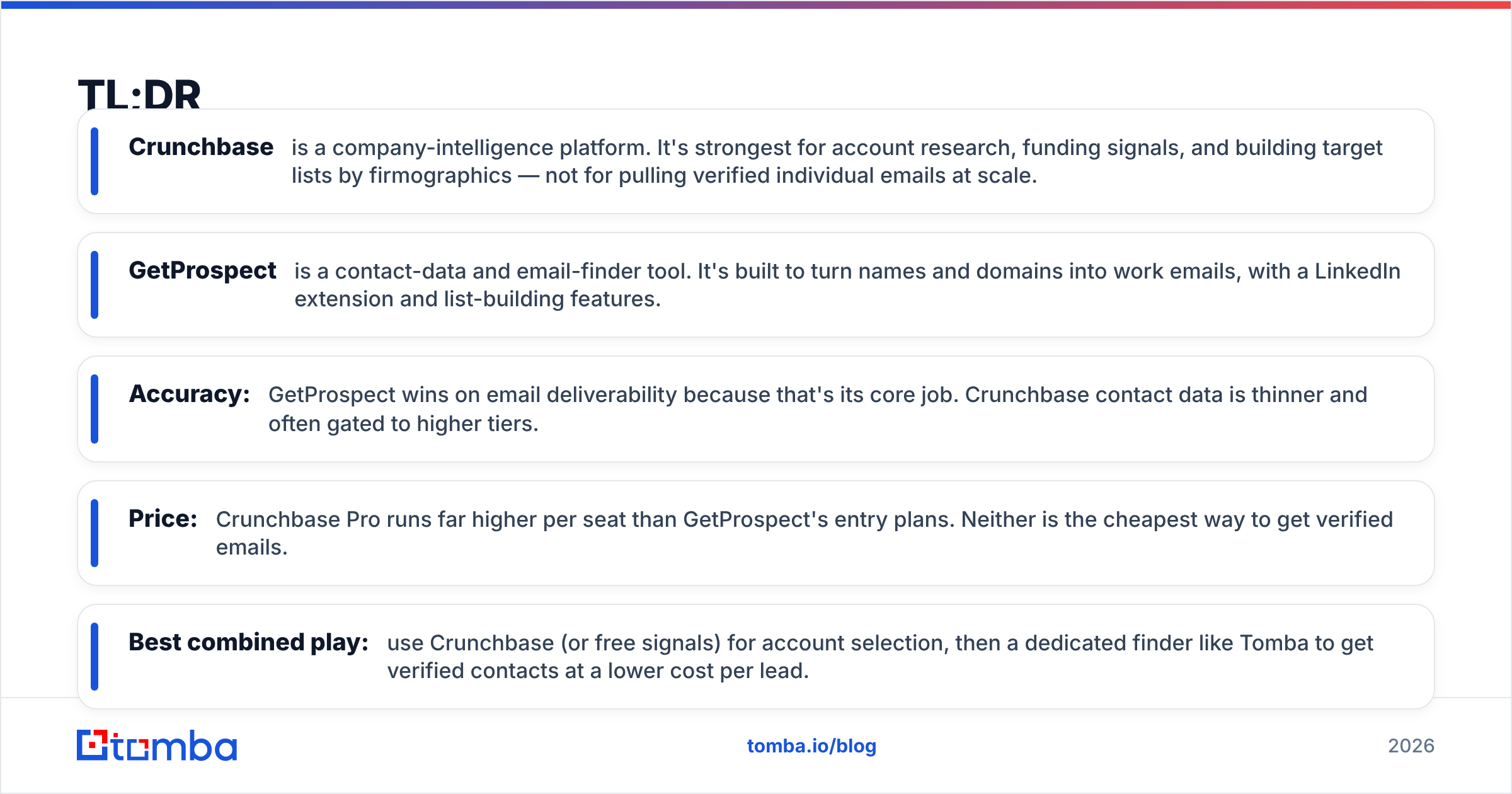
- Crunchbase is a company-intelligence platform. It's strongest for account research, funding signals, and building target lists by firmographics — not for pulling verified individual emails at scale.
- GetProspect is a contact-data and email-finder tool. It's built to turn names and domains into work emails, with a LinkedIn extension and list-building features.
- Accuracy: GetProspect wins on email deliverability because that's its core job. Crunchbase contact data is thinner and often gated to higher tiers.
- Price: Crunchbase Pro runs far higher per seat than GetProspect's entry plans. Neither is the cheapest way to get verified emails.
- Best combined play: use Crunchbase (or free signals) for account selection, then a dedicated finder like Tomba to get verified contacts at a lower cost per lead.
What is Crunchbase and who is it for?#
Crunchbase is a company database. Think of it as the Wikipedia of private-company financials — a searchable record of who raised money, from whom, when, and what a company does. Its bread and butter is funding rounds, investor relationships, acquisitions, headcount ranges, and industry tagging.
Sales and marketing teams use Crunchbase to answer "which accounts should I go after?" You can filter by recently funded startups, employee growth, industry, or region to build an account list that matches your ideal customer profile. For investors, recruiters, and market researchers, that firmographic depth is the whole point.
Where Crunchbase gets weaker is the individual contact layer. It surfaces some key people and leadership, but it was never designed to hand you a verified, deliverable email for the exact VP you want to reach. Contact export and enrichment sit on the pricier tiers, and even then the email coverage trails tools that specialize in it.

What is GetProspect and who is it for?#
GetProspect is an email-finder and contact-database tool. Its core loop is simple: give it a name and a company (or a LinkedIn profile, or a domain), and it returns a business email, usually with a verification status attached. A Chrome extension lets you pull contacts straight off LinkedIn search results and profiles, and a built-in list manager keeps everything organized for export or CRM sync.
The audience is outbound teams, agencies, and founders doing cold outreach who need volume: hundreds or thousands of contacts a month, tied to real people, ready to drop into a sequencer. GetProspect also offers list-based enrichment, so you can upload a CSV of names and domains and get emails back in bulk.
Its weakness is the mirror image of Crunchbase's. GetProspect knows people and emails; it does not give you the deep funding history, investor graph, or market-intelligence view that drives account selection. You bring the target list; it fills in the contacts.
Crunchbase vs GetProspect: how do they compare head-to-head?#
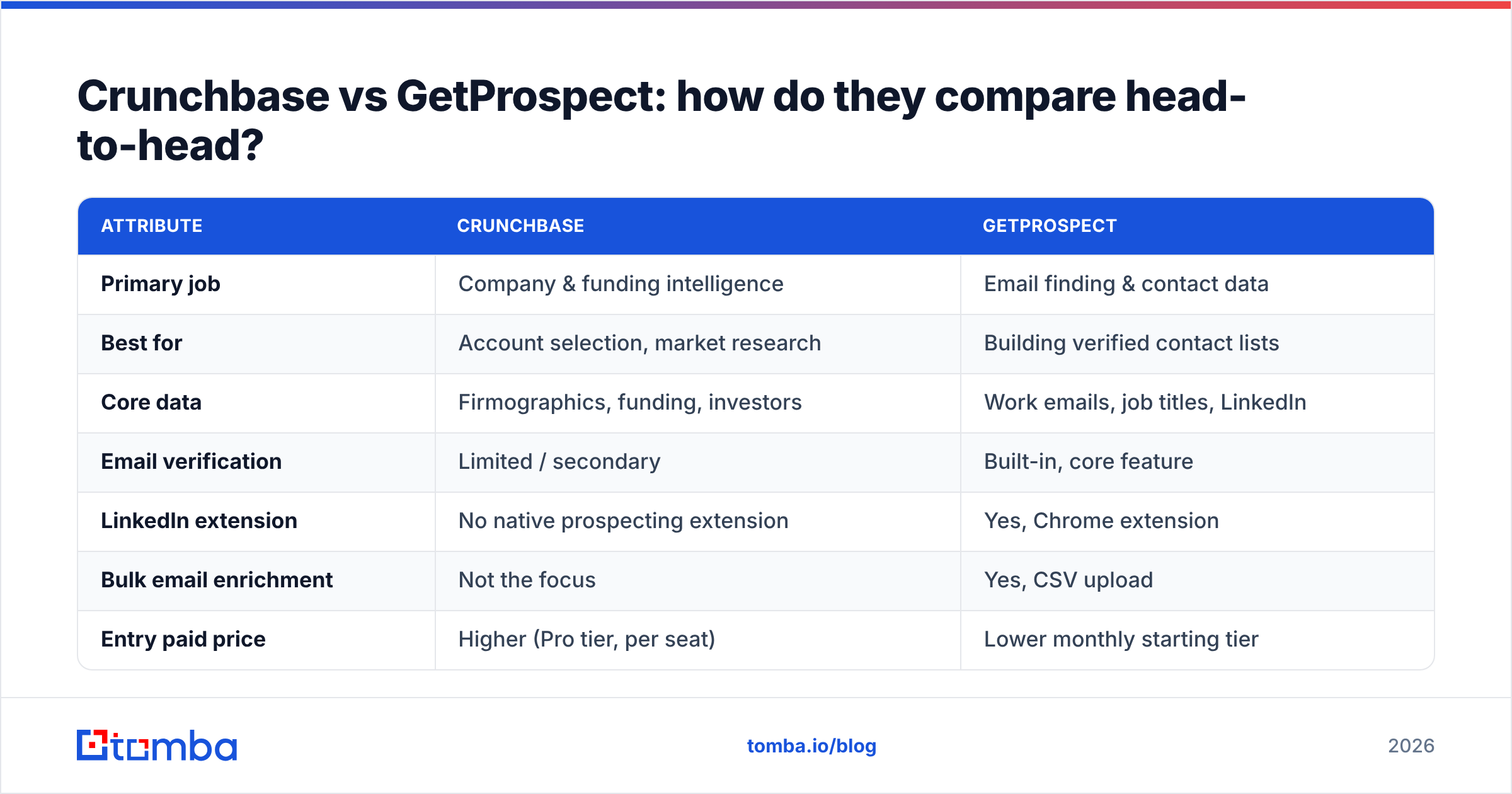
Here's the fast side-by-side. Prices and limits shift over time, so treat these as directional and confirm on each vendor's page before you buy.
| Attribute | Crunchbase | GetProspect |
|---|---|---|
| Primary job | Company & funding intelligence | Email finding & contact data |
| Best for | Account selection, market research | Building verified contact lists |
| Core data | Firmographics, funding, investors | Work emails, job titles, LinkedIn |
| Email verification | Limited / secondary | Built-in, core feature |
| LinkedIn extension | No native prospecting extension | Yes, Chrome extension |
| Bulk email enrichment | Not the focus | Yes, CSV upload |
| Entry paid price | Higher (Pro tier, per seat) | Lower monthly starting tier |
| Free option | Limited free search | Free credits monthly |
| API access | Yes (enterprise-oriented) | Yes |
The pattern is clear: these tools sit on opposite ends of the prospecting pipeline. Crunchbase answers who to target; GetProspect answers how to reach them. Buying one expecting the other's strength is the most common mistake teams make here.

Which one has better data accuracy?#
For emails, GetProspect wins — because that's the metric it's optimized for. A dedicated finder-verifier lives or dies on deliverability, so GetProspect invests in SMTP checks, catch-all detection, and status flags that Crunchbase simply doesn't prioritize. If your success metric is "how many of these emails don't bounce," a contact-first tool beats a company-first one nearly every time.
For company facts — funding, investors, acquisitions, industry — Crunchbase wins by a wide margin. Its dataset is curated, sourced from filings, news, and a large community, and it's the reference point many other tools cite. If you need to know that a prospect raised a Series B four months ago, Crunchbase is where that lives.
The nuance most comparison posts skip: email accuracy decays no matter who sells it to you. People change jobs, domains get retired, catch-all servers accept everything. That's why verification at the moment of send matters more than the vendor's marketing claim. Running your list through an email verifier before a campaign protects your sender reputation regardless of where the addresses originated.

How does pricing compare in 2026?#
Money is where the "apples-to-oranges" reality bites hardest. Crunchbase's paid tiers are priced for intelligence and access — you're paying for the funding graph and search power, and per-seat costs climb quickly for teams. GetProspect is priced per email credit, so cost scales with how many contacts you pull.
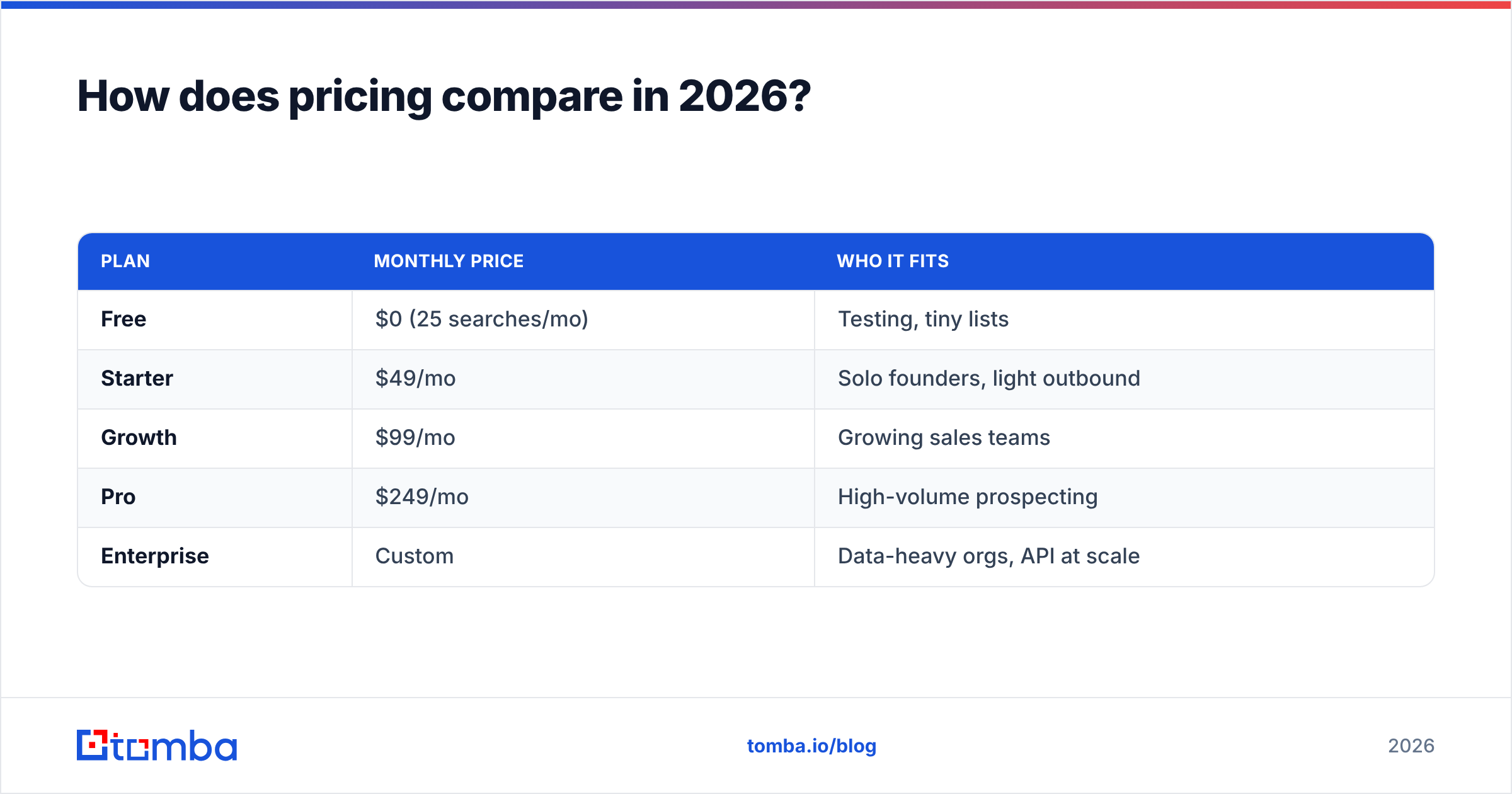
Neither is the cheapest path to a pile of verified emails. If contact discovery is the whole job, a focused finder usually delivers a lower cost per verified lead. For reference, here's how a dedicated tool like Tomba stacks up on price — see full Tomba pricing for current limits:
| Plan | Monthly price | Who it fits |
|---|---|---|
| Free | $0 (25 searches/mo) | Testing, tiny lists |
| Starter | $49/mo | Solo founders, light outbound |
| Growth | $99/mo | Growing sales teams |
| Pro | $249/mo | High-volume prospecting |
| Enterprise | Custom | Data-heavy orgs, API at scale |
The takeaway: if you're evaluating Crunchbase mainly to export contacts, or paying GetProspect's mid-tiers purely for email volume, price out a purpose-built finder first. You may get the same deliverable emails for less and keep budget for the intelligence layer where Crunchbase genuinely earns its price.
What are the pros and cons of each?#
Use this to sanity-check against your own workflow rather than a generic "best tool" verdict.
Crunchbase — pros
- Deep funding and investor data that no email tool matches.
- Strong account-list building by firmographics and growth signals.
- Trusted, well-sourced company records used across the industry.
- Timing signals (recent raises, expansions) for outbound triggers.
Crunchbase — cons
- Thin individual-contact layer; emails aren't the strength.
- Higher per-seat cost that adds up for full teams.
- Export and enrichment gated to pricier tiers.
GetProspect — pros
- Purpose-built email finding with verification baked in.
- LinkedIn Chrome extension for fast, in-context prospecting.
- Bulk enrichment from CSV uploads.
- Lower entry price than a full intelligence platform.
GetProspect — cons
- No market-intelligence depth — you supply the target list.
- Credit-based costs climb with volume.
- Coverage gaps on some niche or non-English domains.
When should you use Crunchbase, GetProspect, or a dedicated finder?#
Match the tool to the question you're actually asking.
Choose Crunchbase when account selection is the bottleneck. You're an investor tracking rounds, a researcher mapping a market, or an SDR team that wants to prioritize freshly funded companies. The firmographic and funding depth justifies the spend when who to target is genuinely hard.
Choose GetProspect when you already know your target companies and need verified emails fast, with LinkedIn as a primary sourcing surface. It's a solid mid-market pick for outbound teams that value the extension workflow.
Choose a dedicated finder like Tomba when your priority is verified contacts at the lowest cost per lead, with clean data enrichment and a strong domain search to sweep whole companies at once. Many teams pair this with free or lower-tier Crunchbase signals for targeting, then let the finder do the heavy contact lifting — the Tomba Chrome extension covers the same LinkedIn-in-context workflow GetProspect users like.
The best-run outbound stacks rarely rely on a single vendor. They separate targeting from contact discovery from verification, and buy the cheapest strong tool for each job rather than overpaying one platform to do all three poorly.
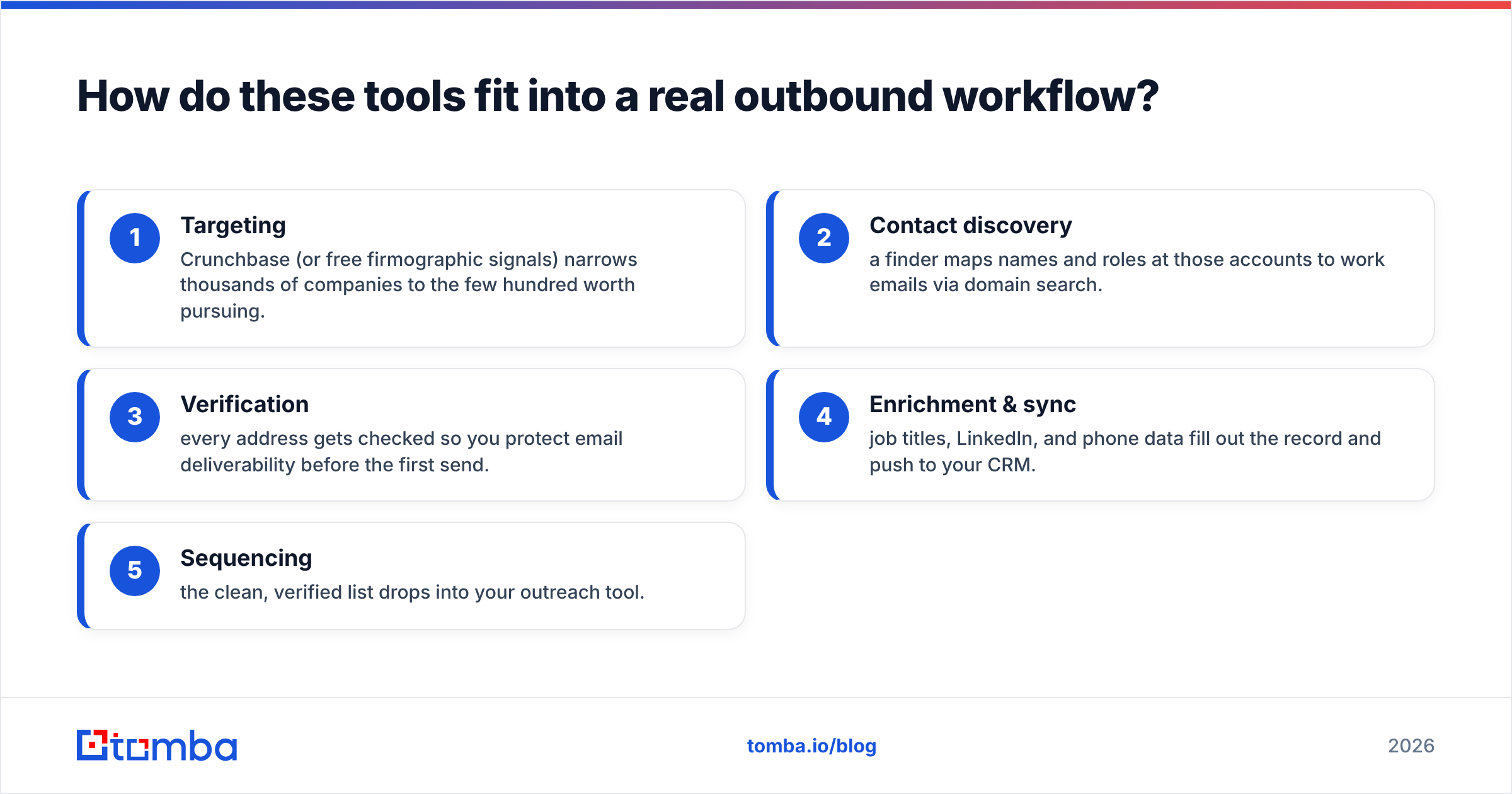
How do these tools fit into a real outbound workflow?#
Walk a lead through the pipeline and the division of labor gets obvious:
- Targeting — Crunchbase (or free firmographic signals) narrows thousands of companies to the few hundred worth pursuing.
- Contact discovery — a finder maps names and roles at those accounts to work emails via domain search.
- Verification — every address gets checked so you protect email deliverability before the first send.
- Enrichment & sync — job titles, LinkedIn, and phone data fill out the record and push to your CRM.
- Sequencing — the clean, verified list drops into your outreach tool.
GetProspect can cover steps 2 through 4 for you. Crunchbase covers step 1 better than anyone. But if you're stitching this together, notice how much of the cost lives in steps 2 and 3 — exactly where a specialized, lower-priced finder changes the math. Reputable review sites like G2 and Capterra are worth scanning for current user sentiment on both platforms before you commit to an annual plan.
The verdict: Crunchbase vs GetProspect#
They're not really competitors — they're complements pointed at different problems. Crunchbase wins account intelligence; GetProspect wins email finding. If someone forces you to pick one, pick the one that solves your harder problem: buy Crunchbase if targeting is your bottleneck, buy GetProspect if getting reachable contacts is.
But the smartest move for most outbound teams is to stop overpaying either platform for the job it does poorly. Use lean intelligence for targeting, and route contact discovery and verification through a purpose-built tool that charges for exactly that.
That's where Tomba fits. The Tomba Email Finder turns a name and domain into a verified work email, its domain search sweeps entire companies in one pass, and built-in verification keeps your bounce rate low — starting free with 25 searches a month and scaling to a $49/mo Starter plan that undercuts what you'd pay to unlock the same emails inside a full intelligence suite. Try it against your next list and compare the cost per verified lead yourself.
Related guides#
Ready to find emails that actually work?
Join 150,000+ professionals who stopped guessing and started sending. Free credits on signup — no credit card required.
Get the Tomba newsletter
Practical outbound tactics and product updates — once every two weeks.
About the author