CSV Enrichment in 2026: Turn Raw Lists Into Revenue
A raw CSV of names and companies is worth almost nothing until it's enriched. Here's how CSV enrichment works in 2026, what fields matter, and how to do it without wrecking deliverability.
You exported a list. Two hundred rows, maybe two thousand. First name, last name, company, and — if you're lucky — a job title. It looks like a pipeline. It isn't. It's a spreadsheet of strangers you can't email, can't call, and can't segment. CSV enrichment is the step that turns that dead export into something your sales team can actually work.
TL;DR#
- CSV enrichment appends missing data — verified emails, direct-dial phones, firmographics, social profiles — to a spreadsheet you already have, using each row's existing fields as the lookup key.
- The two failure modes are empty fields (no email found) and wrong fields (a stale email that bounces). A good workflow fixes both; a cheap one only pretends to.
- Match rate and verification matter more than raw field count. Ninety percent coverage with 40% bounces is worse than 65% coverage that's clean.
- Do it in bulk with an API or add-on, not by hand. Manual enrichment of 500 rows costs more in salary than the tool costs in a year.
- Enrich, verify, then throttle your sends. Skipping verification is the fastest way to torch a sending domain.
What is CSV enrichment?#
CSV enrichment is the process of taking a comma-separated file of partial contact or company records and filling in the blanks from external data sources. Think of it like a passport control officer with a thin manifest: each traveler's name gets cross-referenced against a much larger database, and by the time they walk through, you know their nationality, their reason for travel, and whether their documents are current.
Technically, an enrichment engine reads each row, extracts the strongest identifiers it has (usually a full name plus a company domain, or an email, or a LinkedIn URL), queries one or more data providers, and writes new columns back to the file. The input is thin. The output is sales-ready.
The fields you typically append fall into three buckets:
- Contact data — professional email address, direct phone number, LinkedIn profile, job title, seniority.
- Firmographic data — company size, revenue band, industry, headquarters location, tech stack, funding stage.
- Validation data — email deliverability status, catch-all flags, phone line type (mobile vs landline), last-seen/confidence score.
That third bucket is the one most people ignore, and it's the one that decides whether your campaign lands in an inbox or a spam folder. More on that below.
Why does a raw CSV lose you money?#
A raw list costs you three ways, and none of them show up on an invoice.
Rep time. A salesperson who has to manually hunt for each prospect's email spends 30–40% of their week on data entry instead of selling. That's the single most expensive way to fill a spreadsheet.
Deliverability. When you guess or scrape emails and blast them without checking, you rack up hard bounces. Mailbox providers read a high bounce rate as a spam signal, and your sender reputation drops for every message — including the ones to good addresses. One bad list can degrade a domain you spent months warming.
Bad segmentation. Without firmographics you can't prioritize. A 12-person startup and a 12,000-person enterprise look identical in a name-and-company CSV, so your reps treat them the same and waste their best hours on accounts that will never close.
Enrichment attacks all three at once. It's not a nice-to-have; it's the difference between a list and a target account list.
How does CSV enrichment actually work?#
There are three common approaches, and they sit on a clear cost-versus-quality curve.
Manual lookup. A human opens LinkedIn, guesses the email pattern, and pastes results back into the sheet. Accurate for tiny lists, unscalable past a few dozen rows, and brutal on morale.
Formula and scraper hacks. VLOOKUPs against a reference file, or a browser scraper that pulls whatever's visible. Cheap, but the data is only as good as the source and there's zero verification. Catch-all domains and role addresses slip straight through.
API or bulk enrichment tool. You upload the CSV (or hit an endpoint), the service matches each row against a maintained database plus live verification, and you get a clean file back in minutes. This is where a bulk email finder earns its keep — it's built to process thousands of rows and verify each one before it hands them back.
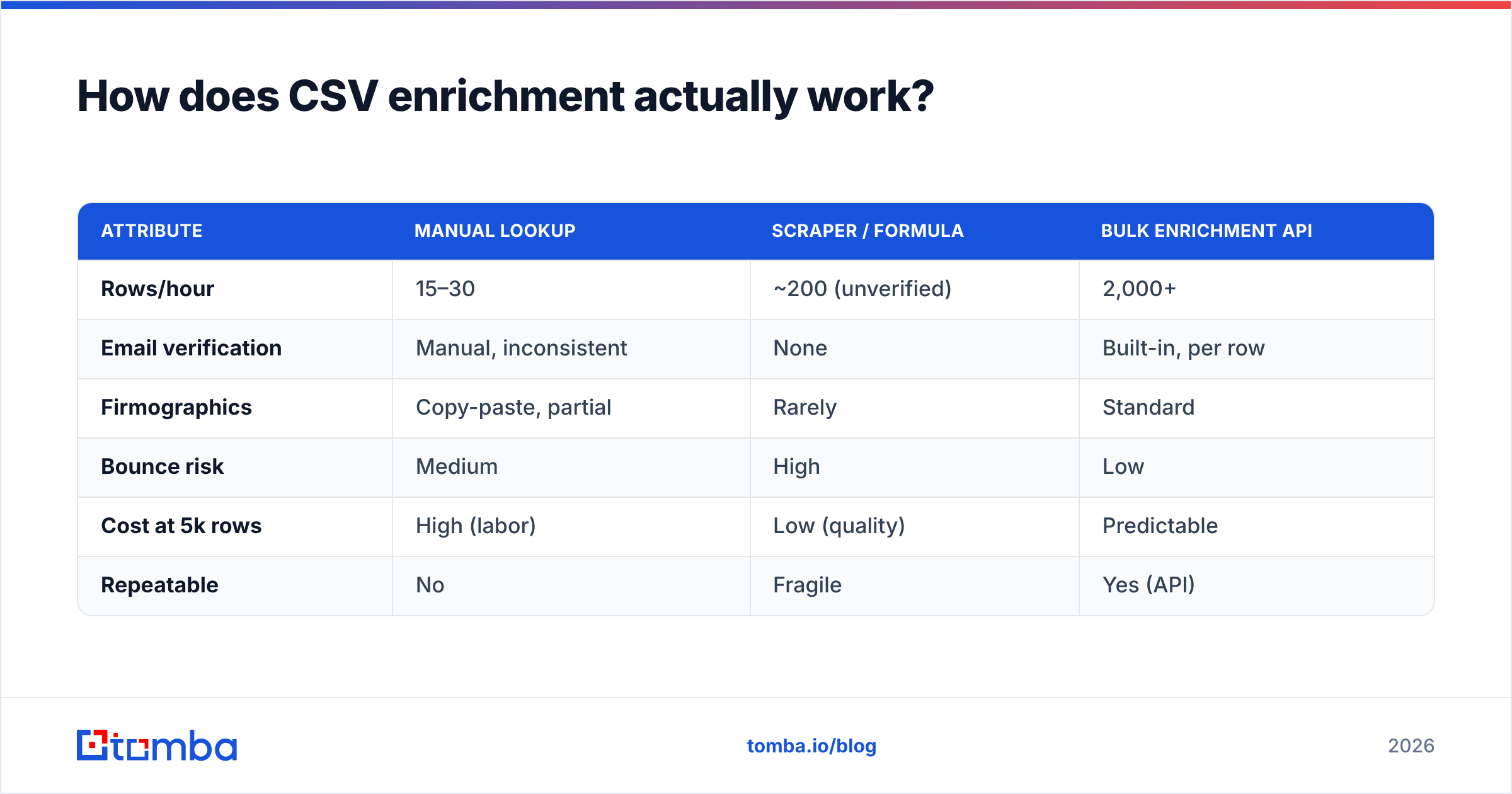
Here's how the three compare on the metrics that decide outcomes.
| Attribute | Manual lookup | Scraper / formula | Bulk enrichment API |
|---|---|---|---|
| Rows/hour | 15–30 | ~200 (unverified) | 2,000+ |
| Email verification | Manual, inconsistent | None | Built-in, per row |
| Firmographics | Copy-paste, partial | Rarely | Standard |
| Bounce risk | Medium | High | Low |
| Cost at 5k rows | High (labor) | Low (quality) | Predictable |
| Repeatable | No | Fragile | Yes (API) |
The pattern is obvious: manual buys accuracy with time you can't spare, scrapers buy speed by sacrificing quality, and a real enrichment service is the only option that scales and verifies. That's not a coincidence — verification is compute-heavy and needs a live data pipeline behind it, which is exactly what a dedicated tool maintains.
Which fields should you enrich first?#
Don't enrich everything. Enrich what changes a rep's next action.
- Verified email — non-negotiable. It's your channel. Without deliverability status it's a liability, not an asset. Run every appended address through an email verifier before it enters a sequence.
- Direct phone — for anything with a real deal size, a mobile number outperforms a switchboard by a wide margin. Append it with a phone finder and validate the line type.
- Company size + industry — the two firmographics that drive segmentation and routing. Everything else is secondary.
- Seniority / title — decides messaging and whether this person can even sign.
- LinkedIn URL — your fallback channel and your enrichment re-key for future refreshes.
Everything past that — funding rounds, tech stack, intent signals — is useful for specific plays but shouldn't block your first send. Ship the core five, launch, then layer depth onto the accounts that engage.
Is more coverage always better?#
No — and this is the trap that sinks most first-time enrichment projects. Coverage (the share of rows that got some new data) is the vanity metric vendors quote. The number that actually predicts your bounce rate is verified match rate: rows where the appended email is confirmed deliverable.
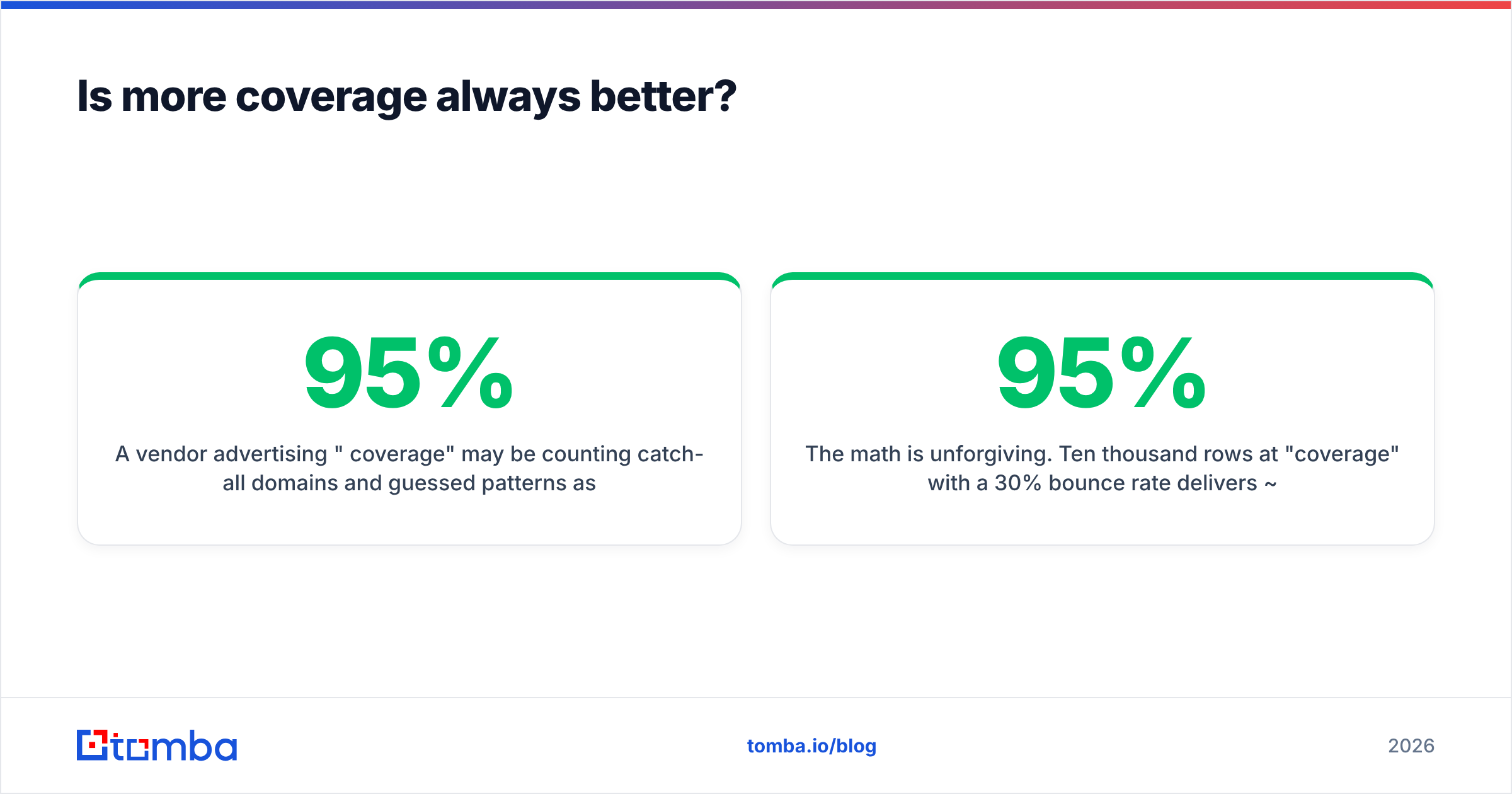
A vendor advertising "95% coverage" may be counting catch-all domains and guessed patterns as hits. Send to those and you'll see 20–40% bounces. A tool reporting a lower coverage figure but only counting verified, deliverable addresses will protect your domain and get more messages actually read.
The math is unforgiving. Ten thousand rows at 95% "coverage" with a 30% bounce rate delivers ~6,650 clean sends and a wrecked reputation. The same list at 65% verified coverage delivers 6,500 clean sends and keeps your domain healthy. Nearly the same reach, wildly different next month. Always ask a vendor whether their headline number is coverage or verified coverage — the honest ones will tell you, and it should be reflected in how they source data. Tomba publishes where its data comes from so you can judge that for yourself.

What does a clean enrichment workflow look like?#
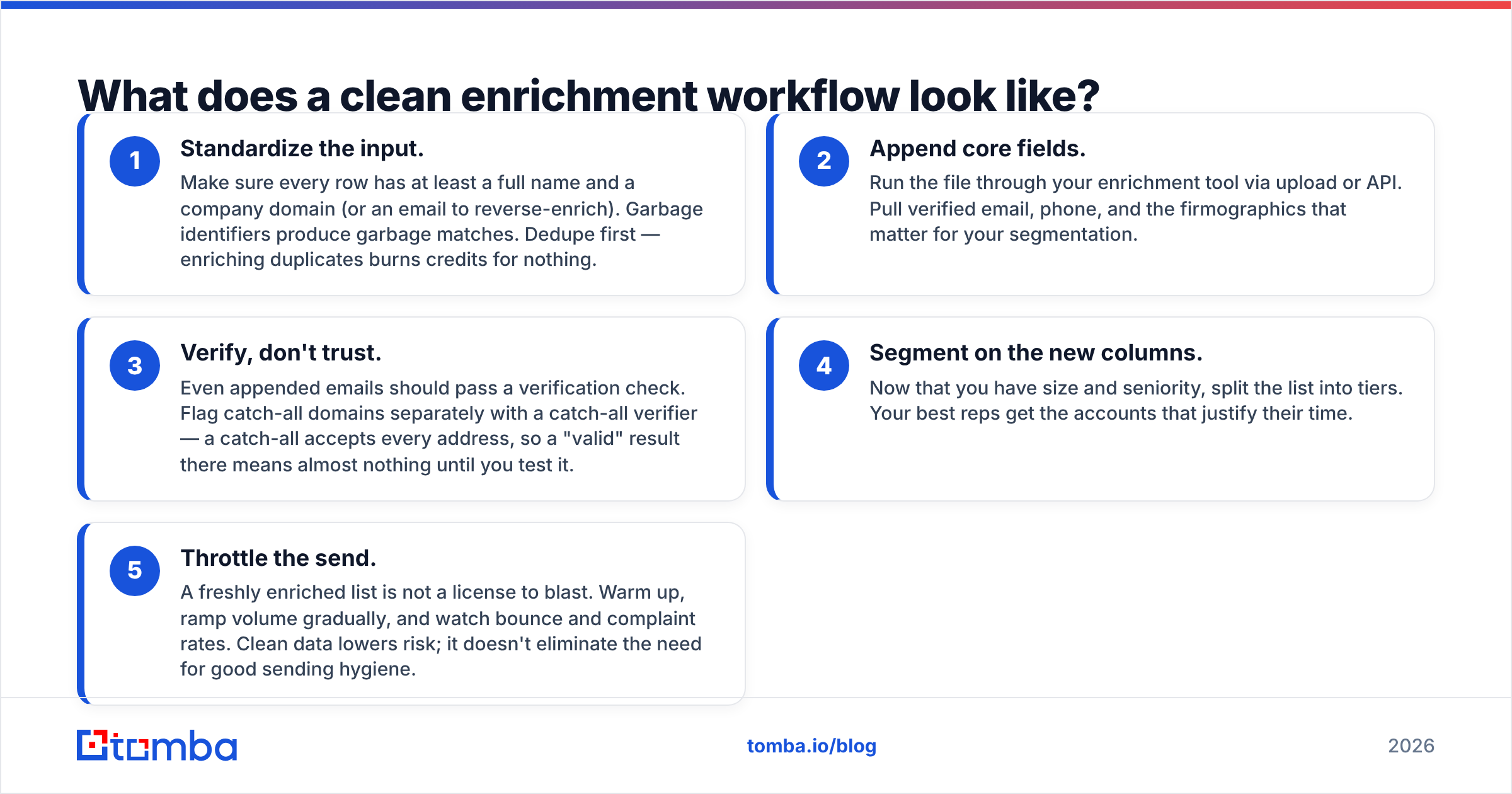
Five steps. Skip none of them, especially step three.
- Standardize the input. Make sure every row has at least a full name and a company domain (or an email to reverse-enrich). Garbage identifiers produce garbage matches. Dedupe first — enriching duplicates burns credits for nothing.
- Append core fields. Run the file through your enrichment tool via upload or API. Pull verified email, phone, and the firmographics that matter for your segmentation.
- Verify, don't trust. Even appended emails should pass a verification check. Flag catch-all domains separately with a catch-all verifier — a catch-all accepts every address, so a "valid" result there means almost nothing until you test it.
- Segment on the new columns. Now that you have size and seniority, split the list into tiers. Your best reps get the accounts that justify their time.
- Throttle the send. A freshly enriched list is not a license to blast. Warm up, ramp volume gradually, and watch bounce and complaint rates. Clean data lowers risk; it doesn't eliminate the need for good sending hygiene.
For repeat work, wire steps 2 and 3 into a pipeline. Push new CRM rows through the Tomba API or a no-code connector so enrichment happens on entry, not in a monthly panic before a campaign.
How much should CSV enrichment cost?#
Pricing is almost always per-credit, where one credit is one successful match or verification. The variables are match rate, whether verification is bundled or billed separately, and monthly volume.
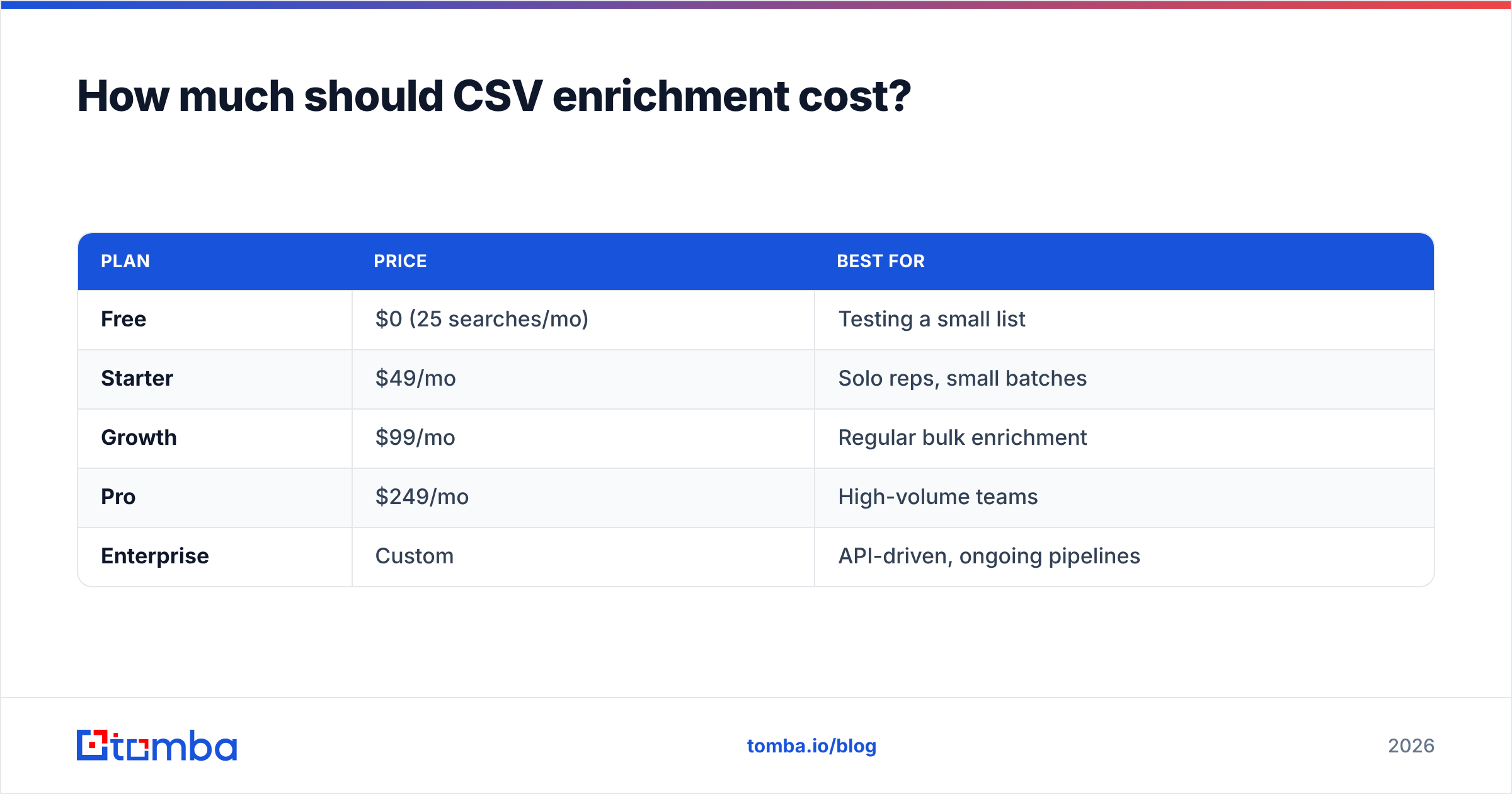
Watch for two things. First, whether failed lookups still cost you — reputable tools only charge for successful, returned data. Second, whether verification is included or an add-on, because a "cheap" finder that bills verification separately can cost more than an all-in tool. As a benchmark, here's how Tomba's tiers map to enrichment volume:
| Plan | Price | Best for |
|---|---|---|
| Free | $0 (25 searches/mo) | Testing a small list |
| Starter | $49/mo | Solo reps, small batches |
| Growth | $99/mo | Regular bulk enrichment |
| Pro | $249/mo | High-volume teams |
| Enterprise | Custom | API-driven, ongoing pipelines |
You can see the full breakdown on the Tomba pricing page. The right tier is the one where your cost-per-verified-record beats what a rep's hour is worth — which, for any list over a few hundred rows, is basically all of them.
For context on how enrichment fits the wider tooling market, analyst directories like G2's data enrichment category and HubSpot's guide to data enrichment are useful neutral starting points before you commit to any single vendor.
When should you not enrich a CSV?#
A few honest cases where you should pump the brakes:
- The source is non-compliant. If a list was scraped or purchased in a way that violates GDPR or CAN-SPAM, enriching it doesn't launder it. Fix the sourcing first.
- The identifiers are too thin. A CSV of first names with no company or domain has nothing to match against. Enrichment isn't magic; it needs a real key.
- You won't act on the data. Enriching 10,000 rows you'll never contact is just spending credits to feel productive. Enrich the segment you'll work this quarter.
Enrichment amplifies whatever list you feed it. Feed it a clean, consented, well-keyed export and it multiplies your reach. Feed it junk and it just makes expensive junk.
The bottom line#
A raw CSV is potential energy. Enrichment is what converts it into pipeline — but only if you verify what you append and send responsibly afterward. Chase verified match rate over headline coverage, enrich the five fields that change a rep's next move, and build the whole thing into a repeatable API flow so you're never manually filling cells at midnight before a launch again.
If you're ready to turn a spreadsheet of strangers into a list you can actually work, start with the Tomba Email Finder. Upload your CSV, get verified emails and firmographics back in minutes, and run every address through built-in verification before it ever hits a sequence. Test it free on 25 searches, then scale when the numbers prove out.
Related guides#
Ready to find emails that actually work?
Join 150,000+ professionals who stopped guessing and started sending. Free credits on signup — no credit card required.
Get the Tomba newsletter
Practical outbound tactics and product updates — once every two weeks.
About the author