Csvgo Pricing, Reviews, Pros and Cons: A 2026 Breakdown
A neutral, no-hype look at Csvgo: what its plans really cost, what reviewers praise and complain about, and when a cheaper, more accurate alternative makes more sense in 2026.

Csvgo markets itself as an all-in-one data platform. You upload a CSV, enrich it, find emails and phone numbers, and export a clean list. That pitch lands with sales and RevOps teams who are drowning in half-built spreadsheets. But before you route budget to it, you want straight answers. What does it actually cost? What do real users complain about? Is there a leaner option that does the core job for less? This guide to Csvgo pricing reviews pros and cons gives you those answers.
This is a neutral breakdown of Csvgo pricing reviews pros and cons for 2026. It is written to help you decide, not to sell you the tool.
TL;DR: Csvgo pricing reviews pros and cons at a glance#
- What it is: a CSV-first tool that finds and appends emails, phones, and firmographics to lists you already have.
- Pricing reality: credit-based tiers look cheap at the entry level. They scale fast once you enrich at volume or need verified data. Read the per-credit math before you commit.
- Where it shines: batch workflows, a spreadsheet-native feel, and a low barrier to your first enriched list.
- Where it frustrates: weak accuracy on catch-all domains, credit burn on unverified matches, and thinner integrations than the big platforms.
- Bottom line: it is solid for occasional bulk cleanups. If email accuracy and predictable cost matter most, a focused email finder like Tomba is often cheaper per verified contact.
What is Csvgo and who is it for?#
Csvgo is a data-enrichment tool built around the spreadsheet. The core loop is simple. You bring a list of names, domains, or partial records. The platform fills in the gaps — work email, company data, sometimes phone numbers. Then it hands back a file you can export.
That focus tells you who it is for. Csvgo fits teams whose data lives in CSVs and who need a quick way to clean a messy export. Think of a recruiter enriching a candidate list, an SDR cleaning a scraped set of domains, or a marketer appending firmographics before a campaign.
It is not a prospecting database like Apollo or ZoomInfo. You do not search for net-new companies inside Csvgo. You enrich contacts you already have. Keep that difference front of mind. It is the biggest driver of whether the tool fits your workflow.

How does Csvgo pricing work in 2026?#
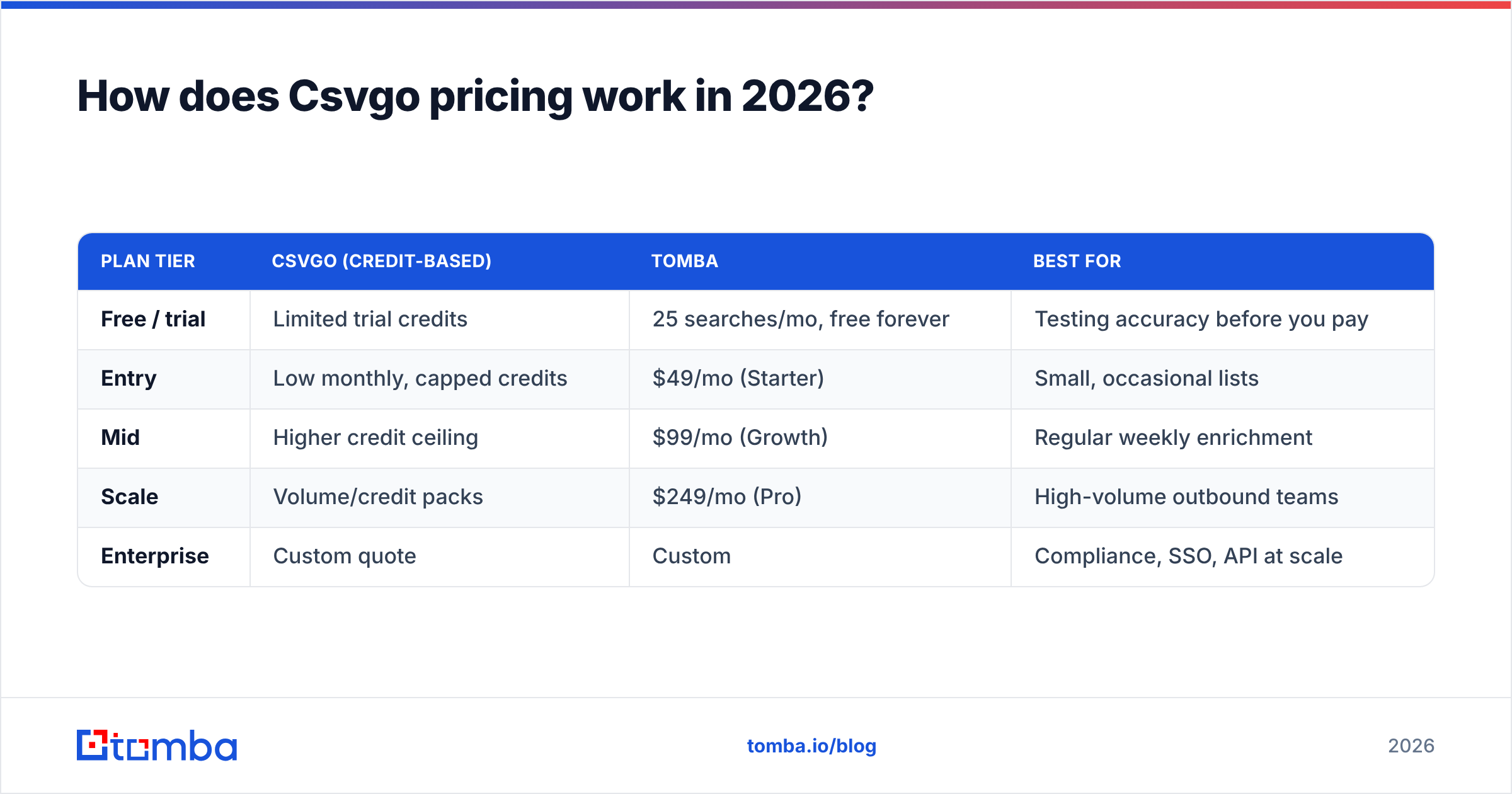
Csvgo uses a credit-based model. This is standard for the category, but it is worth a closer look, because "credits" hide the real unit cost. A credit is usually spent per successful enrichment — one email found, one phone appended, one record matched. Here is the catch buyers miss. Some vendors charge a credit even for unverified or low-confidence matches. So your true cost per usable contact is higher than the sticker price.
Vendor pricing shifts often. Always confirm current numbers on the official Csvgo site. Then cross-check user-reported costs on G2 or Capterra before you buy. As a planning framework, here is how credit tools tend to tier — and how Csvgo compares against a focused email-finder like Tomba's published pricing.
| Plan tier | Csvgo (credit-based) | Tomba | Best for |
|---|---|---|---|
| Free / trial | Limited trial credits | 25 searches/mo, free forever | Testing accuracy before you pay |
| Entry | Low monthly, capped credits | $49/mo (Starter) | Small, occasional lists |
| Mid | Higher credit ceiling | $99/mo (Growth) | Regular weekly enrichment |
| Scale | Volume/credit packs | $249/mo (Pro) | High-volume outbound teams |
| Enterprise | Custom quote | Custom | Compliance, SSO, API at scale |
Two things to check before you sign:
- Are credits charged on match or on attempt? This is the difference between a predictable bill and a surprising one.
- Do rollover rules exist? Unused credits that expire each month quietly inflate your real cost per contact.
What do Csvgo reviews say — the pros?#
Pull together the themes that recur across public reviews and hands-on write-ups. The praise clusters around a few real strengths.
- Spreadsheet-native simplicity. The upload-enrich-export loop is easy. Non-technical users get a result on the first try. No CRM migration or Zapier maze is needed.
- Fast bulk processing. For batch jobs — enrich 2,000 rows overnight — the speed saves real time versus manual lookups.
- Reasonable entry price. The starting tier is approachable, which lowers the risk of a first test.
- Multi-attribute enrichment. You get email, firmographics, and sometimes phone in one pass. That beats stitching three tools together for a light workflow.
None of that is marketing fluff. These are the reasons the tool earns repeat use for the right job. The reviewers who love Csvgo run periodic, medium-volume cleanups. For them, "good enough and fast" beats "perfect and slow."
What do Csvgo reviews say — the cons?#
The critical feedback is just as consistent. This is where you should focus your evaluation.
- Accuracy on catch-all domains. Many company domains accept every address at the mail-server level. So a tool cannot confirm that a specific inbox exists. If Csvgo returns those as "found" without a verification layer, you pay a credit for an address that may bounce. A dedicated catch-all verifier is what separates a usable list from a risky one.
- Credit burn on low-confidence matches. Reviewers report spending credits on results they later had to throw out. That is the hidden tax of unverified data.
- Thinner integrations. Some platforms push straight into HubSpot, Salesforce, or Pipedrive. Csvgo often leans on CSV export and import, which adds manual steps back in.
- Support and roadmap opacity. Smaller tools move fast. But they can be light on documentation and slow on edge-case support.
When your Csvgo pricing reviews pros and cons review is done, one theme stands out: verification is where cheap enrichment gets expensive. An unverified list looks complete in a spreadsheet. Then it torches your sender reputation when 12% of it bounces on send.

Csvgo vs. a dedicated email finder: which fits your workflow?#
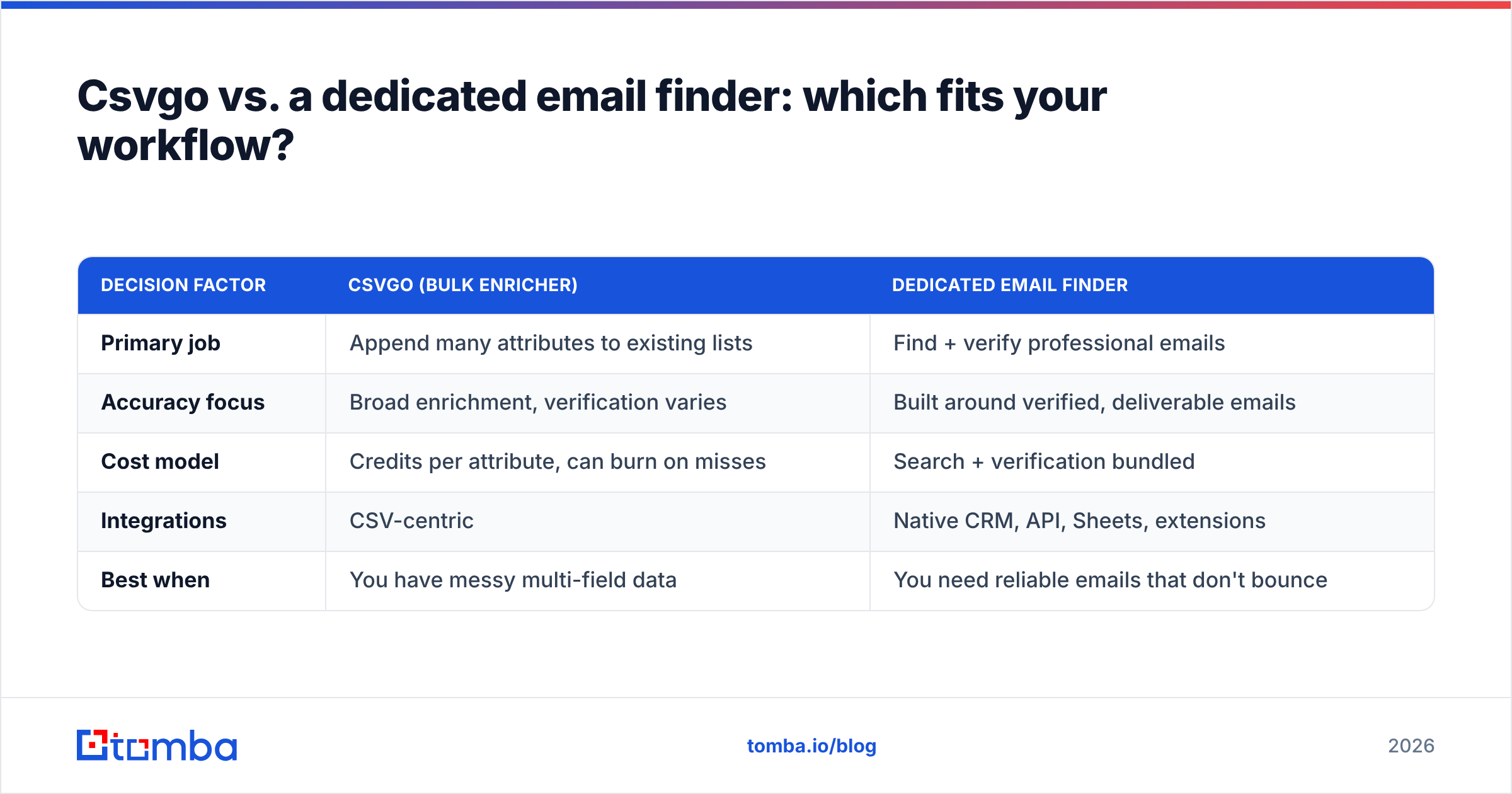
The honest answer is that they solve overlapping but different problems. The right choice depends on what breaks your workflow today.
| Decision factor | Csvgo (bulk enricher) | Dedicated email finder |
|---|---|---|
| Primary job | Append many attributes to existing lists | Find + verify professional emails |
| Accuracy focus | Broad enrichment, verification varies | Built around verified, deliverable emails |
| Cost model | Credits per attribute, can burn on misses | Search + verification bundled |
| Integrations | CSV-centric | Native CRM, API, Sheets, extensions |
| Best when | You have messy multi-field data | You need reliable emails that don't bounce |
Say your pain is "I have 5,000 half-complete records with missing companies, titles, and emails." Then a broad enricher earns its keep. But say your pain is "my cold emails bounce and hurt deliverability." Then you want a tool built around verified addresses. Pair an email finder with an email verifier, or run both in one pass with bulk email finder workflows.
Want to know why bounce rates wreck outbound? The email deliverability basics are worth ten minutes before you spend a dollar on data.
How do you calculate the real cost per verified contact?#
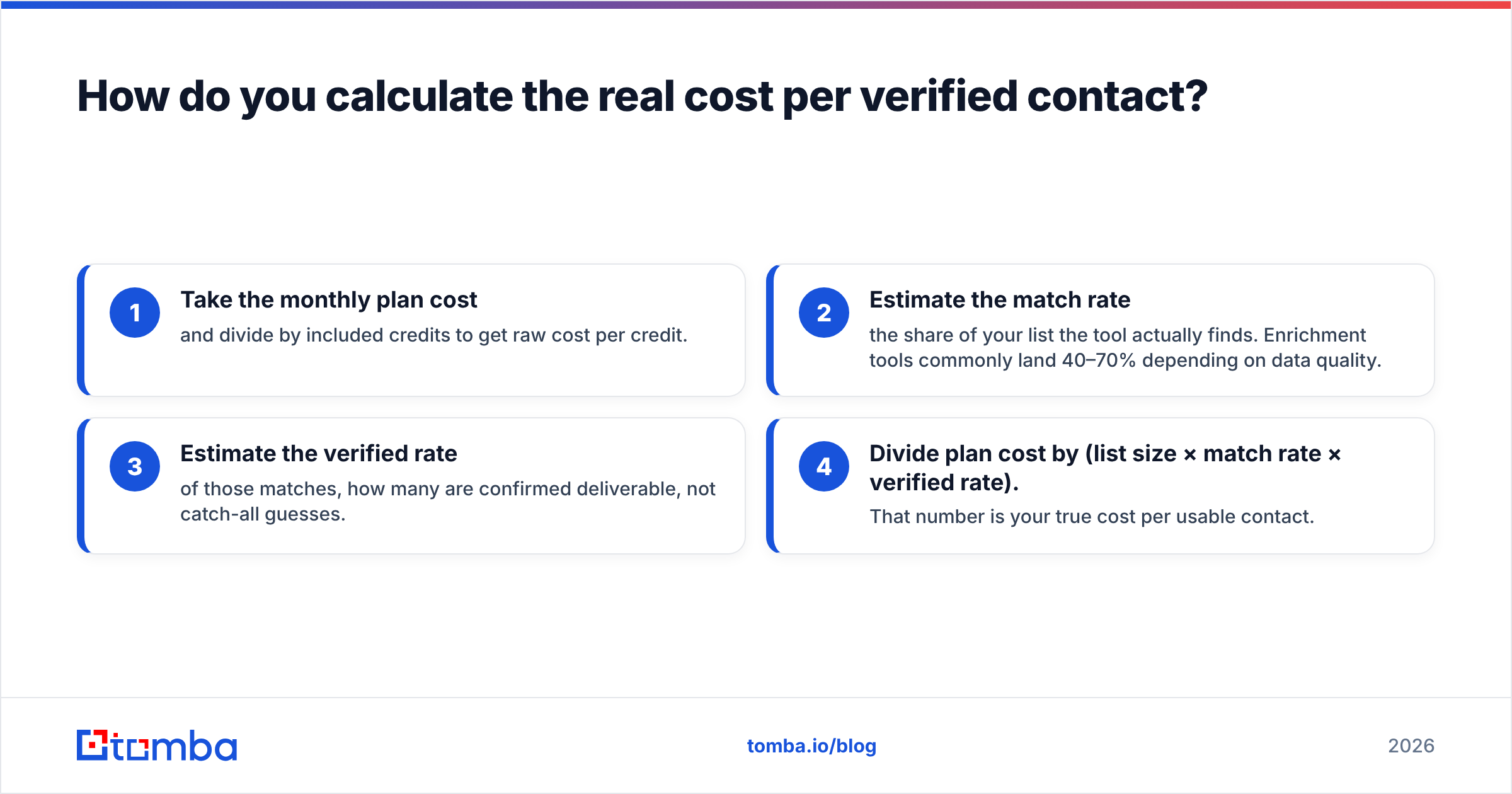
Sticker price lies. Cost per verified, deliverable contact tells the truth. Here is the math to run on any credit-based tool, Csvgo included:
- Take the monthly plan cost and divide by included credits. That gives you the raw cost per credit.
- Estimate the match rate — the share of your list the tool actually finds. Enrichment tools commonly land 40–70%, depending on data quality.
- Estimate the verified rate — of those matches, how many are confirmed deliverable, not catch-all guesses.
- Divide plan cost by (list size × match rate × verified rate). That number is your true cost per usable contact.
A tool can charge less per credit but return 30% unverified matches. It can still cost more per usable contact than a pricier tool with tight verification. This is why the entry-level sticker price is a poor decision anchor. It is also why "cheap" enrichment sometimes isn't.
When should you pick Csvgo — and when shouldn't you?#
Pick Csvgo if:
- Your data genuinely lives in spreadsheets and you want a low-friction enrichment pass.
- You run periodic bulk jobs, not continuous daily prospecting.
- You need several attributes at once and are fine adding your own verification step.
Look elsewhere if:
- Email deliverability is mission-critical and you cannot afford bounces.
- You want native CRM sync instead of CSV round-trips.
- You need predictable, per-verified-contact pricing at scale.
- You rely on accurate results for catch-all domains, which trip up unverified enrichers.
There is no universally "right" tool here. There is only the right tool for your volume, your accuracy tolerance, and your budget. Be honest about which of those is non-negotiable. The choice usually makes itself.
What's a cheaper, accuracy-first alternative?#
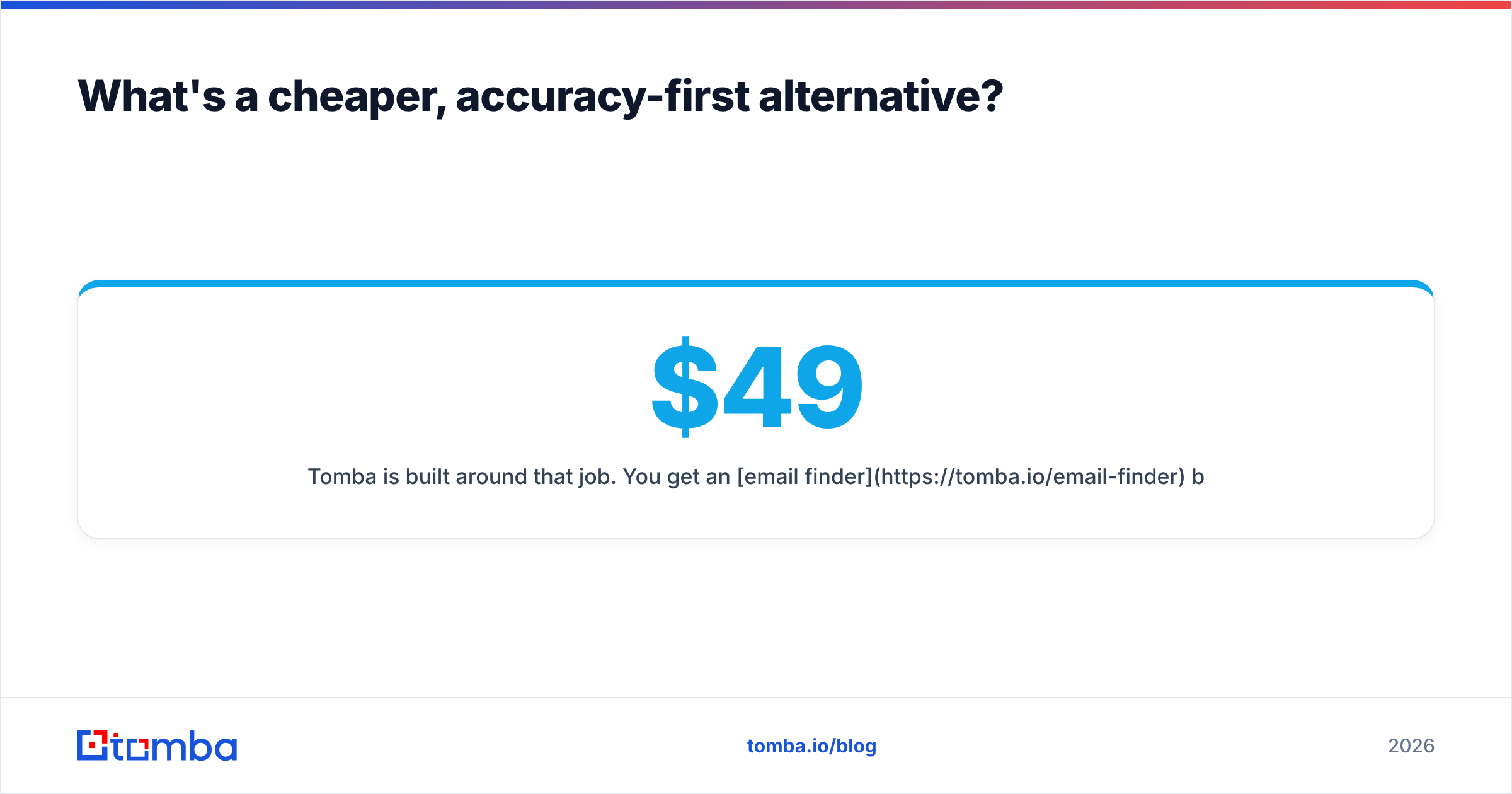
Say your core need is finding professional emails that actually deliver, then verifying them before they hit a sequence. A focused platform is often cheaper per verified contact and simpler to reason about.
Tomba is built around that job. You get an email finder by name, domain, or company. You get a native email verifier, so you are not paying for guesses. You get data enrichment when you do need extra attributes. And you get a real free tier (25 searches/month), so you can test accuracy against your own list before spending. Pricing is transparent — Starter at $49/mo, Growth at $99/mo, Pro at $249/mo — with verification bundled, not billed as a surprise. Compare the full Tomba pricing against any Csvgo quote, and run the cost-per-verified-contact math from above.
The point is not that Csvgo is bad. It is that "enrichment" and "verified email finding" are different jobs. Buying the wrong one for your workflow is where teams waste budget.
Ready to test accuracy on your own list?#
Don't take any vendor's word — including this post's. Take a sample of 100 real contacts. Run them through the Tomba Email Finder free tier. Then measure the verified match rate against whatever you would get from Csvgo. The tool that returns more deliverable emails per dollar wins. And you will have your own evidence instead of a marketing claim. Start free, verify as you go, and only scale the plan once the numbers hold up on your data.
Related guides#
Ready to find emails that actually work?
Join 150,000+ professionals who stopped guessing and started sending. Free credits on signup — no credit card required.
Get the Tomba newsletter
Practical outbound tactics and product updates — once every two weeks.
About the author