CSVGO vs LimeLeads (2026): Which B2B Lead Data Tool Wins?
CSVGO and LimeLeads both sell B2B contact lists, but they price, refresh, and verify data very differently. Here's an honest head-to-head—and a more accurate pick.
Choosing between CSVGO and LimeLeads usually comes down to one question you can't see on either pricing page: how stale is the data the moment you download it? Both platforms sell downloadable B2B contact lists. Both promise coverage. Neither is a live email finder. This comparison breaks down what each one actually does, where the data comes from, what you pay, and when a real-time tool beats a pre-built list altogether.
TL;DR#
- CSVGO is a low-cost, self-serve B2B list builder focused on cheap, high-volume CSV exports by filter (industry, geography, title). Great for price, weaker on freshness guarantees.
- LimeLeads is a US-centric B2B database with in-app filtering, per-record verification prompts, and a credit model. Cleaner UX, higher per-lead cost.
- Both sell static snapshots. The instant you export, decay starts—people change jobs, domains lapse, inboxes close.
- The accuracy gap is the real story. A list bought today can be 20–30% wrong within months; a live-lookup tool re-checks at the moment of send.
- Best of both: build your target account list, then find and verify each email in real time with a tool like the Tomba Email Finder instead of trusting a frozen CSV.
What are CSVGO and LimeLeads?#
Both are B2B lead-list providers—you filter a database, they hand you contacts, you export a spreadsheet. That's the shared DNA. The differences are in sourcing, verification, pricing model, and how much you can trust a row six weeks after you download it.
CSVGO positions itself as the budget option. You pick filters, see a count, and buy the export outright, often at a low cost-per-thousand. The appeal is volume: large lists for less money. The tradeoff is that "cheap and big" rarely comes with strong, per-record verification, so you inherit more bounce risk.
LimeLeads is a more polished, US-focused platform. You search inside the app, preview companies and contacts, and spend credits to unlock verified records. It leans on real-time email validation prompts and a cleaner interface. You generally pay more per lead, but the records feel more curated.
Here's the catch that applies to both: a purchased list is a photograph, not a live feed. B2B data decays fast—industry estimates put contact-data decay at roughly 22–30% per year, concentrated in job changes and email churn. That single fact reframes the entire CSVGO vs LimeLeads debate.

How do CSVGO and LimeLeads compare on features?#
Use this as the fast reference before we go deeper on accuracy and price.
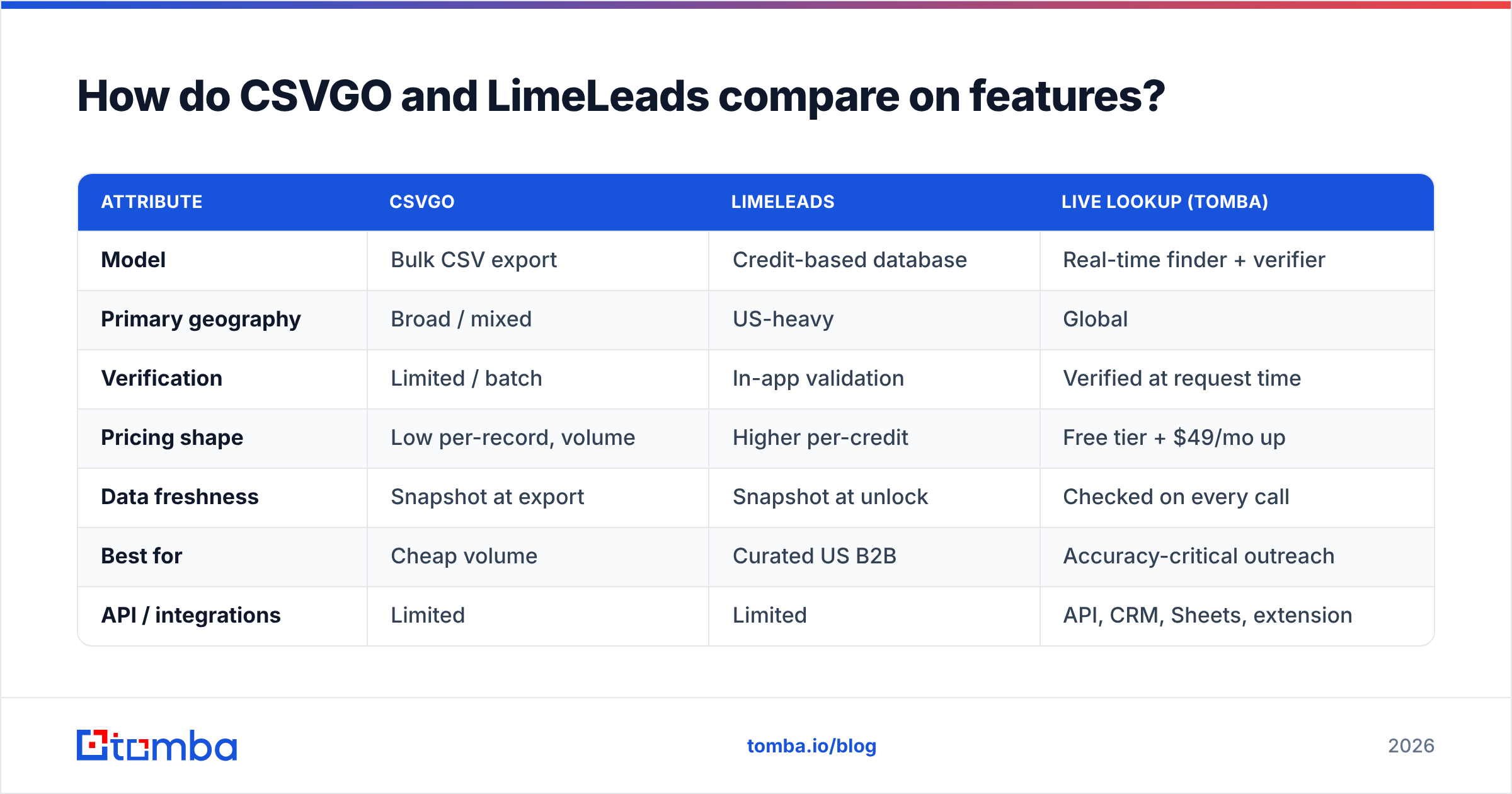
| Attribute | CSVGO | LimeLeads | Live lookup (Tomba) |
|---|---|---|---|
| Model | Bulk CSV export | Credit-based database | Real-time finder + verifier |
| Primary geography | Broad / mixed | US-heavy | Global |
| Verification | Limited / batch | In-app validation | Verified at request time |
| Pricing shape | Low per-record, volume | Higher per-credit | Free tier + $49/mo up |
| Data freshness | Snapshot at export | Snapshot at unlock | Checked on every call |
| Best for | Cheap volume | Curated US B2B | Accuracy-critical outreach |
| API / integrations | Limited | Limited | API, CRM, Sheets, extension |
The pattern is consistent: CSVGO wins on raw cost, LimeLeads wins on interface and curation, and a live tool wins on the one metric that decides whether your emails land—freshness at the moment you actually send.
Which has more accurate data?#
Accuracy is where the CSVGO vs LimeLeads choice gets expensive if you get it wrong. Every bounced email chips at your sender reputation, and mailbox providers punish senders whose bounce rates creep above ~2–3%.

Think of a purchased list like produce at a market. LimeLeads is the stall that washes and inspects each item before it goes on display—cleaner, pricier, still perishable. CSVGO is the wholesale crate: more food for your money, less inspection, and you're trusting it hasn't been sitting out too long. Neither stall refrigerates the box after you carry it home.
A few accuracy factors to weigh:
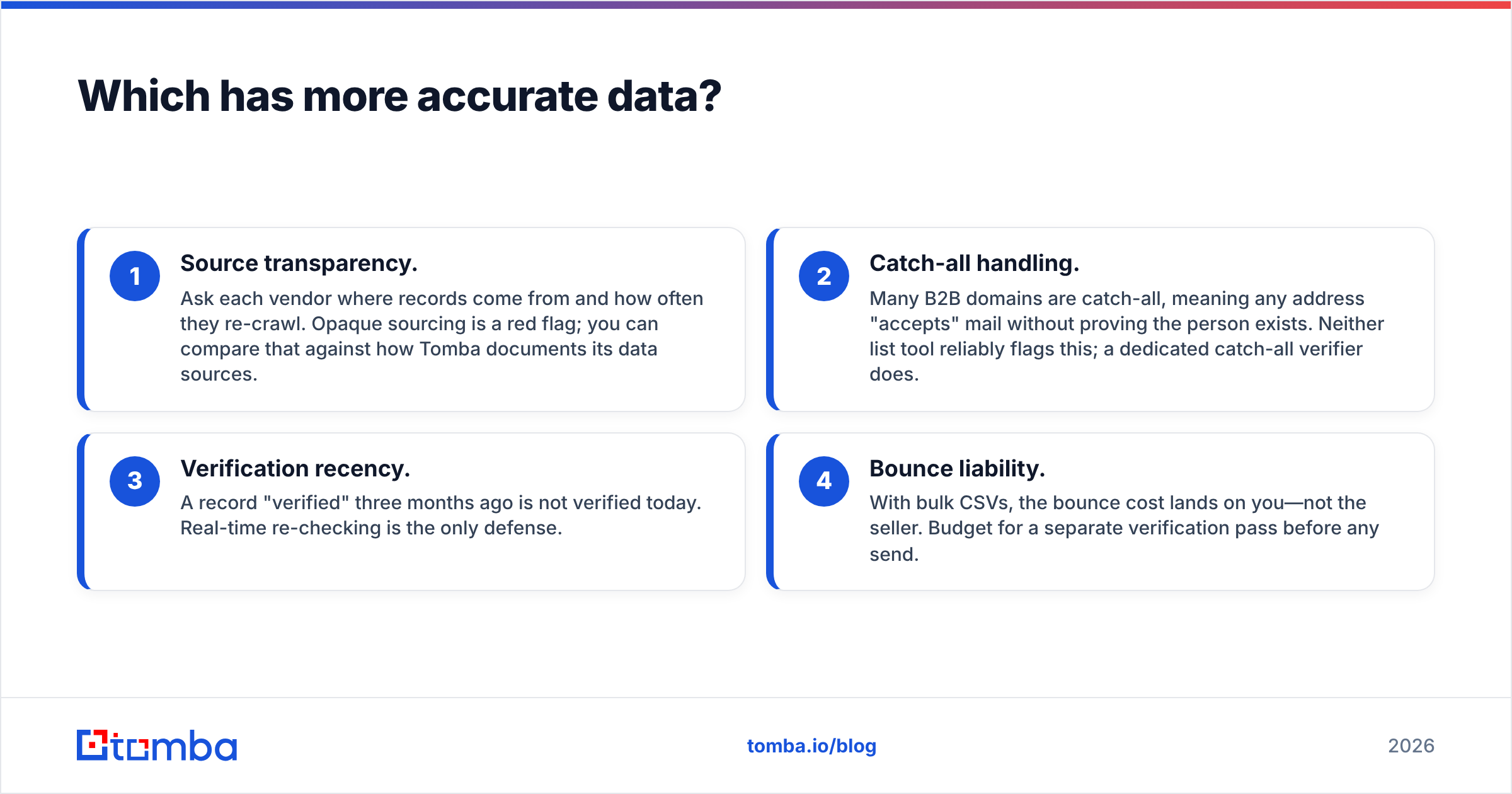
- Source transparency. Ask each vendor where records come from and how often they re-crawl. Opaque sourcing is a red flag; you can compare that against how Tomba documents its data sources.
- Catch-all handling. Many B2B domains are catch-all, meaning any address "accepts" mail without proving the person exists. Neither list tool reliably flags this; a dedicated catch-all verifier does.
- Verification recency. A record "verified" three months ago is not verified today. Real-time re-checking is the only defense.
- Bounce liability. With bulk CSVs, the bounce cost lands on you—not the seller. Budget for a separate verification pass before any send.
The honest takeaway: LimeLeads generally ships cleaner records than CSVGO at export, but both hand you a snapshot that ages the moment it leaves the platform. If deliverability is the goal, re-verify before you send—regardless of which vendor you pick. Running any purchased list through an email verifier is not optional; it's the difference between a warm inbox and a blacklist.
How much do CSVGO and LimeLeads cost?#
Pricing philosophies differ sharply, and the "cheaper" option isn't always cheaper once you factor in wasted, bounced records.
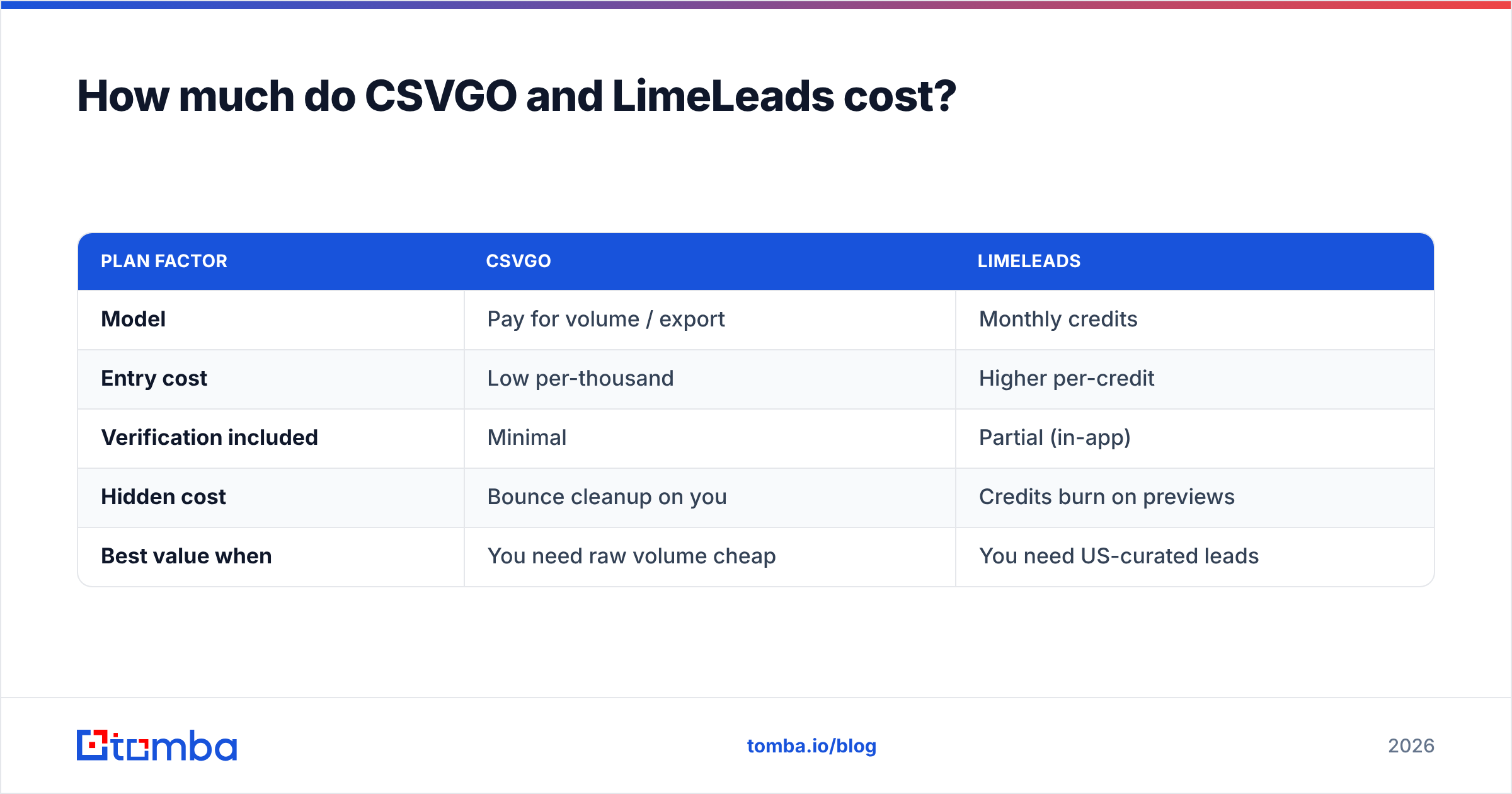
| Plan factor | CSVGO | LimeLeads |
|---|---|---|
| Model | Pay for volume / export | Monthly credits |
| Entry cost | Low per-thousand | Higher per-credit |
| Verification included | Minimal | Partial (in-app) |
| Hidden cost | Bounce cleanup on you | Credits burn on previews |
| Best value when | You need raw volume cheap | You need US-curated leads |
The trap with the "cheap" side is the effective cost. If a $0.02/record list is 25% wrong, your true cost per usable lead is closer to $0.027—plus the deliverability damage from bounces, which no refund covers. LimeLeads' higher sticker price can be cheaper per usable lead if its verification genuinely reduces waste.
Compare both against a live tool's economics. Tomba's pricing starts with a free tier (25 searches/mo), then Starter at $49/mo, Growth at $99/mo, and Pro at $249/mo. You pay for finds and verifications you actually use, and every result is checked when you request it—so you're not paying to store a list that rots. For teams doing volume, the bulk email finder processes lists while validating each row, which collapses the "buy then separately clean" two-step into one.
When should you buy a list vs. use a live finder?#
Buying a static list still makes sense in narrow cases. Being honest about them helps you avoid overpaying for the wrong model.
Buy a CSVGO or LimeLeads list when:
- You need a one-time, broad market map and accuracy tolerance is high (TAM sizing, event invites, awareness blasts you'll heavily re-verify).
- You have no domain or name inputs to start from and just need a rough universe of accounts.
- You're comfortable running your own verification pass afterward.
Use a live finder + verifier when:
- You're doing targeted cold outreach where every bounce hurts deliverability.
- You already know the companies you want and need current contacts by domain search.
- You want data that stays fresh, or you're wiring lookups into a workflow via the Tomba API, Chrome extension, or Google Sheets.
- You care about compliance and want defensible, transparent sourcing per record.
For most modern sales teams, the workflow is a hybrid: use a list tool (or your own research) to define the account universe, then find and verify the person's email in real time. That sequence gives you targeting breadth without inheriting a frozen, decaying spreadsheet.
What's the best CSVGO and LimeLeads alternative?#
The most useful reframe isn't "CSVGO or LimeLeads"—it's "pre-built list or live lookup." If accuracy and deliverability drive your revenue, a real-time finder+verifier beats both static databases on the metric that matters. You can dig into third-party reviews of all three categories on G2 and Capterra before deciding, and check each vendor's own claims like LimeLeads directly.

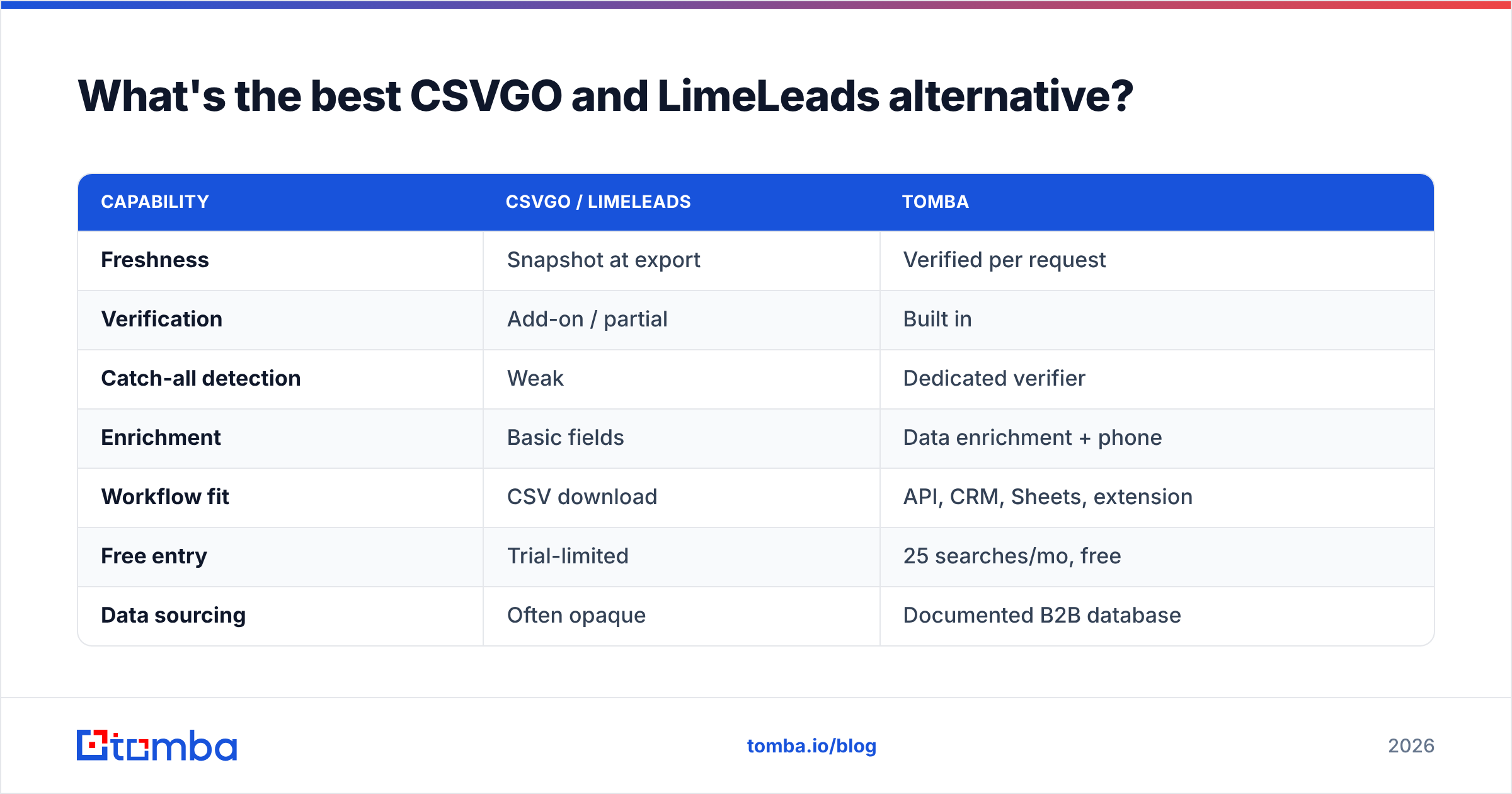
Here's how Tomba stacks against the static-list model:
| Capability | CSVGO / LimeLeads | Tomba |
|---|---|---|
| Freshness | Snapshot at export | Verified per request |
| Verification | Add-on / partial | Built in |
| Catch-all detection | Weak | Dedicated verifier |
| Enrichment | Basic fields | Data enrichment + phone |
| Workflow fit | CSV download | API, CRM, Sheets, extension |
| Free entry | Trial-limited | 25 searches/mo, free |
| Data sourcing | Often opaque | Documented B2B database |
Tomba isn't a magic list-in-a-box—it's the opposite philosophy. Instead of selling you a crate that ages on the shelf, it finds the address when you ask, confirms it's live, and can enrich it with role, company, and phone data. That's the model that protects your email deliverability because you never send to an address that was "verified" last quarter.
The verdict: CSVGO vs LimeLeads#
If you're forced to pick between just these two: choose LimeLeads when you need curated, US-focused records and you'll re-verify before sending; choose CSVGO when raw volume at the lowest sticker price is the priority and accuracy tolerance is high. LimeLeads earns its premium through a cleaner interface and stronger in-app validation; CSVGO earns its place on price alone.
But the sharper move is to stop buying frozen snapshots for outreach that depends on deliverability. B2B data decays too fast for a purchased CSV to stay reliable through a whole campaign. Define your target accounts however you like—then find and verify each contact at the moment you're ready to reach out.
That's exactly what the Tomba Email Finder is built for: enter a name and domain, get a current, verified professional email, and skip the bounce-cleanup tax that both list vendors quietly pass to you. Start free with 25 searches a month, confirm the accuracy on your own target accounts, and only scale up once the data proves itself. Fresh beats frozen—every send.
Related guides#
Ready to find emails that actually work?
Join 150,000+ professionals who stopped guessing and started sending. Free credits on signup — no credit card required.
Get the Tomba newsletter
Practical outbound tactics and product updates — once every two weeks.
About the author