CSVGO vs SalesBot: Lead Data and Sales Automation Compared
CSVGO enriches spreadsheets; SalesBot automates outreach. Here's an honest breakdown of what each does, where they overlap, and which one your workflow actually needs in 2026.

Choosing between CSVGO and SalesBot feels harder than it should, because the two tools barely play the same sport. One cleans and enriches lists. The other runs conversations and automates follow-up. Put them side by side and the real question stops being "which is better" and becomes "which layer of my pipeline is actually broken."
This comparison walks through what each tool does well, where they overlap, what they cost you in time and money, and how to decide without buying both by accident.
TL;DR#
- CSVGO is a data layer. It takes messy spreadsheets and enriches, cleans, and formats them. Its job ends when your list is clean.
- SalesBot is an activity layer. It automates outreach, replies, and routing. It assumes your list is already good.
- They are complements, not rivals. Most teams that "compare" them actually need both a data step and an automation step.
- Neither is a serious email-finder. If accuracy of contact data is the bottleneck, a dedicated finder-and-verifier stack beats either tool.
- Our pick for the data layer: pair whichever automation tool you like with a purpose-built email finder and email verifier so garbage never enters the funnel.
What is CSVGO?#
CSVGO is a spreadsheet-first lead data tool. You drop in a CSV of half-complete rows, and it fills the gaps: normalizes company names, appends firmographic fields, dedupes, and formats columns so your CRM import stops throwing errors. Think of it as the person on your team who quietly fixes everyone's broken exports before a campaign goes out.
The value is real but narrow. CSVGO shines when you already have a list from an event, a scrape, or a partner, and you need it usable fast. It does not go find brand-new contacts from scratch, and it is not built to verify whether an email will actually land. It makes existing data tidy.
Where CSVGO tends to disappoint is coverage and confidence. Enrichment-by-matching only fills fields it can confidently join, so sparse inputs stay sparse. And because it treats email as just another column to append, you can end up with a beautifully formatted list of addresses that still bounce.
What is SalesBot?#
SalesBot sits at the opposite end of the funnel. It is an automation and conversation engine: chat widgets that qualify inbound visitors, sequenced outreach, auto-replies, meeting booking, and routing rules that push the right lead to the right rep. Its promise is fewer manual touches and faster response times.
Automation tools like this are increasingly standard. HubSpot, for example, documents its own chatbot and workflow automation as core CRM features, and the broader category is well-covered on review sites like G2. SalesBot competes in that space: it wants to own the doing, not the knowing.
The catch is the same one every automation tool faces. It amplifies whatever you feed it. Point SalesBot at a clean, verified list and it saves hours. Point it at a raw CSV full of stale or invented addresses and it will cheerfully burn your sending reputation at scale.

CSVGO vs SalesBot: how do they actually compare?#
Here is the honest side-by-side. Note that CSVGO and SalesBot pricing shifts often and is best confirmed on each vendor's site; the capability columns are what matter for a buying decision.
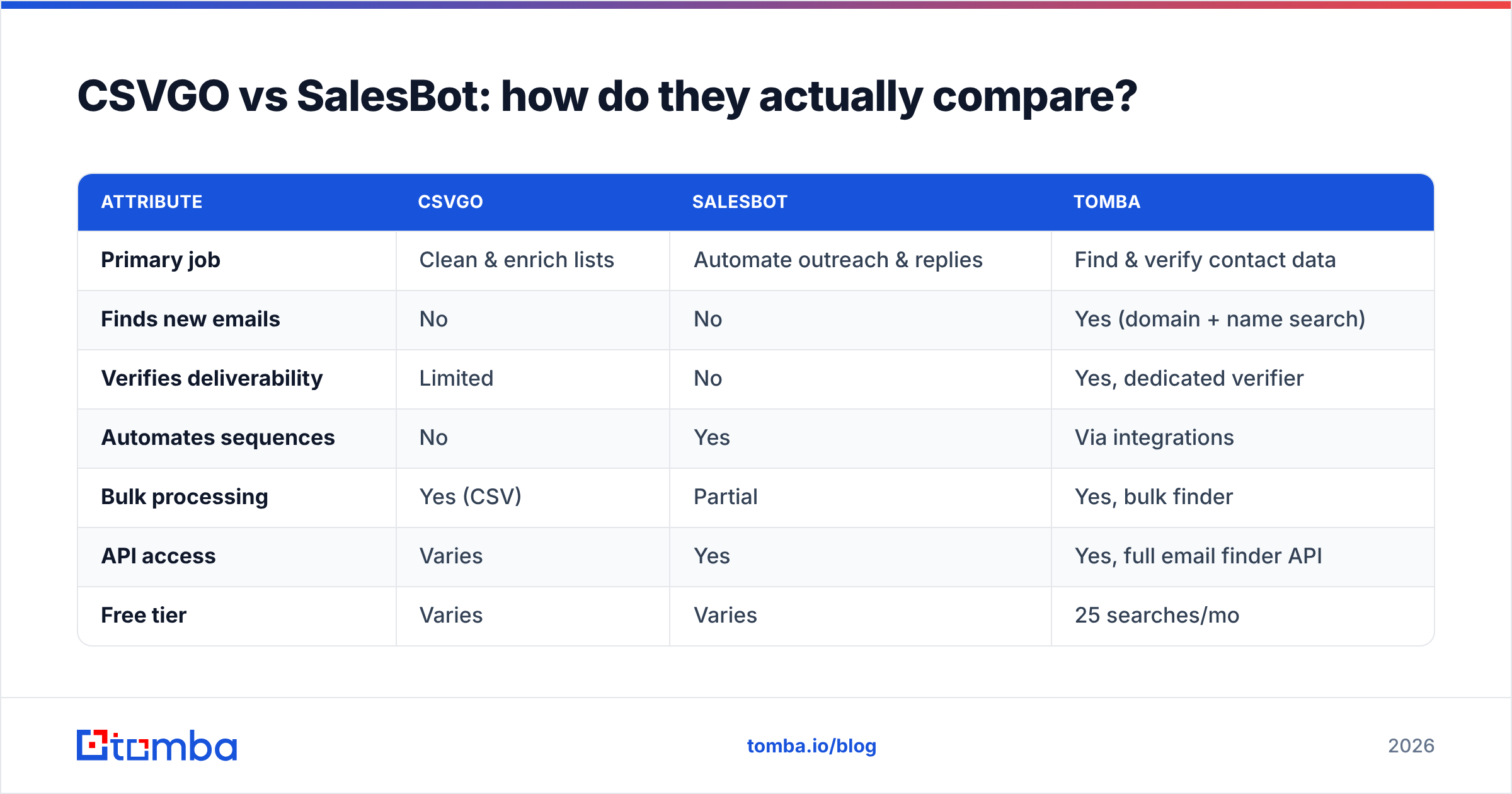
| Attribute | CSVGO | SalesBot | Tomba |
|---|---|---|---|
| Primary job | Clean & enrich lists | Automate outreach & replies | Find & verify contact data |
| Finds new emails | No | No | Yes (domain + name search) |
| Verifies deliverability | Limited | No | Yes, dedicated verifier |
| Automates sequences | No | Yes | Via integrations |
| Bulk processing | Yes (CSV) | Partial | Yes, bulk finder |
| API access | Varies | Yes | Yes, full email finder API |
| Free tier | Varies | Varies | 25 searches/mo |
| Best for | Fixing existing data | Working existing pipeline | Sourcing accurate leads |
The table makes the overlap obvious: it barely exists. CSVGO improves data you already own. SalesBot works the pipeline you already built. Neither reliably answers the earliest question in outbound — is this the right, reachable email?
Is CSVGO better than SalesBot?#
Neither is "better" in a vacuum, because they solve different problems. Use this quick decision framework instead of a scorecard:
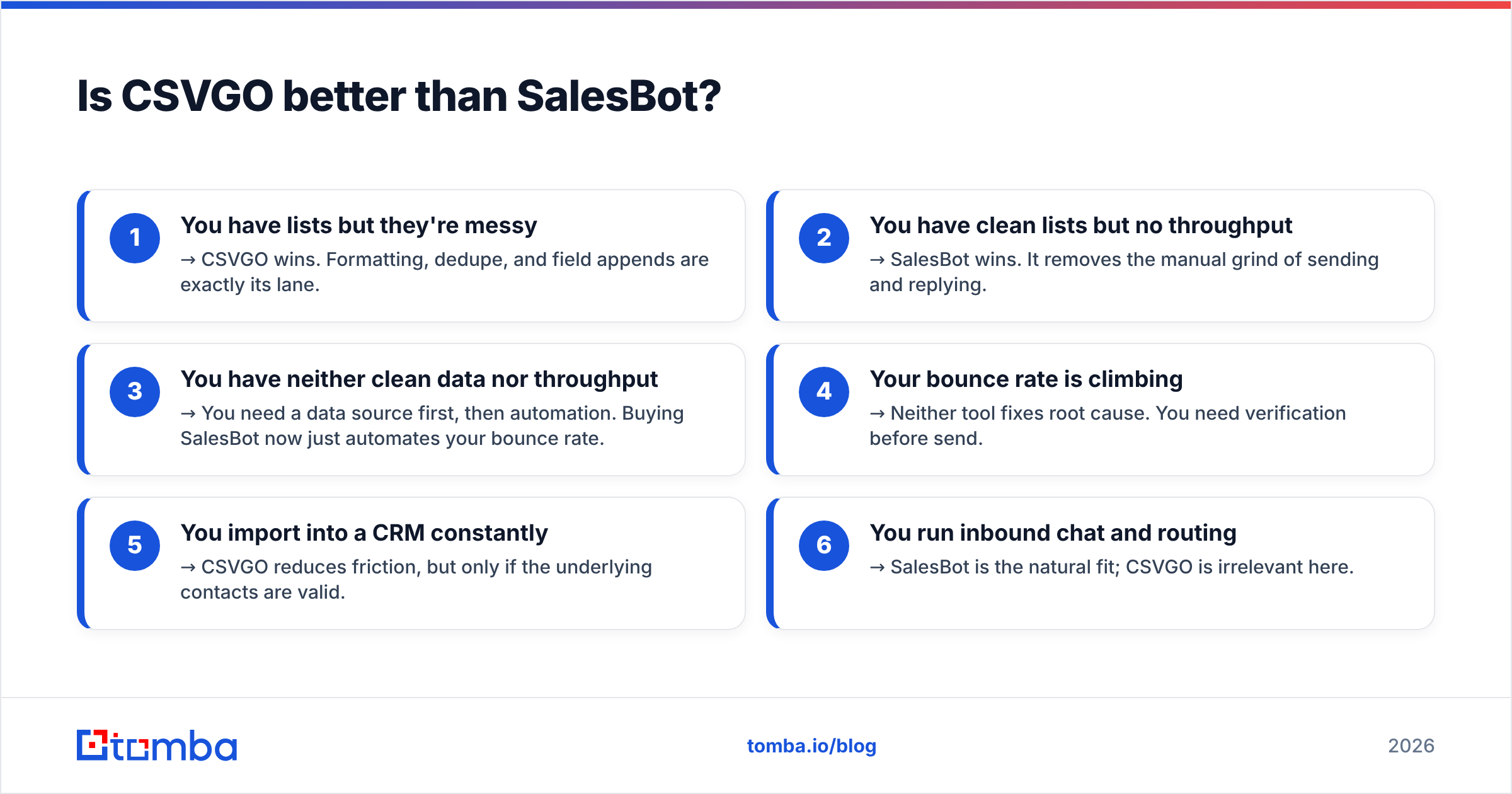
- You have lists but they're messy → CSVGO wins. Formatting, dedupe, and field appends are exactly its lane.
- You have clean lists but no throughput → SalesBot wins. It removes the manual grind of sending and replying.
- You have neither clean data nor throughput → You need a data source first, then automation. Buying SalesBot now just automates your bounce rate.
- Your bounce rate is climbing → Neither tool fixes root cause. You need verification before send.
- You import into a CRM constantly → CSVGO reduces friction, but only if the underlying contacts are valid.
- You run inbound chat and routing → SalesBot is the natural fit; CSVGO is irrelevant here.
Most teams that shortlist "CSVGO vs SalesBot" discover they were comparing a wrench to a drill. The frustration usually traces back to a third, upstream problem: the contact data itself.
Where do both tools leave a gap?#
Both assume good contact data already exists. That assumption is where campaigns quietly fail.
CSVGO enriches what you feed it but won't invent a missing decision-maker's email. SalesBot sends to whatever address is in the row, valid or not. So if your list came from a scrape, a trade show badge dump, or an old export, you are automating and formatting guesses.
This is the email deliverability trap. Send to enough dead or catch-all addresses and mailbox providers start throttling you — which tanks the inbox placement of your good messages too. A tidy CSV and a slick automation flow can't undo a damaged sender reputation.

The fix is a dedicated finding-and-verification step before enrichment or automation:
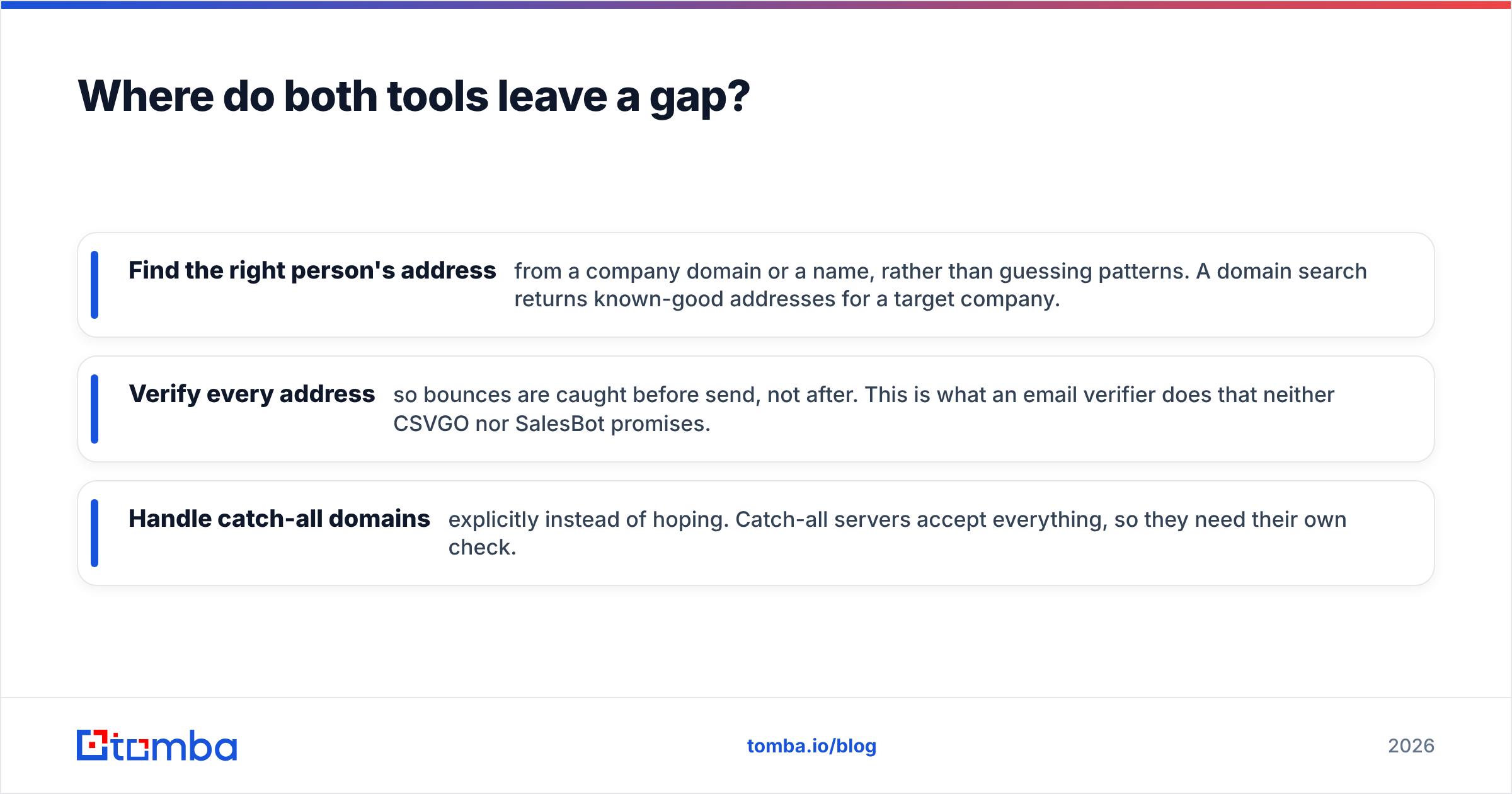
- Find the right person's address from a company domain or a name, rather than guessing patterns. A domain search returns known-good addresses for a target company.
- Verify every address so bounces are caught before send, not after. This is what an email verifier does that neither CSVGO nor SalesBot promises.
- Handle catch-all domains explicitly instead of hoping. Catch-all servers accept everything, so they need their own check.
How does Tomba fit alongside these tools?#
Tomba is not an automation platform and not a spreadsheet formatter — it's the accuracy layer both of those depend on. It sources and verifies the contact data, then hands off cleanly to whatever you use for enrichment or sending.
A realistic stack looks like this:
- Source and verify with Tomba. Use the email finder and verifier (plus the Chrome extension or bulk finder for volume) to build a list of real, reachable contacts.
- Enrich or format if needed. Push that clean list through CSVGO-style tooling for any extra firmographic fields.
- Automate with SalesBot. Now your outreach engine is firing at verified addresses, so open and reply rates reflect your message, not your bounce rate.
Because Tomba exposes a full email finder API and native integrations, that first step slots into most workflows without manual CSV shuffling. You verify at the source instead of cleaning up downstream.
What does Tomba cost?#
Tomba's pricing is straightforward and public, which makes it easy to slot into a budget:
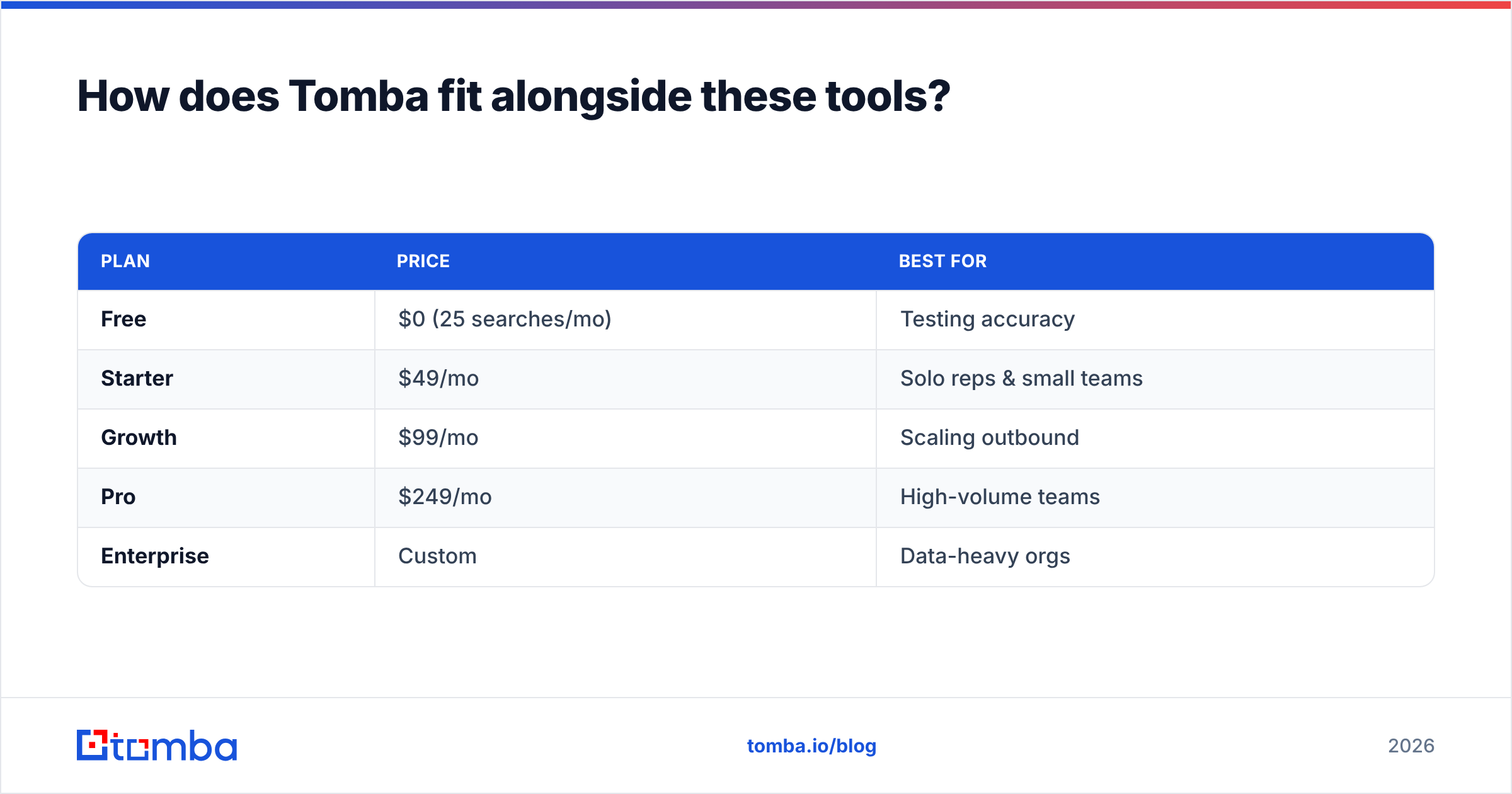
| Plan | Price | Best for |
|---|---|---|
| Free | $0 (25 searches/mo) | Testing accuracy |
| Starter | $49/mo | Solo reps & small teams |
| Growth | $99/mo | Scaling outbound |
| Pro | $249/mo | High-volume teams |
| Enterprise | Custom | Data-heavy orgs |
Full details and credit breakdowns are on the Tomba pricing page. The Free tier is enough to test whether accurate sourcing changes your bounce rate before you commit a cent.
Which should you choose in 2026?#
Here's the direct verdict. If you're comparing CSVGO vs SalesBot expecting one to replace the other, reset the question — they occupy different rungs of the same ladder.
- Pick CSVGO if your only pain is messy, unformatted lists you already own and you're confident the contacts are valid.
- Pick SalesBot if your data is already clean and your bottleneck is manual sending, replying, and routing.
- Pick a finder-and-verifier first if bounces, spam folders, or "we can't reach the right person" are the real problems. That's the layer both tools quietly assume you've already solved.
For most outbound teams, the sequence that actually moves numbers is: verify at the source, enrich if useful, then automate. Tools like CSVGO and SalesBot are worth using — but they earn their keep only on top of accurate data. You can compare more options on independent directories like Capterra before committing.
The bottom line#
CSVGO cleans lists. SalesBot works them. Neither one finds or verifies the contacts, and that's usually the reason a campaign underperforms in the first place. Fix the data layer and both tools get dramatically more effective overnight.
Start with the part that determines everything downstream: whether your emails are real and reachable. Try the Tomba Email Finder free — 25 searches a month, no card — and see how a verified list changes your reply rate before you spend on enrichment or automation. Get the data right first, and CSVGO or SalesBot finally have something worth working with.
Related guides#
Ready to find emails that actually work?
Join 150,000+ professionals who stopped guessing and started sending. Free credits on signup — no credit card required.
Get the Tomba newsletter
Practical outbound tactics and product updates — once every two weeks.
About the author