Cufinder vs D7 Lead Finder: Data, Pricing & Best Fit (2026)
Cufinder and D7 Lead Finder both promise leads, but they solve different problems. Here's an honest breakdown of data accuracy, pricing, and which one fits your outbound in 2026 — plus where a verified email finder beats both.
Picking between Cufinder vs D7 Lead Finder usually comes down to one question you have not asked yet: do you want company and contact intelligence you can enrich and verify, or do you want a bulk scrape of business listings you can call? These two tools sit on opposite ends of the lead-gen spectrum, and buying the wrong one wastes a quarter of outbound.
This is a neutral breakdown — no vendor spin. We will compare what each tool actually does, how the data holds up, what you pay, and where each one wins. We will also be honest about the gap both leave open: deliverable, verified email addresses for real decision-makers.
TL;DR — Cufinder vs D7 Lead Finder at a glance#
- Cufinder is a B2B data and enrichment platform: company search, contact enrichment, technographics, and API access. Best for RevOps and account-based teams that already know their ICP.
- D7 Lead Finder is a local-business lead scraper: pull businesses by keyword and location (think "dentists in Austin") with phone, website, and social data. Best for agencies and local-service outreach.
- Data accuracy differs by use case. Cufinder is stronger on firmographics and B2B contacts; D7 is stronger on volume of small-business listings but weaker on verified emails.
- Neither is a purpose-built email finder. If deliverability is your bottleneck, a verified email finder like Tomba fills the gap both leave.
- Price posture: D7 is cheaper for raw volume; Cufinder costs more but returns richer, enrichable records.
What is Cufinder?#
Cufinder is a B2B lead-generation and data-enrichment platform. You start from a company name, domain, or a set of filters (industry, size, location, technology used) and it returns firmographic data, contact details, and enrichment fields you can push into your CRM. It leans toward the "know your account, then enrich it" workflow that account-based teams run.
Its strengths are breadth of company attributes and an API that lets you enrich records programmatically. If you are building a B2B database or scoring accounts, that structured, field-rich output matters more than raw list size.
The trade-off: Cufinder is a general data platform, not a deliverability tool. It surfaces email addresses, but it is not built to prove an inbox is live before you send. You still need a verification step.
What is D7 Lead Finder?#
D7 Lead Finder is a location-based business scraper. You type a keyword and a place — "plumbers in Denver," "law firms in Toronto" — and it compiles a list of matching businesses with phone numbers, websites, ratings, and social profiles. It is popular with agencies selling web design, SEO, and local services because it turns a niche + a city into a callable list in minutes.
Where D7 shines is coverage of the long tail of small and local businesses that B2B databases often ignore. Where it struggles is contact precision: you frequently get a generic info@ address and a main line, not the owner's direct email. For cold calling, that is fine. For cold email to a named decision-maker, it falls short.

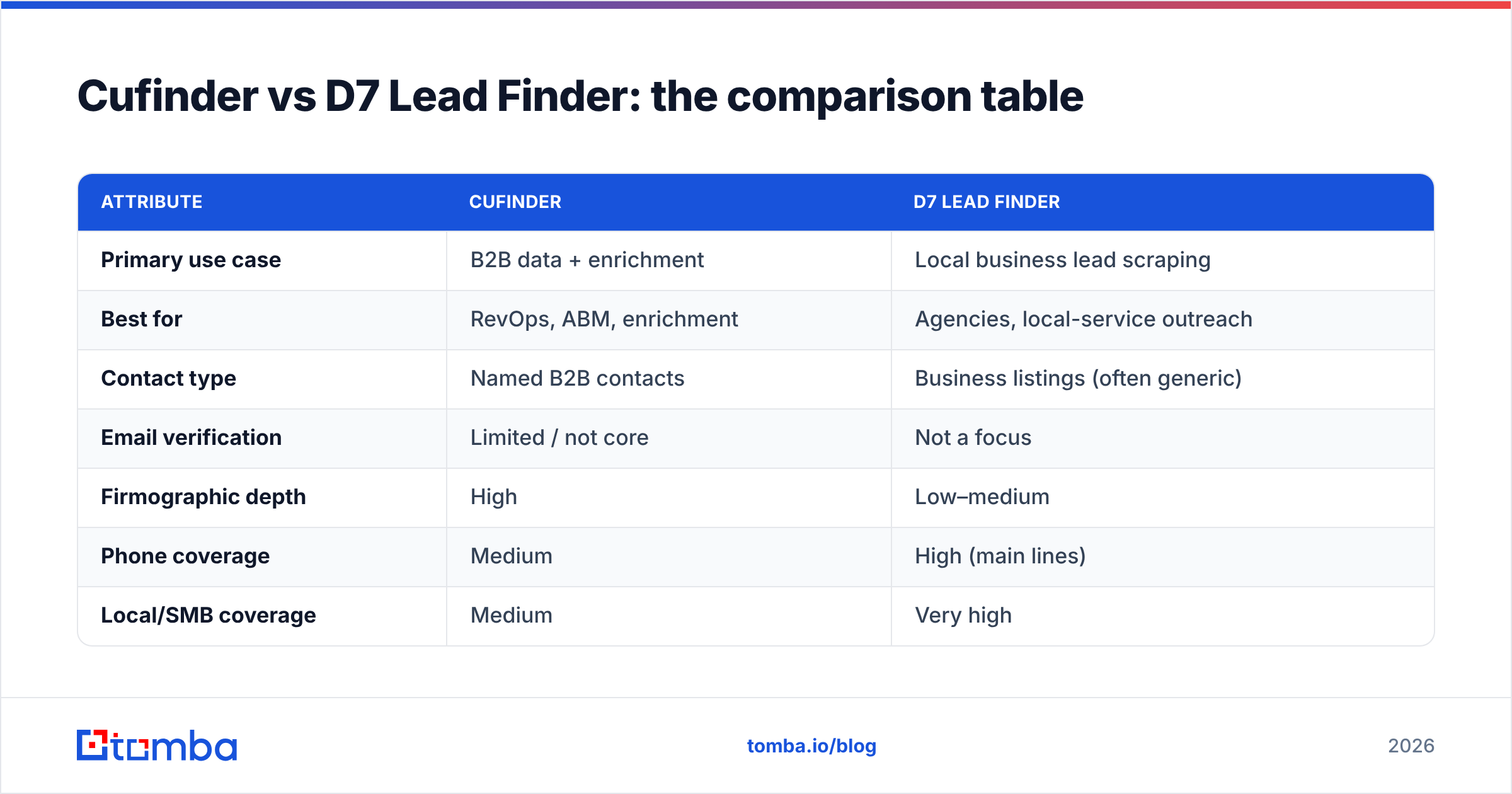
Cufinder vs D7 Lead Finder: the comparison table#
Here is the head-to-head across the attributes that actually change your outcome. Accuracy claims below reflect the general pattern each tool is built for, not a single guaranteed number.
| Attribute | Cufinder | D7 Lead Finder |
|---|---|---|
| Primary use case | B2B data + enrichment | Local business lead scraping |
| Best for | RevOps, ABM, enrichment | Agencies, local-service outreach |
| Contact type | Named B2B contacts | Business listings (often generic) |
| Email verification | Limited / not core | Not a focus |
| Firmographic depth | High | Low–medium |
| Phone coverage | Medium | High (main lines) |
| Local/SMB coverage | Medium | Very high |
| API access | Yes | Limited |
| Pricing posture | Higher, credit-based | Lower, volume-based |
| Ideal channel | Email + multi-touch | Cold calling |
The pattern is clear: Cufinder is precision-and-enrichment; D7 is volume-and-locality. Neither is "better" in the abstract — they answer different questions.
Which has better data accuracy?#
Cufinder wins on B2B contact and firmographic accuracy; D7 wins on breadth of local listings. But both share the same weak spot — email deliverability.
A scraped or aggregated email address is a hypothesis, not a fact. Inboxes churn: people change jobs, companies migrate domains, and catch-all servers accept everything then bounce silently. If you push either tool's raw output straight into a sequence, you inherit their bounce rate, and a high bounce rate quietly wrecks your sender reputation.
That is why serious outbound teams treat any list — Cufinder's, D7's, or a purchased CSV — as input to a verification step, not a finished product. Running addresses through an email verifier before the first send is the single cheapest way to protect deliverability. And when a domain is catch-all, a dedicated catch-all verifier is the difference between a guess and a green light.

Wait — that image token is a meme placeholder. Here it is properly:
Which is cheaper — Cufinder or D7 Lead Finder?#
D7 Lead Finder is cheaper for raw volume; Cufinder costs more but returns richer, enrichable records. D7's model rewards pulling large local lists on a modest monthly fee. Cufinder's credit-based pricing scales with enrichment depth, so a smaller number of high-value, fully-enriched accounts can cost more than a big pile of scraped listings.
The honest way to compare cost is cost per usable lead, not cost per raw row. A $29 list of 5,000 businesses where 60% bounce is more expensive than a smaller verified list, once you count the deliverability damage and rep time chasing dead contacts.
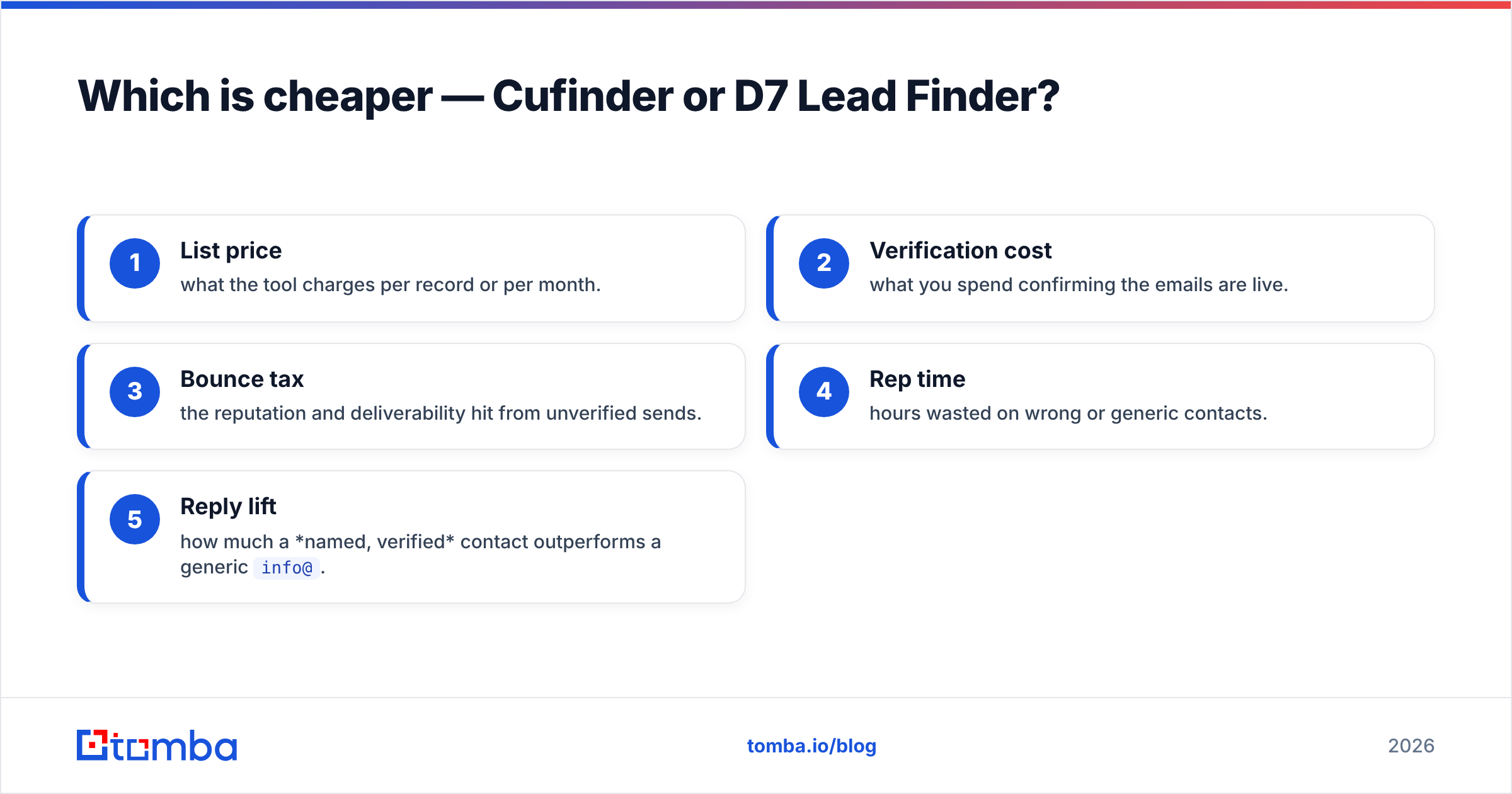
Here is a simple way to think about total cost:
- List price — what the tool charges per record or per month.
- Verification cost — what you spend confirming the emails are live.
- Bounce tax — the reputation and deliverability hit from unverified sends.
- Rep time — hours wasted on wrong or generic contacts.
- Reply lift — how much a named, verified contact outperforms a generic
info@.
Score both tools on all five and the "cheaper" option often flips.
When should you choose Cufinder?#
Choose Cufinder when:
- You run account-based motions. You already have a target account list and need to enrich it with firmographics, technographics, and named contacts.
- You need an API. Programmatic enrichment into your CRM or data warehouse is a core requirement — see how a data enrichment workflow plugs into your stack.
- Your ICP is mid-market to enterprise B2B, where structured company data matters more than raw listing volume.
- You measure by pipeline quality, not list size.
Cufinder is the stronger pick when the shape of the account matters and you will do downstream enrichment anyway.
When should you choose D7 Lead Finder?#
Choose D7 Lead Finder when:
- You sell to local businesses. Web design, SEO, insurance, home services — anything where "category + city" defines your market.
- Cold calling is your primary channel. Main lines and business listings are exactly what a dialer needs.
- You want volume fast and cheap, and you are comfortable doing your own qualification.
- Named decision-maker email is optional, because you will reach the business by phone or walk-in.
D7 is the pragmatic choice for agencies that live on local lists and phone outreach. Just do not expect it to feed a clean, deliverable email sequence without a lot of cleanup.
What both tools miss — verified email at scale#
Here is the gap neither tool was designed to close: finding and verifying the direct email of a specific decision-maker, at scale, with proof it is deliverable.
Cufinder gives you enriched accounts. D7 gives you business listings. But cold email lives or dies on hitting a real person's inbox, and that requires a purpose-built finder-plus-verifier pipeline. This is where a specialist tool earns its place next to either platform:
- Domain search returns every discoverable email on a company domain, with the pattern and role, so you are not guessing at formats.
- Email finder takes a name plus a domain and returns the specific person's address with a confidence score.
- Verification and catch-all checks confirm the inbox is live before you send, protecting your email deliverability.
- Bulk workflows let you process thousands of contacts at once instead of one at a time — see the bulk email finder.
You can run this alongside Cufinder or D7: use them to build the account or listing layer, then use a finder to get the person and a verifier to guarantee the inbox.
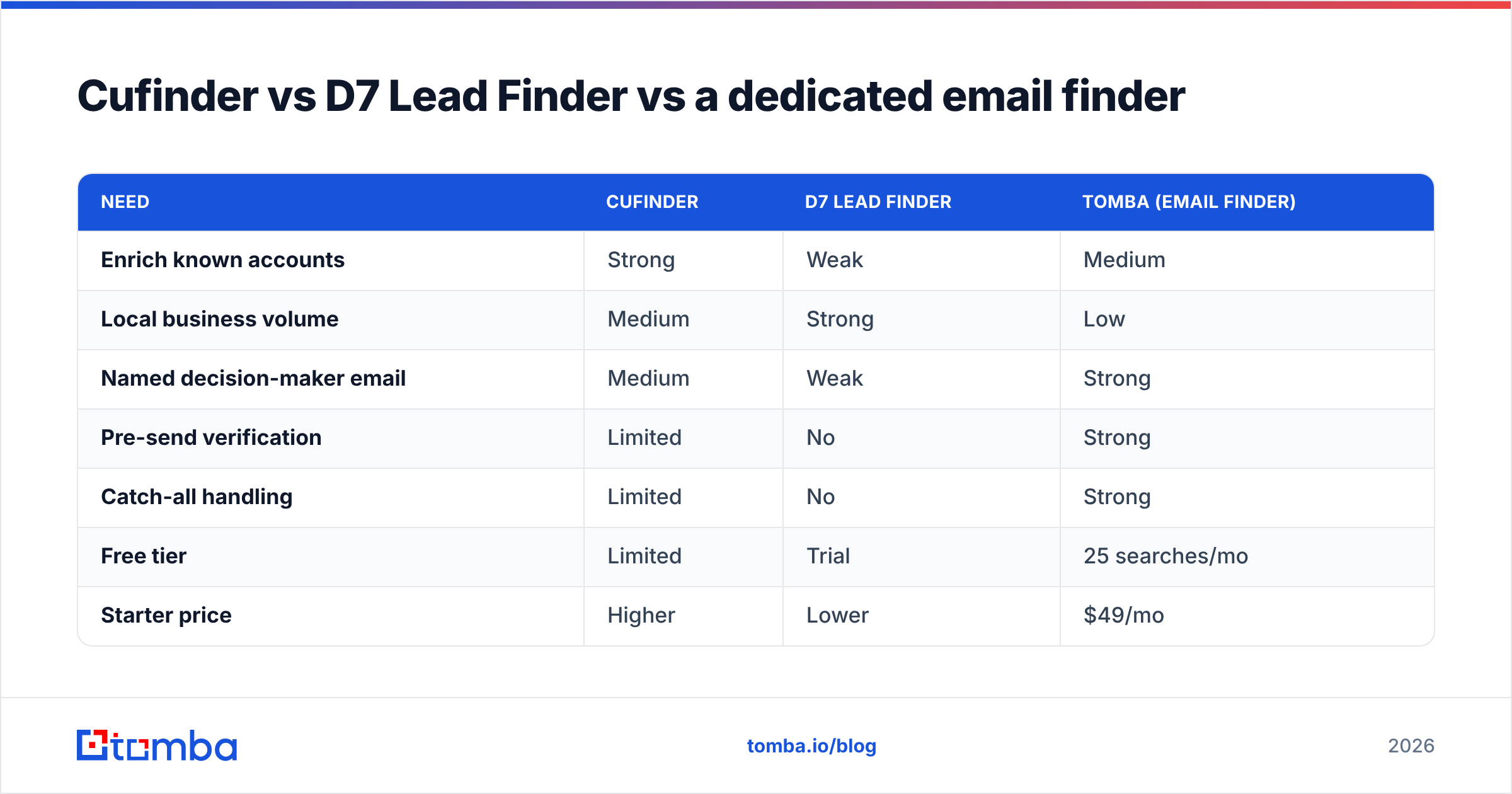
Cufinder vs D7 Lead Finder vs a dedicated email finder#
To make the three-way trade-off explicit:
| Need | Cufinder | D7 Lead Finder | Tomba (email finder) |
|---|---|---|---|
| Enrich known accounts | Strong | Weak | Medium |
| Local business volume | Medium | Strong | Low |
| Named decision-maker email | Medium | Weak | Strong |
| Pre-send verification | Limited | No | Strong |
| Catch-all handling | Limited | No | Strong |
| Free tier | Limited | Trial | 25 searches/mo |
| Starter price | Higher | Lower | $49/mo |
The takeaway is not "one tool to rule them all." It is that email deliverability is a separate job from account intelligence (Cufinder) or listing volume (D7), and it deserves a dedicated tool.
For a broader view of how data vendors stack up on accuracy, independent review sites like G2 and vendor docs at cufinder.io and d7leadfinder.com are worth cross-checking before you commit budget.
How to decide in five minutes#
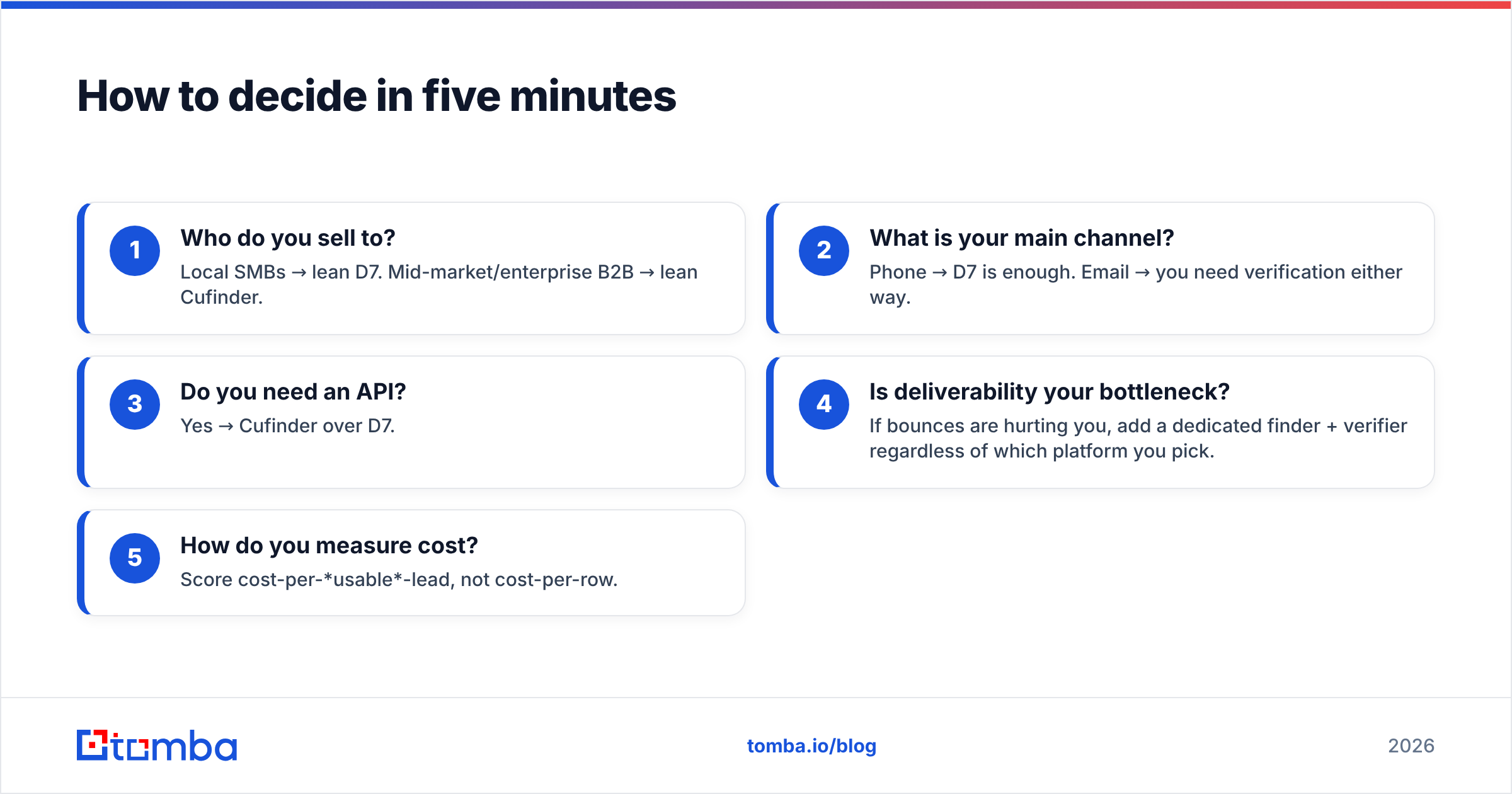
Answer these in order:
- Who do you sell to? Local SMBs → lean D7. Mid-market/enterprise B2B → lean Cufinder.
- What is your main channel? Phone → D7 is enough. Email → you need verification either way.
- Do you need an API? Yes → Cufinder over D7.
- Is deliverability your bottleneck? If bounces are hurting you, add a dedicated finder + verifier regardless of which platform you pick.
- How do you measure cost? Score cost-per-usable-lead, not cost-per-row.
If your honest answer to #4 is "yes" — and for most email-led teams it is — the platform choice matters less than adding verification on top.
The verdict#
Cufinder wins for enrichment-heavy B2B and ABM; D7 Lead Finder wins for cheap, high-volume local lists and cold calling. Neither is a deliverability tool, so both need a verification layer before you email anyone.
If your growth is email-led, the smartest stack is either platform for discovery plus a purpose-built finder for the inbox. Start with Tomba's Email Finder to turn account or listing data into verified, deliverable contacts — with a free tier of 25 searches a month and paid Tomba pricing from $49/mo when you scale. Feed it the accounts from Cufinder or the listings from D7, and let a verified email finder do the one job neither platform was built for: landing in the right person's inbox.
Related guides#
Ready to find emails that actually work?
Join 150,000+ professionals who stopped guessing and started sending. Free credits on signup — no credit card required.
Get the Tomba newsletter
Practical outbound tactics and product updates — once every two weeks.
About the author