Cufinder vs Datanyze: B2B Data Tools Compared for 2026
Cufinder and Datanyze both promise clean B2B contact data — but they solve different problems. Here's an honest breakdown of accuracy, pricing, and the better-value pick for 2026.
Choosing between Cufinder and Datanyze usually comes down to one question you can't answer from a pricing page: which one actually returns usable contact data for your market? Both sell themselves as B2B data engines. In practice they were built for different jobs, and picking the wrong one means paying for coverage you'll never touch.
This is a neutral, hands-on comparison — no vendor spin. We'll cover what each tool is, where the data comes from, how pricing really works, and who should pick which. We'll also show where a focused email finder beats both when your core need is simply reaching decision-makers.
TL;DR: Cufinder vs Datanyze at a glance#
- Cufinder is a lead-generation and enrichment suite — company + contact search, email and phone lookup, and API enrichment aimed at outbound teams building lists from scratch.
- Datanyze is a technographics-first tool. Its strength is telling you what software a company uses, with contact data bolted on as a secondary feature.
- Pricing: Datanyze pushes a free-then-paid model with credit limits; Cufinder sells tiered monthly plans. Neither is transparent about overage costs until you're inside.
- Accuracy varies by region. Both are strong on US mid-market and weaker on EMEA/APAC SMBs — verify before you send.
- If your real goal is finding and verifying work emails, a dedicated tool like Tomba is cheaper and more accurate per lead than either platform's contact module.
What is Cufinder?#
Cufinder is a B2B lead-generation platform built around list-building. You start with a company name, domain, or a set of filters, and it returns firmographic data plus contact details — work emails, phone numbers, LinkedIn profiles, and job titles. It leans on a large aggregated database and an enrichment API so teams can push data straight into a CRM.
The pitch is breadth: one tool to find accounts, find the people at those accounts, and enrich what you already have. That makes Cufinder attractive to SDR teams and agencies who live in spreadsheets and need volume. The tradeoff is that a jack-of-all-trades database rarely matches a specialist on any single data type — and email accuracy is the field that hurts most when it's wrong.
If you mostly need clean, verified work emails at scale, it's worth pairing any broad tool with a dedicated email verifier before your campaign goes out.
What is Datanyze?#
Datanyze is a sales-intelligence tool that made its name in technographics — data about the technology stack a company runs (their CRM, analytics, hosting, ad tech, and so on). If your product only makes sense for companies using Shopify, or HubSpot, or a specific cloud provider, Datanyze lets you filter prospects by exactly that signal. Now part of ZoomInfo's ecosystem, it also surfaces basic contact info through a Chrome extension and credit-based lookups.
The core value is targeting, not volume. Datanyze answers "which companies fit my ideal profile technically," then hands you a contact to reach. Its contact database is smaller and shallower than a dedicated prospecting tool's, and its credit model means casual users burn through their allowance fast.
How do Cufinder and Datanyze compare on features?#
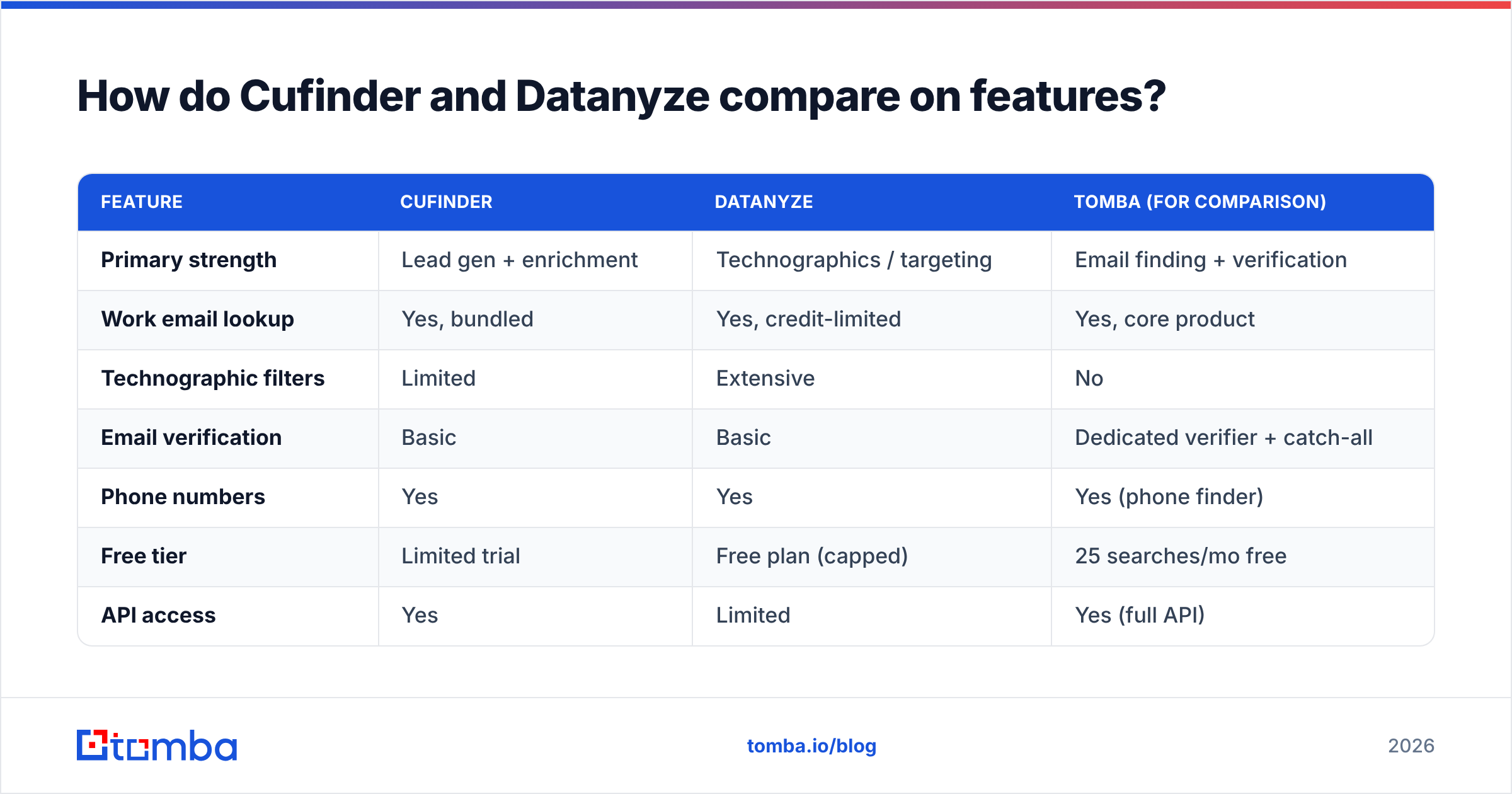
Here's the honest side-by-side. Read it by the job you're hiring the tool to do, not by feature count.
| Feature | Cufinder | Datanyze | Tomba (for comparison) |
|---|---|---|---|
| Primary strength | Lead gen + enrichment | Technographics / targeting | Email finding + verification |
| Work email lookup | Yes, bundled | Yes, credit-limited | Yes, core product |
| Technographic filters | Limited | Extensive | No |
| Email verification | Basic | Basic | Dedicated verifier + catch-all |
| Phone numbers | Yes | Yes | Yes (phone finder) |
| Free tier | Limited trial | Free plan (capped) | 25 searches/mo free |
| API access | Yes | Limited | Yes (full API) |
| Best for | Volume list building | ICP-by-tech-stack targeting | Reaching people by email |
The pattern is clear: Cufinder optimizes for how many leads, Datanyze for which accounts, and a specialist email tool for how reliably you reach them. Most teams actually need the third thing and try to force one of the first two to do it.
Where does the data come from — and how accurate is it?#
Accuracy is the whole game, so treat every vendor's "95%+" claim as marketing until you test it on your own list.
Both Cufinder and Datanyze aggregate from public web sources, business directories, user contributions, and third-party licensing. That aggregation model is why coverage is strong for US-based mid-market and enterprise companies and thinner for smaller EMEA and APAC firms. Datanyze's technographic data is genuinely differentiated because it's crawled from site code and tags; its contact data is more commodity. Cufinder's contact database is broader but noisier — you'll see more guessed patterns that need verification.

The practical takeaway: whichever platform you choose, run the exported emails through verification before sending. A single bounce-heavy campaign can tank your sender reputation for weeks, and neither tool's built-in checking is as thorough as a purpose-built verifier that handles catch-all verification and role-account detection. Tools that publish their data sources openly tend to be the safer bet.
Cufinder vs Datanyze: pricing compared#
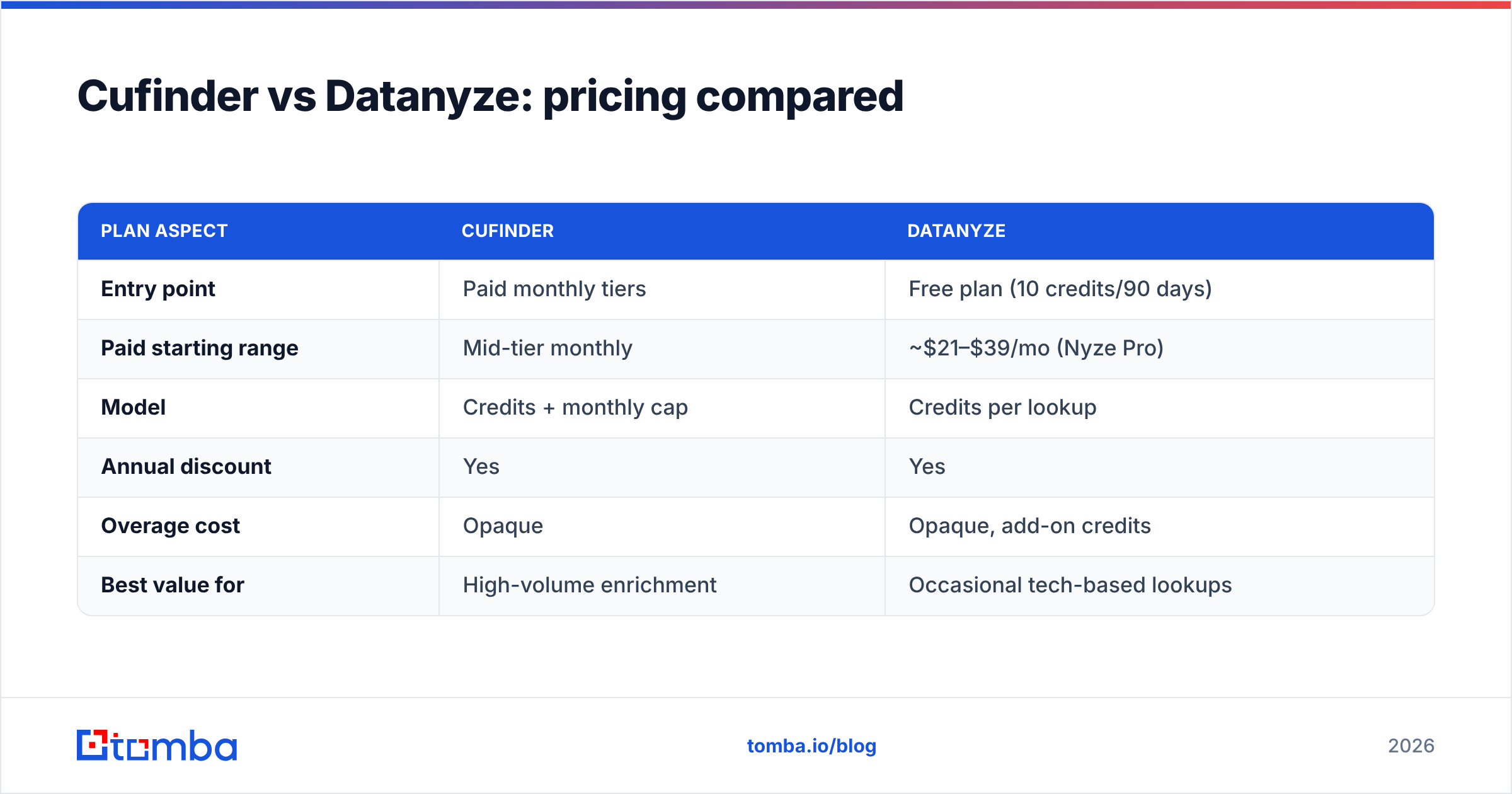
Neither vendor is fully transparent, so here's the shape of it based on published plans. Always confirm current numbers and overage rates directly before committing.
| Plan aspect | Cufinder | Datanyze |
|---|---|---|
| Entry point | Paid monthly tiers | Free plan (10 credits/90 days) |
| Paid starting range | Mid-tier monthly | ~$21–$39/mo (Nyze Pro) |
| Model | Credits + monthly cap | Credits per lookup |
| Annual discount | Yes | Yes |
| Overage cost | Opaque | Opaque, add-on credits |
| Best value for | High-volume enrichment | Occasional tech-based lookups |
Datanyze's free plan is genuinely useful for kicking the tires, but 10 credits over 90 days is a trickle — it's a sampler, not a workflow. Cufinder skips the free tier and asks for a paid commitment sooner, which suits teams already sure they need volume.

The hidden cost with both is waste: you pay per credit whether or not the email verifies. If half your lookups return unusable data, your real cost per usable lead doubles. That's the number that matters — not the sticker price.
Which should you choose — Cufinder or Datanyze?#
Pick based on the job, not the feature list.
- Choose Datanyze if your qualification depends on the tech stack. Selling a Shopify app, a Salesforce integration, or an observability tool? Filtering by installed technology is a real edge, and Datanyze does it better than most.
- Choose Cufinder if you need volume enrichment and list-building across many industries, and you have a verification step downstream to clean the output.
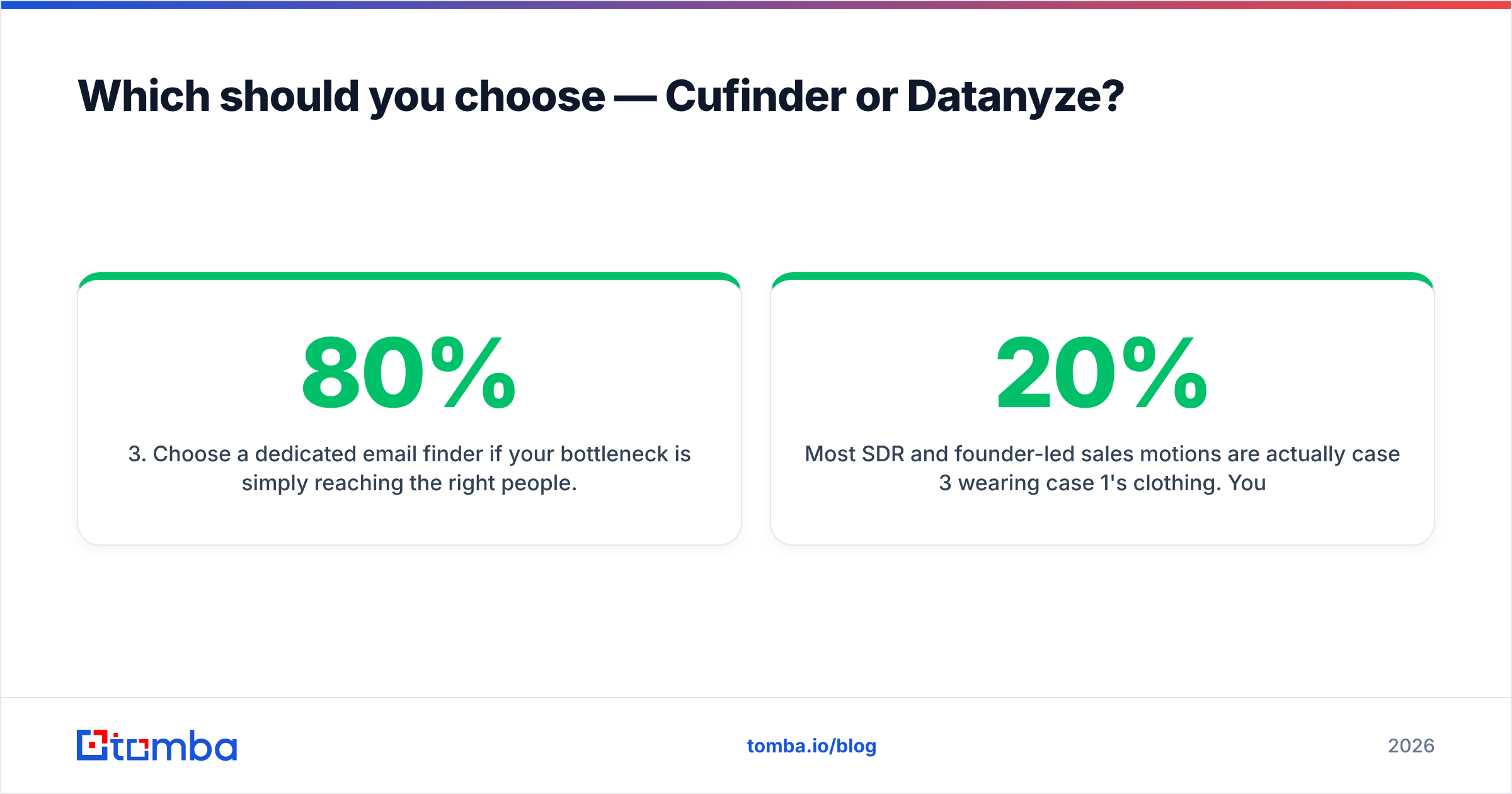
- Choose a dedicated email finder if your bottleneck is simply reaching the right people. When "get me the verified work email for this person at this company" is 80% of your usage, a specialist tool wins on cost and accuracy.
Most SDR and founder-led sales motions are actually case 3 wearing case 1's clothing. You think you need a full data suite, but you're using 20% of it to look up emails — and paying for the other 80%.
Where a dedicated email finder fits#
Here's the part vendors of all-in-one suites won't emphasize: contact-data quality and email verification are specialist disciplines. A tool built only for that will usually beat a bundled module on the one metric that decides whether your email lands.

That's the gap Tomba is built for. Instead of a sprawling data cloud, it focuses on finding and verifying professional emails accurately:
- Email Finder — get a work email from a name and domain, with a confidence score.
- Domain Search — pull every discoverable email at a company, with roles and patterns.
- Email Verifier — SMTP-level checks plus catch-all handling so you don't guess.
- Bulk tools and a full API for pipeline-scale work.
On pricing, Tomba is straightforward: a free tier with 25 searches/month, then Starter at $49/mo, Growth at $99/mo, and Pro at $249/mo. You can see full Tomba pricing without a sales call. Compared with credit models where you pay for misses, per-usable-lead economics usually come out ahead — because verification is baked in, not an afterthought.
This isn't an argument that Cufinder or Datanyze are bad. If you genuinely need technographic targeting, Datanyze earns its place; if you need broad multi-field enrichment, Cufinder is reasonable. But if you've been renting a data suite to do a job an email finder does better and cheaper, that's worth fixing.
How to test any of these before you commit#
Don't trust the demo — run your own five-minute trial:
- Pull a real list of 25–50 target companies you already know.
- Look up the same contacts in each tool.
- Verify the emails independently with a free email checker or a dedicated verifier.
- Score coverage and accuracy per tool: how many did it find, and how many actually verified?
- Divide cost by usable leads, not total lookups.
Whichever tool wins that test for your specific market is your answer — regardless of which has the longer feature list. For deeper reading on evaluating vendors, third-party review sites like G2 and Capterra are useful, and it's worth checking each vendor's own docs — Datanyze and Cufinder both publish current plan details.
The verdict#
Datanyze wins on technographic targeting. Cufinder wins on broad enrichment volume. But if your actual job is reaching decision-makers by email, neither is the most efficient tool — a dedicated email finder is.
For teams whose day-to-day is "find the person, get the verified email, start the conversation," start with the free tier of Tomba's Email Finder. Test it against your current tool on the same list, compare verified-lead cost, and let the numbers decide. That's the honest way to settle any cufinder vs datanyze debate — with your own data, not a vendor's homepage.
Related guides#
Ready to find emails that actually work?
Join 150,000+ professionals who stopped guessing and started sending. Free credits on signup — no credit card required.
Get the Tomba newsletter
Practical outbound tactics and product updates — once every two weeks.
About the author