Cufinder vs EmailListVerify: Full 2026 Comparison Guide
Cufinder finds and enriches B2B contacts; EmailListVerify cleans lists. Here's the honest 2026 breakdown of features, pricing, accuracy, and which one you actually need.
Choosing between Cufinder and EmailListVerify feels like a head-to-head, but it's closer to comparing a fishing rod to a water filter. One tool finds B2B contacts and enriches them. The other cleans the email lists you already have. Picking the wrong one wastes budget and leaves gaps in your outbound engine.
This guide breaks down what each platform actually does, where they overlap, how pricing compares in 2026, and which one belongs in your stack, so you stop guessing and start sending to inboxes that convert.
TL;DR: Cufinder vs EmailListVerify at a glance#
- Cufinder is a B2B data platform: it finds emails, phone numbers, and company data, then enriches your records. Best when you need new contacts.
- EmailListVerify is a dedicated email verification service: it scrubs bounces, spam traps, and invalid addresses from lists you already have. Best when you need clean data.
- They solve different problems, so "which is better" depends entirely on whether your bottleneck is finding leads or protecting deliverability.
- Cufinder pricing is credit-based and leans mid-market; EmailListVerify is pay-as-you-go and cheap for one-off cleaning.
- If you want finding and verification in one workflow, a combined platform like Tomba often beats running two separate subscriptions.
What is Cufinder and who is it for?#
Cufinder is a B2B prospecting and enrichment platform. You feed it a name, a domain, or a company, and it returns professional email addresses, direct-dial phone numbers, and firmographic data like company size, industry, and tech stack. It positions itself as a lead-generation engine with a large contact database and an API for pushing enriched records into your CRM.
The core use case is acquisition: you don't have the contact yet, and you need to build a list from scratch. Sales teams use it to fill a pipeline, recruiters use it to source candidates, and marketers use it to enrich inbound signups with company context.
Cufinder also bundles a bulk email verifier, but verification is a secondary feature layered on top of the finder, not the headline product. If you're evaluating its finder head-to-head against dedicated finders, the Cufinder homepage lists its current database claims and enrichment endpoints.

What is EmailListVerify and who is it for?#
EmailListVerify is a single-purpose tool: it verifies email addresses. Upload a list, and it runs syntax checks, MX record lookups, SMTP pings, spam-trap detection, and catch-all identification, then hands back a cleaned file sorted into valid, invalid, and risky buckets.
The core use case is protection. You already have a list, maybe from a trade show, an old CRM export, or a scraped source, and you need to remove the addresses that will bounce and torch your sender reputation. High bounce rates get you throttled or blacklisted, so verification is a deliverability insurance policy.
EmailListVerify does not find new contacts. It has no prospecting database and no enrichment. If your list is empty, this tool does nothing for you. Their pricing and feature list reflects that narrow, pay-as-you-go focus, which is exactly why it's cheap for one-time jobs.
Cufinder vs EmailListVerify: the core difference#
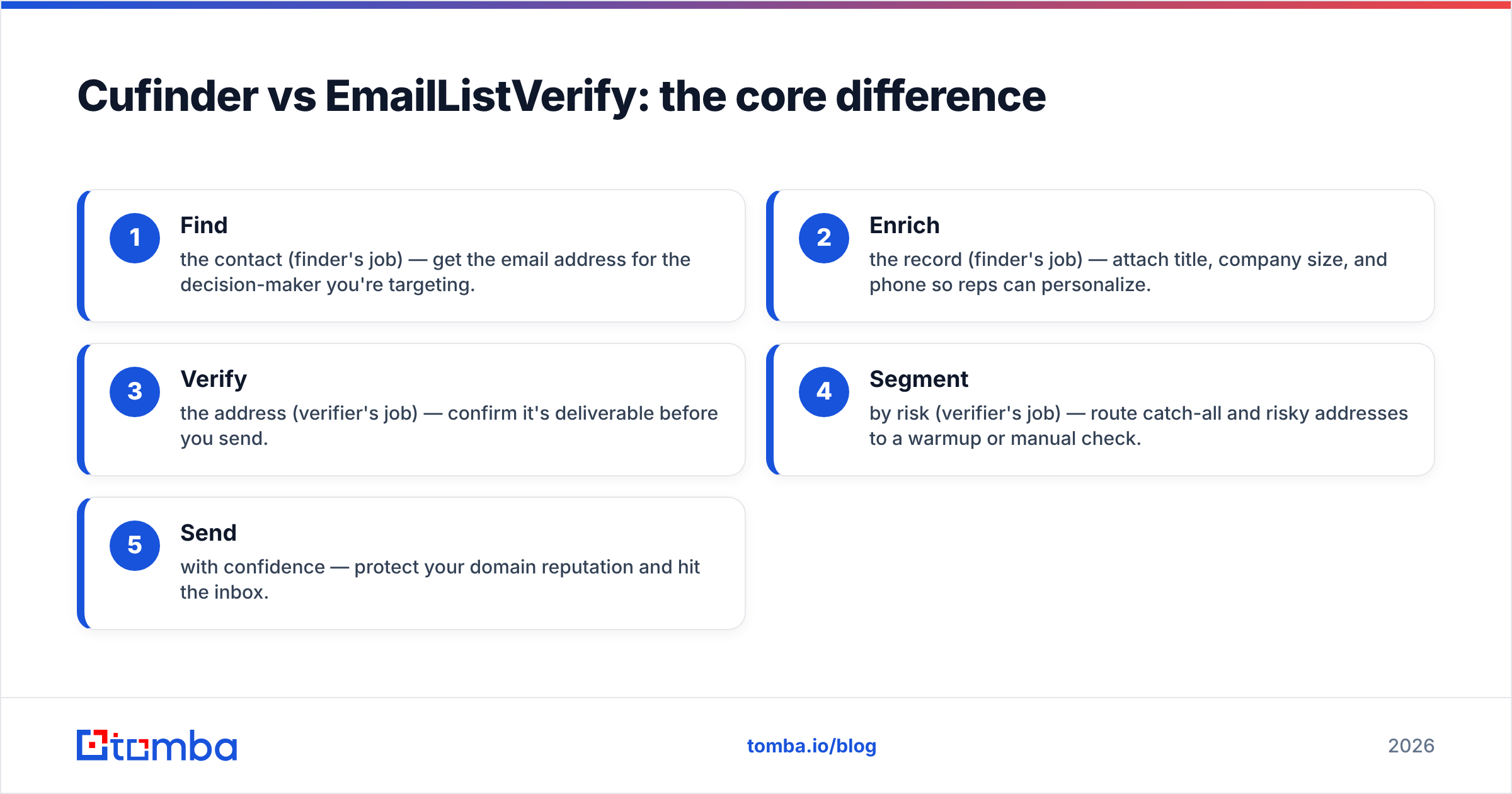
Here's the one sentence that resolves 90% of the confusion: Cufinder builds lists, EmailListVerify cleans them. They sit at different stages of the same funnel.
A healthy outbound workflow actually needs both jobs done:
- Find the contact (finder's job) — get the email address for the decision-maker you're targeting.
- Enrich the record (finder's job) — attach title, company size, and phone so reps can personalize.
- Verify the address (verifier's job) — confirm it's deliverable before you send.
- Segment by risk (verifier's job) — route catch-all and risky addresses to a warmup or manual check.
- Send with confidence — protect your domain reputation and hit the inbox.
Cufinder owns steps 1–2. EmailListVerify owns steps 3–4. Neither covers the full chain alone, which is why teams frequently end up paying for two tools, or looking for one platform that does both.

How do Cufinder and EmailListVerify compare on features?#
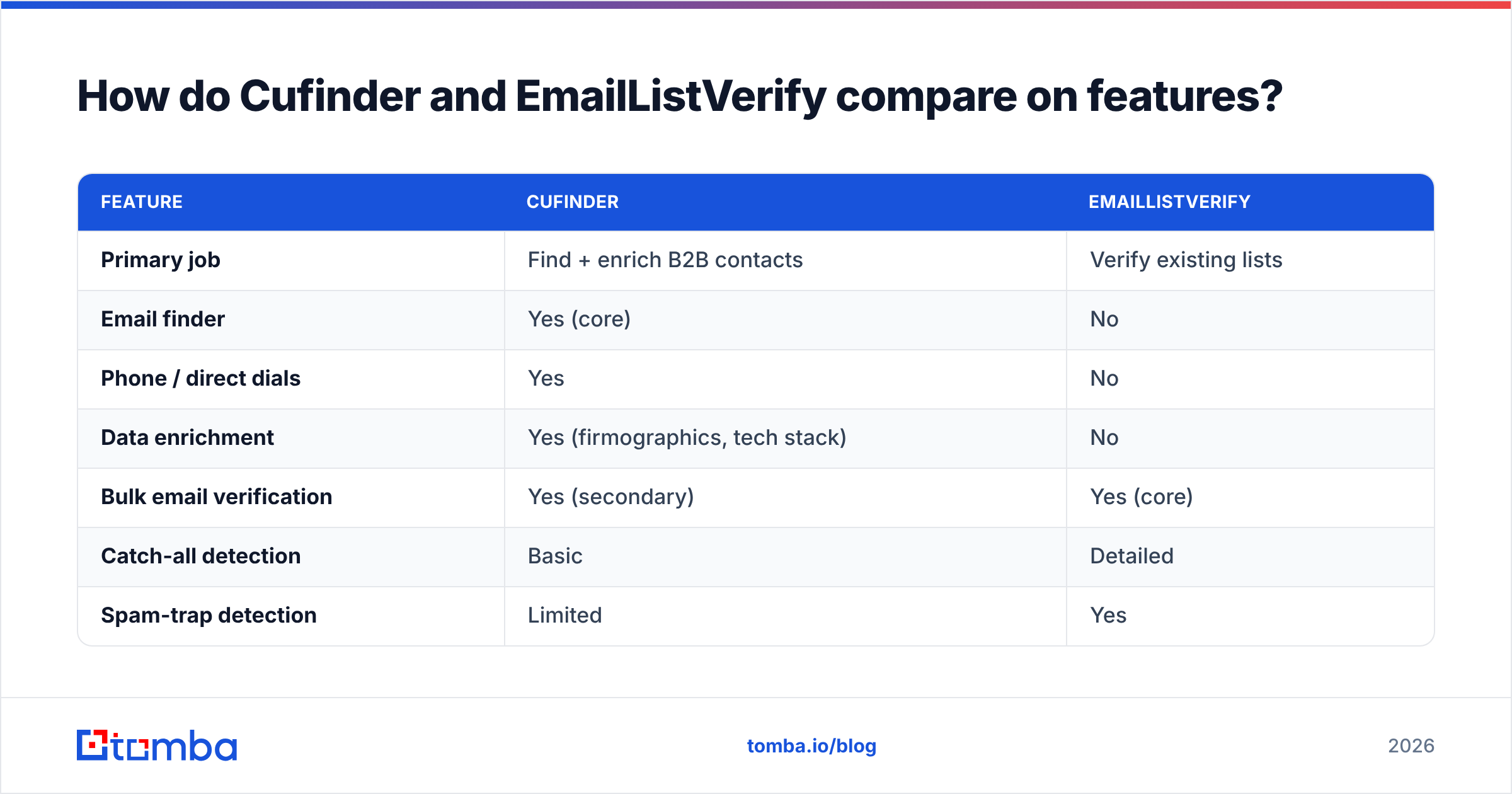
| Feature | Cufinder | EmailListVerify |
|---|---|---|
| Primary job | Find + enrich B2B contacts | Verify existing lists |
| Email finder | Yes (core) | No |
| Phone / direct dials | Yes | No |
| Data enrichment | Yes (firmographics, tech stack) | No |
| Bulk email verification | Yes (secondary) | Yes (core) |
| Catch-all detection | Basic | Detailed |
| Spam-trap detection | Limited | Yes |
| API access | Yes | Yes |
| Best for | Building pipeline from scratch | Cleaning lists before sending |
| Pricing model | Credit-based subscription | Pay-as-you-go + subscription |
The pattern is clear: Cufinder is broad but shallow on verification, while EmailListVerify is narrow but deep on it. If verification accuracy is your top priority and you already have lists, the dedicated verifier tends to win on trap detection and catch-all granularity. If you have no contacts yet, EmailListVerify simply isn't in the running.
How does pricing compare in 2026?#
Pricing is where the two diverge most, because their models reflect their purpose.
Cufinder uses credit-based subscription tiers. You buy a monthly allotment of credits, and each find or enrich action consumes credits. This suits teams with steady, ongoing prospecting volume, but credits can expire and unused ones rarely roll over, so you pay for capacity whether you use it or not.
EmailListVerify offers pay-as-you-go packages alongside subscriptions. You can buy a one-time bundle of verifications, use them whenever, and many bundles don't expire. That's ideal for occasional list cleaning but less economical if you're verifying large volumes every single week.
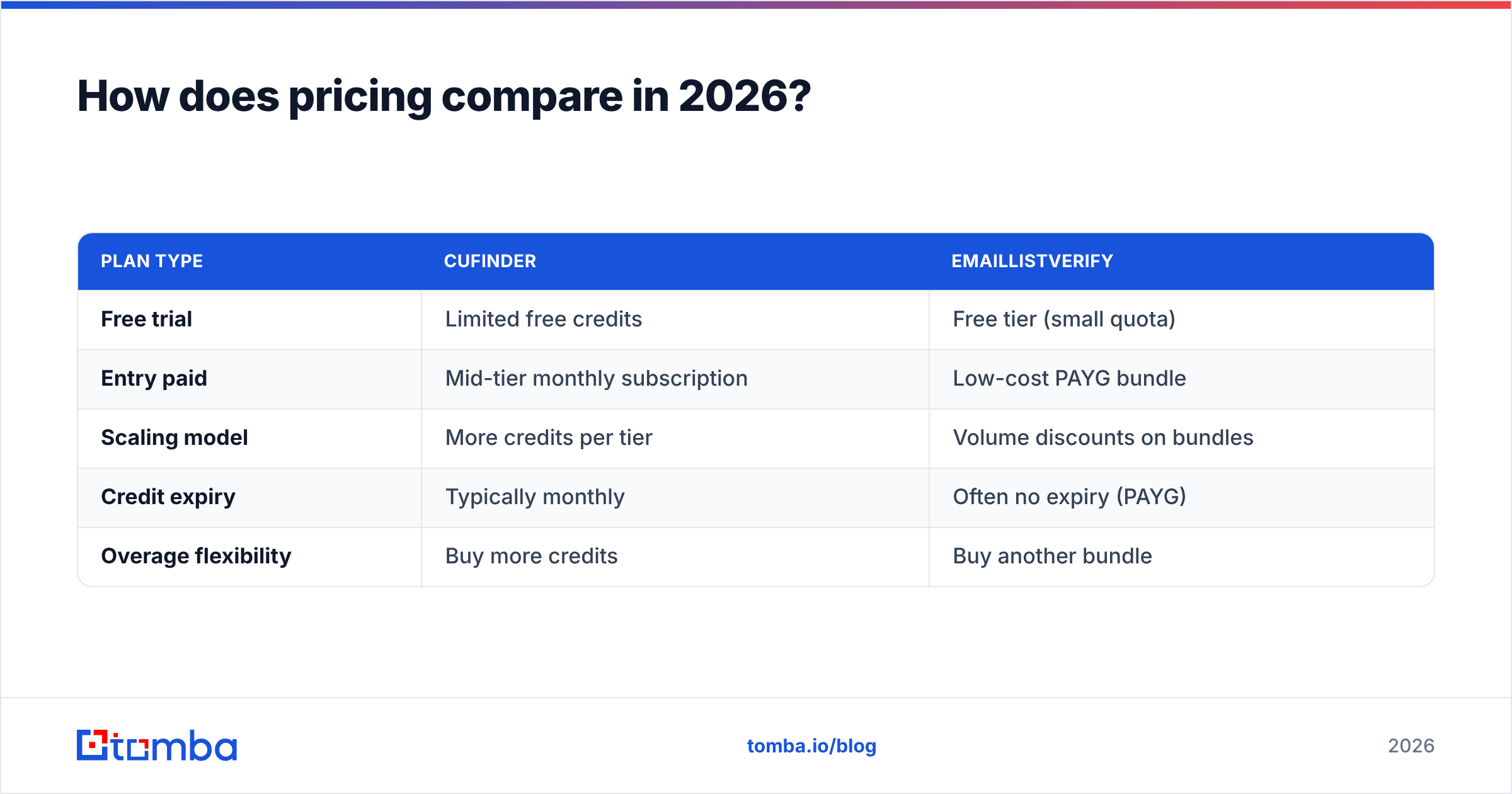
| Plan type | Cufinder | EmailListVerify |
|---|---|---|
| Free trial | Limited free credits | Free tier (small quota) |
| Entry paid | Mid-tier monthly subscription | Low-cost PAYG bundle |
| Scaling model | More credits per tier | Volume discounts on bundles |
| Credit expiry | Typically monthly | Often no expiry (PAYG) |
| Overage flexibility | Buy more credits | Buy another bundle |
For an apples-to-apples cost decision, price out your actual monthly volume for each job separately. A common trap: paying for a Cufinder tier large enough to cover finding, then paying EmailListVerify on top to verify, and discovering the combined bill rivals an all-in-one platform. Independent reviews on G2 are useful for sanity-checking current tier limits, since vendor pages change often.
Is Cufinder better than EmailListVerify?#
Neither is "better" in the abstract, they're better at different things. Use this quick decision guide:
- You need new contacts → Cufinder (or a stronger dedicated email finder).
- You have a list and fear bounces → EmailListVerify (or a dedicated email verifier).
- Your lists are full of catch-all domains → EmailListVerify's granular detection edges out Cufinder's basic check; a dedicated catch-all verifier is even more precise.
- You want finding and verifying in one login → neither is ideal; consider a combined platform.
The honest verdict: if you force a winner, Cufinder wins on breadth (it can do a rough version of both jobs) while EmailListVerify wins on verification depth. But breadth without accuracy and depth without a finder both leave you buying a second tool.
What about accuracy and deliverability?#
Accuracy splits along the same finder/verifier line. Cufinder's accuracy question is "how fresh and correct is the contact data it returns?" A finder that hands you stale emails creates bounces no verifier can fully rescue, because you're verifying bad data. EmailListVerify's accuracy question is "how reliably does it catch invalid, risky, and trap addresses?" Its SMTP and trap detection are its whole reason to exist, so it's typically strong here.
The deliverability reality: verification only helps if the source data is good. Garbage in, verified-garbage out. That's why the smartest workflow pairs a high-accuracy finder with rigorous verification, ideally so the finder already returns verified addresses and you skip the second tool entirely. For teams cleaning big files, running a bulk email finder that verifies inline removes an entire manual step.
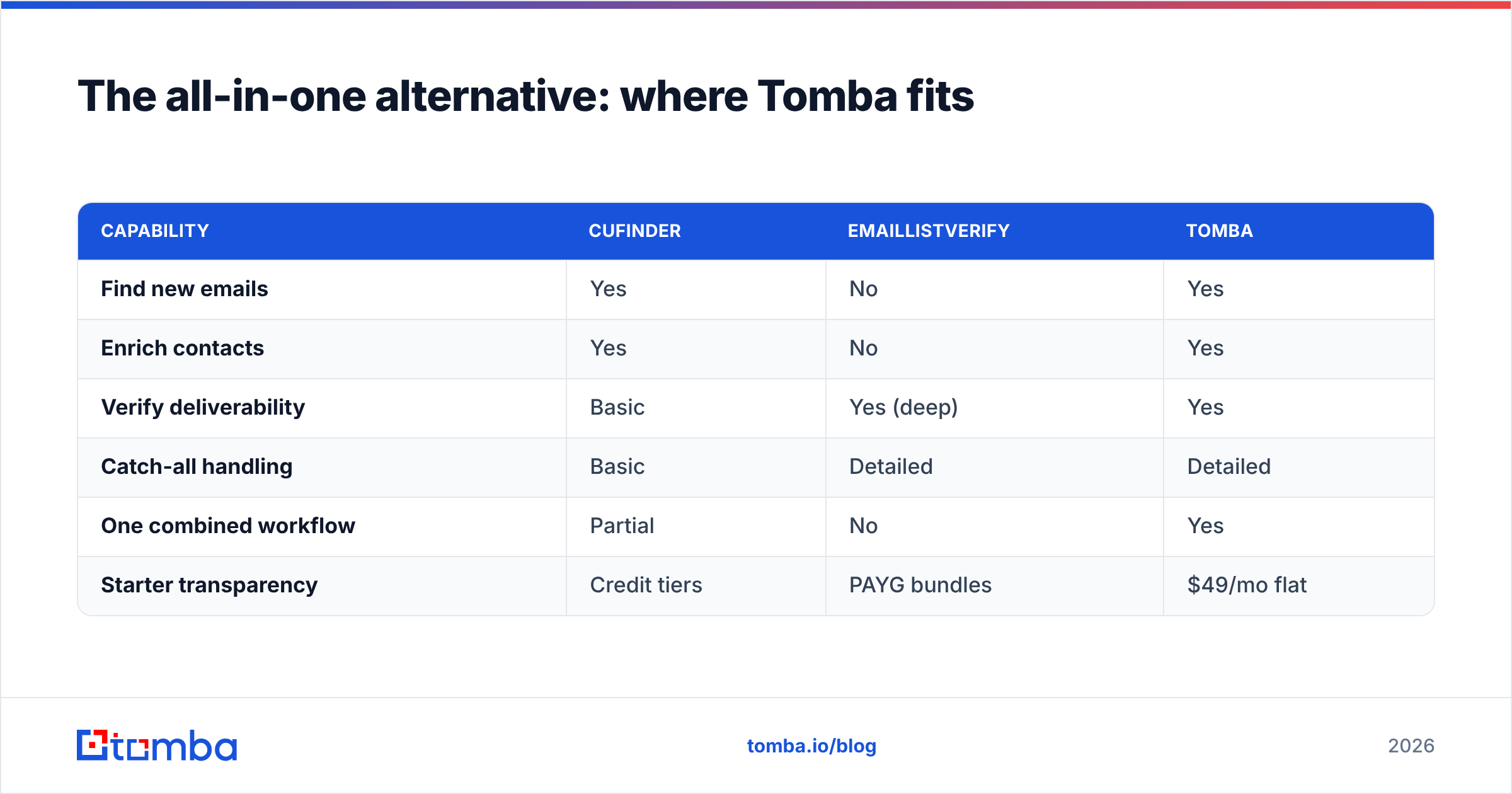
The all-in-one alternative: where Tomba fits#
If the recurring theme, "you'll probably need two tools", is annoying you, that's the real insight. Running a separate finder and verifier means two subscriptions, two APIs, two data formats to reconcile, and a manual handoff between them.
Tomba collapses that into one workflow. It finds professional emails by name, domain, or company, enriches with company and role data, and verifies deliverability in the same pass, plus catch-all handling, phone lookup, and a straightforward API. Instead of exporting from a finder and re-importing into a verifier, you get validated contacts out of a single step.
Tomba's pricing is transparent and predictable: a Free tier with 25 searches/month, Starter at $49/mo, Growth at $99/mo, and Pro at $249/mo, with Enterprise custom. You can compare tiers on the Tomba pricing page and map them against your combined find-plus-verify volume, which is usually where an all-in-one wins on total cost.
| Capability | Cufinder | EmailListVerify | Tomba |
|---|---|---|---|
| Find new emails | Yes | No | Yes |
| Enrich contacts | Yes | No | Yes |
| Verify deliverability | Basic | Yes (deep) | Yes |
| Catch-all handling | Basic | Detailed | Detailed |
| One combined workflow | Partial | No | Yes |
| Starter transparency | Credit tiers | PAYG bundles | $49/mo flat |
This isn't to say Cufinder or EmailListVerify are bad, they're respected tools that do their specific jobs well. The point is to match the tool to your actual bottleneck and avoid paying twice for a workflow one platform can handle.
How do I choose the right tool for my team?#
Answer three questions in order:
- What's my bottleneck, finding or verifying? If you can't name enough target contacts, you need a finder. If your bounce rate is high, you need a verifier. If both, you need a combined platform.
- What's my volume and cadence? Occasional one-off cleaning favors EmailListVerify's PAYG bundles. Steady weekly prospecting favors a subscription with predictable credits or searches.
- How many tools do I want to maintain? Every extra platform is another login, invoice, and integration to babysit. Consolidation has real operational value beyond the sticker price.
Map your answers to the tools: Cufinder for pure sourcing, EmailListVerify for pure cleaning, and an all-in-one when you're doing both regularly and want a single source of truth.
Frequently asked questions#
Can Cufinder verify emails? Yes, it includes a bulk verifier, but verification is a secondary feature. For deep catch-all and spam-trap detection, a dedicated verifier is more thorough.
Can EmailListVerify find new emails? No. It only verifies addresses you already have. It has no prospecting database.
Do I need both? If your bottleneck is both finding and cleaning, you need both jobs done, which is why teams often run two tools or switch to a combined platform that does both in one pass.
Which is cheaper? For one-off list cleaning, EmailListVerify's pay-as-you-go bundles are cheapest. For ongoing find-and-verify, an all-in-one usually beats stacking two subscriptions.
The bottom line#
Cufinder and EmailListVerify aren't really rivals, they're two stages of the same outbound funnel. Cufinder builds your list; EmailListVerify keeps it clean. Choose based on your bottleneck, not on which brand shows up first in a search.
But if you're tired of exporting from one tool and importing into another, the honest recommendation is to stop juggling. Tomba's email finder finds, enriches, and verifies B2B contacts in one workflow, so you get inbox-ready addresses without a second subscription or a manual handoff. Start free with 25 searches a month, and see whether one tool can replace the two you're comparing.
Related guides#
Ready to find emails that actually work?
Join 150,000+ professionals who stopped guessing and started sending. Free credits on signup — no credit card required.
Get the Tomba newsletter
Practical outbound tactics and product updates — once every two weeks.
About the author