Cufinder vs Emailverifyio: Which Email Tool Wins in 2026?
Cufinder finds and enriches B2B contacts; EmailVerify.io cleans your lists. See where each one wins, what they cost, and the accuracy trade-offs before you commit.
Cufinder vs Emailverifyio: Which Email Tool Wins in 2026?
Picking between Cufinder and EmailVerify.io feels like a head-to-head, but it's closer to comparing a fishing rod to a filter. One is built to find new B2B contacts and enrich them; the other is built to clean the list you already have. Buy the wrong one and you'll either drown in unverified data or verify a list you never managed to build.
This comparison breaks down what each tool actually does, where the accuracy and pricing lines fall, and which use cases favor which platform in 2026 — plus where a combined finder-and-verifier stack beats owning two point tools.
TL;DR#
- Cufinder is a lead-generation and data-enrichment engine: company search, contact discovery, and email/phone enrichment from a large B2B database.
- EmailVerify.io is a dedicated email-verification service: it validates existing addresses, catches spam traps, and lowers bounce rates before you send.
- They solve different jobs — Cufinder builds lists, EmailVerify.io cleans them. Many teams end up needing both.
- On accuracy, a finder is only as good as its verification layer, and a verifier is useless without a source of leads. Tools that do both in one pass reduce waste.
- If you want finding and verification without stitching two subscriptions together, a combined platform like Tomba covers both jobs at one price.
What is Cufinder?#
Cufinder is a B2B prospecting and enrichment platform. You start from a company name, domain, or a set of filters, and it returns matching companies and the contacts inside them — job titles, emails, and phone numbers pulled from its database and enrichment pipeline. Think of it as a way to generate a target list from scratch, then fatten each row with contact data.
Its core strengths sit on the discovery side: company lookup, bulk enrichment via API or CSV upload, and appending fields (industry, size, tech stack, social profiles) to records you already have. If your problem is "I have a market but no contacts," Cufinder is aimed squarely at you. You can read more about the company's positioning on its official site.
Where it's weaker is deep, standalone verification. Enrichment tools surface an email, but they don't always re-validate it against the live mail server at send time — which is the exact job the next tool exists to do.

What is EmailVerify.io?#
EmailVerify.io is a single-purpose verifier. You feed it a list of email addresses — from a form, a scrape, a purchased file, or a finder tool — and it tells you which ones are safe to send to. Under the hood it runs syntax checks, MX record lookups, SMTP handshakes, disposable-domain detection, spam-trap flagging, and role-account identification (info@, sales@).
The value is deliverability. Every invalid address you remove before a campaign protects your sender reputation and keeps your bounce rate under the thresholds mailbox providers watch. A verifier like this is the seatbelt for cold email: it doesn't drive the car, but you don't want to send without it.
What EmailVerify.io does not do is find anyone. It has no company database, no contact discovery, and no enrichment. Hand it an empty spreadsheet and it has nothing to work with. That's not a flaw — it's a scope choice — but it's the whole reason this "versus" is a little lopsided.
Cufinder vs Emailverifyio: what's the real difference?#
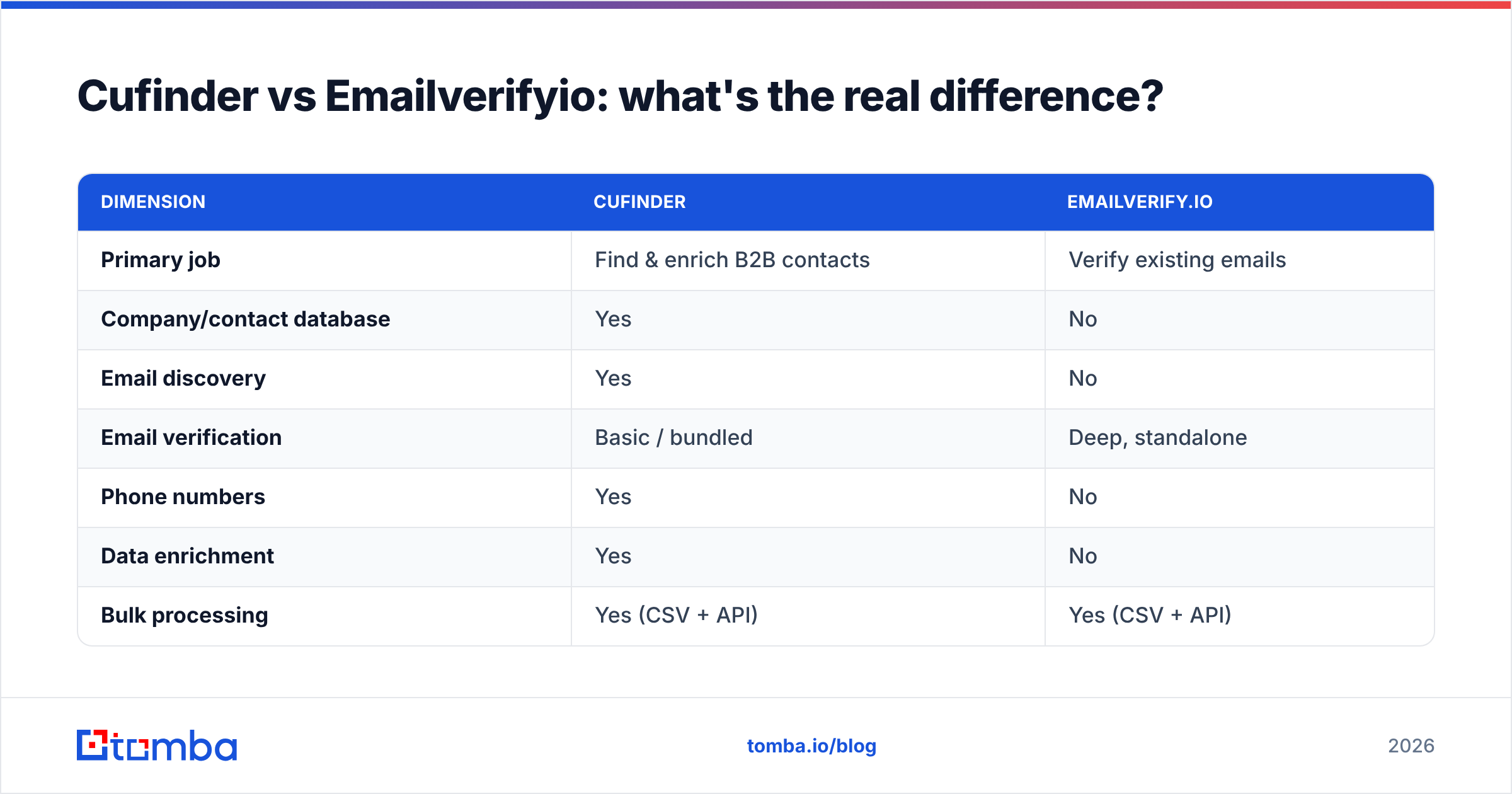
The honest framing: these are complementary tools people mistake for competitors because both touch email addresses. Here's the split.
| Dimension | Cufinder | EmailVerify.io |
|---|---|---|
| Primary job | Find & enrich B2B contacts | Verify existing emails |
| Company/contact database | Yes | No |
| Email discovery | Yes | No |
| Email verification | Basic / bundled | Deep, standalone |
| Phone numbers | Yes | No |
| Data enrichment | Yes | No |
| Bulk processing | Yes (CSV + API) | Yes (CSV + API) |
| Best for | List building, prospecting | List hygiene, deliverability |
| Weak spot | Standalone re-verification | Can't find any leads |
Read that table top to bottom and the pattern is clear: Cufinder is a source, EmailVerify.io is a filter. A serious outbound motion needs both — a way to build the list and a way to keep it clean.
When Cufinder is the right pick#
- You're starting from zero contacts and need to build a target list.
- You want firmographic enrichment (industry, headcount, tech stack) on top of emails.
- You need phone numbers alongside email for multichannel outreach.
When EmailVerify.io is the right pick#
- You already have a big list and just need to scrub it.
- Your bounce rate is climbing and hurting inbox placement.
- You import leads from many sources and want one verification chokepoint.
Which tool is more accurate?#
Accuracy means two different things here, so compare them on the right axis.
For Cufinder, accuracy is match rate and data freshness: when you ask for the CFO of a mid-market SaaS company, does it return a real, current person with a working email? Enrichment databases decay — people change jobs constantly — so the useful question is how often the returned email is deliverable, not just present.
For EmailVerify.io, accuracy is validation precision: of the addresses it marks "valid," how many actually accept mail, and how well does it handle the hard cases — catch-all domains, greylisting, and temporary SMTP failures that masquerade as invalid?
The trap is treating a finder's output as pre-verified. Even a strong enrichment tool benefits from a dedicated verification pass, which is why so many teams run a finder into a verifier. If you'd rather not manage that handoff, a platform that verifies at discovery time — and offers a separate email verifier and catch-all verifier for the edge cases — removes the seam entirely.

How do they price?#
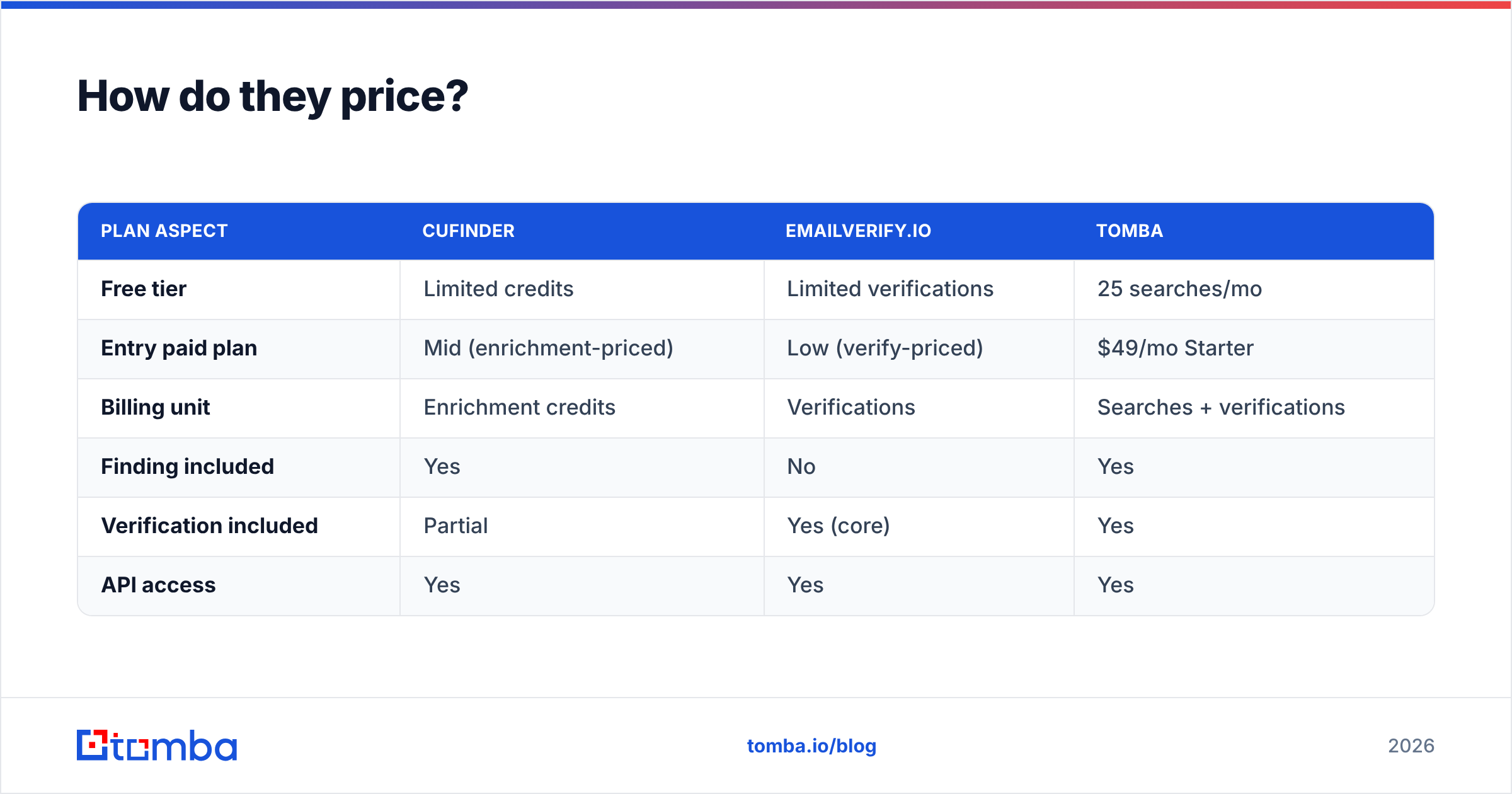
Both use credit- or volume-based pricing, and both offer a free tier to test with. The exact numbers shift, so treat the shape of the pricing more than any single figure — and always confirm on the vendor's live pricing page before buying.
| Plan aspect | Cufinder | EmailVerify.io | Tomba |
|---|---|---|---|
| Free tier | Limited credits | Limited verifications | 25 searches/mo |
| Entry paid plan | Mid (enrichment-priced) | Low (verify-priced) | $49/mo Starter |
| Billing unit | Enrichment credits | Verifications | Searches + verifications |
| Finding included | Yes | No | Yes |
| Verification included | Partial | Yes (core) | Yes |
| API access | Yes | Yes | Yes |
The economic catch: if you buy EmailVerify.io and a separate finder, you're paying two vendors and reconciling two credit systems. If you buy Cufinder alone, you may still want a verification pass before high-stakes sends. Bundled platforms exist precisely to collapse that math — check Tomba pricing to compare a combined finder-plus-verifier against running two point tools.

Can you use them together?#
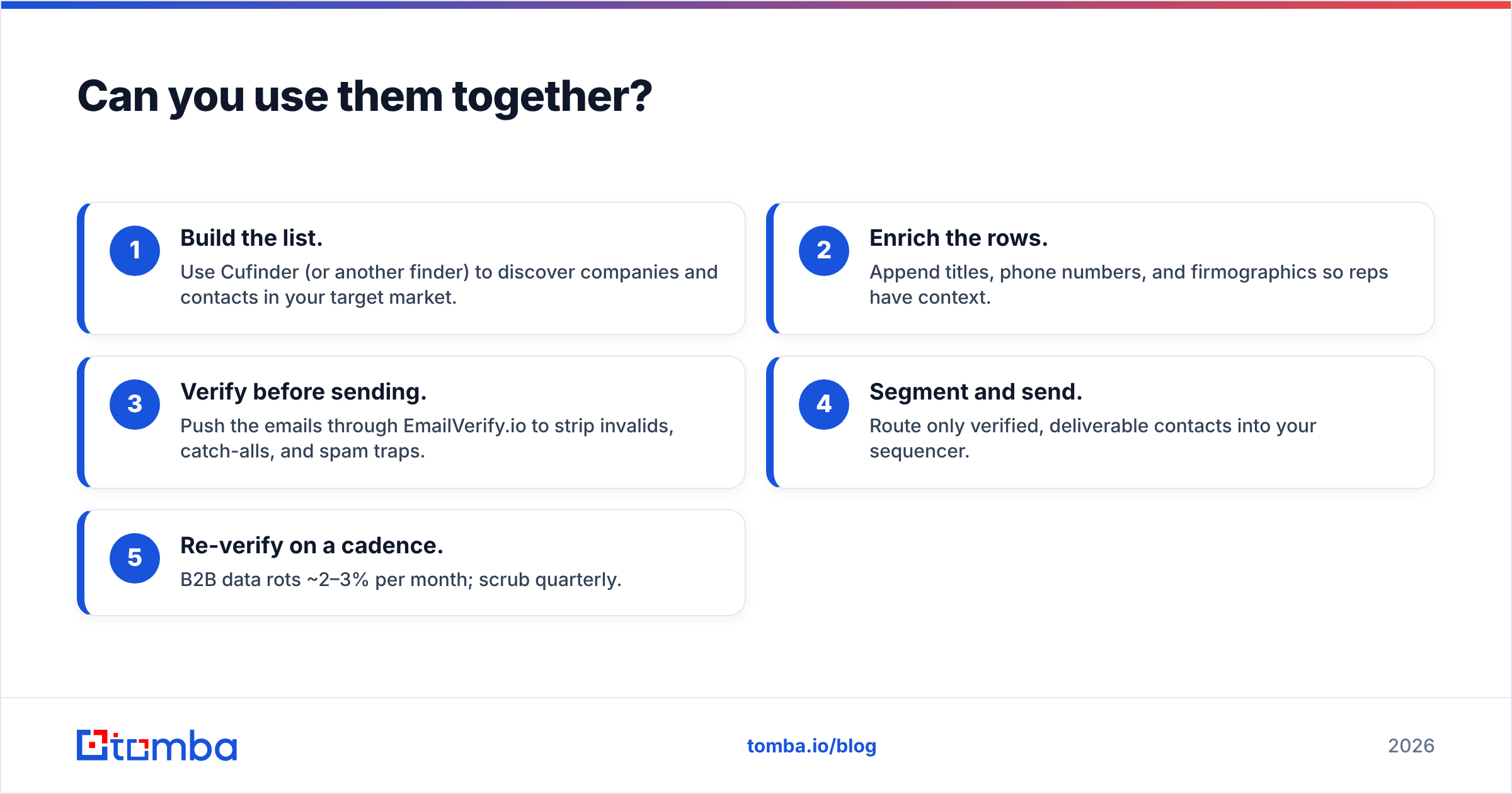
Yes — and for many teams that's the actual answer to "which one." The workflow looks like this:
- Build the list. Use Cufinder (or another finder) to discover companies and contacts in your target market.
- Enrich the rows. Append titles, phone numbers, and firmographics so reps have context.
- Verify before sending. Push the emails through EmailVerify.io to strip invalids, catch-alls, and spam traps.
- Segment and send. Route only verified, deliverable contacts into your sequencer.
- Re-verify on a cadence. B2B data rots ~2–3% per month; scrub quarterly.
That pipeline works. The friction is operational: two logins, two APIs, two invoices, and a manual export/import step between finding and verifying. Every handoff is a place data gets lost or goes stale.
An alternative is one platform that does discovery, enrichment, and verification in a single flow. Tomba's domain search builds the list, the bulk email finder scales it, and verification runs inline — so a found email is a verified email without a second tool. For teams that also need dialing data, a phone finder sits in the same stack.
Which should you choose?#
Decide by the job that's actually blocking you right now:
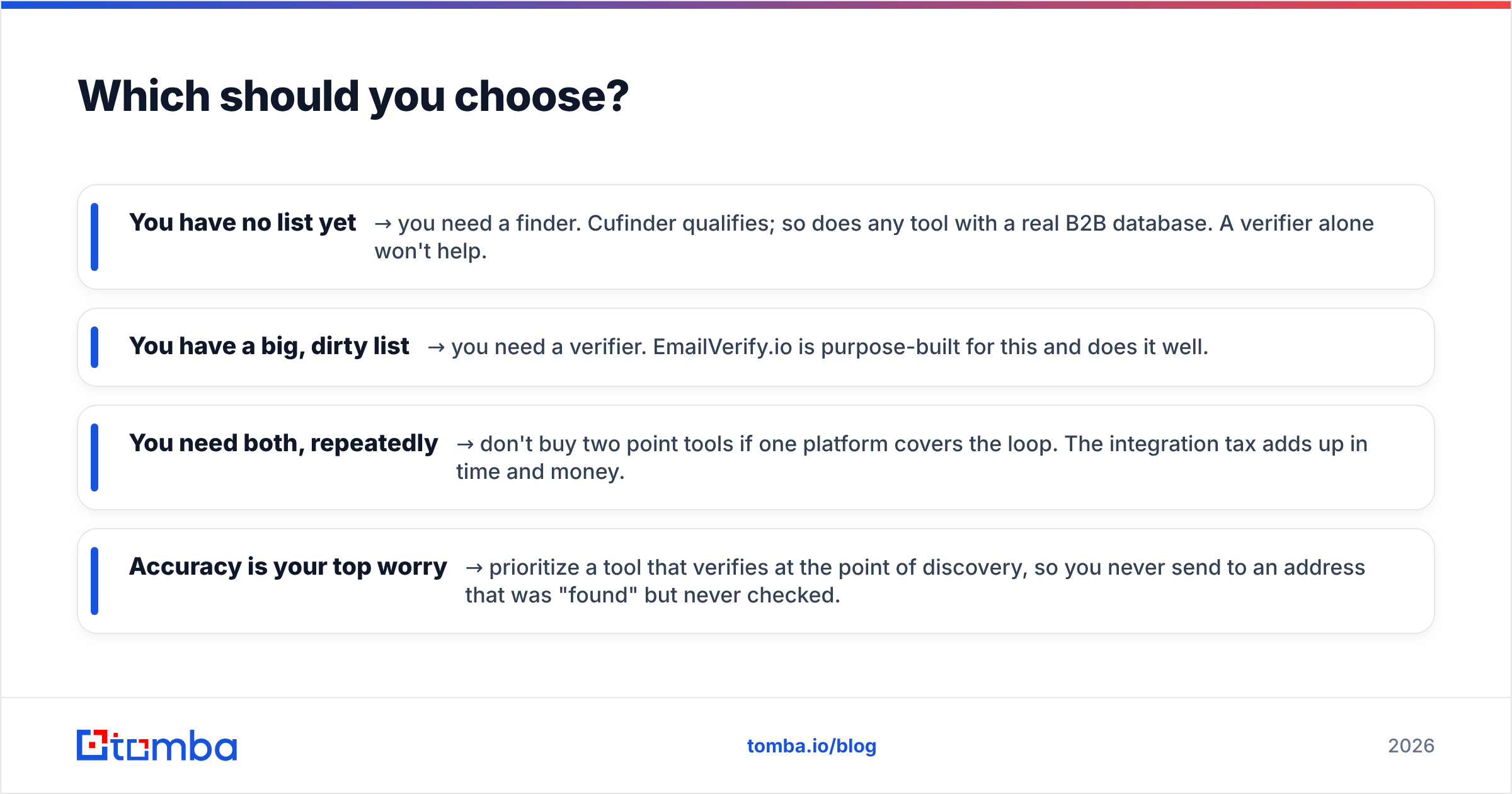
- You have no list yet → you need a finder. Cufinder qualifies; so does any tool with a real B2B database. A verifier alone won't help.
- You have a big, dirty list → you need a verifier. EmailVerify.io is purpose-built for this and does it well.
- You need both, repeatedly → don't buy two point tools if one platform covers the loop. The integration tax adds up in time and money.
- Accuracy is your top worry → prioritize a tool that verifies at the point of discovery, so you never send to an address that was "found" but never checked.
Neither Cufinder nor EmailVerify.io is "wrong." They're just answers to different questions. The mistake is buying one and expecting it to do the other's job — a finder won't clean your list, and a verifier won't fill it.

The case for a combined stack#
If your outbound depends on both finding and sending clean, splitting those across two vendors is the least efficient way to run it. You pay twice, you maintain two integrations, and the gap between "found" and "verified" is where deliverability quietly leaks.
Tomba closes that gap. Start from a domain or a name, get a verified professional email, enrich it with company and role data, and — when you need it — pull phone numbers and reverse-lookup context from the same account. One email finder API, one credit system, one bill. Its free tier gives you 25 searches a month to test accuracy on your own market before paying anything, with the Starter plan at $49/mo when you scale up.
The verdict: if you specifically need Cufinder's enrichment depth or EmailVerify.io's dedicated verification and nothing else, buy the tool that matches the single job. But if you need both — which most outbound teams do — start with a platform that finds and verifies in one pass, and skip the two-vendor tax entirely. Try the Tomba Email Finder free and see how many verified contacts you build before you'd have finished stitching two tools together.
Related guides#
Ready to find emails that actually work?
Join 150,000+ professionals who stopped guessing and started sending. Free credits on signup — no credit card required.
Get the Tomba newsletter
Practical outbound tactics and product updates — once every two weeks.
About the author