Cufinder vs Kaspr (2026): Which Lead Data Tool Wins?
Cufinder and Kaspr both promise fresh B2B contact data, but they win at different jobs. Here's an honest, side-by-side breakdown of accuracy, pricing, and coverage — plus a cheaper pick that beats both on cost-per-lead.
Choosing between Cufinder and Kaspr usually comes down to one question you can't Google your way out of: do you need broad company enrichment or fast LinkedIn contact grabbing? They look similar on a pricing page, but they solve different halves of the prospecting problem — and picking the wrong one quietly wastes credits every month.
This is a neutral, feature-by-feature comparison. No affiliate spin, no "they're both amazing." Where one tool clearly wins, we say so. And where a third option is honestly cheaper for the same output, we say that too.
TL;DR: Cufinder vs Kaspr at a glance#
- Cufinder is an enrichment-first platform: feed it a company name or domain and it returns firmographics, emails, and phone numbers in bulk. Best for list-building and CRM enrichment at scale.
- Kaspr is a LinkedIn-first contact grabber: a Chrome extension that surfaces phone numbers and emails while you browse profiles. Best for SDRs living inside LinkedIn Sales Navigator.
- Accuracy is comparable on verified business emails; Kaspr edges ahead on mobile phone numbers, Cufinder edges ahead on company/firmographic depth.
- Pricing favors Kaspr for individual reps and Cufinder for teams doing bulk enrichment — but both get expensive as credit volume climbs.
- If cost-per-verified-email is your KPI, a dedicated email finder like Tomba often beats both, starting at $49/mo with a real free tier.
What is Cufinder?#
Cufinder is a B2B data and lead-generation platform built around enrichment. You give it an input — a company name, a domain, a person's name, or a partial record — and it fills in the gaps: verified email addresses, direct phone numbers, company size, industry, tech stack, and social profiles.
Its center of gravity is bulk work. Marketers and RevOps teams use Cufinder to take a messy CSV of company names and turn it into a clean, enriched contact list, or to keep an existing CRM from rotting as people change jobs. It also ships an API and a set of niche lookup tools (company-to-email, domain-to-company, and so on).
Where Cufinder shines is width. If your motion starts with a target account list and you need to fan out into contacts and firmographics, it's built for that shape of problem. You can read more about how enrichment fits a modern pipeline in Tomba's data enrichment overview.

What is Kaspr?#
Kaspr is a contact-data tool built for one primary surface: LinkedIn. Its flagship is a Chrome extension that overlays LinkedIn and Sales Navigator profiles. Click a prospect, and Kaspr reveals their phone numbers and email addresses, then lets you push them to your CRM or an outreach sequence in a couple of clicks.
Kaspr's superpower is speed inside a workflow. An SDR working a Sales Navigator search doesn't want to export a list, enrich it overnight, and re-import — they want the phone number now, while the prospect is on screen. Kaspr is optimized for that in-the-moment reveal, with a particular reputation for European mobile numbers.
The trade-off is that Kaspr is narrower by design. It's excellent when your prospecting starts on a LinkedIn profile, and less natural when you're working from domains, uploaded lists, or an API-driven pipeline.
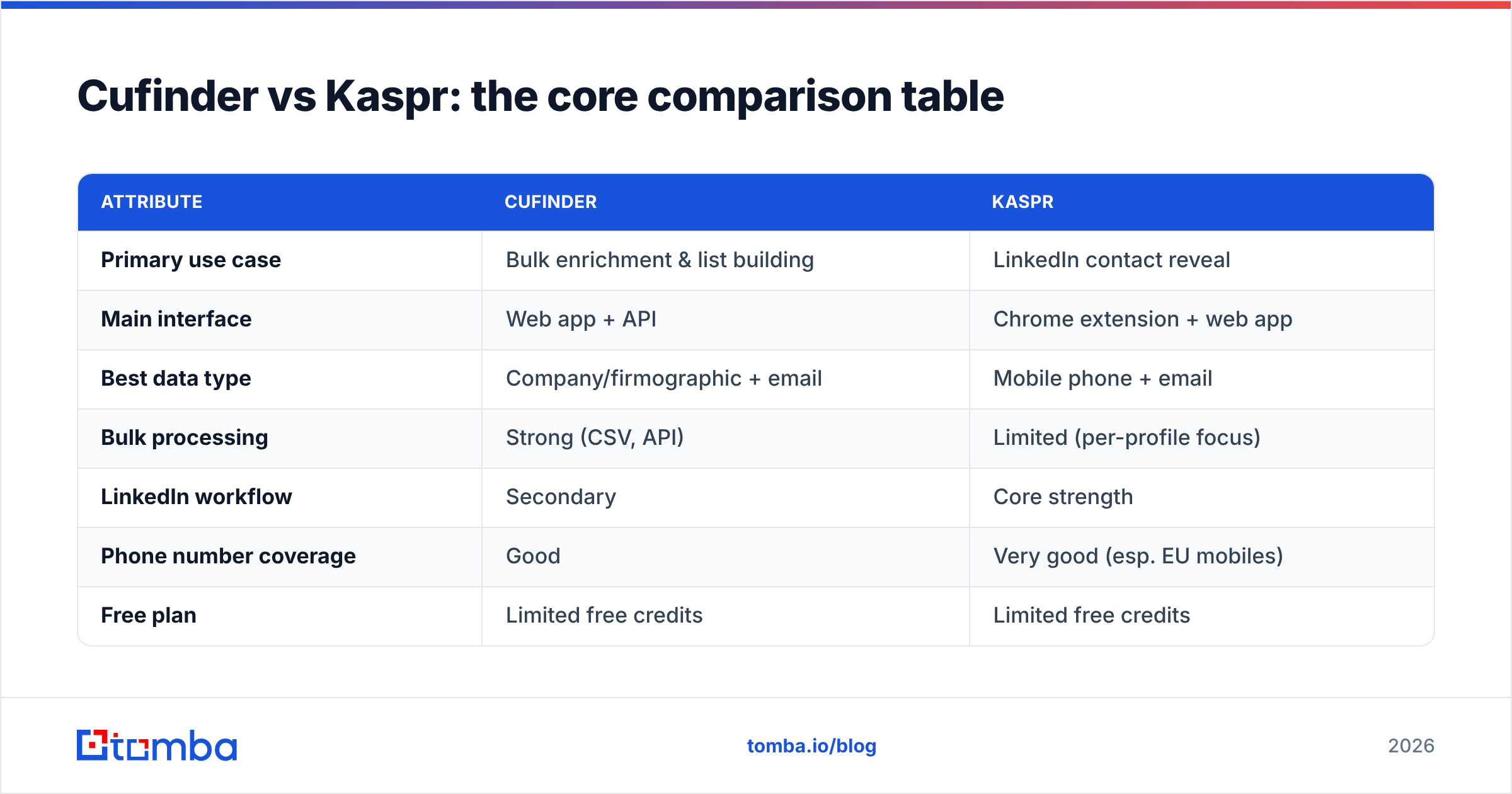
Cufinder vs Kaspr: the core comparison table#
Here's the head-to-head on the attributes that actually change your results.
| Attribute | Cufinder | Kaspr |
|---|---|---|
| Primary use case | Bulk enrichment & list building | LinkedIn contact reveal |
| Main interface | Web app + API | Chrome extension + web app |
| Best data type | Company/firmographic + email | Mobile phone + email |
| Bulk processing | Strong (CSV, API) | Limited (per-profile focus) |
| LinkedIn workflow | Secondary | Core strength |
| Phone number coverage | Good | Very good (esp. EU mobiles) |
| Free plan | Limited free credits | Limited free credits |
| CRM integrations | HubSpot, Pipedrive, Zapier | HubSpot, Salesforce, Pipedrive, Zapier |
| Ideal user | RevOps, marketers, agencies | SDRs, individual reps |
| API access | Yes | Limited |
The pattern is clear: Cufinder is a data engine, Kaspr is a workflow tool. If you mostly work from account lists and want to enrich thousands of records, Cufinder's shape fits. If you live in Sales Navigator and want phone numbers on demand, Kaspr's shape fits.

Is Cufinder or Kaspr more accurate?#
Accuracy is where comparisons get slippery, because "accuracy" means different things per data type. Break it into three:
- Business emails — Both tools return verified professional emails at broadly similar hit rates for common industries. Neither is magic on catch-all domains, where any provider has to guess. This is exactly why a separate verification step matters; running finds through an email verifier before you send is non-negotiable regardless of which tool sourced the address.
- Mobile phone numbers — Kaspr generally has the edge here, especially for European contacts, thanks to its crowdsourced network. If cold calling is central to your motion, that gap is meaningful.
- Firmographics — Cufinder tends to return richer company-level fields (size, industry, revenue bands, tech stack), which is what you'd expect from an enrichment-first platform.
No single vendor wins every category, and independent reviews on G2 reflect that split — reps praise Kaspr's phone data and Cufinder's bulk enrichment in roughly equal measure. The honest takeaway: match the tool to the data type you depend on most, and always verify emails downstream no matter the source.
How do Cufinder and Kaspr price their plans?#
Both use a credit model, and both make it easy to burn credits faster than you expected. The exact tiers shift over time, so always confirm current numbers on the Cufinder and Kaspr sites before you commit. Here's the shape of it:
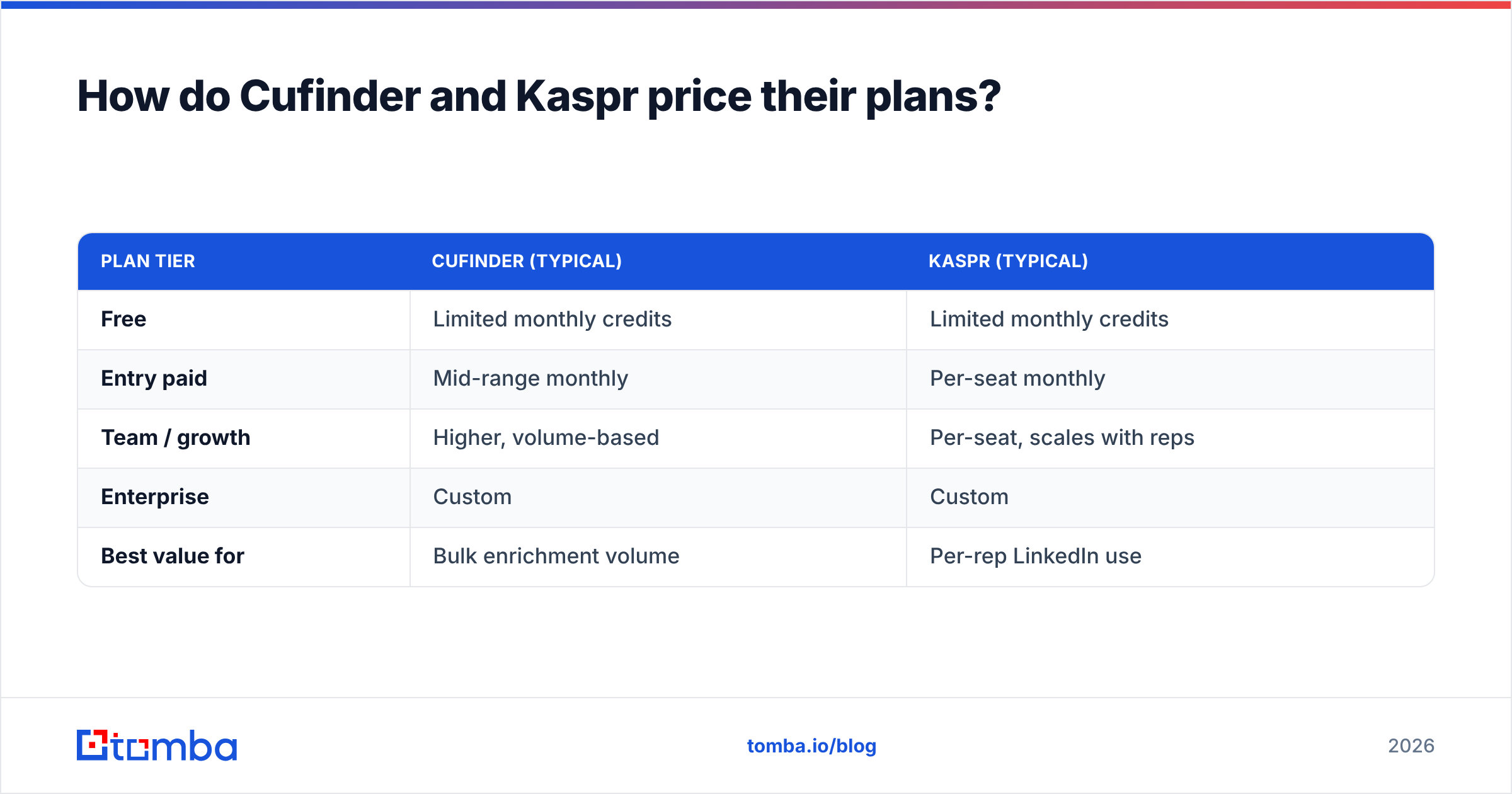
| Plan tier | Cufinder (typical) | Kaspr (typical) |
|---|---|---|
| Free | Limited monthly credits | Limited monthly credits |
| Entry paid | Mid-range monthly | Per-seat monthly |
| Team / growth | Higher, volume-based | Per-seat, scales with reps |
| Enterprise | Custom | Custom |
| Best value for | Bulk enrichment volume | Per-rep LinkedIn use |
The structural difference matters more than the sticker price:
- Cufinder bills around volume of records enriched, so cost scales with list size. Great for one power user enriching a lot; less friendly if you just need occasional lookups.
- Kaspr leans per-seat, so cost scales with headcount. Great for a small SDR pod; expensive once you add a dozen reps who each need a license.
Watch the credit mechanics closely. Revealing a phone and an email can cost separate credits, and failed lookups sometimes still consume them. For a team doing heavy volume, that's where the real bill hides.
Cufinder vs Kaspr: which should you choose?#
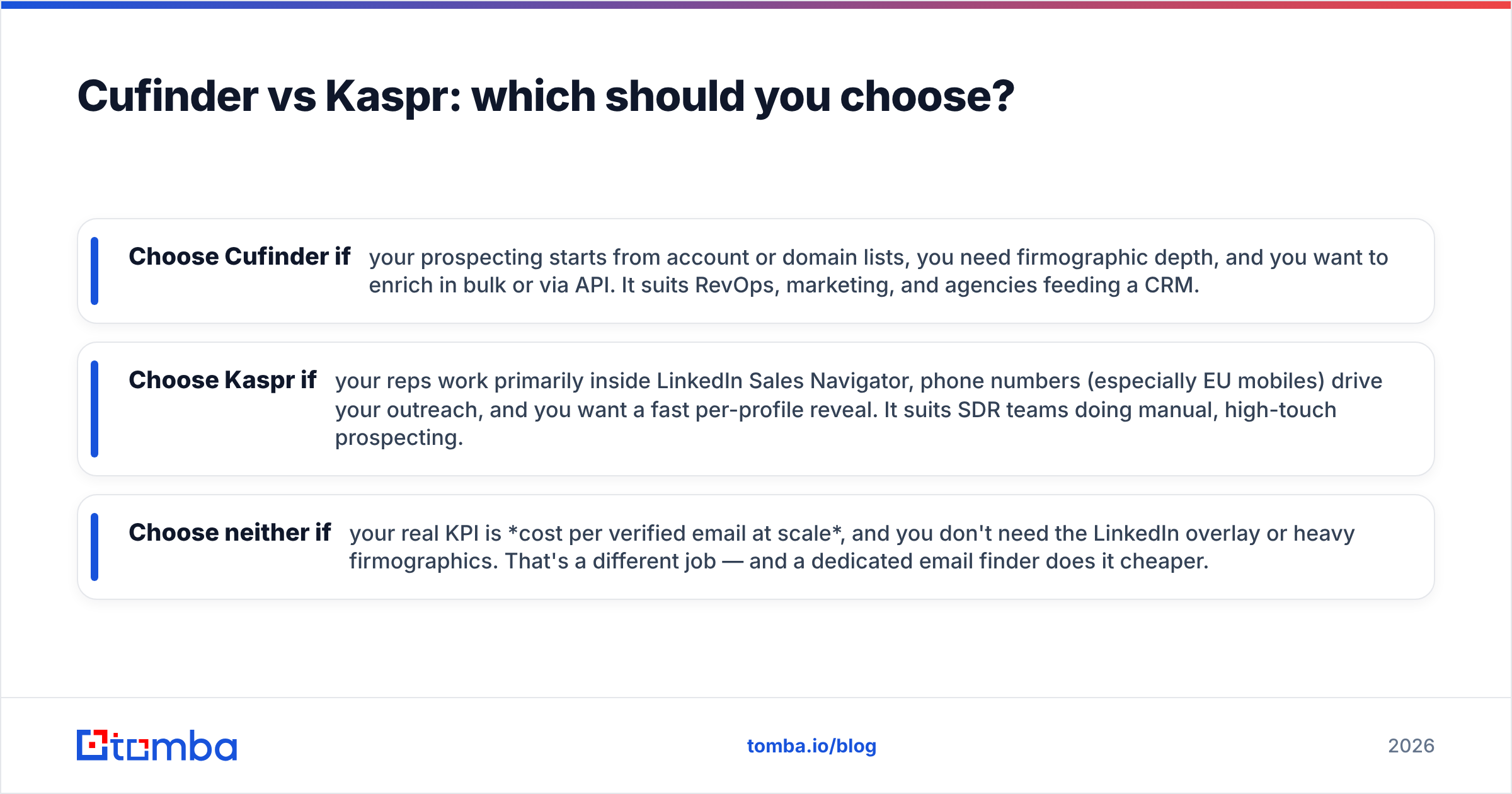
Use this decision shortcut:
- Choose Cufinder if your prospecting starts from account or domain lists, you need firmographic depth, and you want to enrich in bulk or via API. It suits RevOps, marketing, and agencies feeding a CRM.
- Choose Kaspr if your reps work primarily inside LinkedIn Sales Navigator, phone numbers (especially EU mobiles) drive your outreach, and you want a fast per-profile reveal. It suits SDR teams doing manual, high-touch prospecting.
- Choose neither if your real KPI is cost per verified email at scale, and you don't need the LinkedIn overlay or heavy firmographics. That's a different job — and a dedicated email finder does it cheaper.
That third case is more common than vendors admit. Plenty of teams pay enrichment-platform prices for what is, in practice, an email-and-phone lookup need.

Where does a dedicated email finder fit?#
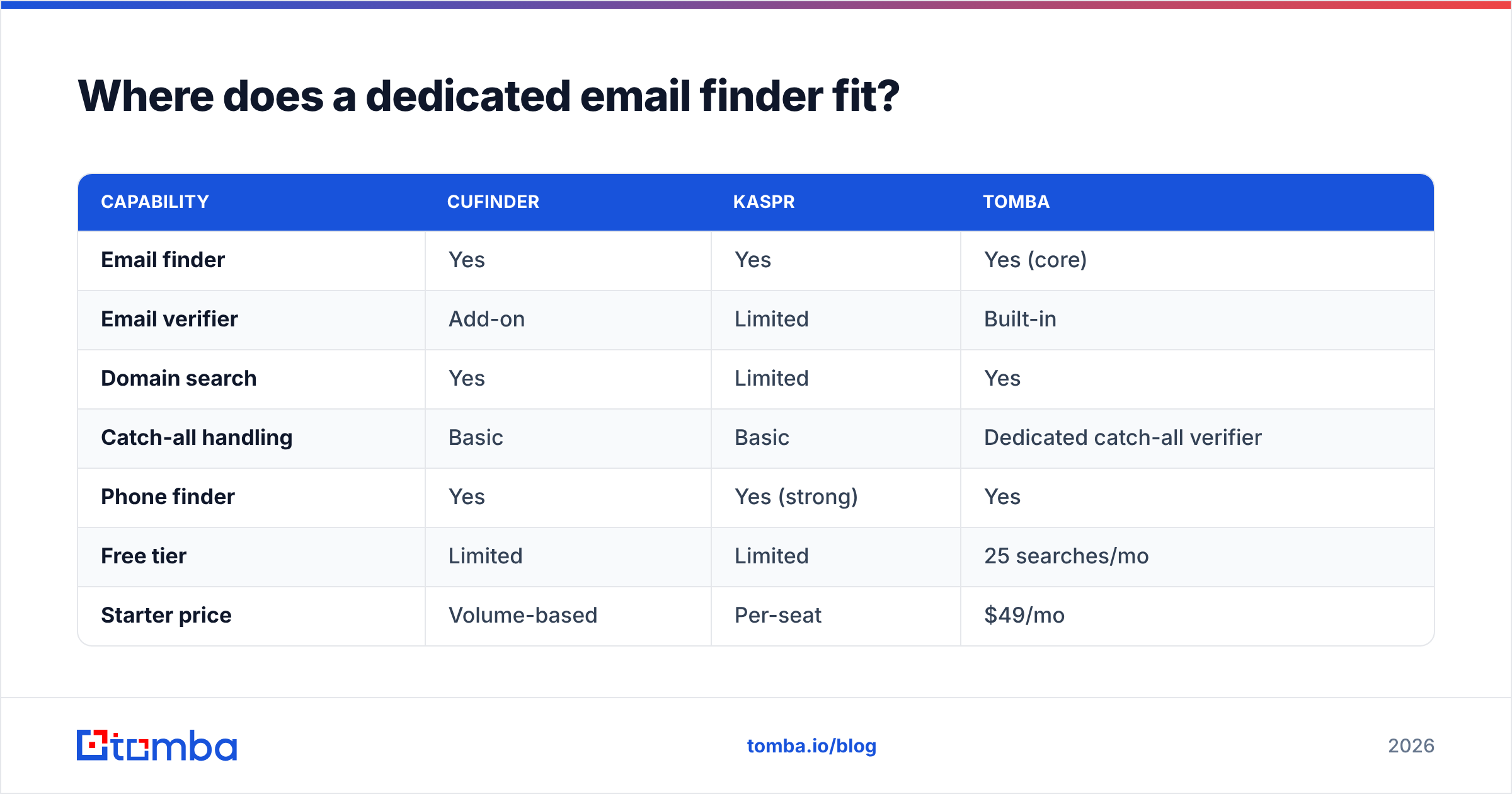
If you strip prospecting down to its most repeated action, it's this: given a name and a company, get me a valid email I can actually reach. Both Cufinder and Kaspr do this, but they wrap it in enrichment or LinkedIn workflows you may not need — and you pay for that wrapper.
A focused tool like Tomba targets that core action directly, and it competes well on the parts that matter for outbound:
| Capability | Cufinder | Kaspr | Tomba |
|---|---|---|---|
| Email finder | Yes | Yes | Yes (core) |
| Email verifier | Add-on | Limited | Built-in |
| Domain search | Yes | Limited | Yes |
| Catch-all handling | Basic | Basic | Dedicated catch-all verifier |
| Phone finder | Yes | Yes (strong) | Yes |
| Free tier | Limited | Limited | 25 searches/mo |
| Starter price | Volume-based | Per-seat | $49/mo |
| API-first | Yes | Limited | Yes |
Tomba's model is straightforward: a real free tier (25 searches/month), then Starter at $49/mo, Growth at $99/mo, and Pro at $249/mo — see full Tomba pricing for the credit breakdown. Because verification is built in rather than a paid add-on, your cost-per-usable email tends to land lower than a platform that charges separately to confirm the address is real.
You also get the surrounding pieces without stitching vendors together: domain search for company-wide patterns, a phone finder for direct dials, and a bulk email finder for list work. It's not trying to be an all-in-one sales OS — it's trying to make the email step accurate and cheap, which is exactly where budget leaks in most stacks.
What about deliverability after you find the email?#
A found email is worthless if it bounces or lands in spam, and this is the step both comparison shoppers skip. Whichever tool you pick, wrap it in basic hygiene:
- Verify before you send. Every provider guesses on catch-all domains. Confirm addresses with a verifier and treat "risky" results as skip-or-manual, not send-anyway.
- Warm the sending domain. New domains that blast cold volume get throttled fast. Ramp gradually.
- Authenticate. Set up SPF, DKIM, and DMARC so mailbox providers trust you. If you're unsure where you stand, the concept of email deliverability and sender reputation is worth ten minutes of reading.
- Keep lists clean. Prune role addresses (info@, sales@) and repeated bounces. Dirty lists drag your whole domain down.
No sourcing tool — Cufinder, Kaspr, or otherwise — replaces this layer. Budget for it.
Frequently asked questions#
Is Cufinder better than Kaspr? Neither is universally better. Cufinder wins for bulk enrichment and firmographic depth; Kaspr wins for LinkedIn workflows and mobile phone data. Pick based on where your prospecting starts.
Does Kaspr work outside LinkedIn? Kaspr has a web app, but its strength and design center on the LinkedIn/Sales Navigator Chrome extension. If most of your work is off-LinkedIn, its advantage shrinks.
Are Cufinder and Kaspr GDPR-compliant? Both publish compliance documentation and offer opt-out mechanisms. If you sell into the EU, review each vendor's current data-processing terms directly before purchasing.
What's the cheapest way to just find verified emails? A dedicated email finder with built-in verification usually has the lowest cost-per-usable-email, because you're not paying for enrichment or LinkedIn features you don't use.
The verdict#
Cufinder and Kaspr are both solid at the job they were built for — they just weren't built for the same job. Cufinder is your pick for enrichment-first, bulk, API-driven list building. Kaspr is your pick for SDRs who live in LinkedIn and run on phone numbers. Match the tool to your motion and either can pay for itself.
But if you look at your spend and realize you're really paying for one thing — accurate, verified emails you can actually send to — you don't need the whole platform. Start with the Tomba Email Finder: find emails by name, domain, or company, verify them in the same flow, and keep your cost-per-lead honest. There's a free tier to test it against your own list before you spend a dollar, so you can compare accuracy on the accounts you actually care about — not a vendor's demo data.
Related guides#
Ready to find emails that actually work?
Join 150,000+ professionals who stopped guessing and started sending. Free credits on signup — no credit card required.
Get the Tomba newsletter
Practical outbound tactics and product updates — once every two weeks.
About the author