Cufinder vs QuickenRich (2026): Which Enrichment Tool Wins?
An honest, side-by-side breakdown of Cufinder vs QuickenRich for B2B data enrichment and email finding in 2026 — pricing, accuracy, coverage, and where a leaner tool beats both.
Choosing between Cufinder and QuickenRich comes down to one question most comparison posts dodge: do you need a broad data warehouse, or do you need accurate contact records you can actually email today? Both tools promise enrichment. They deliver it very differently.
This is a neutral, hands-on comparison — pricing, accuracy, coverage, integrations, and the trade-offs neither vendor puts on its homepage. If your real goal is finding and verifying business emails at a predictable cost, we'll also show where a focused tool undercuts both.
TL;DR: Cufinder vs QuickenRich at a glance#
- Cufinder leans on a large company/contact database and API-first enrichment, best for teams building lists at volume and comfortable with credits math.
- QuickenRich positions itself around fast waterfall-style enrichment and email finding, appealing to outbound teams that want speed over database depth.
- Accuracy varies by segment. Both do well on US mid-market; both thin out on non-US SMBs, catch-all domains, and freshly changed roles.
- Pricing is credit-based on both sides, which makes true cost per verified email hard to predict until you run your own list.
- If email finding + verification is the actual job, a specialized tool like Tomba Email Finder often lands more valid addresses per dollar than a broad enrichment suite.

What is Cufinder and who is it for?#
Cufinder is a B2B data enrichment and prospecting platform built around a large proprietary database of companies and contacts. You feed it a company name, domain, or partial record, and it returns firmographics, technographics, contact details, and email addresses. Its API is the core selling point: teams wire it into their CRM or internal tooling and enrich records programmatically.
Cufinder fits companies that:
- Build large prospect lists and want database-driven lookups rather than live scraping.
- Need firmographic and technographic fields (industry, size, tech stack) alongside emails.
- Have engineering resources to integrate an email finder API and manage credit consumption.
The trade-off is that database-first tools are only as good as their refresh cycle. When a contact changes jobs, a static database can lag, and you pay credits to learn the record is stale.
What is QuickenRich and who is it for?#
QuickenRich is a newer enrichment and email-finding tool that emphasizes speed and a waterfall approach — querying multiple data sources for a single contact and returning the first strong match. The pitch is straightforward: give it a name and company, get a usable email fast, and keep your outbound engine fed.
QuickenRich tends to suit:
- Outbound SDR teams that value quick single-record lookups over bulk database exports.
- Users who want a lighter interface and less setup than a full data platform.
- Buyers who like the idea of multi-source waterfalls without wiring up several vendors themselves.
The catch with waterfall tools is transparency. When results come from blended sources, it's harder to audit why an email was returned, and verification quality can vary from one source to the next. That matters directly for email deliverability — an unverified guess that bounces damages your sender reputation.
Cufinder vs QuickenRich: the core comparison table#
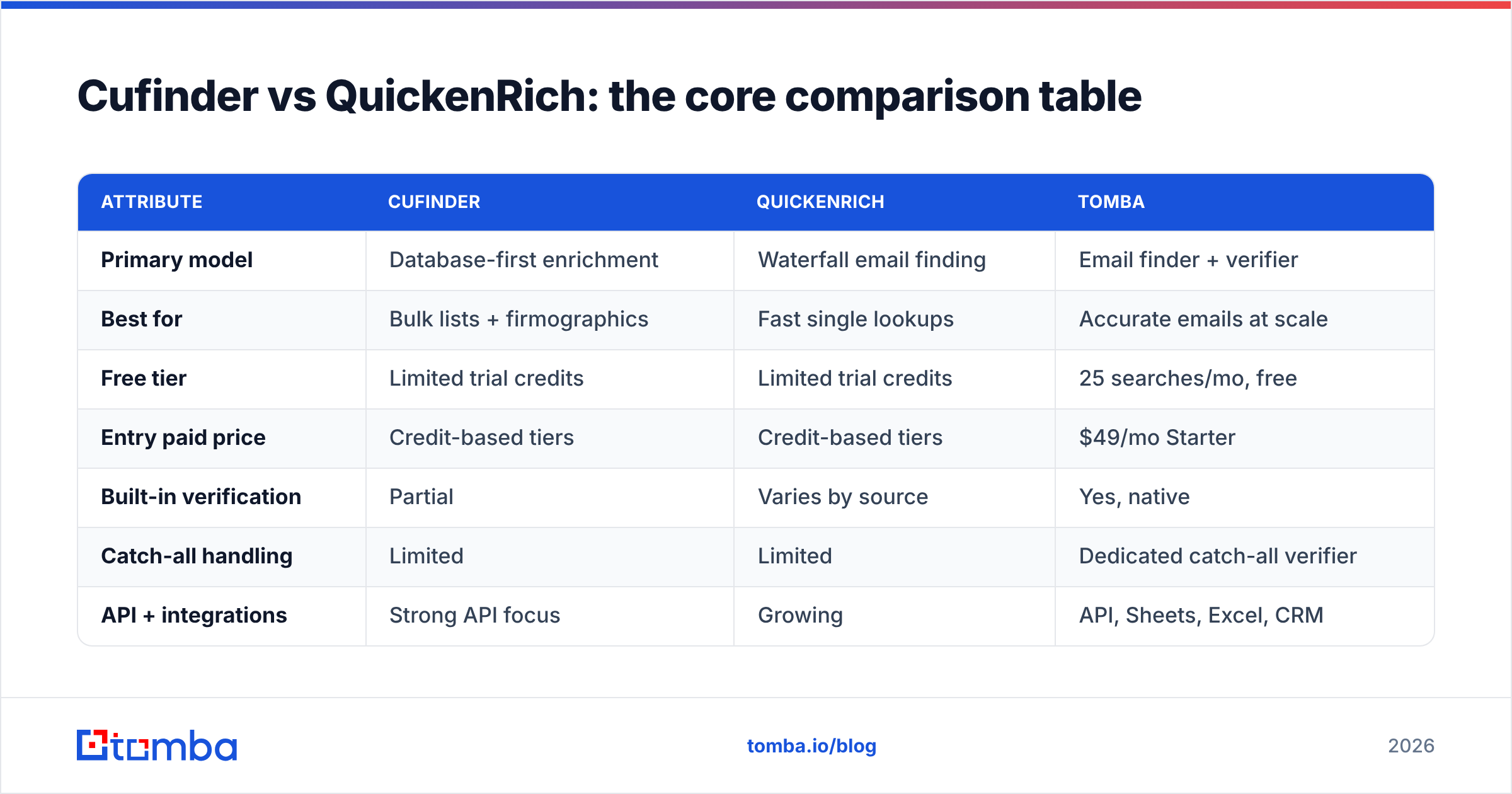
Here's the head-to-head on the attributes that actually move the needle. Treat specifics as directional — always test on your own list before committing budget.
| Attribute | Cufinder | QuickenRich | Tomba |
|---|---|---|---|
| Primary model | Database-first enrichment | Waterfall email finding | Email finder + verifier |
| Best for | Bulk lists + firmographics | Fast single lookups | Accurate emails at scale |
| Free tier | Limited trial credits | Limited trial credits | 25 searches/mo, free |
| Entry paid price | Credit-based tiers | Credit-based tiers | $49/mo Starter |
| Built-in verification | Partial | Varies by source | Yes, native |
| Catch-all handling | Limited | Limited | Dedicated catch-all verifier |
| API + integrations | Strong API focus | Growing | API, Sheets, Excel, CRM |
| Cost predictability | Medium | Medium | High (clear tiers) |
The pattern across most independent tests is consistent: broad enrichment suites win on fields per record, while specialized finders win on valid emails per dollar. Which matters more depends on whether you're building a data warehouse or filling a pipeline.
Which is more accurate — Cufinder or QuickenRich?#
Accuracy is the whole ballgame, and it's where marketing claims get slippery. Both vendors cite high match or accuracy rates, but those numbers usually describe coverage (did we return something?) rather than validity (does it actually deliver?).

Three things separate real accuracy from headline accuracy:
- Verification depth. Returning an email isn't the same as confirming it. If a tool hands back a plausible pattern without SMTP-level checks, you're the one who finds out it bounces. Run everything through an email verifier before it hits your sequencer.
- Catch-all domains. A large share of B2B domains accept all mail, so a naive check returns "valid" for addresses that don't exist. Proper catch-all verification is the difference between a clean list and a bounce trap.
- Freshness. People change jobs constantly. A database record from 14 months ago may be technically "accurate" and completely useless.
In practice, Cufinder's database depth helps on established US companies, while QuickenRich's waterfall can surface contacts that a single database misses. Neither reliably solves catch-all or freshness on its own — which is why pairing any finder with independent verification is non-negotiable.
How do Cufinder and QuickenRich compare on pricing?#
Both tools use credit-based pricing, and this is where cost gets murky. A "credit" might cover a successful enrichment, a partial match, or every attempt depending on the plan — so two tools advertising similar per-credit rates can produce wildly different true costs.
Here's how to compare apples to apples:
- Cost per verified email, not per credit. Take a 1,000-row sample, run it through each tool, verify the results independently, and divide spend by the count of deliverable addresses. This single number cuts through every pricing page.
- Failed-lookup billing. Ask each vendor whether you're charged for no-match or unverifiable results. This quietly doubles real cost for some buyers.
- Overage behavior. Credit tools often push you into a higher tier the moment you exceed your bucket. Model your monthly volume before subscribing.
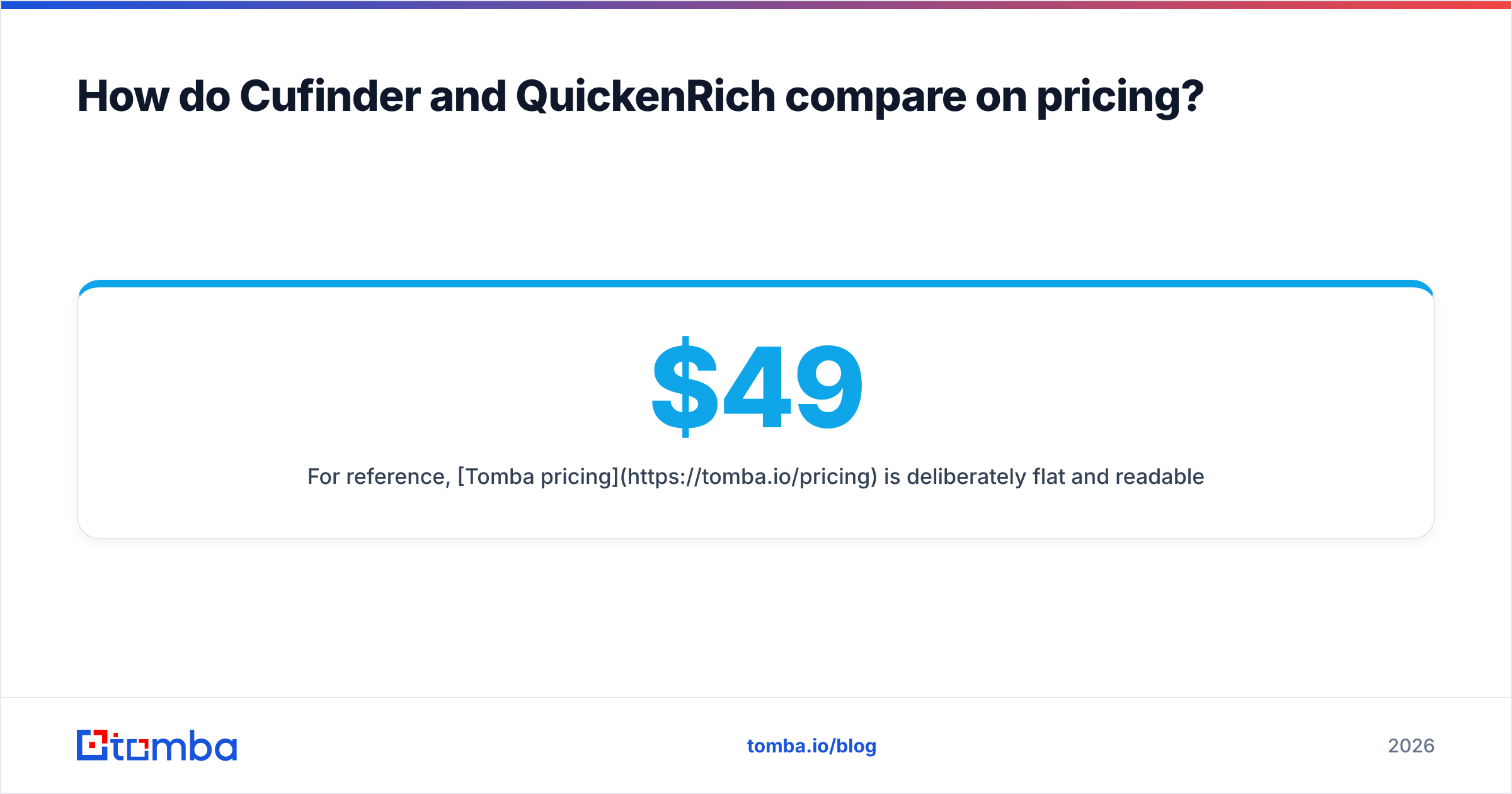
For reference, Tomba pricing is deliberately flat and readable: a free tier with 25 searches/month, Starter at $49/mo, Growth at $99/mo, Pro at $249/mo, and custom Enterprise. Verification is native, so you're not stacking a second vendor's bill on top to make results usable. When you're comparing Cufinder vs QuickenRich, benchmark both against that predictable baseline.

Integrations and workflow: which fits your stack?#
Data is only useful where your team already works. Both tools offer API access; the difference is in the surrounding ecosystem.
- Cufinder is API-forward, which is great if you have engineers but heavier if you don't. CRM enrichment is a common use case.
- QuickenRich leans toward in-app lookups and a lighter setup, with a smaller (but expanding) integration list.
- Tomba covers the API plus no-code paths — a Google Sheets add-on, Excel add-in, Chrome extension, and native connectors to HubSpot, Salesforce, and Pipedrive — so non-technical teammates enrich without writing code.
If your workflow lives in a CRM or spreadsheet, count the round-trips. A tool that forces CSV exports and re-imports burns more hours than a slightly cheaper credit rate saves.
Cufinder vs QuickenRich: pros and cons#
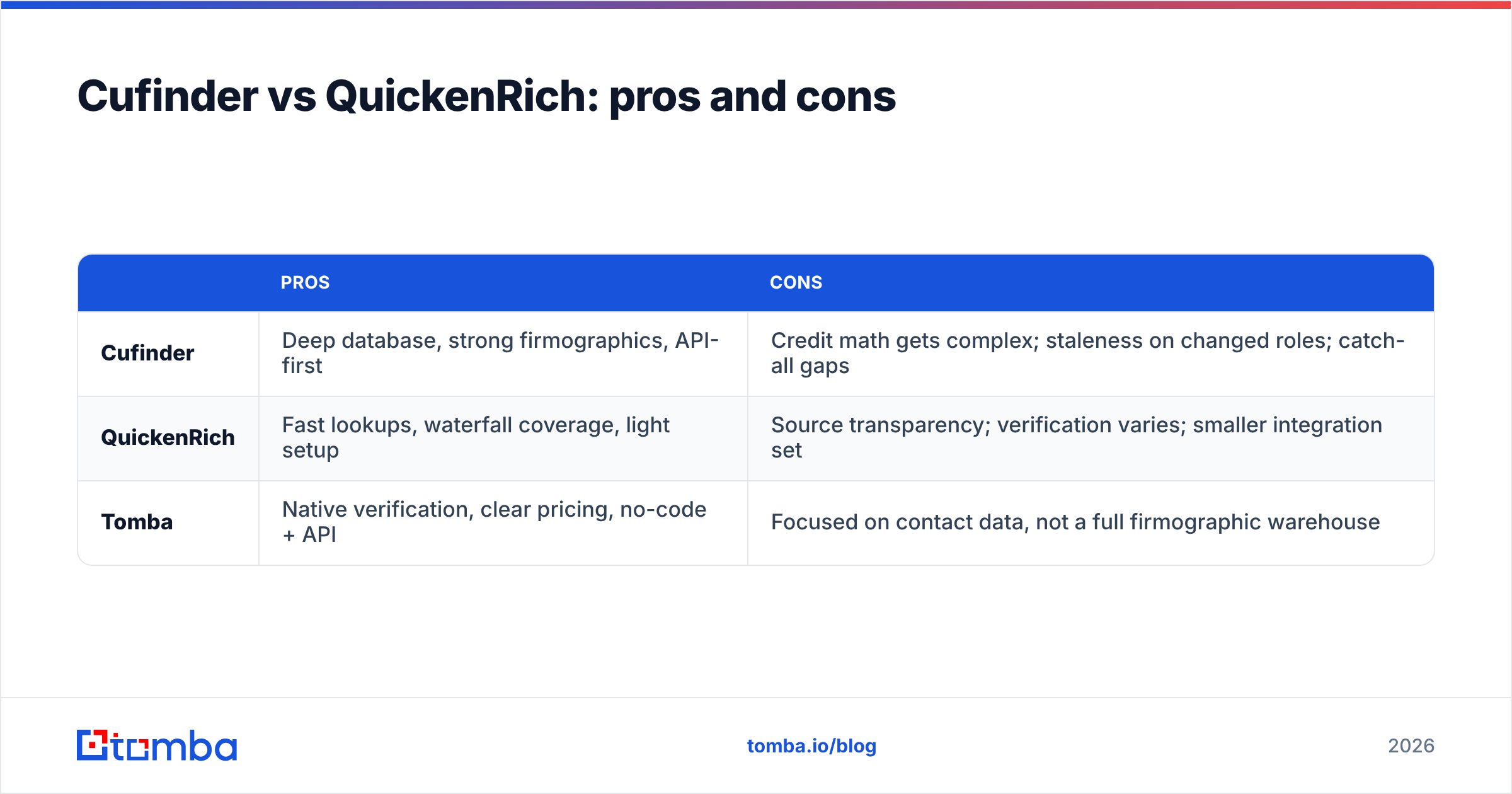
| Pros | Cons | |
|---|---|---|
| Cufinder | Deep database, strong firmographics, API-first | Credit math gets complex; staleness on changed roles; catch-all gaps |
| QuickenRich | Fast lookups, waterfall coverage, light setup | Source transparency; verification varies; smaller integration set |
| Tomba | Native verification, clear pricing, no-code + API | Focused on contact data, not a full firmographic warehouse |
The honest read: if you need a broad B2B intelligence layer with technographics and firmographics baked in, a database suite earns its keep. If you need clean, deliverable emails to run outbound this quarter, a focused finder-plus-verifier is usually the cheaper, more reliable path.
When should you skip both and use a specialized tool?#
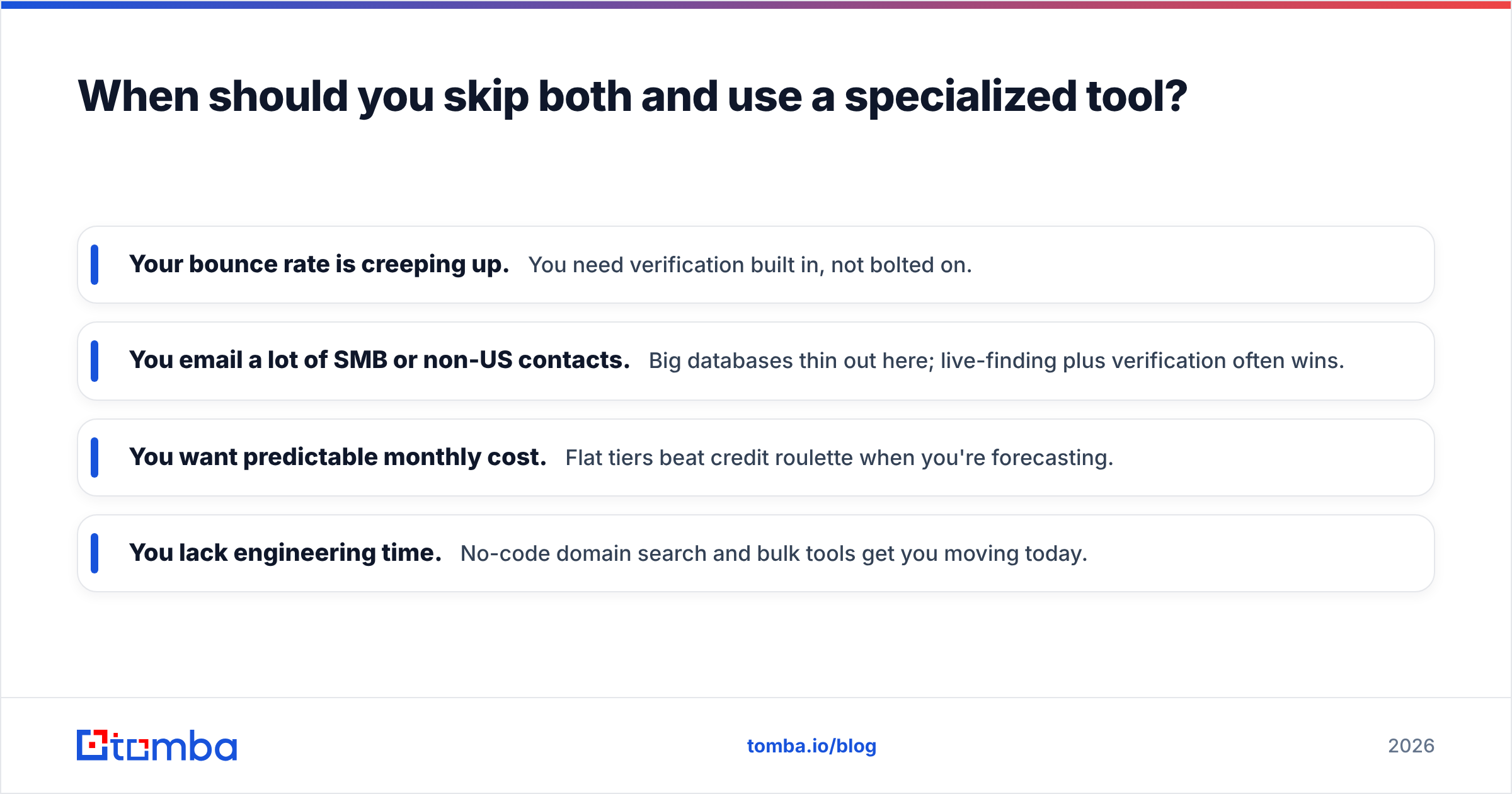
Choose a dedicated email finder over a broad enrichment suite when your bottleneck is reaching people, not describing companies. Signs you're in that camp:
- Your bounce rate is creeping up. You need verification built in, not bolted on.
- You email a lot of SMB or non-US contacts. Big databases thin out here; live-finding plus verification often wins.
- You want predictable monthly cost. Flat tiers beat credit roulette when you're forecasting.
- You lack engineering time. No-code domain search and bulk tools get you moving today.
This is exactly the gap Tomba targets. You can run a bulk email finder over a company list, verify every result natively, catch the catch-alls, and export straight to your CRM — without stitching three vendors together. For teams evaluating enrichment platforms, it's worth putting Tomba in the same test as Cufinder and QuickenRich rather than assuming a bigger database automatically means better outreach results.
You can also sanity-check any provider's claims with independent references. Read verified user reviews on G2 and Capterra, and if you're wiring enrichment into a CRM, confirm the connector details against the vendor's own docs — for example, HubSpot's integration documentation — before you commit.
The verdict: Cufinder vs QuickenRich in 2026#
There's no single winner — there's a winner for your use case:
- Pick Cufinder if you want a database-driven enrichment layer with firmographics and technographics, and you have the engineering resources to manage an API and credit consumption.
- Pick QuickenRich if you prefer fast, lightweight single-record lookups and a waterfall approach with minimal setup.
- Pick a specialized finder like Tomba if the real job is landing accurate, verified emails at a predictable cost — especially across SMB, non-US, and catch-all-heavy segments.
Whatever you choose, run the same 1,000-row test through each tool, verify the output independently, and compare cost per deliverable email. That one experiment tells you more than any feature page.
Ready to benchmark the accurate-email approach yourself? Start free with the Tomba Email Finder — 25 searches a month at no cost, native verification and catch-all checks included, and clear $49/mo Starter pricing when you scale. Test it against Cufinder and QuickenRich on your own list and let cost-per-valid-email settle the debate.
Related guides#
Ready to find emails that actually work?
Join 150,000+ professionals who stopped guessing and started sending. Free credits on signup — no credit card required.
Get the Tomba newsletter
Practical outbound tactics and product updates — once every two weeks.
About the author