Cufinder vs Salutary Data: The Honest 2026 Comparison
Cufinder vs Salutary Data compared on coverage, accuracy, pricing, and workflow fit — plus where a specialist email finder beats both for cold outreach.
Choosing between Cufinder and Salutary Data comes down to one question most comparison pages dodge: are you buying a self-serve prospecting engine or a bulk data file? They sound similar on a feature grid, but they solve different problems, and picking the wrong one wastes a quarter of budget and a lot of rep hours.
This is a neutral breakdown. Both tools have real strengths, both have gaps, and neither is the automatic winner for every team. We'll compare coverage, accuracy, pricing, and workflow fit — then show where a focused email finder outperforms both for cold outreach specifically.
TL;DR#
- Cufinder is a self-serve B2B data platform with a company/contact search UI, enrichment, and API — best for SDRs and growth teams who build lists interactively.
- Salutary Data is a data-provider / list-licensing model — best for teams that want bulk, compliance-vetted files delivered to their CRM or CDP, not a live prospecting tool.
- Accuracy is the deciding factor for cold email, and it's driven by verification, not database size — a big list with 20% bounces is worse than a smaller verified one.
- If your core job is finding and verifying reach-out emails at low cost, a specialist like the Tomba Email Finder often beats a broad platform on price-per-valid-contact.
- Read the full pricing and use-case tables below before committing to an annual contract with either vendor.
What is Cufinder?#
Cufinder is a B2B lead generation and data enrichment platform. You search by company, industry, title, or technology, then pull contact and firmographic data into your workflow through the dashboard, a Chrome extension, or the API. It leans toward the "prospecting cockpit" model: a rep logs in, builds a targeted list, enriches it, and exports.
Its selling points are a fairly broad company database, enrichment endpoints (company-to-domain, email lookup, tech stack), and credit-based self-serve pricing that a single rep can start on without procurement. If you want to do the searching yourself and iterate on segments quickly, that interactive model is the appeal.

What is Salutary Data?#
Salutary Data is positioned as a B2B data provider rather than a prospecting app. The model is closer to list licensing and data supply: you specify an audience, and you receive a compliance-reviewed dataset — B2B contacts with emails, direct dials, and firmographics — delivered for use in your CRM, marketing automation, or ad platforms.
Salutary emphasizes data hygiene and consent/compliance posture, which matters for teams running large marketing sends or feeding a CDP. The trade-off is that it's less of a "log in and prospect one account at a time" experience and more of a "buy the audience, load it, run campaigns" pipeline. That's a strength for volume marketers and a mismatch for a lone SDR who needs 40 verified emails today.
Cufinder vs Salutary Data: how do they compare?#
Here's the core side-by-side. Treat vendor-published numbers as directional — always test on your own ICP before you sign.
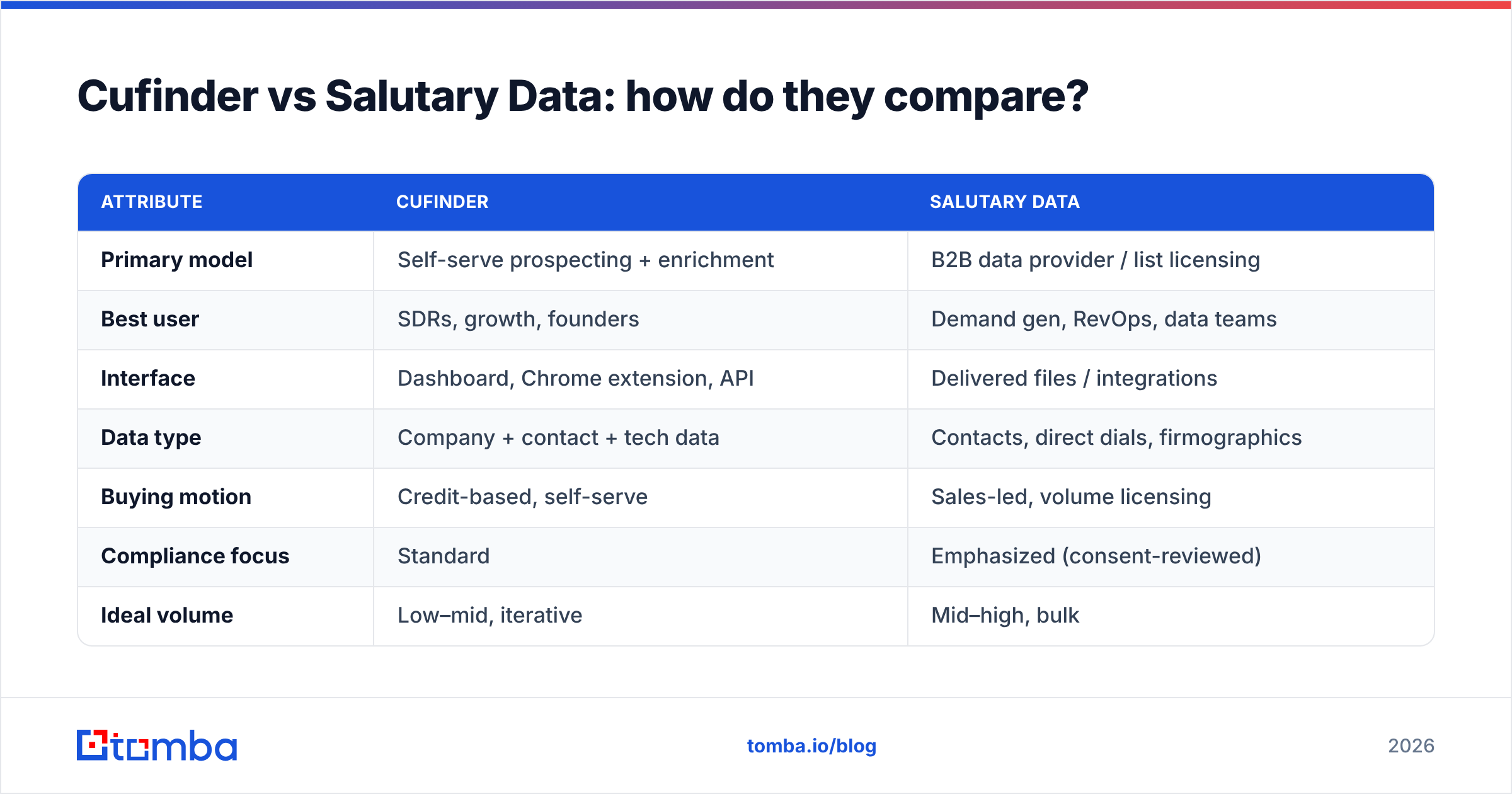
| Attribute | Cufinder | Salutary Data |
|---|---|---|
| Primary model | Self-serve prospecting + enrichment | B2B data provider / list licensing |
| Best user | SDRs, growth, founders | Demand gen, RevOps, data teams |
| Interface | Dashboard, Chrome extension, API | Delivered files / integrations |
| Data type | Company + contact + tech data | Contacts, direct dials, firmographics |
| Buying motion | Credit-based, self-serve | Sales-led, volume licensing |
| Compliance focus | Standard | Emphasized (consent-reviewed) |
| Ideal volume | Low–mid, iterative | Mid–high, bulk |
| Email verification | Included, varies by tier | Hygiene-focused delivery |
The pattern is clear: Cufinder wins on hands-on, iterative prospecting; Salutary Data wins on compliance-conscious bulk supply. Neither is "better" in the abstract — they're built for different buyers.
Which one fits your motion?#
Use this quick decision list before you demo either:
- You're one rep building lists daily → Cufinder's self-serve UI fits; Salutary's licensing model is overkill.
- You're feeding a CDP or running six-figure ad audiences → Salutary's bulk, consent-reviewed delivery fits; Cufinder's credit model gets expensive at that scale.
- You need direct dials for a calling team → both can help, but validate phone accuracy with a phone validator before you trust it.
- You mainly need verified emails for cold outreach → a specialist email finder is usually cheaper per valid contact than either platform (more below).
- You have strict procurement/compliance review → Salutary's positioning is the easier internal sell.
- You want to start today with no contract → Cufinder's self-serve entry beats a sales-led data deal.
Is database size the same as accuracy?#
No — and this is the trap that sinks cold-email programs. A vendor advertising "500M+ contacts" is telling you about breadth, not deliverability. What lands in inboxes is a function of verification: SMTP checks, catch-all handling, and how recently the record was confirmed.
A 500-contact list that's 97% valid outperforms a 5,000-contact list that's 78% valid, because every bounce chips at your sender reputation and pushes future mail toward spam folders. That's why verification quality — not raw count — should anchor your evaluation of both Cufinder and Salutary Data.

When you test either tool, don't count how many rows come back. Sample 100 records, run them through an independent email verifier, and measure the real valid rate. That single test tells you more than any feature grid. If you're unsure how a vendor sources and refreshes records, ask directly and compare it against how Tomba documents its data sources.
How does pricing compare?#
Cufinder uses transparent, credit-based self-serve tiers you can start on immediately. Salutary Data uses a sales-led, volume-based model — pricing scales with audience size and is quoted per engagement, so there's no public "starter" number to anchor on.
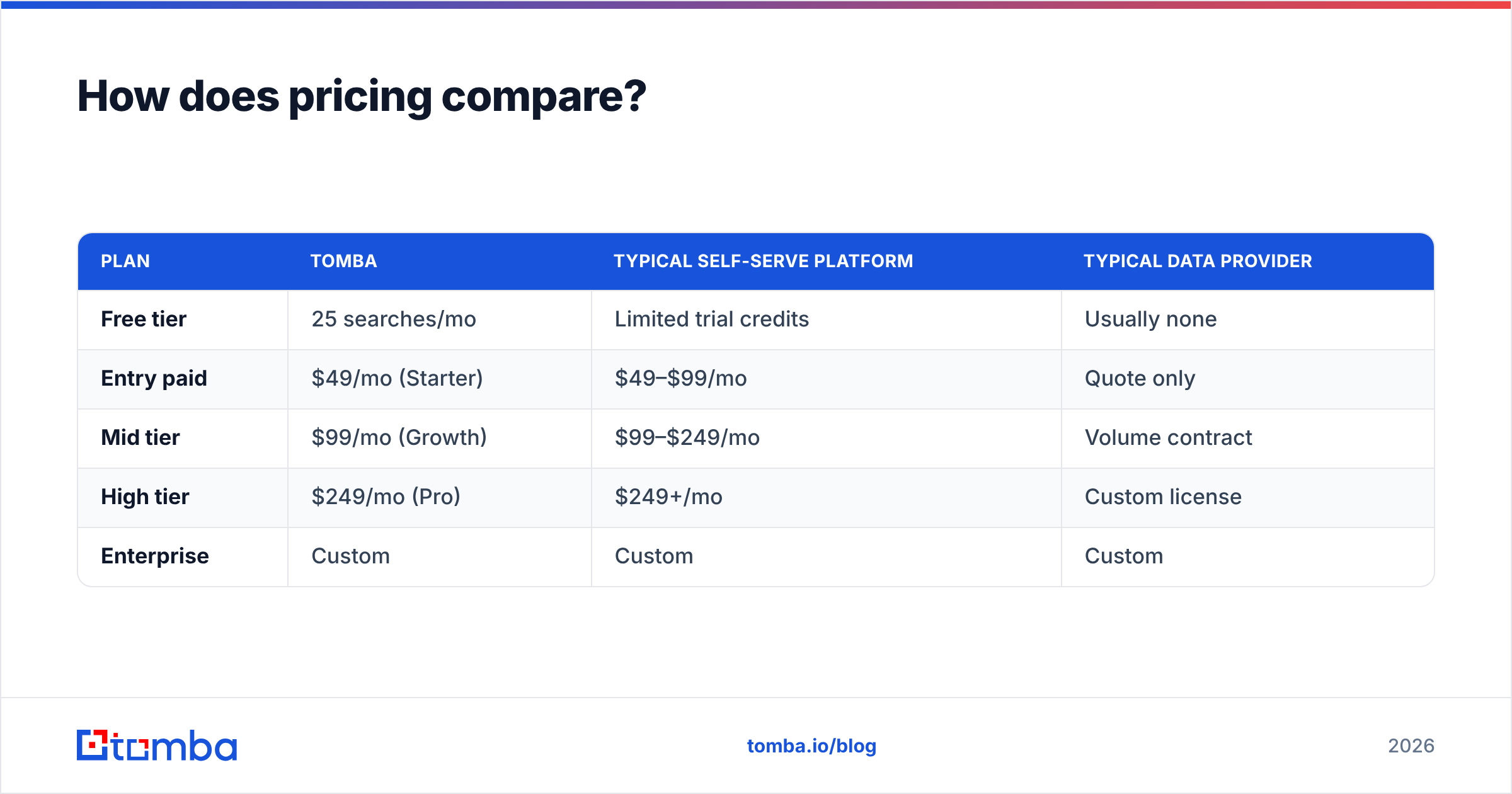
For reference, here's how a specialist email finder prices against that spectrum. Tomba's public pricing gives a concrete floor most bulk-data deals can't match on a per-contact basis:
| Plan | Tomba | Typical self-serve platform | Typical data provider |
|---|---|---|---|
| Free tier | 25 searches/mo | Limited trial credits | Usually none |
| Entry paid | $49/mo (Starter) | $49–$99/mo | Quote only |
| Mid tier | $99/mo (Growth) | $99–$249/mo | Volume contract |
| High tier | $249/mo (Pro) | $249+/mo | Custom license |
| Enterprise | Custom | Custom | Custom |
Two takeaways. First, if you need a predictable monthly cost for outreach, self-serve tiers (Cufinder or a specialist) beat quote-only licensing for planning. Second, if you buy on bulk volume, get the cost per verified contact, not cost per record — a cheap file with a 25% bounce rate is expensive once you price in the reputation damage.

When is a specialist email finder the better call?#
When your bottleneck is finding and verifying reach-out emails, not licensing an entire audience. Broad platforms bundle firmographics, intent, tech data, and dials — useful, but you pay for all of it even if you only need a valid email and a name.
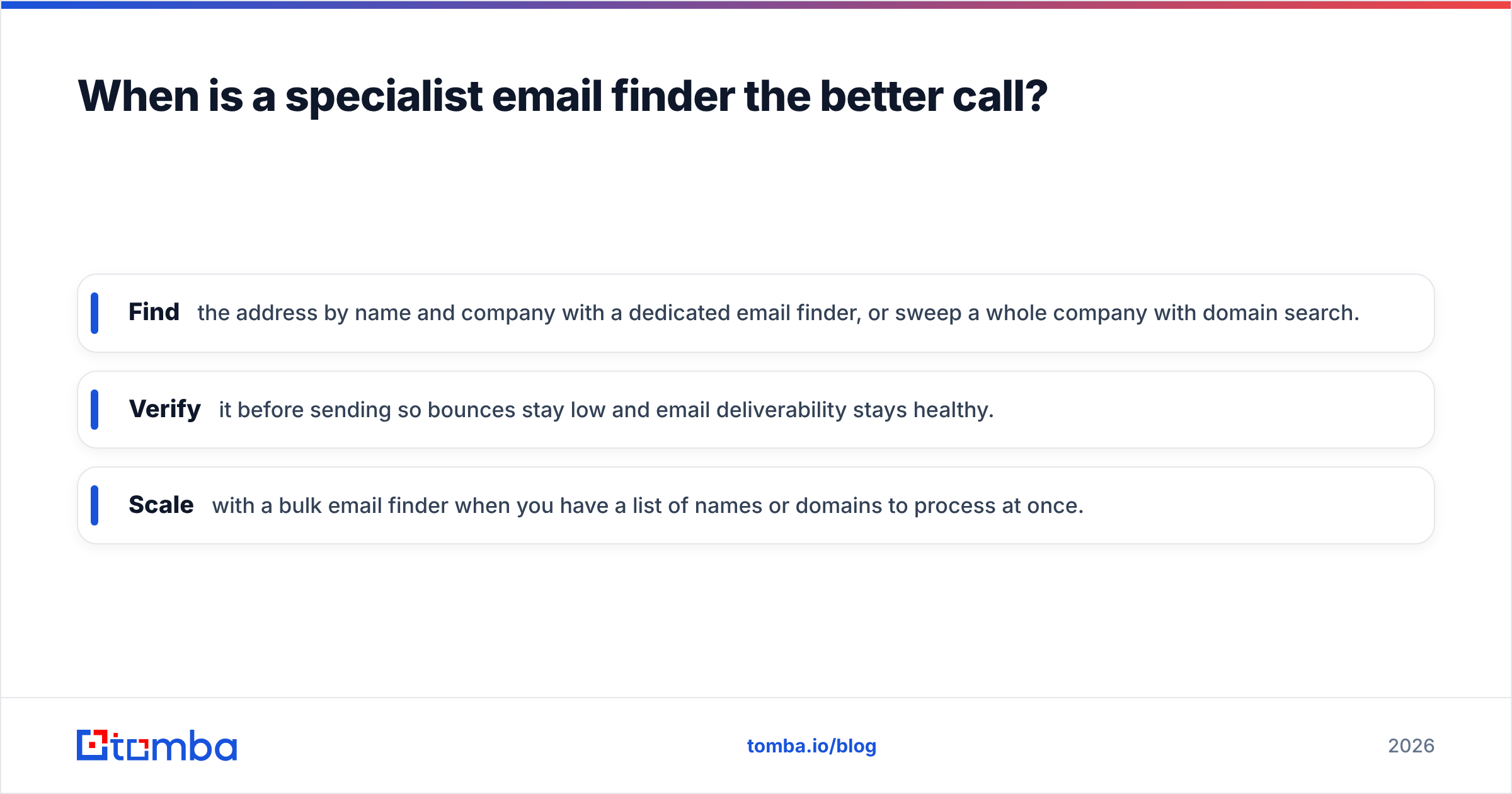
A focused workflow looks like this:
- Find the address by name and company with a dedicated email finder, or sweep a whole company with domain search.
- Verify it before sending so bounces stay low and email deliverability stays healthy.
- Scale with a bulk email finder when you have a list of names or domains to process at once.
This is where Tomba fits against both Cufinder and Salutary Data: it's the specialist layer. You're not buying a data warehouse — you're buying accurate, verified contact points at a low, predictable price. For calling teams, pairing it with a phone finder covers the multichannel gap without a separate bulk contract.
If you're specifically evaluating broader platforms, it's also worth checking neutral review aggregators like G2 for current user sentiment, and reading each vendor's own docs — Cufinder and Salutary Data — before you decide.
What about compliance and data hygiene?#
This is Salutary Data's strongest differentiator. If your legal or procurement team requires documented consent posture and reviewed sourcing — common for large marketing databases or regulated industries — Salutary's provider model is built around that expectation, and that reduces internal friction.
Cufinder handles standard B2B data compliance, but its self-serve nature puts more of the hygiene responsibility on you: you decide what to enrich, when to re-verify, and how to suppress stale records. Neither approach is wrong. The question is whether compliance review is a product feature you're paying for (Salutary) or a process you run yourself (Cufinder plus your own verification step).
Whichever you choose, re-verification cadence matters. B2B data decays fast — people change jobs constantly — so a record that was valid six months ago may not be today. Build a periodic re-check into your workflow regardless of vendor.
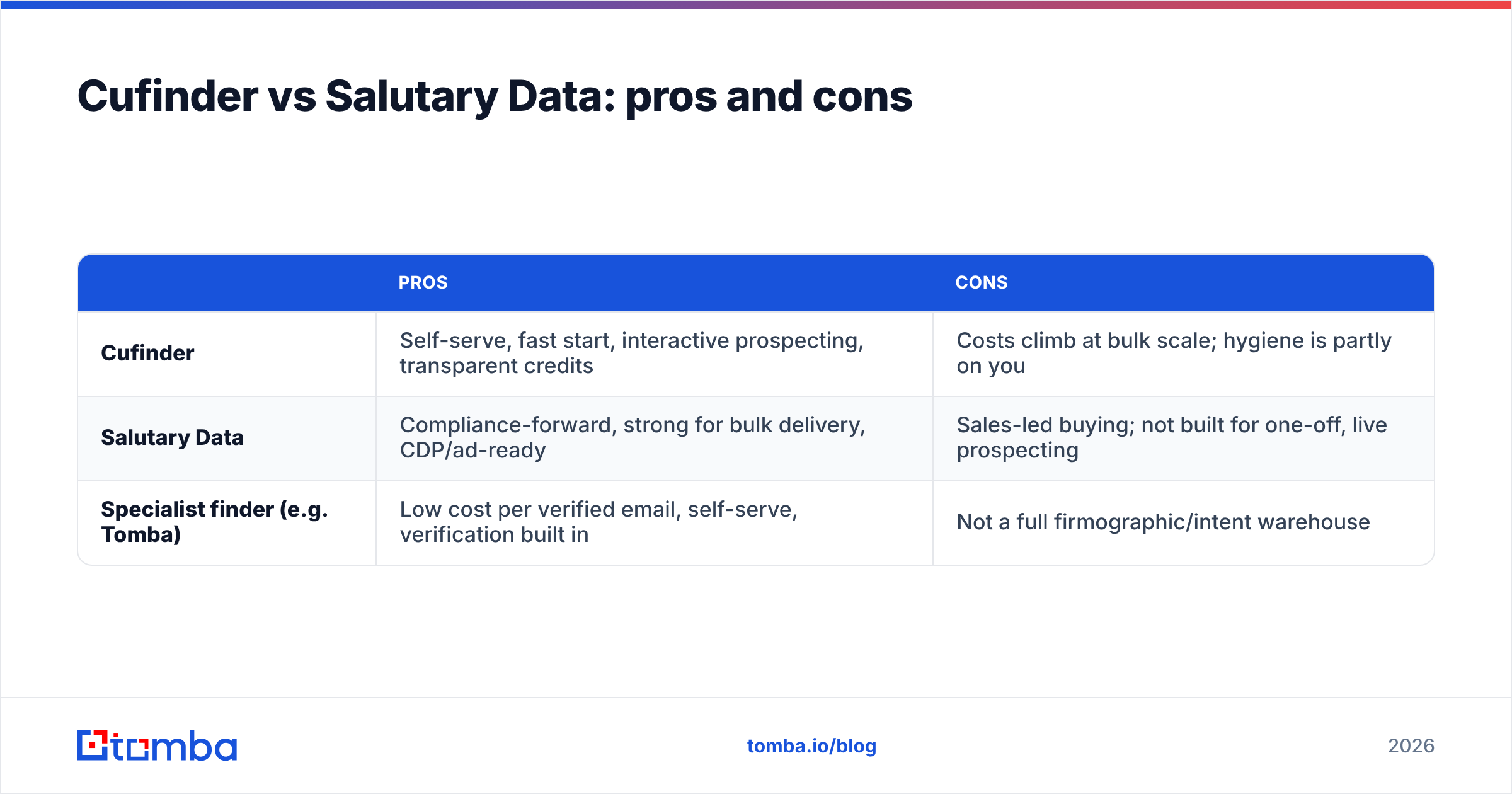
Cufinder vs Salutary Data: pros and cons#
| Pros | Cons | |
|---|---|---|
| Cufinder | Self-serve, fast start, interactive prospecting, transparent credits | Costs climb at bulk scale; hygiene is partly on you |
| Salutary Data | Compliance-forward, strong for bulk delivery, CDP/ad-ready | Sales-led buying; not built for one-off, live prospecting |
| Specialist finder (e.g. Tomba) | Low cost per verified email, self-serve, verification built in | Not a full firmographic/intent warehouse |
So which should you pick?#
Pick Cufinder if you're a rep or small growth team that wants to log in, build segments interactively, and enrich on the fly without a procurement cycle.
Pick Salutary Data if you're running high-volume marketing or feeding a CDP/ad platform and need compliance-reviewed audiences delivered in bulk.
Pick a specialist email finder if your actual job is verified outreach contacts at the lowest predictable cost — which, for most cold-email and SDR teams, is the real bottleneck. You can always layer firmographics on later; you can't un-burn a sending domain.
The honest answer is that many teams end up using two tools: a data source for breadth and a specialist for verified, send-ready emails. If that's you, start the specialist layer cheaply and prove the ROI before committing to any bulk contract.
Get accurate, verified emails without the bulk contract#
If cold outreach is where you actually spend your time, start with the tool built for exactly that. The Tomba Email Finder finds professional emails by name, company, or domain, verifies them before you send, and scales from a free 25-search tier to $49/mo Starter and up — no sales call, no annual lock-in. Test it on your own ICP, measure the valid rate against Cufinder or Salutary Data, and let the bounce numbers decide. Your sender reputation will thank you.
Related guides#
Ready to find emails that actually work?
Join 150,000+ professionals who stopped guessing and started sending. Free credits on signup — no credit card required.
Get the Tomba newsletter
Practical outbound tactics and product updates — once every two weeks.
About the author