Cufinder vs Spherescout: B2B Data & Email Finder Compared
Cufinder and Spherescout both promise accurate B2B contacts, but they solve different problems. Here's an honest head-to-head on data, pricing, and accuracy — plus where a leaner tool wins.
Choosing between Cufinder and Spherescout usually comes down to one question your finance team will ask later: did you pay for verified contacts, or for a big number on a dashboard? Both tools sell B2B contact discovery. Both claim high match rates. But they aim at different buyers, and the gap shows up fast once your bounce rate report lands.
This is a neutral, hands-on comparison — not a sales page for either. We'll break down data coverage, accuracy, pricing, and workflow fit, then show where a focused email finder like Tomba beats both on cost-per-verified-contact.
TL;DR: Cufinder vs Spherescout at a glance#
- Cufinder is a broad B2B data and enrichment suite — company data, contact lists, and API enrichment. Good coverage, but you pay for breadth you may not use.
- Spherescout leans toward prospecting and email discovery with a lighter footprint — faster to learn, thinner on firmographic depth.
- Accuracy is the real battleground. Neither tool verifies every address by default, so catch-all and stale-data risk is on you.
- Pricing favors the buyer who scopes narrowly. Suite pricing punishes small teams that only need emails.
- The honest pick: if your job is "find and verify professional emails at scale without overpaying," a dedicated email finder with a real verifier attached is cheaper and cleaner than either suite.
What is Cufinder?#
Cufinder positions itself as an all-in-one B2B data platform: company search, contact enrichment, and a bulk API for pushing firmographic and contact fields into your CRM. Think of it less as a single tool and more as a data warehouse with a search box on top. You look up a company, and it returns the org profile plus associated contacts and attributes.
That breadth is the selling point and the tax. If you run account-based motions and genuinely consume company technographics, headcount bands, and industry codes, the depth earns its keep. If you just need a verified email for a named prospect, you're renting a warehouse to store one box.
Cufinder's enrichment API is its strongest lane — it's built for teams wiring data into data enrichment pipelines rather than clicking around a UI. The trade-off is that enrichment volume gets expensive quickly, and the "contacts found" count includes records you'll still need to verify before sending.
What is Spherescout?#
Spherescout is the lighter, prospecting-first option. It focuses on finding decision-makers and their emails, with a simpler interface aimed at SDRs and founders doing their own outbound. Onboarding is faster, the learning curve is shallower, and for straightforward "find the VP of Sales at this company" tasks it does the job.
Where it gets thin is firmographic depth and enterprise-grade enrichment. Spherescout is a scout, not a warehouse — it points you at people, but it won't hand you the same volume of structured company attributes Cufinder does. For many outbound teams that's fine; you don't need 40 firmographic fields to write a good first line. But if your RevOps team wants everything normalized into the CRM, you'll feel the ceiling.

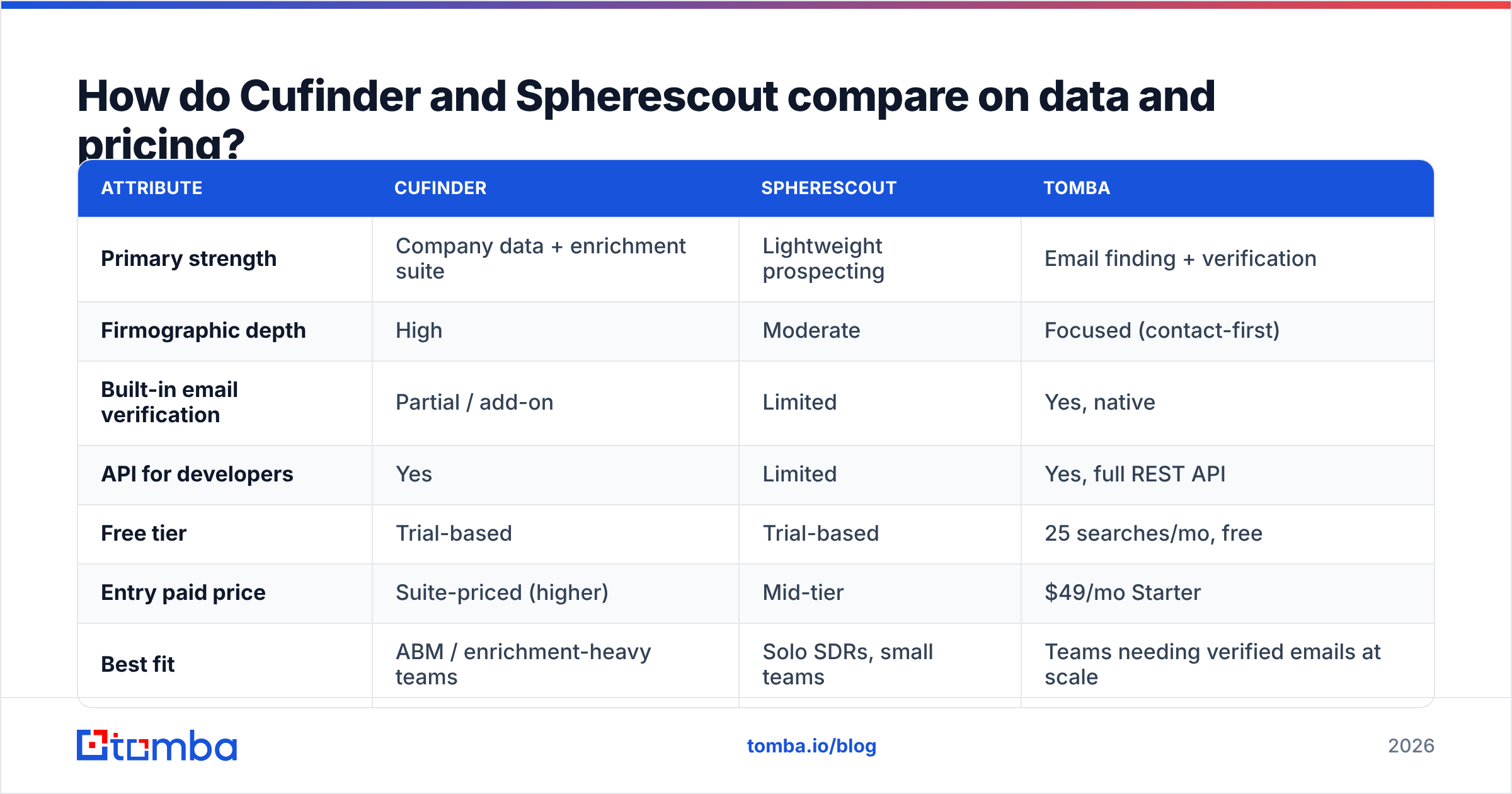
How do Cufinder and Spherescout compare on data and pricing?#
Here's the honest side-by-side. Figures for third-party tools move over time — always confirm current numbers on each vendor's own pricing page before you buy — but the shape of the trade-off is stable.
| Attribute | Cufinder | Spherescout | Tomba |
|---|---|---|---|
| Primary strength | Company data + enrichment suite | Lightweight prospecting | Email finding + verification |
| Firmographic depth | High | Moderate | Focused (contact-first) |
| Built-in email verification | Partial / add-on | Limited | Yes, native |
| API for developers | Yes | Limited | Yes, full REST API |
| Free tier | Trial-based | Trial-based | 25 searches/mo, free |
| Entry paid price | Suite-priced (higher) | Mid-tier | $49/mo Starter |
| Best fit | ABM / enrichment-heavy teams | Solo SDRs, small teams | Teams needing verified emails at scale |
Two things jump out. First, both competitors bundle discovery and enrichment in a way that pushes your entry cost up, even if you only need part of the stack. Second, verification — the step that actually protects your sender reputation — is treated as a secondary feature rather than a core guarantee. That's the crack a focused tool exploits.
You can compare a fully itemized breakdown against the transparent Tomba pricing tiers, where Starter is $49/mo, Growth is $99/mo, and Pro is $249/mo — no "contact us to see the number" wall on the plans most teams actually use.
Which tool is more accurate?#
Accuracy is where marketing copy and inbox reality part ways. Every provider quotes a headline match rate. What matters is the verified deliverability of the emails you actually export — and that number is almost always lower than the headline.

Three failure modes quietly inflate a tool's "found" count:
- Catch-all domains. A server that accepts every address returns a "valid" signal without confirming the mailbox exists. Tools that don't run a dedicated catch-all check will hand you these as clean. They're not.
- Stale records. People change jobs every few years. A contact "found" from a two-year-old crawl may bounce today. Coverage age matters as much as coverage size.
- Guessed permutations. Some finders generate
first.last@domainpatterns and mark them found without SMTP confirmation. That's a coin flip dressed up as data.
This is why pairing discovery with a real email verifier is non-negotiable. Cufinder and Spherescout both surface contacts, but if verification is an add-on or an afterthought, you inherit the bounce risk. A tool that verifies natively — including a proper catch-all verifier — keeps that risk off your domain before you ever hit send.

For a deeper look at how providers source and refresh records, most vendors publish a data-methodology page; Tomba documents its data sources openly, which is a useful bar to hold any competitor to.
Cufinder vs Spherescout: which should you choose?#
Match the tool to the job, not the hype:
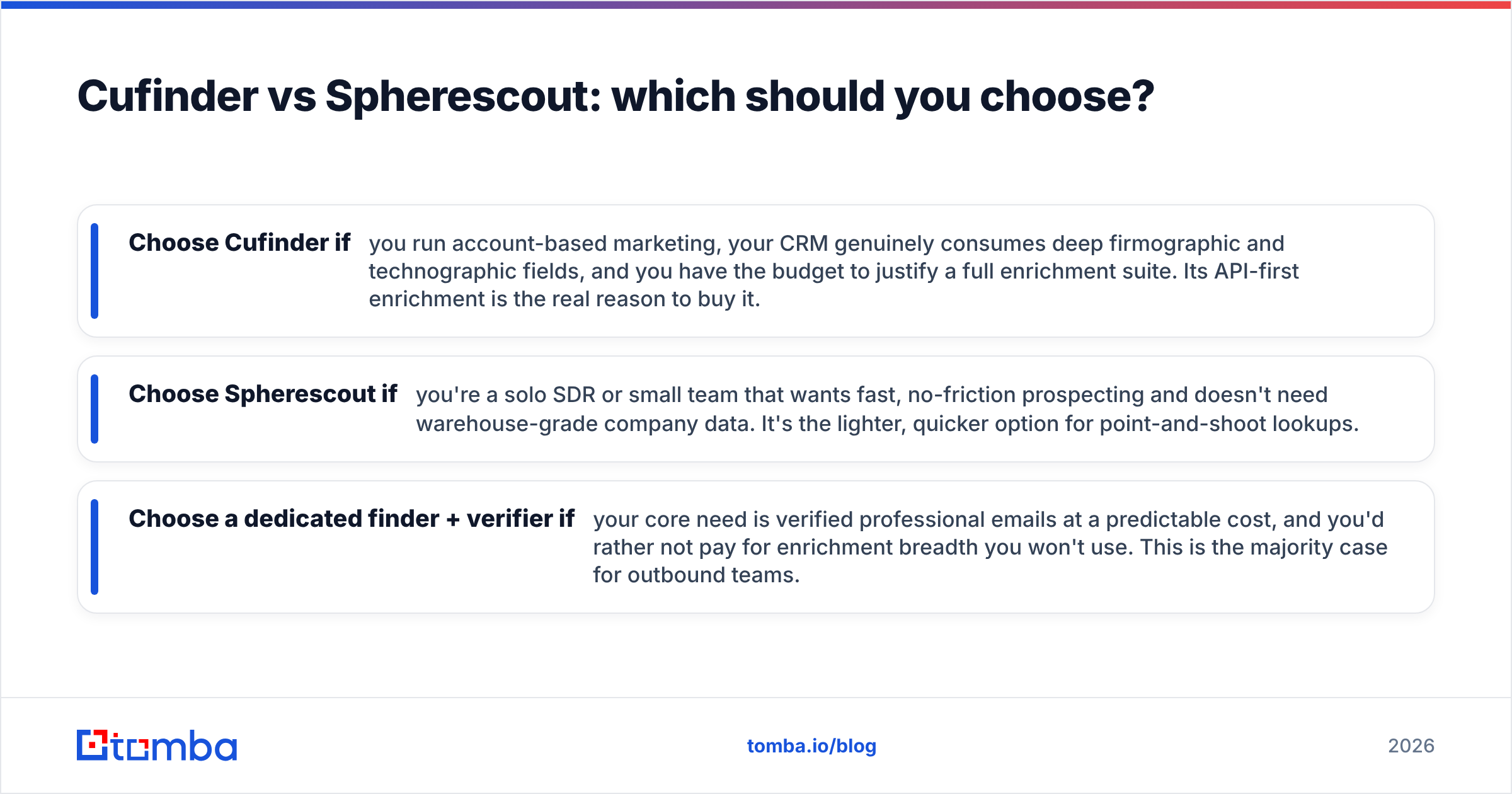
- Choose Cufinder if you run account-based marketing, your CRM genuinely consumes deep firmographic and technographic fields, and you have the budget to justify a full enrichment suite. Its API-first enrichment is the real reason to buy it.
- Choose Spherescout if you're a solo SDR or small team that wants fast, no-friction prospecting and doesn't need warehouse-grade company data. It's the lighter, quicker option for point-and-shoot lookups.
- Choose a dedicated finder + verifier if your core need is verified professional emails at a predictable cost, and you'd rather not pay for enrichment breadth you won't use. This is the majority case for outbound teams.
The uncomfortable truth is that many teams buy a full suite to solve a narrow problem, then discover their real bottleneck was deliverability all along. Deliverability is a verification problem, not a coverage problem — and it's cheaper to solve directly.
Where does Tomba fit against both?#
Tomba is deliberately narrower than Cufinder and lighter to operate than a sprawling suite, while going deeper on the one thing that determines cold-email success: verified, deliverable contacts.
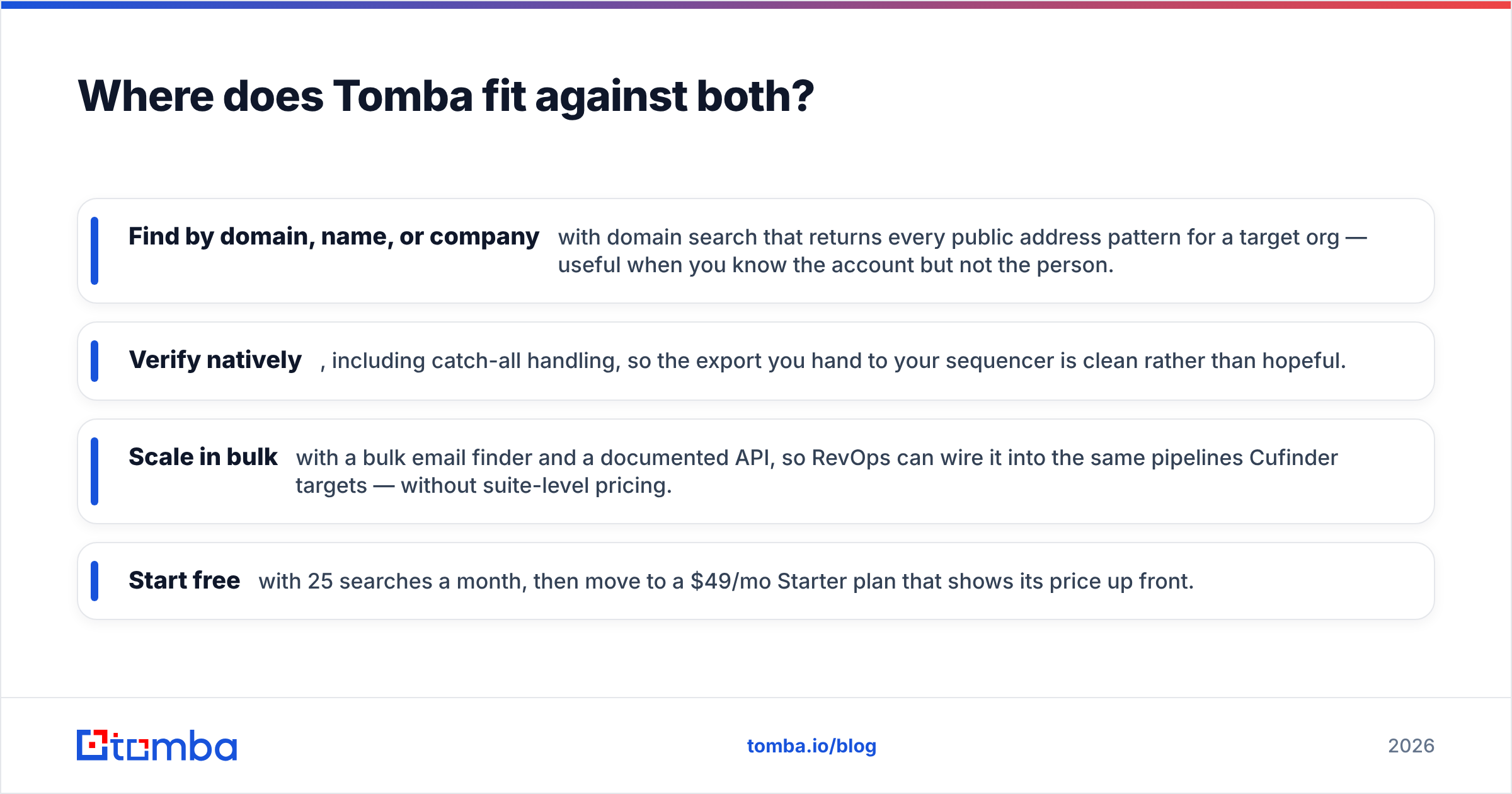
- Find by domain, name, or company with domain search that returns every public address pattern for a target org — useful when you know the account but not the person.
- Verify natively, including catch-all handling, so the export you hand to your sequencer is clean rather than hopeful.
- Scale in bulk with a bulk email finder and a documented API, so RevOps can wire it into the same pipelines Cufinder targets — without suite-level pricing.
- Start free with 25 searches a month, then move to a $49/mo Starter plan that shows its price up front.
You still get real B2B coverage through the Tomba contact database, but the design bias is toward deliverable over voluminous. For most outbound and lead-gen teams, cost-per-verified-contact — not raw records found — is the number that decides ROI, and that's where a focused tool wins.
If you want an independent benchmark of how the major finders stack up on accuracy and price, industry review sites like G2 and vendor documentation from platforms such as HubSpot are good neutral references to cross-check any vendor's self-reported claims. Wikipedia's overview of email verification concepts is also a decent primer on why SMTP-level checks matter.
Frequently asked questions#
Is Cufinder better than Spherescout? Not universally. Cufinder is stronger for enrichment-heavy, account-based teams that consume deep firmographic data. Spherescout is better for solo SDRs and small teams that want fast, lightweight prospecting. "Better" depends entirely on whether you need warehouse-grade data or just verified emails.
Do either of these tools verify emails automatically? Verification is partial or add-on with both, rather than a core guarantee. If your priority is protecting sender reputation, confirm exactly what level of SMTP and catch-all checking is included before you commit — or pair discovery with a dedicated verifier.
What's the cheapest way to get verified B2B emails? Scope narrowly. A focused email finder with native verification, like Tomba's $49/mo Starter plan (or its free 25-search tier), typically costs less per verified contact than a full data suite you only partly use.
Can I use these tools with my CRM? Cufinder offers strong API enrichment for CRM pipelines; Spherescout's integration surface is lighter. Tomba provides a full REST API plus native integrations if you need programmatic access without suite pricing.
The bottom line#
Cufinder and Spherescout aren't really competitors so much as two answers to different questions. Cufinder answers "I need a deep B2B data warehouse with enrichment." Spherescout answers "I need to prospect fast without a learning curve." Both leave verification as a loose end you have to tie off yourself.
If your actual goal is verified emails that land — at a price you can defend on a spreadsheet — start with a tool built for exactly that. Try the Tomba Email Finder free for 25 searches, verify every address before you send, and measure your cost per deliverable contact instead of your cost per record found. That's the number that pays your pipeline.
Related guides#
Ready to find emails that actually work?
Join 150,000+ professionals who stopped guessing and started sending. Free credits on signup — no credit card required.
Get the Tomba newsletter
Practical outbound tactics and product updates — once every two weeks.
About the author