Cufinder vs Techsalerator (2026): B2B Data Compared
Choosing between Cufinder and Techsalerator? We break down data accuracy, pricing, coverage, and real use cases so you can pick the B2B data tool that actually fits your pipeline.
TL;DR
- Cufinder is a self-serve lead-generation and enrichment suite built around a searchable company/contact database and a Chrome extension — good for reps who want to prospect inside a UI.
- Techsalerator is a bulk B2B/B2C data vendor that sells large custom datasets and firmographic files — good for teams buying data in volume for analytics or list-building.
- They solve different problems: Cufinder is closer to a prospecting tool, Techsalerator is closer to a data broker. Pick by workflow, not by feature-count.
- Neither is a pure real-time email-verification engine. If email accuracy is your bottleneck, pair either one with a dedicated email verifier.
- If your core need is finding and verifying professional emails on demand — by name, domain, or company — a focused tool like Tomba often beats a broad data marketplace on cost-per-valid-contact.
Who are Cufinder and Techsalerator?#
Short answer: both sell B2B contact data, but they package it in almost opposite ways.
Cufinder positions itself as an all-in-one lead-generation platform. You search a database of companies and people, enrich existing records, and export contacts — mostly through a web app and a browser extension. It's aimed at SDRs, recruiters, and small marketing teams who want to build lists without touching an API. Think of it as a self-checkout: you walk the aisles, grab what you need, and leave.
Techsalerator is more like a wholesale supplier. It's a data vendor that sells large B2B and B2C datasets — firmographics, contact lists, sometimes consumer and location data — often as custom-scoped deliveries or files. Instead of browsing a UI record-by-record, you tell them the segment you want (industry, geography, company size) and buy the dataset. That model suits data teams, agencies, and analysts feeding a warehouse or a large outbound machine.
The practical takeaway: if you picture yourself clicking through profiles, Cufinder fits. If you picture yourself loading a CSV of 50,000 accounts into a CRM or BI tool, Techsalerator's model fits.

Cufinder vs Techsalerator: side-by-side comparison#
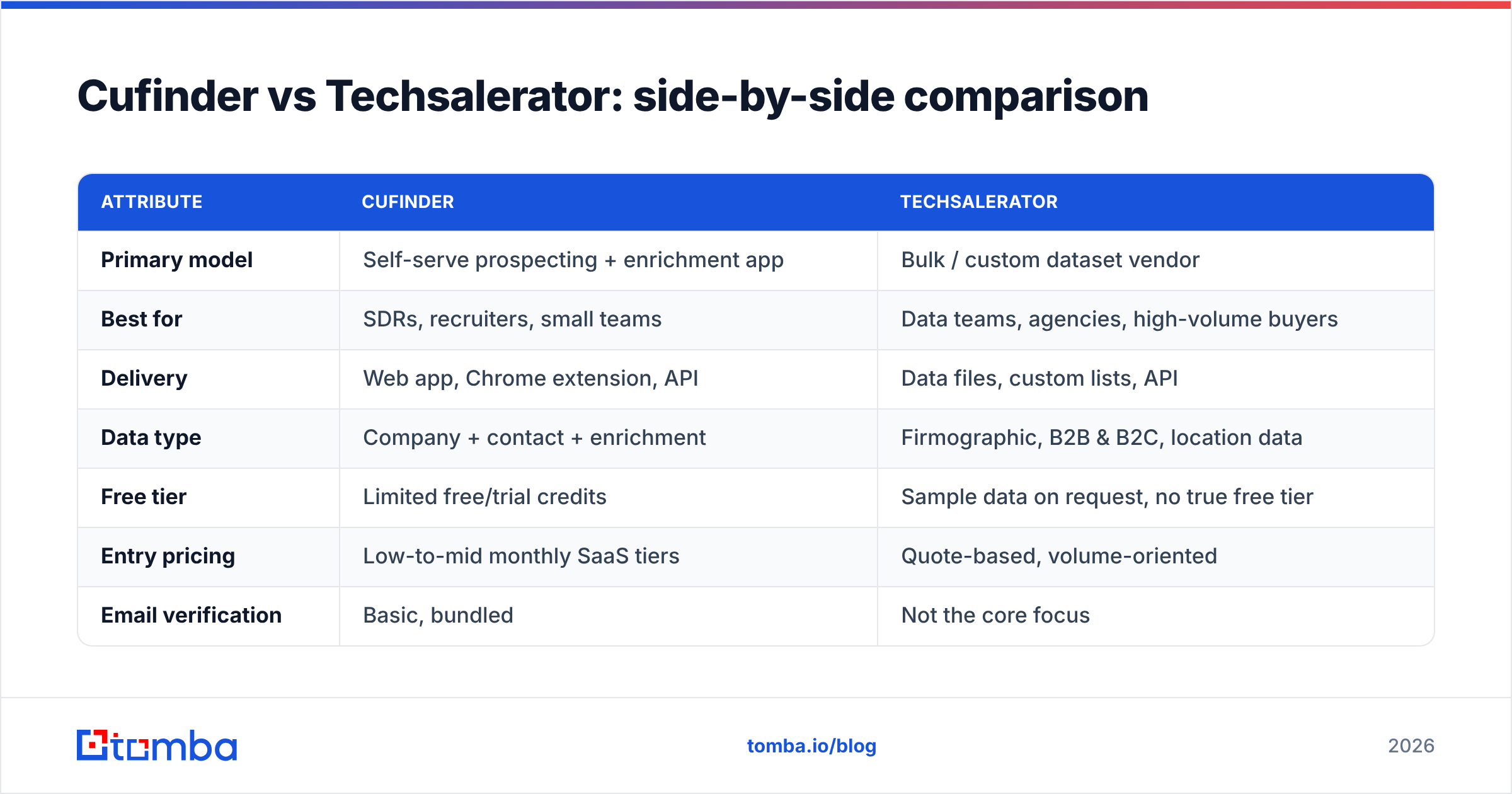
Here's the head-to-head on the attributes that actually change your buying decision. Exact pricing for both moves and is often quote-based, so treat the pricing row as directional and confirm on their sites.
| Attribute | Cufinder | Techsalerator |
|---|---|---|
| Primary model | Self-serve prospecting + enrichment app | Bulk / custom dataset vendor |
| Best for | SDRs, recruiters, small teams | Data teams, agencies, high-volume buyers |
| Delivery | Web app, Chrome extension, API | Data files, custom lists, API |
| Data type | Company + contact + enrichment | Firmographic, B2B & B2C, location data |
| Free tier | Limited free/trial credits | Sample data on request, no true free tier |
| Entry pricing | Low-to-mid monthly SaaS tiers | Quote-based, volume-oriented |
| Email verification | Basic, bundled | Not the core focus |
| Learning curve | Low — point and click | Medium — you scope and buy segments |
| Real-time single lookups | Yes | Limited — built for volume |
Two honest caveats. First, "database size" numbers from any vendor — Cufinder, Techsalerator, or anyone else — are marketing figures, not a promise about your niche. A provider can claim hundreds of millions of records and still be thin in, say, German manufacturing or LATAM fintech. Second, bundled email verification is not the same as dedicated verification. Bundled checks catch obvious junk; they rarely test catch-all domains or SMTP-level deliverability the way a purpose-built tool does.
Which one is more accurate?#
Conclusion first: accuracy depends less on the brand and more on how fresh the underlying data is and whether you verify at the point of use.
Both providers aggregate data from public sources, partners, and their own crawling. That means both will hand you some stale records — people who changed jobs, emails that bounce, phone numbers that ring dead. This isn't a knock on either company; it's the nature of B2B data. Contact data decays roughly 2–3% per month, so any dataset older than a quarter is meaningfully degraded before you send a single email.

The difference shows up in workflow:
- Cufinder verifies at the moment you pull a record, so a single lookup is reasonably current — but bulk exports can still age on your disk.
- Techsalerator ships larger files, which are efficient but "snapshot" the data at delivery time. A 40,000-row list is only as good as the day it was cut.
- Neither replaces a live verification step before a campaign. This is the single biggest lever most teams ignore.
The reliable pattern, regardless of which vendor you choose: source the contact, then run it through a dedicated email verifier right before you send. If you buy in bulk, use a bulk verify pass on the whole list. And if a chunk of your targets sit on catch-all domains — common in enterprise — a catch-all verifier is the only way to separate "might deliver" from "will bounce." That verification layer matters more to your bounce rate than the choice between these two vendors.
For a deeper primer on why messages land or don't, the concept of email deliverability is worth understanding before you scale any list.
How does pricing compare?#
Short version: Cufinder is predictable monthly SaaS; Techsalerator is closer to enterprise procurement.
Cufinder uses tiered subscriptions with credit allowances — you know your monthly bill, and you scale by upgrading tiers. That predictability is friendly for a solo rep or a small team that wants to start today without a sales call.
Techsalerator is typically quote-based and volume-oriented. You're buying a dataset or an ongoing feed, and the price scales with how much data and how much customization you need. That's efficient at scale but slower to start — you talk to sales, scope the segment, and negotiate.
To put both in context against a focused email-finding tool, here's how transparent, published pricing looks:
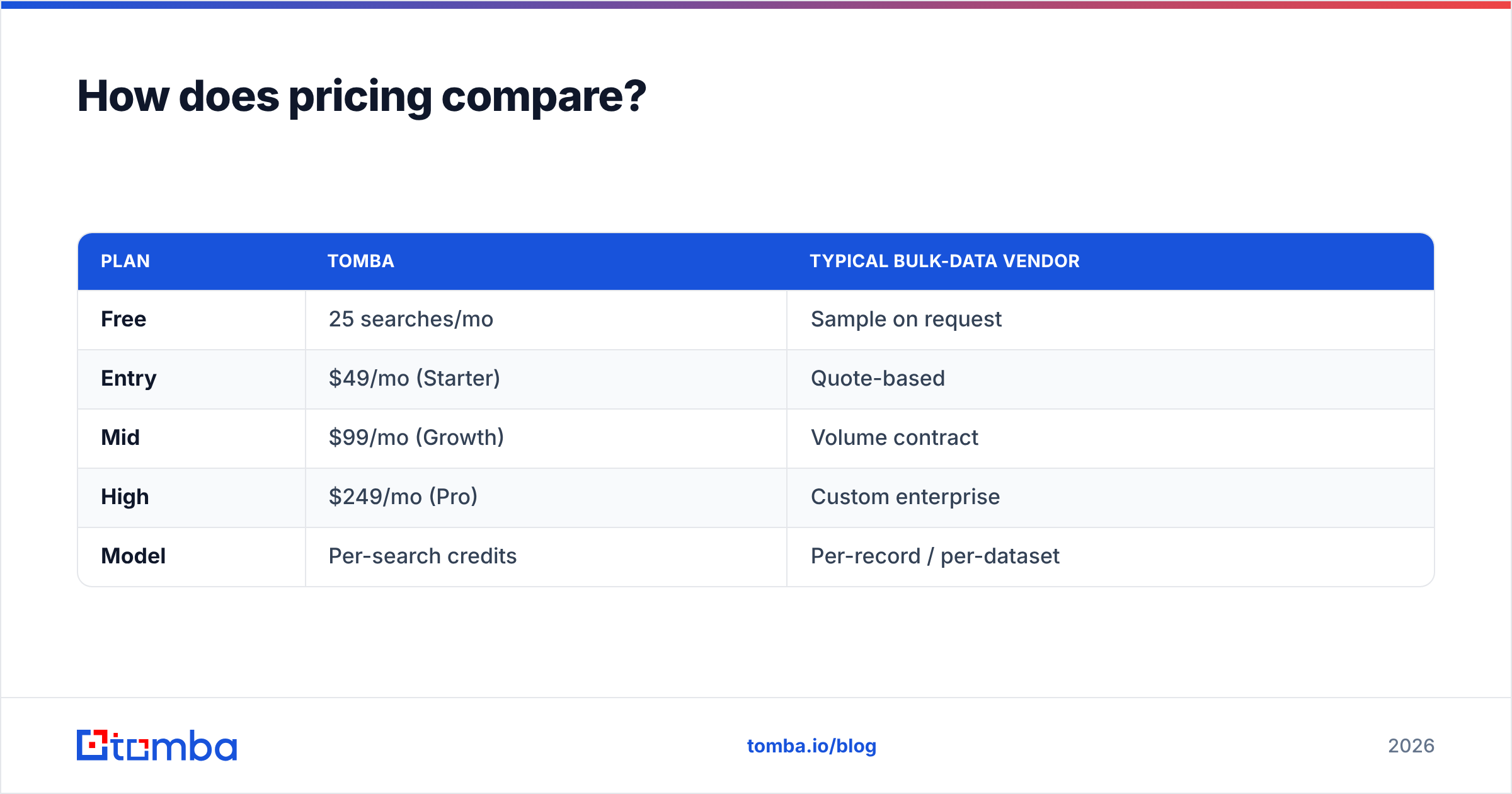
| Plan | Tomba | Typical bulk-data vendor |
|---|---|---|
| Free | 25 searches/mo | Sample on request |
| Entry | $49/mo (Starter) | Quote-based |
| Mid | $99/mo (Growth) | Volume contract |
| High | $249/mo (Pro) | Custom enterprise |
| Model | Per-search credits | Per-record / per-dataset |
You can see full Tomba pricing if you want the exact credit math. The point of the table isn't "Tomba is cheapest" in every scenario — it's that per-search SaaS pricing and per-dataset wholesale pricing optimize for different buyers. If you need 300 verified emails this week, credits win. If you need a 100,000-row market map for a data warehouse, a dataset contract wins.

What are the real use cases for each?#
Match the tool to the job, not the other way around.
Choose Cufinder when:
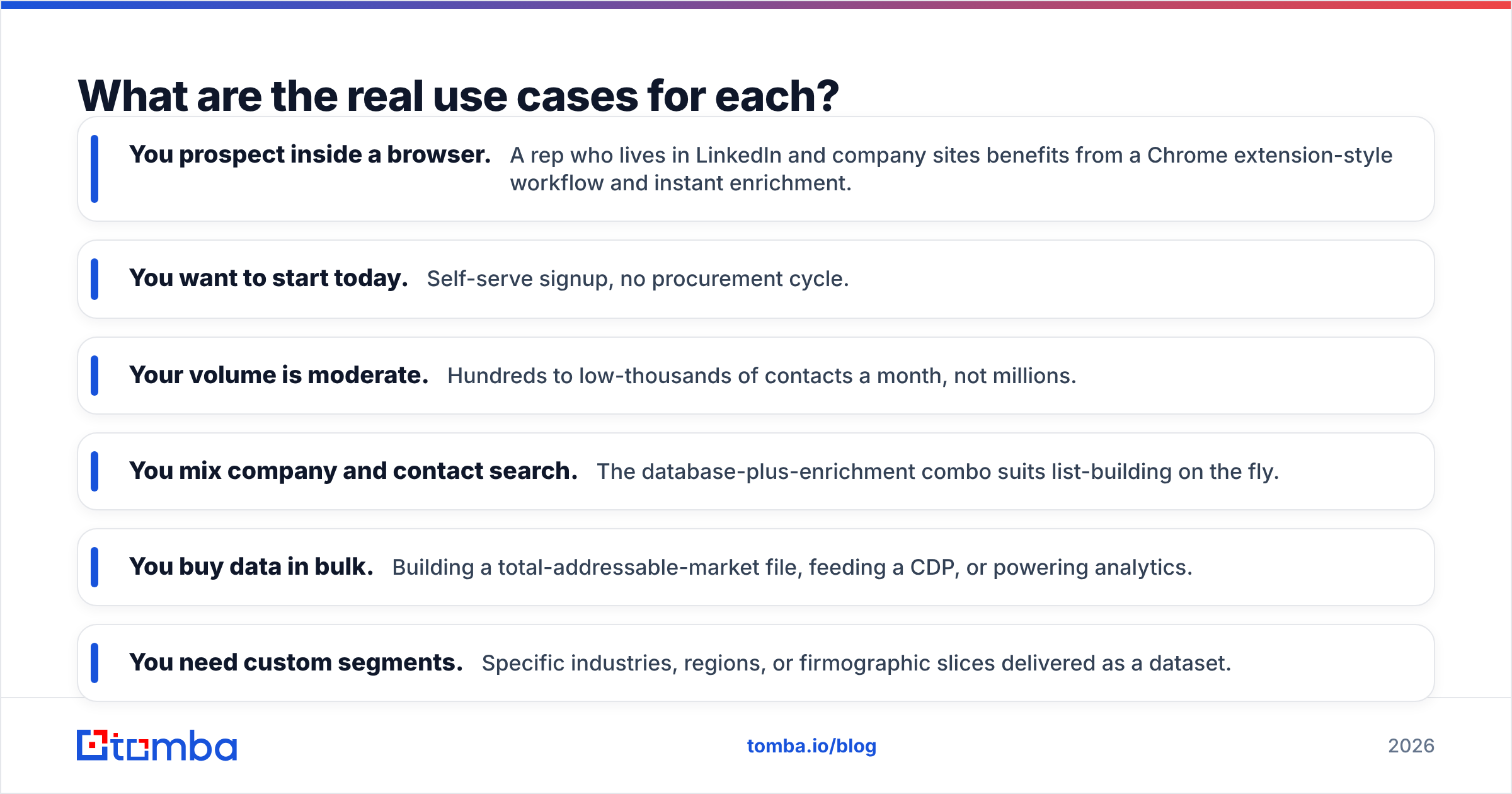
- You prospect inside a browser. A rep who lives in LinkedIn and company sites benefits from a Chrome extension-style workflow and instant enrichment.
- You want to start today. Self-serve signup, no procurement cycle.
- Your volume is moderate. Hundreds to low-thousands of contacts a month, not millions.
- You mix company and contact search. The database-plus-enrichment combo suits list-building on the fly.
Choose Techsalerator when:
- You buy data in bulk. Building a total-addressable-market file, feeding a CDP, or powering analytics.
- You need custom segments. Specific industries, regions, or firmographic slices delivered as a dataset.
- You have engineering support. Someone to load, dedupe, and maintain large files or a feed.
- B2C or location data matters. Techsalerator's catalog reaches beyond pure B2B in some segments.
Choose a focused email finder (like Tomba) when:
- Your bottleneck is valid emails, not raw records. You already know who to reach; you need how to reach them, verified.
- You want an email finder API to enrich records programmatically inside your own app or CRM.
- You run domain search to pull every contact at a target company by domain.
These aren't mutually exclusive. A common, effective stack is: buy a firmographic base from a bulk vendor, then use a dedicated finder-and-verifier to fill and validate the contact layer. That way you're not paying wholesale prices for verification you'd redo anyway.
What about phone numbers and enrichment?#
Both vendors offer more than email, and this is where "all-in-one" claims deserve scrutiny.
Cufinder bundles enrichment and some phone data into its platform, which is convenient. Techsalerator, being a broader data vendor, can supply phone and additional attributes as part of a dataset. In both cases, phone data quality varies wildly by geography — direct dials for US tech companies are far more available than, say, mobile numbers for European SMBs, where privacy regulation limits what any vendor can legally hold.
If dialing is central to your motion, validate numbers the same way you'd validate emails. A phone validator confirms a number is live and correctly formatted before your reps waste an afternoon on disconnected lines, and a dedicated phone finder can fill gaps the primary vendor misses. Treat phone as a separate quality problem from email — a dataset that's strong on firmographics can be weak on direct dials, and vice versa.
On enrichment specifically, ask each vendor what fields they refresh and how often. "500 million records" tells you nothing about whether the job title field — the one that decides your targeting — was updated this year or scraped in 2023.
Is there a simpler alternative to both?#
Depends on what you're actually trying to do. If your goal is a large, custom market dataset, no email-finder replaces a bulk vendor like Techsalerator, and that's fine. But a large share of teams evaluating "Cufinder vs Techsalerator" don't need a data warehouse — they need verified emails for outreach, and they're comparing two heavyweight platforms out of habit.
For that job, a focused tool is often faster and cheaper per valid contact:
- Find email addresses by name + company or in bulk, with verification built into the same step rather than bolted on.
- Pull whole companies with company email search instead of buying a broad list and hoping the domains match your targets.
- Verify before you send so your sender reputation survives contact with a real inbox provider.
- Stay on published pricing — no procurement call to get started, no surprise per-record math.
You don't have to choose ideologically. Plenty of GTM teams run a bulk vendor for account data and a finder for the contact-and-verify layer, and the combined cost is lower than forcing one tool to do both jobs badly. For the vendor-neutral view on how these platforms stack up across the market, third-party review sites like G2 and Capterra are worth a scan before you commit — read the 3-star reviews, not the 5-star ones, since that's where data-quality complaints surface.
The verdict#
There's no universal winner between Cufinder and Techsalerator — there's a winner for your workflow.
- Pick Cufinder if you want a self-serve prospecting app your reps can use today without a procurement cycle.
- Pick Techsalerator if you're buying B2B/B2C data in volume and have the engineering muscle to load and maintain it.
- Pick a dedicated finder-and-verifier if verified emails — not raw records — are the thing standing between you and a full pipeline.
Whatever you choose, the rule that beats every vendor comparison is this: verify contacts at the moment you use them. A fresh, verified list from a "smaller" tool outperforms a stale export from a bigger one every time.
Ready to stop paying for records you'll have to re-verify anyway? Start with the Tomba Email Finder — find professional emails by name, domain, or company, with verification built in and 25 free searches a month to test it against your real target accounts. Pair it with your bulk data source and you get the coverage of a marketplace with the accuracy of a purpose-built tool.
Related guides#
Ready to find emails that actually work?
Join 150,000+ professionals who stopped guessing and started sending. Free credits on signup — no credit card required.
Get the Tomba newsletter
Practical outbound tactics and product updates — once every two weeks.
About the author