Cufinder vs Trueverify (2026): Which Email Tool Wins?
Cufinder finds and enriches B2B contacts; Trueverify cleans your list. We compare accuracy, pricing, and use cases so you know which one your pipeline actually needs in 2026.
Picking between Cufinder and Trueverify feels like a head-to-head, but it usually isn't one. They solve two different halves of the same problem: Cufinder finds and enriches contacts, Trueverify cleans the emails you already have. This guide breaks down where each one earns its price, where the overlap is thin, and when a single combined finder-plus-verifier makes more sense than running two subscriptions.
TL;DR#
- Cufinder is a B2B data and enrichment platform — email/phone lookup, company data, and list building. Buy it when your problem is finding contacts.
- Trueverify is an email verification tool — syntax, MX, and mailbox checks that scrub bad addresses. Buy it when your problem is a dirty list.
- They are complements, not rivals. Using one does not remove the need for the other.
- Running two tools means two bills, two data models, and a manual export/import handoff between them.
- If you want find and verify in one place with transparent pricing, a combined platform like Tomba is usually cheaper and less fragile than stitching Cufinder to Trueverify.
What is Cufinder and what does it actually do?#
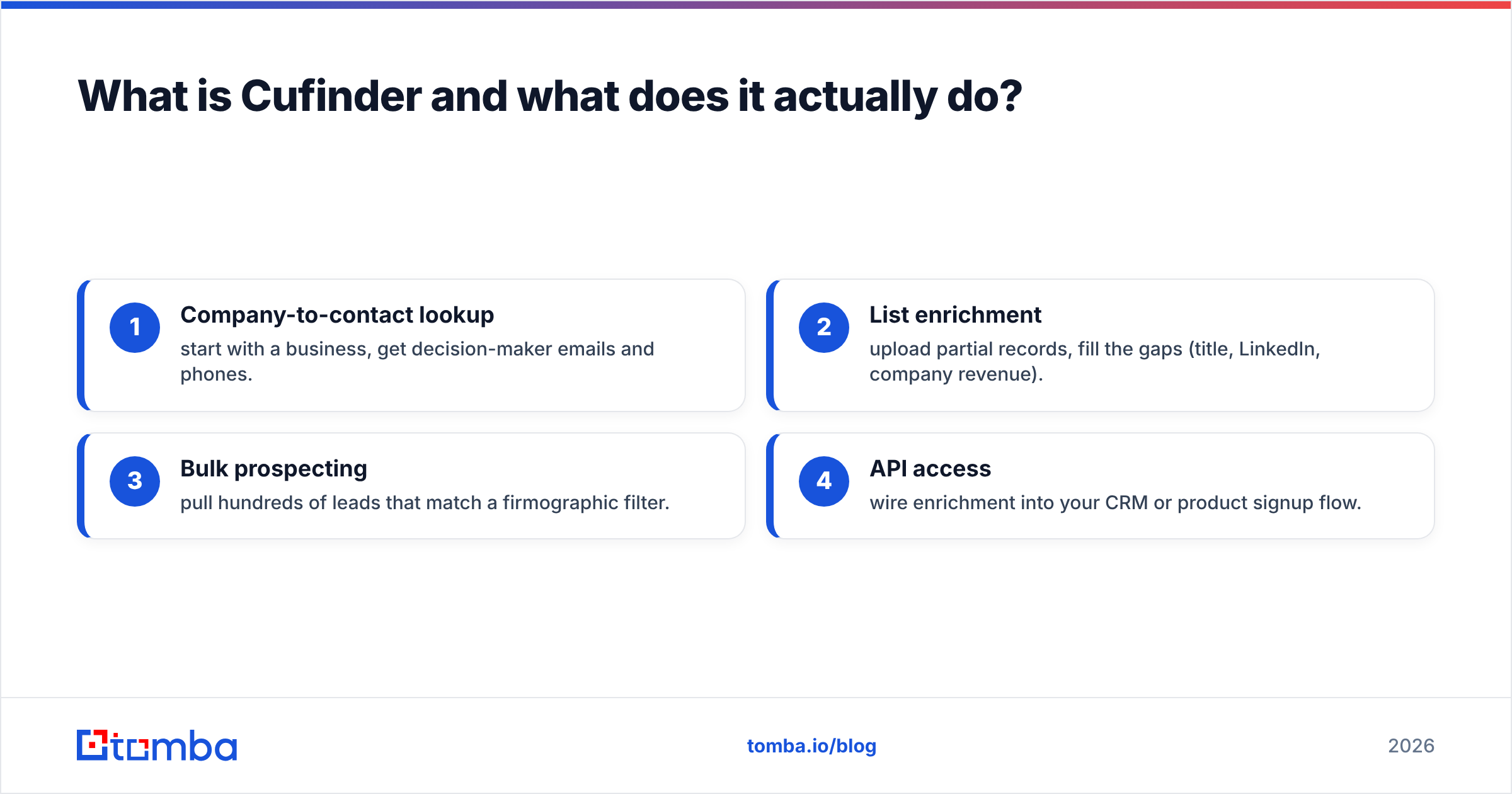
Cufinder is a B2B lead-generation and enrichment engine. You feed it a domain, a company name, or a person, and it returns emails, phone numbers, and firmographic data (industry, size, tech stack, social profiles). Its pitch is breadth: a large database plus enrichment APIs so you can turn a thin list of company names into a full contact record.
The core jobs Cufinder is built for:
- Company-to-contact lookup — start with a business, get decision-maker emails and phones.
- List enrichment — upload partial records, fill the gaps (title, LinkedIn, company revenue).
- Bulk prospecting — pull hundreds of leads that match a firmographic filter.
- API access — wire enrichment into your CRM or product signup flow.
What Cufinder is not built to be is a deliverability gatekeeper. It surfaces emails; it does not deeply scrub them to a mailbox-level SMTP guarantee the way a dedicated verifier does. That's the gap Trueverify fills. You can read Cufinder's own feature list on cufinder.io and cross-check user sentiment on G2.

What is Trueverify and when do you need it?#
Trueverify is an email verification service. Its entire job is answering one question: will this email bounce if I send to it? It runs a chain of checks — syntax validation, domain and MX record lookup, disposable/role-account detection, and SMTP mailbox probing — then tags each address as valid, invalid, risky, or unknown.
You need a verifier like Trueverify when:
- You bought or scraped a list and don't trust it.
- Your bounce rate is creeping past 2–3% and your sender reputation is at risk.
- You're importing old CRM contacts and want to re-validate before a campaign.
- You send high volume and every bounce is a hit to email deliverability.
Here's the honest limitation: a verifier can only check emails you already have. It generates zero new leads. If your list is empty, Trueverify has nothing to do. That's why comparing it against Cufinder is slightly the wrong frame — one produces the raw material, the other quality-controls it.
Cufinder vs Trueverify: the core difference in one table#
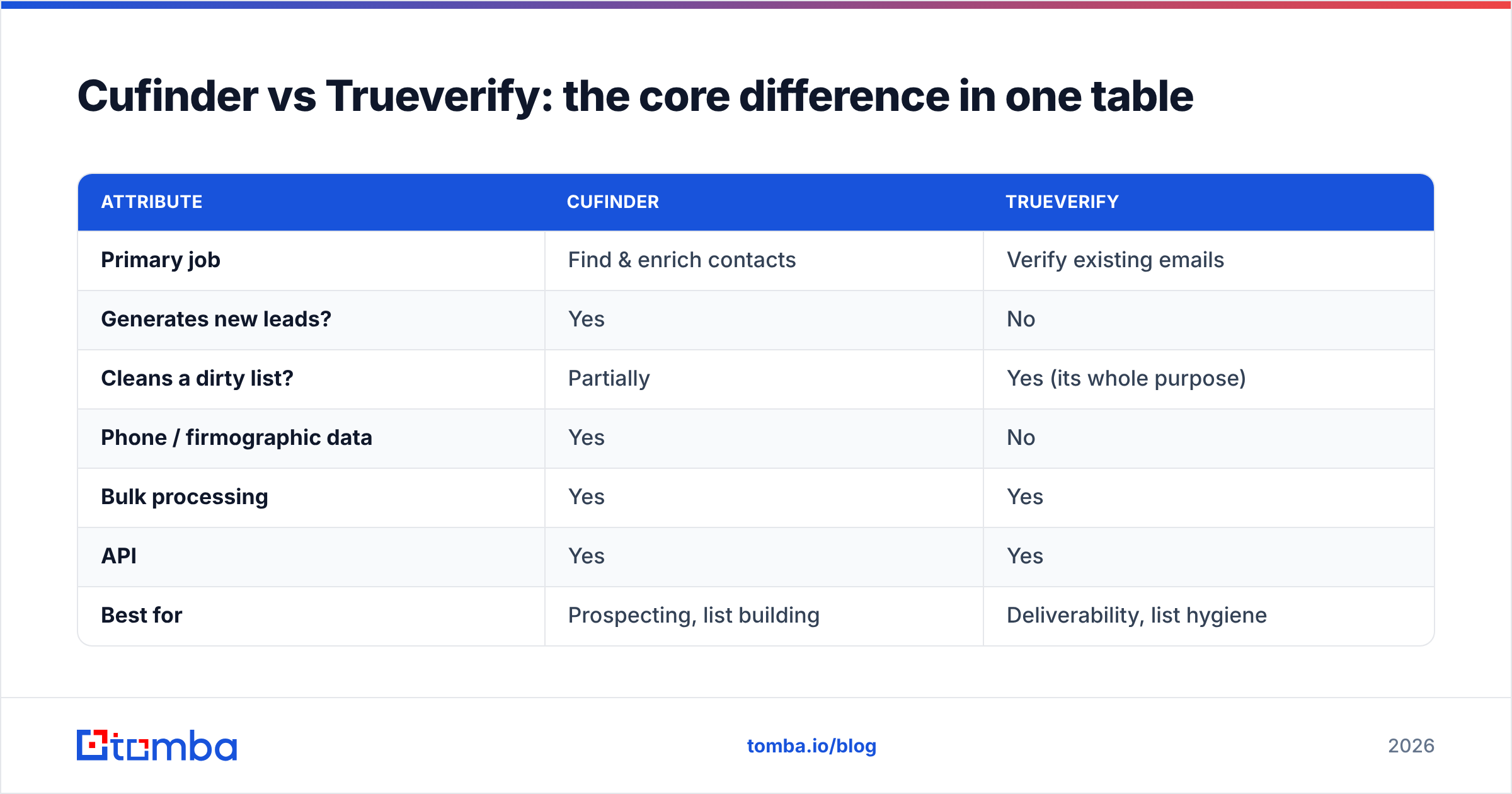
| Attribute | Cufinder | Trueverify |
|---|---|---|
| Primary job | Find & enrich contacts | Verify existing emails |
| Generates new leads? | Yes | No |
| Cleans a dirty list? | Partially | Yes (its whole purpose) |
| Phone / firmographic data | Yes | No |
| Bulk processing | Yes | Yes |
| API | Yes | Yes |
| Best for | Prospecting, list building | Deliverability, list hygiene |
| Replaces the other? | No | No |
Read that last row twice. Neither tool makes the other redundant. A realistic outbound stack needs both capabilities — which is the whole argument for consolidating them, covered below.
Is Cufinder better than Trueverify?#
Wrong question — it depends entirely on which problem you have today. But we can rank them by scenario, which is more useful than a single verdict.
- You have company names, need contacts → Cufinder wins. Trueverify literally cannot do this.
- You have a 50k-row list and 12% bounce rate → Trueverify wins. Cufinder won't scrub deeply enough.
- You're starting from zero and want a clean, sendable list → you need both, in sequence: find, then verify.
- You're on a tight budget and hate managing tools → a combined platform beats buying both.
That third scenario is where most teams actually live, and it's where running Cufinder and Trueverify gets expensive and clunky. You find in one tool, export a CSV, import to the other, verify, export again, then import to your sequencer. Three handoffs, two subscriptions, and a data model that doesn't line up.

How much do Cufinder and Trueverify cost in 2026?#
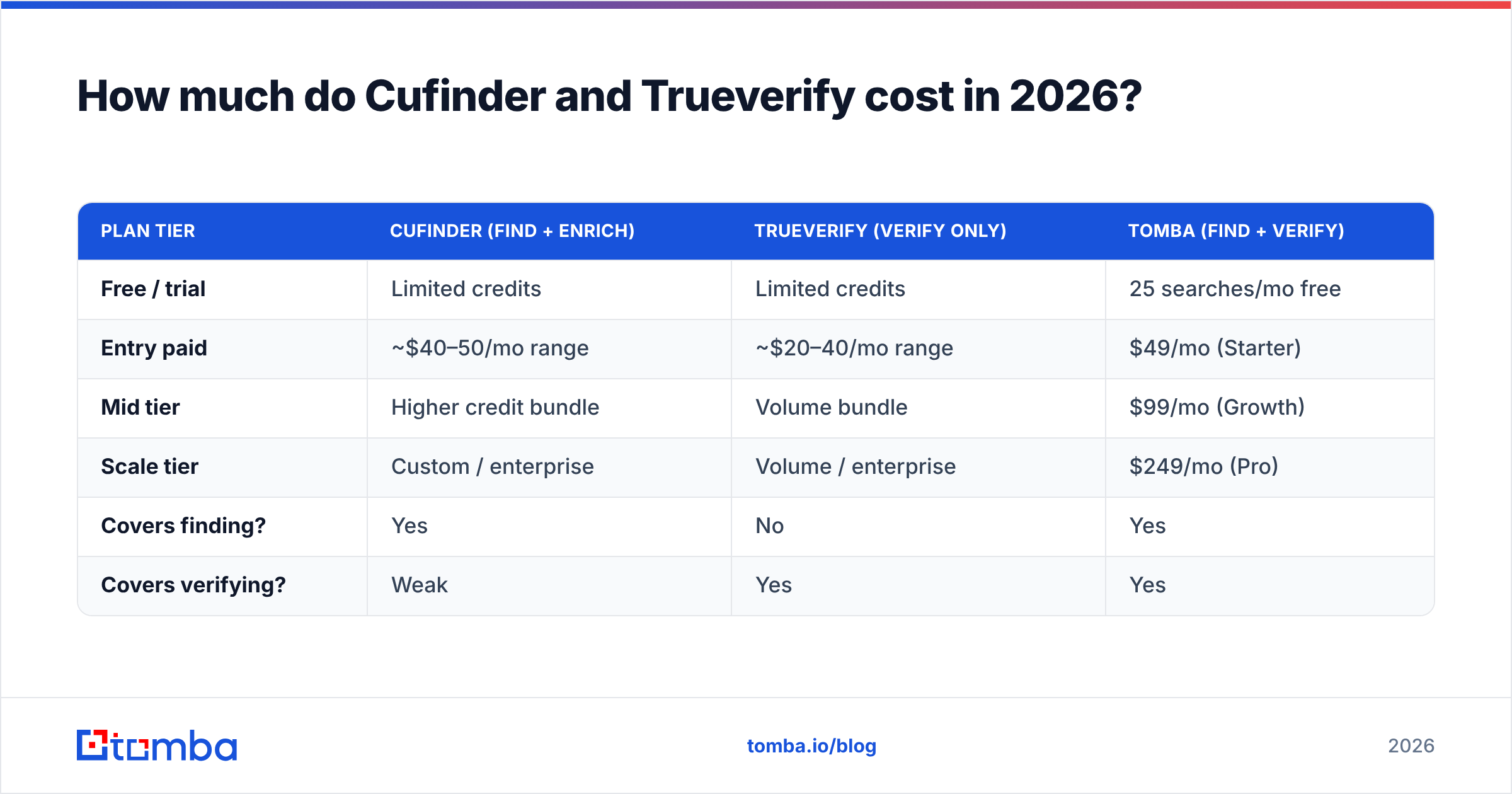
Both use credit-style pricing, and both change their tiers often — so treat the numbers below as directional and confirm on each vendor's live pricing page before you buy. The pattern, not the exact cent, is what matters for a decision.
| Plan tier | Cufinder (find + enrich) | Trueverify (verify only) | Tomba (find + verify) |
|---|---|---|---|
| Free / trial | Limited credits | Limited credits | 25 searches/mo free |
| Entry paid | ~$40–50/mo range | ~$20–40/mo range | $49/mo (Starter) |
| Mid tier | Higher credit bundle | Volume bundle | $99/mo (Growth) |
| Scale tier | Custom / enterprise | Volume / enterprise | $249/mo (Pro) |
| Covers finding? | Yes | No | Yes |
| Covers verifying? | Weak | Yes | Yes |
The math that trips people up: to match one combined plan, you pay for finding on Cufinder and verifying on Trueverify. Two entry plans stacked can quietly cost more than a single mid-tier platform that does both — and you still eat the CSV shuffle between them. Tomba's transparent pricing folds the email finder and email verifier into the same credits, so there's no second bill and no export step.
Do you need both a finder and a verifier?#
Yes — every serious outbound motion needs both stages, whether or not they live in the same tool. Skipping either one has a predictable failure mode:
- Find, no verify — you send to unverified addresses, bounce, and torch your sender reputation. Even great copy lands in spam.
- Verify, no find — you keep a spotless list of the same shrinking contacts and never grow pipeline.
- Find + verify, two tools — it works, but you're paying twice and babysitting exports.
- Find + verify, one tool — same outcome, one bill, one data model, one workflow.
The sophistication ladder looks like this:

That's the real reason "Cufinder vs Trueverify" is a slightly misleading matchup. You're not choosing a winner; you're choosing whether to assemble the workflow from two parts or buy it pre-assembled.
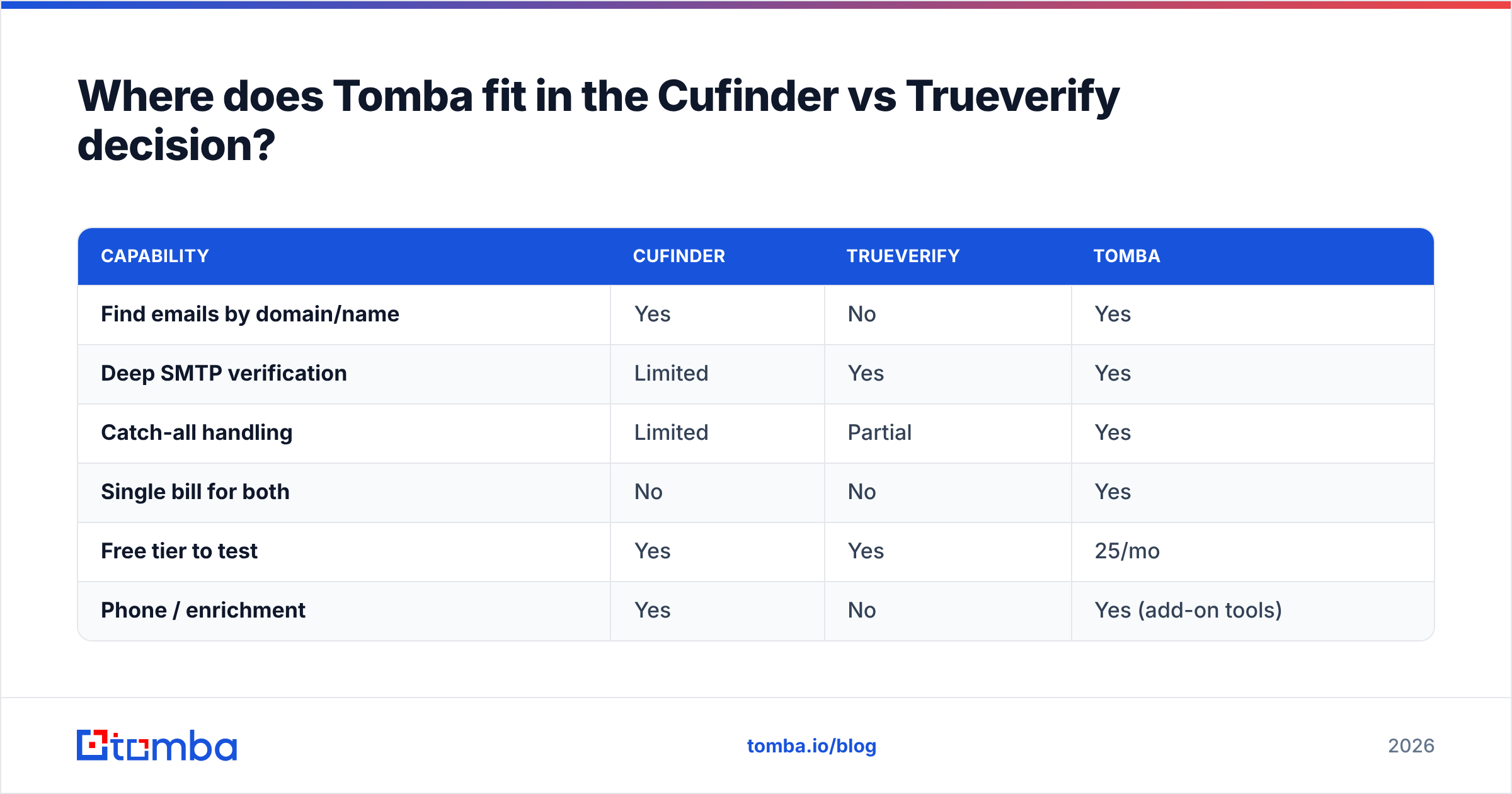
Where does Tomba fit in the Cufinder vs Trueverify decision?#
Tomba is worth a look precisely because it collapses both sides of this comparison into one platform. Instead of pairing a finder with a separate verifier, you get:
- Email Finder — find professional emails by domain, name, or company (Cufinder's job).
- Email Verifier — SMTP-level validation to cut bounces (Trueverify's job).
- Catch-all verifier — handle the risky domains most verifiers flag as "unknown."
- Bulk processing — run thousands of finds and verifies in one pass, no CSV ping-pong.
| Capability | Cufinder | Trueverify | Tomba |
|---|---|---|---|
| Find emails by domain/name | Yes | No | Yes |
| Deep SMTP verification | Limited | Yes | Yes |
| Catch-all handling | Limited | Partial | Yes |
| Single bill for both | No | No | Yes |
| Free tier to test | Yes | Yes | 25/mo |
| Phone / enrichment | Yes | No | Yes (add-on tools) |
To be fair to both competitors: Cufinder has a genuinely broad enrichment dataset, and if firmographic depth is your priority it's a strong specialist. Trueverify is a focused, no-nonsense verifier that does its one job well. If you already own one and only need the other capability, the cleanest move might just be adding the missing piece rather than migrating. Compare the options honestly on Capterra before committing.

How to choose: a 4-question checklist#
Run your situation through these before you pay for anything:
- What's my actual bottleneck — empty list or dirty list? Empty → finder. Dirty → verifier. Both → combined tool.
- How many tools do I want to maintain? Every extra subscription adds a bill, a login, and a handoff.
- Do I need phone and firmographic data too? If yes, weigh Cufinder or an enrichment-capable platform, not a pure verifier.
- What's my total cost across all stages? Add the finder and verifier price, then compare to one combined plan.
If your answers keep landing on "I need both," you've effectively answered the Cufinder-vs-Trueverify question: don't pick one, pick a platform that does the whole loop.
The verdict#
Cufinder and Trueverify aren't really competitors — they're two stages of the same pipeline. Cufinder builds and enriches your list; Trueverify keeps it clean. Choosing "the better one" only makes sense once you've named your bottleneck. If it's lead volume, lean toward a finder. If it's bounce rate, lean toward a verifier. If it's both — which is the common case for growing teams — running two separate tools is the expensive, fragile path.
That's the case for consolidating. Start free with the Tomba Email Finder: find verified, professional emails by domain or name, run bulk verification in the same workspace, and skip the two-subscription CSV shuffle entirely. Test it on 25 free searches a month, then scale on a single plan that covers both halves of the job — no second bill, no export step, no guessing.
Related guides#
Ready to find emails that actually work?
Join 150,000+ professionals who stopped guessing and started sending. Free credits on signup — no credit card required.
Get the Tomba newsletter
Practical outbound tactics and product updates — once every two weeks.
About the author