Cufinder vs Webbula (2026): Which B2B Data Tool Wins?
Cufinder finds contacts; Webbula cleans lists. We compare data accuracy, verification, pricing, and use cases to help you pick the right B2B data tool in 2026 — and where a finder-first platform beats both.
Choosing between Cufinder and Webbula sounds like a head-to-head, but it's closer to a category mismatch. One tool hunts down new B2B contacts; the other scrubs the list you already have. Picking wrong means paying for enrichment when you needed hygiene — or the reverse. This guide breaks down what each does, where the accuracy actually lands, what you'll pay, and when a finder-first platform beats both.
TL;DR: Cufinder vs Webbula at a glance#
- Cufinder is a B2B contact and company database — you search by company or role and it returns emails, phones, and firmographics. Best for building pipeline from scratch.
- Webbula is an email hygiene and verification specialist — it grades your existing list against threats like spam traps, bots, and known complainers. Best for cleaning pipeline before you send.
- They solve different halves of the same problem. Many teams run one for sourcing and one for validation, not one instead of the other.
- On raw email discovery, neither is purpose-built for high-volume prospecting the way a dedicated email finder is.
- If you want find-and-verify in one workflow at a predictable price, a combined platform like Tomba usually wins on cost-per-usable-contact.
What is Cufinder and who is it for?#
Cufinder is a B2B data platform built around lead generation and enrichment. You feed it a company name, domain, or job title and it returns matching contacts — work emails, direct dials, LinkedIn URLs — plus company-level data like industry, headcount, revenue band, and tech stack. It leans on a large aggregated database and offers an API, a Chrome extension, and bulk enrichment for CSV uploads.
The core promise is discovery. If your pipeline is empty and you need net-new accounts and contacts, Cufinder is designed to fill it. Sales development reps, agencies running outbound for clients, and recruiters sourcing candidates are the typical users.
The trade-off with any aggregated database is freshness. B2B data decays fast — people change jobs, companies rebrand, domains migrate. A record that was accurate six months ago may bounce today. That's exactly why a verification layer matters, and it's the gap Webbula is built to fill.

What is Webbula and who is it for?#
Webbula is an email hygiene and verification company. It doesn't source new contacts — it evaluates the ones you bring. Upload a list and Webbula scores each address across categories most basic checkers miss: spam traps, honeypots, bots, frequent complainers, malformed syntax, and hard bounces. The output is a risk grade per address so you can suppress the dangerous ones before they touch your sending domain.
The core promise here is protection. If you've bought a list, inherited a dusty CRM, or run high-volume email marketing where a single spam-trap hit can tank your sender reputation, Webbula's multi-method hygiene is the safety net. Email marketers, ESP administrators, and deliverability teams are the primary audience.
What Webbula won't do is grow your list. There's no "find me the VP of Marketing at Acme" function. It assumes you already have addresses and just need to know which are safe. That's a real, valuable job — but it's the second half of the workflow, not the first.
Cufinder vs Webbula: the core difference#
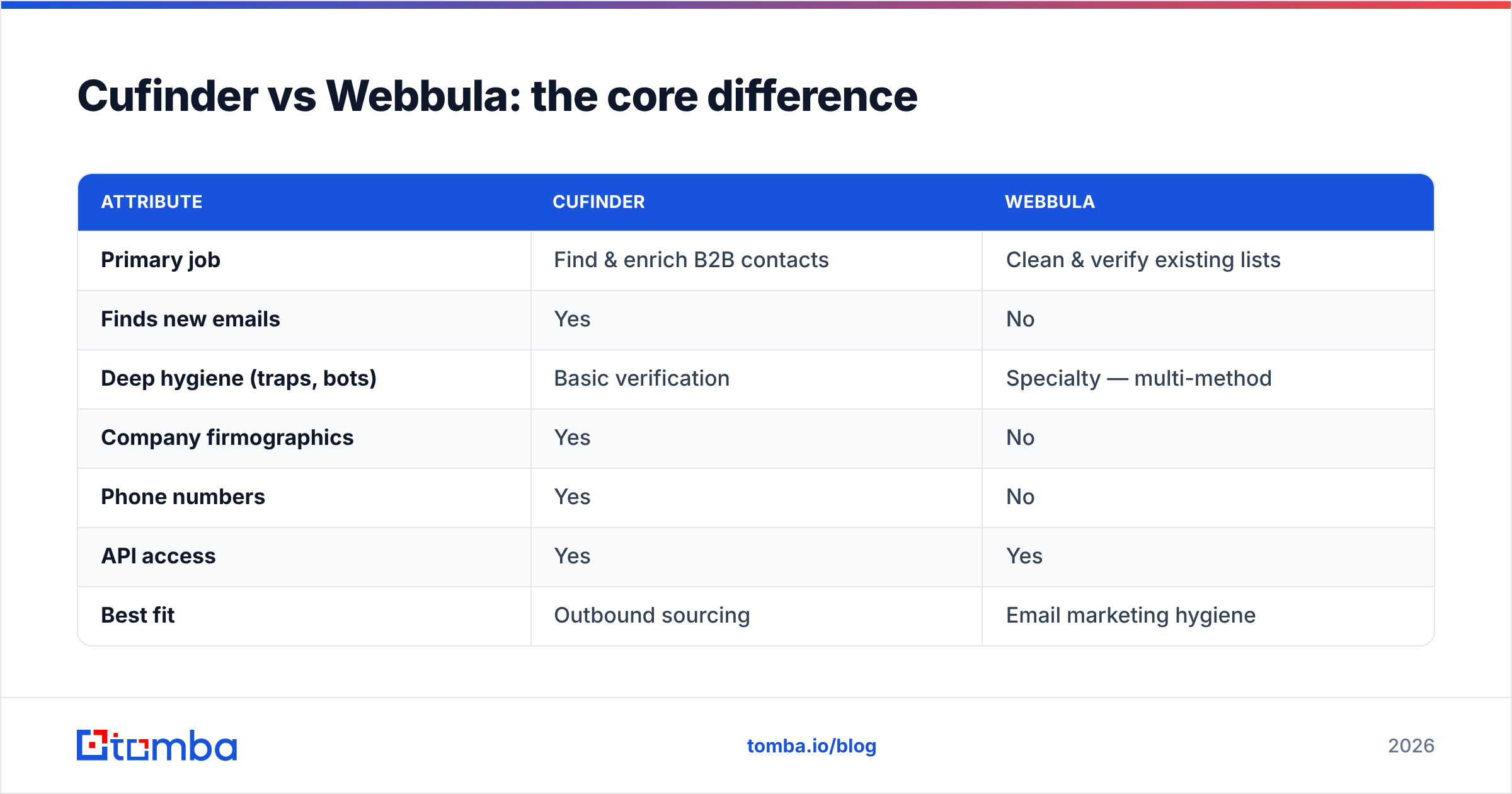
The cleanest way to think about it: Cufinder answers "who should I contact?" and Webbula answers "is this address safe to email?" You almost always need both answers, in that order.
Here's the head-to-head on the attributes that actually drive a buying decision:
| Attribute | Cufinder | Webbula |
|---|---|---|
| Primary job | Find & enrich B2B contacts | Clean & verify existing lists |
| Finds new emails | Yes | No |
| Deep hygiene (traps, bots) | Basic verification | Specialty — multi-method |
| Company firmographics | Yes | No |
| Phone numbers | Yes | No |
| API access | Yes | Yes |
| Best fit | Outbound sourcing | Email marketing hygiene |
| Weak spot | Data freshness | No discovery |
Notice how little the two columns overlap. This isn't a case where one tool is 20% better — they're aimed at different stages. A comparison that pits them as direct rivals misses that you could reasonably subscribe to both and never feel redundant.
But subscribing to two tools has an obvious downside: two bills, two logins, two data models to reconcile. That's where the "do I really need a specialist for each half?" question gets interesting.
Which one is more accurate?#
Accuracy means different things for each tool, so measure them on their own turf.
For Cufinder, accuracy is match rate and email validity — of the contacts it returns, how many are real, current, and deliverable. Aggregated databases typically land somewhere in the 85–95% valid range on fresh records, but that number slides as data ages. The honest metric is bounce rate on a live send, not the vendor's headline claim.
For Webbula, accuracy is threat detection — of the risky addresses in your list, how many it correctly flags. This is genuinely hard: catching a fresh spam trap that looks like a normal mailbox is exactly what a basic syntax-and-MX checker fails at. Webbula's whole reason to exist is doing this better than a $10 bulk verifier.
The practical takeaway: if you source from Cufinder and send without a hygiene pass, you inherit whatever decay is baked into the database. If you run Webbula on a list you never freshly sourced, you're polishing potentially stale contacts. Accuracy compounds only when discovery and verification work together — which is the argument for a platform that does both.

Independent review sites like G2 are a useful sanity check here — read the one-star reviews, not the five-star ones, because that's where bounce-rate and support complaints surface.
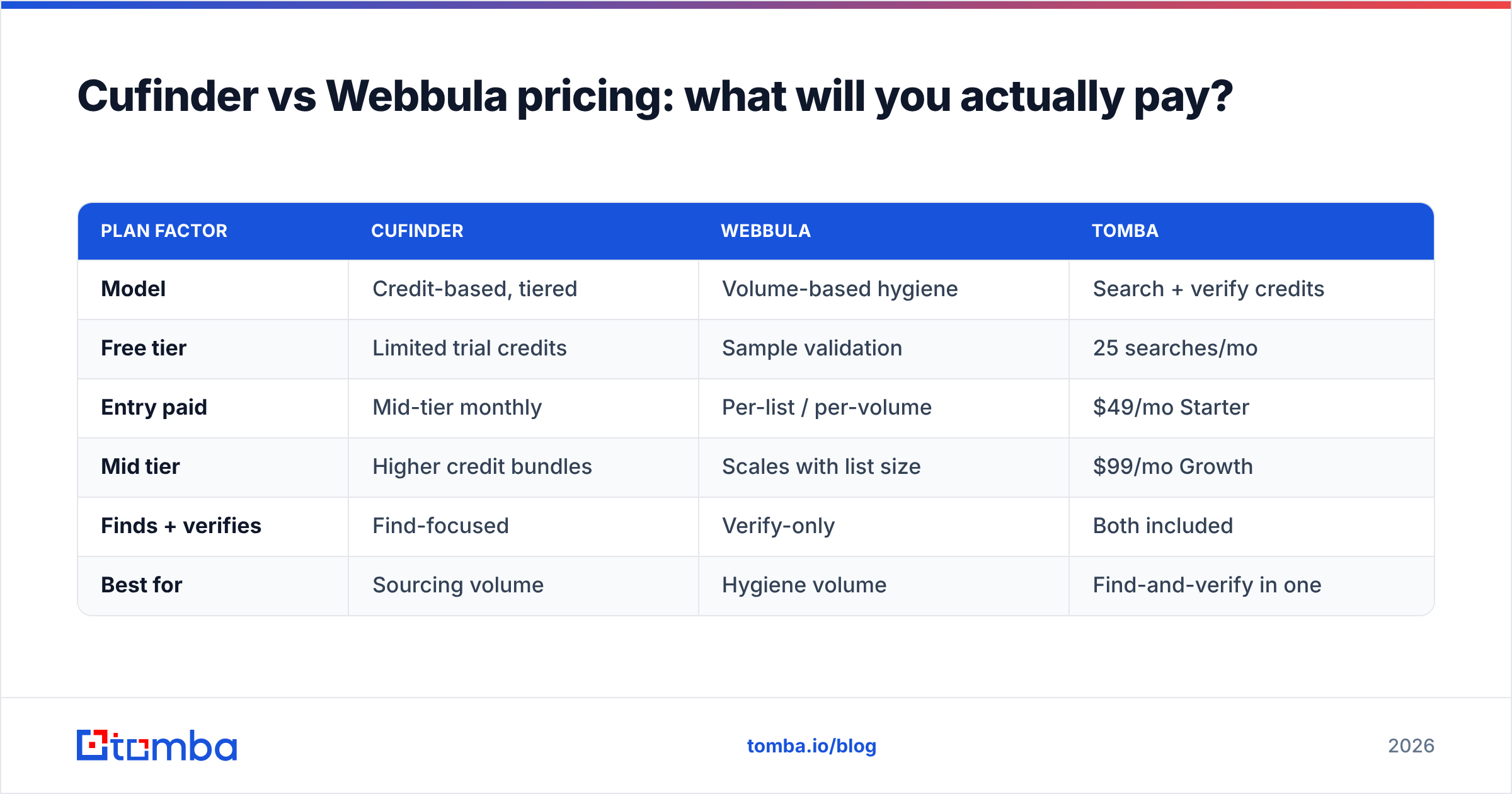
Cufinder vs Webbula pricing: what will you actually pay?#
Both use credit- or volume-based models, and both quote "starting" prices that climb quickly with volume. Exact numbers shift, so treat these as directional and confirm on the vendors' own pages before you buy.
| Plan factor | Cufinder | Webbula | Tomba |
|---|---|---|---|
| Model | Credit-based, tiered | Volume-based hygiene | Search + verify credits |
| Free tier | Limited trial credits | Sample validation | 25 searches/mo |
| Entry paid | Mid-tier monthly | Per-list / per-volume | $49/mo Starter |
| Mid tier | Higher credit bundles | Scales with list size | $99/mo Growth |
| Finds + verifies | Find-focused | Verify-only | Both included |
| Best for | Sourcing volume | Hygiene volume | Find-and-verify in one |
The hidden cost with a two-tool stack is the overlap you pay for twice and the manual export-import shuffle between them. If Cufinder gives you contacts and Webbula grades them, someone still has to move files, reconcile IDs, and suppress the failures. For a lean team, that operational tax can exceed the software cost.
This is where consolidating pays off. A platform that finds the email and runs verification in the same call — see Tomba pricing — collapses two line items and one manual workflow into a single step, and the email verifier runs on the same credits as discovery.

When should you choose Cufinder?#
Pick Cufinder when your bottleneck is not enough contacts. Specifically:
- Empty or thin pipeline — you need to source net-new accounts and people, not clean what you have.
- Firmographic targeting — you filter by industry, size, revenue, or tech stack to build account lists.
- Multi-channel outreach — you want phones and LinkedIn URLs alongside email.
- Agency work — you generate lists for multiple clients and need database breadth.
If that's you, Cufinder does real work. Just plan for a verification step before you send, because discovery tools optimize for coverage, and coverage always includes some stale records.
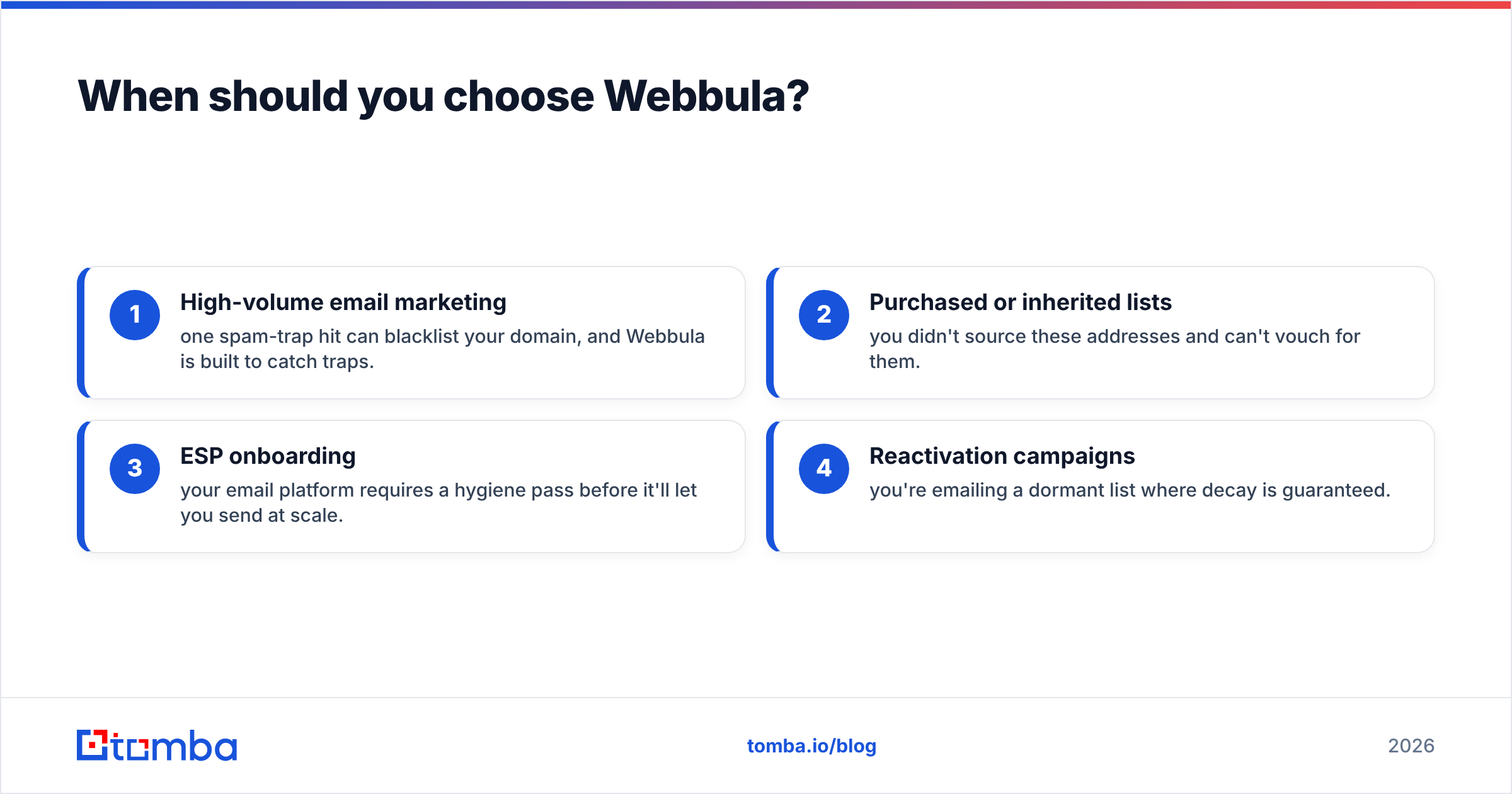
When should you choose Webbula?#
Pick Webbula when your bottleneck is list quality and deliverability risk. Specifically:
- High-volume email marketing — one spam-trap hit can blacklist your domain, and Webbula is built to catch traps.
- Purchased or inherited lists — you didn't source these addresses and can't vouch for them.
- ESP onboarding — your email platform requires a hygiene pass before it'll let you send at scale.
- Reactivation campaigns — you're emailing a dormant list where decay is guaranteed.
Webbula is a specialist, and specialists earn their keep on the exact problem they specialize in. If your addresses are already fresh and self-sourced, you may not need this depth — a standard verifier could suffice. If you're firing at a big, uncertain list, its threat detection is worth it. For context on why hygiene protects revenue, HubSpot's guidance on email deliverability is a solid primer.
Is there a better alternative to running both?#
Often, yes — a find-and-verify platform that covers both halves in one workflow. The two-specialist stack makes sense at enterprise scale where you have a dedicated deliverability team and a separate sourcing team. For everyone else, it's two subscriptions and a manual bridge between them.
A consolidated tool like Tomba is built around the email finder as the core, with verification, domain search, phone finder, and data enrichment sitting on the same credits and the same API. The workflow becomes: find the contact, verify it in the same response, push it to your CRM — no export, no second login, no reconciling two data models.
Here's how the three approaches stack up on the questions buyers actually ask:
| Question | Cufinder | Webbula | Tomba |
|---|---|---|---|
| Can it find new contacts? | Yes | No | Yes |
| Does it verify before send? | Basic | Deep hygiene | Yes, built-in |
| One bill for both jobs? | No | No | Yes |
| Catch-all handling | Limited | N/A | Catch-all verifier |
| Free tier to test | Trial | Sample | 25 searches/mo |
| API-first | Yes | Yes | Yes |
The honest caveat: if you specifically need Webbula-grade spam-trap and honeypot detection on a massive marketing list, a dedicated hygiene vendor may still detect edge-case threats a general verifier won't. And if you need the widest possible firmographic database for enterprise ABM, a mega-database may out-cover a focused finder. Match the tool to the bottleneck. For most sales and outbound teams, though, the bottleneck is "find good emails and don't bounce" — and that's exactly the consolidated sweet spot.

The verdict: Cufinder vs Webbula#
There's no universal winner because they don't compete on the same field. Choose Cufinder if your problem is an empty pipeline and you need to source contacts and firmographics. Choose Webbula if your problem is a risky list and you need best-in-class hygiene before a high-volume send. Run both if you're at enterprise scale with teams for each job.
But if you're a sales, SDR, or growth team whose real need is find accurate emails and verify them before sending — without paying two vendors and gluing them together by hand, the smarter move is a single platform. Start free with Tomba's email finder: 25 searches a month at no cost, work emails verified in the same call, and the same credits cover domain search, catch-all checks, and enrichment. Find it, verify it, send it — one login, one bill, one workflow. Test it against your own target accounts and compare the bounce rate for yourself.
Related guides#
Ready to find emails that actually work?
Join 150,000+ professionals who stopped guessing and started sending. Free credits on signup — no credit card required.
Get the Tomba newsletter
Practical outbound tactics and product updates — once every two weeks.
About the author