Custom Tracking Domain: The Complete 2026 Setup Guide
A custom tracking domain keeps your open and click data yours, protects sender reputation, and stops shared link domains from dragging your cold email into spam. Here's how to set one up.
Most cold email senders never think about the domain buried inside their tracking links — until their open rates crater and half their campaign lands in spam. That domain is the problem, and a custom tracking domain is the fix.
TL;DR#
- A custom tracking domain is a subdomain you own (like
link.yourcompany.com) that rewrites the open-pixel and click URLs in your emails instead of using your sending tool's shared domain. - Shared tracking domains are used by thousands of senders at once — when any of them get flagged, your deliverability takes the hit through no fault of your own.
- Setup is a single CNAME record plus SSL, and it takes about 15 minutes. Most sending platforms support it on paid plans.
- It won't fix bad copy or a cold domain, but it removes one of the most common silent causes of inbox placement problems in 2026.
- Pair it with clean lists, SPF/DKIM/DMARC, and verified contacts for the full deliverability stack.
What is a custom tracking domain?#
A custom tracking domain is a subdomain you control that your email platform uses to host tracking links and open pixels. Instead of a recipient's mail server seeing a link like click.mailtool.io/abc123, it sees go.yourcompany.com/abc123.
Think of it like return address labels on physical mail. If every marketer in your city dropped letters using the same shared return address, and one of them ran a scam, the post office would start eyeing every envelope with that address — including yours. Putting your own name on the label separates your reputation from the crowd. That is exactly what a custom tracking domain does for your links.
Technically, when you enable open and click tracking, your platform rewrites two things in every email:
- The open pixel — a tiny invisible image whose URL loads when the email is opened, recording the open event.
- Every clickable link — rewritten to route through the tracking domain first, log the click, then redirect to the real destination.
By default, both point at your vendor's shared domain. A custom tracking domain swaps that host for one carrying your name and your reputation.
Why does a shared tracking domain hurt deliverability?#
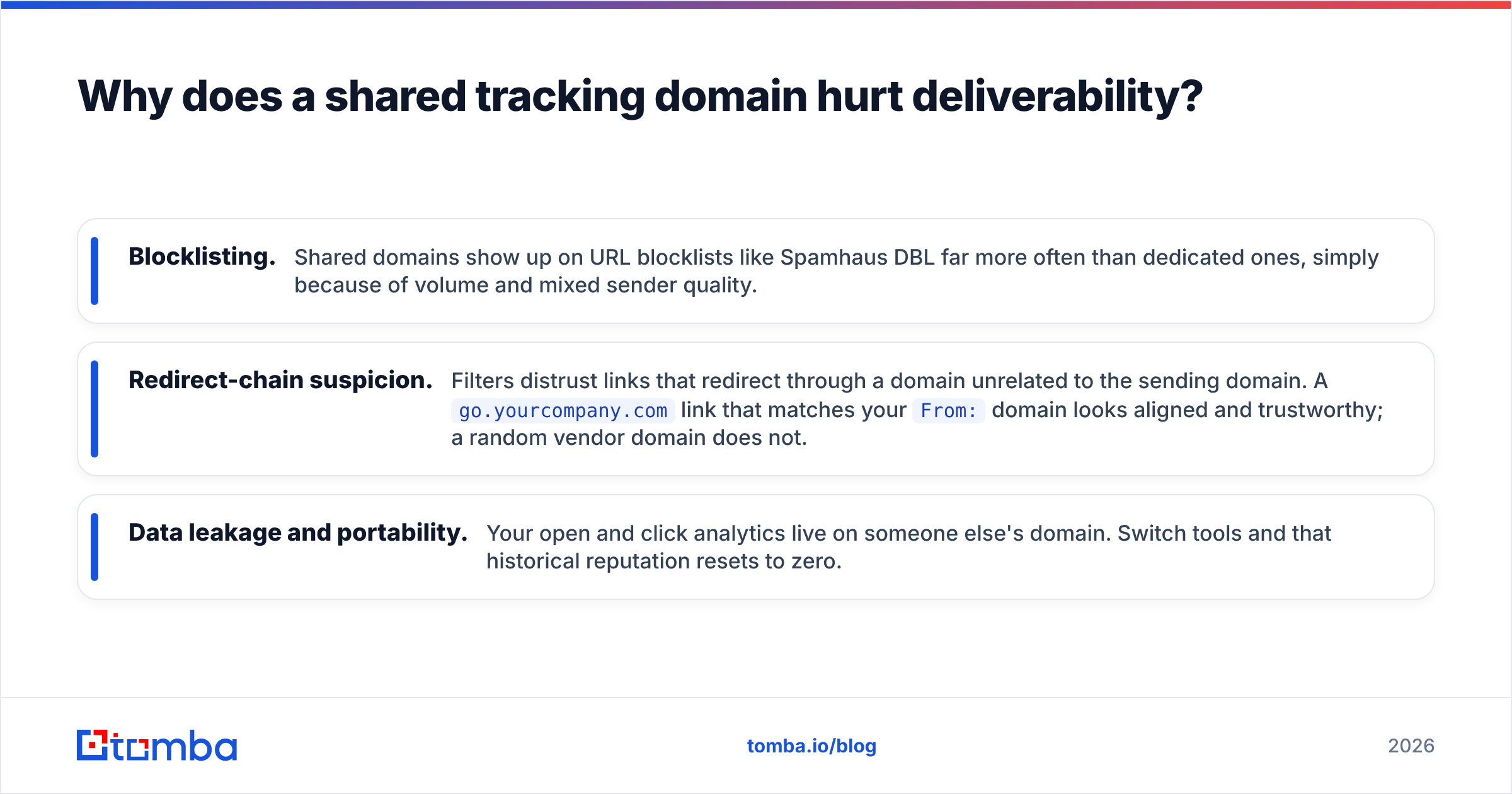
The short answer: reputation is contagious on a shared domain, and you don't control who you share it with.
When your sending tool uses one tracking domain across its entire customer base, spam filters evaluate that domain as a single entity. Google, Microsoft, and enterprise gateways all track domain reputation as part of scoring inbound mail. If a few hundred aggressive senders on your platform get their shared domain flagged onto a blocklist, every email routed through it inherits the penalty. You can write a flawless message to a warm prospect and still hit the spam folder because a stranger three accounts over torched the shared domain last week.
There are three specific failure modes:
- Blocklisting. Shared domains show up on URL blocklists like Spamhaus DBL far more often than dedicated ones, simply because of volume and mixed sender quality.
- Redirect-chain suspicion. Filters distrust links that redirect through a domain unrelated to the sending domain. A
go.yourcompany.comlink that matches yourFrom:domain looks aligned and trustworthy; a random vendor domain does not. - Data leakage and portability. Your open and click analytics live on someone else's domain. Switch tools and that historical reputation resets to zero.
This is why email deliverability specialists treat the tracking domain as a first-class part of the setup, not an afterthought. It sits right next to sender reputation in the list of things that quietly decide whether you reach the inbox.
Custom tracking domain vs shared tracking domain#
Here is the direct comparison senders actually care about.
| Factor | Shared tracking domain | Custom tracking domain |
|---|---|---|
| Reputation control | None — pooled with all users | Full — isolated to you |
| Blocklist risk | High (other senders' behavior) | Low (only your behavior) |
Domain alignment with From: |
Mismatched | Matched subdomain |
| Analytics portability | Resets when you switch tools | Stays with your domain |
| Setup effort | Zero (default) | ~15 min (one CNAME + SSL) |
| Cost | Included | Usually free on paid plans |
| Trust signal to filters | Neutral to negative | Positive |
The trade is lopsided. You spend fifteen minutes once and gain a reputation lane that nobody else can pollute. There is almost no scenario where a serious sender is better off on the shared default.
How do you set up a custom tracking domain?#
Setup is a DNS change plus a toggle in your sending tool. The exact labels differ per platform, but the flow is identical.
1. Choose a subdomain. Use a dedicated subdomain like link.yourcompany.com, go.yourcompany.com, or email.yourcompany.com. Do not use your bare root domain, and do not reuse your main website host. A subdomain keeps the tracking reputation compartmentalized.
2. Grab the CNAME target from your platform. In your sending tool's tracking settings, it will give you a target hostname to point at — something like custom.trackingvendor.net. This is the value your CNAME will reference. (A CNAME record is just a DNS alias; if you want the deeper mechanics, the Wikipedia CNAME reference is a clean primer.)
3. Add the CNAME record in your DNS. In your DNS provider (Cloudflare, GoDaddy, Route 53, etc.), create:
| Field | Value |
|---|---|
| Type | CNAME |
| Host / Name | link (the subdomain part) |
| Target / Value | the host your platform gave you |
| TTL | Auto or 3600 |
| Proxy | Off (DNS only) — proxying breaks tracking redirects |
4. Wait for propagation. DNS changes can take anywhere from a few minutes to a couple of hours. Most resolve within 30 minutes.
5. Verify and enable SSL. Back in your platform, click verify. It confirms the CNAME resolves and provisions an SSL certificate so your links are served over HTTPS. Links without SSL trigger browser and filter warnings, so never ship an http:// tracking domain.
6. Send a test. Fire a test email to yourself, open it, click a link, and confirm the URL now shows your subdomain and that the event registers in your dashboard.
Does a custom tracking domain need SPF, DKIM, and DMARC?#
The tracking domain itself doesn't send mail, so it doesn't require its own SPF or DKIM records — but your sending domain absolutely does, and the two work together.
Authentication and tracking are separate layers that reinforce each other:
- SPF tells receivers which servers are allowed to send for your domain. Check yours with an SPF record lookup before every major campaign.
- DKIM cryptographically signs your messages so receivers can confirm they weren't altered in transit.
- DMARC ties SPF and DKIM together and tells receivers what to do when a message fails.
- Custom tracking domain aligns your link host with your sending identity, so the whole message — headers, body, and links — points back to one coherent owner.
When all four align, filters see a sender who owns their infrastructure end to end. That is the profile that lands in the inbox. Run your message through a spam checker after setup to confirm nothing in the link rewriting trips a content filter.
When is a custom tracking domain not enough?#
A custom tracking domain is one brick, not the whole wall. It fixes the "who owns your links" problem and nothing else. If your deliverability is still poor after setting one up, the cause is almost always upstream:
- Dirty lists. Sending to invalid or spam-trap addresses tanks reputation faster than any tracking domain can save. Verify contacts before you send — an email verifier catches the bounces and traps before they hit your sender score.
- A cold or unwarmed domain. A brand-new sending domain with no history gets throttled regardless of your links. Warm it up gradually.
- Weak targeting. Emailing people who never asked to hear from you produces complaints, and complaints outweigh every technical optimization combined.
- Bad content. Spammy phrasing, too many links, or heavy images will fail filters no matter how clean your domain setup is.
The pattern to internalize: technical hygiene like a custom tracking domain removes penalties, but it doesn't create engagement. You still need the right people and the right message.
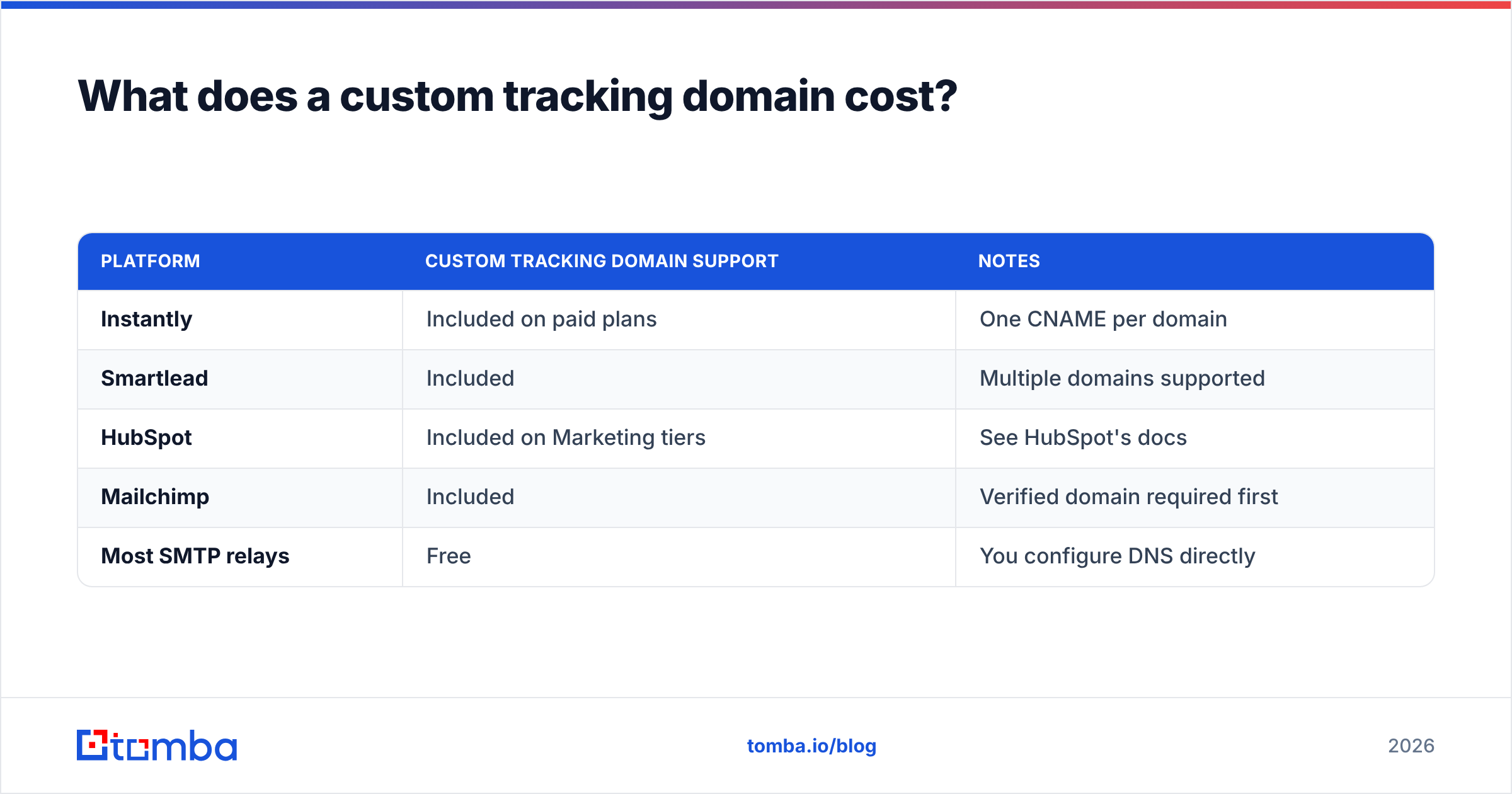
What does a custom tracking domain cost?#
For most senders, nothing beyond your existing plan. Here's how the major cold email and sending platforms treat it.
| Platform | Custom tracking domain support | Notes |
|---|---|---|
| Instantly | Included on paid plans | One CNAME per domain |
| Smartlead | Included | Multiple domains supported |
| HubSpot | Included on Marketing tiers | See HubSpot's docs |
| Mailchimp | Included | Verified domain required first |
| Most SMTP relays | Free | You configure DNS directly |
The only real cost is the fifteen minutes of setup and owning a domain you already have. Compare that to the compounding cost of throttled campaigns, and the math isn't close. If you're evaluating tools on total cost of ownership, deliverability features like this belong in the comparison — a point worth checking against listings on G2 before you commit to a platform.
How does this fit into a full prospecting stack?#
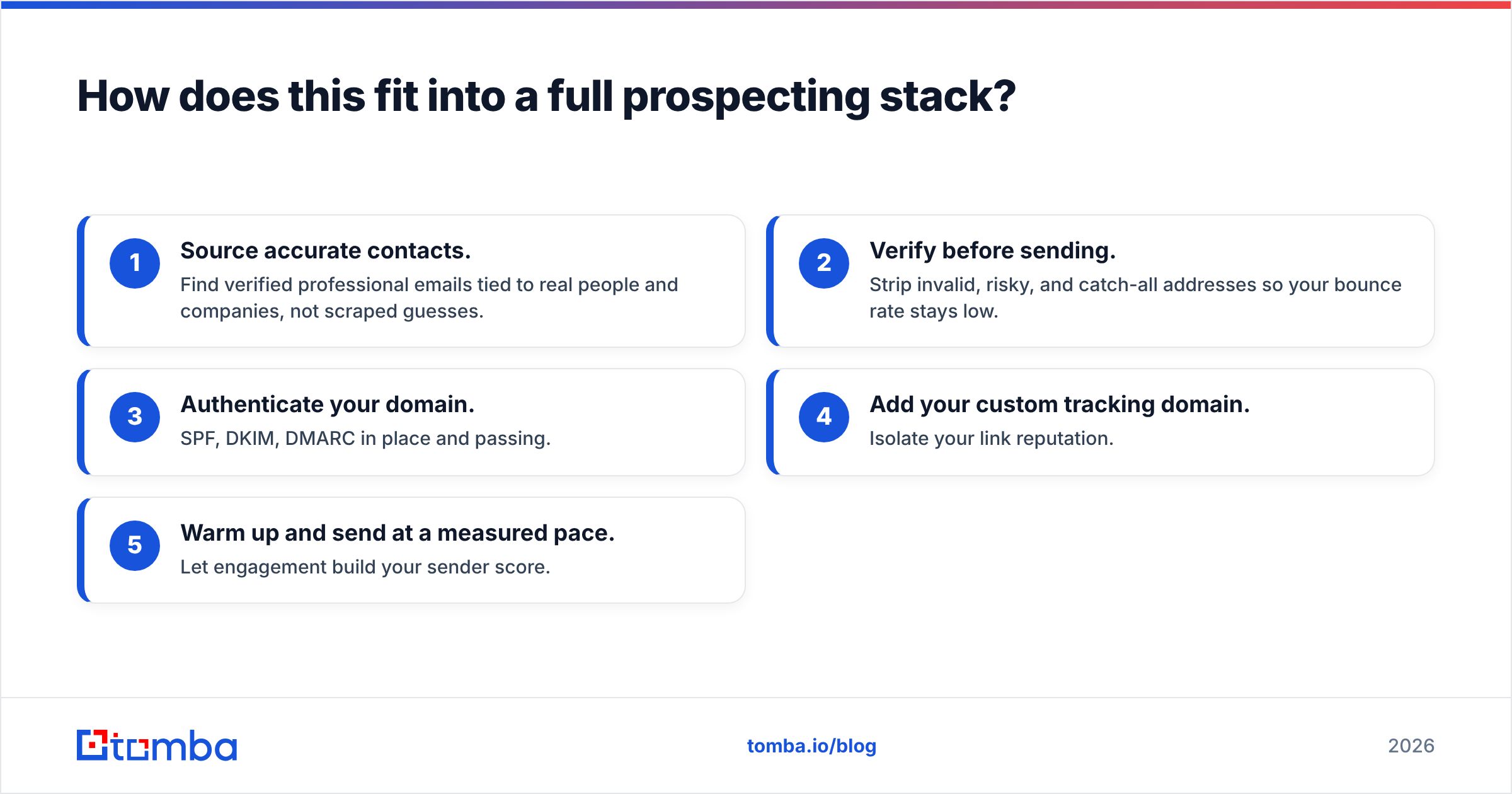
A custom tracking domain sits at the delivery layer. Above it you need accurate contact data feeding clean, targeted campaigns — otherwise you're optimizing the plumbing on a house with no foundation.
The reliable sequence looks like this:
- Source accurate contacts. Find verified professional emails tied to real people and companies, not scraped guesses.
- Verify before sending. Strip invalid, risky, and catch-all addresses so your bounce rate stays low.
- Authenticate your domain. SPF, DKIM, DMARC in place and passing.
- Add your custom tracking domain. Isolate your link reputation.
- Warm up and send at a measured pace. Let engagement build your sender score.
Get all five right and your inbox placement stops being a mystery. Skip any one and the others can't fully compensate.
Frequently asked questions#
Can I use the same custom tracking domain across multiple sending tools?
It's better not to. Each tool wants its own CNAME target, and mixing them creates conflicting records. Use a distinct subdomain per platform, like link1.yourcompany.com and link2.yourcompany.com.
Will a custom tracking domain improve my open rates directly? Not the true engagement rate, but it improves how many of your emails reach the inbox in the first place — and inbox placement is what open rate ultimately depends on.
Does Apple Mail Privacy Protection break tracking anyway? It inflates opens by pre-loading pixels, so open data is noisier than it used to be. Click tracking through your custom domain remains reliable, which is another reason to weight clicks over opens in 2026.
Is a subdomain or a separate domain better for tracking?
A subdomain of your sending domain is best — it maximizes alignment with your From: address, which is exactly the trust signal filters reward.
The bottom line#
A custom tracking domain is one of the highest-leverage, lowest-effort deliverability moves available. It takes a quarter of an hour, usually costs nothing extra, and permanently separates your link reputation from thousands of strangers you never agreed to share it with.
But it only pays off on top of clean, accurate data. Bad contacts poison every layer above the tracking domain. Before you optimize a single DNS record, make sure the emails you're sending to are real: use the Tomba Email Finder to source verified professional addresses by name, domain, or company, then run them through verification so your campaigns start from a clean list. Get the data right, add your custom tracking domain, and let inbox placement stop being the thing that keeps you up at night.
Related guides#
// get started
Find, verify and enrich your first contacts today
Start on the free plan with 25 searches a month, then scale when your team is ready.
Free plan · No credit card required · GDPR & CCPA
// about the author