Customer Data Management in 2026: The Complete, Practical Guide
Most customer data management programs fail on messy inputs, not fancy tools. Here is a practical 2026 framework for clean, unified, revenue-ready customer data.
Customer Data Management in 2026: The Complete, Practical Guide
Your CRM is not the problem. The data you keep pouring into it is.
Most B2B teams treat customer data management (CDM) as a software purchase — buy a platform, connect a few sources, declare victory. Then the sales team ignores half the records, marketing emails bounce, and RevOps spends Fridays untangling duplicates. The tool was never the bottleneck. The inputs, the rules, and the ownership were.
This guide is the no-fluff version: what customer data management actually is, the moving parts that matter, a framework you can implement this quarter, and where tooling (including where a clean data source pays off) fits in.
TL;DR#
- Customer data management is the discipline of collecting, unifying, cleaning, governing, and activating customer data across every system your teams touch — not a single product.
- Garbage in, garbage everywhere. Enrichment and verification at the point of entry beats a quarterly cleanup project every time.
- A CDP is optional; governance is not. You need clear ownership, a single customer view, and rules before you need a six-figure platform.
- Measure data health like a product metric — completeness, accuracy, freshness, duplication rate — and report it monthly.
- Start at the source. Verified emails, deduplicated records, and enriched firmographics prevent 80% of downstream pain.
What Is Customer Data Management?#
Customer data management is the end-to-end practice of turning scattered, messy customer information into a trustworthy, usable asset. Think of it like running a warehouse. Boxes (data) arrive from dozens of suppliers (web forms, CRM, billing, support tickets, ad platforms). Without a receiving process, labeling standard, and inventory system, you end up with duplicate pallets, expired stock, and a team that can never find what it needs. CDM is that receiving-and-inventory process for your customer records.
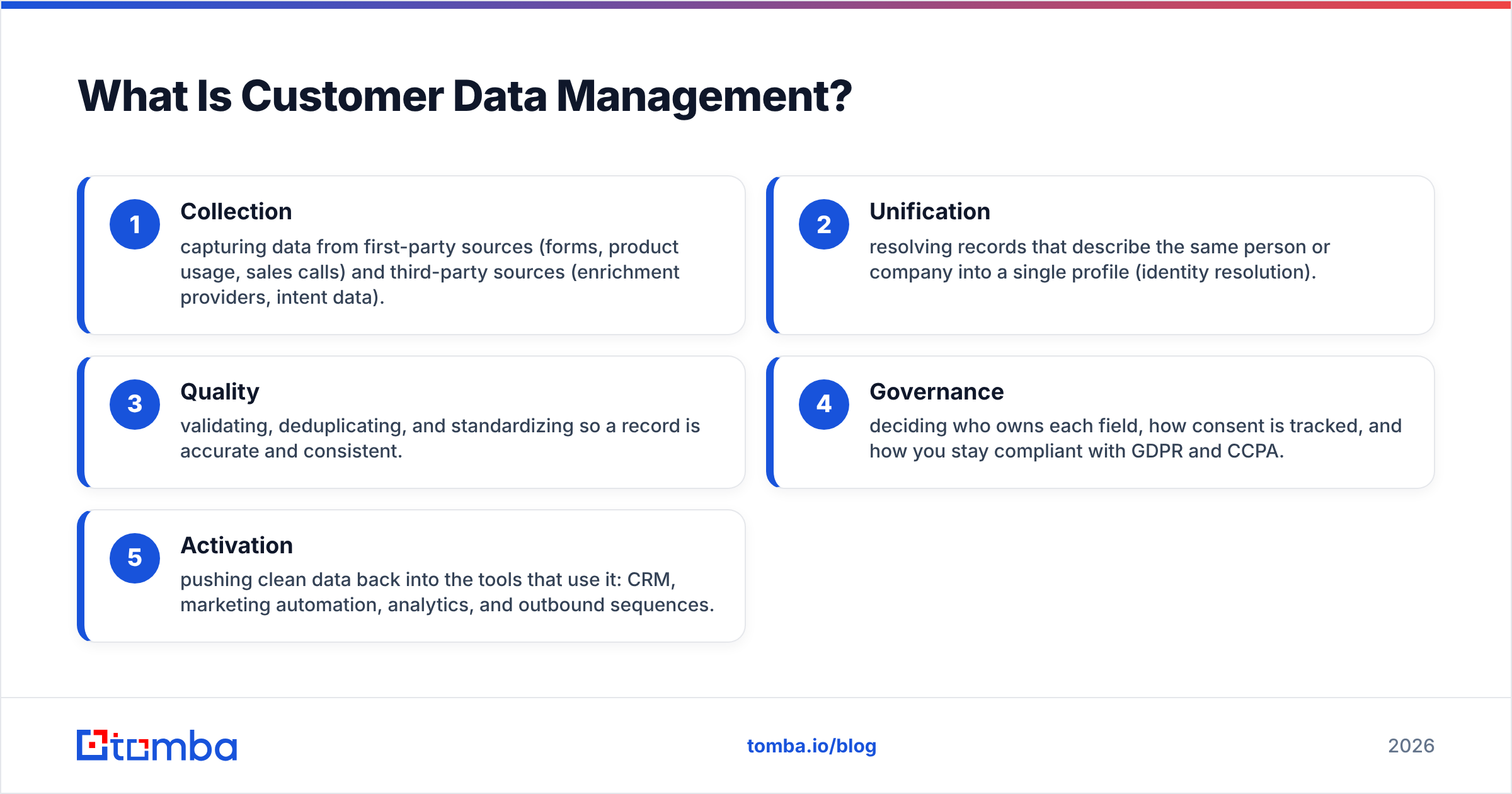
Technically, it spans five jobs:
- Collection — capturing data from first-party sources (forms, product usage, sales calls) and third-party sources (enrichment providers, intent data).
- Unification — resolving records that describe the same person or company into a single profile (identity resolution).
- Quality — validating, deduplicating, and standardizing so a record is accurate and consistent.
- Governance — deciding who owns each field, how consent is tracked, and how you stay compliant with GDPR and CCPA.
- Activation — pushing clean data back into the tools that use it: CRM, marketing automation, analytics, and outbound sequences.
Skip any one of these and the whole thing wobbles. Great collection with no quality control just fills your database faster. Perfect governance with no activation is a compliance binder nobody reads.
Why Does Customer Data Management Matter in 2026?#
Because the cost of bad data compounds, and go-to-market teams now run on automation that trusts the database blindly.
A decade ago, a rep eyeballed a lead before calling. Today an AI sequencer fires 400 emails a day off whatever your CRM says. If 12% of those addresses are stale, you are not just wasting sends — you are torching your sender reputation and training spam filters to distrust your domain. Data quality stopped being a tidiness issue and became a deliverability and revenue issue.
The numbers back this up. Industry analysts consistently estimate that poor data quality costs organizations millions annually in wasted effort and lost opportunity; Gartner's long-cited figure pegs the average at around $12.9 million per year for the businesses it surveyed. And B2B data decays fast — people change jobs, companies merge, domains get retired. A contact list left untouched for a year is meaningfully wrong by the time you use it.
Good customer data management directly moves the metrics leadership cares about:
- Higher conversion — reps spend time on real, reachable contacts.
- Better deliverability — verified addresses protect your email deliverability and domain reputation.
- Cleaner reporting — deduplicated accounts mean pipeline numbers you can trust.
- Lower compliance risk — tracked consent and clear ownership keep you on the right side of regulators.
What Are the Core Components of a Customer Data Management System?#
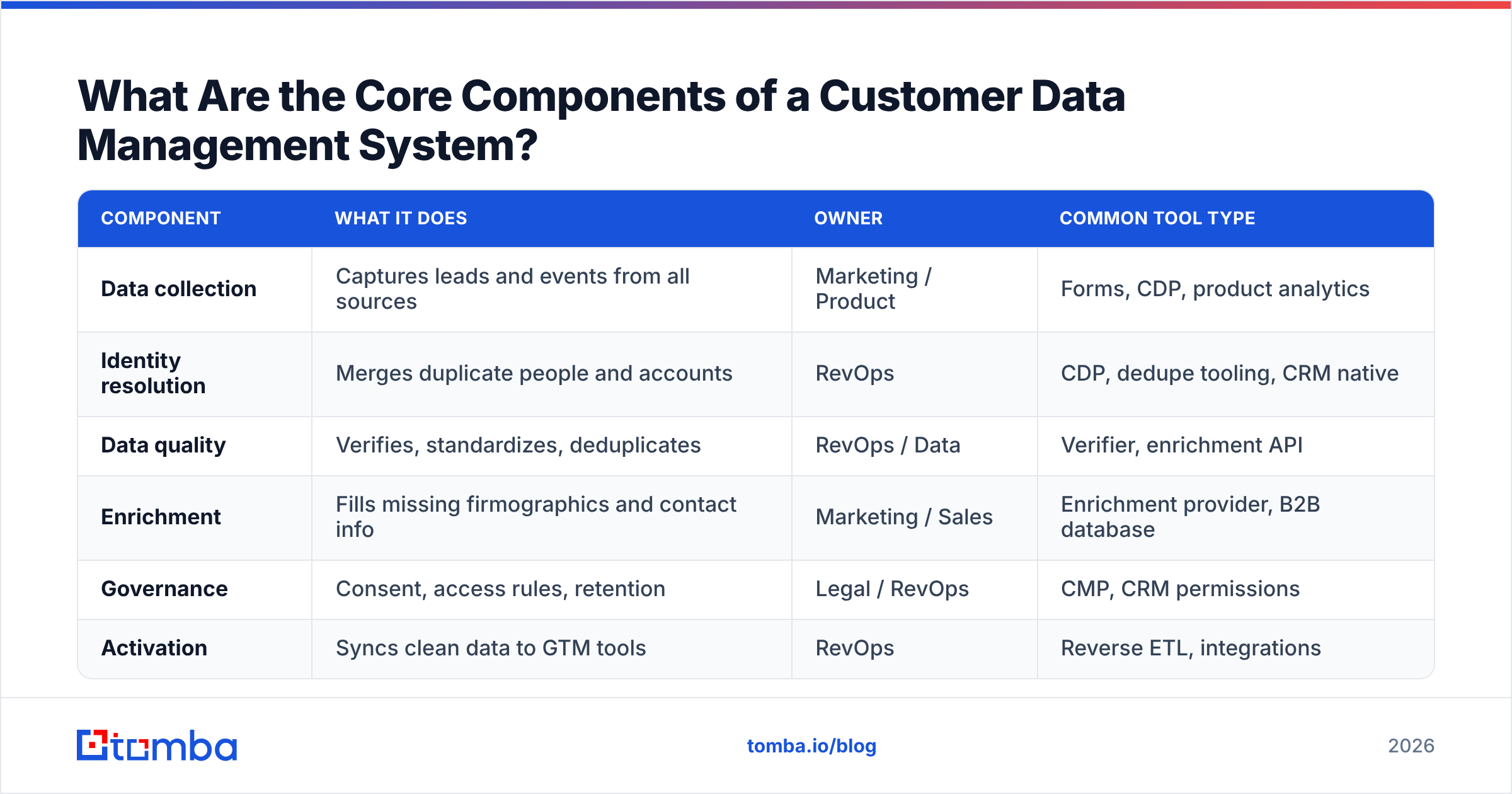
A working CDM setup has six moving parts. You do not need to buy six products — several of these can live inside your CRM or a lightweight enrichment layer — but every function has to have an owner.
| Component | What it does | Owner | Common tool type |
|---|---|---|---|
| Data collection | Captures leads and events from all sources | Marketing / Product | Forms, CDP, product analytics |
| Identity resolution | Merges duplicate people and accounts | RevOps | CDP, dedupe tooling, CRM native |
| Data quality | Verifies, standardizes, deduplicates | RevOps / Data | Verifier, enrichment API |
| Enrichment | Fills missing firmographics and contact info | Marketing / Sales | Enrichment provider, B2B database |
| Governance | Consent, access rules, retention | Legal / RevOps | CMP, CRM permissions |
| Activation | Syncs clean data to GTM tools | RevOps | Reverse ETL, integrations |
Notice that RevOps sits in the middle of almost everything. In 2026, customer data management is less an IT project and more a revenue operations function. The team that owns the pipeline number should own the data feeding it.
CDP vs CRM vs Data Warehouse: Which Do You Actually Need?#
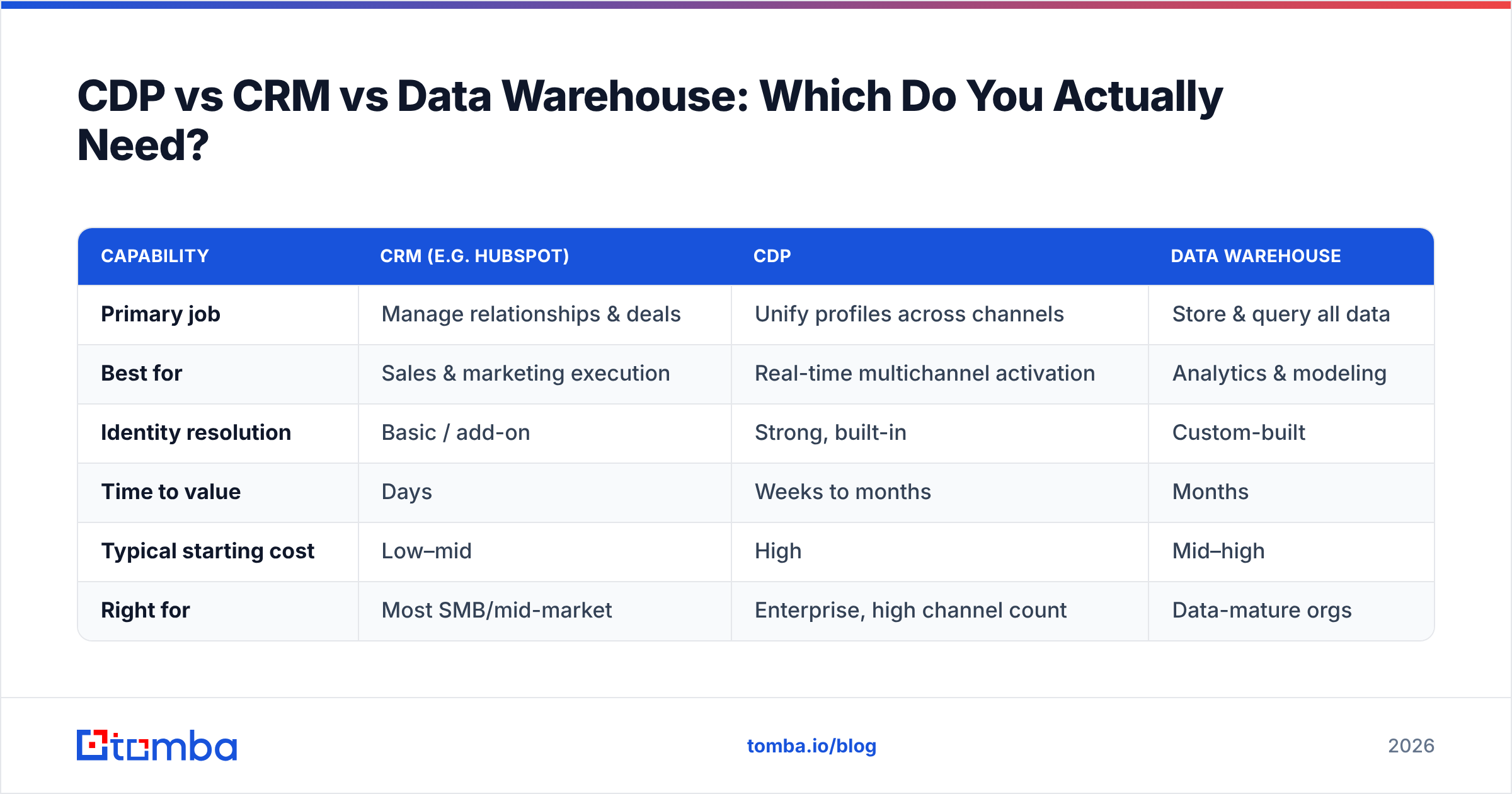
Short answer: most B2B teams under 200 people need a CRM plus disciplined enrichment and verification, not a standalone Customer Data Platform. The CDP is where you graduate when volume and channel complexity outgrow the CRM.
Here is the honest comparison:
| Capability | CRM (e.g. HubSpot) | CDP | Data warehouse |
|---|---|---|---|
| Primary job | Manage relationships & deals | Unify profiles across channels | Store & query all data |
| Best for | Sales & marketing execution | Real-time multichannel activation | Analytics & modeling |
| Identity resolution | Basic / add-on | Strong, built-in | Custom-built |
| Time to value | Days | Weeks to months | Months |
| Typical starting cost | Low–mid | High | Mid–high |
| Right for | Most SMB/mid-market | Enterprise, high channel count | Data-mature orgs |
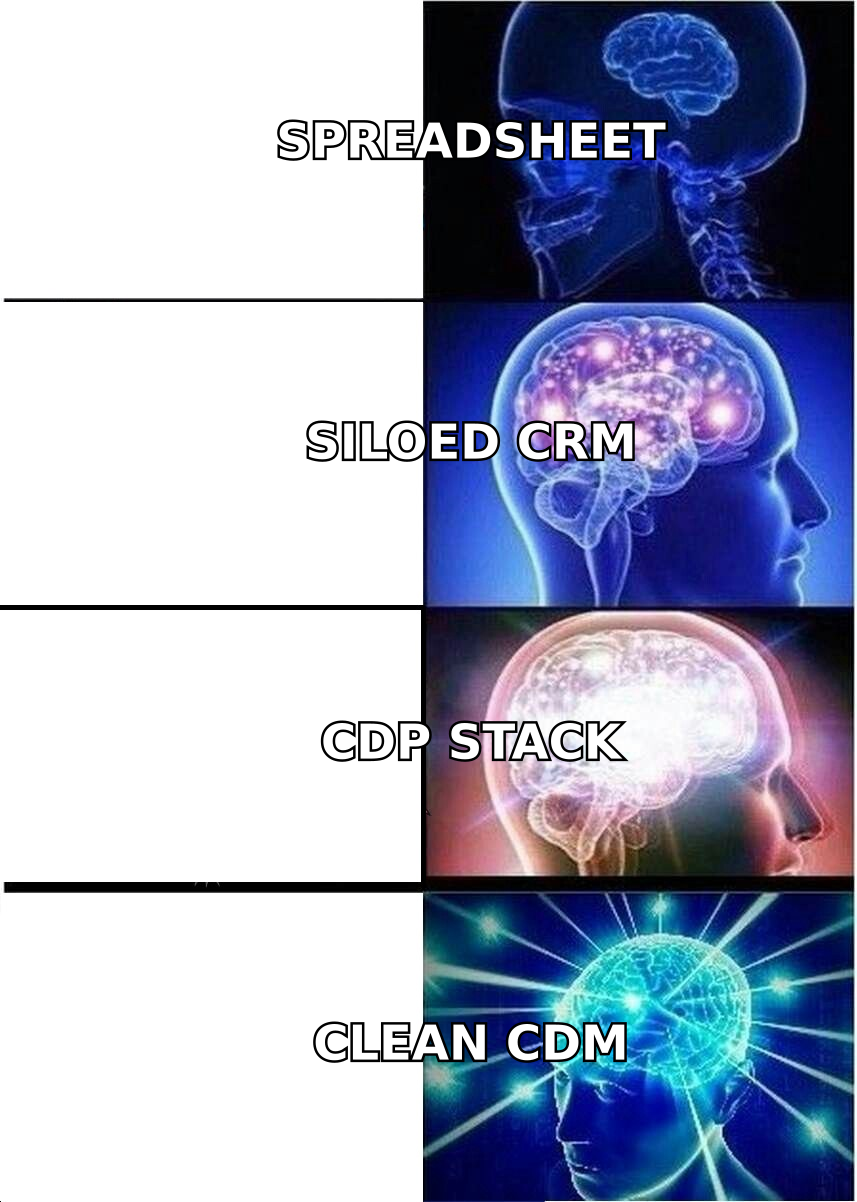
The trap teams fall into is buying a CDP to fix a data-quality problem. A CDP unifies data beautifully — and unifies your bad data just as beautifully. If your inputs are wrong, you have simply paid more to distribute the errors faster. Fix quality at the source first (more on that below), then decide whether a CDP earns its keep. Tools like HubSpot's Smart CRM already cover unification and activation well enough for most mid-market teams.
How Do You Build a Customer Data Management Framework?#
Follow a source-to-activation sequence. Each step assumes the one before it is solid.
- Audit what you have. Export your CRM. Measure four things: completeness (what % of key fields are filled), accuracy (how many emails still bounce), duplication (how many records describe the same entity), and freshness (average age since last update). This baseline is your scoreboard.
- Define the single customer view. Decide, per object, which fields are authoritative and which system owns them. Email might come from your verifier, job title from an enrichment source, deal stage from the CRM. Write it down.
- Clean at the source, not in batch. Verify every email on entry. Deduplicate before a record saves, not during a quarterly purge. Standardize formats (country codes, company names) with rules, not manual edits.
- Enrich the gaps. Fill missing firmographics, roles, and contact details from a reliable B2B database so records are actionable the moment they land.
- Govern access and consent. Map who can see and edit what, log consent, and set retention windows. This is where GDPR and CCPA compliance lives.
- Activate and monitor. Sync clean data to your GTM stack, then watch the four health metrics monthly. Data health is a product you maintain, not a project you finish.
Where Does Data Quality Actually Break — and How Do You Prevent It?#
Data breaks at three predictable points, and each has a cheap prevention that beats an expensive cure.
At entry. A rep fat-fingers an email, a form captures a personal Gmail instead of a work address, a webhook drops a field. Prevention: validate and verify in real time. An email verifier that runs the moment a record is created stops the bad address before it ever reaches a campaign. For domains that accept everything, a dedicated catch-all verifier tells you whether a mailbox is genuinely reachable.
During growth. The same account gets created three times under slightly different names. Prevention: enforce matching rules on save and reconcile against a canonical company record via domain search so "Acme", "Acme Inc", and "acme.com" resolve to one entity.
Over time. People leave jobs; roughly a quarter to a third of B2B contacts change roles each year. Prevention: schedule re-verification and re-enrichment on a cadence, and prioritize records your team actually touches.
The pattern across all three: catch problems at the source with automation, instead of running heroic cleanup sprints later. The G2 grid for data quality tools is full of platforms that promise batch cleanup — useful, but always a second line of defense behind entry-point verification.
How Do You Measure Customer Data Management Success?#
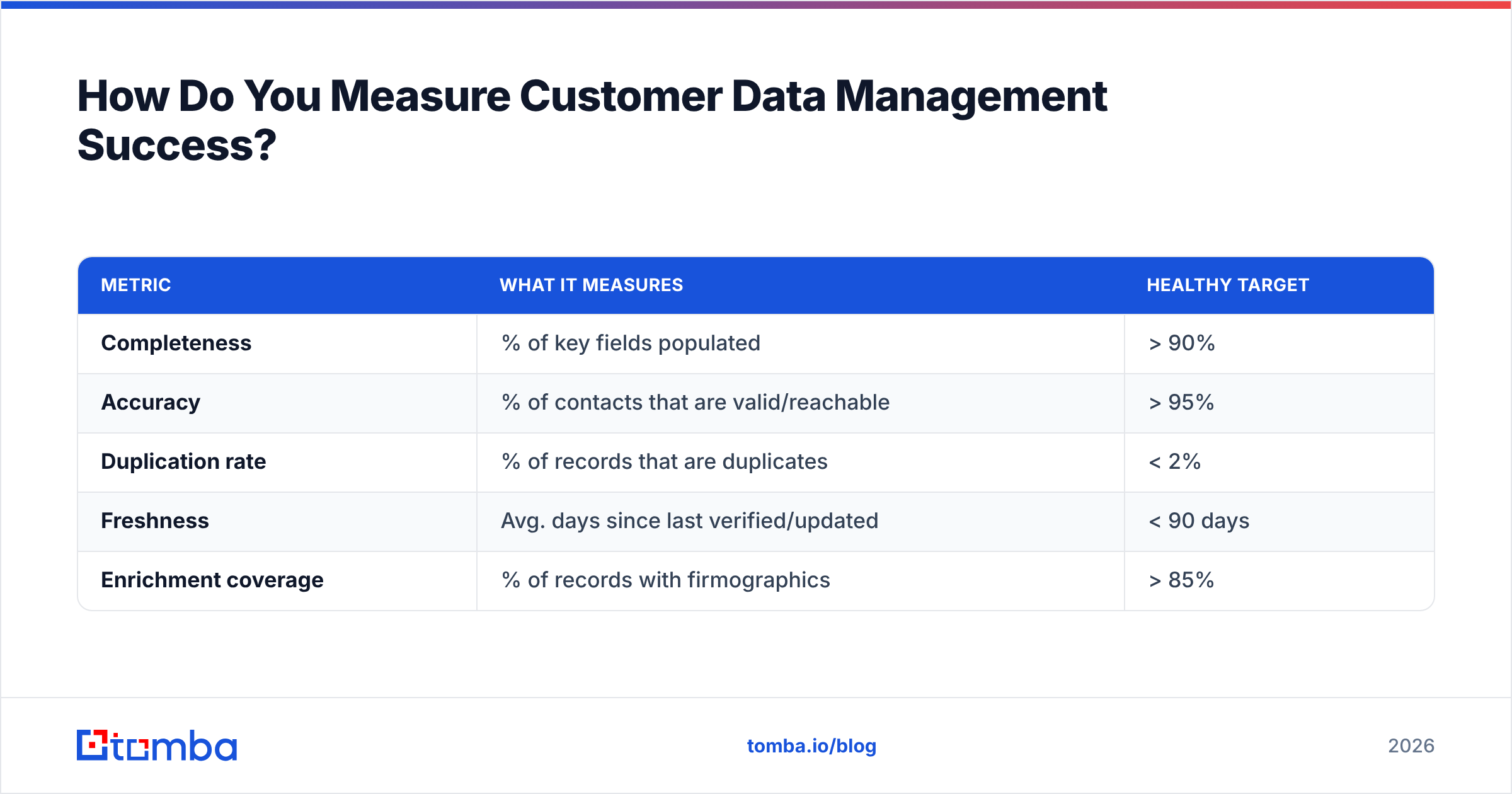
Track data health as a first-class metric, reported monthly, with a target for each dimension.
| Metric | What it measures | Healthy target |
|---|---|---|
| Completeness | % of key fields populated | > 90% |
| Accuracy | % of contacts that are valid/reachable | > 95% |
| Duplication rate | % of records that are duplicates | < 2% |
| Freshness | Avg. days since last verified/updated | < 90 days |
| Enrichment coverage | % of records with firmographics | > 85% |
Two rules keep this honest. First, tie the metrics to a business outcome — for example, correlate accuracy with your email response rate so leadership sees why it matters. Second, assign a single owner. A metric everyone watches and no one owns will drift. RevOps is usually the right home.
What Tools Support Customer Data Management?#
You will assemble a small stack rather than buy one monolith. The categories that matter:
- Verification — confirm emails and phones are real before use.
- Enrichment — fill missing firmographic and contact fields.
- Deduplication / identity resolution — merge duplicate people and accounts.
- Integration / sync — move clean data between tools without manual exports.
- Governance — manage consent, access, and retention.
Where a source-of-truth data provider earns its place is at the front of that list. If the emails, phone numbers, and company data entering your system are already verified and enriched, four of the five categories above get dramatically easier. That is the leverage point. Tomba's data enrichment and verification sit at exactly this layer, feeding clean records into your CRM through native integrations rather than another silo to manage. For teams that want to compare providers on cost, transparent Tomba pricing starts with a free tier (25 searches/mo) and scales to Starter at $49/mo.
A quick note on sourcing partners: providers like BookYourData and Tomba serve slightly different needs — prebuilt list purchase versus real-time finding and verification — and many teams use both. Match the source to whether you need coverage now or accuracy on demand.
Frequently Asked Questions#
Is customer data management the same as a CDP? No. A CDP is one type of tool that can support customer data management, but CDM is the broader discipline — collection, quality, governance, and activation. You can run excellent CDM with a CRM and a verification/enrichment layer and no dedicated CDP at all.
How often should I clean customer data? Continuously at the source, and on a scheduled cadence for the rest. Verify on entry, then re-verify records your team actively uses every 60–90 days. A once-a-year batch cleanup leaves you working with stale data for eleven months.
Who should own customer data management? In most B2B organizations, RevOps. They sit closest to the pipeline number the data feeds and can enforce rules across sales, marketing, and success without turning it into an IT ticket queue.
Does this apply to small teams? Especially to small teams. You cannot brute-force bad data with headcount when you have five people. Getting clean, verified, deduplicated records from day one is the highest-leverage habit a small GTM team can build.
Start Where the Data Enters#
Customer data management sounds like a platform decision. It is really a discipline decision — and the discipline that pays off fastest is verifying and enriching records at the point they enter your systems, before bad data has a chance to spread.
That is exactly what Tomba's Email Finder is built for: find accurate, verified professional email addresses by name, company, or domain, and feed clean contacts straight into your CRM and outbound stack. Pair it with the email verifier and data enrichment, and the four hardest parts of CDM — quality, dedupe, enrichment, and activation — get solved at the source instead of in a cleanup sprint six months from now. Start on the free tier, measure your data-health baseline, and build from there.
Related guides#
Ready to find emails that actually work?
Join 150,000+ professionals who stopped guessing and started sending. Free credits on signup — no credit card required.
Get the Tomba newsletter
Practical outbound tactics and product updates — once every two weeks.
About the author