Customer Follow Up Email Template: 12 Examples That Convert
Most follow-up emails get ignored because they open with "just checking in." Here are 12 customer follow-up email templates that actually earn replies — plus exactly when to send each one.
Most follow-up emails fail for the same reason: they add nothing. "Just circling back" and "any update?" tell the reader you have no new reason to email — so they don't reply. A good customer follow-up email template does the opposite. It gives the recipient a fresh reason to open, a single clear ask, and an easy way to say yes.
This guide gives you 12 templates you can paste and send today, grouped by scenario, plus the cadence and timing rules that decide whether they land at all.
TL;DR#
- The problem isn't frequency, it's value. Every follow-up needs one new angle — a resource, a deadline, a question, or a result — not a nudge.
- Send 4–6 touches, not 1. Roughly 80% of conversions happen after the first email, yet most reps stop after one.
- Timing matters: wait 2–3 business days between touches, send Tuesday–Thursday mornings, and always keep the same subject thread.
- One ask per email. Multiple CTAs cut reply rates. Make the next step a single, low-friction choice.
- Reach the right inbox first. A perfect template sent to a dead address converts zero. Verify contacts before you sequence with a tool like Tomba Email Finder.
What Makes a Customer Follow-Up Email Actually Work?#
A follow-up email works when it respects three constraints: the reader is busy, skeptical, and scanning. That means short, specific, and single-purpose.
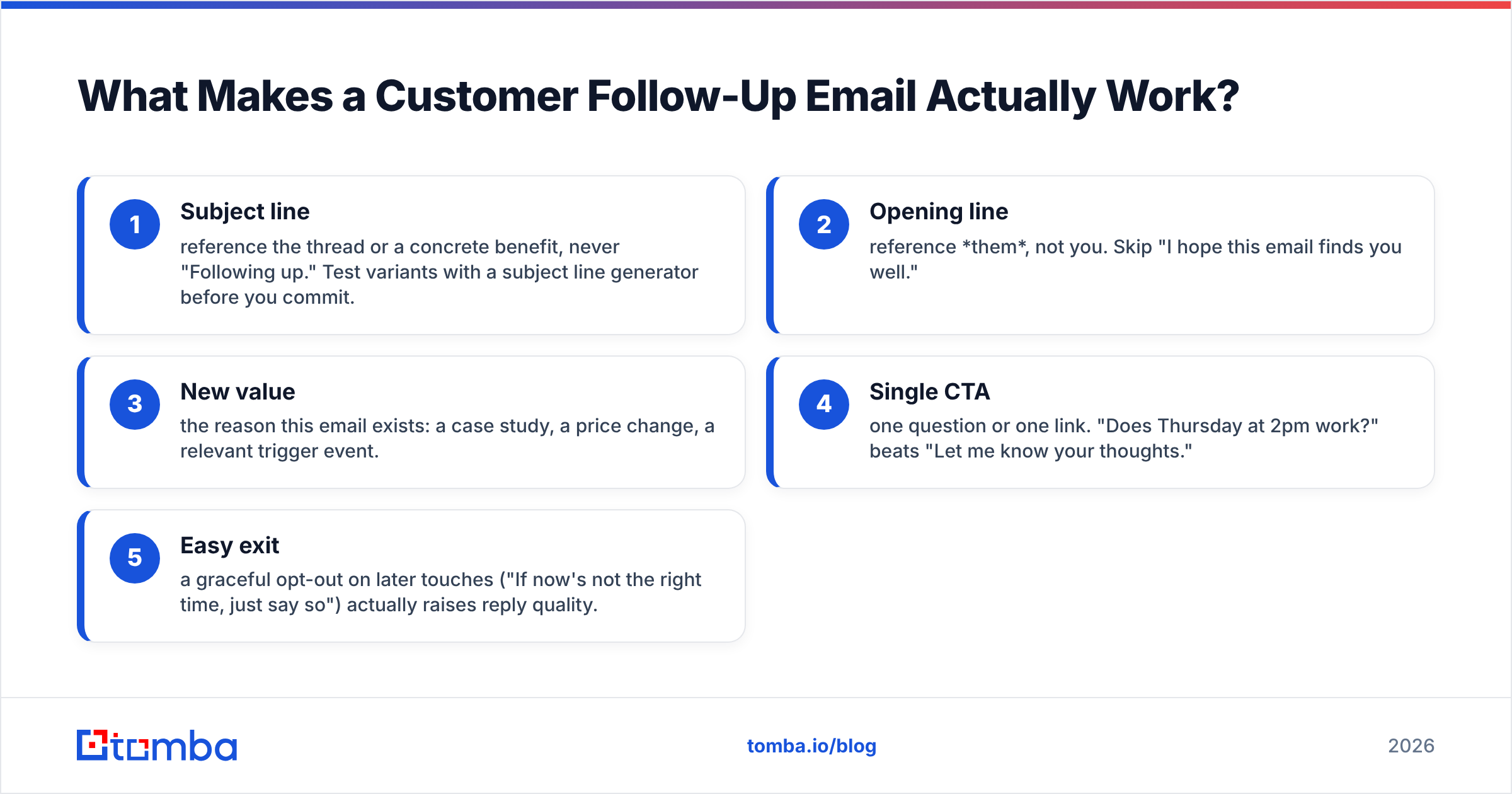
Break it into five parts and every template becomes a fill-in-the-blank exercise:
- Subject line — reference the thread or a concrete benefit, never "Following up." Test variants with a subject line generator before you commit.
- Opening line — reference them, not you. Skip "I hope this email finds you well."
- New value — the reason this email exists: a case study, a price change, a relevant trigger event.
- Single CTA — one question or one link. "Does Thursday at 2pm work?" beats "Let me know your thoughts."
- Easy exit — a graceful opt-out on later touches ("If now's not the right time, just say so") actually raises reply quality.
The difference between a template that converts and one that gets archived is almost never the wording of the CTA — it's whether the middle section earned the ask.
The 12 Customer Follow-Up Email Templates#
Below are 12 templates across the scenarios you actually face. Swap the bracketed variables, keep them short, and never send two in a row without changing the angle.
After a first meeting or demo#
1. The recap-and-next-step
Subject: Recap + the two things you asked about
Hi [Name], thanks for the time today. You mentioned [specific pain point] was the priority, so I pulled the two resources that map to it: [link 1] and [link 2]. Next step on my side is [action]. Does [day/time] work for a 20-minute walkthrough?
2. The stakeholder loop-in
Subject: For [Colleague] — the [topic] breakdown
Hi [Name], you said [Colleague] would need to weigh in on [decision]. I put the key points on one page so you don't have to re-explain it: [link]. Happy to hop on a call with both of you — would [day] suit?
After sending a proposal or quote#
3. The deadline anchor
Subject: [Company] proposal — quick note on timing
Hi [Name], following our proposal from [date]. The [pricing tier/discount] we discussed holds through [date]. If [outcome] is still the goal this quarter, I'd suggest we lock the next step by [day]. Want me to send a calendar hold?
4. The objection pre-empt
Subject: The question most teams ask us next
Hi [Name], after a proposal, most teams ask us about [common objection — e.g. onboarding time]. Short answer: [one-sentence answer]. Longer answer here if useful: [link]. What's the biggest open question on your end?
When a customer has gone quiet#
5. The permission-to-close
Subject: Should I close your file?
Hi [Name], I haven't heard back, which usually means one of three things: you're swamped, it's not a priority right now, or you've gone another direction. A one-word reply tells me how to help. No hard feelings either way.
6. The trigger-event restart
Subject: Saw [Company] just [event]
Hi [Name], congrats on [funding round / product launch / new hire]. That usually changes [relevant priority], which is exactly where we help. Worth a 15-minute conversation now that timing's shifted?
For existing customers (retention and upsell)#
7. The check-in with data
Subject: Your [metric] this month
Hi [Name], quick one — you've hit [result/usage stat] since [date]. Teams at this stage usually unlock [next feature/tier]. Want me to show you the 3-minute version?
8. The renewal runway
Subject: [Product] renews [date] — nothing needed yet
Hi [Name], your plan renews on [date]. Before then, I'd love 15 minutes to make sure you're getting the most out of [feature]. Would [day] work, or should I send a couple of times?
Post-purchase and onboarding#
9. The 7-day success nudge
Subject: Quick win for week one
Hi [Name], you're a week into [product]. The fastest win from here is [specific action]. Here's a 90-second guide: [link]. Stuck anywhere? Reply and I'll jump in.
10. The referral ask
Subject: A small favor (only if it's earned)
Hi [Name], glad [result] is landing for you. If you know one team wrestling with [problem], I'd be grateful for an intro — and happy to return the favor. No pressure at all.
Breakup and re-engagement#
11. The genuine breakup
Subject: Closing the loop
Hi [Name], I don't want to clutter your inbox, so this is my last note on [topic]. If [outcome] moves up your list later, my door's open — just reply to this thread. Wishing you a strong [quarter].
12. The value-first re-engage (6 months later)
Subject: Thought of you when I saw this
Hi [Name], we shelved [project] earlier this year. We just published [resource] on exactly that problem — no ask, just thought it'd be useful: [link]. If the timing's better now, you know where to find me.
How Many Follow-Ups Should You Send, and When?#
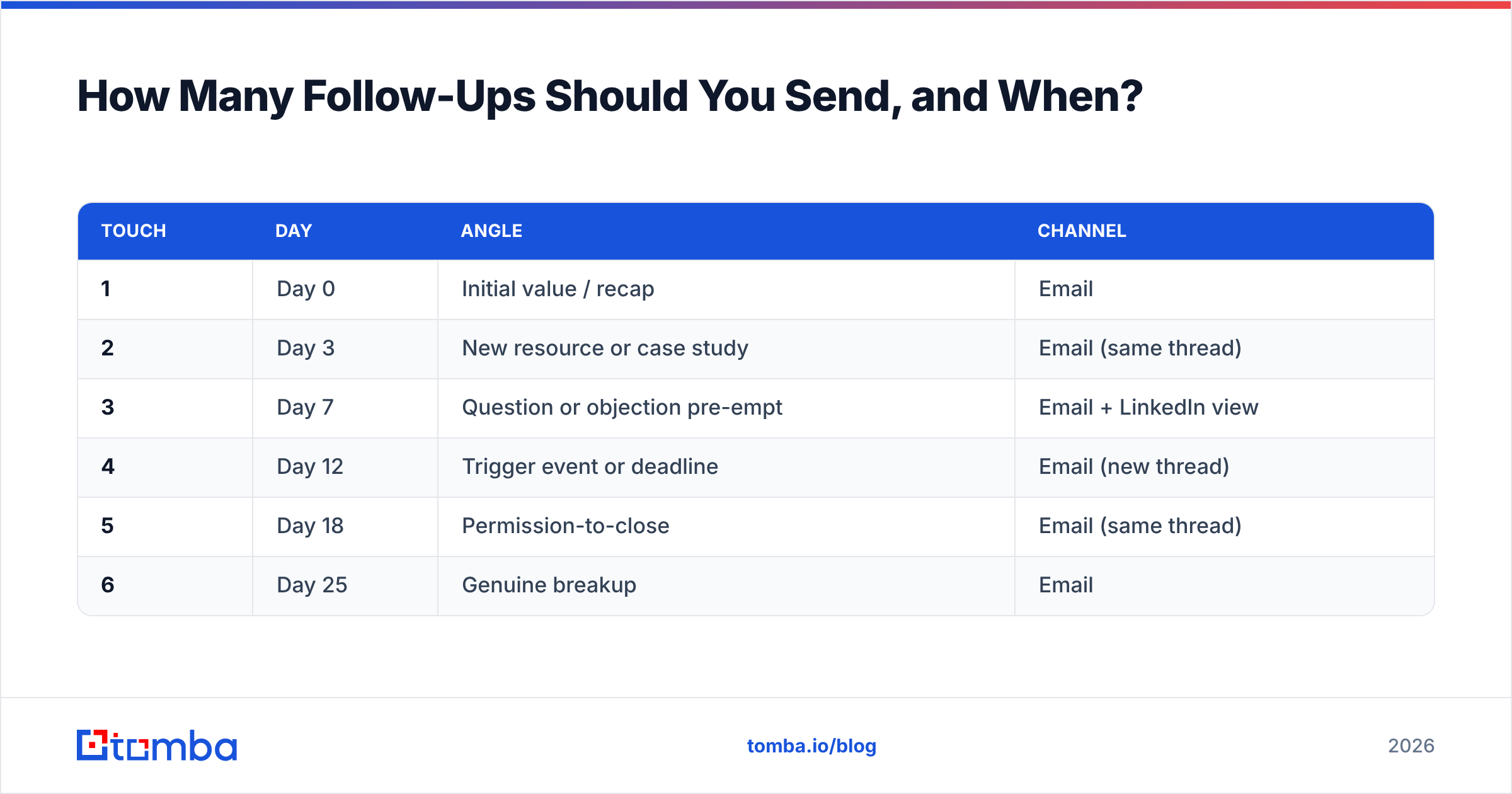
Send four to six touches spaced over two to three weeks — the majority of replies arrive after the first email, not on it. Stopping at one leaves most of your pipeline on the table.
Here's a cadence that balances persistence with respect:
| Touch | Day | Angle | Channel |
|---|---|---|---|
| 1 | Day 0 | Initial value / recap | |
| 2 | Day 3 | New resource or case study | Email (same thread) |
| 3 | Day 7 | Question or objection pre-empt | Email + LinkedIn view |
| 4 | Day 12 | Trigger event or deadline | Email (new thread) |
| 5 | Day 18 | Permission-to-close | Email (same thread) |
| 6 | Day 25 | Genuine breakup |
A few timing rules that consistently outperform:
- Wait 2–3 business days between touches. Same-day double-sends read as desperate.
- Send Tuesday–Thursday, 8–10am in the recipient's time zone. Monday inboxes are overloaded; Friday sends get buried.
- Keep the same subject thread for touches 1–3 so context stays intact, then start a fresh thread to reset the open rate.
- Cap it. After the breakup email, stop — and re-engage months later with template 12.
Follow-Up Templates vs. Generic Check-Ins: What Actually Converts?#
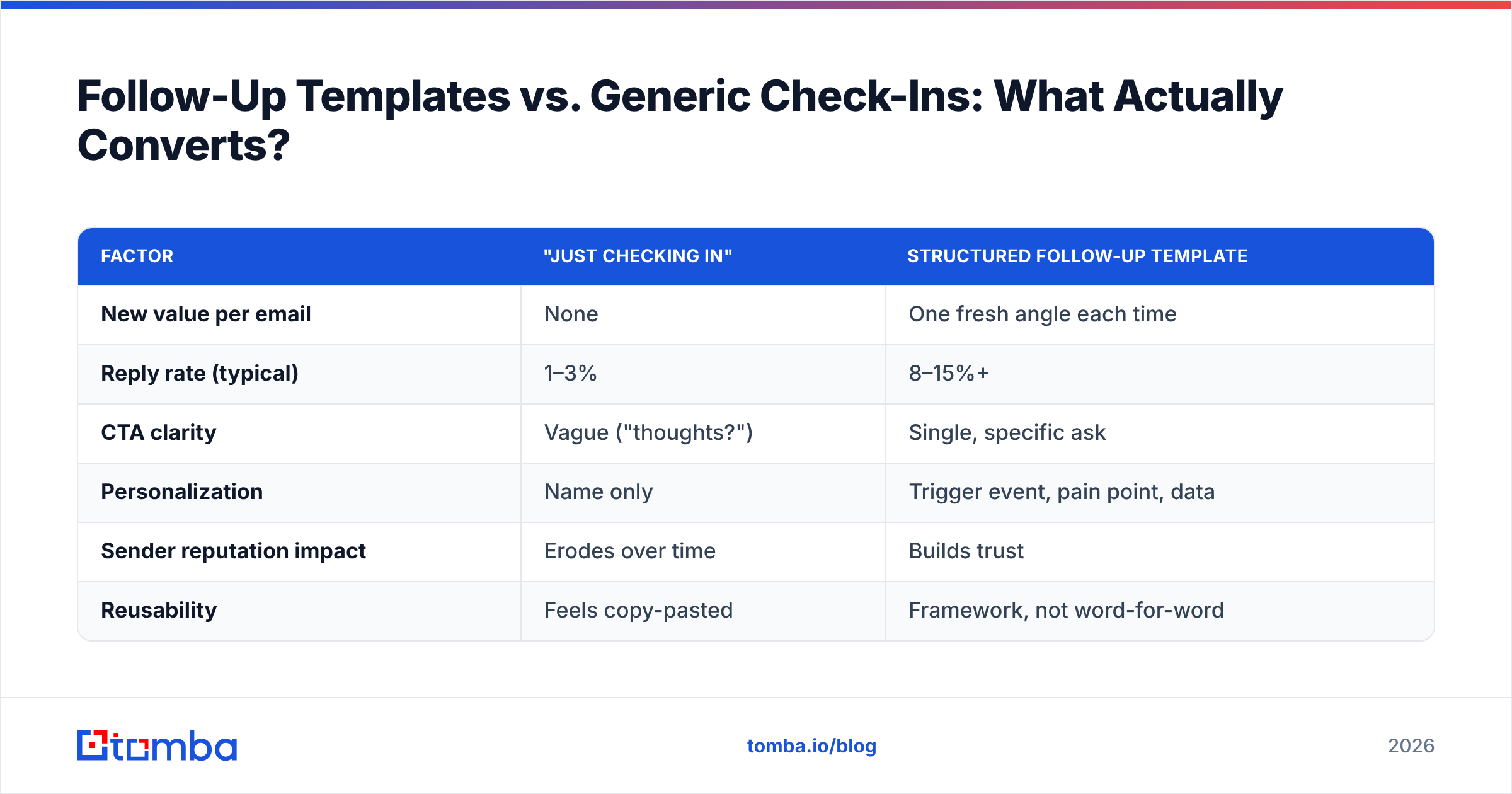
The gap between a structured template and a lazy "just checking in" is measurable. Here's how the two approaches compare on the factors that drive replies.
| Factor | "Just Checking In" | Structured Follow-Up Template |
|---|---|---|
| New value per email | None | One fresh angle each time |
| Reply rate (typical) | 1–3% | 8–15%+ |
| CTA clarity | Vague ("thoughts?") | Single, specific ask |
| Personalization | Name only | Trigger event, pain point, data |
| Sender reputation impact | Erodes over time | Builds trust |
| Reusability | Feels copy-pasted | Framework, not word-for-word |
The templates win because they give the reader a reason and a decision. Generic check-ins give them neither, so silence is the rational response.
Why Do Great Follow-Up Emails Still Get No Reply?#
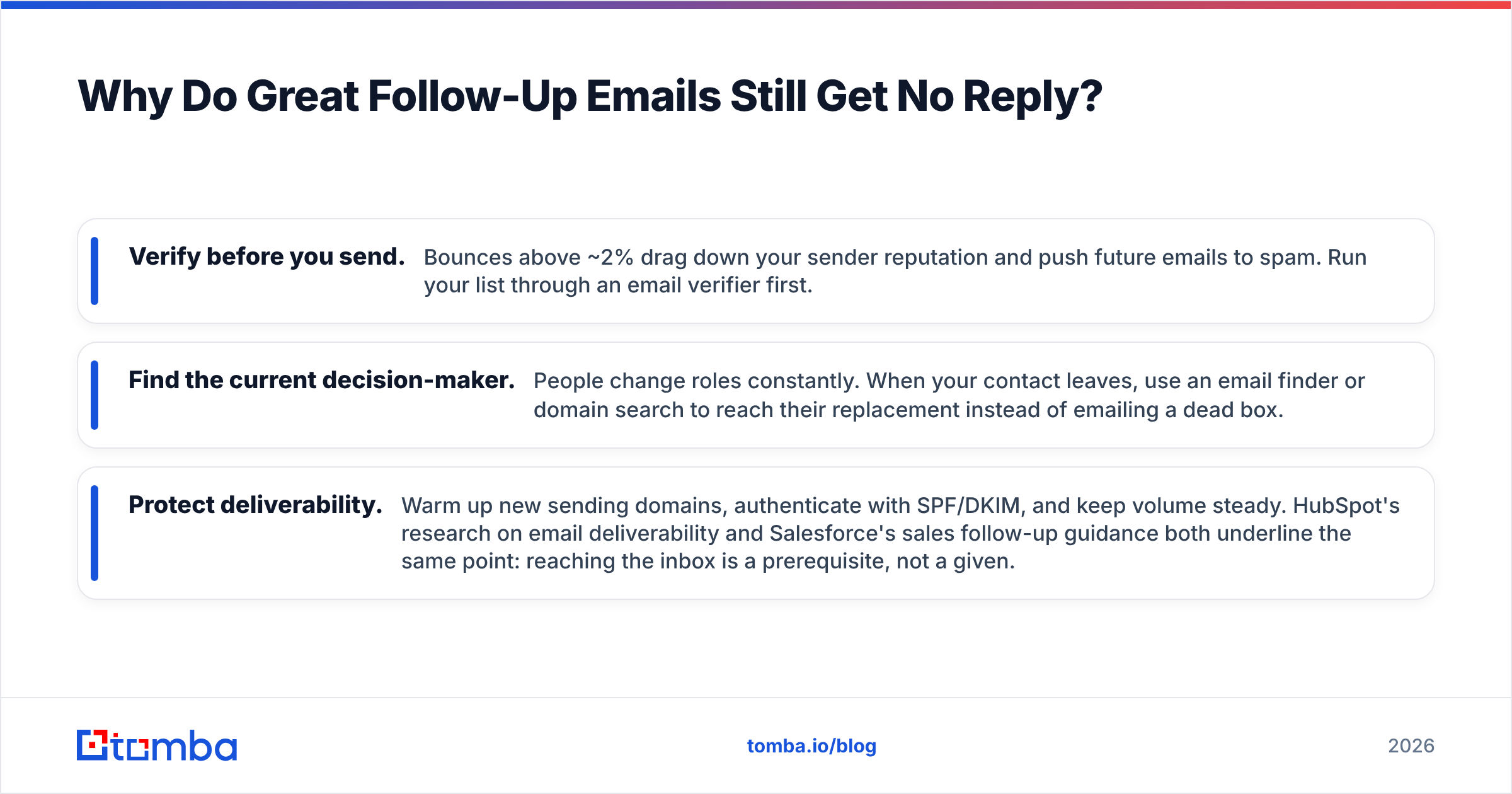
Because they never reached a real inbox. You can write the perfect customer follow-up email template and still get zero replies if the address bounces, lands in spam, or belongs to someone who left the company six months ago.
Three fixes close that gap:
- Verify before you send. Bounces above ~2% drag down your sender reputation and push future emails to spam. Run your list through an email verifier first.
- Find the current decision-maker. People change roles constantly. When your contact leaves, use an email finder or domain search to reach their replacement instead of emailing a dead box.
- Protect deliverability. Warm up new sending domains, authenticate with SPF/DKIM, and keep volume steady. HubSpot's research on email deliverability and Salesforce's sales follow-up guidance both underline the same point: reaching the inbox is a prerequisite, not a given.
A follow-up sequence is only as good as the contact data underneath it. Clean, verified addresses turn your templates from theory into replies.
Common Follow-Up Mistakes to Avoid#
- Guilt-tripping. "I've reached out three times now..." makes it about you. Delete it.
- Stacking CTAs. "Book a call, or reply, or check the link, or..." — pick one.
- Sending the same email twice. If touch 3 reads like touch 1, you've earned the ignore.
- No exit ramp. Later touches need a graceful out; it filters tire-kickers and lifts reply quality.
- Ignoring the send window. A brilliant email at 6pm Friday is a deleted email by Monday.
Turn Your Follow-Up Templates Into Replies#
Templates handle the words. The missing piece is making sure every email reaches a real, current inbox — because reply rate starts with deliverability, not copy. Tomba Email Finder finds and verifies professional email addresses by name, domain, or company, so your follow-up sequence lands with the right person instead of bouncing into a dead box. Pair it with the email verifier to keep bounce rates low, start free with 25 searches a month, and scale on a Tomba plan when your outreach grows. Write the follow-up once, reach the inbox every time.
Related guides#
Ready to find emails that actually work?
Join 150,000+ professionals who stopped guessing and started sending. Free credits on signup — no credit card required.
Get the Tomba newsletter
Practical outbound tactics and product updates — once every two weeks.
About the author