The Customer Profile Template PDF Guide: Build ICPs That Convert
A blank customer profile template PDF is easy to download and hard to fill correctly. Here's the exact framework, the fields that matter, and how to back every field with real B2B data.
The Customer Profile Template PDF Guide: Build ICPs That Convert
Downloading a customer profile template PDF takes ten seconds. Filling it with something that actually sharpens your targeting is where most teams stall. They drop in a job title, a vague company size, and a "pain point" they invented in a meeting — then wonder why the leads still don't convert.
This guide fixes that. You'll get the exact structure of a strong customer profile template, the fields that separate a useful profile from a decorative one, and the data sources that keep each field honest.
TL;DR#
- A customer profile template PDF is a one-page structured document that captures who your best-fit customer is — firmographics, role, goals, pain points, and buying triggers.
- The template is only as good as the data inside it. Guessed profiles produce guessed outreach and dead pipelines.
- The nine core fields below are non-negotiable; everything else is optional detail.
- Back firmographic and contact fields with verified B2B data, not assumptions — that's the difference between an ICP that ranks leads and one that just decorates a slide.
- Use the copy-paste template in this post, then enrich it with real contact and company data before you send a single email.
What is a customer profile template?#
A customer profile template is a reusable one-page framework that describes the type of company and person most likely to buy from you, succeed with your product, and stay. Think of it like a fishing map: it doesn't guarantee a catch, but it tells you exactly which lake to cast in and what bait works there.
There are two related documents people conflate, so let's separate them:
- Ideal Customer Profile (ICP) — describes the company: industry, size, revenue, tech stack, and buying triggers. It answers "which accounts should we target?"
- Buyer persona — describes the person inside that company: role, goals, objections, and how they make decisions. It answers "who do we talk to and what do we say?"
- Customer profile template — the container that holds both, in a format your whole team can fill out the same way every time.
A PDF format matters more than it sounds. A shared Google Doc drifts; a locked template PDF forces consistency, so the profile a rep builds in January looks like the one marketing builds in June. For the underlying concept, HubSpot's guide to buyer personas is a solid primer on the persona half of the equation.
What fields belong in a customer profile template PDF?#
Here's the structure. Copy this into your PDF and you have a working template. The nine fields below are the load-bearing ones — resist the urge to add twenty more, because a template nobody finishes is worse than a short one everyone does.
- Company firmographics — industry, employee count, annual revenue, HQ location, and growth stage. This is the filter that removes 80% of the market before you spend a cent.
- Technographics — the tools they already run (CRM, email platform, analytics). A company on a competing tool is a very different lead than one on nothing.
- Decision-maker role — exact titles and seniority of the person who signs, plus the person who champions internally. These are rarely the same human.
- Primary goal — the outcome this buyer is measured on. Not "efficiency" — something concrete like "book 30 qualified demos a month."
- Pain points — the specific friction stopping that goal, phrased in their words, not your feature list.
- Buying triggers — the events that flip a prospect from "not now" to "let's talk": new funding, a new VP hire, a compliance deadline, hitting a scaling wall.
- Objections — the top three reasons deals stall, and your honest counter to each.
- Preferred channels — where they actually respond: email, LinkedIn, phone, or a mix.
- Contact data — verified work email, phone, and LinkedIn URL for the real person, not a generic info@ address.
Field 9 is where most profiles quietly fail. A beautifully written persona with no reachable contact is a character study, not a sales asset. This is why enrichment belongs in the template workflow, not as an afterthought — you can pull verified emails and firmographics straight into the profile with data enrichment instead of hand-typing guesses.
What does a filled-out customer profile look like?#
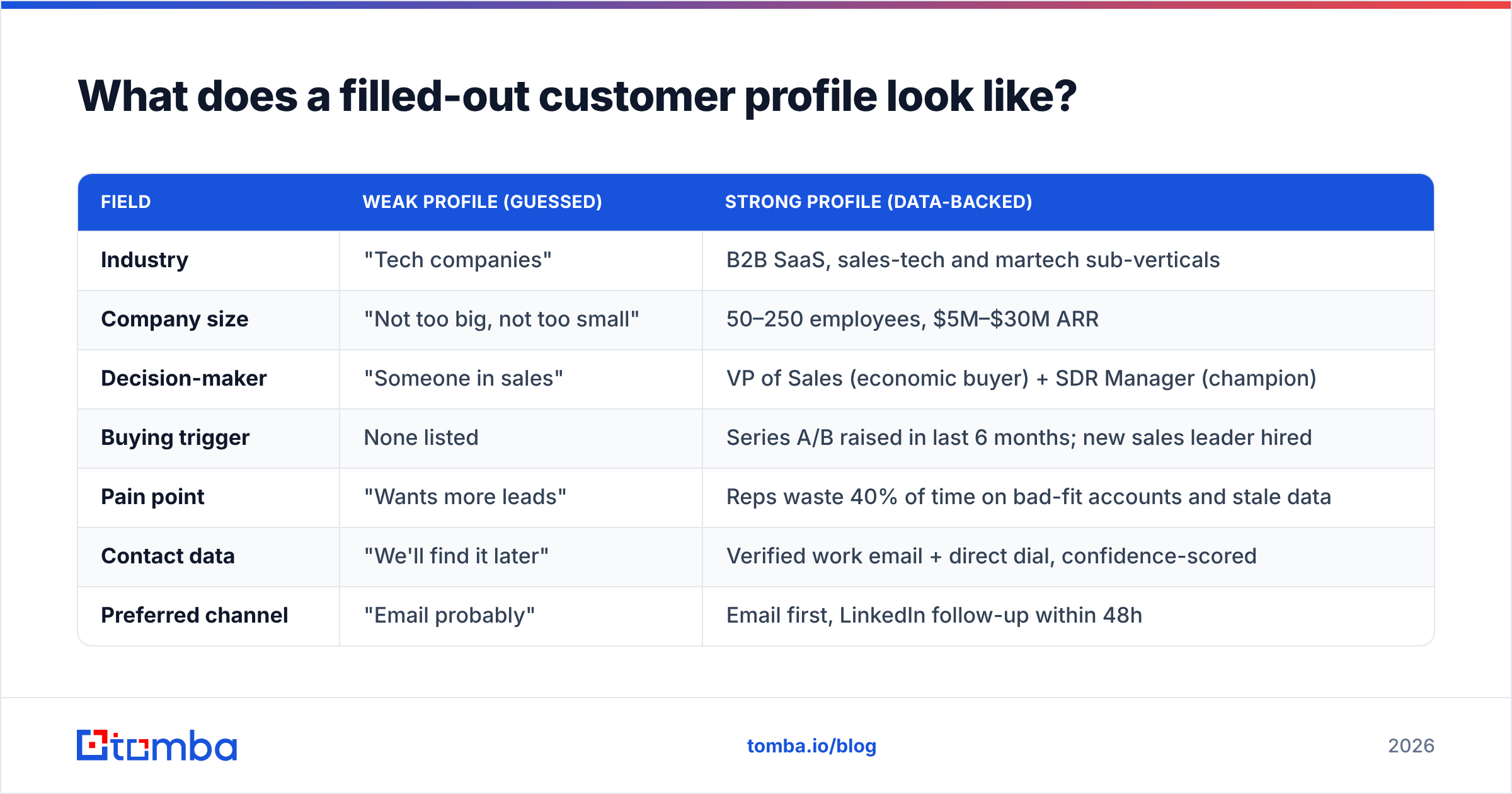
Templates feel abstract until you see one populated. Below is a comparison of a weak profile versus a strong one for the same target — a mid-market SaaS company. Same template, radically different usefulness.
| Field | Weak profile (guessed) | Strong profile (data-backed) |
|---|---|---|
| Industry | "Tech companies" | B2B SaaS, sales-tech and martech sub-verticals |
| Company size | "Not too big, not too small" | 50–250 employees, $5M–$30M ARR |
| Decision-maker | "Someone in sales" | VP of Sales (economic buyer) + SDR Manager (champion) |
| Buying trigger | None listed | Series A/B raised in last 6 months; new sales leader hired |
| Pain point | "Wants more leads" | Reps waste 40% of time on bad-fit accounts and stale data |
| Contact data | "We'll find it later" | Verified work email + direct dial, confidence-scored |
| Preferred channel | "Email probably" | Email first, LinkedIn follow-up within 48h |
| Objection | Not addressed | "We already have Apollo" → position on data accuracy |
The right-hand column doesn't take genius — it takes real inputs. Firmographic ranges come from filtering a B2B database, triggers come from funding and hiring signals, and the contact row comes from verified lookups rather than a permutation you hope routes correctly.
How do you fill the template with accurate data?#
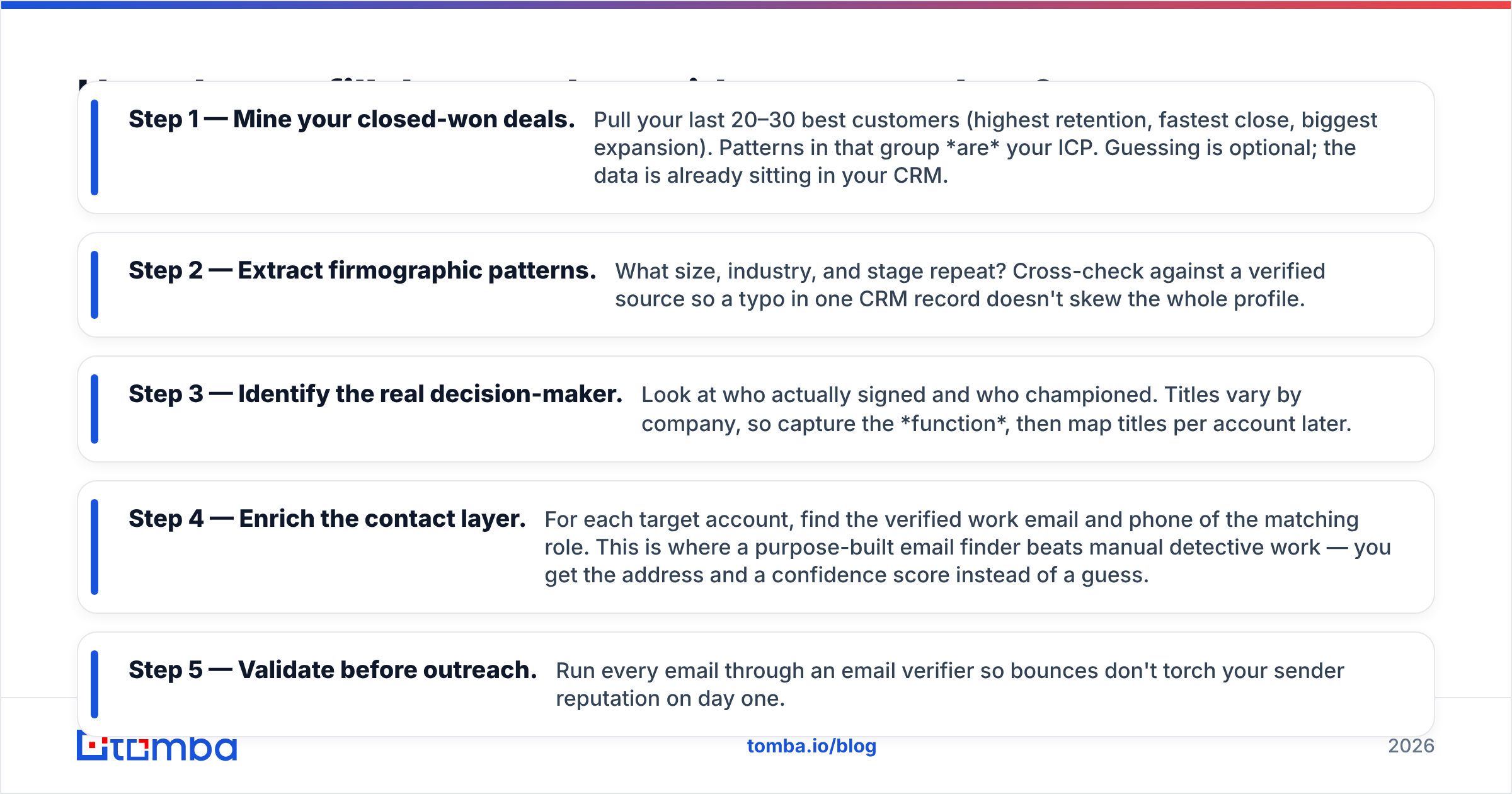
The conclusion first: build the profile from your existing best customers, then verify every data point before you trust it. Working backward from real winners beats inventing an ideal from scratch.
Follow this sequence:
- Step 1 — Mine your closed-won deals. Pull your last 20–30 best customers (highest retention, fastest close, biggest expansion). Patterns in that group are your ICP. Guessing is optional; the data is already sitting in your CRM.
- Step 2 — Extract firmographic patterns. What size, industry, and stage repeat? Cross-check against a verified source so a typo in one CRM record doesn't skew the whole profile.
- Step 3 — Identify the real decision-maker. Look at who actually signed and who championed. Titles vary by company, so capture the function, then map titles per account later.
- Step 4 — Enrich the contact layer. For each target account, find the verified work email and phone of the matching role. This is where a purpose-built email finder beats manual detective work — you get the address and a confidence score instead of a guess.
- Step 5 — Validate before outreach. Run every email through an email verifier so bounces don't torch your sender reputation on day one.
The order matters. Enriching before you've defined the firmographic filter just gets you accurate data on the wrong people faster.

Template PDF vs. spreadsheet vs. CRM field: which format wins?#
You have three realistic homes for a customer profile. Each has a job.
| Format | Best for | Weakness |
|---|---|---|
| PDF template | Sharing a locked, consistent reference across the team | Static — doesn't update as data changes |
| Spreadsheet | Bulk-building profiles across many accounts at once | Gets messy; no enforced structure |
| CRM custom fields | Live scoring and routing inside your workflow | Setup overhead; needs clean data to work |
The winning move isn't picking one — it's using the PDF as the canonical definition, the spreadsheet as the build surface, and the CRM as the live application. You define the ICP once in the PDF, build hundreds of profiles in bulk (a bulk email finder makes the contact layer scalable), then push the enriched rows into your CRM for scoring and routing. Tools like Pipedrive and HubSpot close that last loop.
How often should you update your customer profile?#
Every quarter, and immediately after any of these: a pricing change, a new product line, a shift in your best-performing segment, or a market event that reshapes buyer priorities. A customer profile is a living document, not a founding artifact.
The fastest way to know it's stale: your reply and win rate on "on-profile" accounts start dropping. That's the profile telling you the market moved and it didn't. When you refresh, re-run the closed-won analysis from Step 1 — your newest winners are the most honest signal you have.
One practical warning from reviews on sites like G2: teams that treat the profile as "set once" almost always over-target the customer they had, not the one they can win next. Schedule the review so it happens whether or not anyone remembers to.
Common customer profile template mistakes#
- Too many personas. If you have eight personas, you effectively have none. Start with one primary and one secondary.
- Feature-shaped pain points. "They need our dashboard" is not a pain point. "They can't see pipeline health without pulling three reports" is.
- No contact data. A profile you can't act on is a poster. Always include the verified email and phone layer.
- Ignoring buying triggers. Fit tells you who; triggers tell you when. Skipping triggers means perfect-fit outreach at the worst possible moment.
- Never validating. An unverified email list quietly wrecks deliverability. Verify before you send, every time.
Where should you get the underlying data?#
Firmographics and contact data are the two inputs that make or break the whole template, and they're also the two most people fake. For a defensible profile:
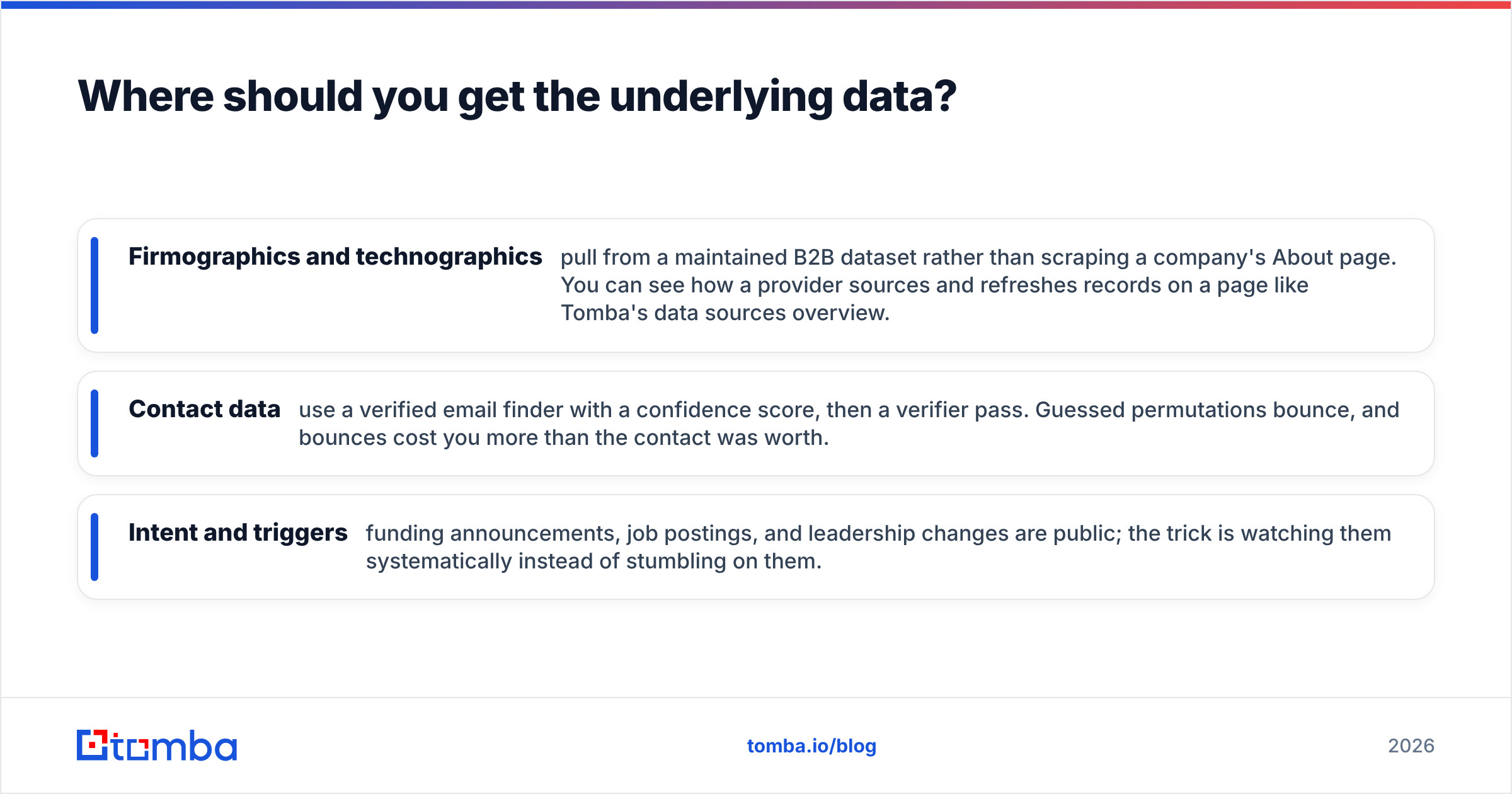
- Firmographics and technographics — pull from a maintained B2B dataset rather than scraping a company's About page. You can see how a provider sources and refreshes records on a page like Tomba's data sources overview.
- Contact data — use a verified email finder with a confidence score, then a verifier pass. Guessed permutations bounce, and bounces cost you more than the contact was worth.
- Intent and triggers — funding announcements, job postings, and leadership changes are public; the trick is watching them systematically instead of stumbling on them.
Analyst research from firms like Gartner consistently ties revenue outcomes to data quality over data volume. A tight, verified profile beats a bloated, guessed one every time.
Build the profile, then fill the hardest field#
You can download a customer profile template PDF anywhere. What you can't download is the accurate data that makes it work — the verified email, the real decision-maker, the firmographic filter that actually matches your winners.
That's the field to solve first. Tomba's Email Finder turns the contact layer of every profile from a guess into a verified, confidence-scored record, so the person you built the persona around is someone you can actually reach. Start free with 25 searches a month, and when your list scales, the Starter plan at $49/mo covers most single-rep workflows before you ever need Growth or Pro.
Build the template once. Fill it with real data. Then watch the profile do the job it was supposed to do — put your best-fit customers in front of you, ready to reach.
Related guides#
Ready to find emails that actually work?
Join 150,000+ professionals who stopped guessing and started sending. Free credits on signup — no credit card required.
Get the Tomba newsletter
Practical outbound tactics and product updates — once every two weeks.
About the author