The Customer Profiling Template That Turns Guesswork Into Pipeline
A copy-and-fill customer profiling template built for 2026 outbound—the exact firmographic, technographic, and behavioral fields that separate a converting ICP from a wishlist.
The Customer Profiling Template That Turns Guesswork Into Pipeline
Most "customer profiles" are a paragraph of wishful thinking taped to a slide deck. They describe the customer a founder wants, not the account that actually signs, expands, and renews. A real customer profiling template is different: it is a structured, field-by-field artifact your whole go-to-market team fills in with evidence, then uses to score every inbound and outbound account.
This guide gives you that template, explains every field, and shows you how to populate it with real data instead of opinions.
TL;DR#
- A customer profiling template is a fixed set of fields (firmographic, technographic, behavioral, and buying-committee data) you complete for your best-fit accounts so targeting stops being subjective.
- Copy the fill-in template in the section below—it works in a spreadsheet, a CRM, or a Notion doc.
- The fields most teams skip are technographics, trigger events, and disqualifiers, and those are exactly the ones that raise reply rates.
- A profile is only as good as the data behind it. Enriched, verified contact and company data is the difference between a template and a fantasy.
- Refresh it quarterly. Your closed-won data—not your intuition—should rewrite the profile every 90 days.
What Is a Customer Profiling Template?#
A customer profiling template is a reusable framework that captures the shared attributes of your highest-value customers so you can find more accounts that look like them. Think of it like a detective's suspect sketch: instead of "tall guy, maybe glasses," you want height, build, distinguishing marks, and last known location—specific enough that a patrol officer can actually make the match on the street.
In B2B, that sketch has two layers people often confuse:
- Ideal Customer Profile (ICP) — the company-level fit. Industry, size, revenue, tech stack, geography.
- Buyer persona — the person-level fit. Role, seniority, goals, objections, and the metrics they're measured on.
A complete customer profiling template holds both. The ICP tells your team which doors to knock on; the persona tells them what to say when the door opens. Skip either half and you get well-targeted emails with terrible messaging, or brilliant copy sent to the wrong companies.

Why Do Most Customer Profiles Fail?#
They fail because they're written once, in a vacuum, and never checked against reality. According to Gartner, B2B buying groups now involve six to ten stakeholders, yet most profiles still describe a single "decision-maker." The result is a profile that's technically filled out but operationally useless.
Here are the four failure modes to design against:
- Aspiration over evidence. The profile describes enterprise logos you've never closed instead of the mid-market accounts that pay your bills.
- No disqualifiers. A profile that only lists green flags can't tell a rep when to walk away, so pipelines clog with bad fits.
- Stale data. People change jobs every ~24 months. A profile built on last year's contact list is quietly rotting.
- No owner. If nobody is responsible for updating it after each quarter's closed-won review, it defaults to fiction.
The fix isn't a longer document. It's a tighter one, backed by fresh data and reviewed on a schedule.
The Customer Profiling Template (Copy This)#
Below is the fill-in structure. Duplicate it per segment—you'll usually maintain two or three profiles, not one. Each field includes what to enter and where the data comes from.
- Segment name — A short label ("Mid-market SaaS, RevOps-led"). Keeps multiple profiles straight.
- Industry / vertical — The 2–4 NAICS or SIC verticals where you win most. Pull from closed-won, not the whole TAM.
- Company size (headcount) — The employee band you actually close (e.g., 50–500). Enrich this from a B2B database rather than guessing.
- Annual revenue band — Your realistic ACV-to-revenue fit (e.g., $5M–$100M).
- Geography / timezone — Where you can support and sell without friction.
- Tech stack (technographics) — The tools that signal fit (e.g., "uses HubSpot + Salesforce"). This is the most predictive and most-skipped field.
- Trigger events — Hiring a VP of Sales, new funding round, opening a new market. These make outreach timely.
- Buying committee — Economic buyer, champion, and blockers, each with title and top metric.
- Pains and desired outcomes — The 2–3 problems they'll pay to remove, in their words.
- Disqualifiers — Explicit red flags (e.g., "no in-house sales team," "under 10 employees"). This field alone saves hundreds of wasted hours.
Filled Example: Two Segments Side by Side#
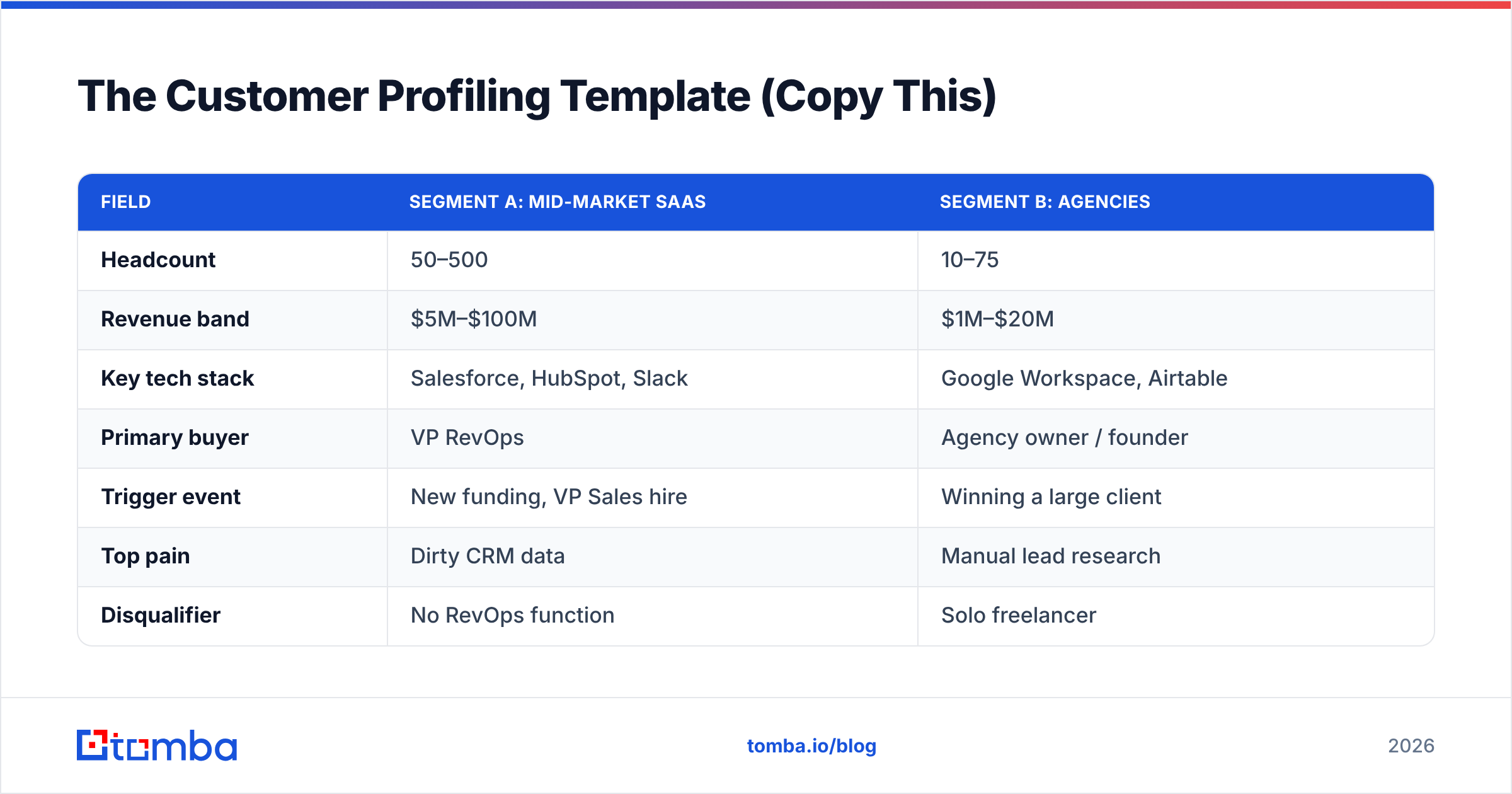
| Field | Segment A: Mid-market SaaS | Segment B: Agencies |
|---|---|---|
| Headcount | 50–500 | 10–75 |
| Revenue band | $5M–$100M | $1M–$20M |
| Key tech stack | Salesforce, HubSpot, Slack | Google Workspace, Airtable |
| Primary buyer | VP RevOps | Agency owner / founder |
| Trigger event | New funding, VP Sales hire | Winning a large client |
| Top pain | Dirty CRM data | Manual lead research |
| Disqualifier | No RevOps function | Solo freelancer |
| Best channel | Email + LinkedIn | Email + referral |
Notice how the two profiles diverge on almost every row. That divergence is the point—a single averaged profile would have missed both.
Which Data Fields Actually Predict a Good Fit?#
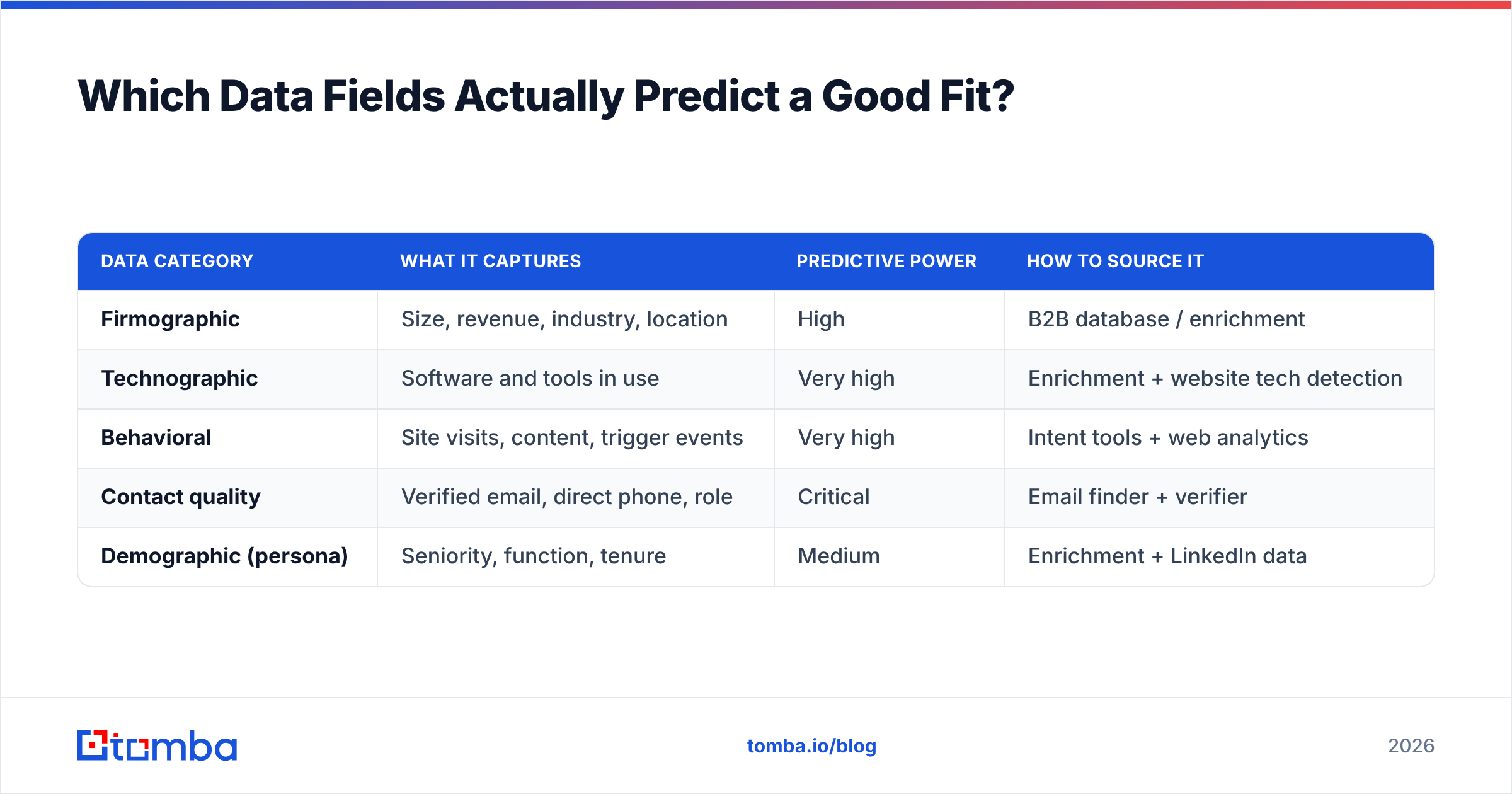
Not all fields carry equal weight. When you score accounts, weight them by how strongly they correlate with closed-won in your data. As a starting point, here's how the main field categories typically rank for B2B outbound.
| Data category | What it captures | Predictive power | How to source it |
|---|---|---|---|
| Firmographic | Size, revenue, industry, location | High | B2B database / enrichment |
| Technographic | Software and tools in use | Very high | Enrichment + website tech detection |
| Behavioral | Site visits, content, trigger events | Very high | Intent tools + web analytics |
| Contact quality | Verified email, direct phone, role | Critical | Email finder + verifier |
| Demographic (persona) | Seniority, function, tenure | Medium | Enrichment + LinkedIn data |
Two takeaways. First, technographic and behavioral signals routinely out-predict raw firmographics—knowing a company runs a competitor's tool tells you more than knowing it has 200 employees. Second, none of it matters if the contact data is wrong. A perfectly profiled account with a bounced email is a dead end, which is why verified contact data sits in the "critical" row.
To populate the technographic and firmographic fields at scale, teams use enrichment and a company domain search to pull every relevant contact and the company's known footprint in one pass, rather than researching accounts one browser tab at a time.

How Do You Build the Profile From Real Data?#
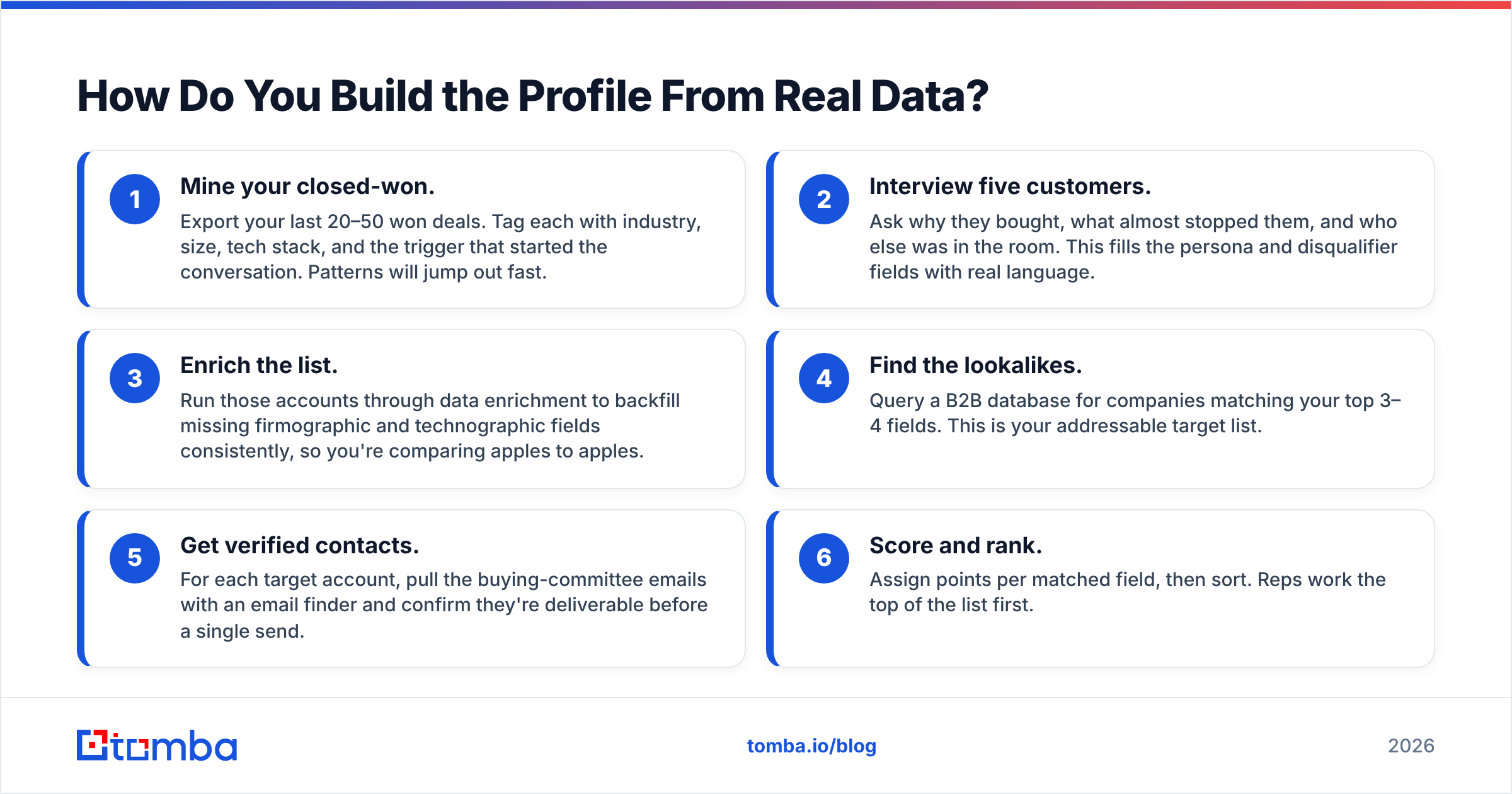
Follow this sequence. It moves from "who already loves us" to "who looks exactly like them," which keeps the profile grounded in revenue instead of hope.
- Mine your closed-won. Export your last 20–50 won deals. Tag each with industry, size, tech stack, and the trigger that started the conversation. Patterns will jump out fast.
- Interview five customers. Ask why they bought, what almost stopped them, and who else was in the room. This fills the persona and disqualifier fields with real language.
- Enrich the list. Run those accounts through data enrichment to backfill missing firmographic and technographic fields consistently, so you're comparing apples to apples.
- Find the lookalikes. Query a B2B database for companies matching your top 3–4 fields. This is your addressable target list.
- Get verified contacts. For each target account, pull the buying-committee emails with an email finder and confirm they're deliverable before a single send.
- Score and rank. Assign points per matched field, then sort. Reps work the top of the list first.
The discipline here is that every field in your template maps to a sourceable data point. If a field can't be filled with evidence, it's an opinion—cut it or demote it.
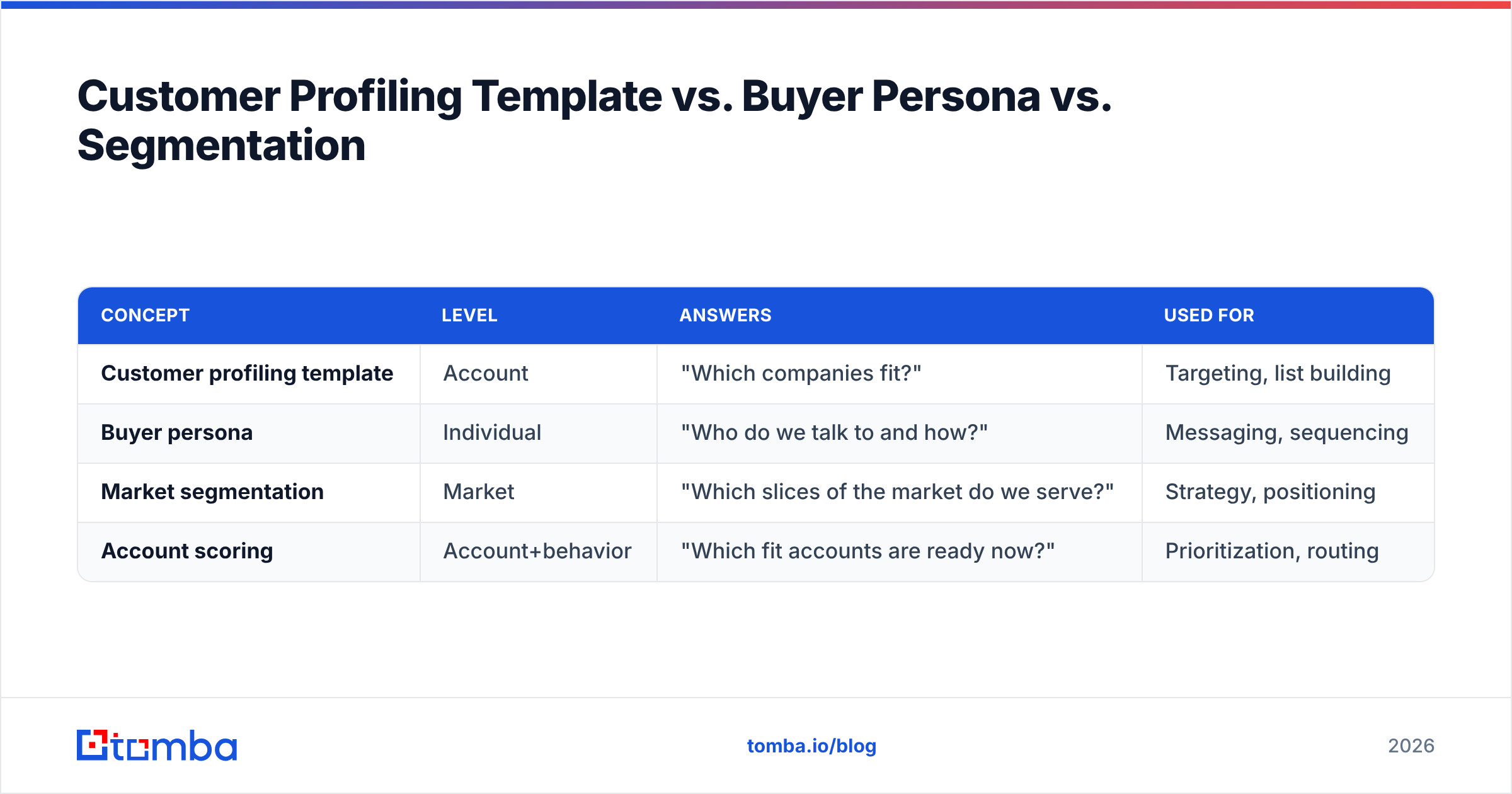
Customer Profiling Template vs. Buyer Persona vs. Segmentation#
These three terms get used interchangeably and shouldn't be. Here's how they relate, because your template should reference all three without collapsing them.
| Concept | Level | Answers | Used for |
|---|---|---|---|
| Customer profiling template | Account | "Which companies fit?" | Targeting, list building |
| Buyer persona | Individual | "Who do we talk to and how?" | Messaging, sequencing |
| Market segmentation | Market | "Which slices of the market do we serve?" | Strategy, positioning |
| Account scoring | Account+behavior | "Which fit accounts are ready now?" | Prioritization, routing |
A mature template nests them: segmentation defines the segments, the profile defines fit within a segment, personas define the humans inside a fit account, and scoring decides sequence. For a deeper library of definitions, HubSpot's resources and peer-review sites like G2 are useful cross-checks when you're aligning terminology across a team.
How Often Should You Update It?#
Quarterly, tied to your closed-won review—no less. Markets move, your product moves, and contact data decays at roughly 2–3% per month. A profile you built in January is materially wrong by summer.
Build the refresh into a recurring ritual:
- Every quarter: Re-mine the last quarter's wins and losses. Did a new industry start converting? Did a "great fit" segment stop closing? Update the fields and re-weight the scores.
- Every quarter: Re-verify the contacts on your active target list. Job changes silently break your best accounts.
- Twice a year: Re-interview two or three recent customers to keep the persona language current.
Treat the template as a living scorecard, not a founding document. The teams that win are the ones whose profile in Q4 barely resembles their profile in Q1—because they let the data rewrite it.
Common Mistakes to Avoid#
- Profiling your whole customer base instead of your best. Average customers produce an average profile. Weight toward your top quartile by revenue and retention.
- One profile for everything. If you sell to two distinct motions, you need two templates. Forcing them into one blurs both.
- Ignoring disqualifiers. The single highest-ROI field is the one that tells reps to stop.
- Letting data go stale. A brilliant profile on rotten contact data still bounces. Verify before you send.
- No feedback loop. If reps can't flag "this 'fit' account was actually terrible," the profile never learns.
Frequently Asked Questions#
What should a customer profiling template include at minimum? Industry, company size, revenue band, tech stack, primary buyer role, trigger events, core pains, and explicit disqualifiers. Everything else is optional detail.
Is an ICP the same as a customer profile? The ICP is the company-fit layer of a broader customer profile that also includes buyer personas. In practice, "customer profiling template" is the umbrella that contains both.
How many profiles should we maintain? Usually two or three—one per distinct buying motion. More than four is a sign your segments aren't really distinct.
Where does the contact data come from? Enrichment and an email finder populate the fields; an email verifier keeps them deliverable. That data layer is what turns a template from a document into a working list.
Turn Your Template Into a Real Target List#
A profile is only worth the pipeline it produces. Once your fields are filled, the bottleneck becomes finding and verifying the actual humans inside every matching account—fast, and without bounces.
That's where Tomba's Email Finder fits. Point it at your fit accounts, pull the buying-committee contacts by name or domain, and verify deliverability before you send—so the profile you built on real data gets executed on real, reachable people. Start on the free tier (25 searches a month), and when you're ready to run your whole target list, the Starter plan is $49/mo. Build the template once; let verified data do the rest.
Related guides#
Ready to find emails that actually work?
Join 150,000+ professionals who stopped guessing and started sending. Free credits on signup — no credit card required.
Get the Tomba newsletter
Practical outbound tactics and product updates — once every two weeks.
About the author