What Is a Customer Relationship Management Tool? (2026 Guide)
A CRM should grow revenue, not create busywork. Here's how a customer relationship management tool actually works in 2026, what to look for, and the data layer most teams forget to feed it.
A customer relationship management tool is only as good as the data you put into it — and that's the part most buyers discover too late. You compare feature grids, pick a platform, migrate your contacts, and six months later half the records are stale, duplicated, or missing an email address. The software wasn't the problem. The pipeline feeding it was.
This guide walks through what a CRM actually does in 2026, how the main categories differ, what to look for before you sign an annual contract, and how to keep the system full of accurate contact data so it earns its keep.
TL;DR#
- A customer relationship management tool is a single system of record for every prospect and customer interaction — contacts, deals, emails, calls, and tasks in one place.
- The real value isn't storage; it's automation, forecasting, and a clean data layer that keeps reps selling instead of typing.
- CRMs split into three buckets: operational (sales/marketing/service), analytical (reporting), and collaborative (shared customer view). Most modern platforms blend all three.
- Price ranges from free tiers to $150+/user/month. The hidden cost is data decay — B2B contact data goes stale at roughly 22–30% per year.
- Pair your CRM with an accurate contact source like the Tomba Email Finder so records stay complete and deliverable, not half-empty.
What is a customer relationship management tool?#
A CRM is the shared brain for your revenue team. Think of it like a restaurant's ticket rail: every order (deal), every table's history (customer record), and every server's next task sits on one rail so nobody drops a plate. Technically, a customer relationship management tool is a database plus a workflow engine that tracks each interaction between your company and a contact across the full lifecycle — from first touch to renewal.
According to Gartner, CRM is both a business strategy and the technology that supports it. In practice, the software gives you four things:
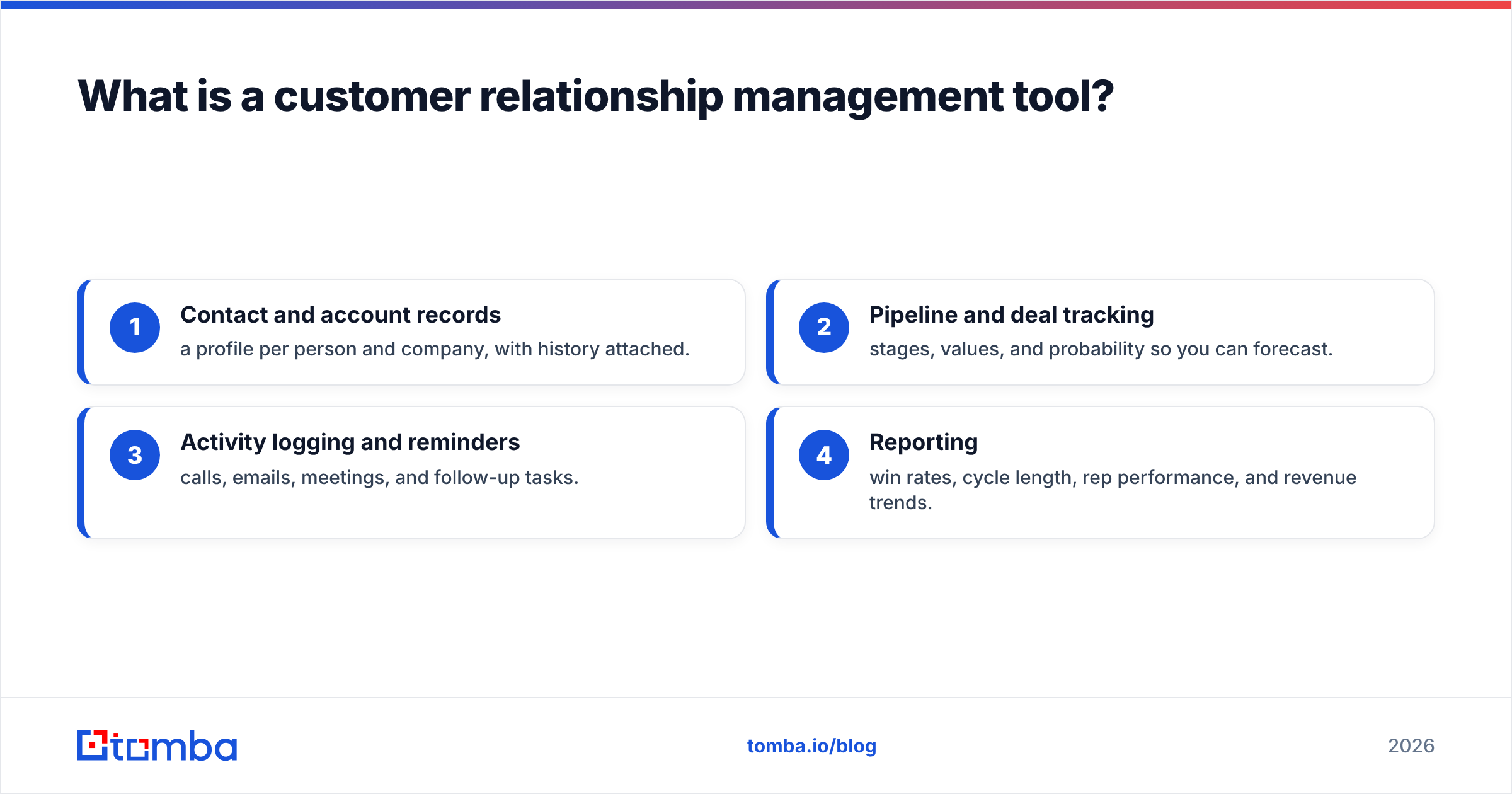
- Contact and account records — a profile per person and company, with history attached.
- Pipeline and deal tracking — stages, values, and probability so you can forecast.
- Activity logging and reminders — calls, emails, meetings, and follow-up tasks.
- Reporting — win rates, cycle length, rep performance, and revenue trends.
If you want the textbook definition and where it fits in the wider sales stack, Tomba's CRM glossary entry breaks the term down further.
Why do teams need a CRM instead of a spreadsheet?#
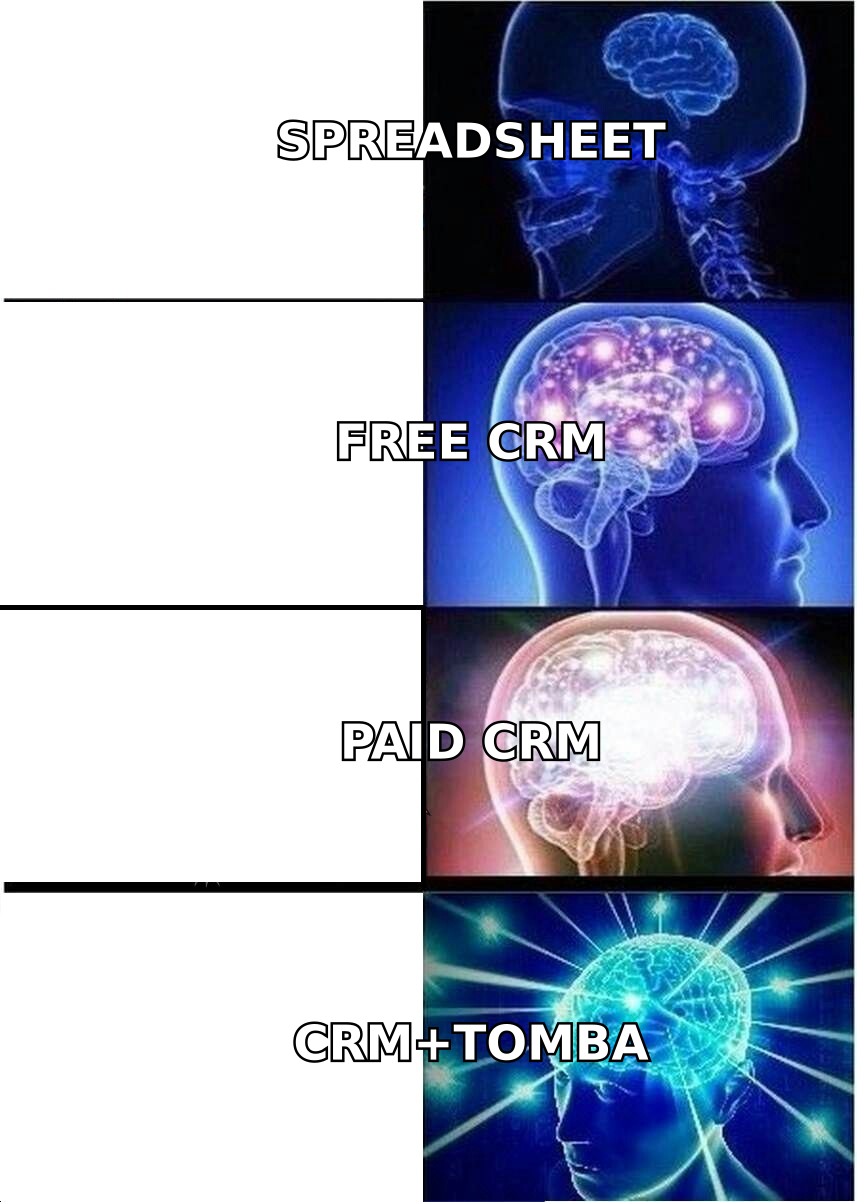
A spreadsheet works until two people edit it, one deal slips, or a rep leaves and takes their tab knowledge with them. A customer relationship management tool solves the problems a spreadsheet quietly creates:
- Single source of truth. No more "which version is current?" Everyone sees the same record.
- Automation. Follow-ups, stage changes, and lead routing fire on rules instead of memory.
- Forecasting. Weighted pipeline math happens automatically, not in a fragile formula.
- Handoffs survive turnover. When a rep leaves, the relationship history stays.
- Compliance and audit trails. Who touched what, and when — important as privacy rules tighten.
The catch: a CRM amplifies whatever data quality you feed it. Clean data in means reliable forecasts out. Dirty data in means confident-looking dashboards built on garbage.
What are the types of customer relationship management tools?#
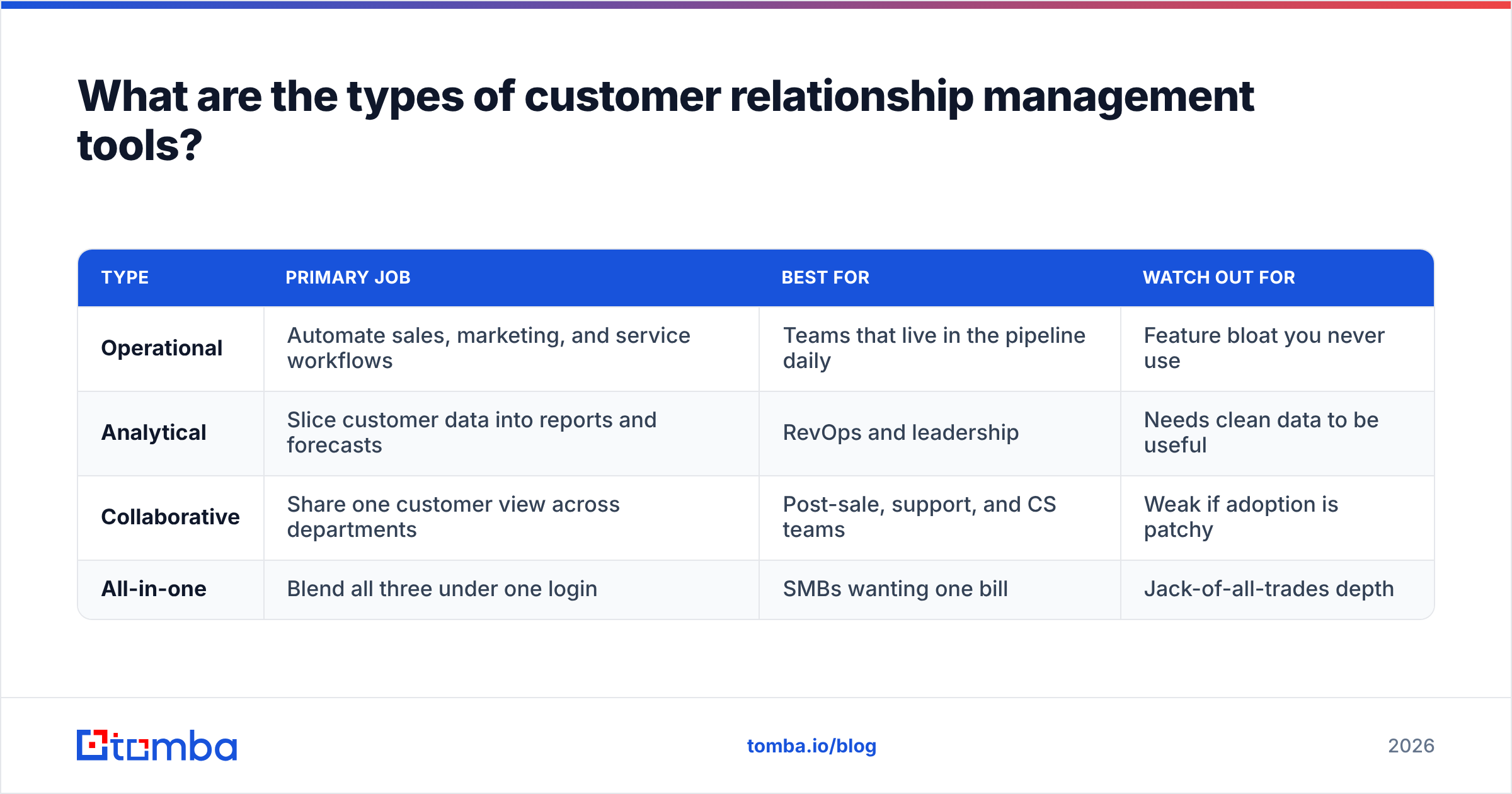
Not every CRM is trying to do the same job. Buyers get burned when they pick an analytical-heavy platform for a team that just needs fast deal logging. Here's the split:
| Type | Primary job | Best for | Watch out for |
|---|---|---|---|
| Operational | Automate sales, marketing, and service workflows | Teams that live in the pipeline daily | Feature bloat you never use |
| Analytical | Slice customer data into reports and forecasts | RevOps and leadership | Needs clean data to be useful |
| Collaborative | Share one customer view across departments | Post-sale, support, and CS teams | Weak if adoption is patchy |
| All-in-one | Blend all three under one login | SMBs wanting one bill | Jack-of-all-trades depth |
Most modern platforms — including the ones below — market themselves as all-in-one. The honest read is that each still has a center of gravity: some lean sales, some lean marketing, some lean service.
How do the top CRM tools compare in 2026?#
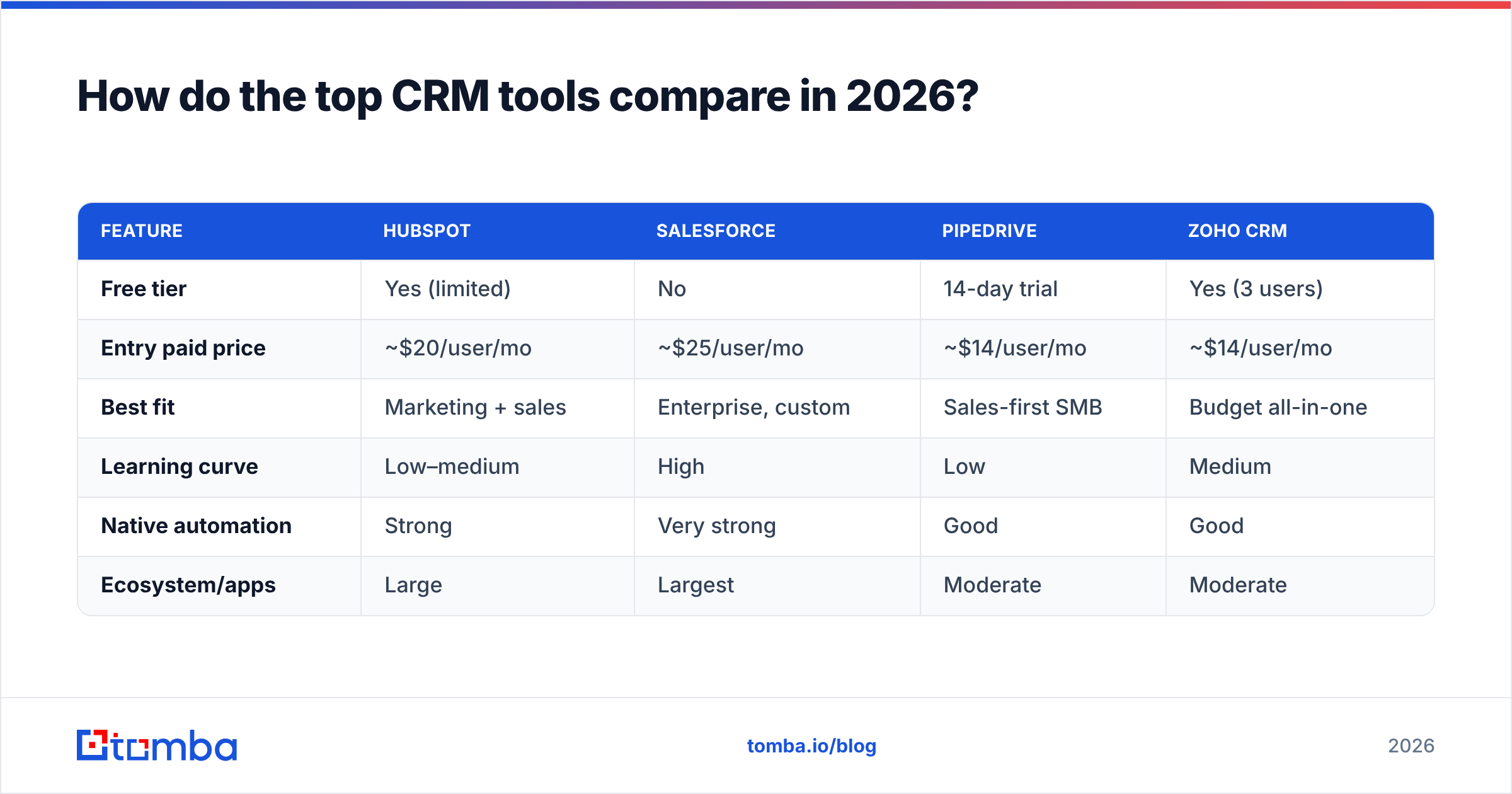
Here's a neutral snapshot of the platforms most B2B teams shortlist. Prices are entry paid tiers and move constantly, so confirm on each vendor's page before you commit.
| Feature | HubSpot | Salesforce | Pipedrive | Zoho CRM |
|---|---|---|---|---|
| Free tier | Yes (limited) | No | 14-day trial | Yes (3 users) |
| Entry paid price | ~$20/user/mo | ~$25/user/mo | ~$14/user/mo | ~$14/user/mo |
| Best fit | Marketing + sales | Enterprise, custom | Sales-first SMB | Budget all-in-one |
| Learning curve | Low–medium | High | Low | Medium |
| Native automation | Strong | Very strong | Good | Good |
| Ecosystem/apps | Large | Largest | Moderate | Moderate |
A few honest notes:
- HubSpot is the easiest to adopt and the friendliest free tier, but costs climb fast as you add Marketing and Service hubs. See their own product overview for current packaging.
- Salesforce is the most configurable and the most likely to need an admin or consultant. Their CRM homepage lays out the editions.
- Pipedrive stays laser-focused on the deal pipeline, which sales reps love and marketers sometimes outgrow.
- Zoho offers the most feature per dollar, at the cost of a slightly clunkier UI.
Cross-shopping the field on G2 is worth an hour before you buy — filter reviews by company size, not just star rating.
What features actually matter when choosing a CRM?#
Ignore the feature-count arms race. These are the attributes that predict whether a customer relationship management tool will still be earning its cost in year two:
- Adoption friction. If reps won't log activity, the data dies. Test the daily workflow, not the demo.
- Data quality tooling. Native dedupe, validation, and contact enrichment matter more than a flashy dashboard.
- Automation depth. Can it route leads, trigger sequences, and update stages without a developer?
- Integrations. It must connect to your email finder, outreach tool, and billing system. Check the marketplace.
- Reporting you'll trust. Forecasting is only as honest as the pipeline hygiene beneath it.
- Pricing that scales sanely. Model the cost at 2x your current headcount before signing.
Tomba plugs directly into the two most common platforms — see the HubSpot integration and Salesforce integration — so newly found contacts land in the CRM already verified.
Why does CRM data quality decide whether the tool works?#
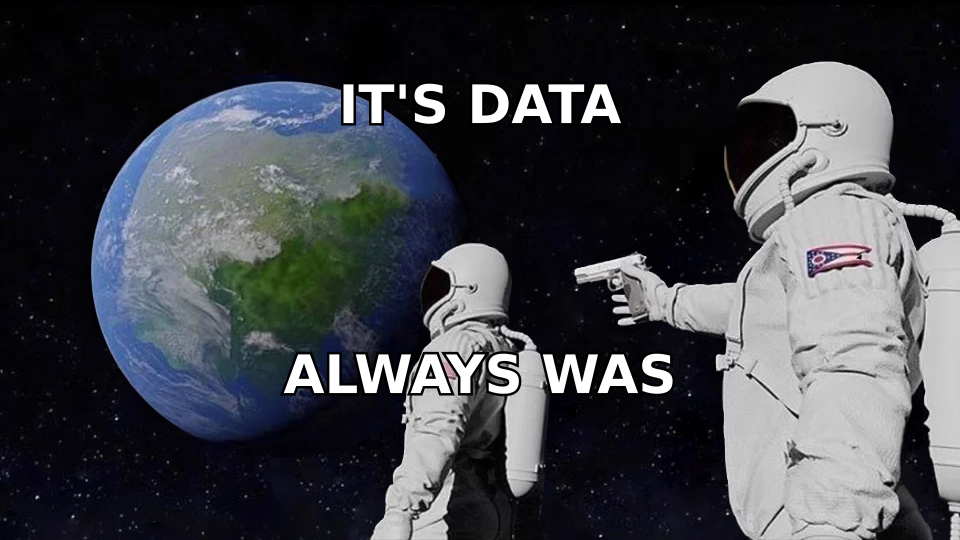
Here's the part vendors underplay: a CRM is a container, and B2B contact data leaks. People change jobs, companies rebrand, emails bounce. Industry estimates put B2B data decay at 22–30% per year — meaning up to a third of your records rot annually if nothing refills them.
That decay quietly wrecks the outputs you bought the CRM for:
- Forecasts drift because dead deals sit in the pipeline.
- Email deliverability drops as you send to stale addresses and rack up bounces, which hurts sender reputation.
- Reps waste hours on wrong numbers and returned mail.
- Personalization breaks when the title or company field is out of date.
The fix isn't a bigger CRM. It's a reliable inflow of accurate contacts. That's where a dedicated finder and verifier earn their place beside the CRM — you find the email, verify it's deliverable, enrich the record, then let the CRM do what it's good at: tracking the relationship over time.
How do you keep a CRM full of accurate contacts?#
A simple, repeatable loop keeps records complete without turning reps into data-entry clerks:
- Find the right contact by name or company using an email finder, or pull whole teams with domain search.
- Verify every address with an email verifier before it enters the pipeline, so bounces never dent your sender reputation.
- Enrich thin records — job title, company size, socials — with data enrichment so segmentation and personalization actually work.
- Sync the clean record straight into your CRM through a native integration or the Tomba API.
- Refresh on a schedule — re-verify high-value accounts quarterly to fight decay.
Run this loop and your customer relationship management tool stops being a graveyard of half-filled records and starts producing forecasts you can defend in a board meeting.
How much should a CRM cost — and where are the hidden fees?#
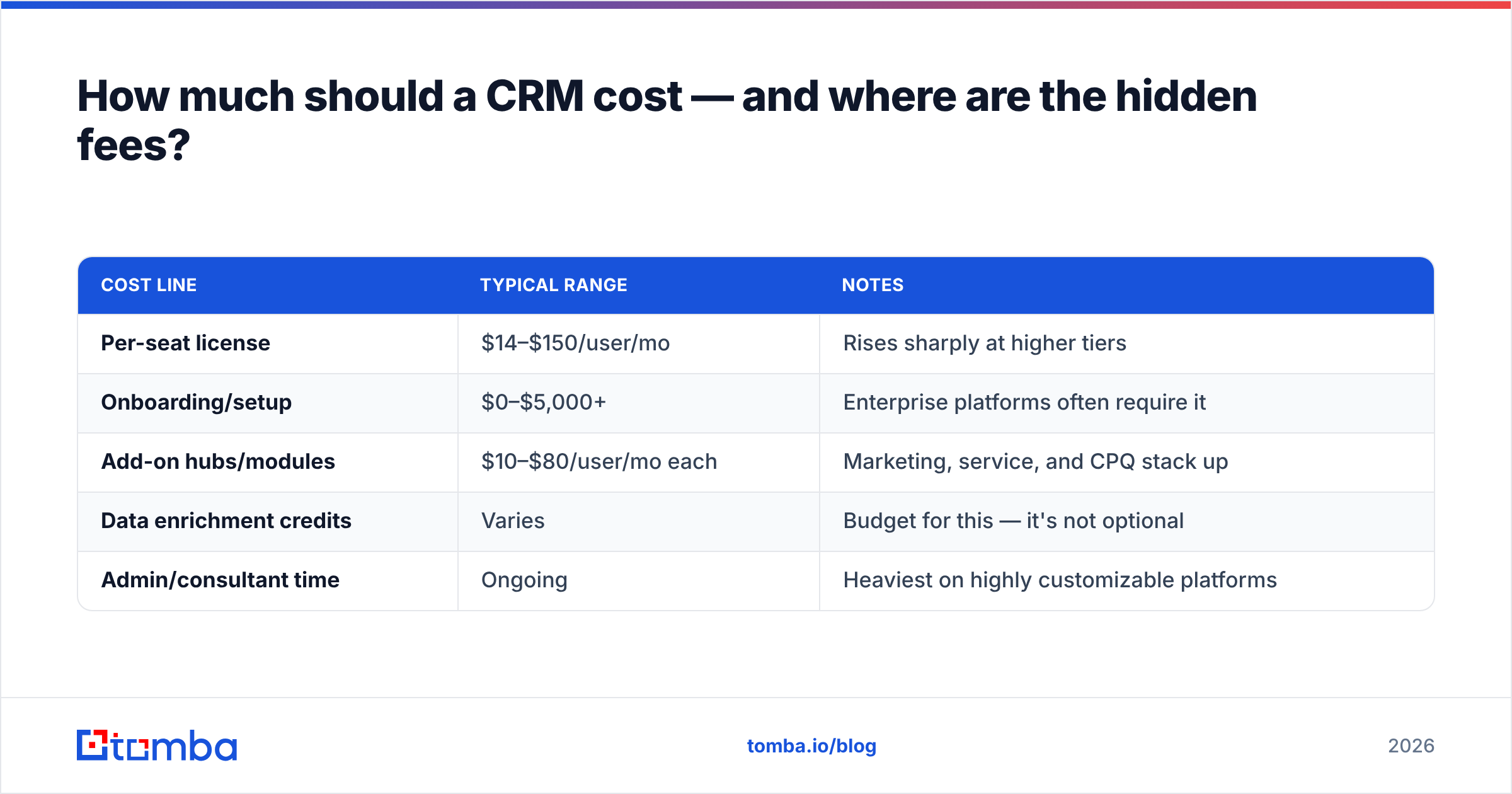
Sticker price is the easy part. The full cost of a customer relationship management tool includes several line items buyers forget:
| Cost line | Typical range | Notes |
|---|---|---|
| Per-seat license | $14–$150/user/mo | Rises sharply at higher tiers |
| Onboarding/setup | $0–$5,000+ | Enterprise platforms often require it |
| Add-on hubs/modules | $10–$80/user/mo each | Marketing, service, and CPQ stack up |
| Data enrichment credits | Varies | Budget for this — it's not optional |
| Admin/consultant time | Ongoing | Heaviest on highly customizable platforms |
For most SMB and mid-market teams, the license is 50–70% of the true annual spend. The rest is implementation, integrations, and keeping data clean. Budgeting for the data layer up front — rather than discovering it later — is what separates a CRM that pays for itself from one that becomes shelfware.
The bottom line#
A customer relationship management tool is the backbone of a modern revenue team, but the software is only half the equation. Pick the platform that matches your team's center of gravity — operational, analytical, or collaborative — and model the true cost, not just the per-seat price. Then treat data quality as a first-class problem, because a CRM inherits whatever accuracy you feed it.
Start the inflow right. Use the Tomba Email Finder to find and verify professional email addresses by name, company, or domain, then push clean, enriched contacts straight into your CRM. You can test it on the free tier — 25 searches a month, no card — before scaling to Starter at $49/mo. Feed the system good data, and every dashboard you built the CRM for finally tells the truth.
Related guides#
Ready to find emails that actually work?
Join 150,000+ professionals who stopped guessing and started sending. Free credits on signup — no credit card required.
Get the Tomba newsletter
Practical outbound tactics and product updates — once every two weeks.
About the author